Introduction to Python -1
Ahmad Hussein
ahmadhussein.ah7@gmail.com
Syntax
Hello World
print("hello world”)
Indentation
• Most languages don’t care about indentation.
• Most humans do.
• We tend to group similar things together.
Indentation
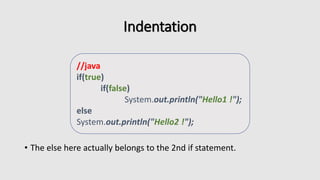
• The else here actually belongs to the 2nd if statement.
//java
if(true)
if(false)
System.out.println("Hello1 !");
else
System.out.println("Hello2 !");
Indentation
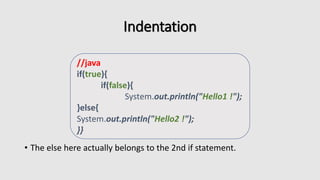
• The else here actually belongs to the 2nd if statement.
//java
if(true){
if(false){
System.out.println("Hello1 !");
}else{
System.out.println("Hello2 !");
}}
Indentation
• I knew a coder like this :D
//java
if(true)
if(false)
System.out.println("Hello1 !");
else
System.out.println("Hello2 !");
Indentation
• You should always be explicit.
//java
if(true){
if(false){
System.out.println("Hello1 !");
}else{
System.out.println("Hello2 !");
}
}
Indentation
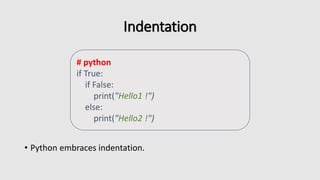
• Python embraces indentation.
# python
if True:
if False:
print("Hello1 !")
else:
print("Hello2 !")
Comments
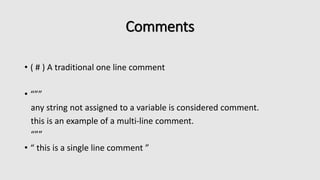
• ( # ) A traditional one line comment
• “””
any string not assigned to a variable is considered comment.
this is an example of a multi-line comment.
“””
• “ this is a single line comment ”
Types
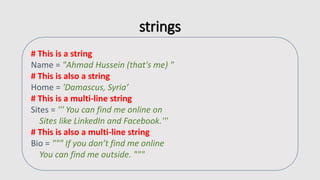
strings
# This is a string
Name = "Ahmad Hussein (that's me) "
# This is also a string
Home = 'Damascus, Syria’
# This is a multi-line string
Sites = ''' You can find me online on
Sites like LinkedIn and Facebook.'''
# This is also a multi-line string
Bio = """ If you don’t find me online
You can find me outside. """
Numbers
# Integer Number
year = 2010
year = int("2010")
# Floating Point Numbers
pi = 3.14159265
pi = float("3.14159265")
# Fixed Point Number
from decimal import Decimal
price = Decimal("0.02")
Null
Optional_data = None
Lists
# Lists can be heterogenous
favorites = []
# Appending
favorites.append(42)
# Extending
favorites.extend(['Python' , True])
# Equivalent to
favorites = [42 , 'Python' , True]
Lists
numbers = [ 1 , 2 , 3 , 4 , 5 ]
len(numbers)
# 5
numbers[0]
# 1
numbers[0:2]
# [1 ,2]
numbers[2:]
# [3, 4, 5]
Dictionaries
person = {}
# Set by key / Get by key
person['name'] = 'Ahmad Hussein'
# Update
person.update({
'favorites' : [42 , 'food'] ,
'gender' : 'male'
})
# Any immutable object can be a dictionary key
person[42] = 'favorite number'
person[(44.47 , -73.21)] = 'coordinates'
Dictionary Methods
person = { 'name' : 'karim' , 'gender' : 'Male'}
person['name']
person.get('name')
# 'karim'
person.keys()
# ['name' , 'gender']
person.values()
# ['karim' , 'Male']
person.items()
# [['name' , 'karim'] , ['gender' , 'Male']]
Booleans
Is_python = True
# Everything in python can be cast to Boolean
Is_pyhton = bool('any object’)
# All of these things are equivalent to False
These_are_false = False or 0 or "" or {} or [] or None
# Most everything else is equivalent to True
These_are_true = True and 1 and 'Text' and {'a' : 'b'} and ['c','d']
Operators
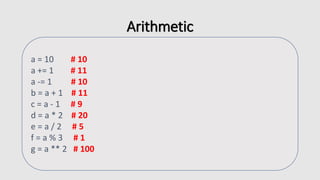
Arithmetic
a = 10 # 10
a += 1 # 11
a -= 1 # 10
b = a + 1 # 11
c = a - 1 # 9
d = a * 2 # 20
e = a / 2 # 5
f = a % 3 # 1
g = a ** 2 # 100
String Manipulation
animals = 'Cats ' + 'Dogs '
animals += 'Rabbits'
# Cats Dogs Rabbits
fruit = ', '.join(['Apple' , 'Banana' , 'Orange'])
#Apple, Banana, Orange
date = '%s %d %d' % ('Mar' , 20 , 2018)
# Mar 20 2018
name = '%(first)s %(last)s' % {
'first' : 'Ahmad' ,
'last' : 'Hussein'}
# Ahmad Hussein
Logical Comparison
# Logical And
a and b
# Logical Or
a or b
# Logical Negation
not a
# Compound
(a and not (b or c))
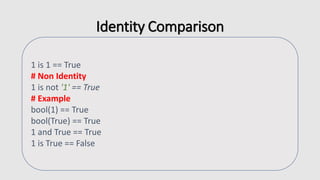
Identity Comparison
1 is 1 == True
# Non Identity
1 is not '1' == True
# Example
bool(1) == True
bool(True) == True
1 and True == True
1 is True == False
Arithmetic Comparison
# Ordering
a > b
a >= b
a < b
a <= b
# Equality / Difference
a == b
a != b
Control Flow
Conditionals
grade = 82
if grade >= 90:
if grade == 100:
print('A+')
else:
print ('A')
elif grade >= 80:
print ('B')
elif grade >= 70:
print ('C')
else:
print('E’)
# B
For Loop
for x in range(10):
print(x)
# 0-9
fruits = ['Apple' , 'Orange']
for fruit in fruits:
print(fruit)
Expanded For Loop
countries = {
'SY' : 'Syria' ,
'US' : 'United States'
}
for key, value in countries.items():
print('%s : %s' % (key, value))
While Loop
x = 0
while x < 100 :
print(x)
x +=1
List comprehensions
• Useful for replacing simple for-loops.
odds = []
for x in range(50):
if x % 2 :
odds.append(x)
odds = [x for x in range(50) if x % 2]
functions
• Assignment : Fibonacci method !
def my_function():
"""Function Documentation """
print('Hello Word’)
def add( x , y ):
return x + y

Python introduction 1

  • 1.
    Introduction to Python-1 Ahmad Hussein ahmadhussein.ah7@gmail.com
  • 2.
  • 3.
  • 4.
    Indentation • Most languagesdon’t care about indentation. • Most humans do. • We tend to group similar things together.
  • 5.
    Indentation • The elsehere actually belongs to the 2nd if statement. //java if(true) if(false) System.out.println("Hello1 !"); else System.out.println("Hello2 !");
  • 6.
    Indentation • The elsehere actually belongs to the 2nd if statement. //java if(true){ if(false){ System.out.println("Hello1 !"); }else{ System.out.println("Hello2 !"); }}
  • 7.
    Indentation • I knewa coder like this :D //java if(true) if(false) System.out.println("Hello1 !"); else System.out.println("Hello2 !");
  • 8.
    Indentation • You shouldalways be explicit. //java if(true){ if(false){ System.out.println("Hello1 !"); }else{ System.out.println("Hello2 !"); } }
  • 9.
    Indentation • Python embracesindentation. # python if True: if False: print("Hello1 !") else: print("Hello2 !")
  • 10.
    Comments • ( #) A traditional one line comment • “”” any string not assigned to a variable is considered comment. this is an example of a multi-line comment. “”” • “ this is a single line comment ”
  • 11.
  • 12.
    strings # This isa string Name = "Ahmad Hussein (that's me) " # This is also a string Home = 'Damascus, Syria’ # This is a multi-line string Sites = ''' You can find me online on Sites like LinkedIn and Facebook.''' # This is also a multi-line string Bio = """ If you don’t find me online You can find me outside. """
  • 13.
    Numbers # Integer Number year= 2010 year = int("2010") # Floating Point Numbers pi = 3.14159265 pi = float("3.14159265") # Fixed Point Number from decimal import Decimal price = Decimal("0.02")
  • 14.
  • 15.
    Lists # Lists canbe heterogenous favorites = [] # Appending favorites.append(42) # Extending favorites.extend(['Python' , True]) # Equivalent to favorites = [42 , 'Python' , True]
  • 16.
    Lists numbers = [1 , 2 , 3 , 4 , 5 ] len(numbers) # 5 numbers[0] # 1 numbers[0:2] # [1 ,2] numbers[2:] # [3, 4, 5]
  • 17.
    Dictionaries person = {} #Set by key / Get by key person['name'] = 'Ahmad Hussein' # Update person.update({ 'favorites' : [42 , 'food'] , 'gender' : 'male' }) # Any immutable object can be a dictionary key person[42] = 'favorite number' person[(44.47 , -73.21)] = 'coordinates'
  • 18.
    Dictionary Methods person ={ 'name' : 'karim' , 'gender' : 'Male'} person['name'] person.get('name') # 'karim' person.keys() # ['name' , 'gender'] person.values() # ['karim' , 'Male'] person.items() # [['name' , 'karim'] , ['gender' , 'Male']]
  • 19.
    Booleans Is_python = True #Everything in python can be cast to Boolean Is_pyhton = bool('any object’) # All of these things are equivalent to False These_are_false = False or 0 or "" or {} or [] or None # Most everything else is equivalent to True These_are_true = True and 1 and 'Text' and {'a' : 'b'} and ['c','d']
  • 20.
  • 21.
    Arithmetic a = 10# 10 a += 1 # 11 a -= 1 # 10 b = a + 1 # 11 c = a - 1 # 9 d = a * 2 # 20 e = a / 2 # 5 f = a % 3 # 1 g = a ** 2 # 100
  • 22.
    String Manipulation animals ='Cats ' + 'Dogs ' animals += 'Rabbits' # Cats Dogs Rabbits fruit = ', '.join(['Apple' , 'Banana' , 'Orange']) #Apple, Banana, Orange date = '%s %d %d' % ('Mar' , 20 , 2018) # Mar 20 2018 name = '%(first)s %(last)s' % { 'first' : 'Ahmad' , 'last' : 'Hussein'} # Ahmad Hussein
  • 23.
    Logical Comparison # LogicalAnd a and b # Logical Or a or b # Logical Negation not a # Compound (a and not (b or c))
  • 24.
    Identity Comparison 1 is1 == True # Non Identity 1 is not '1' == True # Example bool(1) == True bool(True) == True 1 and True == True 1 is True == False
  • 25.
    Arithmetic Comparison # Ordering a> b a >= b a < b a <= b # Equality / Difference a == b a != b
  • 26.
  • 27.
    Conditionals grade = 82 ifgrade >= 90: if grade == 100: print('A+') else: print ('A') elif grade >= 80: print ('B') elif grade >= 70: print ('C') else: print('E’) # B
  • 28.
    For Loop for xin range(10): print(x) # 0-9 fruits = ['Apple' , 'Orange'] for fruit in fruits: print(fruit)
  • 29.
    Expanded For Loop countries= { 'SY' : 'Syria' , 'US' : 'United States' } for key, value in countries.items(): print('%s : %s' % (key, value))
  • 30.
    While Loop x =0 while x < 100 : print(x) x +=1
  • 31.
    List comprehensions • Usefulfor replacing simple for-loops. odds = [] for x in range(50): if x % 2 : odds.append(x) odds = [x for x in range(50) if x % 2]
  • 32.
    functions • Assignment :Fibonacci method ! def my_function(): """Function Documentation """ print('Hello Word’) def add( x , y ): return x + y