Expert System With Python
Ahmad Hussein
ahmadhussein.ah7@gmail.com
Lecture 2: The Basics
CONTENT OVERVIEW
• What is CLIPS?
• CLIPS Characteristics.
• What is PyKnow?
• Facts
• DefFacts
• Rules
• Knowledge Engine
• Conditional Elements: Composing Patterns Together.
• Field Constraints: FC for sort.
• Composing FCs: &, | and ~.
• Variable Binding: The << Operator.
What is CLIPS?
• CLIPS is a multiparadigm programming language that provides
support for:
• Rule-based
• Object-oriented
• Procedural programming
CLIPS Characteristics
• CLIPS is an acronym for
• C Language Integrated Production System.
• CLIPS was designed using the C language at the NASA/Johnson Space
Center.
What is PyKnow?
• PyKnow is a Python library alternative to CLIPS.
• Difference between CLIPS and PyKnow:
• CLIPS is a programming language, PyKnow is a Python library. This imposes
some limitations on the constructions we can do (specially on the LHS of a
rule).
• CLIPS is written in C, PyKnow in Python. A noticeable impact in performance is
to be expected.
• In CLIPS you add facts using assert, in Python assert is a keyword, so we use
declare instead.
The Basics
• Facts
• DefFacts
• Rules
• Knowledge Engine
Facts
• Facts are the basic unit of information of PyKnow. They are used by
the system to reason about the problem.
Let’s enumerate some facts about Facts:
1. The class Fact is a subclass of dict.
f = Fact(a=1, b=2)
print(f['a’])
# 1
Facts
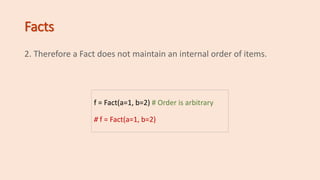
2. Therefore a Fact does not maintain an internal order of items.
f = Fact(a=1, b=2) # Order is arbitrary
# f = Fact(a=1, b=2)
Facts
3. In contrast to dict, you can create a Fact without keys (only values),
and Fact will create a numeric index for your values.
f = Fact('x', 'y', 'z')
print(f[0])
# x
Facts
4. You can mix autonumeric values with key-values, but autonumeric
must be declared first.
f = Fact('x', 'y', 'z', a=1, b=2)
print(f[0])
# x
print(f['a’])
# 1
Facts
5. You can subclass Fact to express different kinds of data or extend it
with your custom functionality.
class Alert(Fact):
pass
class Status(Fact):
pass
f1 = Alert(color = 'red')
f2 = Status(state = 'critical')
print(f1['color’]) # red
print(f2['state’]) # 'critical
Facts vs Patterns
• The difference between Facts and Patterns is small. In fact, Patterns
are just Facts containing Pattern Conditional Elements instead of
regular data. They are used only in the LHS of a rule.
• If you don’t provide the content of a pattern as a PCE, PyKnow will
enclose the value in a LiteralPCE automatically
• for you.
• Also, you can’t declare any Fact containing a PCE, if you do, you will
receive a nice exception back.
DefFacts
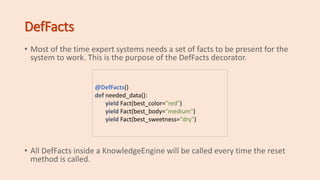
• Most of the time expert systems needs a set of facts to be present for the
system to work. This is the purpose of the DefFacts decorator.
• All DefFacts inside a KnowledgeEngine will be called every time the reset
method is called.
@DefFacts()
def needed_data():
yield Fact(best_color="red")
yield Fact(best_body="medium")
yield Fact(best_sweetness="dry")
Rules
• In PyKnow a rule is a callable, decorated with Rule.
• Rules have two components, LHS (left-hand-side) and RHS (right-
hand-side).
• The LHS describes (using patterns) the conditions on which the rule * should
be executed (or fired).
• The RHS is the set of actions to perform when the rule is fired.
• For a Fact to match a Pattern, all pattern restrictions must be True
when the Fact is evaluated against it.
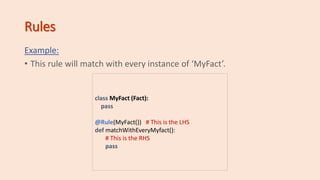
Rules
Example:
• This rule will match with every instance of ‘MyFact’.
class MyFact (Fact):
pass
@Rule(MyFact()) # This is the LHS
def matchWithEveryMyfact():
# This is the RHS
pass
Rules
Example:
• Match with every Fact which:
• f[0] == 'animal'
• f['family'] == 'felinae'
class MyFact (Fact):
pass
@Rule(Fact('animal', family='felinae’))
def match_with_cats ():
print("Meow!")
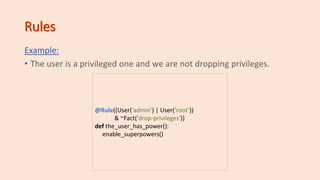
Rules
Example:
• The user is a privileged one and we are not dropping privileges.
@Rule((User('admin') | User('root’))
& ~Fact('drop-privileges'))
def the_user_has_power():
enable_superpowers()
KnowledgeEngine
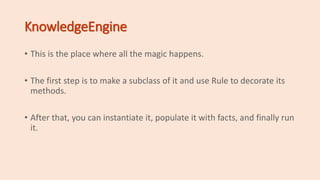
• This is the place where all the magic happens.
• The first step is to make a subclass of it and use Rule to decorate its
methods.
• After that, you can instantiate it, populate it with facts, and finally run
it.
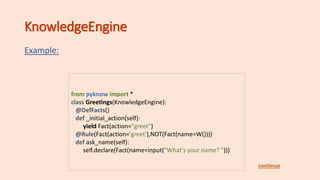
KnowledgeEngine
Example:
from pyknow import *
class Greetings(KnowledgeEngine):
@DefFacts()
def _initial_action(self):
yield Fact(action="greet")
@Rule(Fact(action='greet'),NOT(Fact(name=W())))
def ask_name(self):
self.declare(Fact(name=input("What's your name? ")))
continue
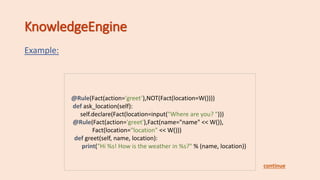
KnowledgeEngine
Example:
@Rule(Fact(action='greet’),NOT(Fact(location=W())))
def ask_location(self):
self.declare(Fact(location=input("Where are you? ")))
@Rule(Fact(action='greet'),Fact(name="name" << W()),
Fact(location="location" << W()))
def greet(self, name, location):
print("Hi %s! How is the weather in %s?" % (name, location))
continue
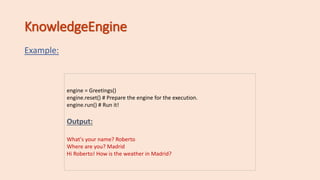
KnowledgeEngine
Example:
engine = Greetings()
engine.reset() # Prepare the engine for the execution.
engine.run() # Run it!
Output:
What's your name? Roberto
Where are you? Madrid
Hi Roberto! How is the weather in Madrid?
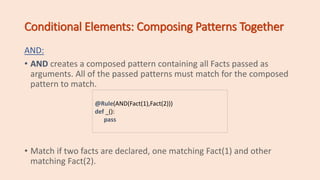
Conditional Elements: Composing Patterns Together
AND:
• AND creates a composed pattern containing all Facts passed as
arguments. All of the passed patterns must match for the composed
pattern to match.
• Match if two facts are declared, one matching Fact(1) and other
matching Fact(2).
@Rule(AND(Fact(1),Fact(2)))
def _():
pass
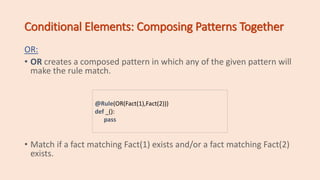
Conditional Elements: Composing Patterns Together
OR:
• OR creates a composed pattern in which any of the given pattern will
make the rule match.
• Match if a fact matching Fact(1) exists and/or a fact matching Fact(2)
exists.
@Rule(OR(Fact(1),Fact(2)))
def _():
pass
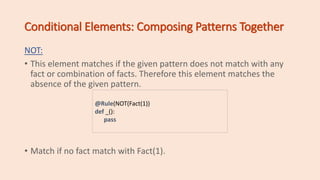
Conditional Elements: Composing Patterns Together
NOT:
• This element matches if the given pattern does not match with any
fact or combination of facts. Therefore this element matches the
absence of the given pattern.
• Match if no fact match with Fact(1).
@Rule(NOT(Fact(1))
def _():
pass
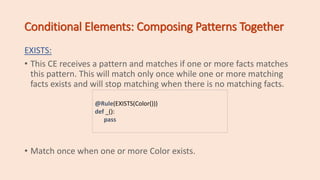
Conditional Elements: Composing Patterns Together
EXISTS:
• This CE receives a pattern and matches if one or more facts matches
this pattern. This will match only once while one or more matching
facts exists and will stop matching when there is no matching facts.
• Match once when one or more Color exists.
@Rule(EXISTS(Color()))
def _():
pass
Conditional Elements: Composing Patterns Together
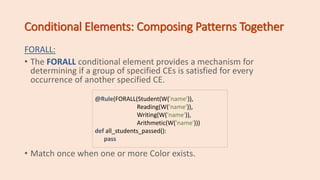
FORALL:
• The FORALL conditional element provides a mechanism for
determining if a group of specified CEs is satisfied for every
occurrence of another specified CE.
• Match once when one or more Color exists.
@Rule(FORALL(Student(W('name')),
Reading(W('name')),
Writing(W('name')),
Arithmetic(W('name')))
def all_students_passed():
pass
Field Constraints: FC for sort
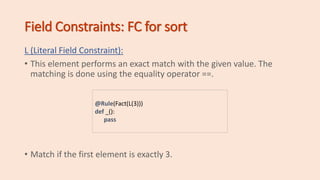
L (Literal Field Constraint):
• This element performs an exact match with the given value. The
matching is done using the equality operator ==.
• Match if the first element is exactly 3.
@Rule(Fact(L(3)))
def _():
pass
Field Constraints: FC for sort
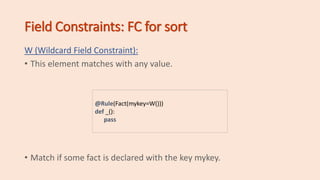
W (Wildcard Field Constraint):
• This element matches with any value.
• Match if some fact is declared with the key mykey.
@Rule(Fact(mykey=W()))
def _():
pass
Field Constraints: FC for sort
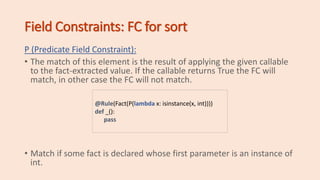
P (Predicate Field Constraint):
• The match of this element is the result of applying the given callable
to the fact-extracted value. If the callable returns True the FC will
match, in other case the FC will not match.
• Match if some fact is declared whose first parameter is an instance of
int.
@Rule(Fact(P(lambda x: isinstance(x, int))))
def _():
pass
Composing FCs: &, | and ~
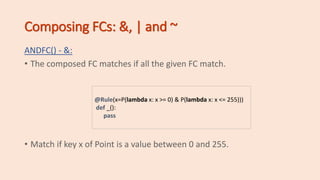
ANDFC() - &:
• The composed FC matches if all the given FC match.
• Match if key x of Point is a value between 0 and 255.
@Rule(x=P(lambda x: x >= 0) & P(lambda x: x <= 255)))
def _():
pass
Composing FCs: &, | and ~
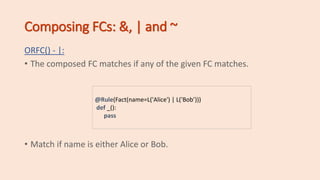
ORFC() - |:
• The composed FC matches if any of the given FC matches.
• Match if name is either Alice or Bob.
@Rule(Fact(name=L('Alice') | L('Bob’)))
def _():
pass
Composing FCs: &, | and ~
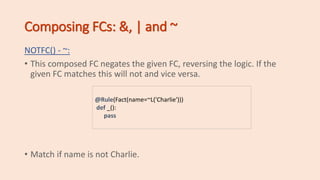
NOTFC() - ~:
• This composed FC negates the given FC, reversing the logic. If the
given FC matches this will not and vice versa.
• Match if name is not Charlie.
@Rule(Fact(name=~L('Charlie')))
def _():
pass
Variable Binding: The << Operator
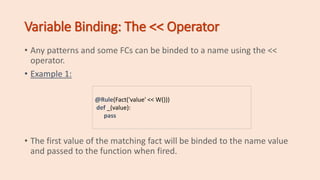
• Any patterns and some FCs can be binded to a name using the <<
operator.
• Example 1:
• The first value of the matching fact will be binded to the name value
and passed to the function when fired.
@Rule(Fact('value' << W()))
def _(value):
pass
Variable Binding: The << Operator
• Any patterns and some FCs can be binded to a name using the <<
operator.
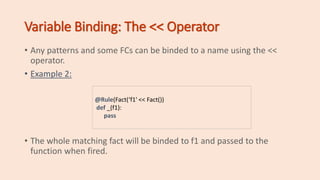
• Example 2:
• The whole matching fact will be binded to f1 and passed to the
function when fired.
@Rule(Fact(‘f1' << Fact())
def _(f1):
pass

Expert system with python -2

  • 1.
    Expert System WithPython Ahmad Hussein ahmadhussein.ah7@gmail.com Lecture 2: The Basics
  • 2.
    CONTENT OVERVIEW • Whatis CLIPS? • CLIPS Characteristics. • What is PyKnow? • Facts • DefFacts • Rules • Knowledge Engine • Conditional Elements: Composing Patterns Together. • Field Constraints: FC for sort. • Composing FCs: &, | and ~. • Variable Binding: The << Operator.
  • 3.
    What is CLIPS? •CLIPS is a multiparadigm programming language that provides support for: • Rule-based • Object-oriented • Procedural programming
  • 4.
    CLIPS Characteristics • CLIPSis an acronym for • C Language Integrated Production System. • CLIPS was designed using the C language at the NASA/Johnson Space Center.
  • 5.
    What is PyKnow? •PyKnow is a Python library alternative to CLIPS. • Difference between CLIPS and PyKnow: • CLIPS is a programming language, PyKnow is a Python library. This imposes some limitations on the constructions we can do (specially on the LHS of a rule). • CLIPS is written in C, PyKnow in Python. A noticeable impact in performance is to be expected. • In CLIPS you add facts using assert, in Python assert is a keyword, so we use declare instead.
  • 6.
    The Basics • Facts •DefFacts • Rules • Knowledge Engine
  • 7.
    Facts • Facts arethe basic unit of information of PyKnow. They are used by the system to reason about the problem. Let’s enumerate some facts about Facts: 1. The class Fact is a subclass of dict. f = Fact(a=1, b=2) print(f['a’]) # 1
  • 8.
    Facts 2. Therefore aFact does not maintain an internal order of items. f = Fact(a=1, b=2) # Order is arbitrary # f = Fact(a=1, b=2)
  • 9.
    Facts 3. In contrastto dict, you can create a Fact without keys (only values), and Fact will create a numeric index for your values. f = Fact('x', 'y', 'z') print(f[0]) # x
  • 10.
    Facts 4. You canmix autonumeric values with key-values, but autonumeric must be declared first. f = Fact('x', 'y', 'z', a=1, b=2) print(f[0]) # x print(f['a’]) # 1
  • 11.
    Facts 5. You cansubclass Fact to express different kinds of data or extend it with your custom functionality. class Alert(Fact): pass class Status(Fact): pass f1 = Alert(color = 'red') f2 = Status(state = 'critical') print(f1['color’]) # red print(f2['state’]) # 'critical
  • 12.
    Facts vs Patterns •The difference between Facts and Patterns is small. In fact, Patterns are just Facts containing Pattern Conditional Elements instead of regular data. They are used only in the LHS of a rule. • If you don’t provide the content of a pattern as a PCE, PyKnow will enclose the value in a LiteralPCE automatically • for you. • Also, you can’t declare any Fact containing a PCE, if you do, you will receive a nice exception back.
  • 13.
    DefFacts • Most ofthe time expert systems needs a set of facts to be present for the system to work. This is the purpose of the DefFacts decorator. • All DefFacts inside a KnowledgeEngine will be called every time the reset method is called. @DefFacts() def needed_data(): yield Fact(best_color="red") yield Fact(best_body="medium") yield Fact(best_sweetness="dry")
  • 14.
    Rules • In PyKnowa rule is a callable, decorated with Rule. • Rules have two components, LHS (left-hand-side) and RHS (right- hand-side). • The LHS describes (using patterns) the conditions on which the rule * should be executed (or fired). • The RHS is the set of actions to perform when the rule is fired. • For a Fact to match a Pattern, all pattern restrictions must be True when the Fact is evaluated against it.
  • 15.
    Rules Example: • This rulewill match with every instance of ‘MyFact’. class MyFact (Fact): pass @Rule(MyFact()) # This is the LHS def matchWithEveryMyfact(): # This is the RHS pass
  • 16.
    Rules Example: • Match withevery Fact which: • f[0] == 'animal' • f['family'] == 'felinae' class MyFact (Fact): pass @Rule(Fact('animal', family='felinae’)) def match_with_cats (): print("Meow!")
  • 17.
    Rules Example: • The useris a privileged one and we are not dropping privileges. @Rule((User('admin') | User('root’)) & ~Fact('drop-privileges')) def the_user_has_power(): enable_superpowers()
  • 18.
    KnowledgeEngine • This isthe place where all the magic happens. • The first step is to make a subclass of it and use Rule to decorate its methods. • After that, you can instantiate it, populate it with facts, and finally run it.
  • 19.
    KnowledgeEngine Example: from pyknow import* class Greetings(KnowledgeEngine): @DefFacts() def _initial_action(self): yield Fact(action="greet") @Rule(Fact(action='greet'),NOT(Fact(name=W()))) def ask_name(self): self.declare(Fact(name=input("What's your name? "))) continue
  • 20.
    KnowledgeEngine Example: @Rule(Fact(action='greet’),NOT(Fact(location=W()))) def ask_location(self): self.declare(Fact(location=input("Where areyou? "))) @Rule(Fact(action='greet'),Fact(name="name" << W()), Fact(location="location" << W())) def greet(self, name, location): print("Hi %s! How is the weather in %s?" % (name, location)) continue
  • 21.
    KnowledgeEngine Example: engine = Greetings() engine.reset()# Prepare the engine for the execution. engine.run() # Run it! Output: What's your name? Roberto Where are you? Madrid Hi Roberto! How is the weather in Madrid?
  • 22.
    Conditional Elements: ComposingPatterns Together AND: • AND creates a composed pattern containing all Facts passed as arguments. All of the passed patterns must match for the composed pattern to match. • Match if two facts are declared, one matching Fact(1) and other matching Fact(2). @Rule(AND(Fact(1),Fact(2))) def _(): pass
  • 23.
    Conditional Elements: ComposingPatterns Together OR: • OR creates a composed pattern in which any of the given pattern will make the rule match. • Match if a fact matching Fact(1) exists and/or a fact matching Fact(2) exists. @Rule(OR(Fact(1),Fact(2))) def _(): pass
  • 24.
    Conditional Elements: ComposingPatterns Together NOT: • This element matches if the given pattern does not match with any fact or combination of facts. Therefore this element matches the absence of the given pattern. • Match if no fact match with Fact(1). @Rule(NOT(Fact(1)) def _(): pass
  • 25.
    Conditional Elements: ComposingPatterns Together EXISTS: • This CE receives a pattern and matches if one or more facts matches this pattern. This will match only once while one or more matching facts exists and will stop matching when there is no matching facts. • Match once when one or more Color exists. @Rule(EXISTS(Color())) def _(): pass
  • 26.
    Conditional Elements: ComposingPatterns Together FORALL: • The FORALL conditional element provides a mechanism for determining if a group of specified CEs is satisfied for every occurrence of another specified CE. • Match once when one or more Color exists. @Rule(FORALL(Student(W('name')), Reading(W('name')), Writing(W('name')), Arithmetic(W('name'))) def all_students_passed(): pass
  • 27.
    Field Constraints: FCfor sort L (Literal Field Constraint): • This element performs an exact match with the given value. The matching is done using the equality operator ==. • Match if the first element is exactly 3. @Rule(Fact(L(3))) def _(): pass
  • 28.
    Field Constraints: FCfor sort W (Wildcard Field Constraint): • This element matches with any value. • Match if some fact is declared with the key mykey. @Rule(Fact(mykey=W())) def _(): pass
  • 29.
    Field Constraints: FCfor sort P (Predicate Field Constraint): • The match of this element is the result of applying the given callable to the fact-extracted value. If the callable returns True the FC will match, in other case the FC will not match. • Match if some fact is declared whose first parameter is an instance of int. @Rule(Fact(P(lambda x: isinstance(x, int)))) def _(): pass
  • 30.
    Composing FCs: &,| and ~ ANDFC() - &: • The composed FC matches if all the given FC match. • Match if key x of Point is a value between 0 and 255. @Rule(x=P(lambda x: x >= 0) & P(lambda x: x <= 255))) def _(): pass
  • 31.
    Composing FCs: &,| and ~ ORFC() - |: • The composed FC matches if any of the given FC matches. • Match if name is either Alice or Bob. @Rule(Fact(name=L('Alice') | L('Bob’))) def _(): pass
  • 32.
    Composing FCs: &,| and ~ NOTFC() - ~: • This composed FC negates the given FC, reversing the logic. If the given FC matches this will not and vice versa. • Match if name is not Charlie. @Rule(Fact(name=~L('Charlie'))) def _(): pass
  • 33.
    Variable Binding: The<< Operator • Any patterns and some FCs can be binded to a name using the << operator. • Example 1: • The first value of the matching fact will be binded to the name value and passed to the function when fired. @Rule(Fact('value' << W())) def _(value): pass
  • 34.
    Variable Binding: The<< Operator • Any patterns and some FCs can be binded to a name using the << operator. • Example 2: • The whole matching fact will be binded to f1 and passed to the function when fired. @Rule(Fact(‘f1' << Fact()) def _(f1): pass