

Automated Organ Localisation
in Fetal Magnetic Resonance Imaging
K. Keraudren1, B. Kainz1, O. Oktay1, M. Kuklisova-Murgasova2,
V. Kyriakopoulou2, C. Malamateniou2, M. Rutherford2,
J. V. Hajnal2 and D. Rueckert1
1 Biomedical Image Analysis Group, Imperial College London
2 Department Biomedical Engineering, King’s College London
PyData London 2015
1) Background:
Fetal Magnetic Resonance Imaging
Python for medical imaging
2) Localising the brain of the fetus
3) Localising the body of the fetus
Introduction
Magnetic Resonance Imaging (MRI)
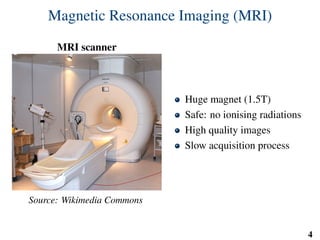
MRI scanner
Source: Wikimedia Commons
Huge magnet (1.5T)
Safe: no ionising radiations
High quality images
Slow acquisition process
4
Challenges in fetal MRI
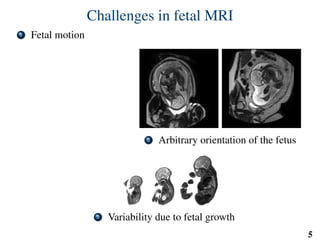
1 Fetal motion
2 Arbitrary orientation of the fetus
3 Variability due to fetal growth
5
Fast MRI acquisition methods
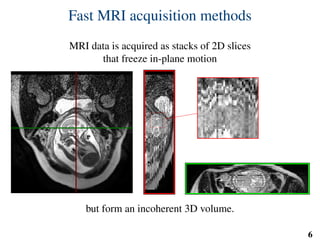
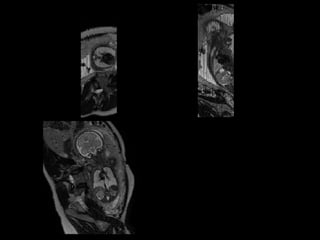
MRI data is acquired as stacks of 2D slices
that freeze in-plane motion
but form an incoherent 3D volume.
6
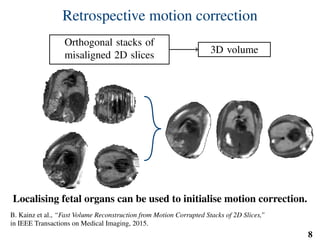
Retrospective motion correction
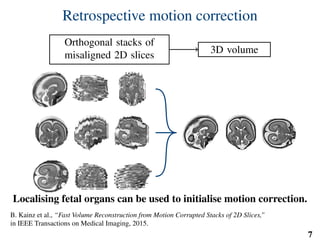
Orthogonal stacks of
misaligned 2D slices
3D volume
Localising fetal organs can be used to initialise motion correction.
B. Kainz et al., “Fast Volume Reconstruction from Motion Corrupted Stacks of 2D Slices,”
in IEEE Transactions on Medical Imaging, 2015.
7
Retrospective motion correction
Orthogonal stacks of
misaligned 2D slices
3D volume
Localising fetal organs can be used to initialise motion correction.
B. Kainz et al., “Fast Volume Reconstruction from Motion Corrupted Stacks of 2D Slices,”
in IEEE Transactions on Medical Imaging, 2015.
8
Python for medical imaging
scikit
machine learning in Python
Interfacing IRTK through Cython
What is a medical image?
4D volume of voxel data (X, Y, Z, T)
Spatial information: ImageToWorld and WorldToImage
Why the Image Registration Toolkit (IRTK)?
Same backend as my colleagues:
same conventions
same features & bugs
State-of-the-art algorithms for aligning images
github.com/BioMedIA/IRTK 11
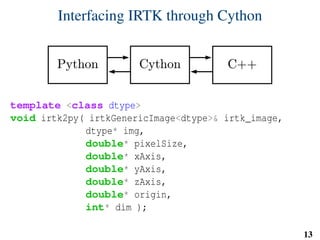
Interfacing IRTK through Cython
Solution:
Subclass numpy arrays
Dictionary attribute holding:
dimension, orientation, origin and pixel size
Access IRTK through cython
Additional benefits:
__getitem__ overloaded to update coordinates when
cropping/slicing
Coordinates preserved when resampling/aligning images
conda install -c kevin-keraudren python-irtk
github.com/BioMedIA/python-irtk 12
Interfacing IRTK through Cython
template <class dtype>
void irtk2py( irtkGenericImage<dtype>& irtk_image,
dtype* img,
double* pixelSize,
double* xAxis,
double* yAxis,
double* zAxis,
double* origin,
int* dim );
13
Machine learning for organ localisation
Machine learning approach to organ localisation
Learning from annotated examples
Generalise from training database to new subjects
Implicitly model variability:
age
pose (articulated body)
maternal tissues
Small dataset limits capacity to model all age categories:
Infer size from gestational age
15
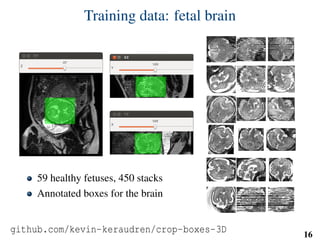
Training data: fetal brain
59 healthy fetuses, 450 stacks
Annotated boxes for the brain
github.com/kevin-keraudren/crop-boxes-3D 16
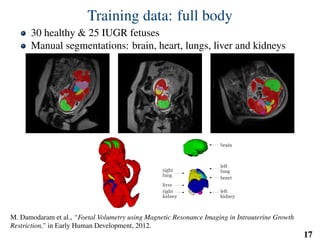
Training data: full body
30 healthy & 25 IUGR fetuses
Manual segmentations: brain, heart, lungs, liver and kidneys
M. Damodaram et al., “Foetal Volumetry using Magnetic Resonance Imaging in Intrauterine Growth
Restriction,” in Early Human Development, 2012.
17
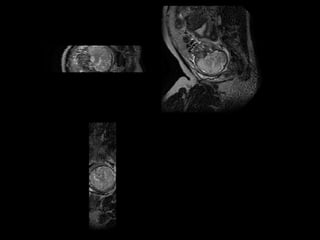
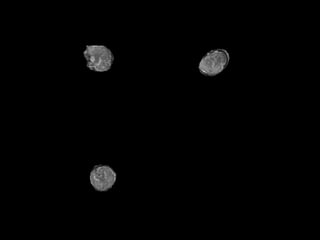
Localising the fetal brain
19
20
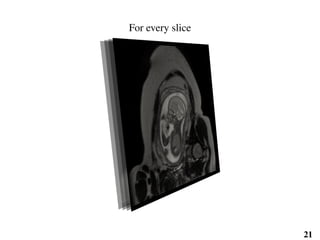
For every slice
21
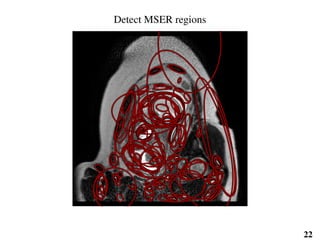
Detect MSER regions
Classify using SIFT features
22
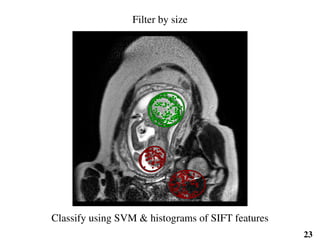
Filter by size
Classify using SVM & histograms of SIFT features
23
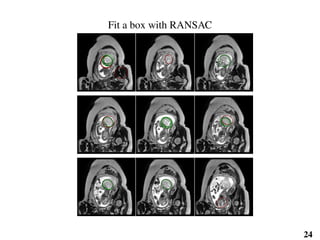
Fit a box with RANSAC
24
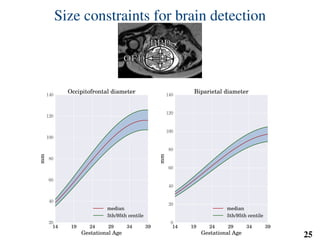
Size constraints for brain detection
OFDOFD
BPDBPD
14 19 24 29 34 39
Gestational Age
20
40
60
80
100
120
140
mm
Occipitofrontal diameter
median
5th/95th centile
14 19 24 29 34 39
Gestational Age
0
20
40
60
80
100
120
140
mm
Biparietal diameter
median
5th/95th centile
25
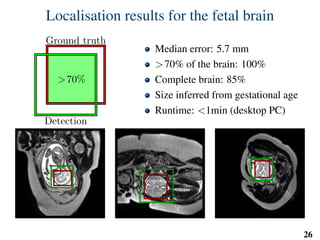
Localisation results for the fetal brain
>70%
Ground truth
Detection
Median error: 5.7 mm
>70% of the brain: 100%
Complete brain: 85%
Size inferred from gestational age
Runtime: <1min (desktop PC)
26
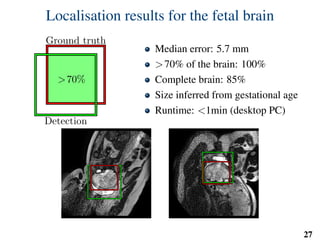
Localisation results for the fetal brain
>70%
Ground truth
Detection
Median error: 5.7 mm
>70% of the brain: 100%
Complete brain: 85%
Size inferred from gestational age
Runtime: <1min (desktop PC)
27
Localising the body of the fetus
29
30
Localising the body of the fetus
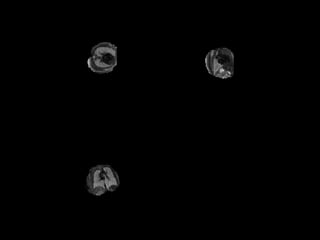
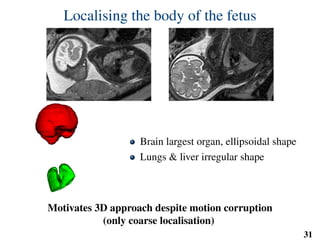
Brain largest organ, ellipsoidal shape
Lungs & liver irregular shape
Motivates 3D approach despite motion corruption
(only coarse localisation)
31
Localising the body of the fetus
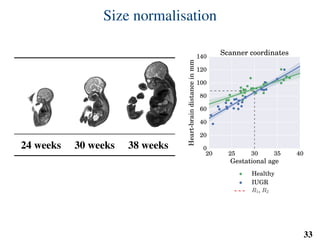
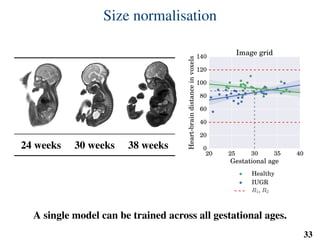
1) Size normalisation based on gestational age
2) Sequential localisation of fetal organs
3) Image features steered by the fetal anatomy
32
Size normalisation
24 weeks 30 weeks 38 weeks
20 25 30 35 40
Gestational age
0
20
40
60
80
100
120
140
Heart-braindistanceinmm
Scanner coordinates
Healthy
IUGR
R1, R2
A single model can be trained across all gestational ages.
33
Size normalisation
24 weeks 30 weeks 38 weeks
20 25 30 35 40
Gestational age
0
20
40
60
80
100
120
140
Heart-braindistanceinvoxels
Image grid
Healthy
IUGR
R1, R2
A single model can be trained across all gestational ages.
33
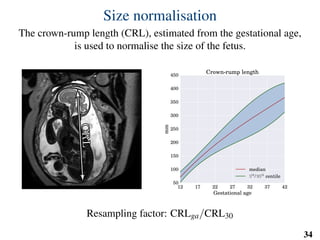
Size normalisation
The crown-rump length (CRL), estimated from the gestational age,
is used to normalise the size of the fetus.
CRLCRL
12 17 22 27 32 37 42
Gestational age
50
100
150
200
250
300
350
400
450
mm
Crown-rump length
median
5th
/ 95th
centile
Resampling factor: CRLga/CRL30
34
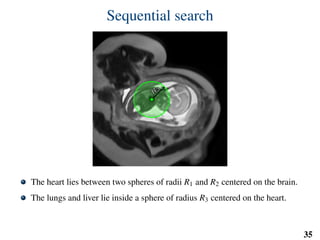
Sequential search
R1R1
R2R2
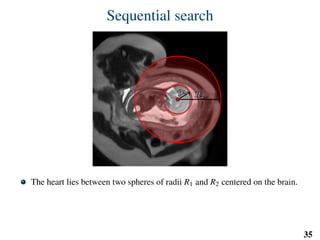
The heart lies between two spheres of radii R1 and R2 centered on the brain.
The lungs and liver lie inside a sphere of radius R3 centered on the heart.
R1, R2 and R3 are independent of gestational age thanks to size normalisation.
35
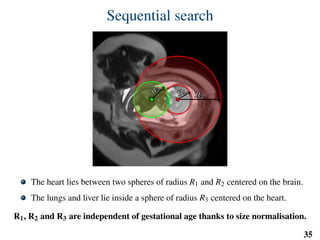
Sequential search
R
3
R
3
The heart lies between two spheres of radii R1 and R2 centered on the brain.
The lungs and liver lie inside a sphere of radius R3 centered on the heart.
R1, R2 and R3 are independent of gestational age thanks to size normalisation.
35
Sequential search
R1R1
R2R2
R
3
R
3
The heart lies between two spheres of radius R1 and R2 centered on the brain.
The lungs and liver lie inside a sphere of radius R3 centered on the heart.
R1, R2 and R3 are independent of gestational age thanks to size normalisation.
35
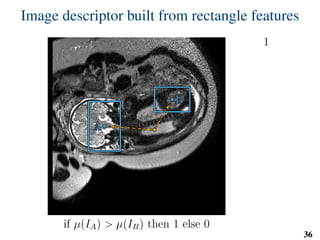
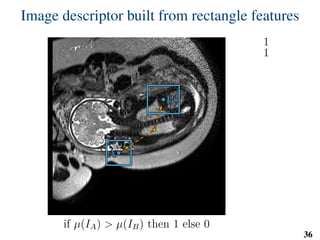
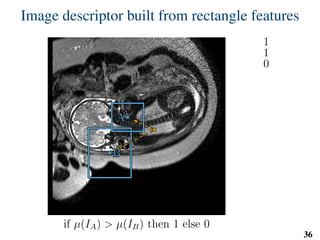
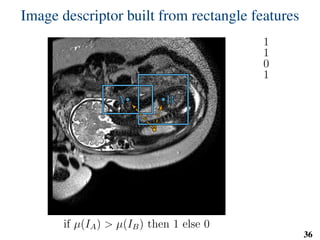
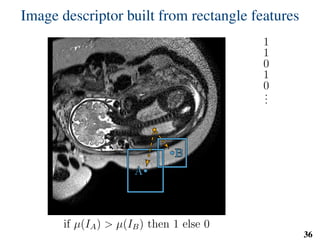
Image descriptor built from rectangle features
BB
AA
if µ(IA) > µ(IB) then 1 else 0
1
36
Image descriptor built from rectangle features
BB
AA
if µ(IA) > µ(IB) then 1 else 0
1
1
36
Image descriptor built from rectangle features
BB
AA
if µ(IA) > µ(IB) then 1 else 0
1
1
0
36
Image descriptor built from rectangle features
BBAA
if µ(IA) > µ(IB) then 1 else 0
1
1
0
1
36
Image descriptor built from rectangle features
BB
AA
if µ(IA) > µ(IB) then 1 else 0
1
1
0
1
0
...
36
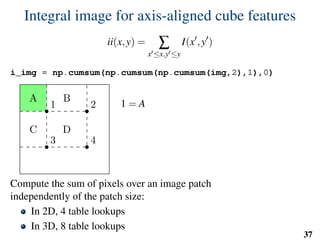
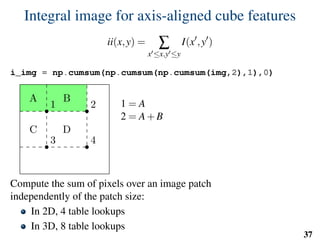
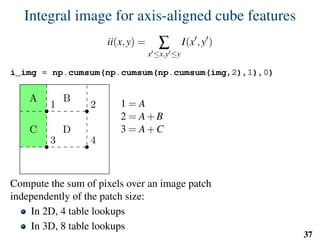
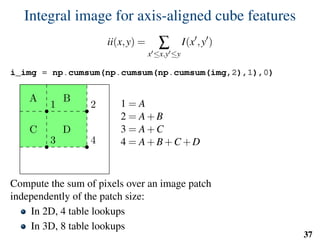
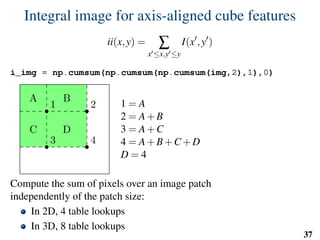
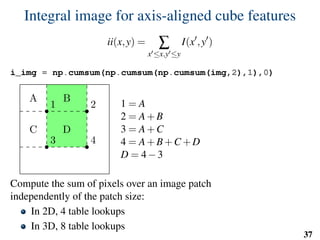
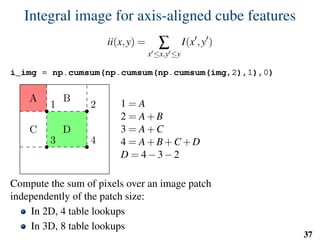
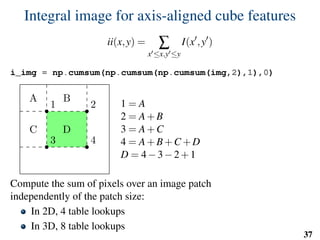
Integral image for axis-aligned cube features
ii(x,y) = ∑
x ≤x,y ≤y
I(x ,y )
i_img = np.cumsum(np.cumsum(np.cumsum(img,2),1),0)
1 2
3 4
A B
C D
1 = A
2 = A+B
3 = A+C
4 = A+B+C +D
D = 4−3−2+1
Compute the sum of pixels over an image patch
independently of the patch size:
In 2D, 4 table lookups
In 3D, 8 table lookups
37
Integral image for axis-aligned cube features
ii(x,y) = ∑
x ≤x,y ≤y
I(x ,y )
i_img = np.cumsum(np.cumsum(np.cumsum(img,2),1),0)
1 2
3 4
A B
C D
1 = A
2 = A+B
3 = A+C
4 = A+B+C +D
D = 4−3−2+1
Compute the sum of pixels over an image patch
independently of the patch size:
In 2D, 4 table lookups
In 3D, 8 table lookups
37
Integral image for axis-aligned cube features
ii(x,y) = ∑
x ≤x,y ≤y
I(x ,y )
i_img = np.cumsum(np.cumsum(np.cumsum(img,2),1),0)
1 2
3 4
A B
C D
1 = A
2 = A+B
3 = A+C
4 = A+B+C +D
D = 4−3−2+1
Compute the sum of pixels over an image patch
independently of the patch size:
In 2D, 4 table lookups
In 3D, 8 table lookups
37
Integral image for axis-aligned cube features
ii(x,y) = ∑
x ≤x,y ≤y
I(x ,y )
i_img = np.cumsum(np.cumsum(np.cumsum(img,2),1),0)
1 2
3 4
A B
C D
1 = A
2 = A+B
3 = A+C
4 = A+B+C +D
D = 4−3−2+1
Compute the sum of pixels over an image patch
independently of the patch size:
In 2D, 4 table lookups
In 3D, 8 table lookups
37
Integral image for axis-aligned cube features
ii(x,y) = ∑
x ≤x,y ≤y
I(x ,y )
i_img = np.cumsum(np.cumsum(np.cumsum(img,2),1),0)
1 2
3 4
A B
C D
1 = A
2 = A+B
3 = A+C
4 = A+B+C +D
D = 4−3−2+1
Compute the sum of pixels over an image patch
independently of the patch size:
In 2D, 4 table lookups
In 3D, 8 table lookups
37
Integral image for axis-aligned cube features
ii(x,y) = ∑
x ≤x,y ≤y
I(x ,y )
i_img = np.cumsum(np.cumsum(np.cumsum(img,2),1),0)
1 2
3 4
A B
C D
1 = A
2 = A+B
3 = A+C
4 = A+B+C +D
D = 4−3−2+1
Compute the sum of pixels over an image patch
independently of the patch size:
In 2D, 4 table lookups
In 3D, 8 table lookups
37
Integral image for axis-aligned cube features
ii(x,y) = ∑
x ≤x,y ≤y
I(x ,y )
i_img = np.cumsum(np.cumsum(np.cumsum(img,2),1),0)
1 2
3 4
A B
C D
1 = A
2 = A+B
3 = A+C
4 = A+B+C +D
D = 4−3−2+1
Compute the sum of pixels over an image patch
independently of the patch size:
In 2D, 4 table lookups
In 3D, 8 table lookups
37
Integral image for axis-aligned cube features
ii(x,y) = ∑
x ≤x,y ≤y
I(x ,y )
i_img = np.cumsum(np.cumsum(np.cumsum(img,2),1),0)
1 2
3 4
A B
C D
1 = A
2 = A+B
3 = A+C
4 = A+B+C +D
D = 4−3−2+1
Compute the sum of pixels over an image patch
independently of the patch size:
In 2D, 4 table lookups
In 3D, 8 table lookups
37
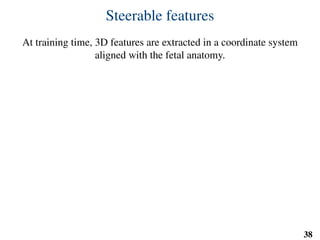
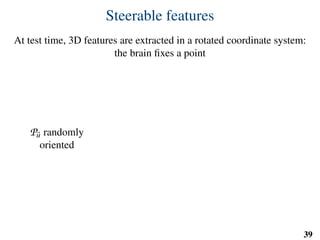
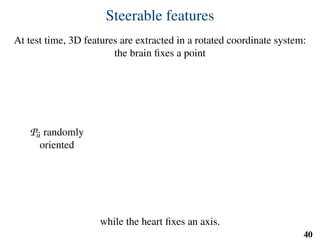
Steerable features
At training time, 3D features are extracted in a coordinate system
aligned with the fetal anatomy.
38
u0u0v0v0
Steerable features
At test time, 3D features are extracted in a rotated coordinate system:
the brain fixes a point
Pu randomly
oriented
while the heart fixes an axis.
39
uu
vv
Steerable features
At test time, 3D features are extracted in a rotated coordinate system:
the brain fixes a point
Pu randomly
oriented
while the heart fixes an axis.
40
uu
vv
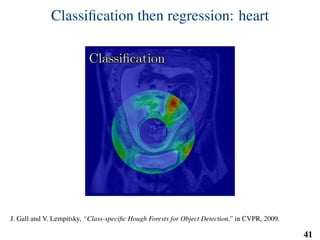
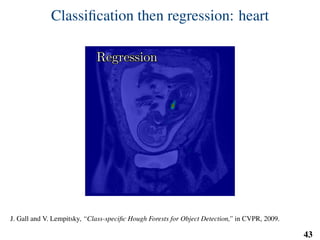
Classification then regression: heart
ClassificationClassification
J. Gall and V. Lempitsky, “Class-specific Hough Forests for Object Detection,” in CVPR, 2009.
41
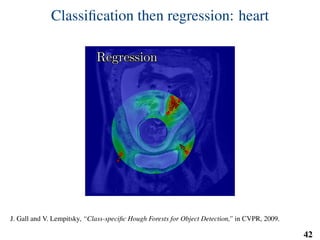
Classification then regression: heart
RegressionRegression
J. Gall and V. Lempitsky, “Class-specific Hough Forests for Object Detection,” in CVPR, 2009.
42
Classification then regression: heart
RegressionRegression
J. Gall and V. Lempitsky, “Class-specific Hough Forests for Object Detection,” in CVPR, 2009.
43
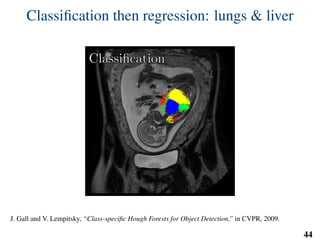
Classification then regression: lungs & liver
ClassificationClassification
J. Gall and V. Lempitsky, “Class-specific Hough Forests for Object Detection,” in CVPR, 2009.
44
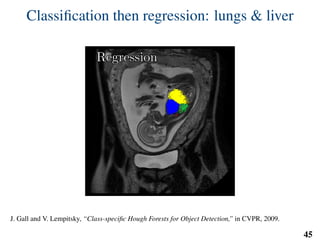
Classification then regression: lungs & liver
RegressionRegression
J. Gall and V. Lempitsky, “Class-specific Hough Forests for Object Detection,” in CVPR, 2009.
45
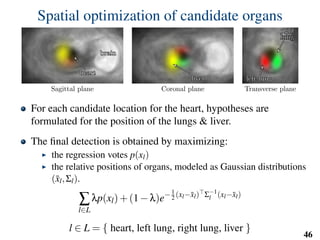
Spatial optimization of candidate organs
brainbrain
heartheart
Sagittal plane
liverliver
Coronal plane
left lungleft lung
rightright
lunglung
Transverse plane
For each candidate location for the heart, hypotheses are
formulated for the position of the lungs & liver.
The final detection is obtained by maximizing:
the regression votes p(xl)
the relative positions of organs, modeled as Gaussian distributions
(¯xl,Σl).
∑
l∈L
λp(xl)+(1−λ)e−1
2 (xl−¯xl) Σ−1
l (xl−¯xl)
l ∈ L = { heart, left lung, right lung, liver }
46
Implementation: training
# predefined set of cube features
offsets = np.random.randint( -o_size, o_size+1, size=(n_tests,3) )
sizes = np.random.randint( 0, d_size+1, size=(n_tests,1) )
X = []
Y = []
for l in range(nb_labels):
pixels = np.argwhere(np.logical_and(narrow_band>0,seg==l))
pixels = pixels[np.random.randint( 0,
pixels.shape[0],
n_samples)]
u,v,w = get_orientation_training( pixels, organ_centers )
x = extract_features( pixels, w, v, u )
y = seg[pixels[:,0],
pixels[:,1],
pixels[:,2]]
X.extend(x)
Y.extend(y)
clf = RandomForestClassifier(n_estimators=100) # scikit-learn
clf.fit(X,Y)
47
Implementation: training
# predefined set of cube features
offsets = np.random.randint( -o_size, o_size+1, size=(n_tests,3) )
sizes = np.random.randint( 0, d_size+1, size=(n_tests,1) )
X = []
Y = []
for l in range(nb_labels):
pixels = np.argwhere(np.logical_and(narrow_band>0,seg==l))
pixels = pixels[np.random.randint( 0,
pixels.shape[0],
n_samples)]
u,v,w = get_orientation_training( pixels, organ_centers )
x = extract_features( pixels, w, v, u )
y = seg[pixels[:,0],
pixels[:,1],
pixels[:,2]]
X.extend(x)
Y.extend(y)
clf = RandomForestClassifier(n_estimators=100) # scikit-learn
clf.fit(X,Y)
47
Implementation: training
# predefined set of cube features
offsets = np.random.randint( -o_size, o_size+1, size=(n_tests,3) )
sizes = np.random.randint( 0, d_size+1, size=(n_tests,1) )
X = []
Y = []
for l in range(nb_labels):
pixels = np.argwhere(np.logical_and(narrow_band>0,seg==l))
pixels = pixels[np.random.randint( 0,
pixels.shape[0],
n_samples)]
u,v,w = get_orientation_training( pixels, organ_centers )
x = extract_features( pixels, w, v, u )
y = seg[pixels[:,0],
pixels[:,1],
pixels[:,2]]
X.extend(x)
Y.extend(y)
clf = RandomForestClassifier(n_estimators=100) # scikit-learn
clf.fit(X,Y)
47
Implementation: training
# predefined set of cube features
offsets = np.random.randint( -o_size, o_size+1, size=(n_tests,3) )
sizes = np.random.randint( 0, d_size+1, size=(n_tests,1) )
X = []
Y = []
for l in range(nb_labels):
pixels = np.argwhere(np.logical_and(narrow_band>0,seg==l))
pixels = pixels[np.random.randint( 0,
pixels.shape[0],
n_samples)]
u,v,w = get_orientation_training( pixels, organ_centers )
x = extract_features( pixels, w, v, u )
y = seg[pixels[:,0],
pixels[:,1],
pixels[:,2]]
X.extend(x)
Y.extend(y)
clf = RandomForestClassifier(n_estimators=100) # scikit-learn
clf.fit(X,Y)
47
Implementation: testing
def get_orientation( brain, pixels ):
u = brain - pixels
u /= np.linalg.norm( u, axis=1 )[...,np.newaxis]
# np.random.rand() returns random floats in the interval [0;1[
v = 2*np.random.rand( pixels.shape[0], 3 ) - 1
v -= (v*u).sum(axis=1)[...,np.newaxis]*u
v /= np.linalg.norm( v,
axis=1 )[...,np.newaxis]
w = np.cross( u, v )
# u and v are perpendicular unit vectors
# so ||w|| = 1
return u, v, w
Brain
Pixel
u
v
w
48
Implementation: testing
def get_orientation( brain, pixels ):
u = brain - pixels
u /= np.linalg.norm( u, axis=1 )[...,np.newaxis]
# np.random.rand() returns random floats in the interval [0;1[
v = 2*np.random.rand( pixels.shape[0], 3 ) - 1
v -= (v*u).sum(axis=1)[...,np.newaxis]*u
v /= np.linalg.norm( v,
axis=1 )[...,np.newaxis]
w = np.cross( u, v )
# u and v are perpendicular unit vectors
# so ||w|| = 1
return u, v, w
Brain
Pixel
u
v
w
48
Implementation: testing
def get_orientation( brain, pixels ):
u = brain - pixels
u /= np.linalg.norm( u, axis=1 )[...,np.newaxis]
# np.random.rand() returns random floats in the interval [0;1[
v = 2*np.random.rand( pixels.shape[0], 3 ) - 1
v -= (v*u).sum(axis=1)[...,np.newaxis]*u
v /= np.linalg.norm( v,
axis=1 )[...,np.newaxis]
w = np.cross( u, v )
# u and v are perpendicular unit vectors
# so ||w|| = 1
return u, v, w
Brain
Pixel
u
v
w
48
Implementation: testing
def get_orientation( brain, pixels ):
u = brain - pixels
u /= np.linalg.norm( u, axis=1 )[...,np.newaxis]
# np.random.rand() returns random floats in the interval [0;1[
v = 2*np.random.rand( pixels.shape[0], 3 ) - 1
v -= (v*u).sum(axis=1)[...,np.newaxis]*u
v /= np.linalg.norm( v,
axis=1 )[...,np.newaxis]
w = np.cross( u, v )
# u and v are perpendicular unit vectors
# so ||w|| = 1
return u, v, w
Brain
Pixel
u
v
w
48
Implementation: testing
def get_orientation( brain, pixels ):
u = brain - pixels
u /= np.linalg.norm( u, axis=1 )[...,np.newaxis]
# np.random.rand() returns random floats in the interval [0;1[
v = 2*np.random.rand( pixels.shape[0], 3 ) - 1
v -= (v*u).sum(axis=1)[...,np.newaxis]*u
v /= np.linalg.norm( v,
axis=1 )[...,np.newaxis]
w = np.cross( u, v )
# u and v are perpendicular unit vectors
# so ||w|| = 1
return u, v, w
Brain
Pixel
u
v
w
48
Implementation: testing
def get_orientation( brain, pixels ):
u = brain - pixels
u /= np.linalg.norm( u, axis=1 )[...,np.newaxis]
# np.random.rand() returns random floats in the interval [0;1[
v = 2*np.random.rand( pixels.shape[0], 3 ) - 1
v -= (v*u).sum(axis=1)[...,np.newaxis]*u
v /= np.linalg.norm( v,
axis=1 )[...,np.newaxis]
w = np.cross( u, v )
# u and v are perpendicular unit vectors
# so ||w|| = 1
return u, v, w
Brain
Pixel
u
v
w
48
Implementation: testing
def get_orientation( brain, pixels ):
u = brain - pixels
u /= np.linalg.norm( u, axis=1 )[...,np.newaxis]
# np.random.rand() returns random floats in the interval [0;1[
v = 2*np.random.rand( pixels.shape[0], 3 ) - 1
v -= (v*u).sum(axis=1)[...,np.newaxis]*u
v /= np.linalg.norm( v,
axis=1 )[...,np.newaxis]
w = np.cross( u, v )
# u and v are perpendicular unit vectors
# so ||w|| = 1
return u, v, w
Brain
Pixel
u
v
w
48
Implementation: testing
img = irtk.imread(...) # Python interface to IRTK
proba = irtk.zeros(img.get_header(),dtype=’float32’)
...
pixels = np.argwhere(narrow_band>0)
u,v,w = get_orientation(brain_center,pixels)
# img is 3D so all features cannot fit in memory at once:
# use chunks
for i in xrange(0,pixels.shape[0],chunk_size):
j = min(i+chunk_size,pixels.shape[0])
x = extract_features( pixels[i:j],w[i:j],v[i:j],u[i:j])
pr = clf_heart.predict_proba(x)
for dim in xrange(nb_labels):
proba[dim,
pixels[i:j,0],
pixels[i:j,1],
pixels[i:j,2]] = pr[:,dim]
49
Implementation: testing
img = irtk.imread(...) # Python interface to IRTK
proba = irtk.zeros(img.get_header(),dtype=’float32’)
...
pixels = np.argwhere(narrow_band>0)
u,v,w = get_orientation(brain_center,pixels)
# img is 3D so all features cannot fit in memory at once:
# use chunks
for i in xrange(0,pixels.shape[0],chunk_size):
j = min(i+chunk_size,pixels.shape[0])
x = extract_features( pixels[i:j],w[i:j],v[i:j],u[i:j])
pr = clf_heart.predict_proba(x)
for dim in xrange(nb_labels):
proba[dim,
pixels[i:j,0],
pixels[i:j,1],
pixels[i:j,2]] = pr[:,dim]
49
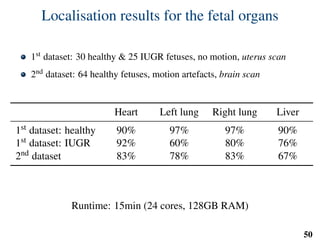
Localisation results for the fetal organs
1st dataset: 30 healthy & 25 IUGR fetuses, no motion, uterus scan
2nd dataset: 64 healthy fetuses, motion artefacts, brain scan
Heart Left lung Right lung Liver
1st dataset: healthy 90% 97% 97% 90%
1st dataset: IUGR 92% 60% 80% 76%
2nd dataset 83% 78% 83% 67%
Runtime: 15min (24 cores, 128GB RAM)
50
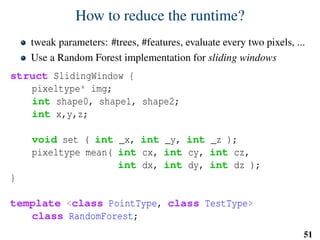
How to reduce the runtime?
tweak parameters: #trees, #features, evaluate every two pixels, ...
Use a Random Forest implementation for sliding windows
struct SlidingWindow {
pixeltype* img;
int shape0, shape1, shape2;
int x,y,z;
void set ( int _x, int _y, int _z );
pixeltype mean( int cx, int cy, int cz,
int dx, int dy, int dz );
}
template <class PointType, class TestType>
class RandomForest;
51
Example localisation results
Conclusion
Conclusion
Automated localisation of fetal organs in MRI using Python:
Brain, heart, lungs & liver
Training one model across all ages and orientations
MSER & SIFT from OpenCV
Image processing from scikit-image & scipy.ndimage
SVM and Random Forest from scikit-learn
And Cython for interfacing with C++
55
Thanks!
For more information and source code:
www.doc.ic.ac.uk/~kpk09/
github.com/kevin-keraudren

PyData London 2015 - Localising Organs of the Fetus in MRI Data Using Python

  • 1.
    Automated Organ Localisation inFetal Magnetic Resonance Imaging K. Keraudren1, B. Kainz1, O. Oktay1, M. Kuklisova-Murgasova2, V. Kyriakopoulou2, C. Malamateniou2, M. Rutherford2, J. V. Hajnal2 and D. Rueckert1 1 Biomedical Image Analysis Group, Imperial College London 2 Department Biomedical Engineering, King’s College London PyData London 2015
  • 2.
    1) Background: Fetal MagneticResonance Imaging Python for medical imaging 2) Localising the brain of the fetus 3) Localising the body of the fetus
  • 3.
  • 4.
    Magnetic Resonance Imaging(MRI) MRI scanner Source: Wikimedia Commons Huge magnet (1.5T) Safe: no ionising radiations High quality images Slow acquisition process 4
  • 5.
    Challenges in fetalMRI 1 Fetal motion 2 Arbitrary orientation of the fetus 3 Variability due to fetal growth 5
  • 6.
    Fast MRI acquisitionmethods MRI data is acquired as stacks of 2D slices that freeze in-plane motion but form an incoherent 3D volume. 6
  • 7.
    Retrospective motion correction Orthogonalstacks of misaligned 2D slices 3D volume Localising fetal organs can be used to initialise motion correction. B. Kainz et al., “Fast Volume Reconstruction from Motion Corrupted Stacks of 2D Slices,” in IEEE Transactions on Medical Imaging, 2015. 7
  • 8.
    Retrospective motion correction Orthogonalstacks of misaligned 2D slices 3D volume Localising fetal organs can be used to initialise motion correction. B. Kainz et al., “Fast Volume Reconstruction from Motion Corrupted Stacks of 2D Slices,” in IEEE Transactions on Medical Imaging, 2015. 8
  • 9.
  • 10.
  • 11.
    Interfacing IRTK throughCython What is a medical image? 4D volume of voxel data (X, Y, Z, T) Spatial information: ImageToWorld and WorldToImage Why the Image Registration Toolkit (IRTK)? Same backend as my colleagues: same conventions same features & bugs State-of-the-art algorithms for aligning images github.com/BioMedIA/IRTK 11
  • 12.
    Interfacing IRTK throughCython Solution: Subclass numpy arrays Dictionary attribute holding: dimension, orientation, origin and pixel size Access IRTK through cython Additional benefits: __getitem__ overloaded to update coordinates when cropping/slicing Coordinates preserved when resampling/aligning images conda install -c kevin-keraudren python-irtk github.com/BioMedIA/python-irtk 12
  • 13.
    Interfacing IRTK throughCython template <class dtype> void irtk2py( irtkGenericImage<dtype>& irtk_image, dtype* img, double* pixelSize, double* xAxis, double* yAxis, double* zAxis, double* origin, int* dim ); 13
  • 14.
    Machine learning fororgan localisation
  • 15.
    Machine learning approachto organ localisation Learning from annotated examples Generalise from training database to new subjects Implicitly model variability: age pose (articulated body) maternal tissues Small dataset limits capacity to model all age categories: Infer size from gestational age 15
  • 16.
    Training data: fetalbrain 59 healthy fetuses, 450 stacks Annotated boxes for the brain github.com/kevin-keraudren/crop-boxes-3D 16
  • 17.
    Training data: fullbody 30 healthy & 25 IUGR fetuses Manual segmentations: brain, heart, lungs, liver and kidneys M. Damodaram et al., “Foetal Volumetry using Magnetic Resonance Imaging in Intrauterine Growth Restriction,” in Early Human Development, 2012. 17
  • 18.
  • 19.
  • 20.
  • 21.
  • 22.
    Detect MSER regions Classifyusing SIFT features 22
  • 23.
    Filter by size Classifyusing SVM & histograms of SIFT features 23
  • 24.
    Fit a boxwith RANSAC 24
  • 25.
    Size constraints forbrain detection OFDOFD BPDBPD 14 19 24 29 34 39 Gestational Age 20 40 60 80 100 120 140 mm Occipitofrontal diameter median 5th/95th centile 14 19 24 29 34 39 Gestational Age 0 20 40 60 80 100 120 140 mm Biparietal diameter median 5th/95th centile 25
  • 26.
    Localisation results forthe fetal brain >70% Ground truth Detection Median error: 5.7 mm >70% of the brain: 100% Complete brain: 85% Size inferred from gestational age Runtime: <1min (desktop PC) 26
  • 27.
    Localisation results forthe fetal brain >70% Ground truth Detection Median error: 5.7 mm >70% of the brain: 100% Complete brain: 85% Size inferred from gestational age Runtime: <1min (desktop PC) 27
  • 28.
    Localising the bodyof the fetus
  • 29.
  • 30.
  • 31.
    Localising the bodyof the fetus Brain largest organ, ellipsoidal shape Lungs & liver irregular shape Motivates 3D approach despite motion corruption (only coarse localisation) 31
  • 32.
    Localising the bodyof the fetus 1) Size normalisation based on gestational age 2) Sequential localisation of fetal organs 3) Image features steered by the fetal anatomy 32
  • 33.
    Size normalisation 24 weeks30 weeks 38 weeks 20 25 30 35 40 Gestational age 0 20 40 60 80 100 120 140 Heart-braindistanceinmm Scanner coordinates Healthy IUGR R1, R2 A single model can be trained across all gestational ages. 33
  • 34.
    Size normalisation 24 weeks30 weeks 38 weeks 20 25 30 35 40 Gestational age 0 20 40 60 80 100 120 140 Heart-braindistanceinvoxels Image grid Healthy IUGR R1, R2 A single model can be trained across all gestational ages. 33
  • 35.
    Size normalisation The crown-rumplength (CRL), estimated from the gestational age, is used to normalise the size of the fetus. CRLCRL 12 17 22 27 32 37 42 Gestational age 50 100 150 200 250 300 350 400 450 mm Crown-rump length median 5th / 95th centile Resampling factor: CRLga/CRL30 34
  • 36.
    Sequential search R1R1 R2R2 The heartlies between two spheres of radii R1 and R2 centered on the brain. The lungs and liver lie inside a sphere of radius R3 centered on the heart. R1, R2 and R3 are independent of gestational age thanks to size normalisation. 35
  • 37.
    Sequential search R 3 R 3 The heartlies between two spheres of radii R1 and R2 centered on the brain. The lungs and liver lie inside a sphere of radius R3 centered on the heart. R1, R2 and R3 are independent of gestational age thanks to size normalisation. 35
  • 38.
    Sequential search R1R1 R2R2 R 3 R 3 The heartlies between two spheres of radius R1 and R2 centered on the brain. The lungs and liver lie inside a sphere of radius R3 centered on the heart. R1, R2 and R3 are independent of gestational age thanks to size normalisation. 35
  • 39.
    Image descriptor builtfrom rectangle features BB AA if µ(IA) > µ(IB) then 1 else 0 1 36
  • 40.
    Image descriptor builtfrom rectangle features BB AA if µ(IA) > µ(IB) then 1 else 0 1 1 36
  • 41.
    Image descriptor builtfrom rectangle features BB AA if µ(IA) > µ(IB) then 1 else 0 1 1 0 36
  • 42.
    Image descriptor builtfrom rectangle features BBAA if µ(IA) > µ(IB) then 1 else 0 1 1 0 1 36
  • 43.
    Image descriptor builtfrom rectangle features BB AA if µ(IA) > µ(IB) then 1 else 0 1 1 0 1 0 ... 36
  • 44.
    Integral image foraxis-aligned cube features ii(x,y) = ∑ x ≤x,y ≤y I(x ,y ) i_img = np.cumsum(np.cumsum(np.cumsum(img,2),1),0) 1 2 3 4 A B C D 1 = A 2 = A+B 3 = A+C 4 = A+B+C +D D = 4−3−2+1 Compute the sum of pixels over an image patch independently of the patch size: In 2D, 4 table lookups In 3D, 8 table lookups 37
  • 45.
    Integral image foraxis-aligned cube features ii(x,y) = ∑ x ≤x,y ≤y I(x ,y ) i_img = np.cumsum(np.cumsum(np.cumsum(img,2),1),0) 1 2 3 4 A B C D 1 = A 2 = A+B 3 = A+C 4 = A+B+C +D D = 4−3−2+1 Compute the sum of pixels over an image patch independently of the patch size: In 2D, 4 table lookups In 3D, 8 table lookups 37
  • 46.
    Integral image foraxis-aligned cube features ii(x,y) = ∑ x ≤x,y ≤y I(x ,y ) i_img = np.cumsum(np.cumsum(np.cumsum(img,2),1),0) 1 2 3 4 A B C D 1 = A 2 = A+B 3 = A+C 4 = A+B+C +D D = 4−3−2+1 Compute the sum of pixels over an image patch independently of the patch size: In 2D, 4 table lookups In 3D, 8 table lookups 37
  • 47.
    Integral image foraxis-aligned cube features ii(x,y) = ∑ x ≤x,y ≤y I(x ,y ) i_img = np.cumsum(np.cumsum(np.cumsum(img,2),1),0) 1 2 3 4 A B C D 1 = A 2 = A+B 3 = A+C 4 = A+B+C +D D = 4−3−2+1 Compute the sum of pixels over an image patch independently of the patch size: In 2D, 4 table lookups In 3D, 8 table lookups 37
  • 48.
    Integral image foraxis-aligned cube features ii(x,y) = ∑ x ≤x,y ≤y I(x ,y ) i_img = np.cumsum(np.cumsum(np.cumsum(img,2),1),0) 1 2 3 4 A B C D 1 = A 2 = A+B 3 = A+C 4 = A+B+C +D D = 4−3−2+1 Compute the sum of pixels over an image patch independently of the patch size: In 2D, 4 table lookups In 3D, 8 table lookups 37
  • 49.
    Integral image foraxis-aligned cube features ii(x,y) = ∑ x ≤x,y ≤y I(x ,y ) i_img = np.cumsum(np.cumsum(np.cumsum(img,2),1),0) 1 2 3 4 A B C D 1 = A 2 = A+B 3 = A+C 4 = A+B+C +D D = 4−3−2+1 Compute the sum of pixels over an image patch independently of the patch size: In 2D, 4 table lookups In 3D, 8 table lookups 37
  • 50.
    Integral image foraxis-aligned cube features ii(x,y) = ∑ x ≤x,y ≤y I(x ,y ) i_img = np.cumsum(np.cumsum(np.cumsum(img,2),1),0) 1 2 3 4 A B C D 1 = A 2 = A+B 3 = A+C 4 = A+B+C +D D = 4−3−2+1 Compute the sum of pixels over an image patch independently of the patch size: In 2D, 4 table lookups In 3D, 8 table lookups 37
  • 51.
    Integral image foraxis-aligned cube features ii(x,y) = ∑ x ≤x,y ≤y I(x ,y ) i_img = np.cumsum(np.cumsum(np.cumsum(img,2),1),0) 1 2 3 4 A B C D 1 = A 2 = A+B 3 = A+C 4 = A+B+C +D D = 4−3−2+1 Compute the sum of pixels over an image patch independently of the patch size: In 2D, 4 table lookups In 3D, 8 table lookups 37
  • 52.
    Steerable features At trainingtime, 3D features are extracted in a coordinate system aligned with the fetal anatomy. 38 u0u0v0v0
  • 53.
    Steerable features At testtime, 3D features are extracted in a rotated coordinate system: the brain fixes a point Pu randomly oriented while the heart fixes an axis. 39 uu vv
  • 54.
    Steerable features At testtime, 3D features are extracted in a rotated coordinate system: the brain fixes a point Pu randomly oriented while the heart fixes an axis. 40 uu vv
  • 55.
    Classification then regression:heart ClassificationClassification J. Gall and V. Lempitsky, “Class-specific Hough Forests for Object Detection,” in CVPR, 2009. 41
  • 56.
    Classification then regression:heart RegressionRegression J. Gall and V. Lempitsky, “Class-specific Hough Forests for Object Detection,” in CVPR, 2009. 42
  • 57.
    Classification then regression:heart RegressionRegression J. Gall and V. Lempitsky, “Class-specific Hough Forests for Object Detection,” in CVPR, 2009. 43
  • 58.
    Classification then regression:lungs & liver ClassificationClassification J. Gall and V. Lempitsky, “Class-specific Hough Forests for Object Detection,” in CVPR, 2009. 44
  • 59.
    Classification then regression:lungs & liver RegressionRegression J. Gall and V. Lempitsky, “Class-specific Hough Forests for Object Detection,” in CVPR, 2009. 45
  • 60.
    Spatial optimization ofcandidate organs brainbrain heartheart Sagittal plane liverliver Coronal plane left lungleft lung rightright lunglung Transverse plane For each candidate location for the heart, hypotheses are formulated for the position of the lungs & liver. The final detection is obtained by maximizing: the regression votes p(xl) the relative positions of organs, modeled as Gaussian distributions (¯xl,Σl). ∑ l∈L λp(xl)+(1−λ)e−1 2 (xl−¯xl) Σ−1 l (xl−¯xl) l ∈ L = { heart, left lung, right lung, liver } 46
  • 61.
    Implementation: training # predefinedset of cube features offsets = np.random.randint( -o_size, o_size+1, size=(n_tests,3) ) sizes = np.random.randint( 0, d_size+1, size=(n_tests,1) ) X = [] Y = [] for l in range(nb_labels): pixels = np.argwhere(np.logical_and(narrow_band>0,seg==l)) pixels = pixels[np.random.randint( 0, pixels.shape[0], n_samples)] u,v,w = get_orientation_training( pixels, organ_centers ) x = extract_features( pixels, w, v, u ) y = seg[pixels[:,0], pixels[:,1], pixels[:,2]] X.extend(x) Y.extend(y) clf = RandomForestClassifier(n_estimators=100) # scikit-learn clf.fit(X,Y) 47
  • 62.
    Implementation: training # predefinedset of cube features offsets = np.random.randint( -o_size, o_size+1, size=(n_tests,3) ) sizes = np.random.randint( 0, d_size+1, size=(n_tests,1) ) X = [] Y = [] for l in range(nb_labels): pixels = np.argwhere(np.logical_and(narrow_band>0,seg==l)) pixels = pixels[np.random.randint( 0, pixels.shape[0], n_samples)] u,v,w = get_orientation_training( pixels, organ_centers ) x = extract_features( pixels, w, v, u ) y = seg[pixels[:,0], pixels[:,1], pixels[:,2]] X.extend(x) Y.extend(y) clf = RandomForestClassifier(n_estimators=100) # scikit-learn clf.fit(X,Y) 47
  • 63.
    Implementation: training # predefinedset of cube features offsets = np.random.randint( -o_size, o_size+1, size=(n_tests,3) ) sizes = np.random.randint( 0, d_size+1, size=(n_tests,1) ) X = [] Y = [] for l in range(nb_labels): pixels = np.argwhere(np.logical_and(narrow_band>0,seg==l)) pixels = pixels[np.random.randint( 0, pixels.shape[0], n_samples)] u,v,w = get_orientation_training( pixels, organ_centers ) x = extract_features( pixels, w, v, u ) y = seg[pixels[:,0], pixels[:,1], pixels[:,2]] X.extend(x) Y.extend(y) clf = RandomForestClassifier(n_estimators=100) # scikit-learn clf.fit(X,Y) 47
  • 64.
    Implementation: training # predefinedset of cube features offsets = np.random.randint( -o_size, o_size+1, size=(n_tests,3) ) sizes = np.random.randint( 0, d_size+1, size=(n_tests,1) ) X = [] Y = [] for l in range(nb_labels): pixels = np.argwhere(np.logical_and(narrow_band>0,seg==l)) pixels = pixels[np.random.randint( 0, pixels.shape[0], n_samples)] u,v,w = get_orientation_training( pixels, organ_centers ) x = extract_features( pixels, w, v, u ) y = seg[pixels[:,0], pixels[:,1], pixels[:,2]] X.extend(x) Y.extend(y) clf = RandomForestClassifier(n_estimators=100) # scikit-learn clf.fit(X,Y) 47
  • 65.
    Implementation: testing def get_orientation(brain, pixels ): u = brain - pixels u /= np.linalg.norm( u, axis=1 )[...,np.newaxis] # np.random.rand() returns random floats in the interval [0;1[ v = 2*np.random.rand( pixels.shape[0], 3 ) - 1 v -= (v*u).sum(axis=1)[...,np.newaxis]*u v /= np.linalg.norm( v, axis=1 )[...,np.newaxis] w = np.cross( u, v ) # u and v are perpendicular unit vectors # so ||w|| = 1 return u, v, w Brain Pixel u v w 48
  • 66.
    Implementation: testing def get_orientation(brain, pixels ): u = brain - pixels u /= np.linalg.norm( u, axis=1 )[...,np.newaxis] # np.random.rand() returns random floats in the interval [0;1[ v = 2*np.random.rand( pixels.shape[0], 3 ) - 1 v -= (v*u).sum(axis=1)[...,np.newaxis]*u v /= np.linalg.norm( v, axis=1 )[...,np.newaxis] w = np.cross( u, v ) # u and v are perpendicular unit vectors # so ||w|| = 1 return u, v, w Brain Pixel u v w 48
  • 67.
    Implementation: testing def get_orientation(brain, pixels ): u = brain - pixels u /= np.linalg.norm( u, axis=1 )[...,np.newaxis] # np.random.rand() returns random floats in the interval [0;1[ v = 2*np.random.rand( pixels.shape[0], 3 ) - 1 v -= (v*u).sum(axis=1)[...,np.newaxis]*u v /= np.linalg.norm( v, axis=1 )[...,np.newaxis] w = np.cross( u, v ) # u and v are perpendicular unit vectors # so ||w|| = 1 return u, v, w Brain Pixel u v w 48
  • 68.
    Implementation: testing def get_orientation(brain, pixels ): u = brain - pixels u /= np.linalg.norm( u, axis=1 )[...,np.newaxis] # np.random.rand() returns random floats in the interval [0;1[ v = 2*np.random.rand( pixels.shape[0], 3 ) - 1 v -= (v*u).sum(axis=1)[...,np.newaxis]*u v /= np.linalg.norm( v, axis=1 )[...,np.newaxis] w = np.cross( u, v ) # u and v are perpendicular unit vectors # so ||w|| = 1 return u, v, w Brain Pixel u v w 48
  • 69.
    Implementation: testing def get_orientation(brain, pixels ): u = brain - pixels u /= np.linalg.norm( u, axis=1 )[...,np.newaxis] # np.random.rand() returns random floats in the interval [0;1[ v = 2*np.random.rand( pixels.shape[0], 3 ) - 1 v -= (v*u).sum(axis=1)[...,np.newaxis]*u v /= np.linalg.norm( v, axis=1 )[...,np.newaxis] w = np.cross( u, v ) # u and v are perpendicular unit vectors # so ||w|| = 1 return u, v, w Brain Pixel u v w 48
  • 70.
    Implementation: testing def get_orientation(brain, pixels ): u = brain - pixels u /= np.linalg.norm( u, axis=1 )[...,np.newaxis] # np.random.rand() returns random floats in the interval [0;1[ v = 2*np.random.rand( pixels.shape[0], 3 ) - 1 v -= (v*u).sum(axis=1)[...,np.newaxis]*u v /= np.linalg.norm( v, axis=1 )[...,np.newaxis] w = np.cross( u, v ) # u and v are perpendicular unit vectors # so ||w|| = 1 return u, v, w Brain Pixel u v w 48
  • 71.
    Implementation: testing def get_orientation(brain, pixels ): u = brain - pixels u /= np.linalg.norm( u, axis=1 )[...,np.newaxis] # np.random.rand() returns random floats in the interval [0;1[ v = 2*np.random.rand( pixels.shape[0], 3 ) - 1 v -= (v*u).sum(axis=1)[...,np.newaxis]*u v /= np.linalg.norm( v, axis=1 )[...,np.newaxis] w = np.cross( u, v ) # u and v are perpendicular unit vectors # so ||w|| = 1 return u, v, w Brain Pixel u v w 48
  • 72.
    Implementation: testing img =irtk.imread(...) # Python interface to IRTK proba = irtk.zeros(img.get_header(),dtype=’float32’) ... pixels = np.argwhere(narrow_band>0) u,v,w = get_orientation(brain_center,pixels) # img is 3D so all features cannot fit in memory at once: # use chunks for i in xrange(0,pixels.shape[0],chunk_size): j = min(i+chunk_size,pixels.shape[0]) x = extract_features( pixels[i:j],w[i:j],v[i:j],u[i:j]) pr = clf_heart.predict_proba(x) for dim in xrange(nb_labels): proba[dim, pixels[i:j,0], pixels[i:j,1], pixels[i:j,2]] = pr[:,dim] 49
  • 73.
    Implementation: testing img =irtk.imread(...) # Python interface to IRTK proba = irtk.zeros(img.get_header(),dtype=’float32’) ... pixels = np.argwhere(narrow_band>0) u,v,w = get_orientation(brain_center,pixels) # img is 3D so all features cannot fit in memory at once: # use chunks for i in xrange(0,pixels.shape[0],chunk_size): j = min(i+chunk_size,pixels.shape[0]) x = extract_features( pixels[i:j],w[i:j],v[i:j],u[i:j]) pr = clf_heart.predict_proba(x) for dim in xrange(nb_labels): proba[dim, pixels[i:j,0], pixels[i:j,1], pixels[i:j,2]] = pr[:,dim] 49
  • 74.
    Localisation results forthe fetal organs 1st dataset: 30 healthy & 25 IUGR fetuses, no motion, uterus scan 2nd dataset: 64 healthy fetuses, motion artefacts, brain scan Heart Left lung Right lung Liver 1st dataset: healthy 90% 97% 97% 90% 1st dataset: IUGR 92% 60% 80% 76% 2nd dataset 83% 78% 83% 67% Runtime: 15min (24 cores, 128GB RAM) 50
  • 75.
    How to reducethe runtime? tweak parameters: #trees, #features, evaluate every two pixels, ... Use a Random Forest implementation for sliding windows struct SlidingWindow { pixeltype* img; int shape0, shape1, shape2; int x,y,z; void set ( int _x, int _y, int _z ); pixeltype mean( int cx, int cy, int cz, int dx, int dy, int dz ); } template <class PointType, class TestType> class RandomForest; 51
  • 76.
  • 78.
  • 79.
    Conclusion Automated localisation offetal organs in MRI using Python: Brain, heart, lungs & liver Training one model across all ages and orientations MSER & SIFT from OpenCV Image processing from scikit-image & scipy.ndimage SVM and Random Forest from scikit-learn And Cython for interfacing with C++ 55
  • 80.
    Thanks! For more informationand source code: www.doc.ic.ac.uk/~kpk09/ github.com/kevin-keraudren