Cutting-Edge Procurement Software
                         (By MMS)
   Masters.
   Requisition for Procurement (aka ‘Indent’).
   Purchase Order.
   Reports.
   Optional Modules.
    ◦   Inventory.
    ◦   Material Receipts.
    ◦   Material Issues.
    ◦   Inventory Returns.
    ◦   Online ‘Reverse Auctions’ for Price Negotiations.
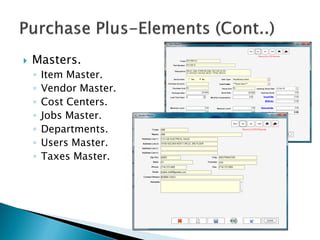
   Masters.
    ◦   Item Master.
    ◦   Vendor Master.
    ◦   Cost Centers.
    ◦   Jobs Master.
    ◦   Departments.
    ◦   Users Master.
    ◦   Taxes Master.
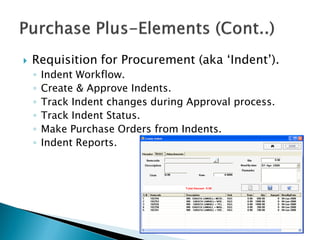
   Requisition for Procurement (aka ‘Indent’).
    ◦   Indent Workflow.
    ◦   Create & Approve Indents.
    ◦   Track Indent changes during Approval process.
    ◦   Track Indent Status.
    ◦   Make Purchase Orders from Indents.
    ◦   Indent Reports.
   Purchase Orders
    ◦   PO Workflow.
    ◦   Customizable Alphanumeric PO Number series.
    ◦   Create & Approve PO’s.
    ◦   Copy existing PO’s to create New PO.
    ◦   Track PO changes.
    ◦   PO’s from Indents.
    ◦   Vendor Enquiry from PO
    ◦   Track PO deliveries.
    ◦   MRN’s against PO’s
    ◦   PO Reports.
   Reports
    ◦ Reports can be Printed and exported to PDF, Word or Excel.
    ◦ Besides prebuilt reports, End User Reporting option is also
      available.
    ◦ Over 50 different prebuilt reports including.
        All Masters, incl Item Master, Vendor Master etc..
        PO Print View.
        PO’s by PO Number, vendor, Item, Jobs, Cost Centers.
        PO Status Reports-Approved, With Partial delivery, Closed,
         Cancelled.
        Vendor Purchase History.
        Item Purchase History.
        Most Ordered Items by- Frequency, Qty.
        Items yet to be received against PO’s.
        Vendors of an Item.
        Items of a Vendor.
   Reports
    ◦ Over 50 different reports including (Cont..).
      Indent Print View.
      Indent Status-Created, Approved, PO created, Cancelled.
      Indents by- Indent No, Department, Cost Center, Creator,
       Item.
      MRN Report.
      MRN’s of a PO.
      MRN’s approved by an Employee.
      Issue Slip.
      Item Issue & Receipts.
      Inventory Returns.
      Items with Stock.
   System Configuration.
    ◦ Windows Desktop Thick client Application in
      Microsoft .Net Technology.
    ◦ Microsoft SQL Server 2005 or above backend.
    ◦ Works with the free SQL Server 2005, 2008 Express
      versions also.
    ◦ Reports in Crystal Reports for .Net 2008 and
      Microsoft Reporting Technology.
   Following are the requirements for Server and
    Client.
   Server:
      PC running on Windows XP Pro/Windows 2000
       Server/Windows 2000 Advanced Server/Windows 2003
       Advanced Server/Windows XP professional Sp2.
      Microsoft Sql Server 2000 or higher.
      .Net Framework 3.5.
   Client:
      PC running Windows Xp Pro Sp2/ Windows 2000 Pro Sp4,
       Windows Vista or higher with minimum 1GB RAM. (2GB
       RAM recommended in case of windows vista or windows
       7).
      Microsoft Internet Explorer 6.0 or higher.
      .Net Framework 3.5.
   Role based security to all screens in the
    software.
   Users are assigned to roles. This way a
    users can be granted access or can be
    blocked from access to any screen of the
    application.
   SQL Server Database itself offers Microsoft
    Industry Standard Security and automated
    Backup features.

Purchase plus

  • 1.
  • 2.
    Masters.  Requisition for Procurement (aka ‘Indent’).  Purchase Order.  Reports.  Optional Modules. ◦ Inventory. ◦ Material Receipts. ◦ Material Issues. ◦ Inventory Returns. ◦ Online ‘Reverse Auctions’ for Price Negotiations.
  • 3.
    Masters. ◦ Item Master. ◦ Vendor Master. ◦ Cost Centers. ◦ Jobs Master. ◦ Departments. ◦ Users Master. ◦ Taxes Master.
  • 4.
    Requisition for Procurement (aka ‘Indent’). ◦ Indent Workflow. ◦ Create & Approve Indents. ◦ Track Indent changes during Approval process. ◦ Track Indent Status. ◦ Make Purchase Orders from Indents. ◦ Indent Reports.
  • 5.
    Purchase Orders ◦ PO Workflow. ◦ Customizable Alphanumeric PO Number series. ◦ Create & Approve PO’s. ◦ Copy existing PO’s to create New PO. ◦ Track PO changes. ◦ PO’s from Indents. ◦ Vendor Enquiry from PO ◦ Track PO deliveries. ◦ MRN’s against PO’s ◦ PO Reports.
  • 6.
    Reports ◦ Reports can be Printed and exported to PDF, Word or Excel. ◦ Besides prebuilt reports, End User Reporting option is also available. ◦ Over 50 different prebuilt reports including.  All Masters, incl Item Master, Vendor Master etc..  PO Print View.  PO’s by PO Number, vendor, Item, Jobs, Cost Centers.  PO Status Reports-Approved, With Partial delivery, Closed, Cancelled.  Vendor Purchase History.  Item Purchase History.  Most Ordered Items by- Frequency, Qty.  Items yet to be received against PO’s.  Vendors of an Item.  Items of a Vendor.
  • 7.
    Reports ◦ Over 50 different reports including (Cont..).  Indent Print View.  Indent Status-Created, Approved, PO created, Cancelled.  Indents by- Indent No, Department, Cost Center, Creator, Item.  MRN Report.  MRN’s of a PO.  MRN’s approved by an Employee.  Issue Slip.  Item Issue & Receipts.  Inventory Returns.  Items with Stock.
  • 8.
    System Configuration. ◦ Windows Desktop Thick client Application in Microsoft .Net Technology. ◦ Microsoft SQL Server 2005 or above backend. ◦ Works with the free SQL Server 2005, 2008 Express versions also. ◦ Reports in Crystal Reports for .Net 2008 and Microsoft Reporting Technology.
  • 9.
    Following are the requirements for Server and Client.  Server:  PC running on Windows XP Pro/Windows 2000 Server/Windows 2000 Advanced Server/Windows 2003 Advanced Server/Windows XP professional Sp2.  Microsoft Sql Server 2000 or higher.  .Net Framework 3.5.  Client:  PC running Windows Xp Pro Sp2/ Windows 2000 Pro Sp4, Windows Vista or higher with minimum 1GB RAM. (2GB RAM recommended in case of windows vista or windows 7).  Microsoft Internet Explorer 6.0 or higher.  .Net Framework 3.5.
  • 10.
    Role based security to all screens in the software.  Users are assigned to roles. This way a users can be granted access or can be blocked from access to any screen of the application.  SQL Server Database itself offers Microsoft Industry Standard Security and automated Backup features.