Google+

October 17, 2012
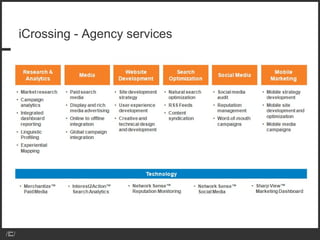
iCrossing - Agency services
with clients including…
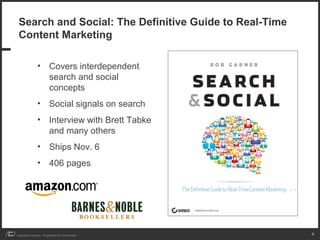
Search and Social: The Definitive Guide to Real-Time
 Content Marketing

                 • Covers interdependent
                   search and social
                   concepts
                 • Social signals on search
                 • Interview with Brett Tabke
                   and many others
                 • Ships Nov. 6
                 • 406 pages


Copyright iCrossing - Proprietary and Confidential      4
Overview

                 • How to think about Google+
                 • Author and Publisher Markup


Copyright iCrossing - Proprietary and Confidential   5
How to think about Google+
Google+ is not intended solely as a destination
 like Facebook…


                     …It will instead provide a human social layer to inform
                     all of its products and services


Copyright iCrossing - Proprietary and Confidential                             7
Wanna know how Google+ works? Use your SEO
 sensibilities

                 • People are nodes, just like websites are nodes
                 • Connections between people are measured just like
                   connections between links
                 • Social profiles also have keyword inference, themes and
                   authority, just like links and websites
                 • Natural language processing is critical to the social experience,
                   and infers intent and context, just like search


Copyright iCrossing - Proprietary and Confidential                                     8
Ex. Of Social Relevancy: An SEO View of Google+

   Consider the parallel aspects of websites, and Google+ accounts
   •   Domain authority : user ID
   •   Duplicate content : +1’ed and shared content
   •   Freshness : freshness
   •   Links : Circles, Shares
   •   Quality of links : Quality of people who have circled you
   •   Inbound links vs. outbound links : Ratio of your circles in contrast to
       the number of people circling you
   •   Linking to bad : good neighborhoods
   •   Anchor text of links: Labeling of Circles
   •   Keyword themes of Google+ Users
                A Big Week For Real-Time And Social Search, Search Insider
                http://bit.ly/bigweek
                What An Algorithmic Approach To Twitter's Social-Search Layer Might Look Like, Search Insider
                http://bit.ly/algorithmic

                                                                                                                9
Social Connections in Google+

                 The Google+ Webmaster FAQ states that the social connections
                 can influence visibility or other elements of your social experience
                 These connections may include:
                 •People in your Gmail chat list
                 •People in your Google contacts
                 •People you’re following on Google Reader
                 •People who are publicly connected to you in other networks such
                 as Twitter


                 http://support.google.com/websearch/bin/answer.py?hl=en&answer=1067707


Copyright iCrossing - Proprietary and Confidential                                        10
Yes, +1s can be used as a search signal


                 Google states that +1s from people in your
                  network can be a “useful signal” to help
                  determine the relevance of a search query.


                 http://support.google.com/webmasters/bin/answer.py?hl=en&answer=1140194


Copyright iCrossing - Proprietary and Confidential                                         11
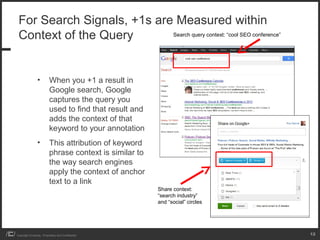
For Search Signals, +1s are Measured within
 Context of the Query       Search query context: “cool SEO conference”


                 •         When you +1 a result in
                           Google search, Google
                           captures the query you
                           used to find that result and
                           adds the context of that
                           keyword to your annotation
                 •         This attribution of keyword
                           phrase context is similar to
                           the way search engines
                           apply the context of anchor
                           text to a link
                                                          Share context:
                                                          “search industry”
                                                          and “social” circles


Copyright iCrossing - Proprietary and Confidential                               12
Circles: Increased network size is an SEO tactic

                 • Annotation features like +1s appear only to those in a networks
                 • Your company presence becomes more prominent within the
                   SERPs of those who have circled you
                 • Tremendous first mover advantage
                              • Many companies slow to embrace Google+

                 • Build up your network
                              • Circle people who are relevant to you
                              • Invite people
                              • Circle those who share or publish content in Google+ that corresponds with
                                the main theme of your business


Copyright iCrossing - Proprietary and Confidential                                                           13
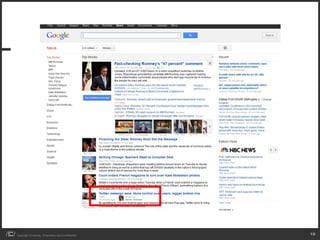
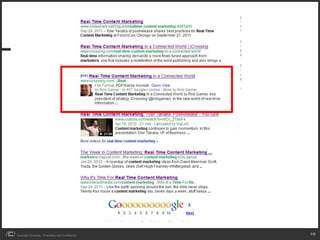
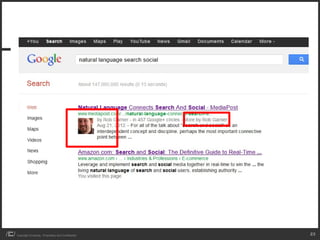
Authorship Markup
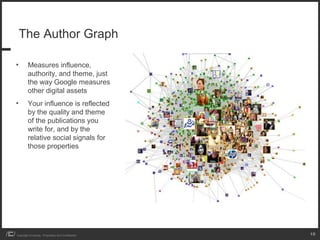
The Author Graph

•        Measures influence,
         authority, and theme, just
         the way Google measures
         other digital assets
•        Your influence is reflected
         by the quality and theme
         of the publications you
         write for, and by the
         relative social signals for
         those properties


Copyright iCrossing - Proprietary and Confidential   15
Copyright iCrossing - Proprietary and Confidential   16
Copyright iCrossing - Proprietary and Confidential   17
Copyright iCrossing - Proprietary and Confidential   18
Copyright iCrossing - Proprietary and Confidential   19
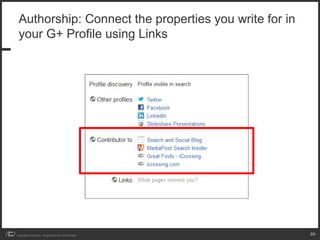
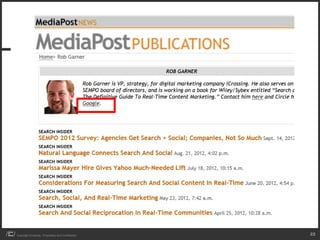
Authorship: Connect the properties you write for in
 your G+ Profile using Links


Copyright iCrossing - Proprietary and Confidential     20
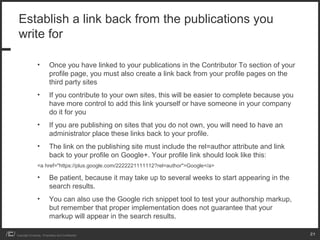
Establish a link back from the publications you
 write for

                 •         Once you have linked to your publications in the Contributor To section of your
                           profile page, you must also create a link back from your profile pages on the
                           third party sites
                 •         If you contribute to your own sites, this will be easier to complete because you
                           have more control to add this link yourself or have someone in your company
                           do it for you
                 •         If you are publishing on sites that you do not own, you will need to have an
                           administrator place these links back to your profile.
                 •         The link on the publishing site must include the rel=author attribute and link
                           back to your profile on Google+. Your profile link should look like this:
                 <a href="https://plus.google.com/2222221111112?rel=author">Google</a>

                 •         Be patient, because it may take up to several weeks to start appearing in the
                           search results.
                 •         You can also use the Google rich snippet tool to test your authorship markup,
                           but remember that proper implementation does not guarantee that your
                           markup will appear in the search results.

Copyright iCrossing - Proprietary and Confidential                                                            21
Copyright iCrossing - Proprietary and Confidential   22
Copyright iCrossing - Proprietary and Confidential   23
Establishing Authorship with a Verified Email
 Address

                 • A second method of verifying your connection between a
                   website and Google is with a verified email address.
                 • This email address should contain the domain of the site that
                   you publish on and that was submitted in the box on the
                   following URL: https://plus.google.com/authorship.
                 • Once your email address has been authenticated, Google will
                   add your address to the Work section of your profile. You can
                   then edit your profile to make it private or adjust the settings of
                   who should see your contact info.
                 • Make sure that all of your articles contain a byline with a brief
                   description of who you are and that each article you wrote is
                   preceded with “by.” Google looks for snippets of text that
                   contain the phrase “by+Author+Name” as a signal to reinforce
                   authorship.
Copyright iCrossing - Proprietary and Confidential                                       24
Establishing Authorship Using WordPress
 Plug-ins

                 • There are a variety of different WordPress plug-ins to help you
                   quickly establish rel=author for your individual authors or blogs
                   with multiple authors. Here are two examples of plug-ins to
                   help get you going:
                 • Authorsure: This plug-in works for both single-author and
                   multiauthor WordPress blogs
                           http://wordpress.org/extend/plugins/authorsure/

                 • Google Authorship for Multiple Authors: This tool is
                   designed mainly for blogs with multiple authors, and its creator
                   states that it needs to be customized in order to work for
                   single-author blogs
                           http://wordpress.org/extend/plugins/google-authorship-for-multiple-writers/


Copyright iCrossing - Proprietary and Confidential                                                       25
Publisher Markup
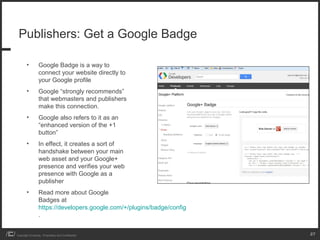
Publishers: Get a Google Badge

        •         Google Badge is a way to
                  connect your website directly to
                  your Google profile
        •         Google “strongly recommends”
                  that webmasters and publishers
                  make this connection.
        •         Google also refers to it as an
                  “enhanced version of the +1
                  button”
        •         In effect, it creates a sort of
                  handshake between your main
                  web asset and your Google+
                  presence and verifies your web
                  presence with Google as a
                  publisher
        •         Read more about Google
                  Badges at
                  https://developers.google.com/+/plugins/badge/config
                  .


Copyright iCrossing - Proprietary and Confidential                       27
Publishers: Get a Google Badge

                 • There are two other ways to confirm ownership of your site
                   with Google:


                 1) Create a rel="publisher" link from the main page of your website to your
                     Google+ page. The link code follows:
                 <a rel="publisher" href="https://plus.google.com/YourGoogle+AcctURLHere">Find
                     us on Google+</a>


                 2) If you don’t want to put the link on your public-facing page, you can include the
                      following code in the head section of your main page:
                 <link rel="publisher" href="https://plus.google.com/[yourpageID]" />


Copyright iCrossing - Proprietary and Confidential                                                      28
Thank you


Copyright iCrossing - Proprietary and Confidential   29

Pubcon Google+ Google Plus and Author Markup Panel by Rob Garner

  • 1.
  • 2.
  • 3.
  • 4.
    Search and Social:The Definitive Guide to Real-Time Content Marketing • Covers interdependent search and social concepts • Social signals on search • Interview with Brett Tabke and many others • Ships Nov. 6 • 406 pages Copyright iCrossing - Proprietary and Confidential 4
  • 5.
    Overview • How to think about Google+ • Author and Publisher Markup Copyright iCrossing - Proprietary and Confidential 5
  • 6.
    How to thinkabout Google+
  • 7.
    Google+ is notintended solely as a destination like Facebook… …It will instead provide a human social layer to inform all of its products and services Copyright iCrossing - Proprietary and Confidential 7
  • 8.
    Wanna know howGoogle+ works? Use your SEO sensibilities • People are nodes, just like websites are nodes • Connections between people are measured just like connections between links • Social profiles also have keyword inference, themes and authority, just like links and websites • Natural language processing is critical to the social experience, and infers intent and context, just like search Copyright iCrossing - Proprietary and Confidential 8
  • 9.
    Ex. Of SocialRelevancy: An SEO View of Google+ Consider the parallel aspects of websites, and Google+ accounts • Domain authority : user ID • Duplicate content : +1’ed and shared content • Freshness : freshness • Links : Circles, Shares • Quality of links : Quality of people who have circled you • Inbound links vs. outbound links : Ratio of your circles in contrast to the number of people circling you • Linking to bad : good neighborhoods • Anchor text of links: Labeling of Circles • Keyword themes of Google+ Users A Big Week For Real-Time And Social Search, Search Insider http://bit.ly/bigweek What An Algorithmic Approach To Twitter's Social-Search Layer Might Look Like, Search Insider http://bit.ly/algorithmic 9
  • 10.
    Social Connections inGoogle+ The Google+ Webmaster FAQ states that the social connections can influence visibility or other elements of your social experience These connections may include: •People in your Gmail chat list •People in your Google contacts •People you’re following on Google Reader •People who are publicly connected to you in other networks such as Twitter http://support.google.com/websearch/bin/answer.py?hl=en&answer=1067707 Copyright iCrossing - Proprietary and Confidential 10
  • 11.
    Yes, +1s canbe used as a search signal Google states that +1s from people in your network can be a “useful signal” to help determine the relevance of a search query. http://support.google.com/webmasters/bin/answer.py?hl=en&answer=1140194 Copyright iCrossing - Proprietary and Confidential 11
  • 12.
    For Search Signals,+1s are Measured within Context of the Query Search query context: “cool SEO conference” • When you +1 a result in Google search, Google captures the query you used to find that result and adds the context of that keyword to your annotation • This attribution of keyword phrase context is similar to the way search engines apply the context of anchor text to a link Share context: “search industry” and “social” circles Copyright iCrossing - Proprietary and Confidential 12
  • 13.
    Circles: Increased networksize is an SEO tactic • Annotation features like +1s appear only to those in a networks • Your company presence becomes more prominent within the SERPs of those who have circled you • Tremendous first mover advantage • Many companies slow to embrace Google+ • Build up your network • Circle people who are relevant to you • Invite people • Circle those who share or publish content in Google+ that corresponds with the main theme of your business Copyright iCrossing - Proprietary and Confidential 13
  • 14.
  • 15.
    The Author Graph • Measures influence, authority, and theme, just the way Google measures other digital assets • Your influence is reflected by the quality and theme of the publications you write for, and by the relative social signals for those properties Copyright iCrossing - Proprietary and Confidential 15
  • 16.
    Copyright iCrossing -Proprietary and Confidential 16
  • 17.
    Copyright iCrossing -Proprietary and Confidential 17
  • 18.
    Copyright iCrossing -Proprietary and Confidential 18
  • 19.
    Copyright iCrossing -Proprietary and Confidential 19
  • 20.
    Authorship: Connect theproperties you write for in your G+ Profile using Links Copyright iCrossing - Proprietary and Confidential 20
  • 21.
    Establish a linkback from the publications you write for • Once you have linked to your publications in the Contributor To section of your profile page, you must also create a link back from your profile pages on the third party sites • If you contribute to your own sites, this will be easier to complete because you have more control to add this link yourself or have someone in your company do it for you • If you are publishing on sites that you do not own, you will need to have an administrator place these links back to your profile. • The link on the publishing site must include the rel=author attribute and link back to your profile on Google+. Your profile link should look like this: <a href="https://plus.google.com/2222221111112?rel=author">Google</a> • Be patient, because it may take up to several weeks to start appearing in the search results. • You can also use the Google rich snippet tool to test your authorship markup, but remember that proper implementation does not guarantee that your markup will appear in the search results. Copyright iCrossing - Proprietary and Confidential 21
  • 22.
    Copyright iCrossing -Proprietary and Confidential 22
  • 23.
    Copyright iCrossing -Proprietary and Confidential 23
  • 24.
    Establishing Authorship witha Verified Email Address • A second method of verifying your connection between a website and Google is with a verified email address. • This email address should contain the domain of the site that you publish on and that was submitted in the box on the following URL: https://plus.google.com/authorship. • Once your email address has been authenticated, Google will add your address to the Work section of your profile. You can then edit your profile to make it private or adjust the settings of who should see your contact info. • Make sure that all of your articles contain a byline with a brief description of who you are and that each article you wrote is preceded with “by.” Google looks for snippets of text that contain the phrase “by+Author+Name” as a signal to reinforce authorship. Copyright iCrossing - Proprietary and Confidential 24
  • 25.
    Establishing Authorship UsingWordPress Plug-ins • There are a variety of different WordPress plug-ins to help you quickly establish rel=author for your individual authors or blogs with multiple authors. Here are two examples of plug-ins to help get you going: • Authorsure: This plug-in works for both single-author and multiauthor WordPress blogs http://wordpress.org/extend/plugins/authorsure/ • Google Authorship for Multiple Authors: This tool is designed mainly for blogs with multiple authors, and its creator states that it needs to be customized in order to work for single-author blogs http://wordpress.org/extend/plugins/google-authorship-for-multiple-writers/ Copyright iCrossing - Proprietary and Confidential 25
  • 26.
  • 27.
    Publishers: Get aGoogle Badge • Google Badge is a way to connect your website directly to your Google profile • Google “strongly recommends” that webmasters and publishers make this connection. • Google also refers to it as an “enhanced version of the +1 button” • In effect, it creates a sort of handshake between your main web asset and your Google+ presence and verifies your web presence with Google as a publisher • Read more about Google Badges at https://developers.google.com/+/plugins/badge/config . Copyright iCrossing - Proprietary and Confidential 27
  • 28.
    Publishers: Get aGoogle Badge • There are two other ways to confirm ownership of your site with Google: 1) Create a rel="publisher" link from the main page of your website to your Google+ page. The link code follows: <a rel="publisher" href="https://plus.google.com/YourGoogle+AcctURLHere">Find us on Google+</a> 2) If you don’t want to put the link on your public-facing page, you can include the following code in the head section of your main page: <link rel="publisher" href="https://plus.google.com/[yourpageID]" /> Copyright iCrossing - Proprietary and Confidential 28
  • 29.
    Thank you Copyright iCrossing- Proprietary and Confidential 29