January 2014 | Proxy Networks, Inc. | 877-PROXY-US | 617-453-2700 | www.proxynetworks.com | sales@proxynetworks.com | Page 1 
REMOTE DESKTOP SOLUTIONS FOR REMOTE SUPPORT AND COLLABORATION 
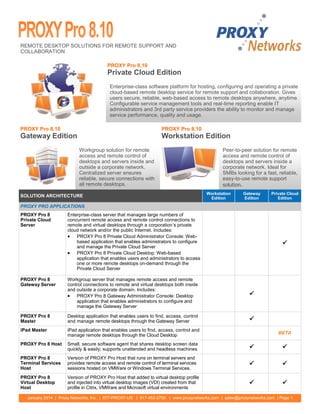
Peer-to-peer solution for remote access and remote control of desktops and servers inside a corporate network. Ideal for SMBs looking for a fast, reliable, easy-to-use remote support solution. 
Enterprise-class software platform for hosting, configuring and operating a private cloud-based remote desktop service for remote support and collaboration. Gives users secure, reliable, web-based access to remote desktops anywhere, anytime. Configurable service management tools and real-time reporting enable IT administrators and 3rd party service providers the ability to monitor and manage service performance, quality and usage. 
Workgroup solution for remote access and remote control of desktops and servers inside and outside a corporate network. Centralized server ensures reliable, secure connections with all remote desktops. 
PROXY Pro 8.10 Gateway Edition 
PROXY Pro 8.10 Workstation Edition 
PROXY Pro 8.10 Private Cloud Edition 
SOLUTION ARCHITECTURE 
Workstation 
Edition 
Gateway 
Edition 
Private Cloud 
Edition 
PROXY PRO APPLICATIONS 
PROXY Pro 8 Private Cloud Server 
Enterprise-class server that manages large numbers of concurrent remote access and remote control connections to remote and virtual desktops through a corporation’s private cloud network and/or the public Internet. Includes: 
 PROXY Pro 8 Private Cloud Administrator Console: Web- based application that enables administrators to configure and manage the Private Cloud Server 
 PROXY Pro 8 Private Cloud Desktop: Web-based application that enables users and administrators to access one or more remote desktops on-demand through the Private Cloud Server 
 
PROXY Pro 8 Gateway Server 
Workgroup server that manages remote access and remote control connections to remote and virtual desktops both inside and outside a corporate domain. Includes: 
 PROXY Pro 8 Gateway Administrator Console: Desktop application that enables administrators to configure and manage the Gateway Server 
 
PROXY Pro 8 Master 
Desktop application that enables users to find, access, control and manage remote desktops through the Gateway Server 
 
iPad Master 
iPad application that enables users to find, access, control and manage remote desktops through the Cloud Desktop 
BETA 
PROXY Pro 8 Host 
Small, secure software agent that shares desktop screen data quickly & easily; supports unattended and headless machines 
 
 
PROXY Pro 8 Terminal Services Host 
Version of PROXY Pro Host that runs on terminal servers and provides remote access and remote control of terminal services sessions hosted on VMWare or Windows Terminal Services. 
 
 
PROXY Pro 8 Virtual Desktop Host 
Version of PROXY Pro Host that added to virtual desktop profile and injected into virtual desktop images (VDI) created from that profile in Citrix, VMWare and Microsoft virtual environments 
 

January 2014 | Proxy Networks, Inc. | 877-PROXY-US | 617-453-2700 | www.proxynetworks.com | sales@proxynetworks.com | Page 2 
REMOTE ACCESS FEATURES 
Workstation Edition 
Gateway 
Edition 
Private Cloud 
Edition 
CONNECTION MANAGEMENT 
Host on-Demand 
Clientless version of the PROXY Host which allows an end user with an internet connection to share their desktop on demand. 
NEW 
NEW 
Automated Group Management 
Configure Hosts to report automatically to predefined Groups on PROXY Pro Gateway Server 
 
 
Wake-on-LAN 
Send a request to turn on remote machines in standby mode 
 
 
Firewall-Friendly Connections 
Connect to remote desktops outside of the corporate network without the need to reconfigure ports 
 
 
Centralized Directory 
Organize large numbers of remote desktops into Groups, making them easier to find and manage 
 
 
RDP Compatibility 
Connect to a Windows Desktop with an active RDP session already in progress 
 
 
 
Polling 
Discover all remote desktops available in your network 
 
 
 
Always-on Service 
Reach remote desktops any time, even if they are unattended 
 
 
 
Connection Notifications 
Use audio (beep) and/or visual (popup toast, tray icon) notifications to alert remote desktop user of connection request 
 
 
 
Stealth Mode 
Enable silent access to remote desktops by turning off audio (beep) and visual (popup, tray icon) connection notifications 
 
 
 
SECURITY—AUTHENTICATION 
Windows Authentication 
Use strong Windows authentication to verify credentials of users 
 
 
 
Shared-Secret Authentication 
Use proprietary PROXY Pro authentication if Windows authentication not available 
 
 
SSL Authentication 
Use SSL certificates to authenticate web requests to PROXY Pro Web Console or PROXY Pro Gateway 
 
 
End-to-End Authentication 
Request Windows credentials acceptable to remote desktop before executing tasks like file transfers or remote management 
 

Pg 3 
January 2014 | Proxy Networks, Inc. | 877-PROXY-US | 617-453-2700 | www.proxynetworks.com | sales@proxynetworks.com | Page 3 
REMOTE ACCESS FEATURES—Continued 
Workstation Edition 
Gateway 
Edition 
Private Cloud Edition 
SECURITY—AUTHORIZATION 
Centralized Authorization 
Create and enforce standard access rights to manage general access to large numbers of remote desktops 
 
 
Customizable Authorization 
Create and enforce custom access rights to manage fine- grained access rights to specific remote desktops 
 
 
 
IP Address Restrictions 
Restrict access to remote desktops by IP address, IP address range and/or time zone 
 
 
 
SECURITY—ENCRYPTION 
Key Strength 
Select encryption key strength ranging from 92– to 256-bits (default = 256) 
 
 
 
Algorithms 
Select encryption algorithm, including RC4, Triple-DES, and state-of-the-art AES (default = AES) 
 
 
 
SECURITY—AUDITING 
Real-time Activity Reports 
Track user, connection, and license activities in real-time using web-based activity reports 
 
 
Customizable Audit Reports 
Generate custom reports of connection, desktop and screen recording activity for analysis 
 
 
REMOTE CONTROL FEATURES 
Workstation Edition 
Gateway 
Edition 
Private Cloud Edition 
REMOTE DESKTOP 
Citrix XenApp 
Access virtual desktops running Citrix XenApp 
 
 
Kernel-Mode Screen Capture 
Use highly-efficient kernel-mode screen capture driver for better responsiveness and performance for less active desktops 
 
 
 
User-Mode Screen Capture 
Use standard user-mode screen capture driver to manage responsiveness and performance for highly active desktops 
 
 
 
Remote Control 
Take control of mouse and keyboard input for remote desktop 
 
 
 
Bandwidth Throttling 
Limit bandwidth usage to enhance performance and responsiveness over slow or narrow networks links 
 
 
 
Display Options 
Customize view of remote desktop (Fit-to-Window, Fit 1-to-1, Full Screen) 
 
 
 
Multi-Monitor 
Capture remote desktop spread over multiple monitors 
 
 
 
Remote Clipboard 
Automatically or explicitly share clipboard content between user and remote desktop 
 
 
 
Headless Display 
Connect to machines without a graphics head 
 
 
 
View Only Mode 
Suppress keyboard/mouse input on remote desktop 
 
 
 
COLLABORATION 
Active Users List 
View the identity of all users connected to desktop 
 
 
Screen Sharing 
Share control with other users connected to a desktop 
 
 
Chat 
Chat with user and others connected to a desktop 
 
 
 
FILE TRANSFER 
Bulk File Transfer 
Drag-and-drop files or directories between desktops 
 
 
 
Resume 
Resume large file transfers if connection is interrupted 
 
 

January 2014 | Proxy Networks, Inc. | 877-PROXY-US | 617-453-2700 | www.proxynetworks.com | sales@proxynetworks.com | Page 4 
REMOTE MANAGEMENT FEATURES 
Workstation Edition 
Gateway 
Edition 
Private Cloud 
Edition 
INVENTORY REPORTING 
Hardware Manager 
View inventory of hardware components of remote desktop 
 
 
 
Software Manager 
View inventory of installed software applications and Windows updates for remote desktop 
 
 
 
CONFIGURATION MANAGEMENT 
System Manager 
View all system settings for remote desktop 
 
 
 
Shared Resource Manager 
View shared folders and drives for remote desktop 
 
 
 
Account Manager 
View a list of local users and groups for remote desktop 
 
 
 
Process Manager 
View/start/stop processes for remote desktop 
 
 
 
Service Manager 
View a list of Windows services for remote desktop; start/stop/ restart any Windows service 
 
 
 
Registry Manager 
View, edit, add or delete registry values for remote desktop 
 
 
 
Power Management 
Force a log off of the remote desktop user; reboot, shut down, or adjust power scheme settings to cause the machine to enter a reduced power state after inactivity 
 
 
 
Reboot in Safe Mode w/Networking 
Trigger a remote desktop to restart in safe mode with networking, and then reconnect while in safe mode 
 
 
 
Event Manager 
View Windows Event Viewer logs for remote desktop 
 
 
 
DEPLOYMENT 
Mass Deployment 
Automate the deployment of the PROXY Pro Host application to large numbers of machines in your domain using PROXY Pro Deployment Tool 
 
 
 
Custom Host Install Package 
Create and deploy custom versions of PROXY Pro Host application with specific settings of your choosing 
 
 
 
Active Directory Integration 
Discover machines accessible for deployment from your existing Active Directory OU structure 
 
 
 
Automated Updates 
Automate the deployment of changes in Host Settings using PROXY Pro Deployment Tool, or a command line script that can be triggered to run on startup/login via Active Directory/Group Policy 
 
 
 
View/Edit Host Settings from Web Console 
Update Host settings right from the Proxy Pro Web Console in your browser. When connecting to a Host that supports Host for Terminal Services, you will be given the option to access the root instance or the Terminal Services Host template settings. 
NEW 
NEW 
© Copyright 2014 Proxy Networks, Inc. All rights reserved. PROXY is a trademark of Proxy Networks, Inc. Microsoft, Windows, Windows NT, Windows Server, and other Microsoft products referenced herein are either trademarks or registered trademarks of the Microsoft Corporation in the United States and other countries. 
REMOTE CONTROL FEATURES—Continued 
Workstation Edition 
Gateway 
Edition 
Private Cloud Edition 
SCREEN RECORDING 
Mass Recording 
Record one or more remote desktops concurrently 
 
 
Playback 
Playback screen recordings from the Gateway, the local file or over HTTP 
 
 
Standard Formats 
Convert screen recordings to .wmv format 
 


Proxy Networks - Proxy Pro 8.10 Remote Desktop Software

  • 1.
    January 2014 |Proxy Networks, Inc. | 877-PROXY-US | 617-453-2700 | www.proxynetworks.com | sales@proxynetworks.com | Page 1 REMOTE DESKTOP SOLUTIONS FOR REMOTE SUPPORT AND COLLABORATION Peer-to-peer solution for remote access and remote control of desktops and servers inside a corporate network. Ideal for SMBs looking for a fast, reliable, easy-to-use remote support solution. Enterprise-class software platform for hosting, configuring and operating a private cloud-based remote desktop service for remote support and collaboration. Gives users secure, reliable, web-based access to remote desktops anywhere, anytime. Configurable service management tools and real-time reporting enable IT administrators and 3rd party service providers the ability to monitor and manage service performance, quality and usage. Workgroup solution for remote access and remote control of desktops and servers inside and outside a corporate network. Centralized server ensures reliable, secure connections with all remote desktops. PROXY Pro 8.10 Gateway Edition PROXY Pro 8.10 Workstation Edition PROXY Pro 8.10 Private Cloud Edition SOLUTION ARCHITECTURE Workstation Edition Gateway Edition Private Cloud Edition PROXY PRO APPLICATIONS PROXY Pro 8 Private Cloud Server Enterprise-class server that manages large numbers of concurrent remote access and remote control connections to remote and virtual desktops through a corporation’s private cloud network and/or the public Internet. Includes:  PROXY Pro 8 Private Cloud Administrator Console: Web- based application that enables administrators to configure and manage the Private Cloud Server  PROXY Pro 8 Private Cloud Desktop: Web-based application that enables users and administrators to access one or more remote desktops on-demand through the Private Cloud Server  PROXY Pro 8 Gateway Server Workgroup server that manages remote access and remote control connections to remote and virtual desktops both inside and outside a corporate domain. Includes:  PROXY Pro 8 Gateway Administrator Console: Desktop application that enables administrators to configure and manage the Gateway Server  PROXY Pro 8 Master Desktop application that enables users to find, access, control and manage remote desktops through the Gateway Server  iPad Master iPad application that enables users to find, access, control and manage remote desktops through the Cloud Desktop BETA PROXY Pro 8 Host Small, secure software agent that shares desktop screen data quickly & easily; supports unattended and headless machines   PROXY Pro 8 Terminal Services Host Version of PROXY Pro Host that runs on terminal servers and provides remote access and remote control of terminal services sessions hosted on VMWare or Windows Terminal Services.   PROXY Pro 8 Virtual Desktop Host Version of PROXY Pro Host that added to virtual desktop profile and injected into virtual desktop images (VDI) created from that profile in Citrix, VMWare and Microsoft virtual environments  
  • 2.
    January 2014 |Proxy Networks, Inc. | 877-PROXY-US | 617-453-2700 | www.proxynetworks.com | sales@proxynetworks.com | Page 2 REMOTE ACCESS FEATURES Workstation Edition Gateway Edition Private Cloud Edition CONNECTION MANAGEMENT Host on-Demand Clientless version of the PROXY Host which allows an end user with an internet connection to share their desktop on demand. NEW NEW Automated Group Management Configure Hosts to report automatically to predefined Groups on PROXY Pro Gateway Server   Wake-on-LAN Send a request to turn on remote machines in standby mode   Firewall-Friendly Connections Connect to remote desktops outside of the corporate network without the need to reconfigure ports   Centralized Directory Organize large numbers of remote desktops into Groups, making them easier to find and manage   RDP Compatibility Connect to a Windows Desktop with an active RDP session already in progress    Polling Discover all remote desktops available in your network    Always-on Service Reach remote desktops any time, even if they are unattended    Connection Notifications Use audio (beep) and/or visual (popup toast, tray icon) notifications to alert remote desktop user of connection request    Stealth Mode Enable silent access to remote desktops by turning off audio (beep) and visual (popup, tray icon) connection notifications    SECURITY—AUTHENTICATION Windows Authentication Use strong Windows authentication to verify credentials of users    Shared-Secret Authentication Use proprietary PROXY Pro authentication if Windows authentication not available   SSL Authentication Use SSL certificates to authenticate web requests to PROXY Pro Web Console or PROXY Pro Gateway   End-to-End Authentication Request Windows credentials acceptable to remote desktop before executing tasks like file transfers or remote management  
  • 3.
    Pg 3 January2014 | Proxy Networks, Inc. | 877-PROXY-US | 617-453-2700 | www.proxynetworks.com | sales@proxynetworks.com | Page 3 REMOTE ACCESS FEATURES—Continued Workstation Edition Gateway Edition Private Cloud Edition SECURITY—AUTHORIZATION Centralized Authorization Create and enforce standard access rights to manage general access to large numbers of remote desktops   Customizable Authorization Create and enforce custom access rights to manage fine- grained access rights to specific remote desktops    IP Address Restrictions Restrict access to remote desktops by IP address, IP address range and/or time zone    SECURITY—ENCRYPTION Key Strength Select encryption key strength ranging from 92– to 256-bits (default = 256)    Algorithms Select encryption algorithm, including RC4, Triple-DES, and state-of-the-art AES (default = AES)    SECURITY—AUDITING Real-time Activity Reports Track user, connection, and license activities in real-time using web-based activity reports   Customizable Audit Reports Generate custom reports of connection, desktop and screen recording activity for analysis   REMOTE CONTROL FEATURES Workstation Edition Gateway Edition Private Cloud Edition REMOTE DESKTOP Citrix XenApp Access virtual desktops running Citrix XenApp   Kernel-Mode Screen Capture Use highly-efficient kernel-mode screen capture driver for better responsiveness and performance for less active desktops    User-Mode Screen Capture Use standard user-mode screen capture driver to manage responsiveness and performance for highly active desktops    Remote Control Take control of mouse and keyboard input for remote desktop    Bandwidth Throttling Limit bandwidth usage to enhance performance and responsiveness over slow or narrow networks links    Display Options Customize view of remote desktop (Fit-to-Window, Fit 1-to-1, Full Screen)    Multi-Monitor Capture remote desktop spread over multiple monitors    Remote Clipboard Automatically or explicitly share clipboard content between user and remote desktop    Headless Display Connect to machines without a graphics head    View Only Mode Suppress keyboard/mouse input on remote desktop    COLLABORATION Active Users List View the identity of all users connected to desktop   Screen Sharing Share control with other users connected to a desktop   Chat Chat with user and others connected to a desktop    FILE TRANSFER Bulk File Transfer Drag-and-drop files or directories between desktops    Resume Resume large file transfers if connection is interrupted   
  • 4.
    January 2014 |Proxy Networks, Inc. | 877-PROXY-US | 617-453-2700 | www.proxynetworks.com | sales@proxynetworks.com | Page 4 REMOTE MANAGEMENT FEATURES Workstation Edition Gateway Edition Private Cloud Edition INVENTORY REPORTING Hardware Manager View inventory of hardware components of remote desktop    Software Manager View inventory of installed software applications and Windows updates for remote desktop    CONFIGURATION MANAGEMENT System Manager View all system settings for remote desktop    Shared Resource Manager View shared folders and drives for remote desktop    Account Manager View a list of local users and groups for remote desktop    Process Manager View/start/stop processes for remote desktop    Service Manager View a list of Windows services for remote desktop; start/stop/ restart any Windows service    Registry Manager View, edit, add or delete registry values for remote desktop    Power Management Force a log off of the remote desktop user; reboot, shut down, or adjust power scheme settings to cause the machine to enter a reduced power state after inactivity    Reboot in Safe Mode w/Networking Trigger a remote desktop to restart in safe mode with networking, and then reconnect while in safe mode    Event Manager View Windows Event Viewer logs for remote desktop    DEPLOYMENT Mass Deployment Automate the deployment of the PROXY Pro Host application to large numbers of machines in your domain using PROXY Pro Deployment Tool    Custom Host Install Package Create and deploy custom versions of PROXY Pro Host application with specific settings of your choosing    Active Directory Integration Discover machines accessible for deployment from your existing Active Directory OU structure    Automated Updates Automate the deployment of changes in Host Settings using PROXY Pro Deployment Tool, or a command line script that can be triggered to run on startup/login via Active Directory/Group Policy    View/Edit Host Settings from Web Console Update Host settings right from the Proxy Pro Web Console in your browser. When connecting to a Host that supports Host for Terminal Services, you will be given the option to access the root instance or the Terminal Services Host template settings. NEW NEW © Copyright 2014 Proxy Networks, Inc. All rights reserved. PROXY is a trademark of Proxy Networks, Inc. Microsoft, Windows, Windows NT, Windows Server, and other Microsoft products referenced herein are either trademarks or registered trademarks of the Microsoft Corporation in the United States and other countries. REMOTE CONTROL FEATURES—Continued Workstation Edition Gateway Edition Private Cloud Edition SCREEN RECORDING Mass Recording Record one or more remote desktops concurrently   Playback Playback screen recordings from the Gateway, the local file or over HTTP   Standard Formats Convert screen recordings to .wmv format  