TIME WARNER CABLE – BI TECH OPS
12/29/2015 2:14 PM Promotion Process - 2015 Page: 1
Technical Documentation
Promotion Process
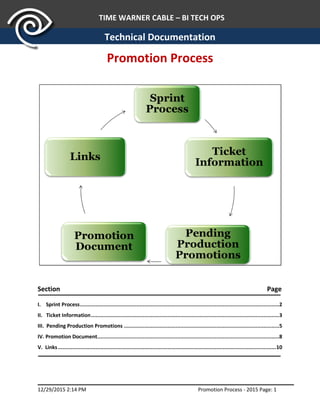
Section Page
I. Sprint Process...............................................................................................................................2
II. Ticket Information........................................................................................................................3
III. Pending Production Promotions ...................................................................................................5
IV. Promotion Document....................................................................................................................8
V. Links...........................................................................................................................................10
TIME WARNER CABLE – BI TECH OPS
12/29/2015 2:14 PM Promotion Process - 2015 Page: 2
I. Sprint Process
I. Sprint Process
Objective: Creates Sprint ticket to identify all objects that are moved
Process: Involves creating JIRA ticket for all objects that are moved to production that
Sprint
Roles and Steps include:
I. Resi Sprint
 Scrum Master/Promoter
 Creates JIRA ticket for Move to Production
 Assigns to Promoter (Shashi – MSTR/Data)
 Sets Issue Type to “ Enhancement”
 Sets Points to 3
 Promoter updates points on last day of Sprint
 Includes RFC/CR # after CR is created
 RFC/CR # is also included on pending Production Promotion
 Promoter (Shashi – MSTR/Data)
 Creates “Work-Log” listing on Master-RFC-JIRA ticket including source
Ticket Number and Comment
 Comments on original JIRA ticket after move to production is completed
 Updates the Pending Production Product document (aka Pending
Promotion Request Log, Pending Promotion Spreadsheet)
 Moves all subversion objects to Production and Trunk
 JIRA ticket (user story) is closed in usual fashion
II. BC Sprint
 Scrum Master
 Creates JIRA ticket to track moves to production
 Assigns to Scrum Master
 Sets Issue Type to “ Tech debt”
 Includes RFC/CR # after CR is created
 RFC/CR # is also included on pending Production Promotion
 Promoter (MSTR – Bella & Data - Dan/Shashi)
 Creates “Work-Log” listing on Master-RFC-JIRA ticket including source
Ticket Number and Comment
 Comments on original JIRA ticket after move to production is completed
 Updates the Pending Production Product document (aka Pending
Promotion Request Log, Pending Promotion Spreadsheet)
 Moves all subversion objects to Production and Trunk
 JIRA ticket (user story) is closed in usual fashion
TIME WARNER CABLE – BI TECH OPS
12/29/2015 2:14 PM Promotion Process - 2015 Page: 3
II. Ticket Information
Objective: Developer documents and attaches all objects that are moved
Process: Involves attaching and logging of information to the JIRA ticket as the Developer
works ticket (applies to both Sprint, Ad-Hoc, and Business User (TERA queue)
teams)
Roles and Steps include:
I. Developer
 Logs time and description of work in Work Log (if Ad-Hoc, comment section)
 Attaches testing info (not requirements)
a. Before/After Changes
 Screen Shots
 Code Prints
Naming Convention: Jira Ticket Number – Testing
 Completes and attaches promotion template (aka promotion document)
a. MSTR Promotion Template includes the following columns:
 Source
 Used dependency Included
 Action
 Name
 Type
 Path
 Modification Time (includes date/time)
b. Data Promotion Template includes the following columns:
 Object
 Object Action
 Object Target Server
 Object Target Database
 Schedule (if needed)
 Name
 Type
 Modification Time (includes date/time)
Above fields are repeated for each object within the steps of importance and execution.
TIME WARNER CABLE – BI TECH OPS
12/29/2015 2:14 PM Promotion Process - 2015 Page: 4
Important: Other info may be included for changes to SQL Agent
jobs (must be built by hand, no permissions to run if scripted in
production). Verify with promoter what to provide on JIRA ticket.
Naming Convention: Jira Ticket Number – Promotion
Note: The fields Team, Ticket, Request Date, Requestor and Description are entered on
the Pending Production Promotions (Pending Production Register Log) along with the
Promotion information.
II. Peer Reviewer
 Updates Peer Review info in Work Log
a. Indicates Peer Review was performed
b. Time spent for Peer Review
Peer Review is a sanity check, not a code review. The developer is ultimately responsible
for the completeness and corrections they complete.
For Code Review, see the Promotion Process – Code Review section in the Subversion
Guide (for developers) in SharePoint.
TIME WARNER CABLE – BI TECH OPS
12/29/2015 2:14 PM Promotion Process - 2015 Page: 5
III. Pending Production Promotions
III. Pending Production Promotions document (aka Pending Promotion Request Log, Pending
Promotion Spreadsheet)
Objective: Review ticket for completeness, approve promotion, assign promote info, and
identify new jobs/tables/columns in development, staging and production
environments
Process: Includes a “team review “ during the Release Management Call (aka Promotion
call)
Roles and Steps include:
I. Developer
 The night prior to the Release Management call fills in the following columns
(Pending Tickets tab):
 Jira #
 Description
 RFC/CR # (may not be included for Ad-Hoc)
 Request Date
 Request By
 Promotion Date
 Notes (if needed) – (Anyone can use this field)
 New Job(s) – (lists all new jobs created for this change)
Developers must complete New Job(s) column when a new job is created in
development, staging and/or production environments.
 The night prior to the Release Management call in the following columns (DBA tab):
 Jira #
 Description
 RFC/CR # (may not be included for Ad-Hoc)
 Server Name
 Database Name
 Table Name
 Column Name
 Type
Developers must complete columns on DBA tab when new columns or fields are
added to a table(s) in development, staging and/or production environments.
TIME WARNER CABLE – BI TECH OPS
12/29/2015 2:14 PM Promotion Process - 2015 Page: 6
II. Approver – Manager/Project Manager
 Prior or during the Release Management call (Pending Tickets Tab)
 Moves all “Completed” Status ticket to Completed tab
 Fills in the following columns:
 Approved By
 Promotion Assigned to
 Promotion Time (EST)
 Notes (if needed) - (Anyone can use this field)
 Verifies Check List
 Testing document from Developer
 WorkLog
 Peer Review information
 Work hours and Work comments from Developer
 Inspects Promotion document from Developer
 For MSTR changes:
 Source
 User dependency Included
 Action
 Name
 Type
 Path
 Modification time (includes date/time)
 For Data changes:
 Object
 Object Action
 Object Target Server
 Object Target Database
 Schedule (if needed)
 Name
 Type
 Modification Time (includes date/time)
Above fields are repeated for each object within the steps of importance
and execution
TIME WARNER CABLE – BI TECH OPS
12/29/2015 2:14 PM Promotion Process - 2015 Page: 7
 Prior or during Release Management call (DBA Tab)
 Inspects the following columns:
 Jira #
 Description
 RFC/CR # (may not be included for Ad-Hoc)
 Server Name
 Database Name
 Table Name
 Column Name
 Type
 Promotion Assigned to
 Promotion Date
 Promotion Time (EST)
III. Promoter
 After move to production fills in the following columns (Pending Tickets tab):
 Status (as Completed)
 Notes (if needed) - (Anyone can use this field)
 After move to production fills in the following columns (DBA tab):
 Promotion Information (as double check to DBA information)
 Promotion Assigned to
 Promotion Date
 Promotion Time (EST)
TIME WARNER CABLE – BI TECH OPS
12/29/2015 2:14 PM Promotion Process - 2015 Page: 8
IV. Promotion Document
IV. Promotion Document (aka Promotion Log)
Objective: To capture all objects moved to production, record in document and email DBA
content to appropriate DBA resource
Process: Manager, Project Manager, or Business Analyst updates the document after
objects are moved to production is responsible for the delivery of the DBA
content
Roles and Steps include
I. Manager/Project Manager /Business Analyst
 Copies promotion template (aka promotion document) information to the bottom
of document
 For MSTR changes:
 Source
 User dependency Included
 Action
 Name
 Type
 Path
 Modification time (includes date/time)
 For Data changes:
 Object
 Object Action
 Object Target Server
 Object Target Database
 Schedule (if needed)
 Name
 Type
 Modification Time (includes date/time)
Above fields are repeated for each object within the steps of importance
and execution
TIME WARNER CABLE – BI TECH OPS
12/29/2015 2:14 PM Promotion Process - 2015 Page: 9
 Copies Pending Production Promotion document (aka Pending Promotion Request
Log) information to the bottom of document to appropriate JIRA ticket
 Promotion Assigned To
 Promotion Date
 Promotion Time (EST)
 Notes (if populated)
 RFC/CR #
The Promotion Document is a log of all MSTR and Data objects moved to
production.
 On Friday mornings attaches DBA tab (spreadsheet) to a newly created SD ticket
assigned to the Corp TSS BI SQL Admins group (for Willie Yeo/Ryan Lacjak (backup))
by noon Friday (cc – Project Manager, Promoters and Business Analyst ticket
number)
 Columns are as follows:
 Jira #
 Description
 RFC/CR # (may not be included for Ad-Hoc)
 Server Name
 Database Name
 Table Name
 Column Name
 Type
 Promotion Assigned to
 Promotion Date
 Promotion Time (EST)
 Attachment Details:
 Delete Pending Ticket and Completed tabs, Sample line
 Save as DBA Updates Date in Excel as SD ticket attachment –Sample
Service Desk Ticket (with attached DBA tab) section
 Confirm group ticket assignment with Willie Yeo and that he can see it
 Copy attachment to Confluence - Link: DBA Updates
 Clear Contents on DBA tab in Pending Production Promotion document
and save to TOPS Promotions Portal
TIME WARNER CABLE – BI TECH OPS
12/29/2015 2:14 PM Promotion Process - 2015 Page: 10
V. Links
V. Links
Objective: Identify and locate all documents involved in the Promotion Process
Process: Involves downloading and completing documents (located on the TOPS
Promotions Portal) used in II Ticket Information, III Pending Production
Promotions and the IV Promotion Document sections
TOPS Promotions Portal
Link: TOPS Promotions Portal
TIME WARNER CABLE – BI TECH OPS
12/29/2015 2:14 PM Promotion Process - 2015 Page: 11
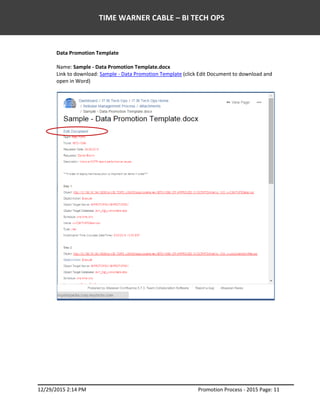
Data Promotion Template
Name: Sample - Data Promotion Template.docx
Link to download: Sample - Data Promotion Template (click Edit Document to download and
open in Word)
TIME WARNER CABLE – BI TECH OPS
12/29/2015 2:14 PM Promotion Process - 2015 Page: 12
Data Promotion Template
Name: Data Promotion Template.docx
Link to download: Data Promotion Template (click Edit Document to download and open in
Word)
TIME WARNER CABLE – BI TECH OPS
12/29/2015 2:14 PM Promotion Process - 2015 Page: 13
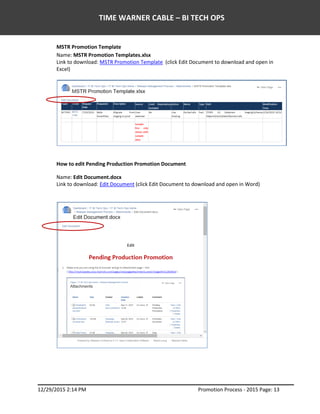
MSTR Promotion Template
Name: MSTR Promotion Templates.xlsx
Link to download: MSTR Promotion Template (click Edit Document to download and open in
Excel)
How to edit Pending Production Promotion Document
Name: Edit Document.docx
Link to download: Edit Document (click Edit Document to download and open in Word)
TIME WARNER CABLE – BI TECH OPS
12/29/2015 2:14 PM Promotion Process - 2015 Page: 14
Pending Document
Name: Pending Production Promotions.xlsx (aka Pending Request Log)
Link to View: Pending Production Promotions (click on named document to download and open
in Excel)
Link to download: Pending Production Promotions (click Edit Document to download and open
in Excel)
DBA and Completed Tabs
The DBA and Completed tabs are only shown once Pending Document is downloaded and
opened. Both tabs are not visual in Edit Document view from the TOPS Promotions Portal.
DBA Tab
TIME WARNER CABLE – BI TECH OPS
12/29/2015 2:14 PM Promotion Process - 2015 Page: 15
Completed Tab
Sample Service Desk Ticket (with attached DBA tab)
TIME WARNER CABLE – BI TECH OPS
12/29/2015 2:14 PM Promotion Process - 2015 Page: 16
Promotion Document
Name: Promotion Document.xlsx (aka Promotion Log)
Promotion Document (PromotionDocument.xlsx)
Link to View: Promotion Document

Promotion Process

  • 1.
    TIME WARNER CABLE– BI TECH OPS 12/29/2015 2:14 PM Promotion Process - 2015 Page: 1 Technical Documentation Promotion Process Section Page I. Sprint Process...............................................................................................................................2 II. Ticket Information........................................................................................................................3 III. Pending Production Promotions ...................................................................................................5 IV. Promotion Document....................................................................................................................8 V. Links...........................................................................................................................................10
  • 2.
    TIME WARNER CABLE– BI TECH OPS 12/29/2015 2:14 PM Promotion Process - 2015 Page: 2 I. Sprint Process I. Sprint Process Objective: Creates Sprint ticket to identify all objects that are moved Process: Involves creating JIRA ticket for all objects that are moved to production that Sprint Roles and Steps include: I. Resi Sprint  Scrum Master/Promoter  Creates JIRA ticket for Move to Production  Assigns to Promoter (Shashi – MSTR/Data)  Sets Issue Type to “ Enhancement”  Sets Points to 3  Promoter updates points on last day of Sprint  Includes RFC/CR # after CR is created  RFC/CR # is also included on pending Production Promotion  Promoter (Shashi – MSTR/Data)  Creates “Work-Log” listing on Master-RFC-JIRA ticket including source Ticket Number and Comment  Comments on original JIRA ticket after move to production is completed  Updates the Pending Production Product document (aka Pending Promotion Request Log, Pending Promotion Spreadsheet)  Moves all subversion objects to Production and Trunk  JIRA ticket (user story) is closed in usual fashion II. BC Sprint  Scrum Master  Creates JIRA ticket to track moves to production  Assigns to Scrum Master  Sets Issue Type to “ Tech debt”  Includes RFC/CR # after CR is created  RFC/CR # is also included on pending Production Promotion  Promoter (MSTR – Bella & Data - Dan/Shashi)  Creates “Work-Log” listing on Master-RFC-JIRA ticket including source Ticket Number and Comment  Comments on original JIRA ticket after move to production is completed  Updates the Pending Production Product document (aka Pending Promotion Request Log, Pending Promotion Spreadsheet)  Moves all subversion objects to Production and Trunk  JIRA ticket (user story) is closed in usual fashion
  • 3.
    TIME WARNER CABLE– BI TECH OPS 12/29/2015 2:14 PM Promotion Process - 2015 Page: 3 II. Ticket Information II. Ticket Information Objective: Developer documents and attaches all objects that are moved Process: Involves attaching and logging of information to the JIRA ticket as the Developer works ticket (applies to both Sprint, Ad-Hoc, and Business User (TERA queue) teams) Roles and Steps include: I. Developer  Logs time and description of work in Work Log (if Ad-Hoc, comment section)  Attaches testing info (not requirements) a. Before/After Changes  Screen Shots  Code Prints Naming Convention: Jira Ticket Number – Testing  Completes and attaches promotion template (aka promotion document) a. MSTR Promotion Template includes the following columns:  Source  Used dependency Included  Action  Name  Type  Path  Modification Time (includes date/time) b. Data Promotion Template includes the following columns:  Object  Object Action  Object Target Server  Object Target Database  Schedule (if needed)  Name  Type  Modification Time (includes date/time) Above fields are repeated for each object within the steps of importance and execution.
  • 4.
    TIME WARNER CABLE– BI TECH OPS 12/29/2015 2:14 PM Promotion Process - 2015 Page: 4 Important: Other info may be included for changes to SQL Agent jobs (must be built by hand, no permissions to run if scripted in production). Verify with promoter what to provide on JIRA ticket. Naming Convention: Jira Ticket Number – Promotion Note: The fields Team, Ticket, Request Date, Requestor and Description are entered on the Pending Production Promotions (Pending Production Register Log) along with the Promotion information. II. Peer Reviewer  Updates Peer Review info in Work Log a. Indicates Peer Review was performed b. Time spent for Peer Review Peer Review is a sanity check, not a code review. The developer is ultimately responsible for the completeness and corrections they complete. For Code Review, see the Promotion Process – Code Review section in the Subversion Guide (for developers) in SharePoint.
  • 5.
    TIME WARNER CABLE– BI TECH OPS 12/29/2015 2:14 PM Promotion Process - 2015 Page: 5 III. Pending Production Promotions III. Pending Production Promotions document (aka Pending Promotion Request Log, Pending Promotion Spreadsheet) Objective: Review ticket for completeness, approve promotion, assign promote info, and identify new jobs/tables/columns in development, staging and production environments Process: Includes a “team review “ during the Release Management Call (aka Promotion call) Roles and Steps include: I. Developer  The night prior to the Release Management call fills in the following columns (Pending Tickets tab):  Jira #  Description  RFC/CR # (may not be included for Ad-Hoc)  Request Date  Request By  Promotion Date  Notes (if needed) – (Anyone can use this field)  New Job(s) – (lists all new jobs created for this change) Developers must complete New Job(s) column when a new job is created in development, staging and/or production environments.  The night prior to the Release Management call in the following columns (DBA tab):  Jira #  Description  RFC/CR # (may not be included for Ad-Hoc)  Server Name  Database Name  Table Name  Column Name  Type Developers must complete columns on DBA tab when new columns or fields are added to a table(s) in development, staging and/or production environments.
  • 6.
    TIME WARNER CABLE– BI TECH OPS 12/29/2015 2:14 PM Promotion Process - 2015 Page: 6 II. Approver – Manager/Project Manager  Prior or during the Release Management call (Pending Tickets Tab)  Moves all “Completed” Status ticket to Completed tab  Fills in the following columns:  Approved By  Promotion Assigned to  Promotion Time (EST)  Notes (if needed) - (Anyone can use this field)  Verifies Check List  Testing document from Developer  WorkLog  Peer Review information  Work hours and Work comments from Developer  Inspects Promotion document from Developer  For MSTR changes:  Source  User dependency Included  Action  Name  Type  Path  Modification time (includes date/time)  For Data changes:  Object  Object Action  Object Target Server  Object Target Database  Schedule (if needed)  Name  Type  Modification Time (includes date/time) Above fields are repeated for each object within the steps of importance and execution
  • 7.
    TIME WARNER CABLE– BI TECH OPS 12/29/2015 2:14 PM Promotion Process - 2015 Page: 7  Prior or during Release Management call (DBA Tab)  Inspects the following columns:  Jira #  Description  RFC/CR # (may not be included for Ad-Hoc)  Server Name  Database Name  Table Name  Column Name  Type  Promotion Assigned to  Promotion Date  Promotion Time (EST) III. Promoter  After move to production fills in the following columns (Pending Tickets tab):  Status (as Completed)  Notes (if needed) - (Anyone can use this field)  After move to production fills in the following columns (DBA tab):  Promotion Information (as double check to DBA information)  Promotion Assigned to  Promotion Date  Promotion Time (EST)
  • 8.
    TIME WARNER CABLE– BI TECH OPS 12/29/2015 2:14 PM Promotion Process - 2015 Page: 8 IV. Promotion Document IV. Promotion Document (aka Promotion Log) Objective: To capture all objects moved to production, record in document and email DBA content to appropriate DBA resource Process: Manager, Project Manager, or Business Analyst updates the document after objects are moved to production is responsible for the delivery of the DBA content Roles and Steps include I. Manager/Project Manager /Business Analyst  Copies promotion template (aka promotion document) information to the bottom of document  For MSTR changes:  Source  User dependency Included  Action  Name  Type  Path  Modification time (includes date/time)  For Data changes:  Object  Object Action  Object Target Server  Object Target Database  Schedule (if needed)  Name  Type  Modification Time (includes date/time) Above fields are repeated for each object within the steps of importance and execution
  • 9.
    TIME WARNER CABLE– BI TECH OPS 12/29/2015 2:14 PM Promotion Process - 2015 Page: 9  Copies Pending Production Promotion document (aka Pending Promotion Request Log) information to the bottom of document to appropriate JIRA ticket  Promotion Assigned To  Promotion Date  Promotion Time (EST)  Notes (if populated)  RFC/CR # The Promotion Document is a log of all MSTR and Data objects moved to production.  On Friday mornings attaches DBA tab (spreadsheet) to a newly created SD ticket assigned to the Corp TSS BI SQL Admins group (for Willie Yeo/Ryan Lacjak (backup)) by noon Friday (cc – Project Manager, Promoters and Business Analyst ticket number)  Columns are as follows:  Jira #  Description  RFC/CR # (may not be included for Ad-Hoc)  Server Name  Database Name  Table Name  Column Name  Type  Promotion Assigned to  Promotion Date  Promotion Time (EST)  Attachment Details:  Delete Pending Ticket and Completed tabs, Sample line  Save as DBA Updates Date in Excel as SD ticket attachment –Sample Service Desk Ticket (with attached DBA tab) section  Confirm group ticket assignment with Willie Yeo and that he can see it  Copy attachment to Confluence - Link: DBA Updates  Clear Contents on DBA tab in Pending Production Promotion document and save to TOPS Promotions Portal
  • 10.
    TIME WARNER CABLE– BI TECH OPS 12/29/2015 2:14 PM Promotion Process - 2015 Page: 10 V. Links V. Links Objective: Identify and locate all documents involved in the Promotion Process Process: Involves downloading and completing documents (located on the TOPS Promotions Portal) used in II Ticket Information, III Pending Production Promotions and the IV Promotion Document sections TOPS Promotions Portal Link: TOPS Promotions Portal
  • 11.
    TIME WARNER CABLE– BI TECH OPS 12/29/2015 2:14 PM Promotion Process - 2015 Page: 11 Data Promotion Template Name: Sample - Data Promotion Template.docx Link to download: Sample - Data Promotion Template (click Edit Document to download and open in Word)
  • 12.
    TIME WARNER CABLE– BI TECH OPS 12/29/2015 2:14 PM Promotion Process - 2015 Page: 12 Data Promotion Template Name: Data Promotion Template.docx Link to download: Data Promotion Template (click Edit Document to download and open in Word)
  • 13.
    TIME WARNER CABLE– BI TECH OPS 12/29/2015 2:14 PM Promotion Process - 2015 Page: 13 MSTR Promotion Template Name: MSTR Promotion Templates.xlsx Link to download: MSTR Promotion Template (click Edit Document to download and open in Excel) How to edit Pending Production Promotion Document Name: Edit Document.docx Link to download: Edit Document (click Edit Document to download and open in Word)
  • 14.
    TIME WARNER CABLE– BI TECH OPS 12/29/2015 2:14 PM Promotion Process - 2015 Page: 14 Pending Document Name: Pending Production Promotions.xlsx (aka Pending Request Log) Link to View: Pending Production Promotions (click on named document to download and open in Excel) Link to download: Pending Production Promotions (click Edit Document to download and open in Excel) DBA and Completed Tabs The DBA and Completed tabs are only shown once Pending Document is downloaded and opened. Both tabs are not visual in Edit Document view from the TOPS Promotions Portal. DBA Tab
  • 15.
    TIME WARNER CABLE– BI TECH OPS 12/29/2015 2:14 PM Promotion Process - 2015 Page: 15 Completed Tab Sample Service Desk Ticket (with attached DBA tab)
  • 16.
    TIME WARNER CABLE– BI TECH OPS 12/29/2015 2:14 PM Promotion Process - 2015 Page: 16 Promotion Document Name: Promotion Document.xlsx (aka Promotion Log) Promotion Document (PromotionDocument.xlsx) Link to View: Promotion Document