March 27, ​2014 
 
SOFTWARE
REQUIREMENTS
SPECIFICATION 
 
 
Autism Curriculum Encyclopedia  
NECC Project 


VERSION 1.0 
 
eSavV Technologies® 
 
Last Revision: March 27, 2014 


                                                                                                        Software Requirements 
Specification   
                                                                                                                                                                      NECC Project  


Table of Contents 
1. Introduction  
1.1 Purpose  
1.2 Scope  
2. Overall Description  
3. Project High Level Requirements  
3.1 Functional Requirements  
3.1.1 Across all Modules  
3.1.1.1 Super admin switch user type  
3.1.1.2 Blackboard Integration  
3.1.1.3 Blackboard Single Sign­on  
3.1.1.4 Date stamp  
3.1.1.5 UI change: Error messages  
3.1.1.6 Potential: Accessibility: Multi­language  
3.1.1.7 Accessibility: Text size  
3.1.1.8 On­screen help  
3.1.1.9 Hard delete  
3.1.1.10 Rich text editor  
3.1.1.11 Make error messages more explanatory throughout ACE  
3.1.1.12 E­mail system  
3.1.1.13 Errors ­ contact admin  
3.1.1.14 Custom Dashboards  
3.1.1.15 Print multiple graphs at once  
3.1.1.16 Add Zendesk to ACE  
3.1.1.17 Update the ACE account email and the forgot password email  
3.1.1.18 Logo customization  
3.1.1.19 Unable to print from the ACE  
3.1.1.20 Add video duration to video titles  
3.1.1.21 BI: Report: Break data path on a graph  
3.1.1.22 Non­Functional:​ Performance  
3.1.2 Home  
3.1.2.1 Show Notices  
3.1.2.2 Show Resources  
3.1.2.3 Add file upload feature  
 
     
2​   | ​Page                                                       ​Discovery Team 
 
                                                                                                        Software Requirements 
Specification   
                                                                                                                                                                      NECC Project  
 
 
3.1.2.4 Video modeling videos  
3.1.2.5 Resource area  
3.1.2.6 New Notice/resource message  
3.1.3 Curriculum  
3.1.3.1 Show Lesson Library  
3.1.3.2 View Lesson  
3.1.3.3 View Documents  
3.1.3.4 Edit Lessons  
3.1.3.5 Dashboard: Error reporting mastered sets  
3.1.3.6 Data sheet pre­populates  
3.1.3.7 Stimuli Print  
3.1.3.8 Make comments/related materials more salient.  
3.1.3.9 Lesson Snapshot  
3.1.3.10 Video Modeling Video  
3.1.3.11 Add/Delete Multiple Skill Lines in Instructional Plan and Instructional Summary.  
3.1.3.12 PTO.  
3.1.3.13 Edit Learner Profile  
3.1.3.14 Visual Scope & Sequence  
3.1.3.15 Lesson plan: New Shaping Template  
3.1.3.16 Conduct Learner Profile Assessment.  
3.1.3.17 Status column.  
3.1.3.18 Change color of IT graph to be consistent with SA.  
3.1.3.19 UI change: IT graph legend needs to be corrected.  
3.1.3.20 Sublevel deselected when filters cascade.  
3.1.3.21 TA session data report ­ data order incorrect.  
3.1.3.22 User entered event not generating a phase line selection  
3.1.3.23 Search By Common Core VBMapp, Abbls  
3.1.3.24 Print Multi­Lesson  
3.1.3.25 Add Shaping Lesson Type.  
3.1.3.26 TA ­ add ability for multiple tasks  
3.1.3.27 TA ­ drag and drop reorder  
3.1.3.28 Prescription sheet  
3.1.3.29 Make web data entry more user friendly  
3.1.3.30 Ability to flag sublevel to NOT appear on data entry screens  
3.1.3.31 Lesson plan: Solve many to one and one to many problem  
3.1.3.32 Print option  
 
     
3​   | ​Page                                                       ​Discovery Team 
 
                                                                                                        Software Requirements 
Specification   
                                                                                                                                                                      NECC Project  
 
 
3.1.3.33 Add own objective  
3.1.3.34 Active Lessons  
3.1.3.35 View Lesson Details  
3.1.3.36 Enter Data  
3.1.3.36.1 Probe Trials With Step Info  
3.1.3.36.2 Automated Messages  
3.1.3.36.3 Automate Criteria  
3.1.3.36.4 Organize Lesson List  
3.1.3.36.5 Default Values  
3.1.3.36.6 Lesson Number of Trials To Reflect ACE values  
3.1.3.36.7 Add Ability For Multiple Tasks  
3.1.3.36.8 Add Trial By Trial Data  
3.1.3.37 Lesson plan: Lesson modifications to group of lessons or group of students  
3.1.3.38 Customize See Teacher Behavior  
3.1.3.39 "Next Lesson" button (AHD#4253)  
3.1.3.40 Instructional Summary to contain past history  
3.1.3.41 New M­L Teaching Procedure  
3.1.3.42 Select Restructured Teaching Procedure  
3.1.3.43 Ability to reactivate an archived lesson if no active version of that lesson exists  
3.1.3.44 Way to organize archived folder  
3.1.3.45 Crowd source tags  
3.1.3.46 Make Search Functionality more User­friendly  
3.1.3.47 Import/Save Modifications  
3.1.3.48 Add Lesson  
3.1.3.49 Add brief sheet print option  
3.1.3.50 Lesson plan: Reference Button  
3.1.3.51 Lesson plan: Message when activating a lesson that exists in archive  
3.1.3.52 Add multiple tasks in a TA  
3.1.3.53 Drag and Drop to re­order steps in a TA  
3.1.3.54 Assign Data Blocks to each level  
3.1.3.55 Break Sublevels into Target  
3.1.3.56 Add NT Contexts  
3.1.3.57 Change name of lesson in active list  
3.1.3.58 Reactivate an Archived Lesson  
3.1.3.59 Event Log  
3.1.3.60 BI: Ability to choose line color or dashes  
 
     
4​   | ​Page                                                       ​Discovery Team 
 
                                                                                                        Software Requirements 
Specification   
                                                                                                                                                                      NECC Project  
 
 
3.1.3.61 BI: X axis with all dates in a time period not just data entry dates  
3.1.3.62 BI: Step info on graphs  
3.1.3.63 Future: Parent portal  
3.1.3.64 Future: Lesson plan  
3.1.3.65 Future: Lesson plan  
3.1.3.66 Future: Link to NJ Standards.  
3.1.3.67 Future: Fluency based data and reports  
3.1.3.68 Future: TA ­ Ability to select other options for steps  
3.1.3.69 Future: Add status "Maintained".  
3.1.3.70 Future: Lesson interspersal  
3.1.3.71 Future: Lesson plan: Group Instruction Teaching format/module  
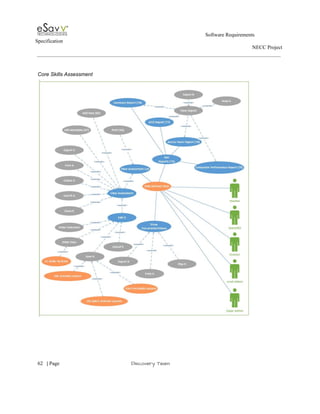
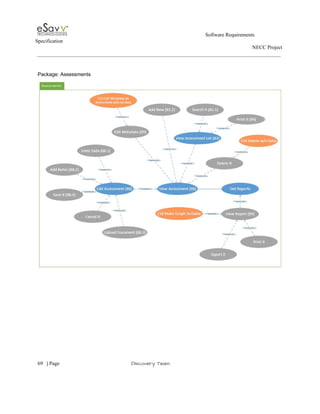
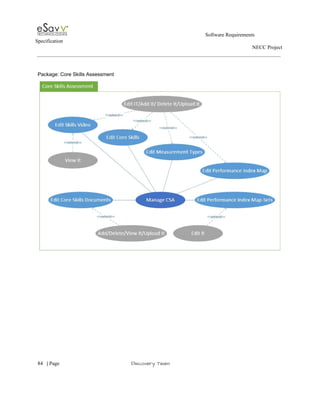
3.1.4 Core Skills Assessment  
3.1.4.1 View Assessment List  
3.1.4.2 View Assessment  
3.1.4.3 Edit Assessment  
3.1.4.4 Show Documents  
3.1.4.5 Get Reports  
3.1.4.6 Order data entry screen to match scoring booklet.  
3.1.4.7 Ability to activate lessons from within CSA module.  
3.1.4.8 Printing Multiple Lessons  
3.1.4.9 Batch Activate.  
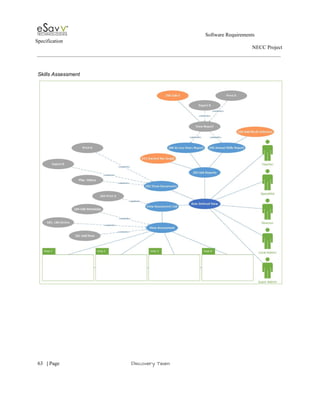
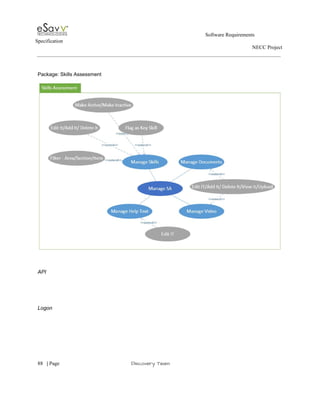
3.1.5 Skills Assessment  
3.1.5.1 View Assessment List.  
3.1.5.2 Show Documents  
3.1.5.3 Get Reports  
3.1.5.4 View Assessment  
3.1.5.5 Ability to print multiple lessons at once  
3.1.5.6 Stacked bar graph  
3.1.5.7 Annual Skills Report: Area, section, item should be multi­select  
3.1.5.8 Add "emerging" as score  
3.1.5.9 Link CSA results to Skills Assessment  
3.1.5.10 Add lesson type to screen display (in addition to lesson name)  
3.1.5.11 Batch Activate  
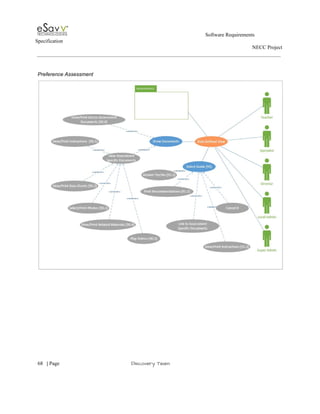
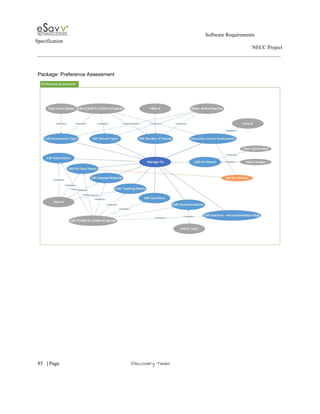
3.1.6 Preference Assessment  
3.1.6.1 View Assessment List  
3.1.6.2 View Assessment  
 
     
5​   | ​Page                                                       ​Discovery Team 
 
                                                                                                        Software Requirements 
Specification   
                                                                                                                                                                      NECC Project  
 
 
3.1.6.3 Edit Assessment  
3.1.6.4 Get Reports  
3.1.6.5 Show Documents  
3.1.6.6 Selection Guide.  
3.1.6.7 Edit MetaData if no data saved for an assessment.  
3.1.6.8 Ability to Delete PA ­ even after data entry started.  
3.1.6.9 Graphs sortable.  
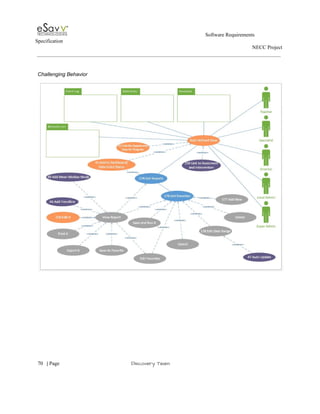
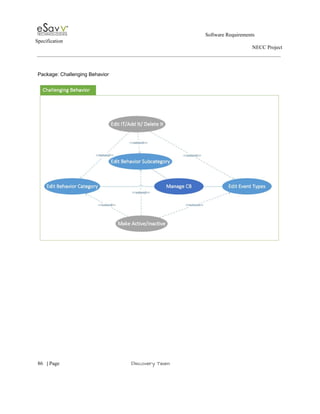
3.1.7 Challenging Behavior  
3.1.7.1 Get Reports.  
3.1.7.2 Get Favorites.  
3.1.7.3 Show Snapshot.  
3.1.7.4 Behavior List.  
3.1.7.5 Data Entry.  
3.1.7.6 Event Log.  
3.1.7.7 Ability to change category/subcategory of behavior.  
3.1.7.8 Ability to change name of behavior.  
3.1.7.9 Baseline Calculate.  
3.1.7.10 Enhance Baseline Calculator.  
3.1.7.11 Dashboard: Addition to data entry status.  
3.1.7.12 No opportunity days.  
3.1.7.13 Set intervals.  
3.1.7.14 Adding timers/counters.  
3.1.7.15 Add Slider Access.  
3.1.7.16 Editing.  
3.1.7.17 Graphs.  
3.1.7.18 Comments.  
3.1.7.19 Create Objective  
3.1.7.20 BI: Add trendline to behavior graphs.  
3.1.7.21 BI: Favorites: Auto date update.  
3.1.7.22 BI: Mean median mode.  
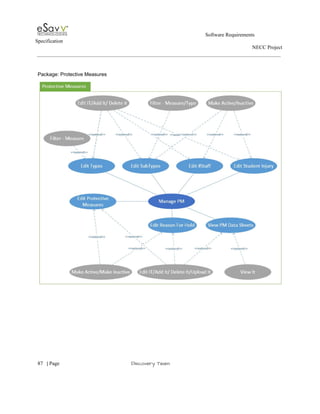
3.1.8 Protective Measures  
3.1.8.1 Protective Measures List  
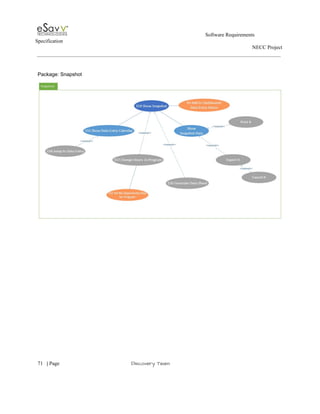
3.1.8.2 Show Snapshot.  
3.1.8.3 Data Entry.  
3.1.8.4 Add Emergency.  
3.1.8.5 Get Reports.  
 
     
6​   | ​Page                                                       ​Discovery Team 
 
                                                                                                        Software Requirements 
Specification   
                                                                                                                                                                      NECC Project  
 
 
3.1.8.6 Event Log.  
3.1.9 Reports  
3.1.9.1 Aggregate report filters.  
3.1.9.2 Deleted teams showing up in reports.  
3.1.10 Admin  
3.1.10.1 Manage User Admin.  
3.1.10.2 Manage Student Admin.  
3.1.10.3 Manage Roles  
3.1.10.4 Manage Groups/Schools  
3.1.10.5 Manage Teams/Programs  
3.1.10.6 Manage Notices  
3.1.10.7 Manage Resources.  
3.1.10.8 Manager Adhoc Reports.  
3.1.10.9 Create Account in Blackboard.  
3.1.10.10 Add some reports to admin.  
3.1.10.11 Ability to make a school/team inactive for a period of time.  
3.1.10.12 Batch include/exclude curricula when creating/editing a school (e.g., remove rights for UAE 
curricula).  
3.1.10.13 Searching feature.  
3.1.10.14 Ability to discharge a school.  
3.1.10.15 Billing options.  
3.1.10.16 Bulk upload students.  
3.1.10.17 Scheduling.  
3.1.10.18 Student move ­ curriculum considerations  
3.1.10.19 Unhide student.  
3.1.10.20 Scheduling "hide student".  
3.1.10.21 Ability to put new user on "hold".  
3.1.10.22 Bulk upload/edit users.  
3.1.10.23 Retrieving customer email.  
3.1.10.24 Schedule user changes in advance.  
3.1.10.25 Password Help.  
3.1.10.26 Bulk change or add access to teams.  
3.1.10.27 Ability to assign 1:1.  
3.1.10.28 New user validation.  
3.1.10.29 Scheduling User.  
3.1.10.30 Editing User Info.  
 
     
7​   | ​Page                                                       ​Discovery Team 
 
                                                                                                        Software Requirements 
Specification   
                                                                                                                                                                      NECC Project  
 
 
3.1.10.31 Additional fields on user management screens.  
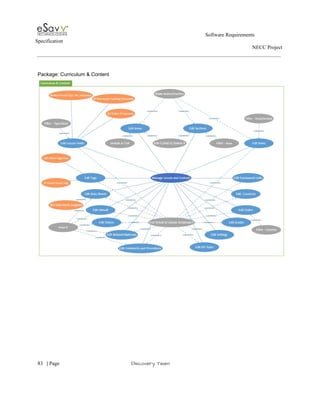
3.1.11 Content  
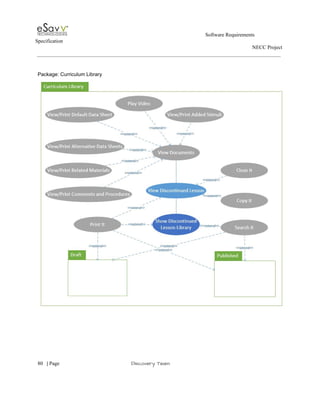
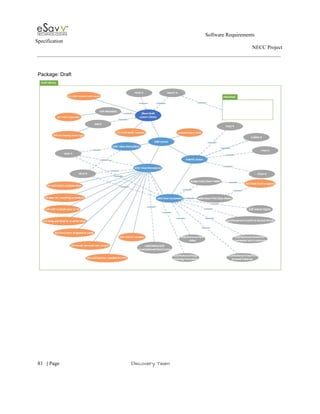
3.1.11.1 Lessons Library  
3.1.11.1.1 Show Draft Lesson Library  
3.1.11.1.2 "Behind the scenes" lesson notes.  
3.1.11.1.3 Print Multi­Lesson  
3.1.11.1.4 Add Shaping Lesson Type  
3.1.11.1.5 Edit Lesson  
3.1.11.1.6 Add/Delete/Insert Multiple Line  
3.1.11.1.7 Add multiple tasks in a TA  
3.1.11.1.8 Drag and Drop to re­order steps in a TA  
3.1.11.1.9 Assign Data Blocks to each level  
3.1.11.1.10 Break Sublevels into Target  
3.1.11.1.11 Add NT Contexts  
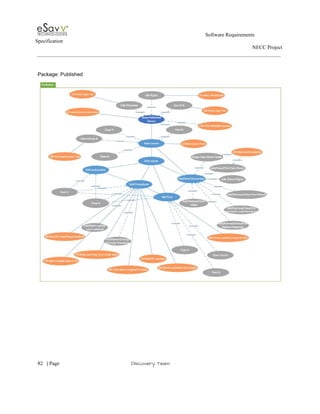
3.1.11.2 Show Published Library  
3.1.11.2.1 "Behind the scenes" lesson notes  
3.1.11.2.2 Print Multi­Lesson  
3.1.11.2.3 Add Shaping Lesson Type  
3.1.11.2.4 Edit Lesson.  
3.1.11.2.5 Add/Delete/Insert Multiple Line  
3.1.11.2.6 Add multiple tasks in a TA  
3.1.11.2.7 Drag and Drop to re­order steps in a TA  
3.1.11.2.8 Assign Data Blocks to each level  
3.1.11.2.9 Break Sublevels into Target  
3.1.11.2.10 Assign Curriculum to All Groups  
3.1.11.2.11 Manage Rights  
3.1.11.2.12 Track Lesson  
3.1.11.2.13 User Alert  
3.1.11.2.14 Add NT Contexts  
3.1.11.3 View Discontinued Lesson  
3.1.11.4 Edit Areas  
3.1.11.5 Edit Sections  
3.1.11.6 Edit Items  
3.1.11.7 Edit Tags  
3.1.11.8 Edit Framework Links  
3.1.11.9 Edit Countries  
 
     
8​   | ​Page                                                       ​Discovery Team 
 
                                                                                                        Software Requirements 
Specification   
                                                                                                                                                                      NECC Project  
 
 
3.1.11.10 Edit States  
3.1.11.11 Edit Grades  
3.1.11.12 Edit Settings  
3.1.11.13 Edit IEP Years  
3.1.11.14 Edit Comments and Procedures  
3.1.11.15 Edit Related Materials  
3.1.11.16 Edit Videos  
3.1.11.17 Edit Data Sheet  
3.1.11.18 Edit Tags  
3.1.11.19 Edit Lesson Fields  
3.1.11.20 New Prompt Type – M­L w/options  
3.1.11.21 Restructure Teaching Procedures  
3.1.11.22 Edit Core Skills  
3.1.11.23 Edit Measurement Types  
3.1.11.24 Edit Performance Index Map  
3.1.11.25 Edit Performance Index Map­set  
3.1.11.26 Edit Core Skills Documents  
3.1.11.27 Edit Skills Video  
3.1.11.28 Edit Assessment Types  
3.1.11.29 Edit Stimuli Types  
3.1.11.30 Edit Number of Stimuli  
3.1.11.31 Edit Docs Across Assessment  
3.1.11.32 Edit Instructions  
3.1.11.33 Edit Data Sheets  
3.1.11.34 Edit Related Materials  
3.1.11.35 Edit Reaching Media  
3.1.11.36 Edit PA Stimuli  
3.1.11.37 Edit Questions  
3.1.11.38 Edit Recommendations  
3.1.11.39 Edit Questions – Recommendations  
3.1.11.40 Documents Options  
3.1.11.41 Edit Behavior Category  
3.1.11.42 Edit Behavior Subcategory  
3.1.11.43 Edit Event Types  
3.1.11.44 Edit Types  
3.1.11.45 Edit SubTypes  
 
     
9​   | ​Page                                                       ​Discovery Team 
 
                                                                                                        Software Requirements 
Specification   
                                                                                                                                                                      NECC Project  
 
 
3.1.11.46 Edit #Staff  
3.1.11.47 Edit Student Injury  
3.1.11.48 Edit Protective Measures  
3.1.11.49 Edit Reason For Hold  
3.1.11.50 View PM Data Sheets  
3.1.11.51 Manage Skills  
3.1.11.52 Manage Documents  
3.1.11.53 Manage Video  
3.1.11.54 Manage Help text  
3.1.11.55 Manage Advance Searching  
3.1.11.55.1 Hidden Tags/Links  
3.1.11.56 Auto­save/time out warning not functioning  
3.1.11.57 Option to "Select All" when assigning curriculum rights to schools  
3.1.11.58 PA data sheet document type too restrictive  
3.1.11.59 Assign data blocks to levels  
3.1.11.60 Objective character limit  
3.1.11.61 Sublevels  
3.1.11.62 Ability to add contexts.  
3.1.11.63 Ability to order all lists  
3.1.11.64 Delete function  
3.1.11.65 Manage # stimuli.  
3.1.11.66 Alerts  
3.1.11.67 Add report listing lessons for given skill(s)  
3.1.11.68 Change M­L teaching procedure  
3.1.11.69 Reorganize teaching procedures  
3.1.11.70 Define teaching procedure hierarchy  
3.1.11.71 Create Account­Level Lesson  
3.1.12 Logon  
3.1.13 Abstract API  
4. Project High Level Use Case Diagrams  
4.1 Domain Models  
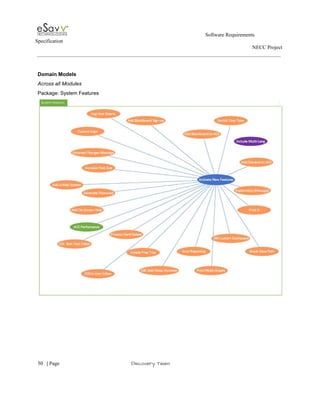
4.1.1 Across all Modules  
4.1.1.1 Package: System Features  
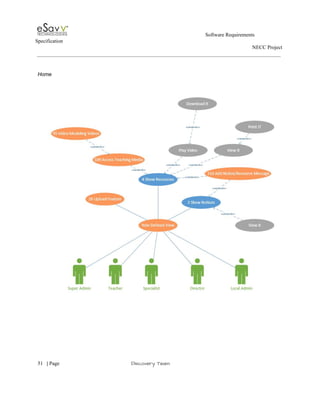
4.1.2 Home  
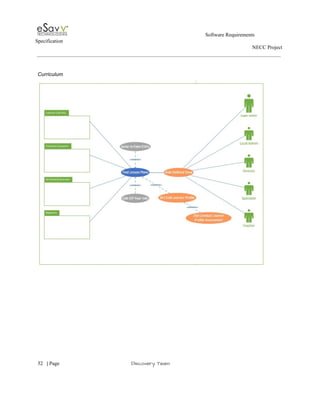
4.1.3 Curriculum  
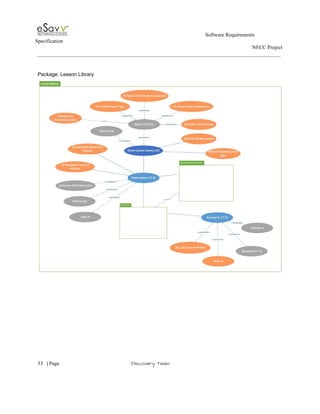
4.1.3.1 Package: Lesson Library  
 
     
10​   | ​Page                                                       ​Discovery Team 
 
                                                                                                        Software Requirements 
Specification   
                                                                                                                                                                      NECC Project  
 
 
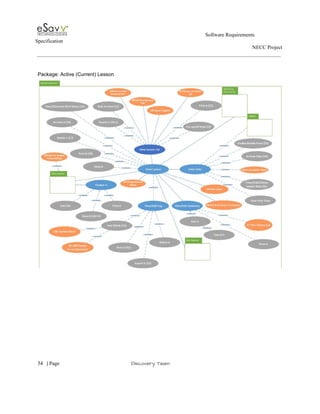
4.1.3.2 Package: Active (Current) Lesson  
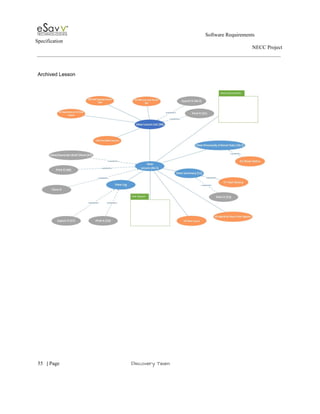
4.1.3.3 Archived Lesson  
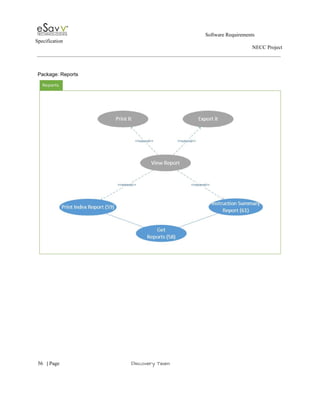
4.1.3.4 Package: Reports  
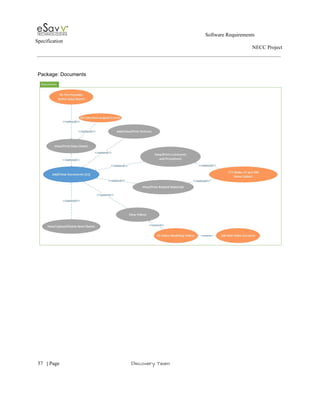
4.1.3.5 Package: Documents  
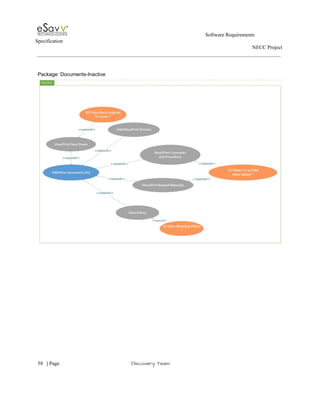
4.1.3.6 Package: Documents­Inactive  
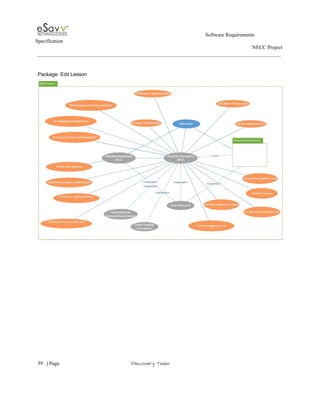
4.1.3.7 Package: Edit Lesson  
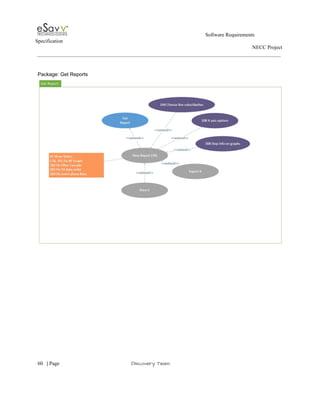
4.1.3.8 Package: Get Reports  
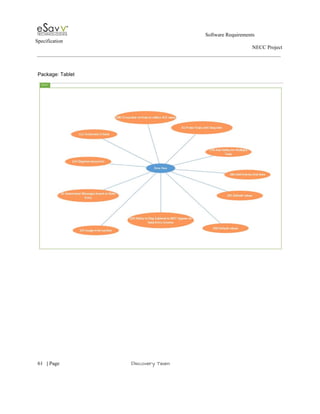
4.1.3.9 Package: Tablet  


 ​Current Revision 
Date  Changed By  Change  Reference to Section 
03/27/2014  new     


11​   | ​Page                                                       ​Discovery Team 
 
                                                                                                        Software Requirements 
Specification   
                                                                                                                                                                      NECC Project  
 
 
Software Requirements Specification 
1. Introduction 
The introduction of the Software Requirements Specification (SRS) provides an overview of the 
entire SRS with purpose, scope, and overview of the SRS. The aim of this document is to gather 
and analyze and give an in­depth insight of the complete ​Autism Curriculum Encyclopedia 
(ACE) system​ by defining the problem statement in detail. Nevertheless, it also concentrates on 
the capabilities required by stakeholders and their needs while defining high­level product 
features. The detailed requirements ​ACE ​are provided in this document. 
 
Purpose 
 
The purpose of the document is to collect and analyze all assorted ideas that have come up to 
define the system, its requirements with respect to consumers. Also, we shall predict and sort out 
how we hope this product will be used in order to gain a better understanding of the project, 
outline concepts that may be developed later, and document ideas that are being considered, but 
may be discarded as the product develops. 
 
In short, the purpose of this SRS document is to provide a detailed overview of our software 
product, its parameters and goals. This document describes the project's target audience and its 
user interface, hardware and software requirements. It defines how our client, team and audience 
see the product and its functionality. Nonetheless, it helps any designer and developer to assist in 
software delivery lifecycle (SDLC) processes. 
 
 
Scope 
 
Primarily, the scope pertains to the product features for making Autism Curriculum 
Encyclopedia project live.   
 
This SRS is also aimed at specifying requirements of software to be developed but it can also be 
applied to assist in the design and development of the new ACE system. . 


12​   | ​Page                                                       ​Discovery Team 
 
                                                                                                        Software Requirements 
Specification   
                                                                                                                                                                      NECC Project  


2. Overall Description 
 
This document contains the problem statement that the current system is facing which is 
hampering the growth opportunities of the company. It further contains a list of the stakeholders 
and users of the proposed solution. It also illustrates the needs and wants of the stakeholders that 
were identified in the brainstorming exercise as part of the requirements workshop. It further lists 
and briefly describes the major features and a brief description of each of the proposed system.  
 
The following SRS contains the detail product perspective from different stakeholders. 
 
 
3. Project High Level Requirements  
 
The specific requirements are – 
 
Functional Requirements 
 
Introduction  
 
This subsection contains the requirements for the ACE system. These requirements are organized 
by modules of the current system. Requirements are then refined into use case diagrams and to 
Use Case Narratives to best capture the functional requirements of the system.  
 
Include current functionality. Take UCD and include. 
 
Across all Modules 
 
Super admin switch user type 
Super admin have the ability to "view" the application as a specific user type for a 
 
     
13​   | ​Page                                                       ​Discovery Team 
 
                                                                                                        Software Requirements 
Specification   
                                                                                                                                                                      NECC Project  
 
 
specific school, while remaining on their own login. (I log in, then need to see resources 
from a teacher perspective in NYC, I can change my view then return back to super 
admin view and continue what I was doing). 
 
Blackboard Integration 
Have Blackboard functionality look like ACE.  Add Blackboard to ACE site (seamless 
integration).  Requires pass­thru authentication from ACE to Blackboard. 
 
Blackboard Single Sign­on 
Make sure Blackboard integration still works. The single sign –on.   
 
Date stamp 
All events should be stored in UTC but displayed in user’s local time zone. This is 
critical for data entry using mobile. 
UI change: Error messages 
Display message for unsaved changes.   
 
Potential: Accessibility: Multi­language  
Translate ACE into different languages to expand user base. 
 
Accessibility: Text size 
Option to increase size of text on screen to improve accessibility (e.g., icons with large A, 
medium A, and small A font ­ click and size of text on screen changes accordingly). 
 
On­screen help 
Hover text, integrated contextual help, get rid of abbreviations, key for anything that must 
have abbreviations, more on­screen instructions to the user.  Add information about 
character limits.  Make error messages clear, simple language, convey needed 
information. CSA Grid report needs more description for column headers. 
 
Hard delete 
Hard delete some items ­ Hard delete would remove all traces whether active or inactive. 
E.g., Ability to delete lesson plans in draft folder.  Also ability to delete uploaded files 
(e.g., comments, related materials, videos).  Also, ability to delete unused users, students, 
schools, teams, and programs, etc. 


14​   | ​Page                                                       ​Discovery Team 
 
                                                                                                        Software Requirements 
Specification   
                                                                                                                                                                      NECC Project  
 
 
BR: Applies to Super Admin and the Content and Admin module. Make active or 
inactive. 
Super Admin will be able to do both hard and soft deletes in Super Admin module. 
 
Rich text editor 
Most if not all open text boxes should include a functioning rich text editor (minimally 
bold/italics/underline/highlight ­ comment section of users – open text box – free form). 
Possibly change the size of text as well. 
  
Make error messages more explanatory throughout ACE 
Revise data entry "ACE Notification" Error Message. I filled in data entry for assessment 
(without saving) then clicked the report tab.  I was given the error message: "Please fill 
all values in the data entry table to view the report."  Can this message be updated to 
indicate that the user should also save the results? 
 
E­mail system 
Alerts & notifications (e.g., triggered during mobile data collection or based on other 
criteria).  Integrate an e­mail system that will allow users to e­mail each other from 
within the ACE (expand functionality that will be part of new CB module). 
 
BR: We will send all the information using the student’s coded name in ACE. 
 
Errors ­ contact admin 
Should notify helpdesk with additional details of what was happening (e.g., Angie's list) 
­­ make it happen automatically or give user option of sending an email from the message 
screen. 
 
Custom Dashboards 
Add dashboards to landing page for each module as well as general user dashboard.  Add 
user ability to customize these dashboards within modules  ­ (data entry status to show 
additional options ­Pop­up alerts when attention is needed to assessment or teaching, 
show data current to X weeks, etc.).  Personal dashboard could show student­specific 
info, aggregate reports, frequently accessed links, or other personal items you wish to see 
upon logging in. 


15​   | ​Page                                                       ​Discovery Team 
 
                                                                                                        Software Requirements 
Specification   
                                                                                                                                                                      NECC Project  
 
 
Print multiple graphs at once 
Ability to print multiple graphs at once. From one general location, graphs can be printed 
from across modules (e.g., session data graphs and behavior graphs in one report). 
 
BR: Curriculum (lessons, lesson plans) & Active Lessons & Challenging Behavior 
(graphs, logs). Can print everything – mass printing. Can section out the printing.  
 
Add Zendesk to ACE 
Add ZenDesk feedback tab to ACE site (seamless integration).  Would require us to add 
the code into Java script on the ACE.  Would continue to allow users to Chat with 
HelpDesk or submit a ticket, but users could also then search our knowledge bank. 
Requires pass­thru authentication from ACE to Help Desk. 
 
Update the ACE account email and the forgot password email 
Unique url that new user will click or paste into the browser as a way of completing the 
account activation, it would pass the username and password automatically. Sort of 
likeviewpath.com (see example right).  This is to avoid having to copy and paste the 
password provided by ACE.  This is a pain point for many users. 
 
Logo customization 
Ability for schools to add their own logo/company name to ACE documents. 
 
Unable to print from the ACE 
Must export everything in order to print ­ would like the option to print from within the 
ACE. This is the default behavior of the Report viewer control in the Chrome browser 
and is a limitation of how the Microsoft report viewer control renders in chrome. 
 
Add video duration to video titles 
The SUD will allow the video duration to be added to the video title. 
 
 
BI: Report: Break data path on a graph 
Overall speed within the application needs to increase. We would like pages to load                           
within 2 sec/industry standard.  Reports particularly should be faster to create and load​. 


16​   | ​Page                                                       ​Discovery Team 
 
                                                                                                        Software Requirements 
Specification   
                                                                                                                                                                      NECC Project  
 
 
Non­Functional:​ Performance 
 
Overall speed within the application needs to increase. We would like pages to load                           
within 2 sec/industry standard.  Reports particularly should be faster to create and load. 
 
Home 
 
Show Notices 
The SUD will display notices. This feature is role specific having two type local and 
global notices. 
 
 
Show Resources 
The SUD will display a library of videos, pictures, a variety of files types that are 
categorized, subcategorized and admin defined order. They are broken into the local and 
global resources. 
 
Add file upload feature 
The SUD will provide the ability to upload and manage student specific files (videos, 
pdfs, docs – any file types). 
 
Video modeling videos 
The SUD will provide access to video modeling videos from ACE or give users the 
ability to download videos to computer or burn to DVD.  
 
Resource area 
The SUD will provide the ability to access resource docs without going into a lesson plan 
(Widgits, NECC pictures, data sheets, videos, etc.)  
 
New Notice/resource message 
The SUD will provide a way to indicate to the user that a new notice/resource has been 
added. ­ See screen shot for what GoodData does.   
 
Curriculum 


17​   | ​Page                                                       ​Discovery Team 
 
                                                                                                        Software Requirements 
Specification   
                                                                                                                                                                      NECC Project  
 
 
Show Lesson Library 
The SUD will display a list of all published lessons to which the specific schools have 
rights. 
 
View Lesson 
The SUD will display the lesson detail.  
 
View Documents 
 The SUD display documents within a lesson. 
 
Edit Lessons 
The SUD allows edits on lessons during activation. 
 
Dashboard: Error reporting mastered sets 
Dashboard should only show the 1st instance when a sublevel is marked with status of 
Mastered.  Currently, shows every session with Mastered status. 
 
 
Data sheet pre­populates 
Full data sheets, ones presented in Document tab, would generate with lesson / student 
specific details (i.e. student name, lesson name, criteria to increase decrease, teaching 
procedure and teaching procedure steps. in a similar fashion that the Brief Sheets 
function. 
 
User can select all levels/or only 1 level; and possibly choose which fields will appear on 
printout. 
 
Stimuli Print 
When selecting 3x2, document generated is a two page document, this layout should print 
out on one page. 
 
Make comments/related materials more salient. 
The SUD will allow comments and procedures and related materials to be previewed 
within the system.  


18​   | ​Page                                                       ​Discovery Team 
 
                                                                                                        Software Requirements 
Specification   
                                                                                                                                                                      NECC Project  
 
 
Lesson Snapshot 
The SUD will display a snapshot of the student’s progress for each individual lesson. 
 
Video Modeling Video 
Shared. 
 
Add/Delete Multiple Skill Lines in Instructional Plan and Instructional Summary. 
The ability to add and delete multiple skills lines in the Instructional Summary and 
Instructional Plan (SA). Currently, when you edit the Instruction Plan/Summary you have 
to add each line individually as well as delete each line.  Between each action the ACE 
wheel is displayed. Depending on environment this may take some time. 
 
PTO. 
Check box next to each level/sublevel include/not include in PTO.  By default all are 
included, but user can uncheck if they will not be counting that sublevel in the PTO. 
Same with IT for context.  TA is simply number of steps across all sub­chains (can delete 
the chains you don't want to target). 
 
Edit Learner Profile 
User ability to select options for the learner that can be applied to all lessons when 
activating them.  These would include fields that are common across lessons (e.g., # 
people, # settings, criteria to increase/decrease, prompt fading strategy, and more).   
 
Visual Scope & Sequence 
Need a way to show where the lesson falls within the greater curriculum scope and 
sequence.  Some way to visualize the skills that come before and after the skill targeted 
by the selected lesson.  Perhaps within the lesson view page we could leverage current 
skills assessment logic to show 3 skills before and 3 skills after to display clear 
curriculum sequences.  Clicking on a skill prior or after would activate the search 
showing all lessons linked to each skill.  This is how to incorporate Prerequisites and next 
steps.  Also include a field for maintenance, generalization, and naturalistic environment 
training. 
 
Lesson plan: New Shaping Template 
New lesson type for shaping lessons and lessons that have criteria to move up/down 
 
     
19​   | ​Page                                                       ​Discovery Team 
 
                                                                                                        Software Requirements 
Specification   
                                                                                                                                                                      NECC Project  
 
 
sublevels within a session.  OR consider allowing fading of prompts within a session. 
 
Conduct Learner Profile Assessment. 
Add functionality designed to guide the user in identifying the most effective teaching 
procedure for any given student​ ​and default settings. 
 
Status column. 
Add a Column on the session data report (RDL file) to show status.  Right now can only 
see status on "last 15 sessions" grid.  Consider adding other missing columns as well. 
 
Change color of IT graph to be consistent with SA. 
The "Correct Prompted" responses on the IT session data report are yellow and they 
should be green to match the SA graph.  Title should also be "Correct" as with the SA 
graph, instead of "correct prompted." 
 
UI change: IT graph legend needs to be corrected. 
"Correct Prompted" should just say "Correct". 
 
Sublevel deselected when filters cascade. 
AHD #3242: In the curriculum Report tab, when trying to generate a graph for sub level 
2.01 (for a date range that includes data from that sublevel), after 2.01 is selected in the 
Sub Level filter, it deselects when the filters cascade. 
 
NOTE: It is possible to select sub level 2.01 by selecting Level 2 ONLY in the level 
filter.  This issue only occurs when Levels 1 AND 2 are selected in the Level filter 
(whether they are clicked manually, or clicked by using "select all" button). 
 
TA session data report ­ data order incorrect. 
Data grid from the Session Data report, shows that the data order is incorrect (not in 
chronological order). 
 
User entered event not generating a phase line selection 
When generating a report for lesson 2.05, matching money to price with visual supports 
(Ay Peter, ACE School, Classroom 157), a user entered event that falls within the report 
date range does not appear as a choice for phase line ("Date introduced for .30" 3/5/13). 
"User Entered" IS selected in the Event Type drop­down.  This user entered event DOES 
 
     
20​   | ​Page                                                       ​Discovery Team 
 
                                                                                                        Software Requirements 
Specification   
                                                                                                                                                                      NECC Project  
 
 
appear in the Log, as well as in the Recently Entered Events list on the student dashboard. 
 
Search By Common Core VBMapp, Abbls 
See also 283.  Better searching regarding links to outside assessments and frameworks. 
Add fields to link lesson plans to the Common Core Standards, VBMAPP, and ABBLS.  
 
Print Multi­Lesson 
Share  
 
Add Shaping Lesson Type. 
Share 


TA ­ add ability for multiple tasks 
Add ability to collect data on multiple chains related to same objective (e.g., 3 snacks for 
a snack­making TA).  Eliminates the need for 3­4 numbered identical lessons, also makes 
it possible to calculate PTO.  This includes creating a summary tab that shows date 
introduced, mastered, etc. All consistent with SA and IT.  Helps with multiple­destiny 
TAs like street crossing would have 2 chains ­ one for crossing when safe and 1 for 
waiting for car to pass. 
 
TA ­ drag and drop reorder 
Ability to drag and drop to re­order steps in chain. 
 
Prescription sheet 
1. Lessons: need a place to select goal for daily/weekly/monthly frequency of sessions 
(learner profile).  Based on the goal selected, progress bar changes to show how close 
you are to the goal (fitbit style).  This will allow users to select which lesson to run based 
on where the greatest need is.  Note: there has been a request to re­order the list based on 
what has been run. 
 
2. Sublevels within lessons: once you open a lesson, sublevels could have a visual 
indication of run/not run so the user knows to select the sublevel that has not yet been run 
that day.  Potentially use the same logic to have those not yet run earlier in the list.   


21​   | ​Page                                                       ​Discovery Team 
 
                                                                                                        Software Requirements 
Specification   
                                                                                                                                                                      NECC Project  
 
 
For 1 & 2: Consider toggle so that users could override defaulted list order (e.g., if they 
would rather see lessons organized by objective number). 
 
Make web data entry more user friendly 
Make data entry more user friendly and streamlined.  E.g., Avoid having to move to new 
day to enter data across days (e.g., have a grid with multiple days and user can enter data 
for whichever day they choose).  This saves time in having to move from one day to the 
next and reload the page each time. Including the ability to set your program days (i.e. 5 
days a week or 7). 
 
Ability to flag sublevel to NOT appear on data entry screens 
Allows users to take away specific sublevels from data entry options (e.g., if a sublevel is 
discontinued, or if you are no longer collecting data on a sublevel because maintenance is 
embedded into higher levels of program). 
 
 
Lesson plan: Solve many to one and one to many problem 
The SUD allows the user to select which sublevels will be targeted. 
 (for Sa) 
 
For TA: The system allows the user to select which lists will be targeted. 
 
For IT (NT): The system allows the user to select which contexts will be targeted. 
 
Print option  
Make printing easier from any part of the application. 
 
Add own objective 
Add your own objective to lesson plan (does not replace the ACE objective); option for 
own objective to appear on progress report.  Discuss how this affects item 55. 
 
Active Lessons 
The SUD will display all active lessons for a given student. 
 
View Lesson Details 
The SUD will allow you to view lesson details. 
 
     
22​   | ​Page                                                       ​Discovery Team 
 
                                                                                                        Software Requirements 
Specification   
                                                                                                                                                                      NECC Project  


Enter Data 
The SUD will allow user to enter summarized data or/and trail by trail  data  
The information comes from active data.  
 
3.1.1.1.1 Probe Trials With Step Info 
The SUD will display data entry options tied to session type. 
 
 
3.1.1.1.2 Automated Messages 
The SUD will provide alerts when criteria from the active lesson has been meet. 
 
BR: Logic per user – tie to active lesson – i.e. based on customized values to move from 
1 level to another.  
 
3.1.1.1.3 Automate Criteria 
The SUD will set default values for a new session based on data entered in previous 
session. 
 
i.e. It will automatically decrease a step  
 
3.1.1.1.4 Organize Lesson List 
The SUD will display lessons in order determined by the date run or frequency.  
 
3.1.1.1.5 Default Values 
The SUD will display the most recent sublevel/context run for that lesson. 
 
3.1.1.1.6 Lesson Number of Trials To Reflect ACE values 
The SUD will display the number of trials based on the lesson criteria. 
 
3.1.1.1.7 Add Ability For Multiple Tasks 
The SUD will allow for data collection on all list associated with a TA. 
   
3.1.1.1.8 Add Trial By Trial Data 
The SUD will provide an option for entering trial by trial data for all lesson types. 


23​   | ​Page                                                       ​Discovery Team 
 
                                                                                                        Software Requirements 
Specification   
                                                                                                                                                                      NECC Project  
 
 
Lesson plan: Lesson modifications to group of lessons or group of students 
Apply modifications (e.g., teaching procedure) to more than one lesson for a student, or 
more than one lesson across students. 
 
Customize See Teacher Behavior 
SUD will allow user to enter free form data when selecting “See Teacher Behavior” as 
the teaching procedure. 
 
"Next Lesson" button (AHD#4253) 
“Next Lesson” option – this button would be placed within a lesson, and would serve as a 
way to jump to the next lesson in the student’s list of lesson.  
 
Instructional Summary to contain past history 
Need a way to view any active lesson with any archive version of that lesson (e.g., view 
summary, data, etc.). Toggle?  
 
Within an active summary there will be a way to show you the instructional summary 
from archived versions of that lesson (lesson­sharing). Only looking from “date 
introduced”. 
 
New M­L Teaching Procedure 
The SUD will allow user to select M­L order from Super Admin determined list. 
 
Select Restructured Teaching Procedure 
The SUD will allow user to select a prompt fading strategy. 
 
Ability to reactivate an archived lesson if no active version of that lesson exists 
User should be able to reactivate archived curriculum. A button would be provided in 
Archived curriculum view page which would reactivate the curriculum. A popup would 
appear if the Curriculum is already active for that student, and cannot be activated again. 
Data would be persisted from archived curriculum and would be moved as is to active 
curriculum list. 
What if more recent version exists in bank?  
How would this affect the past history grid? 
only can do this with the most recent version in the archive folder (i.e., if there are multiple 
copies in the archive folder). What if lesson has been discontinued? 
 
     
24​   | ​Page                                                       ​Discovery Team 
 
                                                                                                        Software Requirements 
Specification   
                                                                                                                                                                      NECC Project  


Way to organize archived folder 
Sometimes students can have upwards of 200 lessons in archived folder.  Minimally, add 
IEP year to grid, so lessons can be sorted by IEP year.  Ideally, some other method of 
organizing lessons that would be meaningful to users (e.g., These lessons have all been 
mastered, these were taught for a while and then we moved on, etc.).  Perhaps, also a way 
to make "sets" as in Photoshop where versions of the same lesson (created when 
archiving data only) are all on the same line rather than multiple lines in the grid).  Also, 
year end summary form. 
 
***Start by adding IEP year to the grid. 
 
Crowd source tags 
Allow users to add tags to lessons ­ Discuss while improving search feature. 
 
Make Search Functionality more User­friendly 
The system will allow users to search and find lessons. Example​:  
Like AMAZON.COM with left navigation "departments" being the Areas, sections, 
items. Other check boxes are "type" "core skill" etc.;  need better way to "see scope and 
sequence"; separate out the frameworks and have these function differently.  Make 
curriculum search like Google (1st screen appears as basic keyword search with button to 
use an advanced search; advanced search is also like Google in that it uses plain English 
to help narrow results: 
 
Find lessons with… 
 
all these words ________ 
this exact word or phrase __________ 
any of these words _________ 
 
Then narrow your results by... 
Area ^ 
Section ^ 
Item ^ 
Skill ^ 
 
     
25​   | ​Page                                                       ​Discovery Team 
 
                                                                                                        Software Requirements 
Specification   
                                                                                                                                                                      NECC Project  


You can also find a specific... 
Curriculum Framework/Common core ^ 
Curriculum Type ^ 
Core Skill ^ 
 
Import/Save Modifications 
 The system will allow user to import from and save to teaching profile showing 
instructional plans (SA), contexts (IT), and steps (TA). 
 
Add Lesson 
Related to 61. Add ability for users to add their own curriculum to the ACE (i.e., A way 
to track higher level skills on the ACE):  Write own objective, upload PDF/word version 
of their own lesson (viewable in­line, but not editable; or could edit with on­screen 
editor), select teaching procedure, select data entry method​. 
 
Add brief sheet print option 
The SUD will provide an option to print brief sheet without data blocks. 
 
Lesson plan: Reference Button 
Develop a systematic way to include research references and link research articles to each 
lesson or group of lessons, as well other modules (e.g., PA, CSA). 
 
Lesson plan: Message when activating a lesson that exists in archive 
When activating a lesson, if there is a copy of that lesson in the student's archive folder, 
give a message that flags to the user that the curriculum has been activated for the student 
in the past (include IEP year, date activated, date archived).   
 
Add multiple tasks in a TA 
The SUD will allow multiple list of steps to a TA lesson. 
 
Drag and Drop to re­order steps in a TA 
The SUD will allow drag and drop to re­order steps in a TA. 
Assign Data Blocks to each level 
The SUD will allow assignment of a specific data type to a given level. 


26​   | ​Page                                                       ​Discovery Team 
 
                                                                                                        Software Requirements 
Specification   
                                                                                                                                                                      NECC Project  
 
 
This a new data type.  
 
Break Sublevels into Target 
The SUD will allow the breaking sublevel of skills into smaller labeled (counted) items.  
 
Add NT Contexts 
The SUD will allow adding unrestricted amount of NT contexts. 
 
Change name of lesson in active list 
When user activates a lesson ability to customize the name (maintain unique ID to we can 
run admin reports); they should be able to edit chosen name.  Chosen name would appear 
on all USER reports and Uis.  Consider an admin report to audit alternate names (can 
inform our naming convention). 
 
 
Reactivate an Archived Lesson 
The SUD will allow the user to reactivate an archived lesson. 
 
Logic involved. ­ Analysis 
 
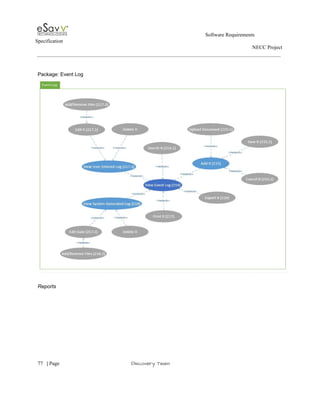
Event Log 
The SUD will display manual and SUD generated event logs. 
 
BR: User will enter an event to lessons, to module or across modules. 
 
BI: ​Ability to choose line color or dashes 
 
BI: X axis with all dates in a time period not just data entry dates 
 
BI: Step info on graphs 
Ability to overlay step info on the graph (i.e., show which step each data point 
corresponds to). 
 
Future: Parent portal 
Relies on item in Admin section for 1:1 user role. Develop a parent dashboard with 
specified reports on their child (e.g., CSA reports, Prog. Report, Print Index). 


27​   | ​Page                                                       ​Discovery Team 
 
                                                                                                        Software Requirements 
Specification   
                                                                                                                                                                      NECC Project  
 
 
Future: Lesson plan 
Detail why a skill is important and how it fits into big picture​*. 
 
Future: Lesson plan 
Include info on trouble shooting problems with skill acquisition*. 
 
Future: ​Link to NJ Standards.  
 
Future: Fluency based data and reports 
Want to edit lessons to incorporate fluency type measures. 
 
Future: TA ­ Ability to select other options for steps 
Can choose a chain from available options that we add (e.g., different types of 
handwashing chains ­ auto vs manual sinks, pump vs bar soap, etc.)  Also can add new as 
in item 278. 
 
Future: Add status "Maintained". 
Add status "maintained". 
 
Future: Lesson interspersal 
Option when starting a session to select another lesson/level/sublevel to intersperse trials 
with the current lesson.  When you choose to intersperse, then instructions change from 
trial to trial randomly and data collection changes as needed (e.g., array/no­array, etc.). 
Consider a slide function similar to fitbit cheer/taunt/etc. 
 
Future: Lesson plan: Group Instruction Teaching format/module 
Add new teaching template for group instruction.  Provide assessment, lesson plans, and 
data SUDs to program for students ready to learn in larger groups. 
 
Core Skills Assessment 
 
View Assessment List 
The SUD will display previous assessments based upon date. You will be able to print. 
 
View Assessment 
The SUD will display an assessment.  
 
     
28​   | ​Page                                                       ​Discovery Team 
 
                                                                                                        Software Requirements 
Specification   
                                                                                                                                                                      NECC Project  


Edit Assessment 
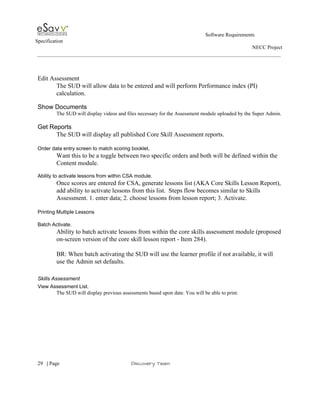
The SUD will allow data to be entered and will perform Performance index (PI) 
calculation. 
 
Show Documents 
The SUD will display videos and files necessary for the Assessment module uploaded by the Super Admin. 
 
Get Reports 
The SUD will display all published Core Skill Assessment reports. 
 
Order data entry screen to match scoring booklet​. 
Want this to be a toggle between two specific orders and both will be defined within the 
Content module. 
 
Ability to activate lessons from within CSA module. 
Once scores are entered for CSA, generate lessons list (AKA Core Skills Lesson Report), 
add ability to activate lessons from this list.  Steps flow becomes similar to Skills 
Assessment. 1. enter data; 2. choose lessons from lesson report; 3. Activate. 
 
Printing Multiple Lessons 
 
Batch Activate. 
Ability to batch activate lessons from within the core skills assessment module (proposed 
on­screen version of the core skill lesson report ­ Item 284). 
 
BR: When batch activating the SUD will use the learner profile if not available, it will 
use the Admin set defaults. 
 
Skills Assessment 
View Assessment List. 
The SUD will display previous assessments based upon date. You will be able to print. 


29​   | ​Page                                                       ​Discovery Team 
 
                                                                                                        Software Requirements 
Specification   
                                                                                                                                                                      NECC Project  
 
 
Show Documents 
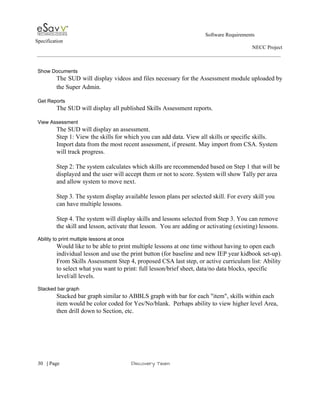
The SUD will display videos and files necessary for the Assessment module uploaded by                           
the Super Admin. 
 
Get Reports 
The SUD will display all published Skills Assessment reports. 
 
View Assessment 
The SUD will display an assessment.  
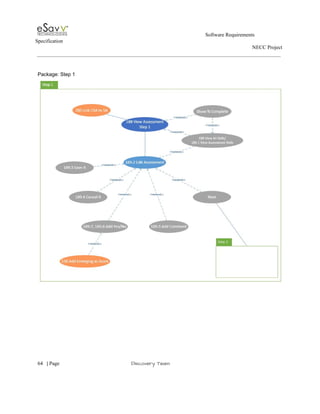
Step 1: View the skills for which you can add data. View all skills or specific skills. 
Import data from the most recent assessment, if present. May import from CSA. System 
will track progress.  
 
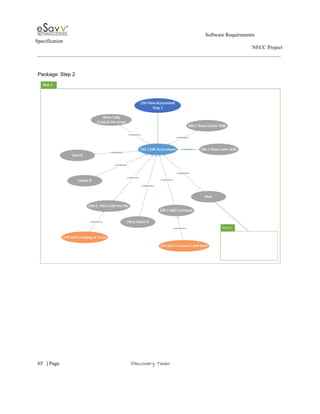
Step 2: The system calculates which skills are recommended based on Step 1 that will be 
displayed and the user will accept them or not to score. System will show Tally per area 
and allow system to move next. 
 
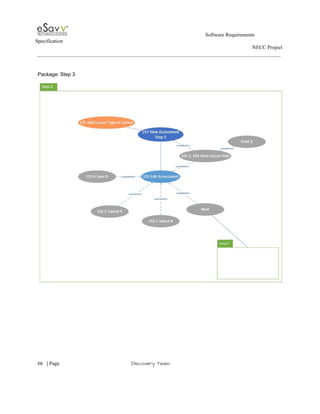
Step 3. The system display available lesson plans per selected skill. For every skill you 
can have multiple lessons. 
 
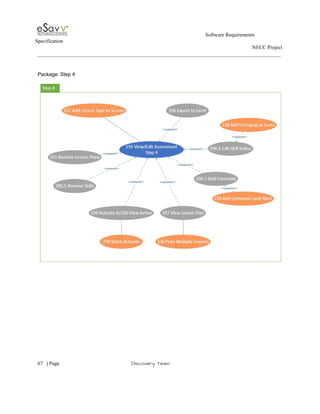
Step 4. The system will display skills and lessons selected from Step 3. You can remove 
the skill and lesson, activate that lesson.  You are adding or activating (existing) lessons. 
 
Ability to print multiple lessons at once 
Would like to be able to print multiple lessons at one time without having to open each 
individual lesson and use the print button (for baseline and new IEP year kidbook set­up). 
From Skills Assessment Step 4, proposed CSA last step, or active curriculum list: Ability 
to select what you want to print: full lesson/brief sheet, data/no data blocks, specific 
level/all levels. 
 
Stacked bar graph 
Stacked bar graph similar to ABBLS graph with bar for each "item", skills within each 
item would be color coded for Yes/No/blank.  Perhaps ability to view higher level Area, 
then drill down to Section, etc. 


30​   | ​Page                                                       ​Discovery Team 
 
                                                                                                        Software Requirements 
Specification   
                                                                                                                                                                      NECC Project  
 
 
Annual Skills Report: Area, section, item should be multi­select 
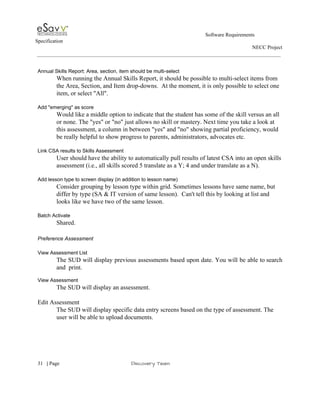
When running the Annual Skills Report, it should be possible to multi­select items from 
the Area, Section, and Item drop­downs.  At the moment, it is only possible to select one 
item, or select "All". 
 
Add "emerging" as score 
Would like a middle option to indicate that the student has some of the skill versus an all 
or none. The "yes" or "no" just allows no skill or mastery. Next time you take a look at 
this assessment, a column in between "yes" and "no" showing partial proficiency, would 
be really helpful to show progress to parents, administrators, advocates etc.  
 
Link CSA results to Skills Assessment 
User should have the ability to automatically pull results of latest CSA into an open skills 
assessment (i.e., all skills scored 5 translate as a Y; 4 and under translate as a N).   
 
Add lesson type to screen display (in addition to lesson name) 
Consider grouping by lesson type within grid. Sometimes lessons have same name, but 
differ by type (SA & IT version of same lesson).  Can't tell this by looking at list and 
looks like we have two of the same lesson. 
 
Batch Activate 
Shared. 
 
Preference Assessment 
 
View Assessment List 
The SUD will display previous assessments based upon date. You will be able to search                             
and  print​. 
 
View Assessment 
The SUD will display an assessment.  
 
Edit Assessment 
The SUD will display specific data entry screens based on the type of assessment. The 
user will be able to upload documents. 
 
     
31​   | ​Page                                                       ​Discovery Team 
 
                                                                                                        Software Requirements 
Specification   
                                                                                                                                                                      NECC Project  


Get Reports 
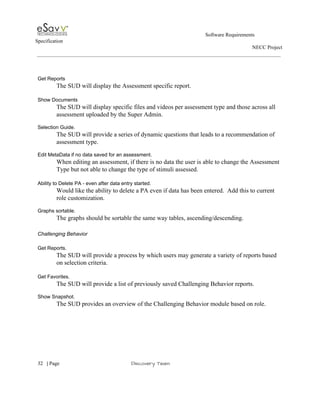
The SUD will display the Assessment specific report. 
 
Show Documents 
The SUD will display specific files and videos per assessment type and those across all 
assessment uploaded by the Super Admin. 
 
Selection Guide. 
The SUD will provide a series of dynamic questions that leads to a recommendation of 
assessment type.  
 
Edit MetaData if no data saved for an assessment. 
When editing an assessment, if there is no data the user is able to change the Assessment 
Type but not able to change the type of stimuli assessed. 
 
Ability to Delete PA ­ even after data entry started. 
Would like the ability to delete a PA even if data has been entered.  Add this to current 
role customization. 
 
Graphs sortable. 
The graphs should be sortable the same way tables, ascending/descending.  
 
Challenging Behavior 
 
Get Reports. 
The SUD will provide a process by which users may generate a variety of reports based 
on selection criteria. 
  
Get Favorites. 
The SUD will provide a list of previously saved Challenging Behavior reports. 
 
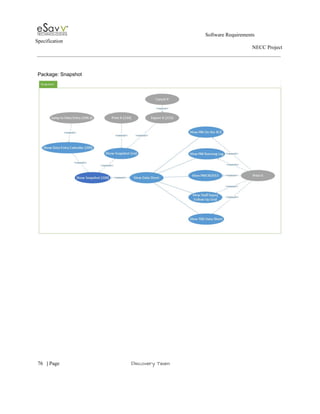
Show Snapshot. 
The SUD provides an overview of the Challenging Behavior module based on role. 


32​   | ​Page                                                       ​Discovery Team 
 
                                                                                                        Software Requirements 
Specification   
                                                                                                                                                                      NECC Project  
 
 
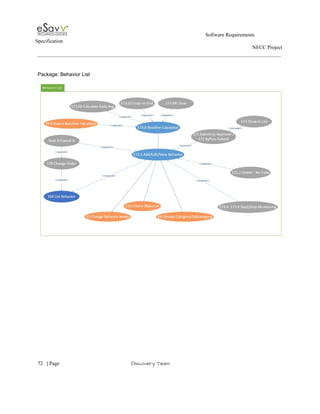
Behavior List. 
The SUD provides a list of active and inactive behaviors. 
 
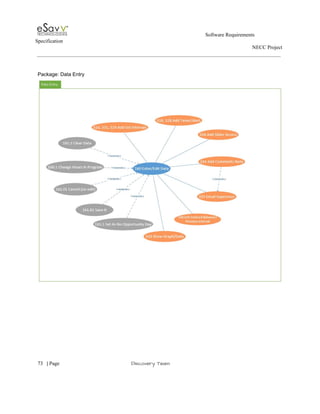
Data Entry. 
The SUD will present a list of behaviors for data entry for a duration selected.  
 
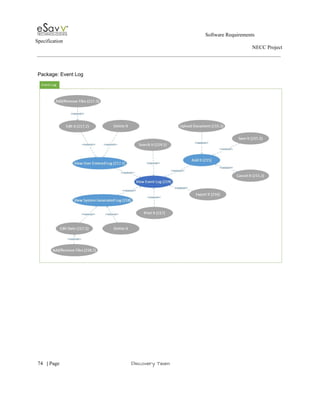
Event Log. 
      The SUD will display manual and SUD generated event logs. 
 
BR: User will enter an event to challenging behavior, to module or across modules. 
 
Ability to change category/subcategory of behavior. 
Ability to change category/subcategory of behavior.   Would need to be reflected in the 
change log/event log.  Then change would update in all places. #44 
 
Ability to change name of behavior. 
Ability to change name of behavior.  Would need to be reflected in the change log/event 
log.  Then change would update in all places.  All validations for creating a new behavior 
should be in place for new name.  
 
Baseline Calculate. 
Ability to calculate daily average for selected behavior. 
 
Enhance Baseline Calculator. 
Baseline calculator should find your highest or lowest period for an indicated time period. 
 
Dashboard: Addition to data entry status. 
 A table that shows summed data within a specific period of time (choose your own time 
frame) within students and across students on a team.   
 
No opportunity days. 
Ability to specify days for a program (i.e., set so Saturday and Sunday are ALWAYS no 
opportunity days). 
 
Set intervals. 
Ability to select preferred intervals for summarizing data (e.g., per hour, per half hour, 
 
     
33​   | ​Page                                                       ​Discovery Team 
 
                                                                                                        Software Requirements 
Specification   
                                                                                                                                                                      NECC Project  
 
 
per quarter hour, continuous, or greater blocks of time…every 2 hrs etc.).  
Frequency counters (tap to tally); timers  (in­app recording of duration); interval 
indicators, latency timers, etc. With all, you should be able to override to enter a total 
number (i.e., rather than tapping a button 20 times). 
 
Adding timers/counters. 
Add in­app timers, interval alerts for MTS, frequency counters, etc. Prompts to record 
data ­ e.g., if taking interval data, when interval has passed, the ACE should ask you to 
enter data for that interval. 
 
Add Slider Access. 
Easily accessible from anywhere on the ACE.  Flexibility in how it is shown (e.g., 
buttons pinned in view at all times vs. hidden page that you slide to access, or a 
combination of both). 
 
Editing. 
Ability to go back to edit entered behaviors or previous interval; enter new data for past 
dates.   
 
Graphs.   
Build in graphs in same way as graphs are being included in the curriculum data 
collection tablet. 
 
Comments. 
Comments section (e.g., note for case manager or future teachers coming on shift later). 
 
Create Objective 
The SUD will allow user to enter data associated with a specific behavior. 
 
BI: ​Add trendline to behavior graphs. 
Would like to add a trendline to behavior graphs.  Help Desk ticket  
 
BI: ​Favorites: Auto date update. 
Have graphs auto update to the most recently entered data. 


34​   | ​Page                                                       ​Discovery Team 
 
                                                                                                        Software Requirements 
Specification   
                                                                                                                                                                      NECC Project  
 
 
BI:​ Mean median mode. 
Option to indicate mean, median, and mode on the graph.  
 
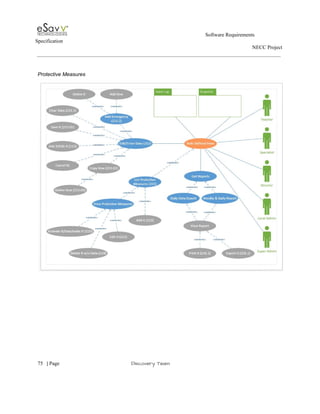
Protective Measures 
Protective Measures List  
The SUD provides a list of active and inactive protective measures. 
 
Show Snapshot. 
The SUD provides an overview of the Protective Measures module based on role.  
 
Data Entry. 
The SUD will present a list of protective measures for data entry for dates selected. 
 
Add Emergency. 
The SUD will allow the user to add an emergency protective measure which is tied to a 
day. This triggers a SUD generated event. 
 
Get Reports. 
The SUD will provide a process by which users may generate a variety of reports based 
on selection criteria. 
 
Event Log. 
            The SUD will display manual and SUD generated event logs. 
 BR: User will enter an event to protective measures, to module or across modules. 
Reports  
 
Aggregate report filters. 
2. Heather Morrison has requested that we remove some of the filters in the aggregate 
reports (i.e., she wants to see all students, not just those with value >x). 
 
Deleted teams showing up in reports. 
Add option to see or not see deleted teams.  Deleted teams are showing up in reports ­­ 
for example, "elementary" shows up in the EEC and aggregate master tables reports​. 


35​   | ​Page                                                       ​Discovery Team 
 
                                                                                                        Software Requirements 
Specification   
                                                                                                                                                                      NECC Project  
 
 
Admin  
 
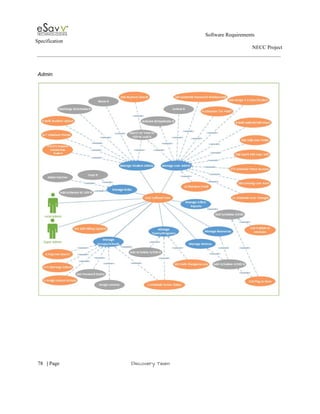
Manage User Admin. 
The SUD will allow user management. Role based local and Super Admin. 
 
Manage Student Admin. 
The SUD will allow student management. Role based local and Super Admin. 
Manage Roles 
The SUD will allow the management of roles. Role based local: Super Admin. 
 
Manage Groups/Schools 
The SUD will allow groups/schools management. Role based: Super Admin. 
 
Groups (Accounts) 
     Local Admin 
 
Manage Teams/Programs 
The SUD will allow teams/programs management. Role based local and Super Admin. 
 
Manage Notices 
The SUD will allow the management of notices. Role based local and Super Admin.  
 
Manage Resources. 
The SUD will allow the management of resources. Role based local and Super Admin. 
 
Manager Adhoc Reports. 
The SUD will allow the management of Adhoc Reports. Role based: Super Admin. 
Ability to publish Adhoc Report. 
 
Create Account in Blackboard. 
The SUD will create an account in Blackboard when one is created in ACE. 
 
Add some reports to admin. 
Recently added schools; recently discharged; total # students, total # users.   


36​   | ​Page                                                       ​Discovery Team 
 
                                                                                                        Software Requirements 
Specification   
                                                                                                                                                                      NECC Project  
 
 
Ability to make a school/team inactive for a period of time. 
Make school/team inactive (e.g., for the summer), then reactivate the school as needed. 
Would be option to remove the school from the web page school dropdown, but still have 
the option to include or not include them in reports.  If make a team inactive then they 
will not show up in that dropdown (though superadmin will still want to report on this). 
 
 
Batch include/exclude curricula when creating/editing a school (e.g., remove rights for UAE curricula). 
Need ability to assign lessons to a specific library (e.g., "UAE").  When creating a new 
school, Admin can then select which libraries the school will have access to (can include 
or exclude libraries).  We would like to maintain the existing functionality where we can 
individually select lessons to include/exclude within a library. 
 
 
Searching feature. 
The ability to search for a school rather than paginate through all schools; improve UI for 
the school management section. 
 
Ability to discharge a school. 
Ability to deactivate all users and students associated with a school (​soft delete​ so you 
can still run certain reports given the option to include discharged schools).  
 
Billing options. 
Add functionality to school required for billing (e.g., discounts, billing type, billing 
reports, scheduling, and other).  
 
The SUD will allow the Super Admin to capture billing information to run reports. 
 
BR: We still want to identify the number of students. 
 
Bulk upload students. 
A bulk upload tool to add multiple students at one time (similar to CB migration tool). 
Schools would fill out template and send to ACE and we would suck in data without 
having to re­type it.  Alternately, would be nice to go to a team and add students into that 
team (would avoid selecting from 3 drop­downs each time you add a student). 
 
     
37​   | ​Page                                                       ​Discovery Team 
 
                                                                                                        Software Requirements 
Specification   
                                                                                                                                                                      NECC Project  


Scheduling. 
Schedule student moves in advance & ability to put student on hold (i.e., create student 
but specify start date for billing).  Enter an effective move date (e.g., student will move 
from team A to team B in 1 month).  Enter the move now and it will take place 
automatically when the scheduled date arrives. Also, incorporate teacher access, so 
current teachers get 2 weeks to 1 month post­move and new teachers get access 2 weeks 
to 1 month prior to move.  Perhaps there is also a way to give teachers access to only the 
student who is moving and not the entire team​. 
 
Student move ­ curriculum considerations 
Student Move: When a student moves from one school to another and the receiving 
school does not have the master curriculum for any of the students active lessons – a 
message to the admin should appear indicating which lessons are missing.  If those 
lessons are not added to the school’s curriculum bank the those lessons do not appear in 
the student’s active list or on the student’s dashboard. 
 
Unhide student. 
When manually "unhide" a student, need to be consistent with giving "view only" access 
across all modules (this is not currently the case). 
 
Scheduling "hide student". 
Set date when student data will be "hidden". 
 
Ability to put new user on "hold". 
Ability to schedule user activation ­­ Add a new user and put them on "hold" so they do 
not receive the welcome email until a specified date (e.g., add the user in May, but they 
will not access ACE until August ­ put on hold until contract begins in August). 
 
Bulk upload/edit users. 
Ability to import ACE users or modifications from an Excel template. 
 
Retrieving customer email. 
Need a way to easily access all emails from each school to send group emails (i.e., for 
user census report). 


38​   | ​Page                                                       ​Discovery Team 
 
                                                                                                        Software Requirements 
Specification   
                                                                                                                                                                      NECC Project  
 
 
Schedule user changes in advance. 
Enter an effective user move or termination in advance.  Enter the change now and it will 
take place automatically when the scheduled date arrives. 
 
Password Help. 
Way to generate and send a new password for a user.  
 
Bulk change or add access to teams. 
Ability to add access to a group of users (e.g., access to a new training team). 
 
Ability to assign 1:1. 
Ability to assign 1 user to 1 student within a classroom. 
 
New user validation. 
Adding users with a previously existing account ­ how to handle this?  Someone coming 
back or existing user that wants to change primary email address.  
 (lower priority). 
 
Scheduling User. 
Ability to schedule user access to specific teams for a period of time (e.g., when a student 
moves from one team to another give access for old team for 2 weeks to finish paperwork 
OR give pre­access to new team to get to know the student). Consider automating this 
based on student move date (make this an option to check when scheduling a student 
move so that it would not always happen with outside customers).  
 
Editing User Info. 
Ability to edit users more quickly without having to open each user.  Quick links similar 
to Blackboard where there is a menu of option associated with the hyperlinked name, 
subset of the full options. 
 
Additional fields on user management screens. 
Add fields to user management screen so admin can gather information without having to 
open up each user.  Also, consistent display of information across student and user 
reports (e.g., last name, first name, etc.). 


39​   | ​Page                                                       ​Discovery Team 
 
                                                                                                        Software Requirements 
Specification   
                                                                                                                                                                      NECC Project  
 
 
Content  
 
Lessons Library 
 
3.1.1.1.9 Show Draft Lesson Library 
The SUD shows a list of all unpublished lessons that can be edited by Super Admin. 
 
3.1.1.1.10 "Behind the scenes" lesson notes. 
Ability to add notes to a lesson that can be accessed by Super Admin only (e.g., 
who submitted the lesson, when and why rights given/taken, rationale for edits 
made, etc.). 
 
3.1.1.1.11 Print Multi­Lesson  
Shared 
 
3.1.1.1.12 Add Shaping Lesson Type 
               Allow fourth type of lesson to be added called Shaping. 
  
   
3.1.1.1.13 Edit Lesson 
The SUD will allow Super Admin to edit unpublished lesson. This are assigned to 
Curriculum. 
 
3.1.1.1.14 Add/Delete/Insert Multiple Line 
 The SUD will allow for edit/delete/insert multiple sublevels for SA lesson 
(instructions) as part of procedures.  
 
3.1.1.1.15 Add multiple tasks in a TA 
The SUD will allow multiple list  of steps to a TA lesson. 
 
3.1.1.1.16 Drag and Drop to re­order steps in a TA 
The SUD will allow Super Admin to drag and drop to re­order steps in a TA. 
   
   
3.1.1.1.17 Assign Data Blocks to each level 
The SUD will allow Super Admin to assign a specific data type to a given level.  
 
     
40​   | ​Page                                                       ​Discovery Team 
 
                                                                                                        Software Requirements 
Specification   
                                                                                                                                                                      NECC Project  


3.1.1.1.18 Break Sublevels into Target 
The SUD will allow Super Admin to break sublevel of skills into smaller labeled 
(counted) items. SUD will maintain count of items in each sublevel. 
 
3.1.1.1.19 Add NT Contexts 
The SUD will allow Super Admin to add unrestricted amount of NT contexts. 
 
Show Published Library 
The SUD shows a list of all published lessons that can be edited by Super Admin​. 
 
3.1.1.1.20 "Behind the scenes" lesson notes 
Shared 
 
3.1.1.1.21 Print Multi­Lesson  
Shared 
 
3.1.1.1.22 Add Shaping Lesson Type 
             Shared. 
 
3.1.1.1.23 Edit Lesson. 
The SUD will allow Super Admin to edit unpublished lesson. This are assigned to 
Curriculum. 
 
3.1.1.1.24 Add/Delete/Insert Multiple Line 
Shared.  
 
3.1.1.1.25 Add multiple tasks in a TA 
Shared. 
 
3.1.1.1.26 Drag and Drop to re­order steps in a TA 
Shared. 
 
3.1.1.1.27 Assign Data Blocks to each level 
Shared 


41​   | ​Page                                                       ​Discovery Team 
 
                                                                                                        Software Requirements 
Specification   
                                                                                                                                                                      NECC Project  
 
 
3.1.1.1.28 Break Sublevels into Target 
Shared. 
 
3.1.1.1.29 Assign Curriculum to All Groups 
The SUD will allow the Super Admin to assign lessons to all groups at one time. 
The reverse is also true, to unassign all. 
 
3.1.1.1.30 Manage Rights 
The SUD will allow the Super Admin to manage which groups and schools have 
access to a lesson​. 
 
3.1.1.1.31 Track Lesson 
SUD to track inactive/discontinue lesson with new replaced lesson. 
 
3.1.1.1.32 User Alert 
The SUD will allow Super Admin to send alert to those with lesson active. 
 
3.1.1.1.33 Add NT Contexts 
Shared. 
 
View Discontinued Lesson 
The SUD shows a list of all discontinued lessons that can be edited by Super Admin. 
 
Edit Areas 
The SUD will allow Super Admin to edits areas. 
 
Edit Sections 
The SUD will allow Super Admin to edit sections areas. 
 
Edit Items 
The SUD will allow Super Admin to edit items areas. 
 
Edit Tags 
The SUD will allow ​Super Admin ​to edit tags. 
 
Edit Framework Links 
The SUD will allow ​Super Admin t​o edit Framework Links. 
 
     
42​   | ​Page                                                       ​Discovery Team 
 
                                                                                                        Software Requirements 
Specification   
                                                                                                                                                                      NECC Project  
 
 
Edit Countries 
The SUD will allow Super Admin to edit countries. 
 
Edit States 
The SUD will allow Super Admin to edit states. 
 
Edit Grades 
The SUD will allow Super Admin to edit grades. 
 
Edit Settings 
The SUD will allow Super Admin to edit settings. 
 
Edit IEP Years 
The SUD will allow Super Admin to edit IEP years. 
 
Edit Comments and Procedures 
The SUD will allow Super Admin to edit comments and procedures. 
 
Edit Related Materials 
The SUD will allow Super Admin to edit related materials. 
 
Edit Videos 
The SUD will allow Super Admin to edit videos 
 
Edit Data Sheet 
The SUD will allow Super Admin to edit data sheets areas. 
 
Edit Tags 
The SUD will allow Super Admin to edit tags. 
 
Edit Lesson Fields 
The SUD will allow Super Admin to edit lesson fields. 
 
New Prompt Type – M­L w/options 
The SUD will allow the Super Admin to create a teaching procedures. 
   
Restructure Teaching Procedures 
The SUD will allow the Super Admin separate procedure name into 2 different fields. 
 
     
43​   | ​Page                                                       ​Discovery Team 
 
                                                                                                        Software Requirements 
Specification   
                                                                                                                                                                      NECC Project  


Edit Core Skills 
The SUD will allow Super Admin to manage core skills. 
 
Edit Measurement Types 
The SUD will allow Super Admin to manage measurement types. 
 
 
Edit Performance Index Map 
The SUD will allow Super Admin to manage performance Index Map. 
 
Edit Performance Index Map­set 
The SUD will allow Super Admin to manage performance Index Map­sets. 
 
Edit Core Skills Documents 
The SUD manage Core Skills documents. 
 
Edit Skills Video 
The SUD will allow Super Admin to manage videos. 
 
Edit Assessment Types 
The SUD will allow Super Admin to manage assessment types. 
 
Edit Stimuli Types 
The SUD will allow Super Admin to manage stimuli types. 
 
Edit Number of Stimuli 
The SUD will allow Super Admin to manage number of stimuli types. 
 
Edit Docs Across Assessment 
The SUD will allow Super Admin to manage docs across assessment. 
 
Edit Instructions 
The SUD will allow Super Admin to manage instructions. 
 
Edit Data Sheets 
The SUD will allow Super Admin to manage data sheets. 


44​   | ​Page                                                       ​Discovery Team 
 
                                                                                                        Software Requirements 
Specification   
                                                                                                                                                                      NECC Project  
 
 
Edit Related Materials 
The SUD will allow Super Admin to manage related materials. 
 
Edit Reaching Media 
The SUD will allow Super Admin to manage reaching media. 
 
Edit PA Stimuli 
The SUD will allow Super Admin to manage edit PA stimuli. 
 
Edit Questions 
The SUD will allow Super Admin to manage questions. 
 
Edit Recommendations 
The SUD will allow Super Admin to manage recommendations. 
 
Edit Questions – Recommendations 
The SUD will allow Super Admin to manage questions – recommendations. 
 
Documents Options 
The SUD will allow the SA to upload any file types. 
 
Edit Behavior Category 
The SUD will allow the Super Admin to manage behavior category. 
 
Edit Behavior Subcategory 
The SUD will allow the Super Admin to manage behavior subcategory. 
 
Edit Event Types 
The SUD will allow the Super Admin to manage event types. 
 
Edit Types 
The SUD will allow the Super Admin to manage types. 
 
Edit SubTypes 
The SUD will allow the Super Admin to manage subtypes. 
 
Edit #Staff 
The SUD will allow the Super Admin to manage #staff. 
 
     
45​   | ​Page                                                       ​Discovery Team 
 
                                                                                                        Software Requirements 
Specification   
                                                                                                                                                                      NECC Project  


Edit Student Injury 
The SUD will allow the Super Admin to manage student injury. 
 
Edit Protective Measures 
The SUD will allow the Super Admin to manage protective measures. 
 
Edit Reason For Hold 
The SUD will allow the Super Admin to manage reason for hold. 
 
View PM Data Sheets 
The SUD will allow the Super Admin to manage PM data sheets. 
 
Manage Skills 
The SUD will allow the Super Admin to manage skills assessment. 
 
Manage Documents 
The SUD will allow the Super Admin to manage documents. 
 
Manage Video 
The SUD will allow the Super Admin to manage video. 
 
Manage Help text 
The SUD will allow the Super Admin to manage help text. 
 
Manage Advance Searching 
 
3.1.1.1.34 Hidden Tags/Links 
 ​The SUD will allow the Super Admin to add tags or links that are visible by only Super 
Admin, but searchable by all users. 
 
Auto­save/time out warning not functioning 
While working in content module, editing lesson, warning popped up to save.  Click OK 
and you are taken immediately to the log­in page, losing all changes. 
 
Option to "Select All" when assigning curriculum rights to schools 
In the pop­up for assigning curriculum rights to schools, the box for each school must be 
individually checked.  We would like the option to select all schools (and would retain 
 
     
46​   | ​Page                                                       ​Discovery Team 
 
                                                                                                        Software Requirements 
Specification   
                                                                                                                                                                      NECC Project  
 
 
the ability to fine­tune selections by checking/unchecking individual boxes if needed). 
 
PA data sheet document type too restrictive 
When uploading data sheets for PA module, only allows PDF documents.  Should allow 
all documents types. 
 
Assign data blocks to levels 
Ability to assign a data block to each level (required for tablet).  Need to map each data 
block to type of array that is shown on the tablet (e.g., array, no array, # trial, etc.). 
Consider adding data collection options such as rate, frequency, percentage. 
 
Objective character limit 
Increase character limit in objective field. 
 
Sublevels  
Ability to break sublevel into targets (taught as sets = Y, then can add Target A, Target B, 
Target C, etc.).  This is needed for the rotation to be displayed on the tablet.   
 
Ability to add contexts. 
Ability to add >8 contexts to IT lessons (on a pr lesson basis ­ right now if we add then it 
adds to all IT lessons).  Want this ability in content and on user side (activating and 
editing). 
 
Ability to order all lists 
Admin ability to order all lists. 
 
Delete function 
Have the ability to soft delete from all the  fields (e.g., data sheets, RM, CP, etc.)  Need to 
clean up old or unused items and/or replace with newer versions.  Need option to delete 
from all lessons, or leave attached to lessons, but soft delete from manage lists.  Want to 
have the option on content side to view items that have been soft deleted OR not to view 
in our lists.  Would also like the option to hard delete in some instances.  For items that 
appear in reports, by default the soft deleted item would not appear in the report, but 
would like to have the option for each report to include deleted items.  Need to discuss 
how this would work with Active lessons (get to keep it in active, but once you edit that 
 
     
47​   | ​Page                                                       ​Discovery Team 
 
                                                                                                        Software Requirements 
Specification   
                                                                                                                                                                      NECC Project  
 
 
field or archive the lesson they get to keep it. 
 
Manage # stimuli. 
Assessment type drop down within Manage # of Stimuli is not following the sort order 
like the other manage list, showing up in alphabetical order. 
 
. 
 
Alerts 
Alerts users that a lesson has been updated (this would be controlled by super admin and 
not completely automatic (e.g., publish a "major version" that triggers a "new" or 
"changes" alert.  Users can opt to apply changes or not. 
 
Also, message to users when the lesson they searched for using a specific ID# that has 
been discontinued.  When Admin discontinues a lesson, there should be an option to 
attach a message to user (i.e., "This lesson has been discontinued.  Please consider 
lessons 2345 and 23456"). 
 
Add report listing lessons for given skill(s) 
Ability to report on all lessons associated with a given skill (or set of skills).  Discussed 
as part of requirements meetings and was told it was a $0 CR. 
 
 
Change M­L teaching procedure 
Make a M­L teaching procedure where the user can specify which prompts to include in 
the hierarchy (just like the L­M hierarchy). 
 
Reorganize teaching procedures 
Content (manage teaching procedure): keep current name, add separate fields for 1) 
prompt type and 2) fading strategy. 
 
Content (draft/published): Ability to assign prompt types  (i.e., verbal, physical, gesture, 
or visual), determine order, and set default.  All fading strategies are available for the 
selected  types. 


48​   | ​Page                                                       ​Discovery Team 
 
                                                                                                        Software Requirements 
Specification   
                                                                                                                                                                      NECC Project  
 
 
Curriculum (learner profile): User can select preferred fading strategy. If activating using 
learner profile setting, lesson will activate with user­chosen fading strategy and default 
prompt type.  If editing, user can select alternate prompt type.  If the lesson has been 
assigned a teaching procedure without an associated fading strategy (e.g., shaping, video 
modeling, exclusion), they get the default assigned and a pop­up message alerting them 
that the chosen fading strategy was not available, please confirm that default is 
acceptable. 
 
Define teaching procedure hierarchy 
For any teaching procedure we need to define hierarchy (i.e., define where "I" and "step 
5" are least intrusive and "MG" and "Step 0" are most intrusive).  This is a new field and 
would be needed to facilitate item 286.  Also allows the TA prompts to be listed in order 
in which you might be teaching them.  Also allows us to order the visual display on the 
tablet. 
 
Create Account­Level Lesson 
The SUD will role based access to create lessons within their group account. 
The Super Admin will be able to reassign the created lesson. 
Logon 
The SUD will allow role based access to ACE. 
The SUD will allow password entered/changed/validation. 
Abstract API 
The SuD will allow a connection point to interface to third party systems. 
The SuD will offer XML over SOAP integration capabilities. 
The SuD will offer JSON over HTTP integration capabilities. 
 
4. Project High Level Use Case Diagrams  
 
Use case diagrams at its simplest provide the simplified and graphical representation of what the                             
system must actually do. This section contains use case diagrams of the Autism Curriculum                           
Encyclopedia (ACE) system. 


49​   | ​Page                                                       ​Discovery Team 
 
                                                                                                        Software Requirements 
Specification   
                                                                                                                                                                      NECC Project  
 
 
Domain Models 
Across all Modules 
Package: System Features 


50​   | ​Page                                                       ​Discovery Team 
 
                                                                                                        Software Requirements 
Specification   
                                                                                                                                                                      NECC Project  
 
 
Home 


51​   | ​Page                                                       ​Discovery Team 
 
                                                                                                        Software Requirements 
Specification   
                                                                                                                                                                      NECC Project  
 
 
Curriculum 


52​   | ​Page                                                       ​Discovery Team 
 
                                                                                                        Software Requirements 
Specification   
                                                                                                                                                                      NECC Project  
 
 
Package: Lesson Library 


53​   | ​Page                                                       ​Discovery Team 
 
                                                                                                        Software Requirements 
Specification   
                                                                                                                                                                      NECC Project  
 
 
Package: Active (Current) Lesson 


54​   | ​Page                                                       ​Discovery Team 
 
                                                                                                        Software Requirements 
Specification   
                                                                                                                                                                      NECC Project  
 
 
Archived Lesson 


55​   | ​Page                                                       ​Discovery Team 
 
                                                                                                        Software Requirements 
Specification   
                                                                                                                                                                      NECC Project  
 
 
Package: Reports 


56​   | ​Page                                                       ​Discovery Team 
 
                                                                                                        Software Requirements 
Specification   
                                                                                                                                                                      NECC Project  
 
 
Package: Documents 


57​   | ​Page                                                       ​Discovery Team 
 
                                                                                                        Software Requirements 
Specification   
                                                                                                                                                                      NECC Project  
 
 
Package: Documents­Inactive 


58​   | ​Page                                                       ​Discovery Team 
 
                                                                                                        Software Requirements 
Specification   
                                                                                                                                                                      NECC Project  
 
 
Package: Edit Lesson 


59​   | ​Page                                                       ​Discovery Team 
 
                                                                                                        Software Requirements 
Specification   
                                                                                                                                                                      NECC Project  
 
 
Package: Get Reports 


60​   | ​Page                                                       ​Discovery Team 
 
                                                                                                        Software Requirements 
Specification   
                                                                                                                                                                      NECC Project  
 
 
Package: Tablet 


61​   | ​Page                                                       ​Discovery Team 
 
                                                                                                        Software Requirements 
Specification   
                                                                                                                                                                      NECC Project  
 
 
Core Skills Assessment 


62​   | ​Page                                                       ​Discovery Team 
 
                                                                                                        Software Requirements 
Specification   
                                                                                                                                                                      NECC Project  
 
 
Skills Assessment 


63​   | ​Page                                                       ​Discovery Team 
 
                                                                                                        Software Requirements 
Specification   
                                                                                                                                                                      NECC Project  
 
 
Package: Step 1 


64​   | ​Page                                                       ​Discovery Team 
 
                                                                                                        Software Requirements 
Specification   
                                                                                                                                                                      NECC Project  
 
 
Package: Step 2 


65​   | ​Page                                                       ​Discovery Team 
 
                                                                                                        Software Requirements 
Specification   
                                                                                                                                                                      NECC Project  
 
 
Package: Step 3 


66​   | ​Page                                                       ​Discovery Team 
 
                                                                                                        Software Requirements 
Specification   
                                                                                                                                                                      NECC Project  
 
 
Package: Step 4 


67​   | ​Page                                                       ​Discovery Team 
 
                                                                                                        Software Requirements 
Specification   
                                                                                                                                                                      NECC Project  
 
 
Preference Assessment 


68​   | ​Page                                                       ​Discovery Team 
 
                                                                                                        Software Requirements 
Specification   
                                                                                                                                                                      NECC Project  
 
 
Package: Assessments 


69​   | ​Page                                                       ​Discovery Team 
 
                                                                                                        Software Requirements 
Specification   
                                                                                                                                                                      NECC Project  
 
 
Challenging Behavior 


70​   | ​Page                                                       ​Discovery Team 
 
                                                                                                        Software Requirements 
Specification   
                                                                                                                                                                      NECC Project  
 
 
Package: Snapshot 


71​   | ​Page                                                       ​Discovery Team 
 
                                                                                                        Software Requirements 
Specification   
                                                                                                                                                                      NECC Project  
 
 
Package: Behavior List 


72​   | ​Page                                                       ​Discovery Team 
 
                                                                                                        Software Requirements 
Specification   
                                                                                                                                                                      NECC Project  
 
 
Package: Data Entry 


73​   | ​Page                                                       ​Discovery Team 
 
                                                                                                        Software Requirements 
Specification   
                                                                                                                                                                      NECC Project  
 
 
Package: Event Log 


74​   | ​Page                                                       ​Discovery Team 
 
                                                                                                        Software Requirements 
Specification   
                                                                                                                                                                      NECC Project  
 
 
Protective Measures 


75​   | ​Page                                                       ​Discovery Team 
 
                                                                                                        Software Requirements 
Specification   
                                                                                                                                                                      NECC Project  
 
 
Package: Snapshot 


76​   | ​Page                                                       ​Discovery Team 
 
                                                                                                        Software Requirements 
Specification   
                                                                                                                                                                      NECC Project  
 
 
Package: Event Log 
 
 
Reports 


77​   | ​Page                                                       ​Discovery Team 
 
                                                                                                        Software Requirements 
Specification   
                                                                                                                                                                      NECC Project  
 
 
Admin 


78​   | ​Page                                                       ​Discovery Team 
 
                                                                                                        Software Requirements 
Specification   
                                                                                                                                                                      NECC Project  
 
 
Content 


79​   | ​Page                                                       ​Discovery Team 
 
                                                                                                        Software Requirements 
Specification   
                                                                                                                                                                      NECC Project  
 
 
Package: Curriculum Library 


80​   | ​Page                                                       ​Discovery Team 
 
                                                                                                        Software Requirements 
Specification   
                                                                                                                                                                      NECC Project  
 
 
Package: Draft 


81​   | ​Page                                                       ​Discovery Team 
 
                                                                                                        Software Requirements 
Specification   
                                                                                                                                                                      NECC Project  
 
 
Package: Published 


82​   | ​Page                                                       ​Discovery Team 
 
                                                                                                        Software Requirements 
Specification   
                                                                                                                                                                      NECC Project  
 
 
Package: Curriculum & Content 


83​   | ​Page                                                       ​Discovery Team 
 
                                                                                                        Software Requirements 
Specification   
                                                                                                                                                                      NECC Project  
 
 
Package: Core Skills Assessment 


84​   | ​Page                                                       ​Discovery Team 
 
                                                                                                        Software Requirements 
Specification   
                                                                                                                                                                      NECC Project  
 
 
Package: Preference Assessment 


85​   | ​Page                                                       ​Discovery Team 
 
                                                                                                        Software Requirements 
Specification   
                                                                                                                                                                      NECC Project  
 
 
Package: Challenging Behavior 


86​   | ​Page                                                       ​Discovery Team 
 
                                                                                                        Software Requirements 
Specification   
                                                                                                                                                                      NECC Project  
 
 
Package: Protective Measures 


87​   | ​Page                                                       ​Discovery Team 
 
                                                                                                        Software Requirements 
Specification   
                                                                                                                                                                      NECC Project  
 
 
Package: Skills Assessment 


API 


Logon 


88​   | ​Page                                                       ​Discovery Team 
 
                                                                                                        Software Requirements 
Specification   
                                                                                                                                                                      NECC Project  


89​   | ​Page                                                       ​Discovery Team 
 

SoftwareRequirementSpecification.docx