Oracle Assessment
A WORK REPORT SUBMITTED
IN PARTIAL FULLFILLMENT OF THE REQUIREMENT FOR THE DEGREE
Bachelor of Computer Application
Dezyne E’cole College
106/10, CIVIL LINES
AJMER
RAJASTHAN - 305001 (INDIA)
(JUNE, 2015)
www.dezyneecole.com
SUBMITTED BY
POOJA JAIN
CLASS: BCA 3RD
YEAR
1
PROJECT ABSTRACT
I am POOJA JAIN Student of 3rd year doing my Bachelor Degree in Computer
Application.
In the following pages I gave compiled my work learnt during my 3rd year at college. The
subject is RDBMS. These assessments are based on Relational Database Management
System that is useful to work with front end (user interface) application. Take example of
an online form if the user filling up an online form (E.g. SBI Form, Gmail registration Form)
on to the internet whenever he/she clicks on the submit button the field value is transfer to
the backend database and stored in Oracle, MS-Access, My SQL, SQL Server.
The purpose of a database is to store and retrieve related information later on. A database
server is the key to solving the problems for information management.
In these assessment we are using Oracle 10g as the Relation Database Software.
The back-end database is a database that is accessed by user indirectly through an
external application rather than by application programming stored within the database
itself or by low level manipulation of the data (e.g. through SQL commands).
Here in the following assessment we are performing the following operations:
1. Creating tables to store the data into tabular format(schemas of the data base)
2. Fetching the data from the database(Using Select Query)
3. Joining the multiple data tables into one(To reduces the redundancy of the data)
4. Nested Queries(Queries within Queries)
2
Content
Select Statement…………………………………………………………………………....8-17
Grouping Having………………………………………………………………………..….18-22
Functions……………………..……………………..……………………..………………..23-30
Coverage Joins……………………..……………………..……………………..….……..31-35
Nested and Correlated Subqueries……………………..……………………..…………36-38
3
1. Create an Employee Table (Emp) with Following Fields:
FIELDS DATA TYPE SIZE
EMPNO NUMBER 4
ENAME VARCHAR2 20
DEPTNO NUMBER 2
JOB VARCHAR2 20
SAL NUMBER 5
COMM NUMBER 4
MGR NUMBER 4
HIREDATE DATE -
Solution
create table Emp1
(EMPNO NUMBER (4),
ENAME VARCHAR2(20),
DEPTNO NUMBER (2),
JOB VARCHAR2(20),
SAL NUMBER (5),
COMM NUMBER (4),
MGR NUMBER (4),
HIREDATE DATE);
How to display structure of Employee Table
Solution
Desc Emp1
Output
Insert Atleast 5 records.
4
Solution
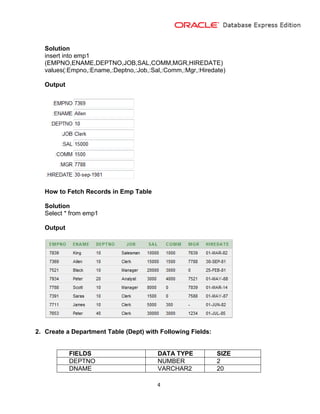
insert into emp1
(EMPNO,ENAME,DEPTNO,JOB,SAL,COMM,MGR,HIREDATE)
values(:Empno,:Ename,:Deptno,:Job,:Sal,:Comm,:Mgr,:Hiredate)
Output
How to Fetch Records in Emp Table
Solution
Select * from emp1
Output
2. Create a Department Table (Dept) with Following Fields:
FIELDS DATA TYPE SIZE
DEPTNO NUMBER 2
DNAME VARCHAR2 20
5
LOC (location) VARCHAR2 20
Solution
create table dept1
(DEPTNO NUMBER (2),
DNAME VARCHAR2 (20),
LOC VARCHAR2(20));
How to display structure of Department Table
Solution
Desc dept1
Output
Desc dept1
Insert Atleast 5 records.
Solution
insert into dept1
(DEPTNO,DNAME,LOC)
values(:Deptno,:Dname,:Loc)
Output
How to Fetch Records in Department Table
Solution
Select * from dept1
Output
6
3. Create a SalGrade Table with Following Fields:
FIELDS DATA TYPE SIZE
GRADE NUMBER 1
LOSAL NUMBER 5
HISAL NUMBER 5
Solution
create table SalGrade1
(GRADE NUMBER (1),
LOSAL NUMBER (5),
HISAL NUMBER (5));
How to display structure of SalGrade Table
Solution:
Desc SalGrade1
Output:
Insert Atleast 5 records.
Solution
insert into SalGrade1
(GRADE,LOSAL,HISAL)
values(:Grade,:Losal,:Hisal)
7
Output
How to Fetch Records from SalGrade Table
Solution
Select * from Salgrade1
Output
8
SELECT STATEMENT
1. List all the information about all Employees.
Solution
select * from emp1
Output
2. Display the Name of all Employees along with their Job.
Solution
select ename,job from emp1
Output
3. List all the Employee Names who is working with Department Number is 20.
Solution
select * from dept1 where deptno=20
9
Output
4. List the Name of all ‘ANALYST’ and ‘SALESMAN’.
Solution
Select ENAME from emp1 where JOB='Analyst' or JOB='Salesman'
Output
5. Display the details of those Employees who have joined before the end of Sept.
1981.
Solution
select * from emp1 where HIREDATE<='30-sep-1981'
Output
6. List the Employee Name and Employee Number, who is ‘MANAGER’.
Solution
select ENAME,EMPNO from emp1 where JOB='Manager'
Output
7. List the Name and Job of all Employees who are not ‘CLERK’.
10
Solution select ENAME,JOB from emp1 where JOB<>'Clerk'
Output
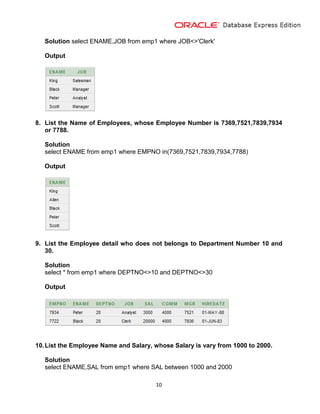
8. List the Name of Employees, whose Employee Number is 7369,7521,7839,7934
or 7788.
Solution
select ENAME from emp1 where EMPNO in(7369,7521,7839,7934,7788)
Output
9. List the Employee detail who does not belongs to Department Number 10 and
30.
Solution
select * from emp1 where DEPTNO<>10 and DEPTNO<>30
Output
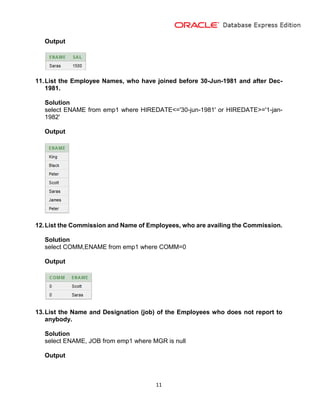
10.List the Employee Name and Salary, whose Salary is vary from 1000 to 2000.
Solution
select ENAME,SAL from emp1 where SAL between 1000 and 2000
11
Output
11.List the Employee Names, who have joined before 30-Jun-1981 and after Dec-
1981.
Solution
select ENAME from emp1 where HIREDATE<='30-jun-1981' or HIREDATE>='1-jan-
1982'
Output
12.List the Commission and Name of Employees, who are availing the Commission.
Solution
select COMM,ENAME from emp1 where COMM=0
Output
13.List the Name and Designation (job) of the Employees who does not report to
anybody.
Solution
select ENAME, JOB from emp1 where MGR is null
Output
12
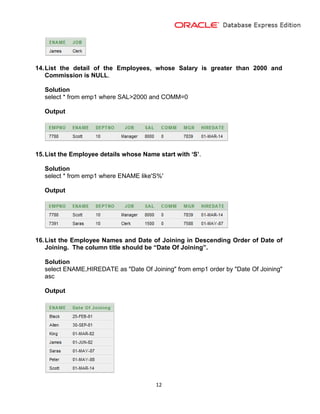
14.List the detail of the Employees, whose Salary is greater than 2000 and
Commission is NULL.
Solution
select * from emp1 where SAL>2000 and COMM=0
Output
15.List the Employee details whose Name start with ‘S’.
Solution
select * from emp1 where ENAME like'S%'
Output
16.List the Employee Names and Date of Joining in Descending Order of Date of
Joining. The column title should be “Date Of Joining”.
Solution
select ENAME,HIREDATE as "Date Of Joining" from emp1 order by "Date Of Joining"
asc
Output
13
17.List the Employee Name, Salary, Job and Department Number and display it in
Descending Order of Department Number, Ascending Order of Name and
Descending Order of Salary.
Solution
select ENAME,JOB,SAL,DEPTNO from emp1 order by DEPTNO desc,ENAME
asc,SAL desc
Output
18.List the Employee Name, Salary, PF, HRA, DA and Gross Salary; Order the result
in Ascending Order of Gross Salary. HRA is 50% of Salary, DA is 30% and PF is
10%.
Solution
select ENAME,SAL+SAL*50/100+SAL*30/100-SAL*10/100 as "Gross Salary" from
emp1 order by "Gross Salary" asc
Output
19.List Salesman from dept No 10.
14
Solution
select JOB,DEPTNO from emp1 where DEPTNO=10 and JOB='Salesman'
Output
20.List Clerks from 20 and salesman from 30. In the list the lowest earning employee
must at top.
Solution
select * from emp1 where JOB='Clerk' and DEPTNO=20 or JOB='Salesman' and
DEPTNO=10 order by SAL asc
Output
21.List different departments from Employee table.
Solution
select distinct DEPTNO from emp1
Output
22.List employees having “S” at the end of their Name.
Solution
select * from emp1 where ENAME like'%s'
Output
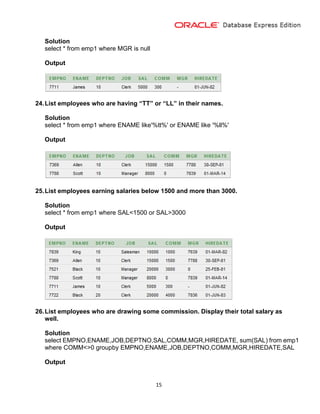
23.List employee who are not managed by anyone
15
Solution
select * from emp1 where MGR is null
Output
24.List employees who are having “TT” or “LL” in their names.
Solution
select * from emp1 where ENAME like'%tt%' or ENAME like '%ll%'
Output
25.List employees earning salaries below 1500 and more than 3000.
Solution
select * from emp1 where SAL<1500 or SAL>3000
Output
26.List employees who are drawing some commission. Display their total salary as
well.
Solution
select EMPNO,ENAME,JOB,DEPTNO,SAL,COMM,MGR,HIREDATE, sum(SAL) from emp1
where COMM<>0 groupby EMPNO,ENAME,JOB,DEPTNO,COMM,MGR,HIREDATE,SAL
Output
16
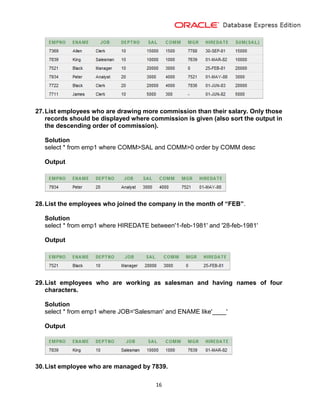
27.List employees who are drawing more commission than their salary. Only those
records should be displayed where commission is given (also sort the output in
the descending order of commission).
Solution
select * from emp1 where COMM>SAL and COMM>0 order by COMM desc
Output
28.List the employees who joined the company in the month of “FEB”.
Solution
select * from emp1 where HIREDATE between'1-feb-1981' and '28-feb-1981'
Output
29.List employees who are working as salesman and having names of four
characters.
Solution
select * from emp1 where JOB='Salesman' and ENAME like'____'
Output
30.List employee who are managed by 7839.
17
Solution
select * from emp1 where MGR=7839
Output
18
GROUPING, HAVING ETC.
1. List the Department number and total number of employees in each department.
Solution
Select count(EMPNO),DEPTNO from emp1 group by DEPTNO
Output
2. List the different Job names (Designation) available in the EMP table.
Solution
select distinct JOB from emp1
Output
3. List the Average Salary and number of Employees working in Department
number 20.
Solution
select avg(SAL),DEPTNO,count(EMPNO) from emp1 where DEPTNO=20 group by
DEPTNO
Output
4. List the Department Number and Total Salary payable at each Department.
Solution
19
select sum(SAL+COMM),DEPTNO from emp1 group by DEPTNO
Output
5. List the jobs and number of Employees in each Job. The result should be in
Descending Order of the number of Employees.
Solution
select job,count(empno) from emp group by job order by count(empno) desc
Output
6. List the Total salary, Maximum Salary, Minimum Salary and Average Salary of
Employees job wise, for Department number 20 only.
Solution
select sum(SAL+COMM),max(SAL),min(SAL),avg(SAL),JOB,DEPTNO from emp1 where
DEPTNO=20 group by JOB,DEPTNO
Output
7. List the Average Salary of each Job, excluding ‘MANAGERS’.
Solution
select avg(SAL),JOB from emp1 where JOB<>'Manager' group by JOB
Output
20
8. List the Average Monthly Salary for each Job within each department.
Solution
Select avg(SAL),JOB,DEPTNO from emp1 group by JOB,DEPTNO
Output
9. List the Average Salary of all departments, in which more than five people are
working.
Solution
select avg(SAL),DEPTNO from emp1 group by DEPTNO having count(EMPNO)>=5
Output
10.List the jobs of all Employees where Maximum Salary is greater than or equal to
5000.
Solution
select JOB from emp1 group by JOB having max(SAL)>=5000
Output
21
11.List the total salary and average salary of the Employees job wise, for
department number 20 and display only those rows having average salary
greater than 1000
Solution
Select sum(SAL+COMM),avg(SAL),JOB,DEPTNO from emp1
where DEPTNO=20group by JOB,DEPTNO having avg(SAL)>1000
Output
12.List the total salaries of only those departments in which at least 2 employees
are working.
Solution
select sum(SAL+COMM),DEPTNO,count(EMPNO) from emp1 group by DEPTNO
having count(EMPNO)=2
Output
13.List the Number of Employees Managed by Each Manager
Solution
select count(EMPNO),MGR from emp1 group by MGR
Output
22
14.List Average Commission Drawn by all Salesman
Solution
select avg(COMM),JOB from emp1 where JOB='Salesman' group by JOB
Output
23
FUNCTIONS
1. Calculate the remainder for two given numbers. (213,9)
Solution
select mod(213,9) from dual
Output
2. Calculate the power of two numbers entered by the users at run time of the query.
Solution
select power(:n1,:n2) from dual
Output
3. Enter a number and check whether it is negative or positive.
Solution
select sign(:n1) from dual
Output
4. Calculate the square root for the given number. (i.e. 10000).
Solution
select sqrt(10000) from dual
Output
24
5. Enter a float number and truncate it up to -2 places of decimal.
Solution
select trunc(:n1,-2) from dual
Output
6. Find the rounding value of 563.456, up to 2 places of decimal.
Solution
select round(563.456,2) from dual
Output
7. Accept two numbers and display its corresponding character with the
appropriate title.
Solution
select chr(:a1) "First", chr(:a2) "second" from dual
Output
8. Input two names and concatenate it separated by one space.
Solution
25
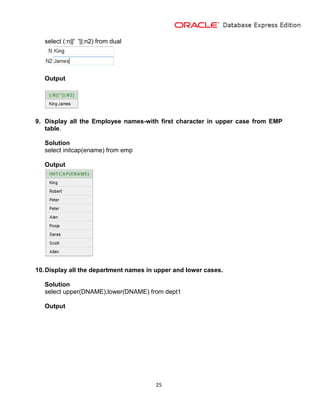
select (:n||' '||:n2) from dual
Output
9. Display all the Employee names-with first character in upper case from EMP
table.
Solution
select initcap(ename) from emp
Output
10.Display all the department names in upper and lower cases.
Solution
select upper(DNAME),lower(DNAME) from dept1
Output
26
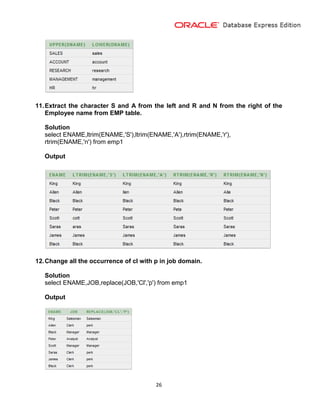
11.Extract the character S and A from the left and R and N from the right of the
Employee name from EMP table.
Solution
select ENAME,ltrim(ENAME,'S'),ltrim(ENAME,'A'),rtrim(ENAME,'r'),
rtrim(ENAME,'n') from emp1
Output
12.Change all the occurrence of cl with p in job domain.
Solution
select ENAME,JOB,replace(JOB,'Cl','p') from emp1
Output
27
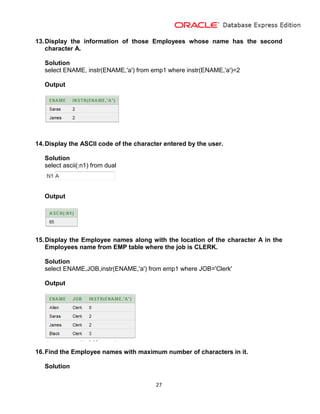
13.Display the information of those Employees whose name has the second
character A.
Solution
select ENAME, instr(ENAME,'a') from emp1 where instr(ENAME,'a')=2
Output
14.Display the ASCII code of the character entered by the user.
Solution
select ascii(:n1) from dual
Output
15.Display the Employee names along with the location of the character A in the
Employees name from EMP table where the job is CLERK.
Solution
select ENAME,JOB,instr(ENAME,'a') from emp1 where JOB='Clerk'
Output
16.Find the Employee names with maximum number of characters in it.
Solution
28
select max(length(ENAME)) from emp1
Output
17.Display the salary of those Employees who are getting salary in three figures.
Solution
select ENAME,substr(SAL,1,3) from emp1
Output
18.Display only the first three characters of the Employees name and their H RA
(salary * .20), truncated to decimal places.
Solution
select substr(ENAME,1,3),trunc(SAL*20/100) from emp1
Output
29
19.List all the Employee names, who have more than 20 years of experience in the
company.
Solution
select ENAME from emp1 where round(months_between
(sysdate,HIREDATE)/12)>20
Output
20.Display the name and job for every Employee, while displaying jobs, 'CLERK'
should be displayed as 'LDC' and 'MANAGER' should be displayed as 'MNGR'.
The other job title should be as they are.
Solution
select ENAME,JOB,decode(JOB,'Clerk','LDC','Manager','mngr') from emp1
Output
21.Display Date in the Following Format Tuesday 31 December 2002.
Solution
select to_char(sysdate,'day yy-month-yyyy') from dual
Output
30
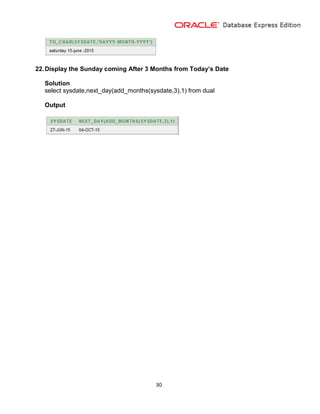
22.Display the Sunday coming After 3 Months from Today’s Date
Solution
select sysdate,next_day(add_months(sysdate,3),1) from dual
Output
31
Coverage Joins
1. List Employee Name, Job, Salary, Grade & the Location where they are working
Solution
select ENAME,JOB,SAL,GRADE,LOC
from emp1 join dept1
on emp1.DEPTNO=dept1.DEPTNO join SalGrade1
on SAL between LOSAL and HISAL
Output
2. Count the Employees For Each Salary Grade for Each Location
Solution
Select count(EMPNO),GRADE,LOC
From emp1 join dept1
On emp1.DEPTNO=dept1.DEPTNO join SalGrade1
On SAL between LOSAL and HISAL
Group by GRADE,LOC
Output
3. List the Average Salary for Those Employees who are drawing salaries of grade
1
Solution
32
Select avg(SAL)
From emp1 join SalGrade1
On SAL between LOSAL and HISAL
Where GRADE=3
Output
4. List Employee Name, Job, Salary Of those employees who are working in
Accounting or Research department but drawing salaries of grade 1
Solution
Select e.ENAME,e.JOB,e.SAL,d.DNAME,s.GRADE
From emp1 e join dept1 d
On e.DEPTNO=d.DEPTNO
Join SalGrade1 s
On SAL between LOSAL and HISAL
Where (d.DNAME='Sales' or d.DNAME='Management') and s.GRADE=1
Output
5. List employee Names, Manager Names & also Display the Employees who are
not managed by anyone
Solution
Select e.ENAME,m.ENAME
From emp1 e left outer join emp1 m
On e.EMPNO=m.MGR where e.MGR is null
Output
6. List Employees who are drawing salary more than the salary of SCOTT
33
Solution
Select e.* from emp1 e join emp1 f
On e.SAL>f.SAL where f.ENAME='Scott'
Output
7. List Employees who have joined the company before their managers
Solution
Select e.ENAME,e.HIREDATE,m.ENAME,m.HIREDATE
From emp1 e join emp1 m
On e.MGR=m.EMPNO where e.HIREDATE<m.HIREDATE
Output
8. List Employee Name, Job, Salary, Department No, Department name and
Location Of all employees Working at NEW YORK
Solution
Select ENAME,JOB,SAL,DNAME,LOC
From emp1 join dept1
On emp1.DEPTNO=dept1.DEPTNO
Where LOC='NewYork'
Output
34
9. List Employee Name, Job, Salary, Hire Date and Location Of all employees
reporting in Accounting or Sales Department
Solution
Select ENAME,JOB,SAL,HIREDATE,LOC,DNAME
From emp1 join dept1
On emp1.DEPTNO=dept1.DEPTNO
Where DNAME='Account' or DNAME='Sales'
Output
10.List Employee Name, Job, Salary, Department Name, Location for Employees
drawing salary more than 2000 and working at New York or Dallas
Solution
Select ENAME,JOB,SAL,DNAME,LOC
From emp1 join dept1
On emp1.DEPTNO=dept1.DEPTNO
Where LOC in('Dallas','NewYork')and SAL>2000
Output
11. List Employee Name, Job, Salary, Department Name, Location Of all employees,
also list the Department Details in which no employee is working
35
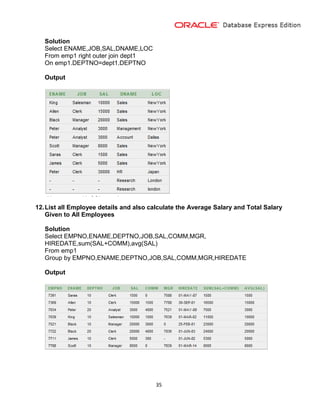
Solution
Select ENAME,JOB,SAL,DNAME,LOC
From emp1 right outer join dept1
On emp1.DEPTNO=dept1.DEPTNO
Output
12.List all Employee details and also calculate the Average Salary and Total Salary
Given to All Employees
Solution
Select EMPNO,ENAME,DEPTNO,JOB,SAL,COMM,MGR,
HIREDATE,sum(SAL+COMM),avg(SAL)
From emp1
Group by EMPNO,ENAME,DEPTNO,JOB,SAL,COMM,MGR,HIREDATE
Output
36
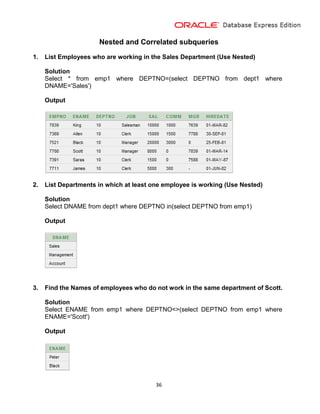
Nested and Correlated subqueries
1. List Employees who are working in the Sales Department (Use Nested)
Solution
Select * from emp1 where DEPTNO=(select DEPTNO from dept1 where
DNAME='Sales')
Output
2. List Departments in which at least one employee is working (Use Nested)
Solution
Select DNAME from dept1 where DEPTNO in(select DEPTNO from emp1)
Output
3. Find the Names of employees who do not work in the same department of Scott.
Solution
Select ENAME from emp1 where DEPTNO<>(select DEPTNO from emp1 where
ENAME='Scott')
Output
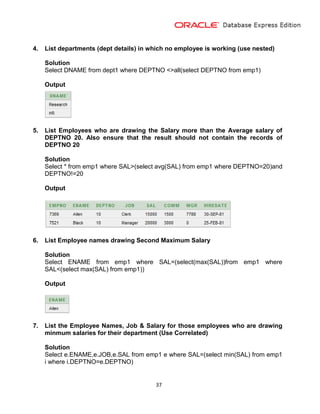
37
4. List departments (dept details) in which no employee is working (use nested)
Solution
Select DNAME from dept1 where DEPTNO <>all(select DEPTNO from emp1)
Output
5. List Employees who are drawing the Salary more than the Average salary of
DEPTNO 20. Also ensure that the result should not contain the records of
DEPTNO 20
Solution
Select * from emp1 where SAL>(select avg(SAL) from emp1 where DEPTNO=20)and
DEPTNO!=20
Output
6. List Employee names drawing Second Maximum Salary
Solution
Select ENAME from emp1 where SAL=(select(max(SAL))from emp1 where
SAL<(select max(SAL) from emp1))
Output
7. List the Employee Names, Job & Salary for those employees who are drawing
minmum salaries for their department (Use Correlated)
Solution
Select e.ENAME,e.JOB,e.SAL from emp1 e where SAL=(select min(SAL) from emp1
i where i.DEPTNO=e.DEPTNO)
38
Output
8. List the highest paid employee for each department using correlated sub query.
Solution
Select * from emp1 e where SAL=(select max(SAL) from emp1 i where
i.DEPTNO=e.DEPTNO)
Output
9. List Employees working for the same job type as of SCOTT and drawing more
than him (use Self Join)
Solution
Select e.* from emp1 e join emp1 f on e.JOB=f.JOB where e.SAL>f.SAL and
f.ENAME='Scott'
Output

Pooja Jain

  • 1.
    Oracle Assessment A WORKREPORT SUBMITTED IN PARTIAL FULLFILLMENT OF THE REQUIREMENT FOR THE DEGREE Bachelor of Computer Application Dezyne E’cole College 106/10, CIVIL LINES AJMER RAJASTHAN - 305001 (INDIA) (JUNE, 2015) www.dezyneecole.com SUBMITTED BY POOJA JAIN CLASS: BCA 3RD YEAR
  • 2.
    1 PROJECT ABSTRACT I amPOOJA JAIN Student of 3rd year doing my Bachelor Degree in Computer Application. In the following pages I gave compiled my work learnt during my 3rd year at college. The subject is RDBMS. These assessments are based on Relational Database Management System that is useful to work with front end (user interface) application. Take example of an online form if the user filling up an online form (E.g. SBI Form, Gmail registration Form) on to the internet whenever he/she clicks on the submit button the field value is transfer to the backend database and stored in Oracle, MS-Access, My SQL, SQL Server. The purpose of a database is to store and retrieve related information later on. A database server is the key to solving the problems for information management. In these assessment we are using Oracle 10g as the Relation Database Software. The back-end database is a database that is accessed by user indirectly through an external application rather than by application programming stored within the database itself or by low level manipulation of the data (e.g. through SQL commands). Here in the following assessment we are performing the following operations: 1. Creating tables to store the data into tabular format(schemas of the data base) 2. Fetching the data from the database(Using Select Query) 3. Joining the multiple data tables into one(To reduces the redundancy of the data) 4. Nested Queries(Queries within Queries)
  • 3.
  • 4.
    3 1. Create anEmployee Table (Emp) with Following Fields: FIELDS DATA TYPE SIZE EMPNO NUMBER 4 ENAME VARCHAR2 20 DEPTNO NUMBER 2 JOB VARCHAR2 20 SAL NUMBER 5 COMM NUMBER 4 MGR NUMBER 4 HIREDATE DATE - Solution create table Emp1 (EMPNO NUMBER (4), ENAME VARCHAR2(20), DEPTNO NUMBER (2), JOB VARCHAR2(20), SAL NUMBER (5), COMM NUMBER (4), MGR NUMBER (4), HIREDATE DATE); How to display structure of Employee Table Solution Desc Emp1 Output Insert Atleast 5 records.
  • 5.
    4 Solution insert into emp1 (EMPNO,ENAME,DEPTNO,JOB,SAL,COMM,MGR,HIREDATE) values(:Empno,:Ename,:Deptno,:Job,:Sal,:Comm,:Mgr,:Hiredate) Output Howto Fetch Records in Emp Table Solution Select * from emp1 Output 2. Create a Department Table (Dept) with Following Fields: FIELDS DATA TYPE SIZE DEPTNO NUMBER 2 DNAME VARCHAR2 20
  • 6.
    5 LOC (location) VARCHAR220 Solution create table dept1 (DEPTNO NUMBER (2), DNAME VARCHAR2 (20), LOC VARCHAR2(20)); How to display structure of Department Table Solution Desc dept1 Output Desc dept1 Insert Atleast 5 records. Solution insert into dept1 (DEPTNO,DNAME,LOC) values(:Deptno,:Dname,:Loc) Output How to Fetch Records in Department Table Solution Select * from dept1 Output
  • 7.
    6 3. Create aSalGrade Table with Following Fields: FIELDS DATA TYPE SIZE GRADE NUMBER 1 LOSAL NUMBER 5 HISAL NUMBER 5 Solution create table SalGrade1 (GRADE NUMBER (1), LOSAL NUMBER (5), HISAL NUMBER (5)); How to display structure of SalGrade Table Solution: Desc SalGrade1 Output: Insert Atleast 5 records. Solution insert into SalGrade1 (GRADE,LOSAL,HISAL) values(:Grade,:Losal,:Hisal)
  • 8.
    7 Output How to FetchRecords from SalGrade Table Solution Select * from Salgrade1 Output
  • 9.
    8 SELECT STATEMENT 1. Listall the information about all Employees. Solution select * from emp1 Output 2. Display the Name of all Employees along with their Job. Solution select ename,job from emp1 Output 3. List all the Employee Names who is working with Department Number is 20. Solution select * from dept1 where deptno=20
  • 10.
    9 Output 4. List theName of all ‘ANALYST’ and ‘SALESMAN’. Solution Select ENAME from emp1 where JOB='Analyst' or JOB='Salesman' Output 5. Display the details of those Employees who have joined before the end of Sept. 1981. Solution select * from emp1 where HIREDATE<='30-sep-1981' Output 6. List the Employee Name and Employee Number, who is ‘MANAGER’. Solution select ENAME,EMPNO from emp1 where JOB='Manager' Output 7. List the Name and Job of all Employees who are not ‘CLERK’.
  • 11.
    10 Solution select ENAME,JOBfrom emp1 where JOB<>'Clerk' Output 8. List the Name of Employees, whose Employee Number is 7369,7521,7839,7934 or 7788. Solution select ENAME from emp1 where EMPNO in(7369,7521,7839,7934,7788) Output 9. List the Employee detail who does not belongs to Department Number 10 and 30. Solution select * from emp1 where DEPTNO<>10 and DEPTNO<>30 Output 10.List the Employee Name and Salary, whose Salary is vary from 1000 to 2000. Solution select ENAME,SAL from emp1 where SAL between 1000 and 2000
  • 12.
    11 Output 11.List the EmployeeNames, who have joined before 30-Jun-1981 and after Dec- 1981. Solution select ENAME from emp1 where HIREDATE<='30-jun-1981' or HIREDATE>='1-jan- 1982' Output 12.List the Commission and Name of Employees, who are availing the Commission. Solution select COMM,ENAME from emp1 where COMM=0 Output 13.List the Name and Designation (job) of the Employees who does not report to anybody. Solution select ENAME, JOB from emp1 where MGR is null Output
  • 13.
    12 14.List the detailof the Employees, whose Salary is greater than 2000 and Commission is NULL. Solution select * from emp1 where SAL>2000 and COMM=0 Output 15.List the Employee details whose Name start with ‘S’. Solution select * from emp1 where ENAME like'S%' Output 16.List the Employee Names and Date of Joining in Descending Order of Date of Joining. The column title should be “Date Of Joining”. Solution select ENAME,HIREDATE as "Date Of Joining" from emp1 order by "Date Of Joining" asc Output
  • 14.
    13 17.List the EmployeeName, Salary, Job and Department Number and display it in Descending Order of Department Number, Ascending Order of Name and Descending Order of Salary. Solution select ENAME,JOB,SAL,DEPTNO from emp1 order by DEPTNO desc,ENAME asc,SAL desc Output 18.List the Employee Name, Salary, PF, HRA, DA and Gross Salary; Order the result in Ascending Order of Gross Salary. HRA is 50% of Salary, DA is 30% and PF is 10%. Solution select ENAME,SAL+SAL*50/100+SAL*30/100-SAL*10/100 as "Gross Salary" from emp1 order by "Gross Salary" asc Output 19.List Salesman from dept No 10.
  • 15.
    14 Solution select JOB,DEPTNO fromemp1 where DEPTNO=10 and JOB='Salesman' Output 20.List Clerks from 20 and salesman from 30. In the list the lowest earning employee must at top. Solution select * from emp1 where JOB='Clerk' and DEPTNO=20 or JOB='Salesman' and DEPTNO=10 order by SAL asc Output 21.List different departments from Employee table. Solution select distinct DEPTNO from emp1 Output 22.List employees having “S” at the end of their Name. Solution select * from emp1 where ENAME like'%s' Output 23.List employee who are not managed by anyone
  • 16.
    15 Solution select * fromemp1 where MGR is null Output 24.List employees who are having “TT” or “LL” in their names. Solution select * from emp1 where ENAME like'%tt%' or ENAME like '%ll%' Output 25.List employees earning salaries below 1500 and more than 3000. Solution select * from emp1 where SAL<1500 or SAL>3000 Output 26.List employees who are drawing some commission. Display their total salary as well. Solution select EMPNO,ENAME,JOB,DEPTNO,SAL,COMM,MGR,HIREDATE, sum(SAL) from emp1 where COMM<>0 groupby EMPNO,ENAME,JOB,DEPTNO,COMM,MGR,HIREDATE,SAL Output
  • 17.
    16 27.List employees whoare drawing more commission than their salary. Only those records should be displayed where commission is given (also sort the output in the descending order of commission). Solution select * from emp1 where COMM>SAL and COMM>0 order by COMM desc Output 28.List the employees who joined the company in the month of “FEB”. Solution select * from emp1 where HIREDATE between'1-feb-1981' and '28-feb-1981' Output 29.List employees who are working as salesman and having names of four characters. Solution select * from emp1 where JOB='Salesman' and ENAME like'____' Output 30.List employee who are managed by 7839.
  • 18.
    17 Solution select * fromemp1 where MGR=7839 Output
  • 19.
    18 GROUPING, HAVING ETC. 1.List the Department number and total number of employees in each department. Solution Select count(EMPNO),DEPTNO from emp1 group by DEPTNO Output 2. List the different Job names (Designation) available in the EMP table. Solution select distinct JOB from emp1 Output 3. List the Average Salary and number of Employees working in Department number 20. Solution select avg(SAL),DEPTNO,count(EMPNO) from emp1 where DEPTNO=20 group by DEPTNO Output 4. List the Department Number and Total Salary payable at each Department. Solution
  • 20.
    19 select sum(SAL+COMM),DEPTNO fromemp1 group by DEPTNO Output 5. List the jobs and number of Employees in each Job. The result should be in Descending Order of the number of Employees. Solution select job,count(empno) from emp group by job order by count(empno) desc Output 6. List the Total salary, Maximum Salary, Minimum Salary and Average Salary of Employees job wise, for Department number 20 only. Solution select sum(SAL+COMM),max(SAL),min(SAL),avg(SAL),JOB,DEPTNO from emp1 where DEPTNO=20 group by JOB,DEPTNO Output 7. List the Average Salary of each Job, excluding ‘MANAGERS’. Solution select avg(SAL),JOB from emp1 where JOB<>'Manager' group by JOB Output
  • 21.
    20 8. List theAverage Monthly Salary for each Job within each department. Solution Select avg(SAL),JOB,DEPTNO from emp1 group by JOB,DEPTNO Output 9. List the Average Salary of all departments, in which more than five people are working. Solution select avg(SAL),DEPTNO from emp1 group by DEPTNO having count(EMPNO)>=5 Output 10.List the jobs of all Employees where Maximum Salary is greater than or equal to 5000. Solution select JOB from emp1 group by JOB having max(SAL)>=5000 Output
  • 22.
    21 11.List the totalsalary and average salary of the Employees job wise, for department number 20 and display only those rows having average salary greater than 1000 Solution Select sum(SAL+COMM),avg(SAL),JOB,DEPTNO from emp1 where DEPTNO=20group by JOB,DEPTNO having avg(SAL)>1000 Output 12.List the total salaries of only those departments in which at least 2 employees are working. Solution select sum(SAL+COMM),DEPTNO,count(EMPNO) from emp1 group by DEPTNO having count(EMPNO)=2 Output 13.List the Number of Employees Managed by Each Manager Solution select count(EMPNO),MGR from emp1 group by MGR Output
  • 23.
    22 14.List Average CommissionDrawn by all Salesman Solution select avg(COMM),JOB from emp1 where JOB='Salesman' group by JOB Output
  • 24.
    23 FUNCTIONS 1. Calculate theremainder for two given numbers. (213,9) Solution select mod(213,9) from dual Output 2. Calculate the power of two numbers entered by the users at run time of the query. Solution select power(:n1,:n2) from dual Output 3. Enter a number and check whether it is negative or positive. Solution select sign(:n1) from dual Output 4. Calculate the square root for the given number. (i.e. 10000). Solution select sqrt(10000) from dual Output
  • 25.
    24 5. Enter afloat number and truncate it up to -2 places of decimal. Solution select trunc(:n1,-2) from dual Output 6. Find the rounding value of 563.456, up to 2 places of decimal. Solution select round(563.456,2) from dual Output 7. Accept two numbers and display its corresponding character with the appropriate title. Solution select chr(:a1) "First", chr(:a2) "second" from dual Output 8. Input two names and concatenate it separated by one space. Solution
  • 26.
    25 select (:n||' '||:n2)from dual Output 9. Display all the Employee names-with first character in upper case from EMP table. Solution select initcap(ename) from emp Output 10.Display all the department names in upper and lower cases. Solution select upper(DNAME),lower(DNAME) from dept1 Output
  • 27.
    26 11.Extract the characterS and A from the left and R and N from the right of the Employee name from EMP table. Solution select ENAME,ltrim(ENAME,'S'),ltrim(ENAME,'A'),rtrim(ENAME,'r'), rtrim(ENAME,'n') from emp1 Output 12.Change all the occurrence of cl with p in job domain. Solution select ENAME,JOB,replace(JOB,'Cl','p') from emp1 Output
  • 28.
    27 13.Display the informationof those Employees whose name has the second character A. Solution select ENAME, instr(ENAME,'a') from emp1 where instr(ENAME,'a')=2 Output 14.Display the ASCII code of the character entered by the user. Solution select ascii(:n1) from dual Output 15.Display the Employee names along with the location of the character A in the Employees name from EMP table where the job is CLERK. Solution select ENAME,JOB,instr(ENAME,'a') from emp1 where JOB='Clerk' Output 16.Find the Employee names with maximum number of characters in it. Solution
  • 29.
    28 select max(length(ENAME)) fromemp1 Output 17.Display the salary of those Employees who are getting salary in three figures. Solution select ENAME,substr(SAL,1,3) from emp1 Output 18.Display only the first three characters of the Employees name and their H RA (salary * .20), truncated to decimal places. Solution select substr(ENAME,1,3),trunc(SAL*20/100) from emp1 Output
  • 30.
    29 19.List all theEmployee names, who have more than 20 years of experience in the company. Solution select ENAME from emp1 where round(months_between (sysdate,HIREDATE)/12)>20 Output 20.Display the name and job for every Employee, while displaying jobs, 'CLERK' should be displayed as 'LDC' and 'MANAGER' should be displayed as 'MNGR'. The other job title should be as they are. Solution select ENAME,JOB,decode(JOB,'Clerk','LDC','Manager','mngr') from emp1 Output 21.Display Date in the Following Format Tuesday 31 December 2002. Solution select to_char(sysdate,'day yy-month-yyyy') from dual Output
  • 31.
    30 22.Display the Sundaycoming After 3 Months from Today’s Date Solution select sysdate,next_day(add_months(sysdate,3),1) from dual Output
  • 32.
    31 Coverage Joins 1. ListEmployee Name, Job, Salary, Grade & the Location where they are working Solution select ENAME,JOB,SAL,GRADE,LOC from emp1 join dept1 on emp1.DEPTNO=dept1.DEPTNO join SalGrade1 on SAL between LOSAL and HISAL Output 2. Count the Employees For Each Salary Grade for Each Location Solution Select count(EMPNO),GRADE,LOC From emp1 join dept1 On emp1.DEPTNO=dept1.DEPTNO join SalGrade1 On SAL between LOSAL and HISAL Group by GRADE,LOC Output 3. List the Average Salary for Those Employees who are drawing salaries of grade 1 Solution
  • 33.
    32 Select avg(SAL) From emp1join SalGrade1 On SAL between LOSAL and HISAL Where GRADE=3 Output 4. List Employee Name, Job, Salary Of those employees who are working in Accounting or Research department but drawing salaries of grade 1 Solution Select e.ENAME,e.JOB,e.SAL,d.DNAME,s.GRADE From emp1 e join dept1 d On e.DEPTNO=d.DEPTNO Join SalGrade1 s On SAL between LOSAL and HISAL Where (d.DNAME='Sales' or d.DNAME='Management') and s.GRADE=1 Output 5. List employee Names, Manager Names & also Display the Employees who are not managed by anyone Solution Select e.ENAME,m.ENAME From emp1 e left outer join emp1 m On e.EMPNO=m.MGR where e.MGR is null Output 6. List Employees who are drawing salary more than the salary of SCOTT
  • 34.
    33 Solution Select e.* fromemp1 e join emp1 f On e.SAL>f.SAL where f.ENAME='Scott' Output 7. List Employees who have joined the company before their managers Solution Select e.ENAME,e.HIREDATE,m.ENAME,m.HIREDATE From emp1 e join emp1 m On e.MGR=m.EMPNO where e.HIREDATE<m.HIREDATE Output 8. List Employee Name, Job, Salary, Department No, Department name and Location Of all employees Working at NEW YORK Solution Select ENAME,JOB,SAL,DNAME,LOC From emp1 join dept1 On emp1.DEPTNO=dept1.DEPTNO Where LOC='NewYork' Output
  • 35.
    34 9. List EmployeeName, Job, Salary, Hire Date and Location Of all employees reporting in Accounting or Sales Department Solution Select ENAME,JOB,SAL,HIREDATE,LOC,DNAME From emp1 join dept1 On emp1.DEPTNO=dept1.DEPTNO Where DNAME='Account' or DNAME='Sales' Output 10.List Employee Name, Job, Salary, Department Name, Location for Employees drawing salary more than 2000 and working at New York or Dallas Solution Select ENAME,JOB,SAL,DNAME,LOC From emp1 join dept1 On emp1.DEPTNO=dept1.DEPTNO Where LOC in('Dallas','NewYork')and SAL>2000 Output 11. List Employee Name, Job, Salary, Department Name, Location Of all employees, also list the Department Details in which no employee is working
  • 36.
    35 Solution Select ENAME,JOB,SAL,DNAME,LOC From emp1right outer join dept1 On emp1.DEPTNO=dept1.DEPTNO Output 12.List all Employee details and also calculate the Average Salary and Total Salary Given to All Employees Solution Select EMPNO,ENAME,DEPTNO,JOB,SAL,COMM,MGR, HIREDATE,sum(SAL+COMM),avg(SAL) From emp1 Group by EMPNO,ENAME,DEPTNO,JOB,SAL,COMM,MGR,HIREDATE Output
  • 37.
    36 Nested and Correlatedsubqueries 1. List Employees who are working in the Sales Department (Use Nested) Solution Select * from emp1 where DEPTNO=(select DEPTNO from dept1 where DNAME='Sales') Output 2. List Departments in which at least one employee is working (Use Nested) Solution Select DNAME from dept1 where DEPTNO in(select DEPTNO from emp1) Output 3. Find the Names of employees who do not work in the same department of Scott. Solution Select ENAME from emp1 where DEPTNO<>(select DEPTNO from emp1 where ENAME='Scott') Output
  • 38.
    37 4. List departments(dept details) in which no employee is working (use nested) Solution Select DNAME from dept1 where DEPTNO <>all(select DEPTNO from emp1) Output 5. List Employees who are drawing the Salary more than the Average salary of DEPTNO 20. Also ensure that the result should not contain the records of DEPTNO 20 Solution Select * from emp1 where SAL>(select avg(SAL) from emp1 where DEPTNO=20)and DEPTNO!=20 Output 6. List Employee names drawing Second Maximum Salary Solution Select ENAME from emp1 where SAL=(select(max(SAL))from emp1 where SAL<(select max(SAL) from emp1)) Output 7. List the Employee Names, Job & Salary for those employees who are drawing minmum salaries for their department (Use Correlated) Solution Select e.ENAME,e.JOB,e.SAL from emp1 e where SAL=(select min(SAL) from emp1 i where i.DEPTNO=e.DEPTNO)
  • 39.
    38 Output 8. List thehighest paid employee for each department using correlated sub query. Solution Select * from emp1 e where SAL=(select max(SAL) from emp1 i where i.DEPTNO=e.DEPTNO) Output 9. List Employees working for the same job type as of SCOTT and drawing more than him (use Self Join) Solution Select e.* from emp1 e join emp1 f on e.JOB=f.JOB where e.SAL>f.SAL and f.ENAME='Scott' Output