Production
Deployment
Shah Ali Newaj Topu
Premises
Now a days we do not host application in our
environment.
We choose from a number of cloud provider
and use services from them.
IaaS and PaaS
IaaS provides virtual machines. You can host
whatever you want.
PaaS provide a platform to upload your Web
Application and it takes care of it.
We mostly use IaaS.
Choosing Right Server
Always choose separate App and DB server. It
helps for load balancing.
App Server can have less RAM than DB server
DB Server should have more RAM.
A standard Startup project setup is 4GB App
Server and 8 GB DB Server
Server Credential
Set a very complex administrator Password for
the Server.
Check your password with an online checker.
A second user should be created for
deployment which will be given to the
Developer to deploy.
Software Licensing
No cracked/pirated software can be installed in
production such as pirated SQL Server.
All components should have proper license to
be used such as UI library.
Firewall
● All the ports of the application server should be closed
except 80(HTTP) ,443(HTTPS) and 3389 (RDS).
● All the port of the DB server should be blocked except
DB Port and RDS. DB Port should be allowed only from
Application Server.
● All RDS should be allowed only from our office network
IP.
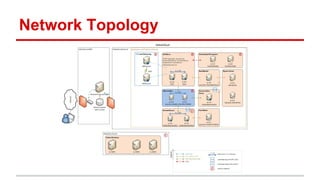
Network Topology
Reverse Proxy
We should always push to have a reverse
proxy in front of the application server.
This allows the application server be hidden
from external world.
HTTPS
All application ever hosted by Selise should be accessible
only under HTTPS unless specifically stated otherwise. All
services (REST, WCF, Web Service) should also be hosted
in HTTPS.
A self signed certificate is good for initial testing. But a real
certificate must be purchased very soon.
Hosting Application
Application should be properly minified and use CDN
wherever possible.
Application should be hosted in the application server in a
way so that there is no real dependency with any specific
configuration of the server. It should not access any
specific drive/folder and should not use the hardcoded
IP/basepath of the server in any way.
Setting Up Database
● sa user of the DB server must have a complex
password.
● sa user cannot be used by the application server. Users
should be created for the application server in a way so
that it only has access to the right table. For example
application server never updates the lookup tables so
that user must not have write access to the lookup
tables.
● The Database must be setup using a script.
Load Balancing
Application must use database based session
management because in case of load
balancing inproc session will fail.
Distributed File System
No application should put/read files from the
local file system of the Application Server.
All file access should be done on a DFS such
as Amazon S3.
Selise Manual Deployment Process
Request For Server
Buy Server
Setup Network and Security
Deploy and Test
Verify Security and revoke access
Dev
Mgt
Sys
Dev
Sys
Continuous Deployment
We will introduce continuous deployment for
future products starting with Selise App Suite.

Production deployment

  • 1.
  • 2.
    Premises Now a dayswe do not host application in our environment. We choose from a number of cloud provider and use services from them.
  • 3.
    IaaS and PaaS IaaSprovides virtual machines. You can host whatever you want. PaaS provide a platform to upload your Web Application and it takes care of it. We mostly use IaaS.
  • 4.
    Choosing Right Server Alwayschoose separate App and DB server. It helps for load balancing. App Server can have less RAM than DB server DB Server should have more RAM. A standard Startup project setup is 4GB App Server and 8 GB DB Server
  • 5.
    Server Credential Set avery complex administrator Password for the Server. Check your password with an online checker. A second user should be created for deployment which will be given to the Developer to deploy.
  • 6.
    Software Licensing No cracked/piratedsoftware can be installed in production such as pirated SQL Server. All components should have proper license to be used such as UI library.
  • 7.
    Firewall ● All theports of the application server should be closed except 80(HTTP) ,443(HTTPS) and 3389 (RDS). ● All the port of the DB server should be blocked except DB Port and RDS. DB Port should be allowed only from Application Server. ● All RDS should be allowed only from our office network IP.
  • 8.
  • 9.
    Reverse Proxy We shouldalways push to have a reverse proxy in front of the application server. This allows the application server be hidden from external world.
  • 10.
    HTTPS All application everhosted by Selise should be accessible only under HTTPS unless specifically stated otherwise. All services (REST, WCF, Web Service) should also be hosted in HTTPS. A self signed certificate is good for initial testing. But a real certificate must be purchased very soon.
  • 11.
    Hosting Application Application shouldbe properly minified and use CDN wherever possible. Application should be hosted in the application server in a way so that there is no real dependency with any specific configuration of the server. It should not access any specific drive/folder and should not use the hardcoded IP/basepath of the server in any way.
  • 12.
    Setting Up Database ●sa user of the DB server must have a complex password. ● sa user cannot be used by the application server. Users should be created for the application server in a way so that it only has access to the right table. For example application server never updates the lookup tables so that user must not have write access to the lookup tables. ● The Database must be setup using a script.
  • 13.
    Load Balancing Application mustuse database based session management because in case of load balancing inproc session will fail.
  • 14.
    Distributed File System Noapplication should put/read files from the local file system of the Application Server. All file access should be done on a DFS such as Amazon S3.
  • 15.
    Selise Manual DeploymentProcess Request For Server Buy Server Setup Network and Security Deploy and Test Verify Security and revoke access Dev Mgt Sys Dev Sys
  • 16.
    Continuous Deployment We willintroduce continuous deployment for future products starting with Selise App Suite.