Create Stage
Process Journal

What I need to do Tools/materials
next
used

Date

Time taken

What I have done

11.12.2013
(at home)

1

Invite the actors (my mother and Writing up the Pen, paper, and
my father), explaining what they script for each role the
storyboard
need to do
design

11.14.2013
(lesson)

1

Look at some similar products on Using
Windows Firefox,
line to see what they have said in Movie Maker to Word/paper
create a title page
their videos
for the video
Write up a script of scene

11.16.2013
(at home)

2.5

Filming scene 1: I ask my mother
to go out to water her flowers on
the balcony, and then she falls
down

Filling the gap Camera,
PC,
between scene 1 Imaxthon Explorer
and scene 2 using
Movie Maker

I didn’t film the scene that the
mother is taken to the hospital;
and I think I will find a photo or a
short scene in some TV programs
to show a patient is brought to
hospital instead
Filming scene 2: the daughter
comes to see her mother
I have found some sound effects
on the internet

11.17.2013
(at home)

2

Filling the gap between scene 1 On the internet, Camera,
PC,
find some videos Windows Movie
and scene 2
that introduce the Maker, Imaxthon
Put scene 1 and scene 2 together procedure
of
Filming scene 3: the conversation angioplasty or PCI
between the doctor and the
daughter (played by my father
and I)

Explorer

Add short animations to the
video to demonstrate how the
stent will work in a human body

11.19.2013
(at home)

1

Filming scene 4: the procedure of Filming scene 5
percutaneous
coronary
intervention (again, I need to use
a mixture of video, images and
cut of films because I cannot
really present an operating room

11.23.2013
(at home)

1

Filming scene 5 in the park near Adding an ending Camera, tripod
page to the video
to my house
using
Windows
Movie Maker

11.23.2013
(at home)

1.5

Add an ending page to the video

11.24.2013
(at home)

1

Put all the five scenes together

1

Filling in every gap Windows
between scenes
Maker

Movie

Fill in the gaps, making the movie Add the other Windows Movie
more
smooth
and
more sounds that are Maker, Imaxthon
comfortable to watch
needed to the film Explorer
Add different sound effects

11.28.2013
(lesson)

Camera, Imaxthon
Explorer, Windows
Movie Maker

Add a background
sound

Add the other sounds that are Check the product Windows Movie
needed to the film
Maker, Firefox
Make sure it is
And now I change my mind, finished
because I don’t think it is
necessary for this video to have a
background sound; moreover, if I
add a background sound, it will
become strange when
characters are talking

the

12.3.2013
(at home)

1

Check the finished product once Use the test plan Windows Movie
to examine it to Maker, Word
again
see whether it is a
good product or
not

12.5.2013
(lesson)

1

I have started to evaluate the Justify what I have Word
done
for
the
product
product, and how I
I have used the test plan to see
did that
whether my product is good or
See if there is
not so good as I expected
anything that I can
still improve
Think about how I
can do even better
next time

I’m sorry that I don’t know how to put the video onto my blog; I will bring it to the lesson

Create Stage

  • 1.
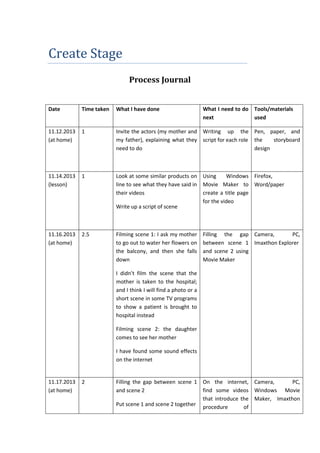
    Create Stage Process Journal WhatI need to do Tools/materials next used Date Time taken What I have done 11.12.2013 (at home) 1 Invite the actors (my mother and Writing up the Pen, paper, and my father), explaining what they script for each role the storyboard need to do design 11.14.2013 (lesson) 1 Look at some similar products on Using Windows Firefox, line to see what they have said in Movie Maker to Word/paper create a title page their videos for the video Write up a script of scene 11.16.2013 (at home) 2.5 Filming scene 1: I ask my mother to go out to water her flowers on the balcony, and then she falls down Filling the gap Camera, PC, between scene 1 Imaxthon Explorer and scene 2 using Movie Maker I didn’t film the scene that the mother is taken to the hospital; and I think I will find a photo or a short scene in some TV programs to show a patient is brought to hospital instead Filming scene 2: the daughter comes to see her mother I have found some sound effects on the internet 11.17.2013 (at home) 2 Filling the gap between scene 1 On the internet, Camera, PC, find some videos Windows Movie and scene 2 that introduce the Maker, Imaxthon Put scene 1 and scene 2 together procedure of
  • 2.
    Filming scene 3:the conversation angioplasty or PCI between the doctor and the daughter (played by my father and I) Explorer Add short animations to the video to demonstrate how the stent will work in a human body 11.19.2013 (at home) 1 Filming scene 4: the procedure of Filming scene 5 percutaneous coronary intervention (again, I need to use a mixture of video, images and cut of films because I cannot really present an operating room 11.23.2013 (at home) 1 Filming scene 5 in the park near Adding an ending Camera, tripod page to the video to my house using Windows Movie Maker 11.23.2013 (at home) 1.5 Add an ending page to the video 11.24.2013 (at home) 1 Put all the five scenes together 1 Filling in every gap Windows between scenes Maker Movie Fill in the gaps, making the movie Add the other Windows Movie more smooth and more sounds that are Maker, Imaxthon comfortable to watch needed to the film Explorer Add different sound effects 11.28.2013 (lesson) Camera, Imaxthon Explorer, Windows Movie Maker Add a background sound Add the other sounds that are Check the product Windows Movie needed to the film Maker, Firefox Make sure it is And now I change my mind, finished because I don’t think it is necessary for this video to have a background sound; moreover, if I add a background sound, it will
  • 3.
    become strange when charactersare talking the 12.3.2013 (at home) 1 Check the finished product once Use the test plan Windows Movie to examine it to Maker, Word again see whether it is a good product or not 12.5.2013 (lesson) 1 I have started to evaluate the Justify what I have Word done for the product product, and how I I have used the test plan to see did that whether my product is good or See if there is not so good as I expected anything that I can still improve Think about how I can do even better next time I’m sorry that I don’t know how to put the video onto my blog; I will bring it to the lesson