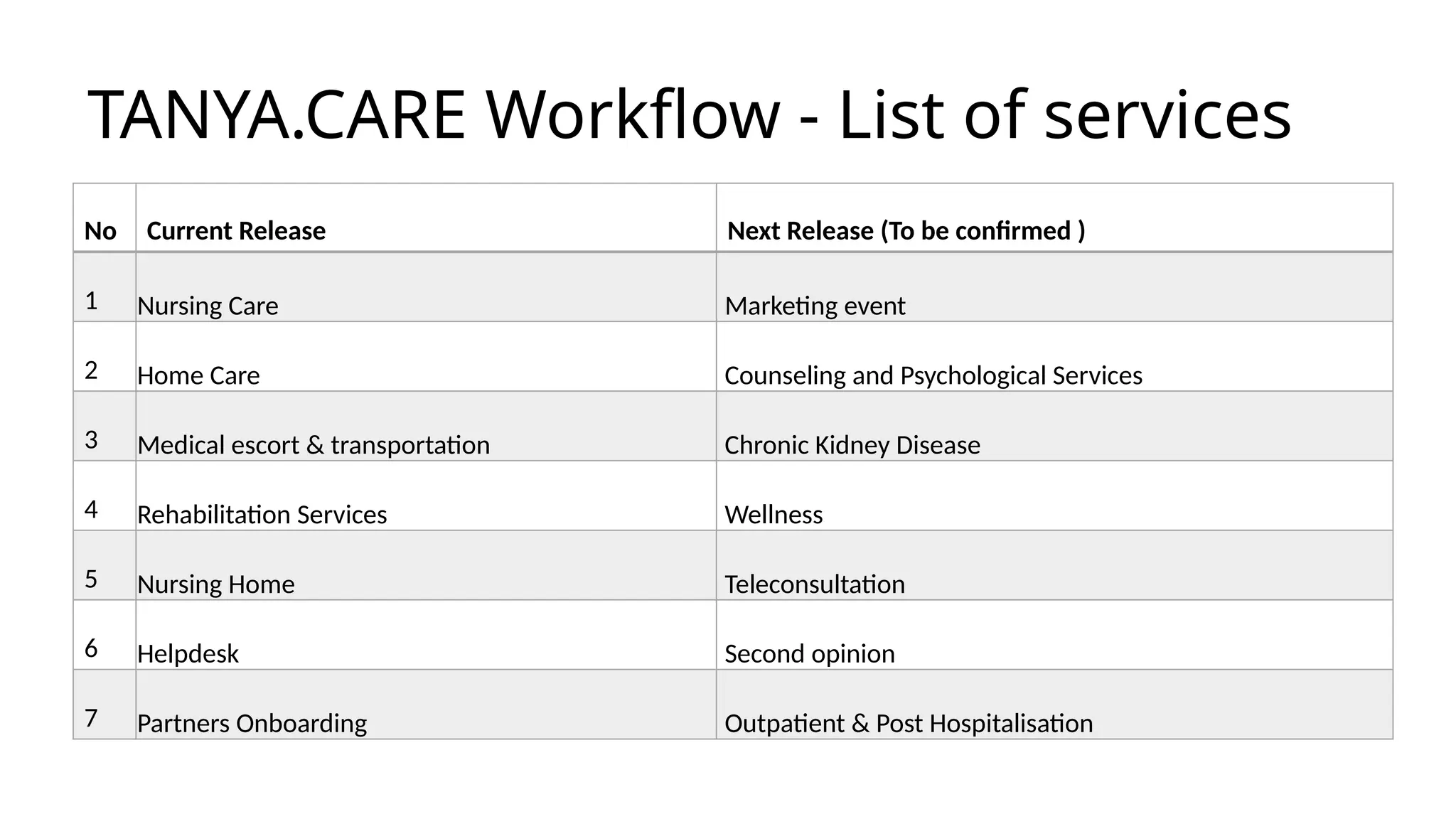
TANYA.CARE Workflow - List of services
No Current Release Next Release (To be confirmed )
1 Nursing Care Marketing event
2 Home Care Counseling and Psychological Services
3 Medical escort & transportation Chronic Kidney Disease
4 Rehabilitation Services Wellness
5 Nursing Home Teleconsultation
6 Helpdesk Second opinion
7 Partners Onboarding Outpatient & Post Hospitalisation
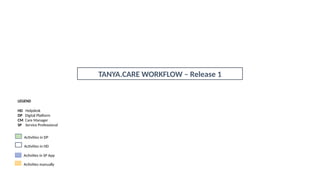
TANYA.CARE WORKFLOW – Release 1
LEGEND
HD Helpdesk
DP Digital Platform
CM Care Manager
SP Service Professional
Activities in DP
Activities in HD
Activities in SP App
Activities manually
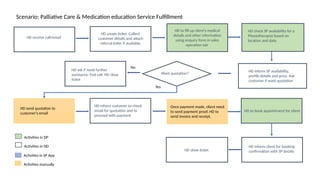
Scenario: Palliative Care & Medication education Service Fulfillment
HD receive call/email
HD create ticket. Collect
customer details and attach
referral letter if available.
HD check SP availability for a
Physiotherapist based on
location and date.
HD inform SP availability,
profile details and price. Ask
customer if want quotation
Want quotation?
HD ask if need further
assistance. End call. HD close
ticket
HD send quotation to
customer’s email
HD inform customer to check
email for quotation and to
proceed with payment
Once payment made, client need
to send payment proof, HD to
send invoice and receipt.
HD close ticket
HD to book appointment for client
Yes
No
HD inform client for booking
confirmation with SP details
HD to fill up client’s medical
details and other information
using enquiry form in sales
operation tab
Activities in DP
Activities in HD
Activities in SP App
Activities manually
SP received appointment
notification via App with
client details.
SP deliver service
SP click start
appointment – check
in- upon arriving
SP click check out
SP complete case note
SP complete client’s medical
reports using the online
assessment in SP App or/and
manually upload other reports
Helpdesk/Service
Supervisor/Service Coordinator
to book appointment on DP or
SP App
Client to choose date & time
of next appointment and
inform to SP during the
session, or call helpdesk.
Scenario: Palliative Care & Medication education Service Fulfillment
Helpdesk to inform client the
booking confirmation
SP click direction on
the App to navigate to
the Service Location
Medication Education-for palliative
client to take their opioids as
prescribed and advice on other
supportive medication for symptoms
control. Arrangements of the
medications according to timing (eg:
Pill code/blister pack).
if poor compliances suggestion for
home visit for Initial Assessment
and tele consultation by
pharmacist/doctors
1.Receive medication delivery at the
door-step.
2.Medication top-up Reminder.
3.Review medication base on the
prognosis & deterioration.
4.Education of the importance of
medication management (adherence,
safety & storage
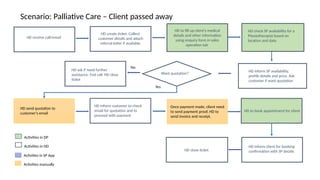
Scenario: Palliative Care – Client passed away
HD receive call/email
HD create ticket. Collect
customer details and attach
referral letter if available.
HD check SP availability for a
Physiotherapist based on
location and date.
HD inform SP availability,
profile details and price. Ask
customer if want quotation
Want quotation?
HD ask if need further
assistance. End call. HD close
ticket
HD send quotation to
customer’s email
HD inform customer to check
email for quotation and to
proceed with payment
Once payment made, client need
to send payment proof, HD to
send invoice and receipt.
HD close ticket
HD to book appointment for client
Yes
No
HD inform client for booking
confirmation with SP details
HD to fill up client’s medical
details and other information
using enquiry form in sales
operation tab
Activities in DP
Activities in HD
Activities in SP App
Activities manually
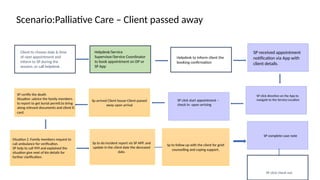
SP received appointment
notification via App with
client details.
SP click start appointment –
check in- upon arriving
SP click check out
SP complete case note
SP certify the death
Situation :advice the family members
to report to get burial permit.to bring
along relevant documents and client IC
card.
Helpdesk/Service
Supervisor/Service Coordinator
to book appointment on DP or
SP App
Client to choose date & time
of next appointment and
inform to SP during the
session, or call helpdesk.
Scenario:Palliative Care – Client passed away
Helpdesk to inform client the
booking confirmation
SP click direction on the App to
navigate to the Service Location
Situation 2 :Family members request to
call ambulance for verification.
SP help to call 999 and explained the
situation give next of kin details for
further clarification.
Sp to do incident report vis SP APP. and
update in the client date the deceased
date.
Sp to follow up with the client for grief
counselling and coping support.
Sp arrived Client house-Client passed
away upon arrival

Process Flow_Palliative for healthcare.pptx

  • 1.
    TANYA.CARE Workflow -List of services No Current Release Next Release (To be confirmed ) 1 Nursing Care Marketing event 2 Home Care Counseling and Psychological Services 3 Medical escort & transportation Chronic Kidney Disease 4 Rehabilitation Services Wellness 5 Nursing Home Teleconsultation 6 Helpdesk Second opinion 7 Partners Onboarding Outpatient & Post Hospitalisation
  • 2.
    TANYA.CARE WORKFLOW –Release 1 LEGEND HD Helpdesk DP Digital Platform CM Care Manager SP Service Professional Activities in DP Activities in HD Activities in SP App Activities manually
  • 3.
    Scenario: Palliative Care& Medication education Service Fulfillment HD receive call/email HD create ticket. Collect customer details and attach referral letter if available. HD check SP availability for a Physiotherapist based on location and date. HD inform SP availability, profile details and price. Ask customer if want quotation Want quotation? HD ask if need further assistance. End call. HD close ticket HD send quotation to customer’s email HD inform customer to check email for quotation and to proceed with payment Once payment made, client need to send payment proof, HD to send invoice and receipt. HD close ticket HD to book appointment for client Yes No HD inform client for booking confirmation with SP details HD to fill up client’s medical details and other information using enquiry form in sales operation tab Activities in DP Activities in HD Activities in SP App Activities manually
  • 4.
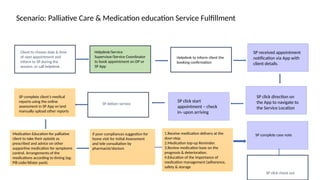
    SP received appointment notificationvia App with client details. SP deliver service SP click start appointment – check in- upon arriving SP click check out SP complete case note SP complete client’s medical reports using the online assessment in SP App or/and manually upload other reports Helpdesk/Service Supervisor/Service Coordinator to book appointment on DP or SP App Client to choose date & time of next appointment and inform to SP during the session, or call helpdesk. Scenario: Palliative Care & Medication education Service Fulfillment Helpdesk to inform client the booking confirmation SP click direction on the App to navigate to the Service Location Medication Education-for palliative client to take their opioids as prescribed and advice on other supportive medication for symptoms control. Arrangements of the medications according to timing (eg: Pill code/blister pack). if poor compliances suggestion for home visit for Initial Assessment and tele consultation by pharmacist/doctors 1.Receive medication delivery at the door-step. 2.Medication top-up Reminder. 3.Review medication base on the prognosis & deterioration. 4.Education of the importance of medication management (adherence, safety & storage
  • 5.
    Scenario: Palliative Care– Client passed away HD receive call/email HD create ticket. Collect customer details and attach referral letter if available. HD check SP availability for a Physiotherapist based on location and date. HD inform SP availability, profile details and price. Ask customer if want quotation Want quotation? HD ask if need further assistance. End call. HD close ticket HD send quotation to customer’s email HD inform customer to check email for quotation and to proceed with payment Once payment made, client need to send payment proof, HD to send invoice and receipt. HD close ticket HD to book appointment for client Yes No HD inform client for booking confirmation with SP details HD to fill up client’s medical details and other information using enquiry form in sales operation tab Activities in DP Activities in HD Activities in SP App Activities manually
  • 6.
    SP received appointment notificationvia App with client details. SP click start appointment – check in- upon arriving SP click check out SP complete case note SP certify the death Situation :advice the family members to report to get burial permit.to bring along relevant documents and client IC card. Helpdesk/Service Supervisor/Service Coordinator to book appointment on DP or SP App Client to choose date & time of next appointment and inform to SP during the session, or call helpdesk. Scenario:Palliative Care – Client passed away Helpdesk to inform client the booking confirmation SP click direction on the App to navigate to the Service Location Situation 2 :Family members request to call ambulance for verification. SP help to call 999 and explained the situation give next of kin details for further clarification. Sp to do incident report vis SP APP. and update in the client date the deceased date. Sp to follow up with the client for grief counselling and coping support. Sp arrived Client house-Client passed away upon arrival