Now the 'Find Alternative' process is analyzing different alternatives…Meanwhile we would like to present to you other powerful ActiveBase solutions…ActiveBase PriorityTM Quick TourLearn how ActiveBase PriorityTM optimizes existing server resource allocation (I/O and CPU) to transactions based on business priorities - guaranteeing SLA and improving response times1ActiveBase Ltd. All Rights reserved
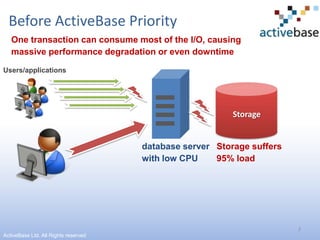
2Before ActiveBase PriorityOne transaction can consume most of the I/O, causing massive performance degradation or even downtimeUsers/applicationsStoragedatabase server with low CPUStorage suffers 95% load ActiveBase Ltd. All Rights reserved
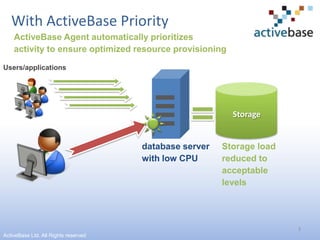
3With ActiveBase PriorityActiveBase Agent automatically prioritizes activity to ensure optimized resource provisioning Users/applicationsStoragedatabase server with low CPUStorage load reduced to acceptablelevelsActiveBase Ltd. All Rights reserved
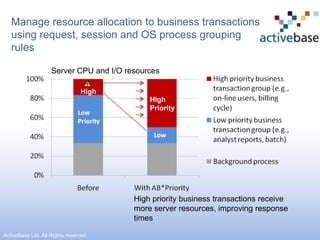
Manage resource allocation to business transactions using request, session and OS process grouping rulesServer CPU and I/O resourcesHighHighPriorityHigh priority business transactions receive more server resources, improving responsetimesActiveBase Ltd. All Rights reserved
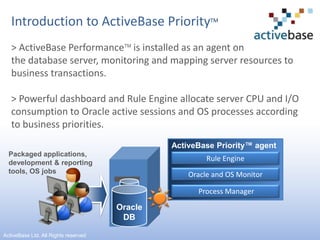
Introduction to ActiveBase PriorityTM> ActiveBase PerformanceTM is installed as an agent on the database server, monitoring and mapping server resources to business transactions.> Powerful dashboard and Rule Engine allocate server CPU and I/O consumption to Oracle active sessions and OS processes according to business priorities.ActiveBase Priority™ agentPackaged applications,development & reportingtools, OS jobsRule EngineOracle and OS Monitor Process ManagerOracleDB5ActiveBase Ltd. All Rights reserved
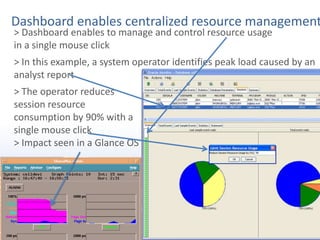
6Dashboard enables centralized resource management > Dashboard enables to manage and control resource usage                           in a single mouse click> In this example, a system operator identifies peak load caused by an analyst report> The operator reduces session resource consumption by 90% with a single mouse click> Impact seen in a Glance OS
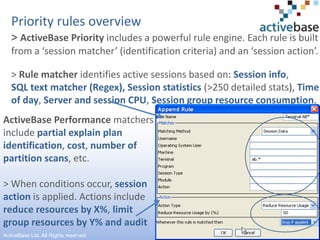
Priority rules overview> ActiveBase Priority includes a powerful rule engine. Each rule is built from a ‘session matcher’ (identification criteria) and an ‘session action’. > Rule matcher identifies active sessions based on: Session info, SQL text matcher (Regex), Session statistics(>250 detailed stats), Time of day, Server and session CPU, Session group resource consumption.ActiveBase Performance matchers includepartial explain plan identification, cost, number of partition scans,etc.> When conditions occur,session action is applied. Actions include reduce resources by X%, limit group resources by Y% and audit7ActiveBase Ltd. All Rights reserved
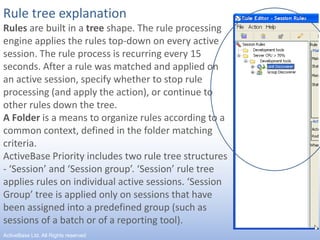
Rule tree explanationRules are built in a tree shape. The rule processing engine applies the rules top-down on every active session. The rule process is recurring every 15 seconds. After a rule was matched and applied on an active session, specify whether to stop rule processing (and apply the action), or continue to other rules down the tree.A Folder is a means to organize rules according to a common context, defined in the folder matching criteria.ActiveBase Priority includes two rule tree structures - ‘Session’ and ‘Session group’. ‘Session’ rule tree applies rules on individual active sessions. ‘Session Group’ tree is applied only on sessions that have been assigned into a predefined group (such as sessions of a batch or of a reporting tool).8ActiveBase Ltd. All Rights reserved
First usage example: control analyst resource consumption during peak times> To prevent performance degradation and guarantee SLA, whenever the server reaches peak-load (e.g., defined by ‘Server CPU exceeds 80%’), analyst reports and less-important batch work resources (CPU and I/O) will be reduced by 50%.> This example is easily built using three rules, presented in the next slide.9ActiveBase Ltd. All Rights reserved
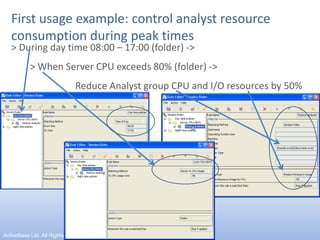
First usage example: control analyst resource consumption during peak times> During day time 08:00 – 17:00 (folder) ->> When Server CPU exceeds 80% (folder) -> 		Reduce Analyst group CPU and I/O resources by 50%10ActiveBase Ltd. All Rights reserved
Second usage example: preventing ‘run-away’ batches that might cause performance degradation> Night operation includes running various batches. In some cases,   due to a bug, code-change or the database, these batches might run out of control, causing resource outage and performance degradation to other night batches that will not be completed in due time.> ActiveBase enables to set resource thresholds to batches.             When resource consumption exceeds the threshold, resource consumption is automatically reduced by 50% - ensuring that other work meets SLA.> This example is easily built using three rules, presented in the next slide.11ActiveBase Ltd. All Rights reserved
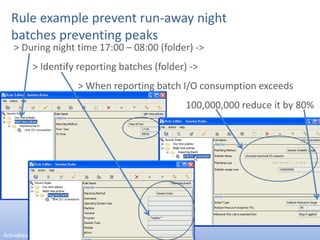
Rule example prevent run-away night batches preventing peaks> During night time 17:00 – 08:00 (folder) ->> Identify reporting batches (folder) -> 		> When reporting batch I/O consumption exceeds 						     100,000,000 reduce it by 80%12ActiveBase Ltd. All Rights reserved
Summary> Guarantee SLA and improve performance during peak loads> ActiveBase Priority provides an intuitive operator dashboard and powerful rules for managing both Oracle and Operating System processes.> It manages multiple Oracle instances sharing a single server.> Powerful virtual database consolidated environments management.> Controls which sessions will be executed (e.g., when CPU>85%, limit ‘Select’ SQL from developers).> Installation and configuration in less than a day.> Centralized management with audit trail and reporting.> Easy, clear and friendly GUI enables concise one-day  training.13ActiveBase Ltd. All Rights reserved

Priority Quick Tour

  • 1.
    Now the 'FindAlternative' process is analyzing different alternatives…Meanwhile we would like to present to you other powerful ActiveBase solutions…ActiveBase PriorityTM Quick TourLearn how ActiveBase PriorityTM optimizes existing server resource allocation (I/O and CPU) to transactions based on business priorities - guaranteeing SLA and improving response times1ActiveBase Ltd. All Rights reserved
  • 2.
    2Before ActiveBase PriorityOnetransaction can consume most of the I/O, causing massive performance degradation or even downtimeUsers/applicationsStoragedatabase server with low CPUStorage suffers 95% load ActiveBase Ltd. All Rights reserved
  • 3.
    3With ActiveBase PriorityActiveBaseAgent automatically prioritizes activity to ensure optimized resource provisioning Users/applicationsStoragedatabase server with low CPUStorage load reduced to acceptablelevelsActiveBase Ltd. All Rights reserved
  • 4.
    Manage resource allocationto business transactions using request, session and OS process grouping rulesServer CPU and I/O resourcesHighHighPriorityHigh priority business transactions receive more server resources, improving responsetimesActiveBase Ltd. All Rights reserved
  • 5.
    Introduction to ActiveBasePriorityTM> ActiveBase PerformanceTM is installed as an agent on the database server, monitoring and mapping server resources to business transactions.> Powerful dashboard and Rule Engine allocate server CPU and I/O consumption to Oracle active sessions and OS processes according to business priorities.ActiveBase Priority™ agentPackaged applications,development & reportingtools, OS jobsRule EngineOracle and OS Monitor Process ManagerOracleDB5ActiveBase Ltd. All Rights reserved
  • 6.
    6Dashboard enables centralizedresource management > Dashboard enables to manage and control resource usage in a single mouse click> In this example, a system operator identifies peak load caused by an analyst report> The operator reduces session resource consumption by 90% with a single mouse click> Impact seen in a Glance OS
  • 7.
    Priority rules overview>ActiveBase Priority includes a powerful rule engine. Each rule is built from a ‘session matcher’ (identification criteria) and an ‘session action’. > Rule matcher identifies active sessions based on: Session info, SQL text matcher (Regex), Session statistics(>250 detailed stats), Time of day, Server and session CPU, Session group resource consumption.ActiveBase Performance matchers includepartial explain plan identification, cost, number of partition scans,etc.> When conditions occur,session action is applied. Actions include reduce resources by X%, limit group resources by Y% and audit7ActiveBase Ltd. All Rights reserved
  • 8.
    Rule tree explanationRulesare built in a tree shape. The rule processing engine applies the rules top-down on every active session. The rule process is recurring every 15 seconds. After a rule was matched and applied on an active session, specify whether to stop rule processing (and apply the action), or continue to other rules down the tree.A Folder is a means to organize rules according to a common context, defined in the folder matching criteria.ActiveBase Priority includes two rule tree structures - ‘Session’ and ‘Session group’. ‘Session’ rule tree applies rules on individual active sessions. ‘Session Group’ tree is applied only on sessions that have been assigned into a predefined group (such as sessions of a batch or of a reporting tool).8ActiveBase Ltd. All Rights reserved
  • 9.
    First usage example:control analyst resource consumption during peak times> To prevent performance degradation and guarantee SLA, whenever the server reaches peak-load (e.g., defined by ‘Server CPU exceeds 80%’), analyst reports and less-important batch work resources (CPU and I/O) will be reduced by 50%.> This example is easily built using three rules, presented in the next slide.9ActiveBase Ltd. All Rights reserved
  • 10.
    First usage example:control analyst resource consumption during peak times> During day time 08:00 – 17:00 (folder) ->> When Server CPU exceeds 80% (folder) -> Reduce Analyst group CPU and I/O resources by 50%10ActiveBase Ltd. All Rights reserved
  • 11.
    Second usage example:preventing ‘run-away’ batches that might cause performance degradation> Night operation includes running various batches. In some cases, due to a bug, code-change or the database, these batches might run out of control, causing resource outage and performance degradation to other night batches that will not be completed in due time.> ActiveBase enables to set resource thresholds to batches. When resource consumption exceeds the threshold, resource consumption is automatically reduced by 50% - ensuring that other work meets SLA.> This example is easily built using three rules, presented in the next slide.11ActiveBase Ltd. All Rights reserved
  • 12.
    Rule example preventrun-away night batches preventing peaks> During night time 17:00 – 08:00 (folder) ->> Identify reporting batches (folder) -> > When reporting batch I/O consumption exceeds 100,000,000 reduce it by 80%12ActiveBase Ltd. All Rights reserved
  • 13.
    Summary> Guarantee SLAand improve performance during peak loads> ActiveBase Priority provides an intuitive operator dashboard and powerful rules for managing both Oracle and Operating System processes.> It manages multiple Oracle instances sharing a single server.> Powerful virtual database consolidated environments management.> Controls which sessions will be executed (e.g., when CPU>85%, limit ‘Select’ SQL from developers).> Installation and configuration in less than a day.> Centralized management with audit trail and reporting.> Easy, clear and friendly GUI enables concise one-day training.13ActiveBase Ltd. All Rights reserved