Preserving access:
Making more informed
“guesses” about what works
Prepared by: Maxine Davis, Collaboration Research Officer
Presented by: David Pearson, Acting Director

Web Archiving & Digital Preservation,
National Library of Australia

IIPC Open Day, San Francisco, 7 October 2009
                                                     1
Presentation Outline

• The problem
• Case study: PANDORA Web Archive
• Some approaches & options
  – Approach 1: Unified Digital Format
    Registry (UDFR)
  – Approach 2: Wikipedia
  – Approach 3: Another way documenting
    what web archives actually use/d


                                          2
The problem
• The World Wide Web is constantly
  evolving
  – Requires combinations of software/hardware
    to render web content
  – But what is used for creation and access
    changes
• Web archives
  – Contain snapshots of websites taken at
    different times (different sites or same sites
    multiple times)
  – Lots of files, many file formats, various
    versions
  – Aim for ongoing access
                                                 3
Process of version “creep”
in the archive
• Mixed accessibility resulting from:
  – Different browsers, plug-ins, operating
    systems in use (then and now)
  – Backwards compatibility not guaranteed
  – Changes in standards and coding practices
    (deprecated, dead & non-standard tags)
  – Obsolescence of file formats & renderers
• Changes to access paths
  – Incremental loss of access not directly
    obvious
  – Alternative access paths not specified
                                              4
Case study:
PANDORA Australia’s Web Archive (1)
 • Selective archive began collecting 1996
   – Sites individually selected by NLA &
     partners
   – As at July 2009 over 70.6 million files
   – Accessible over the web using standard
     web browser
 • .au whole domain harvests
   – 4 annual harvests 2005-2008 completed,
     2009 underway with Internet Archive
   – Combined harvests 05-08 ~ 2.3 billion files
   – Not currently publicly available

                                               5
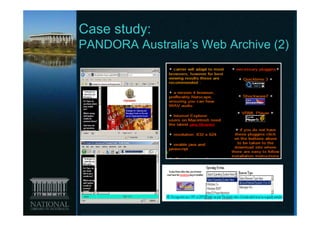
Case study:
PANDORA Australia’s Web Archive (2)


                                 6
IIPC Preservation Working Group
discussions
• Need for documenting the
  technical environment
• Support required for alternative
  preservation action strategies
  –   Emulation of past environments
  –   Migration to standard formats
  –   Risk notification
  –   Recording conversion and alternate
      access paths
• Exploring different approaches
• Sharing information sensible
                                           7
Technical information of interest

• Browsers + plug-ins/helper
  applications versions &
  dependencies

• Used approximately when?

• Appropriate for which individual/
  type of file format or whole
  archive?
                                      8
Already documented?

• Manufacturer/vendor’s websites
• Developer’s networks, forums, blogs,
  etc.
• File format registries
• File extension resources
• Software archives/download sites
• Internet history websites
• Internet statistics websites
• Wikipedia

                                         9
Possible Approach 1: UDFR
• Digital format registry will result from
  proposed merger of PRONOM and
  GDFR
• Pros
   – Considerable intellectual investment already
   – Could be used for general digital preservation and
     potential interaction with other tools
• Cons
   – Under development
   – Web archive requirements need to be specified, use
     cases developed, changes to data model, population
     with relevant data and regular updating
   – Temporal aspect not currently catered for
   – Entry point Individual file format or software type [could
     be a pro?]
                                                           10
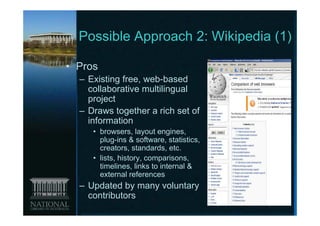
Possible Approach 2: Wikipedia (1)

• Pros
  – Existing free, web-based
    collaborative multilingual
    project
  – Draws together a rich set of
    information
     • browsers, layout engines,
       plug-ins & software, statistics,
       creators, standards, etc.
     • lists, history, comparisons,
       timelines, links to internal &
       external references
  – Updated by many voluntary
    contributors
                                          11
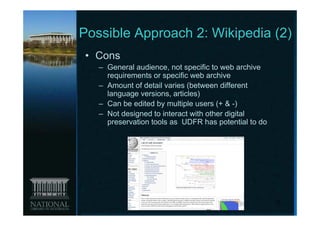
Possible Approach 2: Wikipedia (2)
• Cons
   – General audience, not specific to web archive
     requirements or specific web archive
   – Amount of detail varies (between different
     language versions, articles)
   – Can be edited by multiple users (+ & -)
   – Not designed to interact with other digital
     preservation tools as UDFR has potential to do


                                                      12
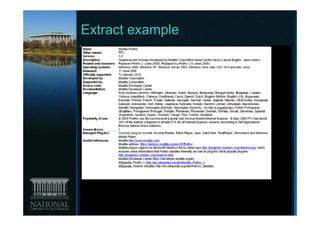
Extract example


                  13
Possible Approach 3:
Documenting what web archives
are using/used
• Pros
  – Time based software suite approach
  – Starting point for
     •   Potential UDFR seed list
     •   Identifying commonly used software
     •   Inferring additional software requirements
     •   Identifying alternate access paths
• Cons
  – Easier to document current versions
  – Obscure/obsolete material in our collections
    may be unknown
                                                      14
Individual web archives as
sources of information
• Analysis of archive contents & harvesting
  statistics

• Web archivists observations & records
   – UK Web Archive Technology Watch blog

• Website usage statistics
   – Browser versions & operating systems
   – Indicative of popularity

• Archived sites
   – Plug-in requirements, file type information
   – May include useful information websites
   – Internet Archive complementary collection
                                                   15
Example: NLA Web archiving
software environment July 2009
• Operating system: Windows XP
• Computer: Windows PC, Intel Pentium 4
• Browser: Internet Explorer 7 (main browser),
  IE8, Firefox 3.0
• Additional software:
   –   Adobe Reader 8
   –   Adobe Shockwave Player
   –   Adobe Flash Player 10
   –   Real Player 10
   –   Apple QuickTime 7
   –   Windows Media Player 11
   –   Java 6 Update 11
   –   JavaScript enabled
   –   Word, Excel, PowerPoint 2003
   –   WinZip
                                                 16
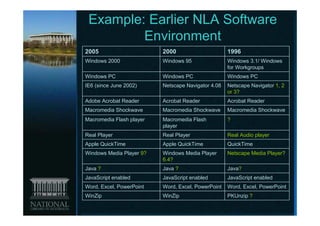
Example: Earlier NLA Software
         Environment
2005                      2000                      1996
Windows 2000              Windows 95                Windows 3.1/ Windows
                                                    for Workgroups
Windows PC                Windows PC                Windows PC
IE6 (since June 2002)     Netscape Navigator 4.08   Netscape Navigator 1, 2
                                                    or 3?
Adobe Acrobat Reader      Acrobat Reader            Acrobat Reader
Macromedia Shockwave      Macromedia Shockwave      Macromedia Shockwave
Macromedia Flash player   Macromedia Flash          ?
                          player
Real Player               Real Player               Real Audio player
Apple QuickTime           Apple QuickTime           QuickTime
Windows Media Player 9?   Windows Media Player      Netscape Media Player?
                          6.4?
Java ?                    Java ?                    Java?
JavaScript enabled        JavaScript enabled        JavaScript enabled
Word, Excel, PowerPoint   Word, Excel, PowerPoint   Word, Excel, PowerPoint
WinZip                    WinZip                    PKUnzip ?
                                                                         17
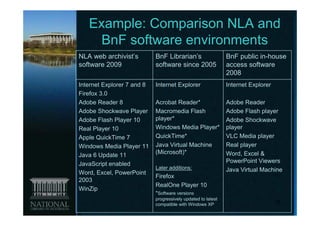
Example: Comparison NLA and
    BnF software environments
NLA web archivist’s         BnF Librarian’s                   BnF public in-house
software 2009               software since 2005               access software
                                                              2008
Internet Explorer 7 and 8   Internet Explorer                 Internet Explorer
Firefox 3.0
Adobe Reader 8              Acrobat Reader*                   Adobe Reader
Adobe Shockwave Player      Macromedia Flash                  Adobe Flash player
Adobe Flash Player 10       player*                           Adobe Shockwave
Real Player 10              Windows Media Player*             player
Apple QuickTime 7           QuickTime*                        VLC Media player
Windows Media Player 11     Java Virtual Machine              Real player
Java 6 Update 11            (Microsoft)*                      Word, Excel &
JavaScript enabled                                            PowerPoint Viewers
                            Later additions:                  Java Virtual Machine
Word, Excel, PowerPoint
                            Firefox
2003
                            RealOne Player 10
WinZip
                            *Software versions
                            progressively updated to latest
                            compatible with Windows XP                            18
Going forward

 • Is it worth pursuing approach 3?
 • If so where would we record
   (IIPC PWG wiki?, other
   suggestions)?
 • Interested in contributing?


                                  19
Questions?


                           Contact
                           •   David Pearson
                               dapearson@nla.gov.au
                           •   Maxine Davis
                               madavis@nla.gov.au


                           Report to IIPC PWG by
                             end October 2009
Everything, for Everyone
        Forever                                  20

Preserving access

  • 1.
    Preserving access: Making moreinformed “guesses” about what works Prepared by: Maxine Davis, Collaboration Research Officer Presented by: David Pearson, Acting Director Web Archiving & Digital Preservation, National Library of Australia IIPC Open Day, San Francisco, 7 October 2009 1
  • 2.
    Presentation Outline • Theproblem • Case study: PANDORA Web Archive • Some approaches & options – Approach 1: Unified Digital Format Registry (UDFR) – Approach 2: Wikipedia – Approach 3: Another way documenting what web archives actually use/d 2
  • 3.
    The problem • TheWorld Wide Web is constantly evolving – Requires combinations of software/hardware to render web content – But what is used for creation and access changes • Web archives – Contain snapshots of websites taken at different times (different sites or same sites multiple times) – Lots of files, many file formats, various versions – Aim for ongoing access 3
  • 4.
    Process of version“creep” in the archive • Mixed accessibility resulting from: – Different browsers, plug-ins, operating systems in use (then and now) – Backwards compatibility not guaranteed – Changes in standards and coding practices (deprecated, dead & non-standard tags) – Obsolescence of file formats & renderers • Changes to access paths – Incremental loss of access not directly obvious – Alternative access paths not specified 4
  • 5.
    Case study: PANDORA Australia’sWeb Archive (1) • Selective archive began collecting 1996 – Sites individually selected by NLA & partners – As at July 2009 over 70.6 million files – Accessible over the web using standard web browser • .au whole domain harvests – 4 annual harvests 2005-2008 completed, 2009 underway with Internet Archive – Combined harvests 05-08 ~ 2.3 billion files – Not currently publicly available 5
  • 6.
  • 7.
    IIPC Preservation WorkingGroup discussions • Need for documenting the technical environment • Support required for alternative preservation action strategies – Emulation of past environments – Migration to standard formats – Risk notification – Recording conversion and alternate access paths • Exploring different approaches • Sharing information sensible 7
  • 8.
    Technical information ofinterest • Browsers + plug-ins/helper applications versions & dependencies • Used approximately when? • Appropriate for which individual/ type of file format or whole archive? 8
  • 9.
    Already documented? • Manufacturer/vendor’swebsites • Developer’s networks, forums, blogs, etc. • File format registries • File extension resources • Software archives/download sites • Internet history websites • Internet statistics websites • Wikipedia 9
  • 10.
    Possible Approach 1:UDFR • Digital format registry will result from proposed merger of PRONOM and GDFR • Pros – Considerable intellectual investment already – Could be used for general digital preservation and potential interaction with other tools • Cons – Under development – Web archive requirements need to be specified, use cases developed, changes to data model, population with relevant data and regular updating – Temporal aspect not currently catered for – Entry point Individual file format or software type [could be a pro?] 10
  • 11.
    Possible Approach 2:Wikipedia (1) • Pros – Existing free, web-based collaborative multilingual project – Draws together a rich set of information • browsers, layout engines, plug-ins & software, statistics, creators, standards, etc. • lists, history, comparisons, timelines, links to internal & external references – Updated by many voluntary contributors 11
  • 12.
    Possible Approach 2:Wikipedia (2) • Cons – General audience, not specific to web archive requirements or specific web archive – Amount of detail varies (between different language versions, articles) – Can be edited by multiple users (+ & -) – Not designed to interact with other digital preservation tools as UDFR has potential to do 12
  • 13.
  • 14.
    Possible Approach 3: Documentingwhat web archives are using/used • Pros – Time based software suite approach – Starting point for • Potential UDFR seed list • Identifying commonly used software • Inferring additional software requirements • Identifying alternate access paths • Cons – Easier to document current versions – Obscure/obsolete material in our collections may be unknown 14
  • 15.
    Individual web archivesas sources of information • Analysis of archive contents & harvesting statistics • Web archivists observations & records – UK Web Archive Technology Watch blog • Website usage statistics – Browser versions & operating systems – Indicative of popularity • Archived sites – Plug-in requirements, file type information – May include useful information websites – Internet Archive complementary collection 15
  • 16.
    Example: NLA Webarchiving software environment July 2009 • Operating system: Windows XP • Computer: Windows PC, Intel Pentium 4 • Browser: Internet Explorer 7 (main browser), IE8, Firefox 3.0 • Additional software: – Adobe Reader 8 – Adobe Shockwave Player – Adobe Flash Player 10 – Real Player 10 – Apple QuickTime 7 – Windows Media Player 11 – Java 6 Update 11 – JavaScript enabled – Word, Excel, PowerPoint 2003 – WinZip 16
  • 17.
    Example: Earlier NLASoftware Environment 2005 2000 1996 Windows 2000 Windows 95 Windows 3.1/ Windows for Workgroups Windows PC Windows PC Windows PC IE6 (since June 2002) Netscape Navigator 4.08 Netscape Navigator 1, 2 or 3? Adobe Acrobat Reader Acrobat Reader Acrobat Reader Macromedia Shockwave Macromedia Shockwave Macromedia Shockwave Macromedia Flash player Macromedia Flash ? player Real Player Real Player Real Audio player Apple QuickTime Apple QuickTime QuickTime Windows Media Player 9? Windows Media Player Netscape Media Player? 6.4? Java ? Java ? Java? JavaScript enabled JavaScript enabled JavaScript enabled Word, Excel, PowerPoint Word, Excel, PowerPoint Word, Excel, PowerPoint WinZip WinZip PKUnzip ? 17
  • 18.
    Example: Comparison NLAand BnF software environments NLA web archivist’s BnF Librarian’s BnF public in-house software 2009 software since 2005 access software 2008 Internet Explorer 7 and 8 Internet Explorer Internet Explorer Firefox 3.0 Adobe Reader 8 Acrobat Reader* Adobe Reader Adobe Shockwave Player Macromedia Flash Adobe Flash player Adobe Flash Player 10 player* Adobe Shockwave Real Player 10 Windows Media Player* player Apple QuickTime 7 QuickTime* VLC Media player Windows Media Player 11 Java Virtual Machine Real player Java 6 Update 11 (Microsoft)* Word, Excel & JavaScript enabled PowerPoint Viewers Later additions: Java Virtual Machine Word, Excel, PowerPoint Firefox 2003 RealOne Player 10 WinZip *Software versions progressively updated to latest compatible with Windows XP 18
  • 19.
    Going forward •Is it worth pursuing approach 3? • If so where would we record (IIPC PWG wiki?, other suggestions)? • Interested in contributing? 19
  • 20.
    Questions? Contact • David Pearson dapearson@nla.gov.au • Maxine Davis madavis@nla.gov.au Report to IIPC PWG by end October 2009 Everything, for Everyone Forever 20