COMPUTER BASICS
What is a computer?
A computer is an electronic device that
manipulates information, or data. It has the ability
to store, retrieve, and process data. You may
already know that you can use a computer to type
documents, send email, play games, and browse
the Web. You can also use it to edit or
create spreadsheets, presentations, and
even videos.
Hardware vs. software
Before we talk about different types of
computers, let's talk about two things
all computers have in
common: hardware and software.
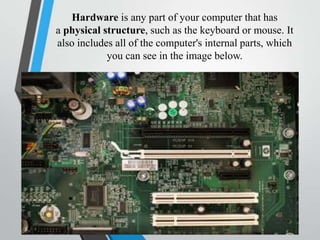
Hardware is any part of your computer that has
a physical structure, such as the keyboard or mouse. It
also includes all of the computer's internal parts, which
you can see in the image below.
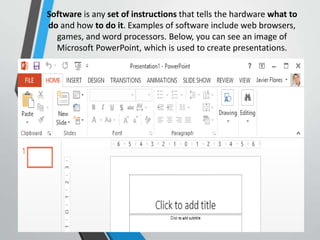
Software is any set of instructions that tells the hardware what to
do and how to do it. Examples of software include web browsers,
games, and word processors. Below, you can see an image of
Microsoft PowerPoint, which is used to create presentations.
• Everything you do on your computer will rely
on both hardware and software. For example,
right now you may be viewing this lesson in
a web browser (software) and using
your mouse (hardware) to click from page to
page. As you learn about different types of
computers, ask yourself about the differences
in their hardware. As you progress through this
tutorial, you'll see that different types of
computers also often use different types of
software.
What are the different types of
computers?
• When most people hear the word computer,
they think of a personal computer such as
a desktop or laptop. However, computers
come in many shapes and sizes, and they
perform many different functions in our daily
lives. When you withdraw cash from an ATM,
scan groceries at the store, or use a calculator,
you're using a type of computer.
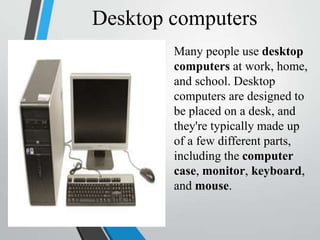
Desktop computers
Many people use desktop
computers at work, home,
and school. Desktop
computers are designed to
be placed on a desk, and
they're typically made up
of a few different parts,
including the computer
case, monitor, keyboard,
and mouse.
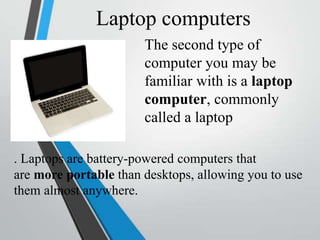
Laptop computers
The second type of
computer you may be
familiar with is a laptop
computer, commonly
called a laptop
. Laptops are battery-powered computers that
are more portable than desktops, allowing you to use
them almost anywhere.
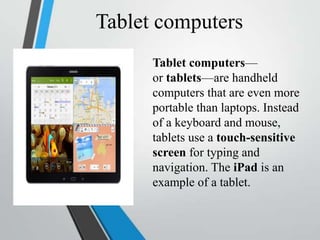
Tablet computers
Tablet computers—
or tablets—are handheld
computers that are even more
portable than laptops. Instead
of a keyboard and mouse,
tablets use a touch-sensitive
screen for typing and
navigation. The iPad is an
example of a tablet.
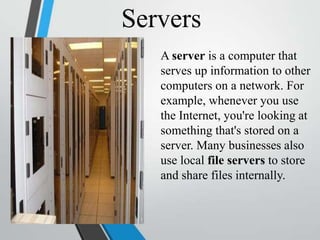
Servers
A server is a computer that
serves up information to other
computers on a network. For
example, whenever you use
the Internet, you're looking at
something that's stored on a
server. Many businesses also
use local file servers to store
and share files internally.
PCs and Macs
• Personal computers come in two main
styles: PC and Mac. Both are fully
functional, but they have a different
look and feel, and many people prefer
one or the other.
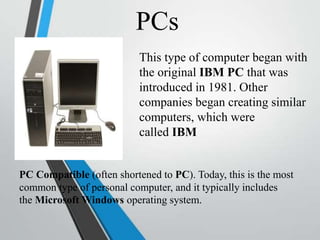
PCs
This type of computer began with
the original IBM PC that was
introduced in 1981. Other
companies began creating similar
computers, which were
called IBM
PC Compatible (often shortened to PC). Today, this is the most
common type of personal computer, and it typically includes
the Microsoft Windows operating system.
Macs
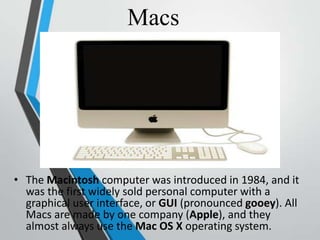
• The Macintosh computer was introduced in 1984, and it
was the first widely sold personal computer with a
graphical user interface, or GUI (pronounced gooey). All
Macs are made by one company (Apple), and they
almost always use the Mac OS X operating system.

Presentation1- Educ8

  • 1.
  • 2.
    What is acomputer? A computer is an electronic device that manipulates information, or data. It has the ability to store, retrieve, and process data. You may already know that you can use a computer to type documents, send email, play games, and browse the Web. You can also use it to edit or create spreadsheets, presentations, and even videos.
  • 3.
    Hardware vs. software Beforewe talk about different types of computers, let's talk about two things all computers have in common: hardware and software.
  • 4.
    Hardware is anypart of your computer that has a physical structure, such as the keyboard or mouse. It also includes all of the computer's internal parts, which you can see in the image below.
  • 5.
    Software is anyset of instructions that tells the hardware what to do and how to do it. Examples of software include web browsers, games, and word processors. Below, you can see an image of Microsoft PowerPoint, which is used to create presentations.
  • 6.
    • Everything youdo on your computer will rely on both hardware and software. For example, right now you may be viewing this lesson in a web browser (software) and using your mouse (hardware) to click from page to page. As you learn about different types of computers, ask yourself about the differences in their hardware. As you progress through this tutorial, you'll see that different types of computers also often use different types of software.
  • 7.
    What are thedifferent types of computers? • When most people hear the word computer, they think of a personal computer such as a desktop or laptop. However, computers come in many shapes and sizes, and they perform many different functions in our daily lives. When you withdraw cash from an ATM, scan groceries at the store, or use a calculator, you're using a type of computer.
  • 8.
    Desktop computers Many peopleuse desktop computers at work, home, and school. Desktop computers are designed to be placed on a desk, and they're typically made up of a few different parts, including the computer case, monitor, keyboard, and mouse.
  • 9.
    Laptop computers The secondtype of computer you may be familiar with is a laptop computer, commonly called a laptop . Laptops are battery-powered computers that are more portable than desktops, allowing you to use them almost anywhere.
  • 10.
    Tablet computers Tablet computers— ortablets—are handheld computers that are even more portable than laptops. Instead of a keyboard and mouse, tablets use a touch-sensitive screen for typing and navigation. The iPad is an example of a tablet.
  • 11.
    Servers A server isa computer that serves up information to other computers on a network. For example, whenever you use the Internet, you're looking at something that's stored on a server. Many businesses also use local file servers to store and share files internally.
  • 12.
    PCs and Macs •Personal computers come in two main styles: PC and Mac. Both are fully functional, but they have a different look and feel, and many people prefer one or the other.
  • 13.
    PCs This type ofcomputer began with the original IBM PC that was introduced in 1981. Other companies began creating similar computers, which were called IBM PC Compatible (often shortened to PC). Today, this is the most common type of personal computer, and it typically includes the Microsoft Windows operating system.
  • 14.
    Macs • The Macintoshcomputer was introduced in 1984, and it was the first widely sold personal computer with a graphical user interface, or GUI (pronounced gooey). All Macs are made by one company (Apple), and they almost always use the Mac OS X operating system.