Benoit Mortier Leila El Hitori Intelligent Infrastructure management with GOsa² This work is licensed under the Creative Commons Attribution-Noncommercial-Share Alike 2.0 Belgium License.
Intelligent Infrastructure management with GOsa² Speaker's Profile Who ? Benoit Mortier Born in 1967 in Belgium Studies College and self learning What ? Co-founder of Opensides in 2001 Main Contributor of GOsa² since 2005 Contributor to FusionInventory Contributor to OPSI Manager of OpenSides
Intelligent Infrastructure management with GOsa² What is GOsa 2 GOsa 2  key features Managing the ACME company with GOsa² GOsa² architecture and extensibility Deploying systems with GOsa² Real life examples of GOsa² usage Glimpse at future development Live demonstration
What is GOsa ²  ? Tool for managing your directory Web based PHP5 application with valid W3C and CSS Abstract view of information Licensed under the GPL No pro-version available but enterprise capable Internationalized in 10 languages Help you to manage people, systems, softwares Intelligent Infrastructure management with GOsa²
GOsa² key features Subtree management Handle organizational and inetOrg persons POSIX users and groups Trust accounts and sudo SSH Key management Samba 3 Grouped objects GOto and FAI, OPSI, LTSP Intelligent Infrastructure management with GOsa²
GOsa² key features DNS ISC DHCP MIT Kerberos 5 (policies, accounts, keys) Asterisk VoIP GOfax + hylafax Kolab 2 OpenXchange / PHPGroupware / OpenGroupware Postfix / Cyrus / Sieve management Intelligent Infrastructure management with GOsa²
Let's take a look at the growing ACME company The ultimate ACME homepage Groupware for internal and external communication DNS to be reachable at all DHCP to assign internal IP addresses M$ Windows and Debian GNU/Linux workstations File and print service via samba VoIP and FAX Addressbook Centralized authentication Intelligent Infrastructure management with GOsa²
ACME Intelligent Infrastructure management with GOsa²
Questions arising from the growth How to manage the diversity of services ? How to manage the complexity of services ?  How to prevent multiple instances of the same data ? How to implement self service and delegation ? Intelligent Infrastructure management with GOsa²
One possible answer could be Move information to some kind of centralized location! Intelligent Infrastructure management with GOsa²
We've chosen LDAP as the main backend! LDAP is a protocol to access X.500 style directories Lightweight Directory Access Protocol LDAP is available as free software when using i.e. OpenLDAP ApacheDS FedoraDS Many services already have LDAP backends Intelligent Infrastructure management with GOsa²
Intelligent Infrastructure management with GOsa²
Intelligent Infrastructure management with GOsa² Architecture - or "how things work"
Intelligent Infrastructure management with GOsa²
Deploying system with GOsa 2 Deploying  Linux systems Deploying  Windows systems Managing  LTSP clients Managing your applications by groups and by users Intelligent Infrastructure management with GOsa²
Linux system deployment with GOsa² Installing Linux systems with FAI How does it work ? Automatic configuration of Linux systems Managing applications by groups, users Managing mime types centrally Intelligent Infrastructure management with GOsa²
Installing Linux systems with FAI Management of FAI 3.1.8 to 3.3.x Everything is managed in the interface Support Debian distribution and derivatives Support Debian particularities like : Debconf Installation method ( aptitude, dpkg ... ) Multiple architecture Support multiple distribution servers Intelligent Infrastructure management with GOsa²
Intelligent Infrastructure management with GOsa²
How do it works ? Preparing the system Configuration / Detection of the machine inside GOsa ² Creation of dns, dhcp data Add the installation profile to the system Intelligent Infrastructure management with GOsa²
How do it work ? Installing the system Booting of the system by PXE Verification of his data in dns, dhcp Get his kernel and mount his nfsroot Creation of the fai configuration directory for the system Installation can be followed in GOsa² interface via the system install log in real-time and GOsa-si Intelligent Infrastructure management with GOsa²
How does it works ? Finishing the 'installation Reboot of the system Warning show on the system if an error occured A warning will be show in the interface if something is not right Intelligent Infrastructure management with GOsa²
Automatic configuration of the linux systems Configuration of all the parameters in GOsa 2 Agents are started at boot : Configuration of ldap access Configuration of Xorg if necessary Configuration of the printers Loading of the user kiosk profile Automatic connexion to his network resources  Mime types management Hotplug management Intelligent Infrastructure management with GOsa²
Windows system deployment Installing Windows systems with OPSI Updating systems Intelligent Infrastructure management with GOsa²
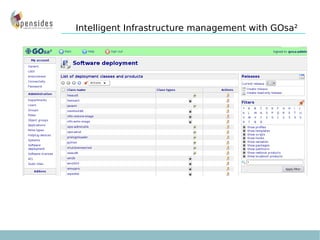
Windows system deployment with OPSI Manage OPSI 3.4 Everything is managed in GOsa² Support from Windows 2000 to Windows Seven Allow you to install complete systems and updates in one step Complete install « from scratch » Multiple distribution servers allowed Intelligent Infrastructure management with GOsa²
Intelligent Infrastructure management with GOsa²
Management of updates The server contains the updates for the software The Windows systems connect at startup to see if there are update for them Updates management is done in GOsa² Intelligent Infrastructure management with GOsa²
How do it works ? Preparing the system Configuration / Detection of the machine inside GOsa ² Creation of dns, dhcp data Add the windows systems version to be installed to the system Adding Windows serial Key Adding the software that should be installed on it Intelligent Infrastructure management with GOsa²
How do it work ? Installing the system Booting of the system by PXE Verification of his data in dns, dhcp Get his kernel and mount his nfsroot Connect to the samba share on the distribution system Doing the hardware audit to create the files needed by the windows setup program Copy the content of the I386 directory on the disk if asked for Reboot Classical Windows Setup is running Intelligent Infrastructure management with GOsa²
How does it works ? At each start The preloginloader start before the login prompt  Ask the distribution server if there is software to be deployed Deploy/ Remove software if needed Intelligent Infrastructure management with GOsa²
Deploying clusters nodes at EDF R&D with GOsa²
History Problem Solution Benefit
History EDF R&D was among the first to build a Debian based cluster The industrial distribution of EDF called “Calibre” is based on Debian since 2003 FAI is used for automatic installation of nodes In 2007, the test cluster node (25 nodes) is installed with GOsa² running on Debian Etch 64bits In 2009, the new test cluster (60 nodes) is installed with GOSa² 2.6 and GOsa-si In 2010, the new graphical cluster (256 nodes) is installed with GOsa² 2.6.9 on Debian Squeeze  Intelligent Infrastructure management with GOsa²
Problems  Update, node creation can only be made by the engineers who have build the cluster Testing new configuration represent a huge amount of manual work and frequent trip to the server room If they want to delegate the support, re-installation, update work they have to provide a graphical interface for non specialists Intelligent Infrastructure management with GOsa²
Solution Porting the GOsa² / FAI module of the city of Munich from sarge to Etch 64bit pour EDF R&D Development of dhcp, dns, ssh extension for GOsa² Intelligent Infrastructure management with GOsa²
Benefit Simplify node creation Making it easier to manage in day to day operations Possibility of testing new configurations without changing configuration that works Choice of 32bit or 64bit distribution Intelligent Infrastructure management with GOsa²
Real uses cases examples The city of Munich The city of Munich uses GOsa² for the management and the deployment of their systems Ministries in France Managing 2000 Desktop windows and Linux  EDF R&D (Clamart) EDF R&D is using GOsa ²  for the installation of 2 test clusters ,25 nodes, 60 nodes and 256 nodes. Those clusters are full amd64 64bit. COF asbl Management of six servers including a firewall, file server, web server, Kolab2 server, backup server Intelligent Infrastructure management with GOsa²
Glimpse at current developments CA management GLPI integration by webservice Nagios integration Free Radius OpenVPN White pages Management of cups servers Management of XEN with deployment of DomU Intelligent Infrastructure management with GOsa²
Winner of the professional category GOsa² has won the first prize at the “libre trophy 2009” Intelligent Infrastructure management with GOsa²
Intelligent Infrastructure management with GOsa² Links : GOsa² project :  http://oss.gonicus.de/labs/gosa GOsa² Addons :  http://oss.gonicus.de/labs/gosa-addons Mailing list :  [email_address] Irc channel: #gosa on freenode
Questions ? Intelligent Infrastructure management with GOsa²
Thank you for listening Intelligent Infrastructure management with GOsa²

Presentation Gosa Loaddays2010

  • 1.
    Benoit Mortier LeilaEl Hitori Intelligent Infrastructure management with GOsa² This work is licensed under the Creative Commons Attribution-Noncommercial-Share Alike 2.0 Belgium License.
  • 2.
    Intelligent Infrastructure managementwith GOsa² Speaker's Profile Who ? Benoit Mortier Born in 1967 in Belgium Studies College and self learning What ? Co-founder of Opensides in 2001 Main Contributor of GOsa² since 2005 Contributor to FusionInventory Contributor to OPSI Manager of OpenSides
  • 3.
    Intelligent Infrastructure managementwith GOsa² What is GOsa 2 GOsa 2 key features Managing the ACME company with GOsa² GOsa² architecture and extensibility Deploying systems with GOsa² Real life examples of GOsa² usage Glimpse at future development Live demonstration
  • 4.
    What is GOsa² ? Tool for managing your directory Web based PHP5 application with valid W3C and CSS Abstract view of information Licensed under the GPL No pro-version available but enterprise capable Internationalized in 10 languages Help you to manage people, systems, softwares Intelligent Infrastructure management with GOsa²
  • 5.
    GOsa² key featuresSubtree management Handle organizational and inetOrg persons POSIX users and groups Trust accounts and sudo SSH Key management Samba 3 Grouped objects GOto and FAI, OPSI, LTSP Intelligent Infrastructure management with GOsa²
  • 6.
    GOsa² key featuresDNS ISC DHCP MIT Kerberos 5 (policies, accounts, keys) Asterisk VoIP GOfax + hylafax Kolab 2 OpenXchange / PHPGroupware / OpenGroupware Postfix / Cyrus / Sieve management Intelligent Infrastructure management with GOsa²
  • 7.
    Let's take alook at the growing ACME company The ultimate ACME homepage Groupware for internal and external communication DNS to be reachable at all DHCP to assign internal IP addresses M$ Windows and Debian GNU/Linux workstations File and print service via samba VoIP and FAX Addressbook Centralized authentication Intelligent Infrastructure management with GOsa²
  • 8.
    ACME Intelligent Infrastructuremanagement with GOsa²
  • 9.
    Questions arising fromthe growth How to manage the diversity of services ? How to manage the complexity of services ? How to prevent multiple instances of the same data ? How to implement self service and delegation ? Intelligent Infrastructure management with GOsa²
  • 10.
    One possible answercould be Move information to some kind of centralized location! Intelligent Infrastructure management with GOsa²
  • 11.
    We've chosen LDAPas the main backend! LDAP is a protocol to access X.500 style directories Lightweight Directory Access Protocol LDAP is available as free software when using i.e. OpenLDAP ApacheDS FedoraDS Many services already have LDAP backends Intelligent Infrastructure management with GOsa²
  • 12.
  • 13.
    Intelligent Infrastructure managementwith GOsa² Architecture - or "how things work"
  • 14.
  • 15.
    Deploying system withGOsa 2 Deploying Linux systems Deploying Windows systems Managing LTSP clients Managing your applications by groups and by users Intelligent Infrastructure management with GOsa²
  • 16.
    Linux system deploymentwith GOsa² Installing Linux systems with FAI How does it work ? Automatic configuration of Linux systems Managing applications by groups, users Managing mime types centrally Intelligent Infrastructure management with GOsa²
  • 17.
    Installing Linux systemswith FAI Management of FAI 3.1.8 to 3.3.x Everything is managed in the interface Support Debian distribution and derivatives Support Debian particularities like : Debconf Installation method ( aptitude, dpkg ... ) Multiple architecture Support multiple distribution servers Intelligent Infrastructure management with GOsa²
  • 18.
  • 19.
    How do itworks ? Preparing the system Configuration / Detection of the machine inside GOsa ² Creation of dns, dhcp data Add the installation profile to the system Intelligent Infrastructure management with GOsa²
  • 20.
    How do itwork ? Installing the system Booting of the system by PXE Verification of his data in dns, dhcp Get his kernel and mount his nfsroot Creation of the fai configuration directory for the system Installation can be followed in GOsa² interface via the system install log in real-time and GOsa-si Intelligent Infrastructure management with GOsa²
  • 21.
    How does itworks ? Finishing the 'installation Reboot of the system Warning show on the system if an error occured A warning will be show in the interface if something is not right Intelligent Infrastructure management with GOsa²
  • 22.
    Automatic configuration ofthe linux systems Configuration of all the parameters in GOsa 2 Agents are started at boot : Configuration of ldap access Configuration of Xorg if necessary Configuration of the printers Loading of the user kiosk profile Automatic connexion to his network resources Mime types management Hotplug management Intelligent Infrastructure management with GOsa²
  • 23.
    Windows system deploymentInstalling Windows systems with OPSI Updating systems Intelligent Infrastructure management with GOsa²
  • 24.
    Windows system deploymentwith OPSI Manage OPSI 3.4 Everything is managed in GOsa² Support from Windows 2000 to Windows Seven Allow you to install complete systems and updates in one step Complete install « from scratch » Multiple distribution servers allowed Intelligent Infrastructure management with GOsa²
  • 25.
  • 26.
  • 27.
    Management of updatesThe server contains the updates for the software The Windows systems connect at startup to see if there are update for them Updates management is done in GOsa² Intelligent Infrastructure management with GOsa²
  • 28.
    How do itworks ? Preparing the system Configuration / Detection of the machine inside GOsa ² Creation of dns, dhcp data Add the windows systems version to be installed to the system Adding Windows serial Key Adding the software that should be installed on it Intelligent Infrastructure management with GOsa²
  • 29.
    How do itwork ? Installing the system Booting of the system by PXE Verification of his data in dns, dhcp Get his kernel and mount his nfsroot Connect to the samba share on the distribution system Doing the hardware audit to create the files needed by the windows setup program Copy the content of the I386 directory on the disk if asked for Reboot Classical Windows Setup is running Intelligent Infrastructure management with GOsa²
  • 30.
    How does itworks ? At each start The preloginloader start before the login prompt Ask the distribution server if there is software to be deployed Deploy/ Remove software if needed Intelligent Infrastructure management with GOsa²
  • 31.
    Deploying clusters nodesat EDF R&D with GOsa²
  • 32.
  • 33.
    History EDF R&Dwas among the first to build a Debian based cluster The industrial distribution of EDF called “Calibre” is based on Debian since 2003 FAI is used for automatic installation of nodes In 2007, the test cluster node (25 nodes) is installed with GOsa² running on Debian Etch 64bits In 2009, the new test cluster (60 nodes) is installed with GOSa² 2.6 and GOsa-si In 2010, the new graphical cluster (256 nodes) is installed with GOsa² 2.6.9 on Debian Squeeze Intelligent Infrastructure management with GOsa²
  • 34.
    Problems Update,node creation can only be made by the engineers who have build the cluster Testing new configuration represent a huge amount of manual work and frequent trip to the server room If they want to delegate the support, re-installation, update work they have to provide a graphical interface for non specialists Intelligent Infrastructure management with GOsa²
  • 35.
    Solution Porting theGOsa² / FAI module of the city of Munich from sarge to Etch 64bit pour EDF R&D Development of dhcp, dns, ssh extension for GOsa² Intelligent Infrastructure management with GOsa²
  • 36.
    Benefit Simplify nodecreation Making it easier to manage in day to day operations Possibility of testing new configurations without changing configuration that works Choice of 32bit or 64bit distribution Intelligent Infrastructure management with GOsa²
  • 37.
    Real uses casesexamples The city of Munich The city of Munich uses GOsa² for the management and the deployment of their systems Ministries in France Managing 2000 Desktop windows and Linux EDF R&D (Clamart) EDF R&D is using GOsa ² for the installation of 2 test clusters ,25 nodes, 60 nodes and 256 nodes. Those clusters are full amd64 64bit. COF asbl Management of six servers including a firewall, file server, web server, Kolab2 server, backup server Intelligent Infrastructure management with GOsa²
  • 38.
    Glimpse at currentdevelopments CA management GLPI integration by webservice Nagios integration Free Radius OpenVPN White pages Management of cups servers Management of XEN with deployment of DomU Intelligent Infrastructure management with GOsa²
  • 39.
    Winner of theprofessional category GOsa² has won the first prize at the “libre trophy 2009” Intelligent Infrastructure management with GOsa²
  • 40.
    Intelligent Infrastructure managementwith GOsa² Links : GOsa² project : http://oss.gonicus.de/labs/gosa GOsa² Addons : http://oss.gonicus.de/labs/gosa-addons Mailing list : [email_address] Irc channel: #gosa on freenode
  • 41.
    Questions ? IntelligentInfrastructure management with GOsa²
  • 42.
    Thank you forlistening Intelligent Infrastructure management with GOsa²