ICT and Programming
Project 2:Buzzer
Alarm with Light
Mr Gee, Amir, Ms Siti
Science Educators
STEM INC
Science Centre Singapore
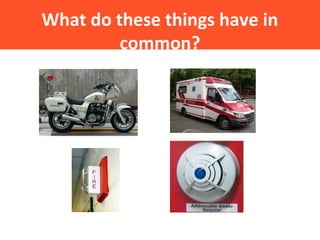
What do these things have in
common?
Objective
In this project, you will learn to use the Arduino to:
•Produce light in an LED and sound through a buzzer
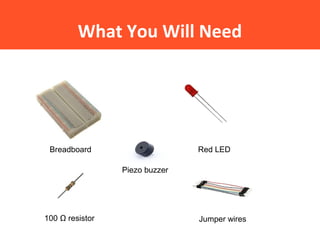
What You Will Need
Breadboard Red LED
100 Ω resistor Jumper wires
Piezo buzzer
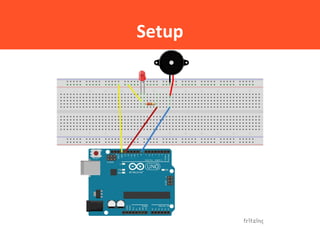
Setup
The Arduino Integrated
Development Environment (IDE)
Creating the sketch:
Step 1: Double click the icon to open up the IDE
Let’s get to coding!
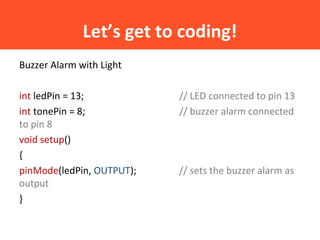
Buzzer Alarm with Light
int ledPin = 13; // LED connected to pin 13
int tonePin = 8; // buzzer alarm connected
to pin 8
void setup()
{
pinMode(ledPin, OUTPUT); // sets the buzzer alarm as
output
}
Let’s get to coding!
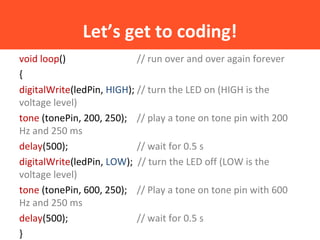
void loop() // run over and over again forever
{
digitalWrite(ledPin, HIGH); // turn the LED on (HIGH is the
voltage level)
tone (tonePin, 200, 250); // play a tone on tone pin with 200
Hz and 250 ms
delay(500); // wait for 0.5 s
digitalWrite(ledPin, LOW); // turn the LED off (LOW is the
voltage level)
tone (tonePin, 600, 250); // Play a tone on tone pin with 600
Hz and 250 ms
delay(500); // wait for 0.5 s
}
Uploading the Sketch
Step 1: Click the Verify/Compile button and check for errors in
the code.
Step 2: Click the Upload button.
Let’s think!
1. What happens in the circuit after the code was uploaded?
2. Change the value highlighted in yellow to a higher value, say
500. Compile/Verify the program before uploading the program
again. What happens?
3. Change the value highlighted in yellow to a lower value, say
100. Compile/Verify the program before uploading the program
again. What happens?
Let’s think!
1. Change the circled number to a lower value, say 100.
Compile/Verify the program before uploading the program
again. What happens?
The first beep is at lower pitch.
2. Try changing the underlined value to a higher value, say 600.
Compile/Verify the program before uploading the program
again. What happens?
The first beep remains on for a longer time.(600 ms)
Challenge
Listen to the alarm played by the educator. Can you create
something similar to that?
What have you learnt?
• The tone function in a sketch
• The function of the piezo buzzer
• Relationship between frequency and sound

Presentation

  • 1.
    ICT and Programming Project2:Buzzer Alarm with Light Mr Gee, Amir, Ms Siti Science Educators STEM INC Science Centre Singapore
  • 2.
    What do thesethings have in common?
  • 3.
    Objective In this project,you will learn to use the Arduino to: •Produce light in an LED and sound through a buzzer
  • 4.
    What You WillNeed Breadboard Red LED 100 Ω resistor Jumper wires Piezo buzzer
  • 5.
  • 6.
    The Arduino Integrated DevelopmentEnvironment (IDE) Creating the sketch: Step 1: Double click the icon to open up the IDE
  • 7.
    Let’s get tocoding! Buzzer Alarm with Light int ledPin = 13; // LED connected to pin 13 int tonePin = 8; // buzzer alarm connected to pin 8 void setup() { pinMode(ledPin, OUTPUT); // sets the buzzer alarm as output }
  • 8.
    Let’s get tocoding! void loop() // run over and over again forever { digitalWrite(ledPin, HIGH); // turn the LED on (HIGH is the voltage level) tone (tonePin, 200, 250); // play a tone on tone pin with 200 Hz and 250 ms delay(500); // wait for 0.5 s digitalWrite(ledPin, LOW); // turn the LED off (LOW is the voltage level) tone (tonePin, 600, 250); // Play a tone on tone pin with 600 Hz and 250 ms delay(500); // wait for 0.5 s }
  • 9.
    Uploading the Sketch Step1: Click the Verify/Compile button and check for errors in the code. Step 2: Click the Upload button.
  • 10.
    Let’s think! 1. Whathappens in the circuit after the code was uploaded? 2. Change the value highlighted in yellow to a higher value, say 500. Compile/Verify the program before uploading the program again. What happens? 3. Change the value highlighted in yellow to a lower value, say 100. Compile/Verify the program before uploading the program again. What happens?
  • 11.
    Let’s think! 1. Changethe circled number to a lower value, say 100. Compile/Verify the program before uploading the program again. What happens? The first beep is at lower pitch. 2. Try changing the underlined value to a higher value, say 600. Compile/Verify the program before uploading the program again. What happens? The first beep remains on for a longer time.(600 ms)
  • 12.
    Challenge Listen to thealarm played by the educator. Can you create something similar to that?
  • 13.
    What have youlearnt? • The tone function in a sketch • The function of the piezo buzzer • Relationship between frequency and sound