Android Quickstart
Building a Todo Application
(with Eclipse ADT)
Selecting an App
Let's begin by building a simple and
functional Android application.
● Best way to learn Android is to build (simple) apps
● Let's take a look at the essentials for apps
● We are going to build a simple Todo List
Let's scope our Todo app before we get started
● User can view a list of existing todo items
● User can add a new item to the todo list
● User can remove an item from the todo list
This means that for this application, we just need one
screen which allows us to view, add and remove simple list
items.
This first version will not support "marking" completion or
setting priority, but we could add this in a future version.
Scoping our Todo App
Wireframe the Todo App
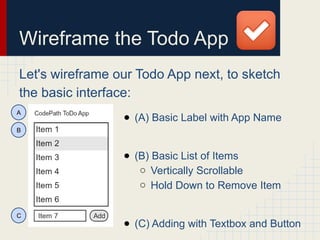
Let's wireframe our Todo App next, to sketch
the basic interface:
● (A) Basic Label with App Name
● (B) Basic List of Items
○ Vertically Scrollable
○ Hold Down to Remove Item
● (C) Adding with Textbox and Button
A
B
C
Building the Todo App
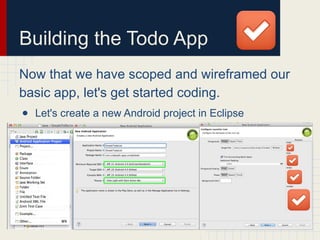
Now that we have scoped and wireframed our
basic app, let's get started coding.
● Let's create a new Android project in Eclipse
Building the Todo App
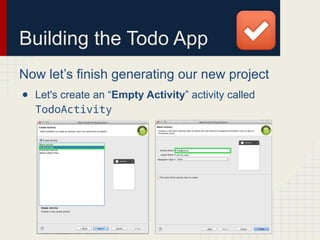
Now let’s finish generating our new project
● Let's create an “Empty Activity” activity called
TodoActivity
Building the Todo App
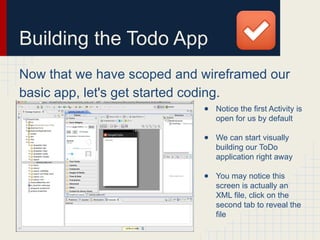
Now that we have scoped and wireframed our
basic app, let's get started coding.
● Notice the first Activity is
open for us by default
● We can start visually
building our ToDo
application right away
● You may notice this
screen is actually an
XML file, click on the
second tab to reveal the
file
Short Orientation
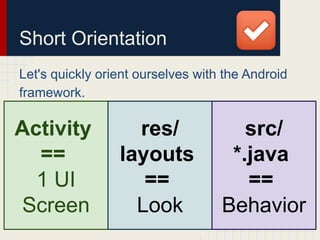
Let's quickly orient ourselves with the Android
framework.
Activity
==
1 UI
Screen
res/
layouts
==
Look
src/
*.java
==
Behavior
Short Orientation
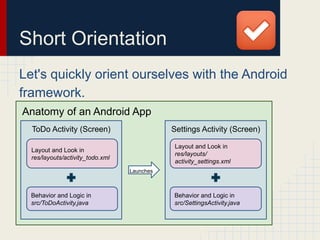
Let's quickly orient ourselves with the Android
framework.
Anatomy of an Android App
ToDo Activity (Screen) Settings Activity (Screen)
Layout and Look in
res/layouts/activity_todo.xml
Behavior and Logic in
src/ToDoActivity.java
Layout and Look in
res/layouts/
activity_settings.xml
Behavior and Logic in
src/SettingsActivity.java
Launches
Building the Interface
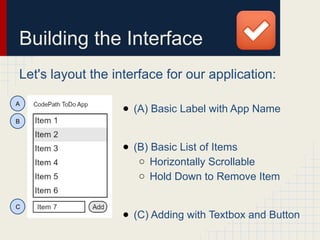
Let's layout the interface for our application:
● (A) Basic Label with App Name
● (B) Basic List of Items
○ Horizontally Scrollable
○ Hold Down to Remove Item
● (C) Adding with Textbox and Button
A
B
C
Building the Interface
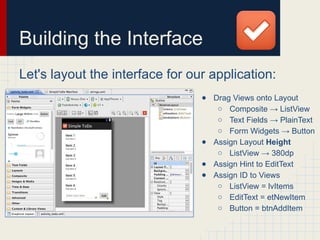
Let's layout the interface for our application:
● Drag Views onto Layout
○ Composite → ListView
○ Text Fields → PlainText
○ Form Widgets → Button
● Assign Layout Height
○ ListView → 380dp
● Assign Hint to EditText
● Assign ID to Views
○ ListView = lvItems
○ EditText = etNewItem
○ Button = btnAddItem
Building the Interface
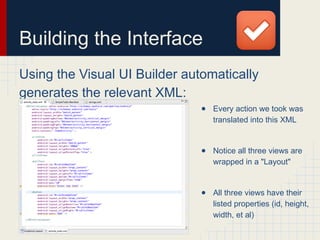
Using the Visual UI Builder automatically
generates the relevant XML:
● Every action we took was
translated into this XML
● Notice all three views are
wrapped in a "Layout"
● All three views have their
listed properties (id, height,
width, et al)
Coding the Behavior
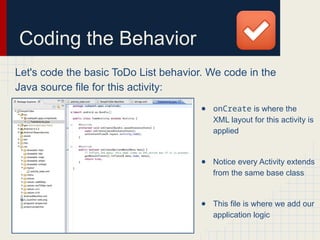
Let's code the basic ToDo List behavior. We code in the
Java source file for this activity:
● onCreate is where the
XML layout for this activity is
applied
● Notice every Activity extends
from the same base class
● This file is where we add our
application logic
Coding the Behavior
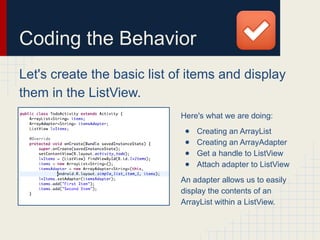
Let's create the basic list of items and display
them in the ListView.
Here's what we are doing:
● Creating an ArrayList
● Creating an ArrayAdapter
● Get a handle to ListView
● Attach adapter to ListView
An adapter allows us to easily
display the contents of an
ArrayList within a ListView.
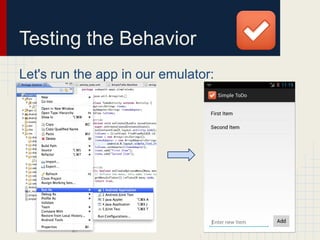
Testing the Behavior
Let's run the app in our emulator:
Coding the Behavior
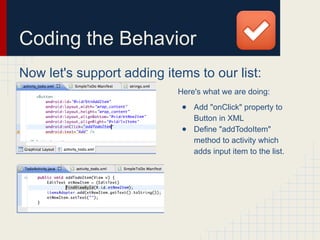
Now let's support adding items to our list:
Here's what we are doing:
● Add "onClick" property to
Button in XML
● Define "addTodoItem"
method to activity which
adds input item to the list.
Coding the Behavior
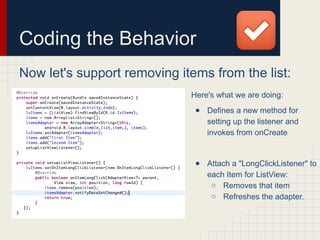
Now let's support removing items from the list:
Here's what we are doing:
● Defines a new method for
setting up the listener and
invokes from onCreate
● Attach a "LongClickListener" to
each Item for ListView:
○ Removes that item
○ Refreshes the adapter.
Coding the Behavior
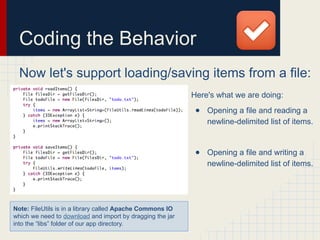
Now let's support loading/saving items from a file:
Here's what we are doing:
● Opening a file and reading a
newline-delimited list of items.
● Opening a file and writing a
newline-delimited list of items.
Note: FileUtils is in a library called Apache Commons IO
which we need to download and import by dragging the jar
into the “libs” folder of our app directory.
Coding the Behavior
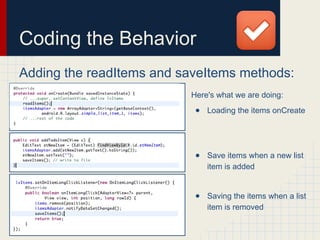
Adding the readItems and saveItems methods:
Here's what we are doing:
● Loading the items onCreate
● Save items when a new list
item is added
● Saving the items when a list
item is removed
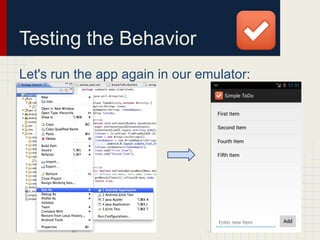
Testing the Behavior
Let's run the app again in our emulator:
ToDo App Summary
We have now built our very first functioning
application using many essential concepts:
● Activity XML (Layouts and Views)
● Activity Source (Java Code for App Logic)
● View IDs and Properties
● ListViews, EditText and Button View Types
● List Adapters for Displaying List Items
● Click Handling for Buttons and List Items
● Testing Applications with the Emulator
What you would add to the ToDo List next?

(Preface B) Android Quickstart Guide for Apps

  • 1.
    Android Quickstart Building aTodo Application (with Eclipse ADT)
  • 2.
    Selecting an App Let'sbegin by building a simple and functional Android application. ● Best way to learn Android is to build (simple) apps ● Let's take a look at the essentials for apps ● We are going to build a simple Todo List
  • 3.
    Let's scope ourTodo app before we get started ● User can view a list of existing todo items ● User can add a new item to the todo list ● User can remove an item from the todo list This means that for this application, we just need one screen which allows us to view, add and remove simple list items. This first version will not support "marking" completion or setting priority, but we could add this in a future version. Scoping our Todo App
  • 4.
    Wireframe the TodoApp Let's wireframe our Todo App next, to sketch the basic interface: ● (A) Basic Label with App Name ● (B) Basic List of Items ○ Vertically Scrollable ○ Hold Down to Remove Item ● (C) Adding with Textbox and Button A B C
  • 5.
    Building the TodoApp Now that we have scoped and wireframed our basic app, let's get started coding. ● Let's create a new Android project in Eclipse
  • 6.
    Building the TodoApp Now let’s finish generating our new project ● Let's create an “Empty Activity” activity called TodoActivity
  • 7.
    Building the TodoApp Now that we have scoped and wireframed our basic app, let's get started coding. ● Notice the first Activity is open for us by default ● We can start visually building our ToDo application right away ● You may notice this screen is actually an XML file, click on the second tab to reveal the file
  • 8.
    Short Orientation Let's quicklyorient ourselves with the Android framework. Activity == 1 UI Screen res/ layouts == Look src/ *.java == Behavior
  • 9.
    Short Orientation Let's quicklyorient ourselves with the Android framework. Anatomy of an Android App ToDo Activity (Screen) Settings Activity (Screen) Layout and Look in res/layouts/activity_todo.xml Behavior and Logic in src/ToDoActivity.java Layout and Look in res/layouts/ activity_settings.xml Behavior and Logic in src/SettingsActivity.java Launches
  • 10.
    Building the Interface Let'slayout the interface for our application: ● (A) Basic Label with App Name ● (B) Basic List of Items ○ Horizontally Scrollable ○ Hold Down to Remove Item ● (C) Adding with Textbox and Button A B C
  • 11.
    Building the Interface Let'slayout the interface for our application: ● Drag Views onto Layout ○ Composite → ListView ○ Text Fields → PlainText ○ Form Widgets → Button ● Assign Layout Height ○ ListView → 380dp ● Assign Hint to EditText ● Assign ID to Views ○ ListView = lvItems ○ EditText = etNewItem ○ Button = btnAddItem
  • 12.
    Building the Interface Usingthe Visual UI Builder automatically generates the relevant XML: ● Every action we took was translated into this XML ● Notice all three views are wrapped in a "Layout" ● All three views have their listed properties (id, height, width, et al)
  • 13.
    Coding the Behavior Let'scode the basic ToDo List behavior. We code in the Java source file for this activity: ● onCreate is where the XML layout for this activity is applied ● Notice every Activity extends from the same base class ● This file is where we add our application logic
  • 14.
    Coding the Behavior Let'screate the basic list of items and display them in the ListView. Here's what we are doing: ● Creating an ArrayList ● Creating an ArrayAdapter ● Get a handle to ListView ● Attach adapter to ListView An adapter allows us to easily display the contents of an ArrayList within a ListView.
  • 15.
    Testing the Behavior Let'srun the app in our emulator:
  • 16.
    Coding the Behavior Nowlet's support adding items to our list: Here's what we are doing: ● Add "onClick" property to Button in XML ● Define "addTodoItem" method to activity which adds input item to the list.
  • 17.
    Coding the Behavior Nowlet's support removing items from the list: Here's what we are doing: ● Defines a new method for setting up the listener and invokes from onCreate ● Attach a "LongClickListener" to each Item for ListView: ○ Removes that item ○ Refreshes the adapter.
  • 18.
    Coding the Behavior Nowlet's support loading/saving items from a file: Here's what we are doing: ● Opening a file and reading a newline-delimited list of items. ● Opening a file and writing a newline-delimited list of items. Note: FileUtils is in a library called Apache Commons IO which we need to download and import by dragging the jar into the “libs” folder of our app directory.
  • 19.
    Coding the Behavior Addingthe readItems and saveItems methods: Here's what we are doing: ● Loading the items onCreate ● Save items when a new list item is added ● Saving the items when a list item is removed
  • 20.
    Testing the Behavior Let'srun the app again in our emulator:
  • 21.
    ToDo App Summary Wehave now built our very first functioning application using many essential concepts: ● Activity XML (Layouts and Views) ● Activity Source (Java Code for App Logic) ● View IDs and Properties ● ListViews, EditText and Button View Types ● List Adapters for Displaying List Items ● Click Handling for Buttons and List Items ● Testing Applications with the Emulator What you would add to the ToDo List next?