Laboratorio de Comunicaciones Industriales y Sistemas SCADA
PRÁCTICA #1
Tema: Introducción a Studio 5000 Logix Designer
1. Objetivos
1.1. Objetivo general
Reconocer las principales herramientas del software Studio 5000 Logix Designer para la
programación en lenguaje escalera usando entradas y salidas tanto digitales como
analógicas del PLC CompactLogix L33.
1.2. Objetivos específicos
1. Identificar las herramientas del software Studio 5000 para la creación de un proyecto.
2. Diferenciar las partes del PLC CompactLogix para la realización de aplicaciones
industriales.
3. Crear una red Ethernet a través del software Studio 5000 para la configuración una
arquitectura integrada CIP.
2. Equipos y herramientas
• CompactLogix L33 ERM.
• Módulo remoto POINT I/O
• Studio 5000.
• RsLinx Classic.
• Cables Ethernet.
• Switch administrable.
• Módulo de E/S digitales del CompactLogix.
• Computadora.
• Cables bananas.
• Botoneras y luz piloto del tablero de automatización.
3. Marco teórico
Studio 5000
El software Studio 5000 contiene, Logix Designer y Factory Talk View. Logix Designer permite
la programación y configuración de los controladores autómatas programables ControlLogix
y CompactLogix de la plataforma Rockwell Automation.
Logix Designer permite programar en diferentes lenguajes como: ladder, texto estructurado,
diagrama de bloques funcionales, y Graphcet.
Laboratorio de Comunicaciones Industriales y Sistemas SCADA
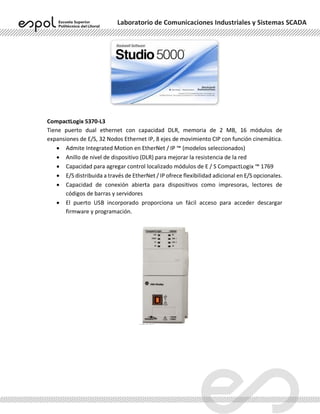
CompactLogix 5370-L3
Tiene puerto dual ethernet con capacidad DLR, memoria de 2 MB, 16 módulos de
expansiones de E/S, 32 Nodos Ethernet IP, 8 ejes de movimiento CIP con función cinemática.
• Admite Integrated Motion en EtherNet / IP ™ (modelos seleccionados)
• Anillo de nivel de dispositivo (DLR) para mejorar la resistencia de la red
• Capacidad para agregar control localizado módulos de E / S CompactLogix ™ 1769
• E/S distribuida a través de EtherNet / IP ofrece flexibilidad adicional en E/S opcionales.
• Capacidad de conexión abierta para dispositivos como impresoras, lectores de
códigos de barras y servidores
• El puerto USB incorporado proporciona un fácil acceso para acceder descargar
firmware y programación.
Laboratorio de Comunicaciones Industriales y Sistemas SCADA
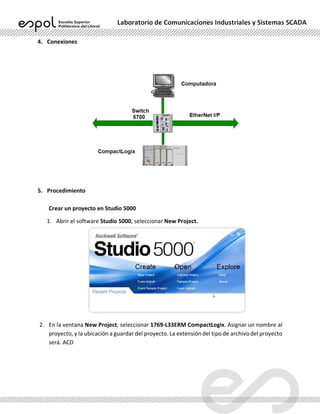
4. Conexiones
5. Procedimiento
Crear un proyecto en Studio 5000
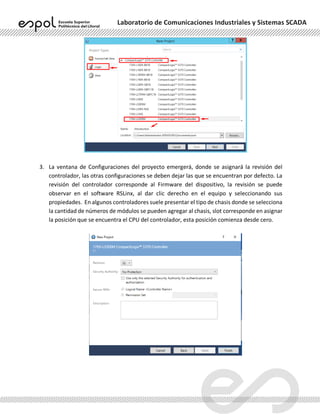
1. Abrir el software Studio 5000, seleccionar New Project.
2. En la ventana New Project, seleccionar 1769-L33ERM CompactLogix. Asignar un nombre al
proyecto, y la ubicación a guardar del proyecto. La extensión del tipo de archivo del proyecto
será. ACD
Laboratorio de Comunicaciones Industriales y Sistemas SCADA
3. La ventana de Configuraciones del proyecto emergerá, donde se asignará la revisión del
controlador, las otras configuraciones se deben dejar las que se encuentran por defecto. La
revisión del controlador corresponde al Firmware del dispositivo, la revisión se puede
observar en el software RSLinx, al dar clic derecho en el equipo y seleccionando sus
propiedades. En algunos controladores suele presentar el tipo de chasis donde se selecciona
la cantidad de números de módulos se pueden agregar al chasis, slot corresponde en asignar
la posición que se encuentra el CPU del controlador, esta posición comienza desde cero.
Laboratorio de Comunicaciones Industriales y Sistemas SCADA
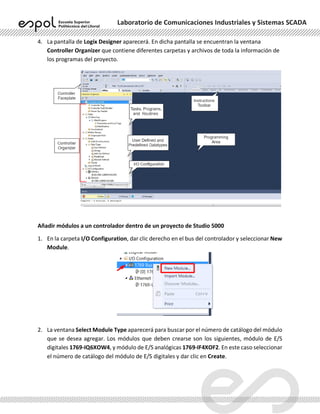
4. La pantalla de Logix Designer aparecerá. En dicha pantalla se encuentran la ventana
Controller Organizer que contiene diferentes carpetas y archivos de toda la información de
los programas del proyecto.
Añadir módulos a un controlador dentro de un proyecto de Studio 5000
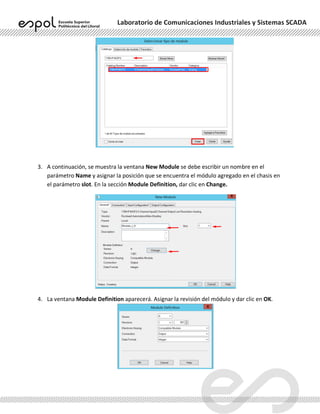
1. En la carpeta I/O Configuration, dar clic derecho en el bus del controlador y seleccionar New
Module.
2. La ventana Select Module Type aparecerá para buscar por el número de catálogo del módulo
que se desea agregar. Los módulos que deben crearse son los siguientes, módulo de E/S
digitales 1769-IQ6XOW4, y módulo de E/S analógicas 1769-IF4XOF2. En este caso seleccionar
el número de catálogo del módulo de E/S digitales y dar clic en Create.
Laboratorio de Comunicaciones Industriales y Sistemas SCADA
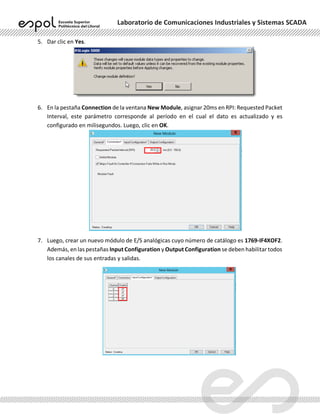
3. A continuación, se muestra la ventana New Module se debe escribir un nombre en el
parámetro Name y asignar la posición que se encuentra el módulo agregado en el chasis en
el parámetro slot. En la sección Module Definition, dar clic en Change.
4. La ventana Module Definition aparecerá. Asignar la revisión del módulo y dar clic en OK.
Laboratorio de Comunicaciones Industriales y Sistemas SCADA
5. Dar clic en Yes.
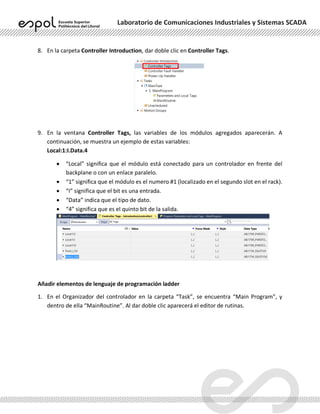
6. En la pestaña Connection de la ventana New Module, asignar 20ms en RPI: Requested Packet
Interval, este parámetro corresponde al período en el cual el dato es actualizado y es
configurado en milisegundos. Luego, clic en OK.
7. Luego, crear un nuevo módulo de E/S analógicas cuyo número de catálogo es 1769-IF4XOF2.
Además, en las pestañas Input Configuration y Output Configuration se deben habilitar todos
los canales de sus entradas y salidas.
Laboratorio de Comunicaciones Industriales y Sistemas SCADA
8. En la carpeta Controller Introduction, dar doble clic en Controller Tags.
9. En la ventana Controller Tags, las variables de los módulos agregados aparecerán. A
continuación, se muestra un ejemplo de estas variables:
Local:1:I.Data.4
• “Local” significa que el módulo está conectado para un controlador en frente del
backplane o con un enlace paralelo.
• “1” significa que el módulo es el numero #1 (localizado en el segundo slot en el rack).
• “I” significa que el bit es una entrada.
• “Data” indica que el tipo de dato.
• “4” significa que es el quinto bit de la salida.
Añadir elementos de lenguaje de programación ladder
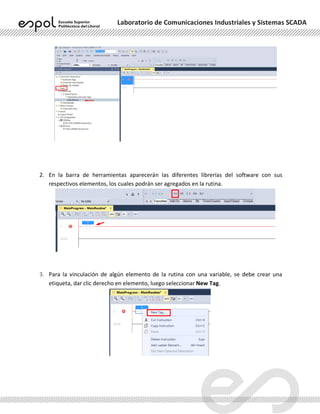
1. En el Organizador del controlador en la carpeta “Task”, se encuentra “Main Program”, y
dentro de ella “MainRoutine”. Al dar doble clic aparecerá el editor de rutinas.
Laboratorio de Comunicaciones Industriales y Sistemas SCADA
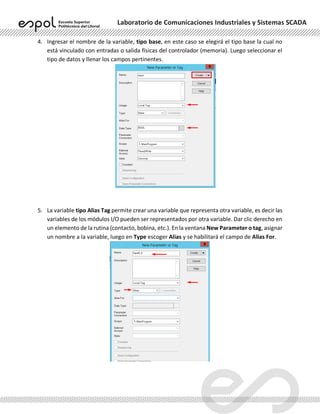
2. En la barra de herramientas aparecerán las diferentes librerías del software con sus
respectivos elementos, los cuales podrán ser agregados en la rutina.
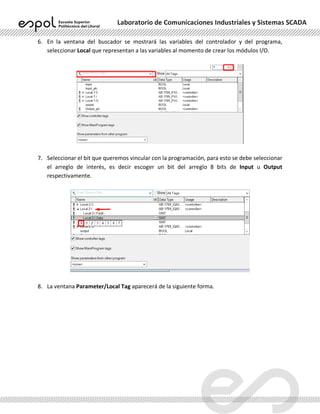
3. Para la vinculación de algún elemento de la rutina con una variable, se debe crear una
etiqueta, dar clic derecho en elemento, luego seleccionar New Tag.
Laboratorio de Comunicaciones Industriales y Sistemas SCADA
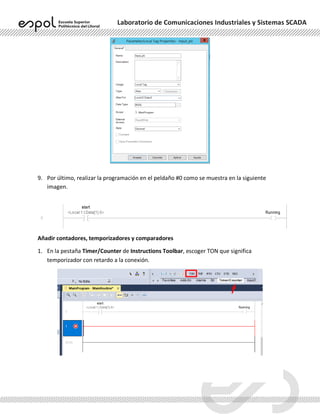
4. Ingresar el nombre de la variable, tipo base, en este caso se elegirá el tipo base la cual no
está vinculado con entradas o salida físicas del controlador (memoria). Luego seleccionar el
tipo de datos y llenar los campos pertinentes.
5. La variable tipo Alias Tag permite crear una variable que representa otra variable, es decir las
variables de los módulos I/O pueden ser representados por otra variable. Dar clic derecho en
un elemento de la rutina (contacto, bobina, etc.). En la ventana New Parameter o tag, asignar
un nombre a la variable, luego en Type escoger Alias y se habilitará el campo de Alias For.
Laboratorio de Comunicaciones Industriales y Sistemas SCADA
6. En la ventana del buscador se mostrará las variables del controlador y del programa,
seleccionar Local que representan a las variables al momento de crear los módulos I/O.
7. Seleccionar el bit que queremos vincular con la programación, para esto se debe seleccionar
el arreglo de interés, es decir escoger un bit del arreglo 8 bits de Input u Output
respectivamente.
8. La ventana Parameter/Local Tag aparecerá de la siguiente forma.
Laboratorio de Comunicaciones Industriales y Sistemas SCADA
9. Por último, realizar la programación en el peldaño #0 como se muestra en la siguiente
imagen.
Añadir contadores, temporizadores y comparadores
1. En la pestaña Timer/Counter de Instructions Toolbar, escoger TON que significa
temporizador con retardo a la conexión.
Laboratorio de Comunicaciones Industriales y Sistemas SCADA
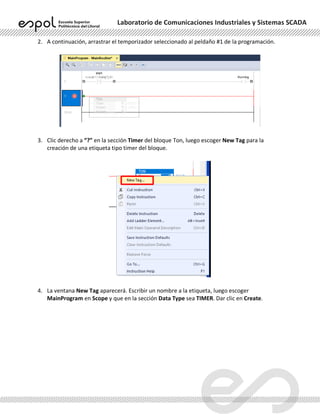
2. A continuación, arrastrar el temporizador seleccionado al peldaño #1 de la programación.
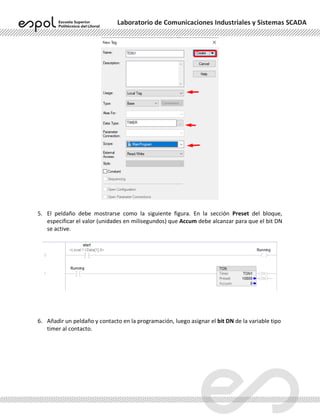
3. Clic derecho a “?” en la sección Timer del bloque Ton, luego escoger New Tag para la
creación de una etiqueta tipo timer del bloque.
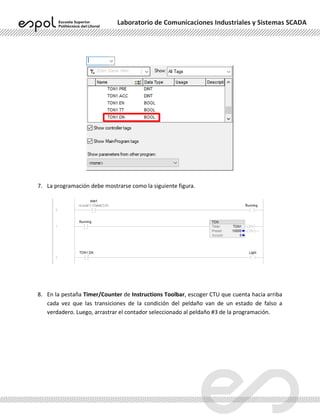
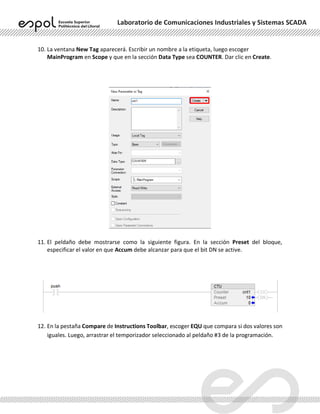
4. La ventana New Tag aparecerá. Escribir un nombre a la etiqueta, luego escoger
MainProgram en Scope y que en la sección Data Type sea TIMER. Dar clic en Create.
Laboratorio de Comunicaciones Industriales y Sistemas SCADA
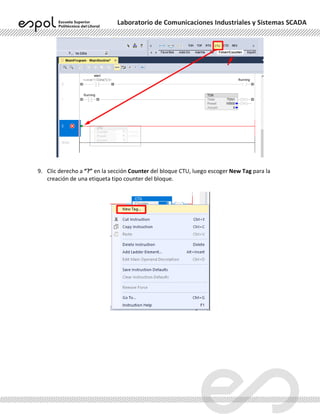
5. El peldaño debe mostrarse como la siguiente figura. En la sección Preset del bloque,
especificar el valor (unidades en milisegundos) que Accum debe alcanzar para que el bit DN
se active.
6. Añadir un peldaño y contacto en la programación, luego asignar el bit DN de la variable tipo
timer al contacto.
Laboratorio de Comunicaciones Industriales y Sistemas SCADA
7. La programación debe mostrarse como la siguiente figura.
8. En la pestaña Timer/Counter de Instructions Toolbar, escoger CTU que cuenta hacia arriba
cada vez que las transiciones de la condición del peldaño van de un estado de falso a
verdadero. Luego, arrastrar el contador seleccionado al peldaño #3 de la programación.
Laboratorio de Comunicaciones Industriales y Sistemas SCADA
9. Clic derecho a “?” en la sección Counter del bloque CTU, luego escoger New Tag para la
creación de una etiqueta tipo counter del bloque.
Laboratorio de Comunicaciones Industriales y Sistemas SCADA
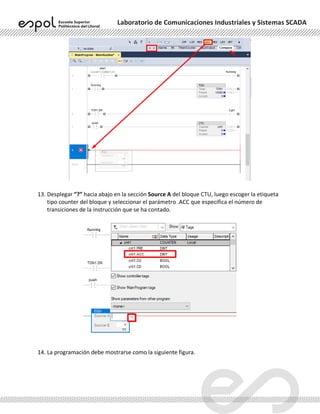
10. La ventana New Tag aparecerá. Escribir un nombre a la etiqueta, luego escoger
MainProgram en Scope y que en la sección Data Type sea COUNTER. Dar clic en Create.
11. El peldaño debe mostrarse como la siguiente figura. En la sección Preset del bloque,
especificar el valor en que Accum debe alcanzar para que el bit DN se active.
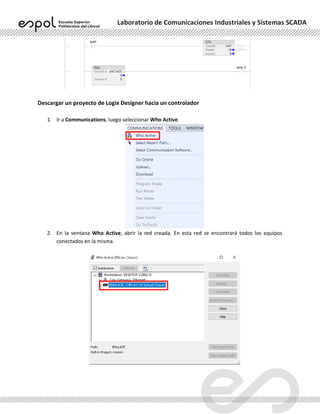
12. En la pestaña Compare de Instructions Toolbar, escoger EQU que compara si dos valores son
iguales. Luego, arrastrar el temporizador seleccionado al peldaño #3 de la programación.
Laboratorio de Comunicaciones Industriales y Sistemas SCADA
13. Desplegar “?” hacia abajo en la sección Source A del bloque CTU, luego escoger la etiqueta
tipo counter del bloque y seleccionar el parámetro .ACC que especifica el número de
transiciones de la instrucción que se ha contado.
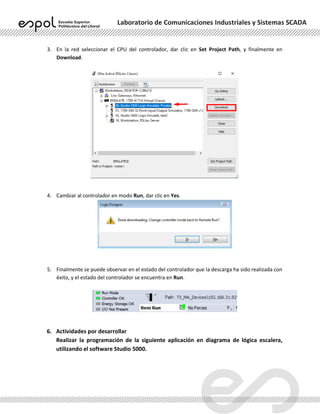
14. La programación debe mostrarse como la siguiente figura.
Laboratorio de Comunicaciones Industriales y Sistemas SCADA
Descargar un proyecto de Logix Designer hacia un controlador
1. Ir a Communications, luego seleccionar Who Active.
2. En la ventana Who Active, abrir la red creada. En esta red se encontrará todos los equipos
conectados en la misma.
Laboratorio de Comunicaciones Industriales y Sistemas SCADA
3. En la red seleccionar el CPU del controlador, dar clic en Set Project Path, y finalmente en
Download.
4. Cambiar al controlador en modo Run, dar clic en Yes.
5. Finalmente se puede observar en el estado del controlador que la descarga ha sido realizada con
éxito, y el estado del controlador se encuentra en Run.
6. Actividades por desarrollar
Realizar la programación de la siguiente aplicación en diagrama de lógica escalera,
utilizando el software Studio 5000.
Laboratorio de Comunicaciones Industriales y Sistemas SCADA
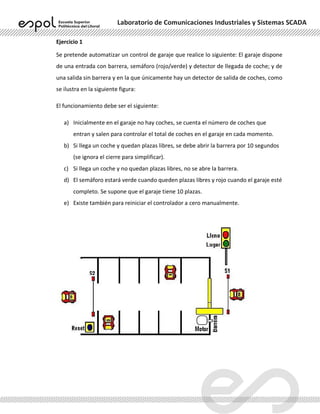
Ejercicio 1
Se pretende automatizar un control de garaje que realice lo siguiente: El garaje dispone
de una entrada con barrera, semáforo (rojo/verde) y detector de llegada de coche; y de
una salida sin barrera y en la que únicamente hay un detector de salida de coches, como
se ilustra en la siguiente figura:
El funcionamiento debe ser el siguiente:
a) Inicialmente en el garaje no hay coches, se cuenta el número de coches que
entran y salen para controlar el total de coches en el garaje en cada momento.
b) Si llega un coche y quedan plazas libres, se debe abrir la barrera por 10 segundos
(se ignora el cierre para simplificar).
c) Si llega un coche y no quedan plazas libres, no se abre la barrera.
d) El semáforo estará verde cuando queden plazas libres y rojo cuando el garaje esté
completo. Se supone que el garaje tiene 10 plazas.
e) Existe también para reiniciar el controlador a cero manualmente.
Laboratorio de Comunicaciones Industriales y Sistemas SCADA
ANEXOS
2 Rockwell Automation Publication 1769-SG001Q-EN-P - August 2014
CompactLogix System
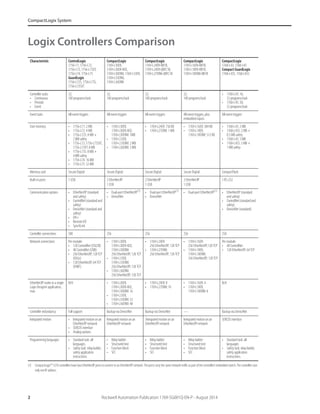
Logix Controllers Comparison
Characteristic ControlLogix
1756-71, 1756-L72,
1756-L73, 1756-L73XT,
1756-L74, 1756-L75
GuardLogix
1756-L72S, 1756-L73S,
1756-L73SXT
CompactLogix
1769-L30ER,
1769-L30ER-NSE,
1769-L30ERM, 1769-L33ER,
1769-L33ERM,
1769-L36ERM
CompactLogix
1769-L24ER-BB1B,
1769-L24ER-QBFC1B,
1769-L27ERM-QBFC1B
CompactLogix
1769-L16ER-BB1B,
1769-L18ER-BB1B,
1769-L18ERM-BB1B
CompactLogix
1768-L43, 1768-L45
Compact GuardLogix
1768-L43S, 1768-L45S
Controller tasks:
• Continuous
• Periodic
• Event
32;
100 programs/task
32;
100 programs/task
32;
100 programs/task
32;
100 programs/task
• 1768-L43: 16;
32 programs/task
• 1768-L45: 30;
32 programs/task
Event tasks All event triggers All event triggers All event triggers All event triggers, plus
embedded inputs
All event triggers
User memory • 1756-L71: 2 MB
• 1756-L72: 4 MB
• 1756-L72S: 4 MB +
2 MB safety
• 1756-L73,1756-L73SXT,
1756-L73XT: 8 MB
• 1756-L73S: 8 MB +
4 MB safety
• 1756-L74: 16 MB
• 1756-L75: 32 MB
• 1769-L30ER,
1769-L30ER-NSE,
1769-L30ERM: 1MB
• 1769-L33ER,
1769-L33ERM: 2 MB
• 1769-L36ERM: 3 MB
• 1769-L24ER: 750 KB
• 1769-L27ERM: 1 MB
• 1769-L16ER: 384 KB
• 1769-L18ER,
1769-L18ERM: 512 KB
• 1768-L43: 2 MB
• 1768-L43S: 2 MB +
0.5 MB safety
• 1768-L45: 3 MB
• 1768-L45S: 3 MB +
1 MB safety
Memory card Secure Digital Secure Digital Secure Digital Secure Digital CompactFlash
Built-in ports 1 USB 2 EtherNet/IP
1 USB
2 EtherNet/IP
1 USB
2 EtherNet/IP
1 USB
1 RS-232
Communication options • EtherNet/IP (standard
and safety)
• ControlNet(standardand
safety)
• DeviceNet (standard and
safety)
• DH+
• Remote I/O
• SynchLink
• Dual-port EtherNet/IP(1)
• DeviceNet
(1) CompactLogix™ 5370 controllers have two EtherNet/IP ports toconnect to an EtherNet/IP network. The ports carry the same network traffic as part of the controller’s embedded switch. The controller uses
only one IP address.
• Dual-port EtherNet/IP(1)
• DeviceNet
• Dual-port EtherNet/IP(1)
• EtherNet/IP (standard
and safety)
• ControlNet(standardand
safety)
• DeviceNet (standard)
Controller connections 500 256 256 256 250
Network connections Per module:
• 128 ControlNet (CN2/B)
• 40 ControlNet (CNB)
• 256EtherNet/IP;128TCP
(EN2x)
• 128 EtherNet/IP; 64 TCP
(ENBT)
• 1769-L30ER,
1769-L30ER-NSE,
1769-L30ERM:
256 EtherNet/IP; 120 TCP
• 1769-L33ER,
1769-L33ERM:
256 EtherNet/IP; 120 TCP
• 1769-L36ERM:
256 EtherNet/IP; 120 TCP
• 1769-L24ER:
256 EtherNet/IP; 120 TCP
• 1769-L27ERM:
256 EtherNet/IP; 120 TCP
• 1769-L16ER:
256 EtherNet/IP;120 TCP
• 1769-L18ER,
1769-L18ERM:
256 EtherNet/IP; 120 TCP
Per module:
• 48 ControlNet
• 128 EtherNet/IP; 64 TCP
EtherNet/IPnodesinasingle
Logix Designer application,
max
N/A • 1769-L30ER,
1769-L30ER-NSE,
1769-L30ERM: 16
• 1769-L33ER,
1769-L33ERM: 32
• 1769-L36ERM: 48
• 1769-L24ER: 8
• 1769-L27ERM: 16
• 1769-L16ER: 4
• 1769-L18ER,
1769-L18ERM: 8
N/A
Controller redundancy Full support Backup via DeviceNet Backupvia DeviceNet — Backup via DeviceNet
Integrated motion • Integrated motion on an
EtherNet/IP network
• SERCOS interface
• Analog options
Integratedmotion on an
EtherNet/IP network
Integrated motionon an
EtherNet/IP network
Integrated motion on an
EtherNet/IP network
SERCOS interface
Programming languages • Standard task: all
languages
• Safety task: relay ladder,
safety application
instructions
• Relay ladder
• Structured text
• Function block
• SFC
• Relay ladder
• Structured text
• Function block
• SFC
• Relay ladder
• Structured text
• Function block
• SFC
• Standard task: all
languages
• Safety task: relay ladder,
safety application
instructions
Rockwell Automation Publication 1769-SG001Q-EN-P - August 2014 3
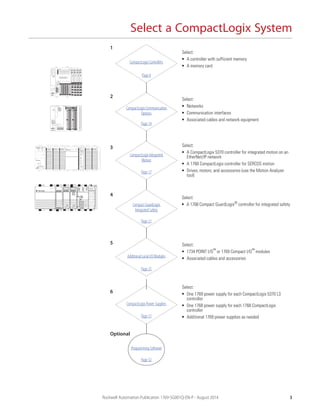
Select a CompactLogix System
CompactLogix Controllers
CompactLogix Communication
Options
CompactLogix Integrated
Motion
Additional Local I/O Modules
CompactLogix Power Supplies
Select:
• A controller with sufficient memory
• A memory card
Select:
• Networks
• Communication interfaces
• Associated cables and network equipment
Select:
• A CompactLogix 5370 controller for integrated motion on an
EtherNet/IP network
• A 1768 CompactLogix controller for SERCOS motion
• Drives, motors, and accessories (use the Motion Analyzer
tool)
Select:
• 1734 POINT I/O™ or 1769 Compact I/O™ modules
• Associated cables and accessories
Select:
• One 1769 power supply for each CompactLogix 5370 L3
controller
• One 1768 power supply for each 1768 CompactLogix
controller
• Additional 1769 power supplies as needed
Programming Software
Page 8
Page 14
Page 17
Page 25
Page 31
Page 32
Compact GuardLogix
Integrated Safety
Select:
• A 1768 Compact GuardLogix® controller for integrated safety
Page 21
1
2
3
4
5
6
Optional
4 Rockwell Automation Publication 1769-SG001Q-EN-P - August 2014
Select a CompactLogix System
CompactLogix Controllers Overview
The CompactLogix system is designed to provide a Logix solution for small and mid-size applications. Typically, these
applications are machine-level control applications. A simple system can consist of a standalone controller with one bank of I/O
modules and DeviceNet communication. In a more complex system, add other networks, motion control, and safety control. As
part of the Integrated Architecture™
system, the CompactLogix controllers use the same programming software, network
protocol, and information capabilities as all Logix controllers, providing a common development environment for all control
disciplines.
• The CompactLogix 5370 L3 controllers deliver scalable, affordable control ideal for applications from small standalone
equipment to high-performance indexing tables, process skids, case packers and erectors, and packaging. The
CompactLogix 5370 L3 controllers also provide a truly integrated motion solution.
• The CompactLogix 5370 L2 controllers combine the power of the Logix architecture with the flexibility of Compact I/O
modules. From small standalone equipment to higher performance applications, these controllers are ideal for assembly
machines, hoisting systems, process skids, indexing tables, and packaging.
• The CompactLogix 5370 L1 controllers combine the power of the Logix architecture with the flexibility of POINT I/O. Ideal
for small to mid-size machines, these controllers offer value to customers looking for the benefits of Integrated
Architecture in a lower cost system.
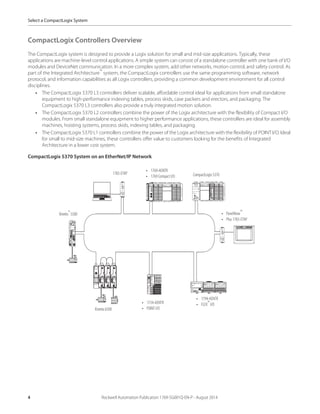
CompactLogix 5370 System on an EtherNet/IP Network
1783-ETAP CompactLogix5370
• PanelView™
• Plus 1783-ETAP
• 1794-AENTR
• FLEX™
I/O
• 1734-AENTR
• POINT I/O
Kinetix® 5500
Kinetix 6500
• 1769-AENTR
• 1769 Compact I/O
8 Rockwell Automation Publication 1769-SG001Q-EN-P - August 2014
Select a CompactLogix System
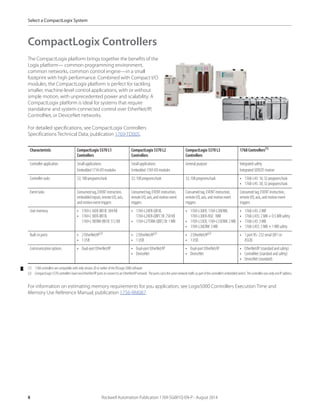
CompactLogix Controllers
The CompactLogix platform brings together the benefits of the
Logix platform— common programming environment,
common networks, common control engine—in a small
footprint with high performance. Combined with Compact I/O
modules, the CompactLogix platform is perfect for tackling
smaller, machine-level control applications, with or without
simple motion, with unprecedented power and scalability. A
CompactLogix platform is ideal for systems that require
standalone and system-connected control over EtherNet/IP,
ControlNet, or DeviceNet networks.
For detailed specifications, see CompactLogix Controllers
Specifications Technical Data, publication 1769-TD005.
For information on estimating memory requirements for you application, see Logix5000 Controllers Execution Time and
Memory Use Reference Manual, publication 1756-RM087.
Characteristic CompactLogix 5370 L1
Controllers
CompactLogix 5370 L2
Controllers
CompactLogix 5370 L3
Controllers
1768 Controllers(1)
(1) 1768 controllers are compatible with only version 20 or earlier of the RSLogix 5000 software.
Controller application Small applications
Embedded 1734 I/O modules
Small applications
Embedded 1769 I/O modules
General purpose Integrated safety
Integrated SERCOS motion
Controller tasks 32; 100 programs/task 32; 100 programs/task 32; 100 programs/task • 1768-L43: 16; 32 programs/task
• 1768-L45: 30; 32 programs/task
Event tasks Consumed tag, EVENT instruction,
embedded inputs, remote I/O, axis,
and motion event triggers
Consumed tag, EVENT instruction,
remote I/O,axis, and motion event
triggers
Consumed tag, EVENT instruction,
remote I/O, axis, and motion event
triggers
Consumed tag,EVENT instruction,
remote I/O, axis, and motion event
triggers
User memory • 1769-L16ER-BB1B: 384 KB
• 1769-L18ER-BB1B,
1769-L18ERM-BB1B: 512 KB
• 1769-L24ER-QB1B,
1769-L24ER-QBFC1B: 750 KB
• 1769-L27ERM-QBFC1B: 1 MB
• 1769-L30ER, 1769-L30ERM,
1769-L30ER-NSE: 1MB
• 1769-L33ER, 1769-L33ERM: 2 MB
• 1769-L36ERM: 3 MB
• 1768-L43: 2 MB
• 1768-L43S: 2 MB + 0.5 MB safety
• 1768-L45: 3 MB
• 1768-L45S: 3 MB + 1 MB safety
Built-in ports • 2 EtherNet/IP(2)
• 1 USB
(2) CompactLogix5370controllershavetwoEtherNet/IPportstoconnecttoanEtherNet/IPnetwork.Theportscarrythesamenetworktrafficaspartofthecontroller’sembeddedswitch.ThecontrollerusesonlyoneIPaddress.
• 2 EtherNet/IP(2)
• 1 USB
• 2 EtherNet/IP(2)
• 1 USB
• 1 port RS- 232 serial (DF1 or
ASCII)
Communication options • Dual-port EtherNet/IP • Dual-port EtherNet/IP
• DeviceNet
• Dual-port EtherNet/IP
• DeviceNet
• EtherNet/IP (standard and safety)
• ControlNet (standard and safety)
• DeviceNet (standard)
Rockwell Automation Publication 1769-SG001Q-EN-P - August 2014 11
Select a CompactLogix System
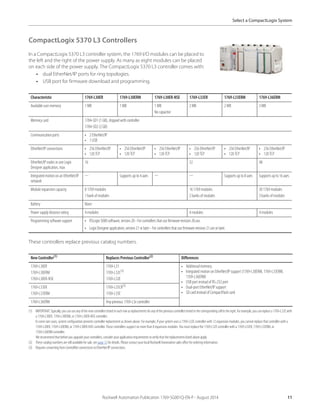
CompactLogix 5370 L3 Controllers
In a CompactLogix 5370 L3 controller system, the 1769 I/O modules can be placed to
the left and the right of the power supply. As many as eight modules can be placed
on each side of the power supply. The CompactLogix 5370 L3 controller comes with:
• dual EtherNet/IP ports for ring topologies.
• USB port for firmware download and programming.
These controllers replace previous catalog numbers.
Characteristic 1769-L30ER 1769-L30ERM 1769-L30ER-NSE 1769-L33ER 1769-L33ERM 1769-L36ERM
Available user memory 1 MB 1 MB 1 MB
No capacitor
2 MB 2 MB 3 MB
Memory card 1784-SD1 (1 GB), shipped with controller
1784-SD2 (2 GB)
Communication ports • 2 EtherNet/IP
• 1 USB
EtherNet/IP connections • 256 EtherNet/IP
• 120 TCP
• 256 EtherNet/IP
• 120 TCP
• 256 EtherNet/IP
• 120 TCP
• 256 EtherNet/IP
• 120 TCP
• 256 EtherNet/IP
• 120 TCP
• 256 EtherNet/IP
• 120 TCP
EtherNet/IP nodes in one Logix
Designer application, max
16 32 48
Integrated motion on an EtherNet/IP
network
— Supports up to 4 axes — — Supports up to 8 axes Supports up to 16 axes
Module expansion capacity 8 1769 modules
1 bank of modules
16 1769 modules
2 banks of modules
30 1769 modules
3 banks of modules
Battery None
Power supply distance rating 4 modules 4 modules 4 modules
Programming software support • RSLogix 5000 software, version 20 - For controllers that use firmware revision 20.xxx.
• Logix Designer application, version 21 or later - For controllers that use firmware revision 21.xxx or later.
New Controller(1)
(1) IMPORTANT:Typically,youcanuseany ofthenewcontrollerslisted ineachrowasreplacementsforanyofthepreviouscontrollerslistedinthecorrespondingcelltotheright.Forexample,youcanreplacea1769-L32Ewith
a 1769-L30ER, 1769-L30ERM, or 1769-L30ER-NSE controller.
In some rare cases, system configuration prevents controller replacement as shown above. For example, if your system uses a 1769-L32E controller with 12 expansion modules, you cannot replace that controller with a
1769-L30ER, 1769-L30ERM, or 1769-L30ER-NSE controller. Those controllers support no more than 8 expansion modules. You must replace the 1769-L32E controller with a 1769-L33ER, 1769-L33ERM, or
1769-L36ERM controller.
We recommend that before you upgrade your controllers, consider your application requirements to verify that the replacements listed above apply.
Replaces Previous Controller(2)
(2) These catalog numbers are still available for sale, see page 13 for details. Please contact your local Rockwell Automation sales office for ordering information.
Differences
1769-L30ER
1769-L30ERM
1769-L30ER-NSE
1769-L31
1769-L32C(3)
1769-L32E
(3) Requires converting from ControlNet connections to EtherNet/IP connections.
• Additionalmemory
• Integrated motion on EtherNet/IP support (1769-L30ERM, 1769-L33ERM,
1769-L36ERM)
• USB port instead of RS-232 port
• Dual-port EtherNet/IP support
• SD card instead of CompactFlash card
1769-L33ER
1769-L33ERM
1769-L35CR(3)
1769-L35E
1769-L36ERM Any previous 1769-L3xcontroller
Rockwell Automation Publication 1769-SG001Q-EN-P - August 2014 13
Select a CompactLogix System
1769-L3x Modular CompactLogix Controllers
In a 1769-L3x controller system, the 1769 I/O modules can be placed to the left and the right of the power supply. As many as
eight modules can be placed on each side of the power supply.
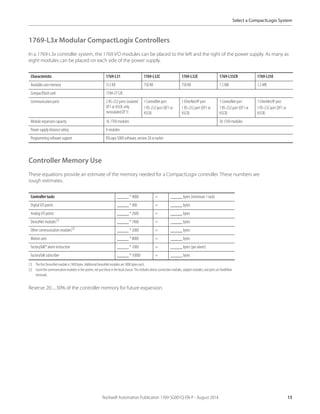
Controller Memory Use
These equations provide an estimate of the memory needed for a CompactLogix controller. These numbers are
rough estimates.
Reserve 20…30% of the controller memory for future expansion.
Characteristic 1769-L31 1769-L32C 1769-L32E 1769-L35CR 1769-L35E
Available user memory 512 KB 750 KB 750 KB 1.5 MB 1.5 MB
CompactFlash card 1784-CF128
Communication ports 2 RS-232 ports (isolated
DF1 or ASCII; only
nonisolated DF1)
1 ControlNet port
1 RS-232 port (DF1 or
ASCII)
1 EtherNet/IP port
1 RS-232 port (DF1 or
ASCII)
1 ControlNet port
1 RS-232 port (DF1 or
ASCII)
1 EtherNet/IP port
1 RS-232 port (DF1 or
ASCII)
Module expansion capacity 16 1769 modules 30 1769 modules
Power supply distance rating 4 modules
Programming software support RSLogix 5000 software, version 20 or earlier
Controller tasks _____ * 4000 = _____ bytes (minimum 1 task)
Digital I/O points _____ * 400 = _____ bytes
Analog I/O points _____ * 2600 = _____ bytes
DeviceNet modules(1)
(1) The first DeviceNet module is 7400 bytes. Additional DeviceNet modules are 5800 bytes each.
_____ * 7400 = _____ bytes
Other communication modules(2)
(2) Count the communication modules in the system, not justthose in the local chassis. This includes device connection modules, adapter modules, and ports onPanelView
terminals.
_____ * 2000 = _____ bytes
Motion axes _____ * 8000 = _____ bytes
FactoryTalk® alarm instruction _____ * 1000 = _____ bytes (per alarm)
FactoryTalk subscriber _____ * 10000 = _____ bytes
14 Rockwell Automation Publication 1769-SG001Q-EN-P - August 2014
Select a CompactLogix System
CompactLogix Communication Options
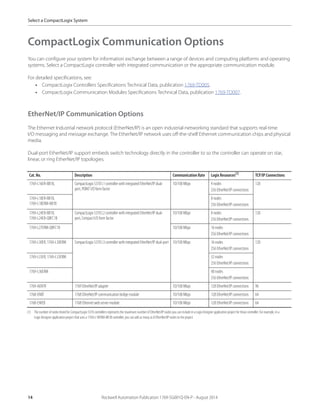
You can configure your system for information exchange between a range of devices and computing platforms and operating
systems. Select a CompactLogix controller with integrated communication or the appropriate communication module.
For detailed specifications, see:
• CompactLogix Controllers Specifications Technical Data, publication 1769-TD005.
• CompactLogix Communication Modules Specifications Technical Data, publication 1769-TD007.
EtherNet/IP Communication Options
The Ethernet Industrial network protocol (EtherNet/IP) is an open industrial-networking standard that supports real-time
I/O messaging and message exchange. The EtherNet/IP network uses off-the-shelf Ethernet communication chips and physical
media.
Dual-port EtherNet/IP support embeds switch technology directly in the controller to so the controller can operate on star,
linear, or ring EtherNet/IP topologies.
Cat. No. Description Communication Rate Logix Resources(1)
(1) The number of nodes listed for CompactLogix 5370 controllers represents the maximum number of EtherNet/IP nodes you can include in a Logix Designer application project for those controller. For example, in a
Logix Designer application project that uses a 1769-L18ERM-BB1B controller, you can add as many as8 EtherNet/IP nodes to the project.
TCP/IP Connections
1769-L16ER-BB1B, CompactLogix 5370 L1 controller with integrated EtherNet/IP dual-
port, POINT I/O form factor
10/100 Mbps 4 nodes
256 EtherNet/IP connections
120
1769-L18ER-BB1B,
1769-L18ERM-BB1B
8 nodes
256 EtherNet/IP connections
1769-L24ER-BB1B,
1769-L24ER-QBFC1B
CompactLogix 5370 L2 controller with integrated EtherNet/IP dual-
port, Compact I/O form factor
10/100 Mbps 8 nodes
256 EtherNet/IP connections
120
1769-L27ERM-QBFC1B 10/100 Mbps 16 nodes
256 EtherNet/IP connections
1769-L30ER, 1769-L30ERM CompactLogix 5370 L3 controller with integrated EtherNet/IP dual-port 10/100 Mbps 16 nodes
256 EtherNet/IP connections
120
1769-L33ER, 1769-L33ERM 32 nodes
256 EtherNet/IP connections
1769-L36ERM 48 nodes
256 EtherNet/IP connections
1769-AENTR 1769 EtherNet/IP adapter 10/100 Mbps 128 EtherNet/IP connections 96
1768-ENBT 1768 EtherNet/IP communicationbridge module 10/100 Mbps 128 EtherNet/IP connections 64
1768-EWEB 1768 Ethernet web server module 10/100 Mbps 128 EtherNet/IP connections 64
Rockwell Automation Publication 1769-SG001Q-EN-P - August 2014 15
Select a CompactLogix System
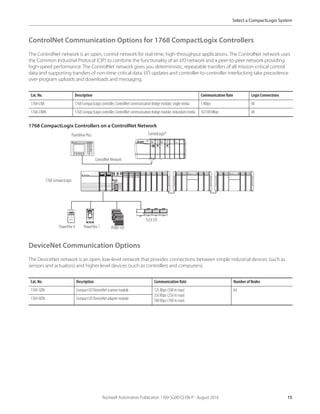
ControlNet Communication Options for 1768 CompactLogix Controllers
The ControlNet network is an open, control network for real-time, high-throughput applications. The ControlNet network uses
the Common Industrial Protocol (CIP) to combine the functionality of an I/O network and a peer-to-peer network providing
high-speed performance. The ControlNet network gives you deterministic, repeatable transfers of all mission-critical control
data and supporting transfers of non-time-critical data. I/O updates and controller-to-controller interlocking take precedence
over program uploads and downloads and messaging.
1768 CompactLogix Controllers on a ControlNet Network
DeviceNet Communication Options
The DeviceNet network is an open, low-level network that provides connections between simple industrial devices (such as
sensors and actuators) and higher-level devices (such as controllers and computers).
Cat. No. Description Communication Rate Logix Connections
1768-CNB 1768 CompactLogix controller, ControlNet communication bridge module, single media 5 Mbps 48
1768-CNBR 1768 CompactLogix controller, ControlNet communication bridge module, redundant media 10/100 Mbps 48
Cat. No. Description Communication Rate Number of Nodes
1769-SDN Compact I/O DeviceNet scanner module 125 Kbps (500 m max)
250 Kbps (250 m max)
500 Kbps (100 m max)
64
1769-ADN Compact I/O DeviceNet adapter module
1768 CompactLogix
POINTI/O
PowerFlex 7
PanelView Plus
PowerFlex 4
FLEX I/O
ControlNet Network
ControlLogix®
16 Rockwell Automation Publication 1769-SG001Q-EN-P - August 2014
Select a CompactLogix System
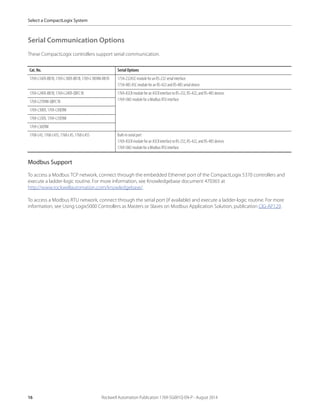
Serial Communication Options
These CompactLogix controllers support serial communication.
Modbus Support
To access a Modbus TCP network, connect through the embedded Ethernet port of the CompactLogix 5370 controllers and
execute a ladder-logic routine. For more information, see Knowledgebase document 470365 at
http://www.rockwellautomation.com/knowledgebase/.
To access a Modbus RTU network, connect through the serial port (if available) and execute a ladder-logic routine. For more
information, see Using Logix5000 Controllers as Masters or Slaves on Modbus Application Solution, publication CIG-AP129.
Cat. No. Serial Options
1769-L16ER-BB1B, 1769-L18ER-BB1B, 1769-L18ERM-BB1B 1734-232ASC module for anRS-232 serial interface
1734-485 ASC module for an RS-422 and RS-485 serialdevice
1769-L24ER-BB1B,1769-L24ER-QBFC1B 1769-ASCII module for an ASCII interface to RS-232, RS-422, and RS-485 devices
1769-SM2 module for a Modbus RTU interface
1769-L27ERM-QBFC1B
1769-L30ER, 1769-L30ERM
1769-L33ER, 1769-L33ERM
1769-L36ERM
1768-L43, 1768-L43S, 1768-L45, 1768-L45S Built-in serial port
1769-ASCII module for an ASCII interface to RS-232, RS-422, and RS-485 devices
1769-SM2 module for a Modbus RTU interface
Rockwell Automation Publication 1769-SG001Q-EN-P - August 2014 17
Select a CompactLogix System
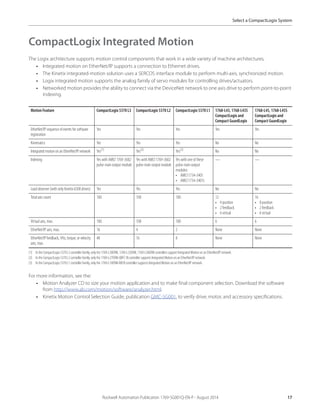
CompactLogix Integrated Motion
The Logix architecture supports motion control components that work in a wide variety of machine architectures.
• Integrated motion on EtherNet/IP supports a connection to Ethernet drives.
• The Kinetix integrated-motion solution uses a SERCOS interface module to perform multi-axis, synchronized motion.
• Logix integrated motion supports the analog family of servo modules for controlling drives/actuators.
• Networked motion provides the ability to connect via the DeviceNet network to one axis drive to perform point-to-point
indexing.
For more information, see the:
• Motion Analyzer CD to size your motion application and to make final component selection. Download the software
from http://www.ab.com/motion/software/analyzer.html.
• Kinetix Motion Control Selection Guide, publication GMC-SG001, to verify drive, motor, and accessory specifications.
Motion Feature CompactLogix 5370 L3 CompactLogix 5370 L2 CompactLogix 5370 L1 1768-L43, 1768-L43S
CompactLogix and
Compact GuardLogix
1768-L45, 1768-L45S
CompactLogix and
Compact GuardLogix
EtherNet/IP sequence of events for software
registration
Yes Yes Yes Yes Yes
Kinematics Yes Yes Yes No No
Integrated motion on an EtherNet/IP network Yes(1)
(1) In the CompactLogix 5370 L3 controller family, only the1769-L30ERM, 1769-L33ERM, 1769-L36ERM controllers support Integrated Motion on an EtherNet/IP network.
Yes(2)
(2) In the CompactLogix 5370 L2 controller family, only the 1769-L27ERM-QBFC1B controller supports Integrated Motion on an EtherNet/IP network.
Yes(3)
(3) In the CompactLogix 5370 L1 controller family, only the 1769-L18ERM-BB1B controller supports Integrated Motion on an EtherNet/IP network.
No No
Indexing Yes with AMCI 1769-3602
pulse-train output module
Yes withAMCI 1769-3602
pulse-train output module
Yes with one of these
pulse-train output
modules:
• AMCI 1734-3401
• AMCI 1734-3401L
— —
Load observer (with only Kinetix 6500 drives) Yes Yes Yes No No
Total axis count 100 100 100 12
• 4 position
• 2 feedback
• 6 virtual
16
• 8 position
• 2 feedback
• 6 virtual
Virtual axis, max. 100 100 100 6 6
EtherNet/IP axis, max. 16 4 2 None None
EtherNet/IP feedback, VHz, torque, or velocity
axis, max.
48 16 8 None None
18 Rockwell Automation Publication 1769-SG001Q-EN-P - August 2014
Select a CompactLogix System
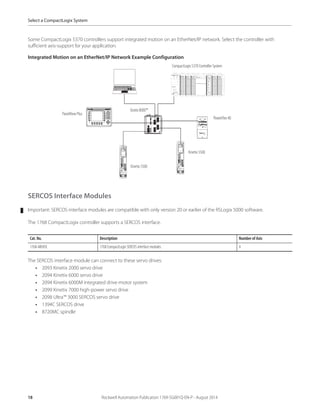
Some CompactLogix 5370 controllers support integrated motion on an EtherNet/IP network. Select the controller with
sufficient axis-support for your application.
Integrated Motion on an EtherNet/IP Network Example Configuration
SERCOS Interface Modules
Important: SERCOS interface modules are compatible with only version 20 or earlier of the RSLogix 5000 software.
The 1768 CompactLogix controller supports a SERCOS interface.
The SERCOS interface module can connect to these servo drives:
• 2093 Kinetix 2000 servo drive
• 2094 Kinetix 6000 servo drive
• 2094 Kinetix 6000M integrated drive-motor system
• 2099 Kinetix 7000 high-power servo drive
• 2098 Ultra™ 3000 SERCOS servo drive
• 1394C SERCOS drive
• 8720MC spindle
Cat. No. Description Number of Axis
1768-M04SE 1768 CompactLogix SERCOS interface modules 4
CompactLogix 5370 Controller System
PowerFlex 40
PanelView Plus
Stratix 8000™
Kinetix 5500
Kinetix 5500
Rockwell Automation Publication 1769-SG001Q-EN-P - August 2014 25
Select a CompactLogix System
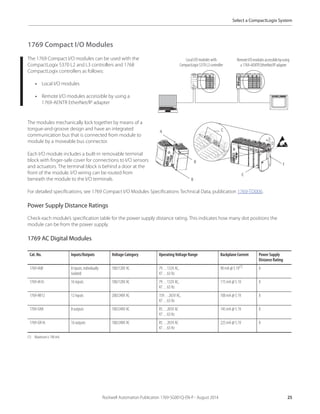
1769 Compact I/O Modules
The 1769 Compact I/O modules can be used with the
CompactLogix 5370 L2 and L3 controllers and 1768
CompactLogix controllers as follows:
• Local I/O modules
• Remote I/O modules accessible by using a
1769-AENTR EtherNet/IP adapter
The modules mechanically lock together by means of a
tongue-and-groove design and have an integrated
communication bus that is connected from module to
module by a moveable bus connector.
Each I/O module includes a built-in removable terminal
block with finger-safe cover for connections to I/O sensors
and actuators. The terminal block is behind a door at the
front of the module. I/O wiring can be routed from
beneath the module to the I/O terminals.
For detailed specifications, see 1769 Compact I/O Modules Specifications Technical Data, publication 1769-TD006.
Power Supply Distance Ratings
Check each module’s specification table for the power supply distance rating. This indicates how many slot positions the
module can be from the power supply.
1769 AC Digital Modules
Cat. No. Inputs/Outputs Voltage Category Operating Voltage Range Backplane Current Power Supply
Distance Rating
1769-IA8I 8 inputs, individually
isolated
100/120V AC 79…132V AC,
47…63 Hz
90 mA @ 5.1V(1)
(1) Maximum is 190 mA.
8
1769-IA16 16 inputs 100/120V AC 79…132V AC,
47…63 Hz
115 mA @ 5.1V 8
1769-IM12 12 inputs 200/240V AC 159…265V AC,
47…63 Hz
100 mA @ 5.1V 8
1769-OA8 8 outputs 100/240V AC 85…265V AC
47…63 Hz
145 mA @ 5.1V 8
1769-OA16 16 outputs 100/240V AC 85…265V AC
47…63 Hz
225 mA @ 5.1V 8
Local I/O modules with
CompactLogix5370 L3 controller
RemoteI/Omodulesaccessiblebyusing
a 1769-AENTR EtherNet/IP adapter
A
B
B
C
D
E
F
26 Rockwell Automation Publication 1769-SG001Q-EN-P - August 2014
Select a CompactLogix System
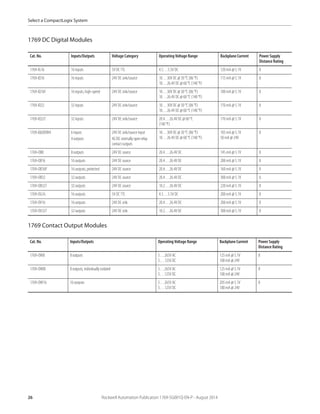
1769 DC Digital Modules
1769 Contact Output Modules
Cat. No. Inputs/Outputs Voltage Category Operating Voltage Range Backplane Current Power Supply
Distance Rating
1769-IG16 16 inputs 5V DC TTL 4.5…5.5V DC 120 mA @ 5.1V 8
1769-IQ16 16 inputs 24V DC sink/source 10…30V DC @ 30 °C (86 °F)
10…26.4V DC @ 60 °C (140 °F)
115 mA @ 5.1V 8
1769-IQ16F 16 inputs, high-speed 24V DC sink/source 10…30V DC @ 30 °C (86 °F)
10…26.4V DC @ 60 °C (140 °F)
100 mA @ 5.1V 8
1769-IQ32 32 inputs 24V DC sink/source 10…30V DC @ 30 °C (86 °F)
10…26.4V DC @ 60 °C (140 °F)
170 mA @ 5.1V 8
1769-IQ32T 32 inputs 24V DC sink/source 20.4…26.4V DC @ 60 °C
(140 °F)
170 mA @ 5.1V 8
1769-IQ6XOW4 6 inputs
4 outputs
24V DC sink/source input
AC/DC normally open relay
contact outputs
10…30V DC @ 30 °C (86 °F)
10…26.4V DC @ 60 °C (140 °F)
105 mA @ 5.1V
50 mA @ 24V
8
1769-OB8 8 outputs 24V DC source 20.4…26.4V DC 145 mA @ 5.1V 8
1769-OB16 16 outputs 24V DC source 20.4…26.4V DC 200 mA @ 5.1V 8
1769-OB16P 16 outputs, protected 24V DC source 20.4…26.4V DC 160 mA @ 5.1V 8
1769-OB32 32 outputs 24V DC source 20.4…26.4V DC 300 mA @ 5.1V 6
1769-OB32T 32 outputs 24V DC source 10.2…26.4V DC 220 mA @ 5.1V 8
1769-OG16 16 outputs 5V DC TTL 4.5…5.5V DC 200 mA @ 5.1V 8
1769-OV16 16 outputs 24V DC sink 20.4…26.4V DC 200 mA @ 5.1V 8
1769-OV32T 32 outputs 24V DC sink 10.2…26.4V DC 300 mA @ 5.1V 8
Cat. No. Inputs/Outputs Operating Voltage Range Backplane Current Power Supply
Distance Rating
1769-OW8 8 outputs 5…265V AC
5…125V DC
125 mA @ 5.1V
100 mA @ 24V
8
1769-OW8I 8 outputs, individually isolated 5…265V AC
5…125V DC
125 mA @ 5.1V
100 mA @ 24V
8
1769-OW16 16 outputs 5…265V AC
5…125V DC
205 mA @ 5.1V
180 mA @ 24V
8
Rockwell Automation Publication 1769-SG001Q-EN-P - August 2014 27
Select a CompactLogix System
1769 Analog Modules
Cat. No. Inputs/Outputs Range Resolution Backplane Current Power Supply
Distance Rating
1769-IF4 4 inputs, differential or single-
ended
±10V
0…10V
0…5V
1…5V
0…20 mA
4…20 mA
14 bits (unipolar)
14 bits plus sign (bipolar)
120 mA @ 5.1V
60 mA @ 24V
8
1769-IF4I 4 inputs, differential or single-
ended, individually isolated
±10V
0…10V
0…5V
1…5V
0…20 mA
4…20 mA
16 bits (unipolar)
15 bits plus sign (bipolar)
145 mA @ 5.1V
125 mA @ 24V
8
1769-IF8 8 inputs, differential or single-
ended
±10V
0…10V
0…5V
1…5V
0…20 mA
4…20 mA
16 bits (unipolar)
15 bits plus sign (bipolar)
120 mA @ 5.1V
70 mA @ 24V
8
1769-IF16C 16 inputs, single-ended 0…20 mA
4…20 mA
16 bits (unipolar)
15 bits plus sign (bipolar)
190 mA @ 5.1V
70 mA @ 24V
8
1769-IF16V 16 inputs, single-ended ±10V
0…10V
0…5V
1…5V
16 bits (unipolar)
15 bits plus sign (bipolar)
190 mA @ 5.1V
70 mA @ 24V
8
1769-IF4XOF2 4 differential or single-ended
inputs
2 single-ended outputs
0…10V
0…20 mA
Input: 8 bits plus sign
Output: 8 bits plus sign
120 mA @ 5.1V
160 mA @ 24V
8
1769-IF4FXOF2F 4 fast differential or single-ended
inputs
2 fast single-ended outputs
±10V
0…10V
0…5V
1…5V
0…20 mA
4…20 mA
Input: 14 bits (unipolar)
14 bits plus sign (bipolar)
Output: 13 bits (unipolar)
13 bits plus sign (bipolar)
220 mA @ 5.1V
120 mA @ 24V
8
1769-OF2 2 outputs,single-ended ±10V
0…10V
0…5V
1…5V
0…20 mA
4…20 mA
14 bits (unipolar)
14 bits plus sign (bipolar)
120 mA @ 5.1V
120 mA @ 24V
8
1769-OF4 4 outputs,single-ended ±10V
0…10V
0…5V
1…5V
0…20 mA
4…20 mA
15 bits plus sign unipolar and
bipolar
120 mA @ 5.1V
170 mA @ 24V
8
1769-OF4CI 4outputs,differential,individually
isolated
0…20 mA
4…20 mA
16 bits (unipolar) 165 mA @ 5V
110 mA @ 24V
8
28 Rockwell Automation Publication 1769-SG001Q-EN-P - August 2014
Select a CompactLogix System
1769 Analog RTD and Thermocouple Modules
1769 Communication and Specialty Modules
1769-OF4VI 4outputs,differential,individually
isolated
±10V
0…10V
0…5V
1…5V
15 bits plus sign (bipolar) 145 mA @ 5.1V
75 mA @ 24V
8
1769-OF8C 8 outputs, single-ended 0…20 mA
4…20 mA
16 bits (unipolar) 140 mA @ 5.1V
145 mA @ 24V
8
1769-OF8V 8 outputs,single-ended ±10V
0…10V
0…5V
1…5V
16 bits plus sign (bipolar) 145 mA @ 5.1V
125 mA @ 24V
8
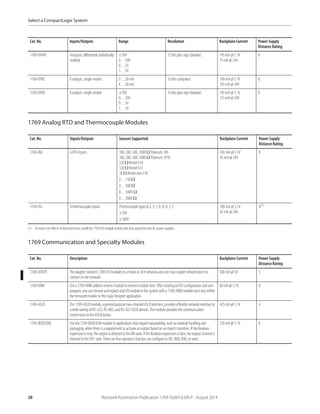
Cat. No. Inputs/Outputs Sensors Supported Backplane Current Power Supply
Distance Rating
1769-IR6 6 RTD inputs 100, 200, 500, 1000 Ω Platinum 385
100, 200, 500, 1000 Ω Platinum 3916
120 Ω Nickel 618
120 Ω Nickel 672
10 Ω Nickel-iron518
0…150 Ω
0…500 Ω
0…1000 Ω
0…3000 Ω
100 mA @ 5.1V
45 mA @ 24V
8
1769-IT6 6 thermocouple inputs Thermocoupletypes B, C, E, J, K, N, R, S, T
±50V
±100V
100 mA @ 5.1V
45 mA @ 24V
8(1)
(1) To reduce the effects of electrical noise, install the 1769-IT6 module at least two slots away from the AC power supplies.
Cat. No. Description Backplane Current Power Supply
Distance Rating
1769-AENTR The adapter connects 1769 I/O modules to a linear or DLR network and uses two copper network ports to
connect to the network.
500 mA @ 5V 5
1769-ARM Use a 1769-ARM address reserve module to reserve module slots. After creating anI/O configuration and user
program,youcanremoveandreplaceanyI/Omoduleinthesystemwitha1769-ARMmoduleonceyouinhibit
the removed module in the Logix Designer application.
60 mA @ 5.1V 8
1769-ASCII The1769-ASCIImodule,ageneralpurposetwo-channelASCIIinterface,providesaflexiblenetworkinterfaceto
a wide variety of RS-232, RS-485, and RS-422 ASCII devices.The module provides the communication
connections to the ASCII device.
425 mA @ 5.1V 4
1769-BOOLEAN Use the 1769-BOOLEAN module in applications that require repeatability, such as material handling and
packaging, when there is a requirement to activate an output based on an input’s transition. If the Boolean
expressionistrue,theoutputis directedto theONstate.IftheBooleanexpressionisfalse,theoutputchannelis
directed to the OFF state. There are four operators that you can configure as OR, AND, XOR, or none.
220 mA @ 5.1V 8
Cat. No. Inputs/Outputs Range Resolution Backplane Current Power Supply
Distance Rating
Rockwell Automation Publication 1769-SG001Q-EN-P - August 2014 29
Select a CompactLogix System
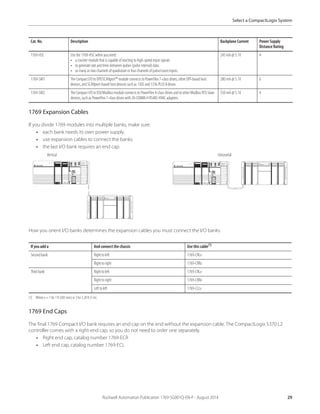
1769 Expansion Cables
If you divide 1769 modules into multiple banks, make sure:
• each bank needs its own power supply.
• use expansion cables to connect the banks.
• the last I/O bank requires an end cap.
How you orient I/O banks determines the expansion cables you must connect the I/O banks.
1769 End Caps
The final 1769 Compact I/O bank requires an end cap on the end without the expansion cable. The CompactLogix 5370 L2
controller comes with a right-end cap, so you do not need to order one separately.
• Right end cap, catalog number 1769-ECR
• Left end cap, catalog number 1769-ECL
1769-HSC Use the 1769-HSC when you need:
• a counter module that is capable of reacting to high-speed input signals.
• to generate rate and time-between-pulses (pulse interval) data.
• as many as two channels of quadrature or four channels of pulse/count inputs.
245 mA @ 5.1V 4
1769-SM1 The Compact I/O to DPI/SCANport™ module connects to PowerFlex 7-class drives, other DPI-based host
devices, and SCANport-based host devices such as 1305 and 1336 PLUS II drives.
280 mA @ 5.1V 6
1769-SM2 The Compact I/O to DSI/Modbus module connects to PowerFlex 4-class drives and to other Modbus RTU slave
devices, such as PowerFlex 7-class drives with 20-COMM-H RS485 HVAC adapters.
350 mA @ 5.1V 4
If you add a And connect the chassis Use this cable(1)
(1) Where x = 1 for 1 ft (305 mm) or 3 for 3.28 ft (1 m).
Second bank Right to left 1769-CRLx
Right to right 1769-CRRx
Third bank Right to left 1769-CRLx
Right to right 1769-CRRx
Left to left 1769-CLLx
Cat. No. Description Backplane Current Power Supply
Distance Rating
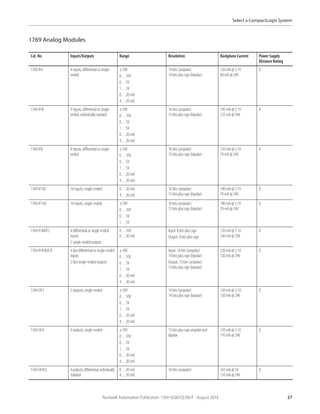
Horizontal
Vertical
30 Rockwell Automation Publication 1769-SG001Q-EN-P - August 2014
Select a CompactLogix System
1769 Wiring Systems
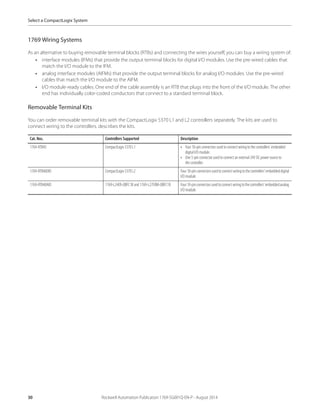
As an alternative to buying removable terminal blocks (RTBs) and connecting the wires yourself, you can buy a wiring system of:
• interface modules (IFMs) that provide the output terminal blocks for digital I/O modules. Use the pre-wired cables that
match the I/O module to the IFM.
• analog interface modules (AIFMs) that provide the output terminal blocks for analog I/O modules. Use the pre-wired
cables that match the I/O module to the AIFM.
• I/O module-ready cables. One end of the cable assembly is an RTB that plugs into the front of the I/O module. The other
end has individually color-coded conductors that connect to a standard terminal block.
Removable Terminal Kits
You can order removable terminal kits with the CompactLogix 5370 L1 and L2 controllers separately. The kits are used to
connect wiring to the controllers. describes the kits.
Cat. Nos. Controllers Supported Description
1769-RTB45 CompactLogix 5370 L1 • Four 10-pin connectors used to connect wiring to the controllers’ embedded
digital I/O module.
• One 5-pin connector used to connect an external24V DC power source to
the controller.
1769-RTB40DIO CompactLogix 5370 L2 Four10-pinconnectorsusedtoconnectwiringtothecontrollers’embeddeddigital
I/O module.
1769-RTB40AIO 1769-L24ER-QBFC1B and 1769-L27ERM-QBFC1B Four10-pinconnectorsusedtoconnectwiringtothecontrollers’embeddedanalog
I/O module.
Rockwell Automation Publication 1769-SG001Q-EN-P - August 2014 31
Select a CompactLogix System
CompactLogix Power Supplies
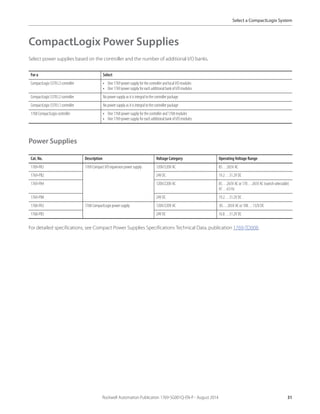
Select power supplies based on the controller and the number of additional I/O banks.
Power Supplies
For detailed specifications, see Compact Power Supplies Specifications Technical Data, publication 1769-TD008.
For a Select
CompactLogix 5370 L3 controller • One 1769 power supply for the controller and local I/O modules
• One 1769 power supply for eachadditional bank of I/O modules
CompactLogix 5370 L2 controller No power supply as it is integral to the controller package
CompactLogix 5370 L1 controller No power supply as it is integral to the controller package
1768 CompactLogixcontroller • One 1768 power supply for the controller and 1768 modules
• One 1769 power supply for eachadditional bank of I/O modules
Cat. No. Description Voltage Category Operating Voltage Range
1769-PA2 1769 Compact I/O expansion power supply 120V/220V AC 85…265V AC
1769-PB2 24V DC 19.2…31.2V DC
1769-PA4 120V/220V AC 85…265V AC or 170…265V AC (switch selectable)
47…63 Hz
1769-PB4 24V DC 19.2…31.2V DC
1768-PA3 1768 CompactLogix power supply 120V/220V AC 85…265V AC or 108…132V DC
1768-PB3 24V DC 16.8…31.2V DC
32 Rockwell Automation Publication 1769-SG001Q-EN-P - August 2014
Select a CompactLogix System
Programming Software
Your selection of modules and network configuration determines what software packages you need to configure and program
your system.
Studio 5000 Environment
The Studio 5000 Automation Engineering & Design Environment™ combines engineering and design elements into a common
environment. The first element in the Studio 5000® environment is the Studio 5000 Logix Designer™ application. The Logix
Designer application is the rebranding of RSLogix™ 5000 software and continues to be the product to program Logix5000™
controllers for discrete, process, batch, motion, safety, and drive-based s solutions.
The Studio 5000 environment is the foundation for the future of Rockwell Automation® engineering design tools and
capabilities. This environment is the one place for design engineers to develop all elements of their control system.
The Studio 5000 environment does not support the following controllers.
• 1768 CompactLogix controllers
• 1769-L23x Packaged CompactLogix controllers
• 1769-L3x Modular CompactLogix controllers
You must use RSLogix 5000 software, version 20 or earlier, with the previously listed controllers.
6 POINTI/ODualPortEtherNet/IPAdapter
Publication 1734-IN040C-EN-P-December 2018
1734-AENTR Adapter
Read this publication for information about the POINT I/O™ Dual Port EtherNet/IP™
adapter,acommunicationsadapterforPOINTI/O modules.
This adapter is for the POINT I/O backplane that provides connectivity to an
EtherNet/IPnetworkwithtwo RJ-45 connectorsfor 2portpass-through tosupport
daisy-chain or ring,and the existing star and tree network topologies.
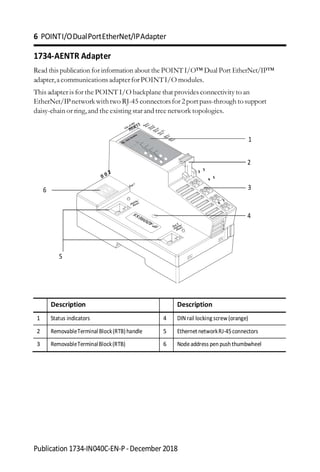
Description Description
1 Status indicators 4 DINrail locking screw(orange)
2 RemovableTerminalBlock(RTB)handle 5 EthernetnetworkRJ-45connectors
3 RemovableTerminalBlock(RTB) 6 Nodeaddress penpushthumbwheel
1
2
6 3
4
5
POINTI/ODualPortEtherNet/IPAdapter 7
Publication 1734-IN040C-EN-P-December2018
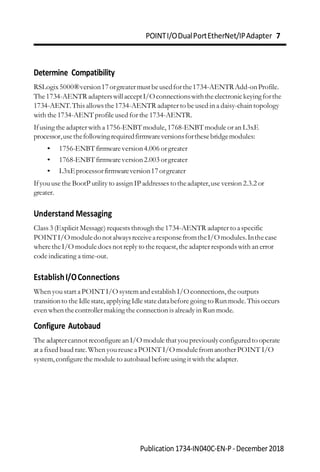
Determine Compatibility
RSLogix5000®version17orgreatermustbeusedforthe1734-AENTRAdd-onProfile.
The1734-AENTR adapterswillacceptI/Oconnectionswiththeelectronickeyingforthe
1734-AENT.This allows the1734-AENTR adapter to be used in a daisy-chain topology
with the 1734-AENTprofile used for the 1734-AENTR.
Ifusing the adapter with a1756-ENBTmodule, 1768-ENBTmodule or an L3xE
processor,usethefollowingrequiredfirmwareversionsforthesebridgemodules:
• 1756-ENBTfirmwareversion4.006 orgreater
• 1768-ENBTfirmwareversion2.003 orgreater
• L3xEprocessorfirmwareversion17orgreater
Ifyouuse the BootP utility to assign IP addresses totheadapter,use version 2.3.2 or
greater.
Understand Messaging
Class 3 (Explicit Message) requests through the1734-AENTR adapter to aspecific
POINTI/OmoduledonotalwaysreceivearesponsefromtheI/Omodules.Inthecase
wheretheI/O module does not reply to therequest,the adapter responds with an error
code indicating a time-out.
EstablishI/OConnections
When youstart aPOINTI/O systemand establish I/Oconnections,theoutputs
transitionto the Idlestate,applying Idle statedatabefore going to Run mode.This occurs
even when thecontroller making the connection is already in Run mode.
Configure Autobaud
The adaptercannot reconfigure an I/O module thatyoupreviouslyconfiguredto operate
at a fixed baud rate.When youreuse aPOINT I/O modulefromanother POINT I/O
system,configure the module to autobaud before using it with the adapter.
8 POINTI/ODualPortEtherNet/IPAdapter
Publication 1734-IN040C-EN-P-December 2018
InstalltheAdapter
Follow this procedure to install the adapter on the DINrail.
1. Position the adapter vertically above the DIN rail. Make sure that the DIN rail
lock is in horizontal position.
2. Press down firmly to install the adapter on a DIN rail,noting that the locking
mechanismlocks the adapter to the DINrail.
3. Setthe node addressonthenode addresspenpush thumbwheel.See Set the
NetworkAddress for moreinformation on setting the IPaddress.
4. Slidethe safety end capup to remove it,exposing the backplane and power
interconnections.
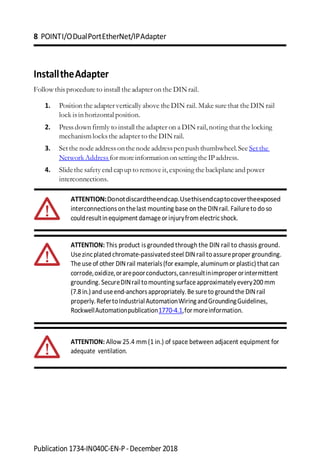
ATTENTION:Donotdiscardtheendcap.Usethisendcaptocovertheexposed
interconnections onthelast mounting base on the DINrail. Failureto do so
couldresultinequipment damageorinjuryfrom electricshock.
ATTENTION: This product is grounded through the DIN rail to chassis ground.
Usezincplated chromate-passivatedsteel DINrail toassureproper grounding.
The use of other DINrail materials(for example,aluminumor plastic)that can
corrode,oxidize,orarepoorconductors,canresultinimproperorintermittent
grounding.SecureDINrailtomountingsurfaceapproximatelyevery200mm
(7.8in.)and useend-anchorsappropriately.Be sureto groundthe DINrail
properly.RefertoIndustrialAutomationWiringandGroundingGuidelines,
RockwellAutomationpublication1770-4.1,formoreinformation.
ATTENTION: Allow 25.4 mm(1 in.) of space between adjacent equipment for
adequate ventilation.
POINTI/ODualPortEtherNet/IPAdapter 9
Publication 1734-IN040C-EN-P-December2018
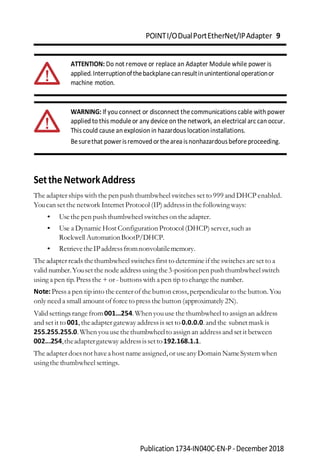
ATTENTION: Do not remove or replace an Adapter Module while power is
applied.Interruptionofthebackplanecanresultinunintentional operationor
machine motion.
WARNING: If you connect or disconnect the communications cable with power
applied to this module or any device on the network, an electrical arc can occur.
This could cause an explosion in hazardous locationinstallations.
Besurethat powerisremoved ortheareaisnonhazardousbefore proceeding.
SettheNetworkAddress
The adapter ships with the pen push thumbwheel switches set to 999 and DHCP enabled.
Youcan set the network Internet Protocol (IP) address in the following ways:
• Usethe pen push thumbwheel switches on the adapter.
• Use a Dynamic Host Configuration Protocol (DHCP) server,such as
Rockwell AutomationBootP/DHCP.
• RetrievetheIPaddressfromnonvolatilememory.
The adapter reads thethumbwheel switches first to determine if the switches are set to a
valid number.Youset the node address using the3-positionpen pushthumbwheelswitch
using a pen tip.Press the + or - buttons with apen tip to change the number.
Note:Press a pen tip into the center of the button cross,perpendicular to the button.You
only need a small amount of force to pressthe button (approximately 2N).
Validsettings range from001…254.When youuse the thumbwheel to assign an address
and set it to 001,theadapter gateway addressis set to 0.0.0.0.and the subnet mask is
255.255.255.0.When youusethethumbwheelto assign an addressand set it between
002...254,theadaptergateway addressissetto192.168.1.1.
The adapter doesnot haveahost name assigned,or useany Domain NameSystemwhen
usingthe thumbwheel settings.
10 POINTI/ODualPortEtherNet/IPAdapter
Publication 1734-IN040C-EN-P-December 2018
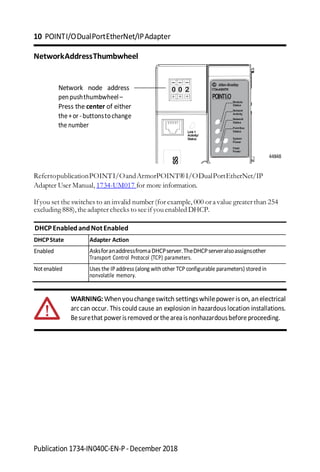
NetworkAddressThumbwheel
Network node address
penpushthumbwheel–
Press the center of either
the+or-buttonstochange
the number
44848
RefertopublicationPOINTI/OandArmorPOINT®I/ODualPortEtherNet/IP
Adapter User Manual, 1734-UM017 for more information.
Ifyou set the switches to an invalid number (for example, 000 or avalue greater than 254
excluding 888),theadapter checks to see if youenabled DHCP.
DHCPEnabledandNotEnabled
DHCPState Adapter Action
Enabled AsksforanaddressfromaDHCPserver.TheDHCPserveralsoassignsother
Transport Control Protocol (TCP) parameters.
Notenabled Uses the IP address (along withother TCP configurable parameters) storedin
nonvolatile memory.
WARNING: Whenyouchangeswitch settingswhilepowerison, anelectrical
arc can occur. This could cause an explosion in hazardous location installations.
Besurethat powerisremoved ortheareaisnonhazardousbefore proceeding.
0 0 2 1734-AENTR
POINTI O
Link1
Activity/
Status
Module
Status
Network
Activity
Network
Status
PointBus
Status
System
Power
Field
Power
SS

Prática de Studio 5000, inserir novos drives e instruções.

  • 1.
    Laboratorio de ComunicacionesIndustriales y Sistemas SCADA PRÁCTICA #1 Tema: Introducción a Studio 5000 Logix Designer 1. Objetivos 1.1. Objetivo general Reconocer las principales herramientas del software Studio 5000 Logix Designer para la programación en lenguaje escalera usando entradas y salidas tanto digitales como analógicas del PLC CompactLogix L33. 1.2. Objetivos específicos 1. Identificar las herramientas del software Studio 5000 para la creación de un proyecto. 2. Diferenciar las partes del PLC CompactLogix para la realización de aplicaciones industriales. 3. Crear una red Ethernet a través del software Studio 5000 para la configuración una arquitectura integrada CIP. 2. Equipos y herramientas • CompactLogix L33 ERM. • Módulo remoto POINT I/O • Studio 5000. • RsLinx Classic. • Cables Ethernet. • Switch administrable. • Módulo de E/S digitales del CompactLogix. • Computadora. • Cables bananas. • Botoneras y luz piloto del tablero de automatización. 3. Marco teórico Studio 5000 El software Studio 5000 contiene, Logix Designer y Factory Talk View. Logix Designer permite la programación y configuración de los controladores autómatas programables ControlLogix y CompactLogix de la plataforma Rockwell Automation. Logix Designer permite programar en diferentes lenguajes como: ladder, texto estructurado, diagrama de bloques funcionales, y Graphcet.
  • 2.
    Laboratorio de ComunicacionesIndustriales y Sistemas SCADA CompactLogix 5370-L3 Tiene puerto dual ethernet con capacidad DLR, memoria de 2 MB, 16 módulos de expansiones de E/S, 32 Nodos Ethernet IP, 8 ejes de movimiento CIP con función cinemática. • Admite Integrated Motion en EtherNet / IP ™ (modelos seleccionados) • Anillo de nivel de dispositivo (DLR) para mejorar la resistencia de la red • Capacidad para agregar control localizado módulos de E / S CompactLogix ™ 1769 • E/S distribuida a través de EtherNet / IP ofrece flexibilidad adicional en E/S opcionales. • Capacidad de conexión abierta para dispositivos como impresoras, lectores de códigos de barras y servidores • El puerto USB incorporado proporciona un fácil acceso para acceder descargar firmware y programación.
  • 3.
    Laboratorio de ComunicacionesIndustriales y Sistemas SCADA 4. Conexiones 5. Procedimiento Crear un proyecto en Studio 5000 1. Abrir el software Studio 5000, seleccionar New Project. 2. En la ventana New Project, seleccionar 1769-L33ERM CompactLogix. Asignar un nombre al proyecto, y la ubicación a guardar del proyecto. La extensión del tipo de archivo del proyecto será. ACD
  • 4.
    Laboratorio de ComunicacionesIndustriales y Sistemas SCADA 3. La ventana de Configuraciones del proyecto emergerá, donde se asignará la revisión del controlador, las otras configuraciones se deben dejar las que se encuentran por defecto. La revisión del controlador corresponde al Firmware del dispositivo, la revisión se puede observar en el software RSLinx, al dar clic derecho en el equipo y seleccionando sus propiedades. En algunos controladores suele presentar el tipo de chasis donde se selecciona la cantidad de números de módulos se pueden agregar al chasis, slot corresponde en asignar la posición que se encuentra el CPU del controlador, esta posición comienza desde cero.
  • 5.
    Laboratorio de ComunicacionesIndustriales y Sistemas SCADA 4. La pantalla de Logix Designer aparecerá. En dicha pantalla se encuentran la ventana Controller Organizer que contiene diferentes carpetas y archivos de toda la información de los programas del proyecto. Añadir módulos a un controlador dentro de un proyecto de Studio 5000 1. En la carpeta I/O Configuration, dar clic derecho en el bus del controlador y seleccionar New Module. 2. La ventana Select Module Type aparecerá para buscar por el número de catálogo del módulo que se desea agregar. Los módulos que deben crearse son los siguientes, módulo de E/S digitales 1769-IQ6XOW4, y módulo de E/S analógicas 1769-IF4XOF2. En este caso seleccionar el número de catálogo del módulo de E/S digitales y dar clic en Create.
  • 6.
    Laboratorio de ComunicacionesIndustriales y Sistemas SCADA 3. A continuación, se muestra la ventana New Module se debe escribir un nombre en el parámetro Name y asignar la posición que se encuentra el módulo agregado en el chasis en el parámetro slot. En la sección Module Definition, dar clic en Change. 4. La ventana Module Definition aparecerá. Asignar la revisión del módulo y dar clic en OK.
  • 7.
    Laboratorio de ComunicacionesIndustriales y Sistemas SCADA 5. Dar clic en Yes. 6. En la pestaña Connection de la ventana New Module, asignar 20ms en RPI: Requested Packet Interval, este parámetro corresponde al período en el cual el dato es actualizado y es configurado en milisegundos. Luego, clic en OK. 7. Luego, crear un nuevo módulo de E/S analógicas cuyo número de catálogo es 1769-IF4XOF2. Además, en las pestañas Input Configuration y Output Configuration se deben habilitar todos los canales de sus entradas y salidas.
  • 8.
    Laboratorio de ComunicacionesIndustriales y Sistemas SCADA 8. En la carpeta Controller Introduction, dar doble clic en Controller Tags. 9. En la ventana Controller Tags, las variables de los módulos agregados aparecerán. A continuación, se muestra un ejemplo de estas variables: Local:1:I.Data.4 • “Local” significa que el módulo está conectado para un controlador en frente del backplane o con un enlace paralelo. • “1” significa que el módulo es el numero #1 (localizado en el segundo slot en el rack). • “I” significa que el bit es una entrada. • “Data” indica que el tipo de dato. • “4” significa que es el quinto bit de la salida. Añadir elementos de lenguaje de programación ladder 1. En el Organizador del controlador en la carpeta “Task”, se encuentra “Main Program”, y dentro de ella “MainRoutine”. Al dar doble clic aparecerá el editor de rutinas.
  • 9.
    Laboratorio de ComunicacionesIndustriales y Sistemas SCADA 2. En la barra de herramientas aparecerán las diferentes librerías del software con sus respectivos elementos, los cuales podrán ser agregados en la rutina. 3. Para la vinculación de algún elemento de la rutina con una variable, se debe crear una etiqueta, dar clic derecho en elemento, luego seleccionar New Tag.
  • 10.
    Laboratorio de ComunicacionesIndustriales y Sistemas SCADA 4. Ingresar el nombre de la variable, tipo base, en este caso se elegirá el tipo base la cual no está vinculado con entradas o salida físicas del controlador (memoria). Luego seleccionar el tipo de datos y llenar los campos pertinentes. 5. La variable tipo Alias Tag permite crear una variable que representa otra variable, es decir las variables de los módulos I/O pueden ser representados por otra variable. Dar clic derecho en un elemento de la rutina (contacto, bobina, etc.). En la ventana New Parameter o tag, asignar un nombre a la variable, luego en Type escoger Alias y se habilitará el campo de Alias For.
  • 11.
    Laboratorio de ComunicacionesIndustriales y Sistemas SCADA 6. En la ventana del buscador se mostrará las variables del controlador y del programa, seleccionar Local que representan a las variables al momento de crear los módulos I/O. 7. Seleccionar el bit que queremos vincular con la programación, para esto se debe seleccionar el arreglo de interés, es decir escoger un bit del arreglo 8 bits de Input u Output respectivamente. 8. La ventana Parameter/Local Tag aparecerá de la siguiente forma.
  • 12.
    Laboratorio de ComunicacionesIndustriales y Sistemas SCADA 9. Por último, realizar la programación en el peldaño #0 como se muestra en la siguiente imagen. Añadir contadores, temporizadores y comparadores 1. En la pestaña Timer/Counter de Instructions Toolbar, escoger TON que significa temporizador con retardo a la conexión.
  • 13.
    Laboratorio de ComunicacionesIndustriales y Sistemas SCADA 2. A continuación, arrastrar el temporizador seleccionado al peldaño #1 de la programación. 3. Clic derecho a “?” en la sección Timer del bloque Ton, luego escoger New Tag para la creación de una etiqueta tipo timer del bloque. 4. La ventana New Tag aparecerá. Escribir un nombre a la etiqueta, luego escoger MainProgram en Scope y que en la sección Data Type sea TIMER. Dar clic en Create.
  • 14.
    Laboratorio de ComunicacionesIndustriales y Sistemas SCADA 5. El peldaño debe mostrarse como la siguiente figura. En la sección Preset del bloque, especificar el valor (unidades en milisegundos) que Accum debe alcanzar para que el bit DN se active. 6. Añadir un peldaño y contacto en la programación, luego asignar el bit DN de la variable tipo timer al contacto.
  • 15.
    Laboratorio de ComunicacionesIndustriales y Sistemas SCADA 7. La programación debe mostrarse como la siguiente figura. 8. En la pestaña Timer/Counter de Instructions Toolbar, escoger CTU que cuenta hacia arriba cada vez que las transiciones de la condición del peldaño van de un estado de falso a verdadero. Luego, arrastrar el contador seleccionado al peldaño #3 de la programación.
  • 16.
    Laboratorio de ComunicacionesIndustriales y Sistemas SCADA 9. Clic derecho a “?” en la sección Counter del bloque CTU, luego escoger New Tag para la creación de una etiqueta tipo counter del bloque.
  • 17.
    Laboratorio de ComunicacionesIndustriales y Sistemas SCADA 10. La ventana New Tag aparecerá. Escribir un nombre a la etiqueta, luego escoger MainProgram en Scope y que en la sección Data Type sea COUNTER. Dar clic en Create. 11. El peldaño debe mostrarse como la siguiente figura. En la sección Preset del bloque, especificar el valor en que Accum debe alcanzar para que el bit DN se active. 12. En la pestaña Compare de Instructions Toolbar, escoger EQU que compara si dos valores son iguales. Luego, arrastrar el temporizador seleccionado al peldaño #3 de la programación.
  • 18.
    Laboratorio de ComunicacionesIndustriales y Sistemas SCADA 13. Desplegar “?” hacia abajo en la sección Source A del bloque CTU, luego escoger la etiqueta tipo counter del bloque y seleccionar el parámetro .ACC que especifica el número de transiciones de la instrucción que se ha contado. 14. La programación debe mostrarse como la siguiente figura.
  • 19.
    Laboratorio de ComunicacionesIndustriales y Sistemas SCADA Descargar un proyecto de Logix Designer hacia un controlador 1. Ir a Communications, luego seleccionar Who Active. 2. En la ventana Who Active, abrir la red creada. En esta red se encontrará todos los equipos conectados en la misma.
  • 20.
    Laboratorio de ComunicacionesIndustriales y Sistemas SCADA 3. En la red seleccionar el CPU del controlador, dar clic en Set Project Path, y finalmente en Download. 4. Cambiar al controlador en modo Run, dar clic en Yes. 5. Finalmente se puede observar en el estado del controlador que la descarga ha sido realizada con éxito, y el estado del controlador se encuentra en Run. 6. Actividades por desarrollar Realizar la programación de la siguiente aplicación en diagrama de lógica escalera, utilizando el software Studio 5000.
  • 21.
    Laboratorio de ComunicacionesIndustriales y Sistemas SCADA Ejercicio 1 Se pretende automatizar un control de garaje que realice lo siguiente: El garaje dispone de una entrada con barrera, semáforo (rojo/verde) y detector de llegada de coche; y de una salida sin barrera y en la que únicamente hay un detector de salida de coches, como se ilustra en la siguiente figura: El funcionamiento debe ser el siguiente: a) Inicialmente en el garaje no hay coches, se cuenta el número de coches que entran y salen para controlar el total de coches en el garaje en cada momento. b) Si llega un coche y quedan plazas libres, se debe abrir la barrera por 10 segundos (se ignora el cierre para simplificar). c) Si llega un coche y no quedan plazas libres, no se abre la barrera. d) El semáforo estará verde cuando queden plazas libres y rojo cuando el garaje esté completo. Se supone que el garaje tiene 10 plazas. e) Existe también para reiniciar el controlador a cero manualmente.
  • 22.
    Laboratorio de ComunicacionesIndustriales y Sistemas SCADA ANEXOS
  • 23.
    2 Rockwell AutomationPublication 1769-SG001Q-EN-P - August 2014 CompactLogix System Logix Controllers Comparison Characteristic ControlLogix 1756-71, 1756-L72, 1756-L73, 1756-L73XT, 1756-L74, 1756-L75 GuardLogix 1756-L72S, 1756-L73S, 1756-L73SXT CompactLogix 1769-L30ER, 1769-L30ER-NSE, 1769-L30ERM, 1769-L33ER, 1769-L33ERM, 1769-L36ERM CompactLogix 1769-L24ER-BB1B, 1769-L24ER-QBFC1B, 1769-L27ERM-QBFC1B CompactLogix 1769-L16ER-BB1B, 1769-L18ER-BB1B, 1769-L18ERM-BB1B CompactLogix 1768-L43, 1768-L45 Compact GuardLogix 1768-L43S, 1768-L45S Controller tasks: • Continuous • Periodic • Event 32; 100 programs/task 32; 100 programs/task 32; 100 programs/task 32; 100 programs/task • 1768-L43: 16; 32 programs/task • 1768-L45: 30; 32 programs/task Event tasks All event triggers All event triggers All event triggers All event triggers, plus embedded inputs All event triggers User memory • 1756-L71: 2 MB • 1756-L72: 4 MB • 1756-L72S: 4 MB + 2 MB safety • 1756-L73,1756-L73SXT, 1756-L73XT: 8 MB • 1756-L73S: 8 MB + 4 MB safety • 1756-L74: 16 MB • 1756-L75: 32 MB • 1769-L30ER, 1769-L30ER-NSE, 1769-L30ERM: 1MB • 1769-L33ER, 1769-L33ERM: 2 MB • 1769-L36ERM: 3 MB • 1769-L24ER: 750 KB • 1769-L27ERM: 1 MB • 1769-L16ER: 384 KB • 1769-L18ER, 1769-L18ERM: 512 KB • 1768-L43: 2 MB • 1768-L43S: 2 MB + 0.5 MB safety • 1768-L45: 3 MB • 1768-L45S: 3 MB + 1 MB safety Memory card Secure Digital Secure Digital Secure Digital Secure Digital CompactFlash Built-in ports 1 USB 2 EtherNet/IP 1 USB 2 EtherNet/IP 1 USB 2 EtherNet/IP 1 USB 1 RS-232 Communication options • EtherNet/IP (standard and safety) • ControlNet(standardand safety) • DeviceNet (standard and safety) • DH+ • Remote I/O • SynchLink • Dual-port EtherNet/IP(1) • DeviceNet (1) CompactLogix™ 5370 controllers have two EtherNet/IP ports toconnect to an EtherNet/IP network. The ports carry the same network traffic as part of the controller’s embedded switch. The controller uses only one IP address. • Dual-port EtherNet/IP(1) • DeviceNet • Dual-port EtherNet/IP(1) • EtherNet/IP (standard and safety) • ControlNet(standardand safety) • DeviceNet (standard) Controller connections 500 256 256 256 250 Network connections Per module: • 128 ControlNet (CN2/B) • 40 ControlNet (CNB) • 256EtherNet/IP;128TCP (EN2x) • 128 EtherNet/IP; 64 TCP (ENBT) • 1769-L30ER, 1769-L30ER-NSE, 1769-L30ERM: 256 EtherNet/IP; 120 TCP • 1769-L33ER, 1769-L33ERM: 256 EtherNet/IP; 120 TCP • 1769-L36ERM: 256 EtherNet/IP; 120 TCP • 1769-L24ER: 256 EtherNet/IP; 120 TCP • 1769-L27ERM: 256 EtherNet/IP; 120 TCP • 1769-L16ER: 256 EtherNet/IP;120 TCP • 1769-L18ER, 1769-L18ERM: 256 EtherNet/IP; 120 TCP Per module: • 48 ControlNet • 128 EtherNet/IP; 64 TCP EtherNet/IPnodesinasingle Logix Designer application, max N/A • 1769-L30ER, 1769-L30ER-NSE, 1769-L30ERM: 16 • 1769-L33ER, 1769-L33ERM: 32 • 1769-L36ERM: 48 • 1769-L24ER: 8 • 1769-L27ERM: 16 • 1769-L16ER: 4 • 1769-L18ER, 1769-L18ERM: 8 N/A Controller redundancy Full support Backup via DeviceNet Backupvia DeviceNet — Backup via DeviceNet Integrated motion • Integrated motion on an EtherNet/IP network • SERCOS interface • Analog options Integratedmotion on an EtherNet/IP network Integrated motionon an EtherNet/IP network Integrated motion on an EtherNet/IP network SERCOS interface Programming languages • Standard task: all languages • Safety task: relay ladder, safety application instructions • Relay ladder • Structured text • Function block • SFC • Relay ladder • Structured text • Function block • SFC • Relay ladder • Structured text • Function block • SFC • Standard task: all languages • Safety task: relay ladder, safety application instructions
  • 24.
    Rockwell Automation Publication1769-SG001Q-EN-P - August 2014 3 Select a CompactLogix System CompactLogix Controllers CompactLogix Communication Options CompactLogix Integrated Motion Additional Local I/O Modules CompactLogix Power Supplies Select: • A controller with sufficient memory • A memory card Select: • Networks • Communication interfaces • Associated cables and network equipment Select: • A CompactLogix 5370 controller for integrated motion on an EtherNet/IP network • A 1768 CompactLogix controller for SERCOS motion • Drives, motors, and accessories (use the Motion Analyzer tool) Select: • 1734 POINT I/O™ or 1769 Compact I/O™ modules • Associated cables and accessories Select: • One 1769 power supply for each CompactLogix 5370 L3 controller • One 1768 power supply for each 1768 CompactLogix controller • Additional 1769 power supplies as needed Programming Software Page 8 Page 14 Page 17 Page 25 Page 31 Page 32 Compact GuardLogix Integrated Safety Select: • A 1768 Compact GuardLogix® controller for integrated safety Page 21 1 2 3 4 5 6 Optional
  • 25.
    4 Rockwell AutomationPublication 1769-SG001Q-EN-P - August 2014 Select a CompactLogix System CompactLogix Controllers Overview The CompactLogix system is designed to provide a Logix solution for small and mid-size applications. Typically, these applications are machine-level control applications. A simple system can consist of a standalone controller with one bank of I/O modules and DeviceNet communication. In a more complex system, add other networks, motion control, and safety control. As part of the Integrated Architecture™ system, the CompactLogix controllers use the same programming software, network protocol, and information capabilities as all Logix controllers, providing a common development environment for all control disciplines. • The CompactLogix 5370 L3 controllers deliver scalable, affordable control ideal for applications from small standalone equipment to high-performance indexing tables, process skids, case packers and erectors, and packaging. The CompactLogix 5370 L3 controllers also provide a truly integrated motion solution. • The CompactLogix 5370 L2 controllers combine the power of the Logix architecture with the flexibility of Compact I/O modules. From small standalone equipment to higher performance applications, these controllers are ideal for assembly machines, hoisting systems, process skids, indexing tables, and packaging. • The CompactLogix 5370 L1 controllers combine the power of the Logix architecture with the flexibility of POINT I/O. Ideal for small to mid-size machines, these controllers offer value to customers looking for the benefits of Integrated Architecture in a lower cost system. CompactLogix 5370 System on an EtherNet/IP Network 1783-ETAP CompactLogix5370 • PanelView™ • Plus 1783-ETAP • 1794-AENTR • FLEX™ I/O • 1734-AENTR • POINT I/O Kinetix® 5500 Kinetix 6500 • 1769-AENTR • 1769 Compact I/O
  • 26.
    8 Rockwell AutomationPublication 1769-SG001Q-EN-P - August 2014 Select a CompactLogix System CompactLogix Controllers The CompactLogix platform brings together the benefits of the Logix platform— common programming environment, common networks, common control engine—in a small footprint with high performance. Combined with Compact I/O modules, the CompactLogix platform is perfect for tackling smaller, machine-level control applications, with or without simple motion, with unprecedented power and scalability. A CompactLogix platform is ideal for systems that require standalone and system-connected control over EtherNet/IP, ControlNet, or DeviceNet networks. For detailed specifications, see CompactLogix Controllers Specifications Technical Data, publication 1769-TD005. For information on estimating memory requirements for you application, see Logix5000 Controllers Execution Time and Memory Use Reference Manual, publication 1756-RM087. Characteristic CompactLogix 5370 L1 Controllers CompactLogix 5370 L2 Controllers CompactLogix 5370 L3 Controllers 1768 Controllers(1) (1) 1768 controllers are compatible with only version 20 or earlier of the RSLogix 5000 software. Controller application Small applications Embedded 1734 I/O modules Small applications Embedded 1769 I/O modules General purpose Integrated safety Integrated SERCOS motion Controller tasks 32; 100 programs/task 32; 100 programs/task 32; 100 programs/task • 1768-L43: 16; 32 programs/task • 1768-L45: 30; 32 programs/task Event tasks Consumed tag, EVENT instruction, embedded inputs, remote I/O, axis, and motion event triggers Consumed tag, EVENT instruction, remote I/O,axis, and motion event triggers Consumed tag, EVENT instruction, remote I/O, axis, and motion event triggers Consumed tag,EVENT instruction, remote I/O, axis, and motion event triggers User memory • 1769-L16ER-BB1B: 384 KB • 1769-L18ER-BB1B, 1769-L18ERM-BB1B: 512 KB • 1769-L24ER-QB1B, 1769-L24ER-QBFC1B: 750 KB • 1769-L27ERM-QBFC1B: 1 MB • 1769-L30ER, 1769-L30ERM, 1769-L30ER-NSE: 1MB • 1769-L33ER, 1769-L33ERM: 2 MB • 1769-L36ERM: 3 MB • 1768-L43: 2 MB • 1768-L43S: 2 MB + 0.5 MB safety • 1768-L45: 3 MB • 1768-L45S: 3 MB + 1 MB safety Built-in ports • 2 EtherNet/IP(2) • 1 USB (2) CompactLogix5370controllershavetwoEtherNet/IPportstoconnecttoanEtherNet/IPnetwork.Theportscarrythesamenetworktrafficaspartofthecontroller’sembeddedswitch.ThecontrollerusesonlyoneIPaddress. • 2 EtherNet/IP(2) • 1 USB • 2 EtherNet/IP(2) • 1 USB • 1 port RS- 232 serial (DF1 or ASCII) Communication options • Dual-port EtherNet/IP • Dual-port EtherNet/IP • DeviceNet • Dual-port EtherNet/IP • DeviceNet • EtherNet/IP (standard and safety) • ControlNet (standard and safety) • DeviceNet (standard)
  • 27.
    Rockwell Automation Publication1769-SG001Q-EN-P - August 2014 11 Select a CompactLogix System CompactLogix 5370 L3 Controllers In a CompactLogix 5370 L3 controller system, the 1769 I/O modules can be placed to the left and the right of the power supply. As many as eight modules can be placed on each side of the power supply. The CompactLogix 5370 L3 controller comes with: • dual EtherNet/IP ports for ring topologies. • USB port for firmware download and programming. These controllers replace previous catalog numbers. Characteristic 1769-L30ER 1769-L30ERM 1769-L30ER-NSE 1769-L33ER 1769-L33ERM 1769-L36ERM Available user memory 1 MB 1 MB 1 MB No capacitor 2 MB 2 MB 3 MB Memory card 1784-SD1 (1 GB), shipped with controller 1784-SD2 (2 GB) Communication ports • 2 EtherNet/IP • 1 USB EtherNet/IP connections • 256 EtherNet/IP • 120 TCP • 256 EtherNet/IP • 120 TCP • 256 EtherNet/IP • 120 TCP • 256 EtherNet/IP • 120 TCP • 256 EtherNet/IP • 120 TCP • 256 EtherNet/IP • 120 TCP EtherNet/IP nodes in one Logix Designer application, max 16 32 48 Integrated motion on an EtherNet/IP network — Supports up to 4 axes — — Supports up to 8 axes Supports up to 16 axes Module expansion capacity 8 1769 modules 1 bank of modules 16 1769 modules 2 banks of modules 30 1769 modules 3 banks of modules Battery None Power supply distance rating 4 modules 4 modules 4 modules Programming software support • RSLogix 5000 software, version 20 - For controllers that use firmware revision 20.xxx. • Logix Designer application, version 21 or later - For controllers that use firmware revision 21.xxx or later. New Controller(1) (1) IMPORTANT:Typically,youcanuseany ofthenewcontrollerslisted ineachrowasreplacementsforanyofthepreviouscontrollerslistedinthecorrespondingcelltotheright.Forexample,youcanreplacea1769-L32Ewith a 1769-L30ER, 1769-L30ERM, or 1769-L30ER-NSE controller. In some rare cases, system configuration prevents controller replacement as shown above. For example, if your system uses a 1769-L32E controller with 12 expansion modules, you cannot replace that controller with a 1769-L30ER, 1769-L30ERM, or 1769-L30ER-NSE controller. Those controllers support no more than 8 expansion modules. You must replace the 1769-L32E controller with a 1769-L33ER, 1769-L33ERM, or 1769-L36ERM controller. We recommend that before you upgrade your controllers, consider your application requirements to verify that the replacements listed above apply. Replaces Previous Controller(2) (2) These catalog numbers are still available for sale, see page 13 for details. Please contact your local Rockwell Automation sales office for ordering information. Differences 1769-L30ER 1769-L30ERM 1769-L30ER-NSE 1769-L31 1769-L32C(3) 1769-L32E (3) Requires converting from ControlNet connections to EtherNet/IP connections. • Additionalmemory • Integrated motion on EtherNet/IP support (1769-L30ERM, 1769-L33ERM, 1769-L36ERM) • USB port instead of RS-232 port • Dual-port EtherNet/IP support • SD card instead of CompactFlash card 1769-L33ER 1769-L33ERM 1769-L35CR(3) 1769-L35E 1769-L36ERM Any previous 1769-L3xcontroller
  • 28.
    Rockwell Automation Publication1769-SG001Q-EN-P - August 2014 13 Select a CompactLogix System 1769-L3x Modular CompactLogix Controllers In a 1769-L3x controller system, the 1769 I/O modules can be placed to the left and the right of the power supply. As many as eight modules can be placed on each side of the power supply. Controller Memory Use These equations provide an estimate of the memory needed for a CompactLogix controller. These numbers are rough estimates. Reserve 20…30% of the controller memory for future expansion. Characteristic 1769-L31 1769-L32C 1769-L32E 1769-L35CR 1769-L35E Available user memory 512 KB 750 KB 750 KB 1.5 MB 1.5 MB CompactFlash card 1784-CF128 Communication ports 2 RS-232 ports (isolated DF1 or ASCII; only nonisolated DF1) 1 ControlNet port 1 RS-232 port (DF1 or ASCII) 1 EtherNet/IP port 1 RS-232 port (DF1 or ASCII) 1 ControlNet port 1 RS-232 port (DF1 or ASCII) 1 EtherNet/IP port 1 RS-232 port (DF1 or ASCII) Module expansion capacity 16 1769 modules 30 1769 modules Power supply distance rating 4 modules Programming software support RSLogix 5000 software, version 20 or earlier Controller tasks _____ * 4000 = _____ bytes (minimum 1 task) Digital I/O points _____ * 400 = _____ bytes Analog I/O points _____ * 2600 = _____ bytes DeviceNet modules(1) (1) The first DeviceNet module is 7400 bytes. Additional DeviceNet modules are 5800 bytes each. _____ * 7400 = _____ bytes Other communication modules(2) (2) Count the communication modules in the system, not justthose in the local chassis. This includes device connection modules, adapter modules, and ports onPanelView terminals. _____ * 2000 = _____ bytes Motion axes _____ * 8000 = _____ bytes FactoryTalk® alarm instruction _____ * 1000 = _____ bytes (per alarm) FactoryTalk subscriber _____ * 10000 = _____ bytes
  • 29.
    14 Rockwell AutomationPublication 1769-SG001Q-EN-P - August 2014 Select a CompactLogix System CompactLogix Communication Options You can configure your system for information exchange between a range of devices and computing platforms and operating systems. Select a CompactLogix controller with integrated communication or the appropriate communication module. For detailed specifications, see: • CompactLogix Controllers Specifications Technical Data, publication 1769-TD005. • CompactLogix Communication Modules Specifications Technical Data, publication 1769-TD007. EtherNet/IP Communication Options The Ethernet Industrial network protocol (EtherNet/IP) is an open industrial-networking standard that supports real-time I/O messaging and message exchange. The EtherNet/IP network uses off-the-shelf Ethernet communication chips and physical media. Dual-port EtherNet/IP support embeds switch technology directly in the controller to so the controller can operate on star, linear, or ring EtherNet/IP topologies. Cat. No. Description Communication Rate Logix Resources(1) (1) The number of nodes listed for CompactLogix 5370 controllers represents the maximum number of EtherNet/IP nodes you can include in a Logix Designer application project for those controller. For example, in a Logix Designer application project that uses a 1769-L18ERM-BB1B controller, you can add as many as8 EtherNet/IP nodes to the project. TCP/IP Connections 1769-L16ER-BB1B, CompactLogix 5370 L1 controller with integrated EtherNet/IP dual- port, POINT I/O form factor 10/100 Mbps 4 nodes 256 EtherNet/IP connections 120 1769-L18ER-BB1B, 1769-L18ERM-BB1B 8 nodes 256 EtherNet/IP connections 1769-L24ER-BB1B, 1769-L24ER-QBFC1B CompactLogix 5370 L2 controller with integrated EtherNet/IP dual- port, Compact I/O form factor 10/100 Mbps 8 nodes 256 EtherNet/IP connections 120 1769-L27ERM-QBFC1B 10/100 Mbps 16 nodes 256 EtherNet/IP connections 1769-L30ER, 1769-L30ERM CompactLogix 5370 L3 controller with integrated EtherNet/IP dual-port 10/100 Mbps 16 nodes 256 EtherNet/IP connections 120 1769-L33ER, 1769-L33ERM 32 nodes 256 EtherNet/IP connections 1769-L36ERM 48 nodes 256 EtherNet/IP connections 1769-AENTR 1769 EtherNet/IP adapter 10/100 Mbps 128 EtherNet/IP connections 96 1768-ENBT 1768 EtherNet/IP communicationbridge module 10/100 Mbps 128 EtherNet/IP connections 64 1768-EWEB 1768 Ethernet web server module 10/100 Mbps 128 EtherNet/IP connections 64
  • 30.
    Rockwell Automation Publication1769-SG001Q-EN-P - August 2014 15 Select a CompactLogix System ControlNet Communication Options for 1768 CompactLogix Controllers The ControlNet network is an open, control network for real-time, high-throughput applications. The ControlNet network uses the Common Industrial Protocol (CIP) to combine the functionality of an I/O network and a peer-to-peer network providing high-speed performance. The ControlNet network gives you deterministic, repeatable transfers of all mission-critical control data and supporting transfers of non-time-critical data. I/O updates and controller-to-controller interlocking take precedence over program uploads and downloads and messaging. 1768 CompactLogix Controllers on a ControlNet Network DeviceNet Communication Options The DeviceNet network is an open, low-level network that provides connections between simple industrial devices (such as sensors and actuators) and higher-level devices (such as controllers and computers). Cat. No. Description Communication Rate Logix Connections 1768-CNB 1768 CompactLogix controller, ControlNet communication bridge module, single media 5 Mbps 48 1768-CNBR 1768 CompactLogix controller, ControlNet communication bridge module, redundant media 10/100 Mbps 48 Cat. No. Description Communication Rate Number of Nodes 1769-SDN Compact I/O DeviceNet scanner module 125 Kbps (500 m max) 250 Kbps (250 m max) 500 Kbps (100 m max) 64 1769-ADN Compact I/O DeviceNet adapter module 1768 CompactLogix POINTI/O PowerFlex 7 PanelView Plus PowerFlex 4 FLEX I/O ControlNet Network ControlLogix®
  • 31.
    16 Rockwell AutomationPublication 1769-SG001Q-EN-P - August 2014 Select a CompactLogix System Serial Communication Options These CompactLogix controllers support serial communication. Modbus Support To access a Modbus TCP network, connect through the embedded Ethernet port of the CompactLogix 5370 controllers and execute a ladder-logic routine. For more information, see Knowledgebase document 470365 at http://www.rockwellautomation.com/knowledgebase/. To access a Modbus RTU network, connect through the serial port (if available) and execute a ladder-logic routine. For more information, see Using Logix5000 Controllers as Masters or Slaves on Modbus Application Solution, publication CIG-AP129. Cat. No. Serial Options 1769-L16ER-BB1B, 1769-L18ER-BB1B, 1769-L18ERM-BB1B 1734-232ASC module for anRS-232 serial interface 1734-485 ASC module for an RS-422 and RS-485 serialdevice 1769-L24ER-BB1B,1769-L24ER-QBFC1B 1769-ASCII module for an ASCII interface to RS-232, RS-422, and RS-485 devices 1769-SM2 module for a Modbus RTU interface 1769-L27ERM-QBFC1B 1769-L30ER, 1769-L30ERM 1769-L33ER, 1769-L33ERM 1769-L36ERM 1768-L43, 1768-L43S, 1768-L45, 1768-L45S Built-in serial port 1769-ASCII module for an ASCII interface to RS-232, RS-422, and RS-485 devices 1769-SM2 module for a Modbus RTU interface
  • 32.
    Rockwell Automation Publication1769-SG001Q-EN-P - August 2014 17 Select a CompactLogix System CompactLogix Integrated Motion The Logix architecture supports motion control components that work in a wide variety of machine architectures. • Integrated motion on EtherNet/IP supports a connection to Ethernet drives. • The Kinetix integrated-motion solution uses a SERCOS interface module to perform multi-axis, synchronized motion. • Logix integrated motion supports the analog family of servo modules for controlling drives/actuators. • Networked motion provides the ability to connect via the DeviceNet network to one axis drive to perform point-to-point indexing. For more information, see the: • Motion Analyzer CD to size your motion application and to make final component selection. Download the software from http://www.ab.com/motion/software/analyzer.html. • Kinetix Motion Control Selection Guide, publication GMC-SG001, to verify drive, motor, and accessory specifications. Motion Feature CompactLogix 5370 L3 CompactLogix 5370 L2 CompactLogix 5370 L1 1768-L43, 1768-L43S CompactLogix and Compact GuardLogix 1768-L45, 1768-L45S CompactLogix and Compact GuardLogix EtherNet/IP sequence of events for software registration Yes Yes Yes Yes Yes Kinematics Yes Yes Yes No No Integrated motion on an EtherNet/IP network Yes(1) (1) In the CompactLogix 5370 L3 controller family, only the1769-L30ERM, 1769-L33ERM, 1769-L36ERM controllers support Integrated Motion on an EtherNet/IP network. Yes(2) (2) In the CompactLogix 5370 L2 controller family, only the 1769-L27ERM-QBFC1B controller supports Integrated Motion on an EtherNet/IP network. Yes(3) (3) In the CompactLogix 5370 L1 controller family, only the 1769-L18ERM-BB1B controller supports Integrated Motion on an EtherNet/IP network. No No Indexing Yes with AMCI 1769-3602 pulse-train output module Yes withAMCI 1769-3602 pulse-train output module Yes with one of these pulse-train output modules: • AMCI 1734-3401 • AMCI 1734-3401L — — Load observer (with only Kinetix 6500 drives) Yes Yes Yes No No Total axis count 100 100 100 12 • 4 position • 2 feedback • 6 virtual 16 • 8 position • 2 feedback • 6 virtual Virtual axis, max. 100 100 100 6 6 EtherNet/IP axis, max. 16 4 2 None None EtherNet/IP feedback, VHz, torque, or velocity axis, max. 48 16 8 None None
  • 33.
    18 Rockwell AutomationPublication 1769-SG001Q-EN-P - August 2014 Select a CompactLogix System Some CompactLogix 5370 controllers support integrated motion on an EtherNet/IP network. Select the controller with sufficient axis-support for your application. Integrated Motion on an EtherNet/IP Network Example Configuration SERCOS Interface Modules Important: SERCOS interface modules are compatible with only version 20 or earlier of the RSLogix 5000 software. The 1768 CompactLogix controller supports a SERCOS interface. The SERCOS interface module can connect to these servo drives: • 2093 Kinetix 2000 servo drive • 2094 Kinetix 6000 servo drive • 2094 Kinetix 6000M integrated drive-motor system • 2099 Kinetix 7000 high-power servo drive • 2098 Ultra™ 3000 SERCOS servo drive • 1394C SERCOS drive • 8720MC spindle Cat. No. Description Number of Axis 1768-M04SE 1768 CompactLogix SERCOS interface modules 4 CompactLogix 5370 Controller System PowerFlex 40 PanelView Plus Stratix 8000™ Kinetix 5500 Kinetix 5500
  • 34.
    Rockwell Automation Publication1769-SG001Q-EN-P - August 2014 25 Select a CompactLogix System 1769 Compact I/O Modules The 1769 Compact I/O modules can be used with the CompactLogix 5370 L2 and L3 controllers and 1768 CompactLogix controllers as follows: • Local I/O modules • Remote I/O modules accessible by using a 1769-AENTR EtherNet/IP adapter The modules mechanically lock together by means of a tongue-and-groove design and have an integrated communication bus that is connected from module to module by a moveable bus connector. Each I/O module includes a built-in removable terminal block with finger-safe cover for connections to I/O sensors and actuators. The terminal block is behind a door at the front of the module. I/O wiring can be routed from beneath the module to the I/O terminals. For detailed specifications, see 1769 Compact I/O Modules Specifications Technical Data, publication 1769-TD006. Power Supply Distance Ratings Check each module’s specification table for the power supply distance rating. This indicates how many slot positions the module can be from the power supply. 1769 AC Digital Modules Cat. No. Inputs/Outputs Voltage Category Operating Voltage Range Backplane Current Power Supply Distance Rating 1769-IA8I 8 inputs, individually isolated 100/120V AC 79…132V AC, 47…63 Hz 90 mA @ 5.1V(1) (1) Maximum is 190 mA. 8 1769-IA16 16 inputs 100/120V AC 79…132V AC, 47…63 Hz 115 mA @ 5.1V 8 1769-IM12 12 inputs 200/240V AC 159…265V AC, 47…63 Hz 100 mA @ 5.1V 8 1769-OA8 8 outputs 100/240V AC 85…265V AC 47…63 Hz 145 mA @ 5.1V 8 1769-OA16 16 outputs 100/240V AC 85…265V AC 47…63 Hz 225 mA @ 5.1V 8 Local I/O modules with CompactLogix5370 L3 controller RemoteI/Omodulesaccessiblebyusing a 1769-AENTR EtherNet/IP adapter A B B C D E F
  • 35.
    26 Rockwell AutomationPublication 1769-SG001Q-EN-P - August 2014 Select a CompactLogix System 1769 DC Digital Modules 1769 Contact Output Modules Cat. No. Inputs/Outputs Voltage Category Operating Voltage Range Backplane Current Power Supply Distance Rating 1769-IG16 16 inputs 5V DC TTL 4.5…5.5V DC 120 mA @ 5.1V 8 1769-IQ16 16 inputs 24V DC sink/source 10…30V DC @ 30 °C (86 °F) 10…26.4V DC @ 60 °C (140 °F) 115 mA @ 5.1V 8 1769-IQ16F 16 inputs, high-speed 24V DC sink/source 10…30V DC @ 30 °C (86 °F) 10…26.4V DC @ 60 °C (140 °F) 100 mA @ 5.1V 8 1769-IQ32 32 inputs 24V DC sink/source 10…30V DC @ 30 °C (86 °F) 10…26.4V DC @ 60 °C (140 °F) 170 mA @ 5.1V 8 1769-IQ32T 32 inputs 24V DC sink/source 20.4…26.4V DC @ 60 °C (140 °F) 170 mA @ 5.1V 8 1769-IQ6XOW4 6 inputs 4 outputs 24V DC sink/source input AC/DC normally open relay contact outputs 10…30V DC @ 30 °C (86 °F) 10…26.4V DC @ 60 °C (140 °F) 105 mA @ 5.1V 50 mA @ 24V 8 1769-OB8 8 outputs 24V DC source 20.4…26.4V DC 145 mA @ 5.1V 8 1769-OB16 16 outputs 24V DC source 20.4…26.4V DC 200 mA @ 5.1V 8 1769-OB16P 16 outputs, protected 24V DC source 20.4…26.4V DC 160 mA @ 5.1V 8 1769-OB32 32 outputs 24V DC source 20.4…26.4V DC 300 mA @ 5.1V 6 1769-OB32T 32 outputs 24V DC source 10.2…26.4V DC 220 mA @ 5.1V 8 1769-OG16 16 outputs 5V DC TTL 4.5…5.5V DC 200 mA @ 5.1V 8 1769-OV16 16 outputs 24V DC sink 20.4…26.4V DC 200 mA @ 5.1V 8 1769-OV32T 32 outputs 24V DC sink 10.2…26.4V DC 300 mA @ 5.1V 8 Cat. No. Inputs/Outputs Operating Voltage Range Backplane Current Power Supply Distance Rating 1769-OW8 8 outputs 5…265V AC 5…125V DC 125 mA @ 5.1V 100 mA @ 24V 8 1769-OW8I 8 outputs, individually isolated 5…265V AC 5…125V DC 125 mA @ 5.1V 100 mA @ 24V 8 1769-OW16 16 outputs 5…265V AC 5…125V DC 205 mA @ 5.1V 180 mA @ 24V 8
  • 36.
    Rockwell Automation Publication1769-SG001Q-EN-P - August 2014 27 Select a CompactLogix System 1769 Analog Modules Cat. No. Inputs/Outputs Range Resolution Backplane Current Power Supply Distance Rating 1769-IF4 4 inputs, differential or single- ended ±10V 0…10V 0…5V 1…5V 0…20 mA 4…20 mA 14 bits (unipolar) 14 bits plus sign (bipolar) 120 mA @ 5.1V 60 mA @ 24V 8 1769-IF4I 4 inputs, differential or single- ended, individually isolated ±10V 0…10V 0…5V 1…5V 0…20 mA 4…20 mA 16 bits (unipolar) 15 bits plus sign (bipolar) 145 mA @ 5.1V 125 mA @ 24V 8 1769-IF8 8 inputs, differential or single- ended ±10V 0…10V 0…5V 1…5V 0…20 mA 4…20 mA 16 bits (unipolar) 15 bits plus sign (bipolar) 120 mA @ 5.1V 70 mA @ 24V 8 1769-IF16C 16 inputs, single-ended 0…20 mA 4…20 mA 16 bits (unipolar) 15 bits plus sign (bipolar) 190 mA @ 5.1V 70 mA @ 24V 8 1769-IF16V 16 inputs, single-ended ±10V 0…10V 0…5V 1…5V 16 bits (unipolar) 15 bits plus sign (bipolar) 190 mA @ 5.1V 70 mA @ 24V 8 1769-IF4XOF2 4 differential or single-ended inputs 2 single-ended outputs 0…10V 0…20 mA Input: 8 bits plus sign Output: 8 bits plus sign 120 mA @ 5.1V 160 mA @ 24V 8 1769-IF4FXOF2F 4 fast differential or single-ended inputs 2 fast single-ended outputs ±10V 0…10V 0…5V 1…5V 0…20 mA 4…20 mA Input: 14 bits (unipolar) 14 bits plus sign (bipolar) Output: 13 bits (unipolar) 13 bits plus sign (bipolar) 220 mA @ 5.1V 120 mA @ 24V 8 1769-OF2 2 outputs,single-ended ±10V 0…10V 0…5V 1…5V 0…20 mA 4…20 mA 14 bits (unipolar) 14 bits plus sign (bipolar) 120 mA @ 5.1V 120 mA @ 24V 8 1769-OF4 4 outputs,single-ended ±10V 0…10V 0…5V 1…5V 0…20 mA 4…20 mA 15 bits plus sign unipolar and bipolar 120 mA @ 5.1V 170 mA @ 24V 8 1769-OF4CI 4outputs,differential,individually isolated 0…20 mA 4…20 mA 16 bits (unipolar) 165 mA @ 5V 110 mA @ 24V 8
  • 37.
    28 Rockwell AutomationPublication 1769-SG001Q-EN-P - August 2014 Select a CompactLogix System 1769 Analog RTD and Thermocouple Modules 1769 Communication and Specialty Modules 1769-OF4VI 4outputs,differential,individually isolated ±10V 0…10V 0…5V 1…5V 15 bits plus sign (bipolar) 145 mA @ 5.1V 75 mA @ 24V 8 1769-OF8C 8 outputs, single-ended 0…20 mA 4…20 mA 16 bits (unipolar) 140 mA @ 5.1V 145 mA @ 24V 8 1769-OF8V 8 outputs,single-ended ±10V 0…10V 0…5V 1…5V 16 bits plus sign (bipolar) 145 mA @ 5.1V 125 mA @ 24V 8 Cat. No. Inputs/Outputs Sensors Supported Backplane Current Power Supply Distance Rating 1769-IR6 6 RTD inputs 100, 200, 500, 1000 Ω Platinum 385 100, 200, 500, 1000 Ω Platinum 3916 120 Ω Nickel 618 120 Ω Nickel 672 10 Ω Nickel-iron518 0…150 Ω 0…500 Ω 0…1000 Ω 0…3000 Ω 100 mA @ 5.1V 45 mA @ 24V 8 1769-IT6 6 thermocouple inputs Thermocoupletypes B, C, E, J, K, N, R, S, T ±50V ±100V 100 mA @ 5.1V 45 mA @ 24V 8(1) (1) To reduce the effects of electrical noise, install the 1769-IT6 module at least two slots away from the AC power supplies. Cat. No. Description Backplane Current Power Supply Distance Rating 1769-AENTR The adapter connects 1769 I/O modules to a linear or DLR network and uses two copper network ports to connect to the network. 500 mA @ 5V 5 1769-ARM Use a 1769-ARM address reserve module to reserve module slots. After creating anI/O configuration and user program,youcanremoveandreplaceanyI/Omoduleinthesystemwitha1769-ARMmoduleonceyouinhibit the removed module in the Logix Designer application. 60 mA @ 5.1V 8 1769-ASCII The1769-ASCIImodule,ageneralpurposetwo-channelASCIIinterface,providesaflexiblenetworkinterfaceto a wide variety of RS-232, RS-485, and RS-422 ASCII devices.The module provides the communication connections to the ASCII device. 425 mA @ 5.1V 4 1769-BOOLEAN Use the 1769-BOOLEAN module in applications that require repeatability, such as material handling and packaging, when there is a requirement to activate an output based on an input’s transition. If the Boolean expressionistrue,theoutputis directedto theONstate.IftheBooleanexpressionisfalse,theoutputchannelis directed to the OFF state. There are four operators that you can configure as OR, AND, XOR, or none. 220 mA @ 5.1V 8 Cat. No. Inputs/Outputs Range Resolution Backplane Current Power Supply Distance Rating
  • 38.
    Rockwell Automation Publication1769-SG001Q-EN-P - August 2014 29 Select a CompactLogix System 1769 Expansion Cables If you divide 1769 modules into multiple banks, make sure: • each bank needs its own power supply. • use expansion cables to connect the banks. • the last I/O bank requires an end cap. How you orient I/O banks determines the expansion cables you must connect the I/O banks. 1769 End Caps The final 1769 Compact I/O bank requires an end cap on the end without the expansion cable. The CompactLogix 5370 L2 controller comes with a right-end cap, so you do not need to order one separately. • Right end cap, catalog number 1769-ECR • Left end cap, catalog number 1769-ECL 1769-HSC Use the 1769-HSC when you need: • a counter module that is capable of reacting to high-speed input signals. • to generate rate and time-between-pulses (pulse interval) data. • as many as two channels of quadrature or four channels of pulse/count inputs. 245 mA @ 5.1V 4 1769-SM1 The Compact I/O to DPI/SCANport™ module connects to PowerFlex 7-class drives, other DPI-based host devices, and SCANport-based host devices such as 1305 and 1336 PLUS II drives. 280 mA @ 5.1V 6 1769-SM2 The Compact I/O to DSI/Modbus module connects to PowerFlex 4-class drives and to other Modbus RTU slave devices, such as PowerFlex 7-class drives with 20-COMM-H RS485 HVAC adapters. 350 mA @ 5.1V 4 If you add a And connect the chassis Use this cable(1) (1) Where x = 1 for 1 ft (305 mm) or 3 for 3.28 ft (1 m). Second bank Right to left 1769-CRLx Right to right 1769-CRRx Third bank Right to left 1769-CRLx Right to right 1769-CRRx Left to left 1769-CLLx Cat. No. Description Backplane Current Power Supply Distance Rating Horizontal Vertical
  • 39.
    30 Rockwell AutomationPublication 1769-SG001Q-EN-P - August 2014 Select a CompactLogix System 1769 Wiring Systems As an alternative to buying removable terminal blocks (RTBs) and connecting the wires yourself, you can buy a wiring system of: • interface modules (IFMs) that provide the output terminal blocks for digital I/O modules. Use the pre-wired cables that match the I/O module to the IFM. • analog interface modules (AIFMs) that provide the output terminal blocks for analog I/O modules. Use the pre-wired cables that match the I/O module to the AIFM. • I/O module-ready cables. One end of the cable assembly is an RTB that plugs into the front of the I/O module. The other end has individually color-coded conductors that connect to a standard terminal block. Removable Terminal Kits You can order removable terminal kits with the CompactLogix 5370 L1 and L2 controllers separately. The kits are used to connect wiring to the controllers. describes the kits. Cat. Nos. Controllers Supported Description 1769-RTB45 CompactLogix 5370 L1 • Four 10-pin connectors used to connect wiring to the controllers’ embedded digital I/O module. • One 5-pin connector used to connect an external24V DC power source to the controller. 1769-RTB40DIO CompactLogix 5370 L2 Four10-pinconnectorsusedtoconnectwiringtothecontrollers’embeddeddigital I/O module. 1769-RTB40AIO 1769-L24ER-QBFC1B and 1769-L27ERM-QBFC1B Four10-pinconnectorsusedtoconnectwiringtothecontrollers’embeddedanalog I/O module.
  • 40.
    Rockwell Automation Publication1769-SG001Q-EN-P - August 2014 31 Select a CompactLogix System CompactLogix Power Supplies Select power supplies based on the controller and the number of additional I/O banks. Power Supplies For detailed specifications, see Compact Power Supplies Specifications Technical Data, publication 1769-TD008. For a Select CompactLogix 5370 L3 controller • One 1769 power supply for the controller and local I/O modules • One 1769 power supply for eachadditional bank of I/O modules CompactLogix 5370 L2 controller No power supply as it is integral to the controller package CompactLogix 5370 L1 controller No power supply as it is integral to the controller package 1768 CompactLogixcontroller • One 1768 power supply for the controller and 1768 modules • One 1769 power supply for eachadditional bank of I/O modules Cat. No. Description Voltage Category Operating Voltage Range 1769-PA2 1769 Compact I/O expansion power supply 120V/220V AC 85…265V AC 1769-PB2 24V DC 19.2…31.2V DC 1769-PA4 120V/220V AC 85…265V AC or 170…265V AC (switch selectable) 47…63 Hz 1769-PB4 24V DC 19.2…31.2V DC 1768-PA3 1768 CompactLogix power supply 120V/220V AC 85…265V AC or 108…132V DC 1768-PB3 24V DC 16.8…31.2V DC
  • 41.
    32 Rockwell AutomationPublication 1769-SG001Q-EN-P - August 2014 Select a CompactLogix System Programming Software Your selection of modules and network configuration determines what software packages you need to configure and program your system. Studio 5000 Environment The Studio 5000 Automation Engineering & Design Environment™ combines engineering and design elements into a common environment. The first element in the Studio 5000® environment is the Studio 5000 Logix Designer™ application. The Logix Designer application is the rebranding of RSLogix™ 5000 software and continues to be the product to program Logix5000™ controllers for discrete, process, batch, motion, safety, and drive-based s solutions. The Studio 5000 environment is the foundation for the future of Rockwell Automation® engineering design tools and capabilities. This environment is the one place for design engineers to develop all elements of their control system. The Studio 5000 environment does not support the following controllers. • 1768 CompactLogix controllers • 1769-L23x Packaged CompactLogix controllers • 1769-L3x Modular CompactLogix controllers You must use RSLogix 5000 software, version 20 or earlier, with the previously listed controllers.
  • 42.
    6 POINTI/ODualPortEtherNet/IPAdapter Publication 1734-IN040C-EN-P-December2018 1734-AENTR Adapter Read this publication for information about the POINT I/O™ Dual Port EtherNet/IP™ adapter,acommunicationsadapterforPOINTI/O modules. This adapter is for the POINT I/O backplane that provides connectivity to an EtherNet/IPnetworkwithtwo RJ-45 connectorsfor 2portpass-through tosupport daisy-chain or ring,and the existing star and tree network topologies. Description Description 1 Status indicators 4 DINrail locking screw(orange) 2 RemovableTerminalBlock(RTB)handle 5 EthernetnetworkRJ-45connectors 3 RemovableTerminalBlock(RTB) 6 Nodeaddress penpushthumbwheel 1 2 6 3 4 5
  • 43.
    POINTI/ODualPortEtherNet/IPAdapter 7 Publication 1734-IN040C-EN-P-December2018 DetermineCompatibility RSLogix5000®version17orgreatermustbeusedforthe1734-AENTRAdd-onProfile. The1734-AENTR adapterswillacceptI/Oconnectionswiththeelectronickeyingforthe 1734-AENT.This allows the1734-AENTR adapter to be used in a daisy-chain topology with the 1734-AENTprofile used for the 1734-AENTR. Ifusing the adapter with a1756-ENBTmodule, 1768-ENBTmodule or an L3xE processor,usethefollowingrequiredfirmwareversionsforthesebridgemodules: • 1756-ENBTfirmwareversion4.006 orgreater • 1768-ENBTfirmwareversion2.003 orgreater • L3xEprocessorfirmwareversion17orgreater Ifyouuse the BootP utility to assign IP addresses totheadapter,use version 2.3.2 or greater. Understand Messaging Class 3 (Explicit Message) requests through the1734-AENTR adapter to aspecific POINTI/OmoduledonotalwaysreceivearesponsefromtheI/Omodules.Inthecase wheretheI/O module does not reply to therequest,the adapter responds with an error code indicating a time-out. EstablishI/OConnections When youstart aPOINTI/O systemand establish I/Oconnections,theoutputs transitionto the Idlestate,applying Idle statedatabefore going to Run mode.This occurs even when thecontroller making the connection is already in Run mode. Configure Autobaud The adaptercannot reconfigure an I/O module thatyoupreviouslyconfiguredto operate at a fixed baud rate.When youreuse aPOINT I/O modulefromanother POINT I/O system,configure the module to autobaud before using it with the adapter.
  • 44.
    8 POINTI/ODualPortEtherNet/IPAdapter Publication 1734-IN040C-EN-P-December2018 InstalltheAdapter Follow this procedure to install the adapter on the DINrail. 1. Position the adapter vertically above the DIN rail. Make sure that the DIN rail lock is in horizontal position. 2. Press down firmly to install the adapter on a DIN rail,noting that the locking mechanismlocks the adapter to the DINrail. 3. Setthe node addressonthenode addresspenpush thumbwheel.See Set the NetworkAddress for moreinformation on setting the IPaddress. 4. Slidethe safety end capup to remove it,exposing the backplane and power interconnections. ATTENTION:Donotdiscardtheendcap.Usethisendcaptocovertheexposed interconnections onthelast mounting base on the DINrail. Failureto do so couldresultinequipment damageorinjuryfrom electricshock. ATTENTION: This product is grounded through the DIN rail to chassis ground. Usezincplated chromate-passivatedsteel DINrail toassureproper grounding. The use of other DINrail materials(for example,aluminumor plastic)that can corrode,oxidize,orarepoorconductors,canresultinimproperorintermittent grounding.SecureDINrailtomountingsurfaceapproximatelyevery200mm (7.8in.)and useend-anchorsappropriately.Be sureto groundthe DINrail properly.RefertoIndustrialAutomationWiringandGroundingGuidelines, RockwellAutomationpublication1770-4.1,formoreinformation. ATTENTION: Allow 25.4 mm(1 in.) of space between adjacent equipment for adequate ventilation.
  • 45.
    POINTI/ODualPortEtherNet/IPAdapter 9 Publication 1734-IN040C-EN-P-December2018 ATTENTION:Do not remove or replace an Adapter Module while power is applied.Interruptionofthebackplanecanresultinunintentional operationor machine motion. WARNING: If you connect or disconnect the communications cable with power applied to this module or any device on the network, an electrical arc can occur. This could cause an explosion in hazardous locationinstallations. Besurethat powerisremoved ortheareaisnonhazardousbefore proceeding. SettheNetworkAddress The adapter ships with the pen push thumbwheel switches set to 999 and DHCP enabled. Youcan set the network Internet Protocol (IP) address in the following ways: • Usethe pen push thumbwheel switches on the adapter. • Use a Dynamic Host Configuration Protocol (DHCP) server,such as Rockwell AutomationBootP/DHCP. • RetrievetheIPaddressfromnonvolatilememory. The adapter reads thethumbwheel switches first to determine if the switches are set to a valid number.Youset the node address using the3-positionpen pushthumbwheelswitch using a pen tip.Press the + or - buttons with apen tip to change the number. Note:Press a pen tip into the center of the button cross,perpendicular to the button.You only need a small amount of force to pressthe button (approximately 2N). Validsettings range from001…254.When youuse the thumbwheel to assign an address and set it to 001,theadapter gateway addressis set to 0.0.0.0.and the subnet mask is 255.255.255.0.When youusethethumbwheelto assign an addressand set it between 002...254,theadaptergateway addressissetto192.168.1.1. The adapter doesnot haveahost name assigned,or useany Domain NameSystemwhen usingthe thumbwheel settings.
  • 46.
    10 POINTI/ODualPortEtherNet/IPAdapter Publication 1734-IN040C-EN-P-December2018 NetworkAddressThumbwheel Network node address penpushthumbwheel– Press the center of either the+or-buttonstochange the number 44848 RefertopublicationPOINTI/OandArmorPOINT®I/ODualPortEtherNet/IP Adapter User Manual, 1734-UM017 for more information. Ifyou set the switches to an invalid number (for example, 000 or avalue greater than 254 excluding 888),theadapter checks to see if youenabled DHCP. DHCPEnabledandNotEnabled DHCPState Adapter Action Enabled AsksforanaddressfromaDHCPserver.TheDHCPserveralsoassignsother Transport Control Protocol (TCP) parameters. Notenabled Uses the IP address (along withother TCP configurable parameters) storedin nonvolatile memory. WARNING: Whenyouchangeswitch settingswhilepowerison, anelectrical arc can occur. This could cause an explosion in hazardous location installations. Besurethat powerisremoved ortheareaisnonhazardousbefore proceeding. 0 0 2 1734-AENTR POINTI O Link1 Activity/ Status Module Status Network Activity Network Status PointBus Status System Power Field Power SS