
PRESENTING BY : - MAHESH GADEKAR
BRANCH : - CM2I
ROLL NO. : - 27
 HISTORY
 What is Internet ?
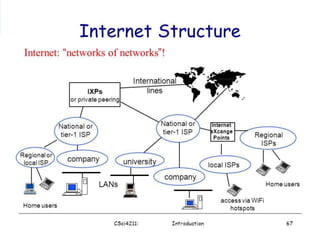
 Structure of the Internet
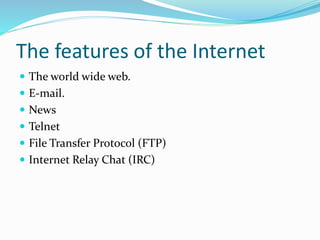
 The features of the Internet
 Basic services of the Internet
 Advantages of Internet
 Disadvantages of Internet
 ARPA- Advanced Research Project Agency.
 1969 January 2 – started an experimental Computer
Network.
 Concept- No Server, but equal
importance/participation to every computer in the
Network.
 Even if, one or two node destroyed that will not affect
the Network.
 In 1982 the word internet started.
 1986: First “free net” created in Case Western Reserve
University.
 1991: US government allowed business agencies to
connect to internet.
 Now all peoples can connect to internet and improve
their life and work quality.
 The internet support various aspects in our life.
The Internet is a global wide area network that
connects computer systems across the world. It
includes several high-bandwidth data lines that
comprise the Internet "backbone." These lines are
connected to major Internet hubs that distribute
data to other locations, such as web servers and
ISPs.
Structure
The features of the Internet
 The world wide web.
 E-mail.
 News
 Telnet
 File Transfer Protocol (FTP)
 Internet Relay Chat (IRC)
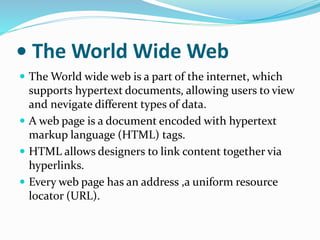
• The World Wide Web
 The World wide web is a part of the internet, which
supports hypertext documents, allowing users to view
and nevigate different types of data.
 A web page is a document encoded with hypertext
markup language (HTML) tags.
 HTML allows designers to link content together via
hyperlinks.
 Every web page has an address ,a uniform resource
locator (URL).
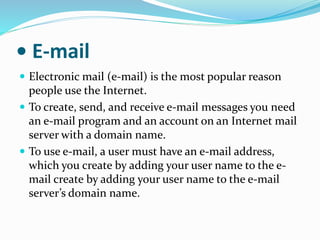
• E-mail
 Electronic mail (e-mail) is the most popular reason
people use the Internet.
 To create, send, and receive e-mail messages you need
an e-mail program and an account on an Internet mail
server with a domain name.
 To use e-mail, a user must have an e-mail address,
which you create by adding your user name to the e-
mail create by adding your user name to the e-mail
server’s domain name.
 Communication
 Research
 Education
 Financial transactions
 For Updates
 Theft of Personal Information
 Spamming
 Malware Threats
 Social Isolation, Obesity and Depression
Thank you !

ppt on INTERNET

  • 2.
     PRESENTING BY :- MAHESH GADEKAR BRANCH : - CM2I ROLL NO. : - 27
  • 3.
     HISTORY  Whatis Internet ?  Structure of the Internet  The features of the Internet  Basic services of the Internet  Advantages of Internet  Disadvantages of Internet
  • 4.
     ARPA- AdvancedResearch Project Agency.  1969 January 2 – started an experimental Computer Network.  Concept- No Server, but equal importance/participation to every computer in the Network.  Even if, one or two node destroyed that will not affect the Network.
  • 5.
     In 1982the word internet started.  1986: First “free net” created in Case Western Reserve University.  1991: US government allowed business agencies to connect to internet.  Now all peoples can connect to internet and improve their life and work quality.  The internet support various aspects in our life.
  • 6.
    The Internet isa global wide area network that connects computer systems across the world. It includes several high-bandwidth data lines that comprise the Internet "backbone." These lines are connected to major Internet hubs that distribute data to other locations, such as web servers and ISPs.
  • 7.
  • 8.
    The features ofthe Internet  The world wide web.  E-mail.  News  Telnet  File Transfer Protocol (FTP)  Internet Relay Chat (IRC)
  • 9.
    • The WorldWide Web  The World wide web is a part of the internet, which supports hypertext documents, allowing users to view and nevigate different types of data.  A web page is a document encoded with hypertext markup language (HTML) tags.  HTML allows designers to link content together via hyperlinks.  Every web page has an address ,a uniform resource locator (URL).
  • 10.
    • E-mail  Electronicmail (e-mail) is the most popular reason people use the Internet.  To create, send, and receive e-mail messages you need an e-mail program and an account on an Internet mail server with a domain name.  To use e-mail, a user must have an e-mail address, which you create by adding your user name to the e- mail create by adding your user name to the e-mail server’s domain name.
  • 11.
     Communication  Research Education  Financial transactions  For Updates
  • 12.
     Theft ofPersonal Information  Spamming  Malware Threats  Social Isolation, Obesity and Depression
  • 13.