EHS - PowerVC upgrade 1.3.0.2 to 1.3.2.0
Gobinath Panchavarnam1/India/IBM
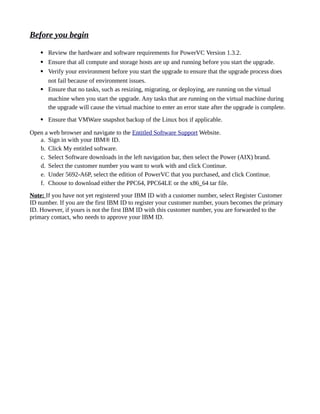
Before you begin
 Review the hardware and software requirements for PowerVC Version 1.3.2.
 Ensure that all compute and storage hosts are up and running before you start the upgrade.
 Verify your environment before you start the upgrade to ensure that the upgrade process does
not fail because of environment issues.
 Ensure that no tasks, such as resizing, migrating, or deploying, are running on the virtual
machine when you start the upgrade. Any tasks that are running on the virtual machine during
the upgrade will cause the virtual machine to enter an error state after the upgrade is complete.
 Ensure that VMWare snapshot backup of the Linux box if applicable.
Open a web browser and navigate to the Entitled Software Support Website.
a. Sign in with your IBM® ID.
b. Click My entitled software.
c. Select Software downloads in the left navigation bar, then select the Power (AIX) brand.
d. Select the customer number you want to work with and click Continue.
e. Under 5692-A6P, select the edition of PowerVC that you purchased, and click Continue.
f. Choose to download either the PPC64, PPC64LE or the x86_64 tar file.
Note: If you have not yet registered your IBM ID with a customer number, select Register Customer
ID number. If you are the first IBM ID to register your customer number, yours becomes the primary
ID. However, if yours is not the first IBM ID with this customer number, you are forwarded to the
primary contact, who needs to approve your IBM ID.
Upgrade Procedure:
1. Take snapshot of VM copy to revert back or in case of any failure during the upgrade can revert back
and start the upgrade from the beginning.
2. Copy the package to PowerVC System
[root@hostname packages]# ls -lrt
total 507900
drwx------. 2 root root 16384 Dec 14 2016 lost+found
-rw-r--r-- 1 root root 520062315 Nov 29 10:26 powervc-install-x86-rhel-1.3.2.0.tgz
drwxr-xr-x 2 root root 4096 Nov 29 10:29 powervc133
drwxrwxr-x 3 root root 4096 Nov 30 05:27 PowerVC1321_fixx
3. Extract the software package
[root@hostname packages]# ls -lrt
total 507904
drwx------. 2 root root 16384 Dec 14 2016 lost+found
-rw-r--r-- 1 root root 520062315 Nov 29 10:26 powervc-install-x86-rhel-1.3.2.0.tgz
drwxr-xr-x 2 root root 4096 Nov 29 10:29 powervc133
drwxrwxr-x 3 root root 4096 Nov 30 05:27 PowerVC1321_fixx
drwx------ 5 root root 4096 Dec 25 04:56 powervc-1.3.2.0
4. During the upgrade /etc/passwd and /etc/sudoers will be modified. So take the backup of the file for
future reference. Please don't restore the file. This is only to compare after upgrade. /etc/passwd file
will be updated with new user for MariaDB in PowerVC 1.3.2.0. (User and group names: swift and
panko).
5. Move the PowerVC backups (location is, /var/opt/ibm/powervc/backups) to any other location. If
there is any other latest backup in this location will be used for the upgrade else will take new backup
and do the upgrade.
6. Run the prerequisite checks
# ./install -t
Checking available memory
Checking CPU speed
Checking file size limit of the file system.
Current maximum file size : unlimited
/etc directory has the user/group as root/root required for install
/opt directory has the user/group as root/root required for install
/var directory has the user/group as root/root required for install
/tmp directory has the user/group as root/root required for install
Checking disk space
Cleaning yum repository files.
Configuring yum repository files.
Loaded plugins: langpacks, product-id, subscription-manager
repo id repo name status
PowerVC_Prereq PowerVC_Prereq 13
powervc-noarch IBM PowerVC noarch 33
powervc-x86_64 IBM PowerVC x86_64 2
pvc-openstack-noarch IBM PowerVC Openstack noarch 225
pvc-openstack-x86-64 IBM PowerVC Openstack x86_64 76
rhel-7-server-rpms/7Server/x86_64 Red Hat Enterprise Linux 7 Server (RPMs 17,521
rhel71iso rhel71iso 4,432
repolist: 22,302
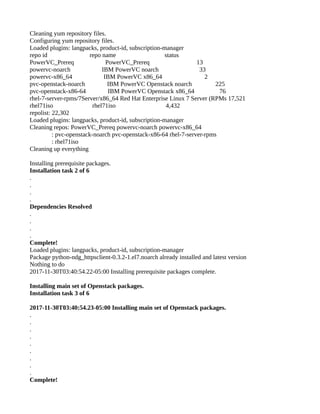
Loaded plugins: langpacks, product-id, subscription-manager
Cleaning repos: PowerVC_Prereq powervc-noarch powervc-x86_64
: pvc-openstack-noarch pvc-openstack-x86-64 rhel-7-server-rpms
: rhel71iso
Cleaning up everything
Loaded plugins: langpacks, product-id
All RPM prereq requirements are met
[root@hostname powervc-1.3.2.0]#
Start the upgrade:
Herewith I've shrinked the output log. Always, you can refer the log file to know more about the
upgrade status.
The log file will be under, /opt/ibm/powervc/log location.
Run the ./install command to start the upgrade process. Respond to the system prompts.
################################################################################
Starting the IBM PowerVC 1.3.2.0 Installation on:
2017-11-30T03:21:36-05:00
################################################################################
.
.
.
.
.
.
IBM PowerVC version 1.3.0.2 is installed.
Do you want to upgrade to version 1.3.2.0: 1-Yes or 2-No? 1
Would you like to enable IBM Cloud PowerVC Manager
for PowerVC 1.3.2.0: 1-Yes or 2-No? 2 <Important: Yes if you are using IBM cloud for
PowerVC Manager else No>
.
.
.
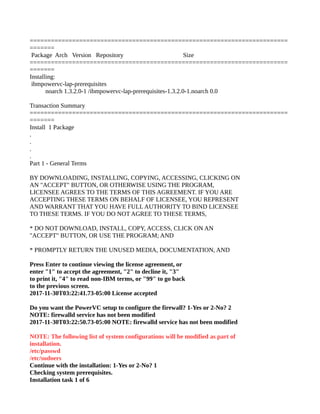
Dependencies Resolved
=========================================================================
=======
Package Arch Version Repository Size
=========================================================================
=======
Installing:
ibmpowervc-lap-prerequisites
noarch 1.3.2.0-1 /ibmpowervc-lap-prerequisites-1.3.2.0-1.noarch 0.0
Transaction Summary
=========================================================================
=======
Install 1 Package
.
.
.
.
Part 1 - General Terms
BY DOWNLOADING, INSTALLING, COPYING, ACCESSING, CLICKING ON
AN "ACCEPT" BUTTON, OR OTHERWISE USING THE PROGRAM,
LICENSEE AGREES TO THE TERMS OF THIS AGREEMENT. IF YOU ARE
ACCEPTING THESE TERMS ON BEHALF OF LICENSEE, YOU REPRESENT
AND WARRANT THAT YOU HAVE FULLAUTHORITY TO BIND LICENSEE
TO THESE TERMS. IF YOU DO NOT AGREE TO THESE TERMS,
* DO NOT DOWNLOAD, INSTALL, COPY, ACCESS, CLICK ON AN
"ACCEPT" BUTTON, OR USE THE PROGRAM; AND
* PROMPTLY RETURN THE UNUSED MEDIA, DOCUMENTATION, AND
Press Enter to continue viewing the license agreement, or
enter "1" to accept the agreement, "2" to decline it, "3"
to print it, "4" to read non-IBM terms, or "99" to go back
to the previous screen.
2017-11-30T03:22:41.73-05:00 License accepted
Do you want the PowerVC setup to configure the firewall? 1-Yes or 2-No? 2
NOTE: firewalld service has not been modified
2017-11-30T03:22:50.73-05:00 NOTE: firewalld service has not been modified
NOTE: The following list of system configurations will be modified as part of
installation.
/etc/passwd
/etc/sudoers
Continue with the installation: 1-Yes or 2-No? 1
Checking system prerequisites.
Installation task 1 of 6
.
.
.
.
.
Checking disk space
Cleaning yum repository files.
Configuring yum repository files.
Loaded plugins: langpacks, product-id, subscription-manager
repo id repo name status
PowerVC_Prereq PowerVC_Prereq 13
powervc-noarch IBM PowerVC noarch 33
powervc-x86_64 IBM PowerVC x86_64 2
pvc-openstack-noarch IBM PowerVC Openstack noarch 225
pvc-openstack-x86-64 IBM PowerVC Openstack x86_64 76
rhel-7-server-rpms/7Server/x86_64 Red Hat Enterprise Linux 7 Server (RPMs 17,521
rhel71iso rhel71iso 4,432
repolist: 22,302
Loaded plugins: langpacks, product-id, subscription-manager
Cleaning repos: PowerVC_Prereq powervc-noarch powervc-x86_64
: pvc-openstack-noarch pvc-openstack-x86-64 rhel-7-server-rpms
: rhel71iso
Cleaning up everything
Loaded plugins: langpacks, product-id
2017-11-30 03:23:41 INFO rpm_prereq [-] All requirements are met
All RPM prereq requirements are met
Performing product backup.
The product backup archive is located /var/opt/ibm/powervc/backups
2017-11-30 03:23:44 CONSOLE __main__ [-] Exporting database data from DB2 to restore to
MariaDB…
2017-11-30T03:30:48.47-05:00 Running powervc-backup.
2017-11-30T03:35:34.60-05:00 group admin user list:
root,fgimen,icopvcadmin,icoadmin,nicotor,gaciagui,rberteve,hu29060,ar089306
2017-11-30T03:35:35.35-05:00 group pvcadmintmp user list:
root,fgimen,icopvcadmin,icoadmin,nicotor,gaciagui,rberteve,hu29060,ar089306
2017-11-30T03:35:35.36-05:00 group deployer user list:
2017-11-30T03:35:35.39-05:00 group pvcdeployertmp user list:
2017-11-30T03:35:35.41-05:00 group viewer user list: atrapano
2017-11-30T03:35:35.47-05:00 group pvcviewertmp user list: atrapano
2017-11-30T03:35:35.65-05:00 Completed powervc-backup.
Removing previous version
2017-11-30T03:35:35.87-05:00 Upgrade uninstall started.
IBM PowerVC uninstallation
2017-11-30T03:35:35.87-05:00 Using 1.3.0.x uninstall script.
2017-11-30T03:39:47.46-05:00 Upgrade uninstall complete.
2017-11-30T03:39:47.46-05:00
2017-11-30T03:39:47.48-05:00 Refreshing python-crypto package
Cleaning yum repository files.
Configuring yum repository files.
Loaded plugins: langpacks, product-id, subscription-manager
repo id repo name status
PowerVC_Prereq PowerVC_Prereq 13
powervc-noarch IBM PowerVC noarch 33
powervc-x86_64 IBM PowerVC x86_64 2
pvc-openstack-noarch IBM PowerVC Openstack noarch 225
pvc-openstack-x86-64 IBM PowerVC Openstack x86_64 76
rhel-7-server-rpms/7Server/x86_64 Red Hat Enterprise Linux 7 Server (RPMs 17,521
rhel71iso rhel71iso 4,432
repolist: 22,302
Loaded plugins: langpacks, product-id, subscription-manager
Cleaning repos: PowerVC_Prereq powervc-noarch powervc-x86_64
: pvc-openstack-noarch pvc-openstack-x86-64 rhel-7-server-rpms
: rhel71iso
Cleaning up everything
Installing prerequisite packages.
Installation task 2 of 6
.
.
.
.
Dependencies Resolved
.
.
.
.
Complete!
Loaded plugins: langpacks, product-id, subscription-manager
Package python-ndg_httpsclient-0.3.2-1.el7.noarch already installed and latest version
Nothing to do
2017-11-30T03:40:54.22-05:00 Installing prerequisite packages complete.
Installing main set of Openstack packages.
Installation task 3 of 6
2017-11-30T03:40:54.23-05:00 Installing main set of Openstack packages.
.
.
.
.
.
.
.
.
.
Complete!
Installing PowerVC packages.
Installation task 4 of 6
2017-11-30T03:44:16.82-05:00 Installing PowerVC packages.
.
.
.
.
.
.
.
.
Complete!
Preparing... ########################################
Updating / installing...
hbsd-3.0.0-0_9.0 ########################################
Installing database.
Installation task 5 of 6
2017-11-30T03:45:09.43-05:00 ulimit settings
2017-11-30T03:45:09.44-05:00
core file size (blocks, -c) 0
data seg size (kbytes, -d) unlimited
scheduling priority (-e) 0
file size (blocks, -f) unlimited
pending signals (-i) 47346
max locked memory (kbytes, -l) 64
max memory size (kbytes, -m) unlimited
open files (-n) 1024
pipe size (512 bytes, -p) 8
POSIX message queues (bytes, -q) 819200
real-time priority (-r) 0
stack size (kbytes, -s) 8192
cpu time (seconds, -t) unlimited
max user processes (-u) 47346
virtual memory (kbytes, -v) unlimited
file locks (-x) unlimited
2017-11-30T03:45:09.44-05:00
2017-11-30T03:45:11.54-05:00 Completed configuring objectstore rings
2017-11-30 03:45:12 CONSOLE powervc_oslo.config.data_mgr [-] Creating the PowerVC
certificates...
Creating the PowerVC certificates…
.
.
.
.
2017-11-30 03:46:13 CONSOLE powervc_oslo.config.data_mgr [-] Stopping PowerVC services...
Stopping PowerVC services...
2017-11-30 03:46:43 INFO powervc_oslo.config.data_utils [-] Shut down LIM on
<hostname.ahe.pok.ibm.com> ......
2017-11-30 03:46:43 WARNING powervc_oslo.config.data_utils [-] ls_limcontrol: Communication
time out
2017-11-30 03:46:46 CONSOLE powervc_oslo.config.data_mgr [-] Starting PowerVC services...
Starting PowerVC services...
Restoring and migrating product data.
2017-11-30T03:46:55.20-05:00 Running powervc-restore.
2017-11-30T03:46:55.88-05:00 group pvcadmintmp user list:
root,fgimen,icopvcadmin,icoadmin,nicotor,gaciagui,rberteve,hu29060,ar089306
2017-11-30T03:46:57.56-05:00 group admin user list:
root,fgimen,icopvcadmin,icoadmin,nicotor,gaciagui,rberteve,hu29060,ar089306
2017-11-30T03:46:57.91-05:00 group pvcdeployertmp user list:
2017-11-30T03:46:58.26-05:00 group deployer user list:
2017-11-30T03:46:58.58-05:00 group pvcviewertmp user list: atrapano
2017-11-30T03:46:59.31-05:00 group viewer user list: atrapano
2017-11-30T04:34:13.71-05:00 Completed powervc-restore. <This may take upto 3 hours to
complete it>
Cleaning up temporary and support files.
Installation task 6 of 6
2017-11-30T04:34:33.55-05:00 Cleaning up temporary and support files.
The validation of PowerVC Services post install was successful.
************************************************************
PowerVC installation successfully completed at 2017-11-30T04:34:33-05:00.
Refer to
/opt/ibm/powervc/log/powervc_install_2017-11-30-032136.log
for more details.
Use a web browser to access IBM PowerVC at
https://<PowerVC FQDN>
Firewall configuration may be required to use PowerVC.
Refer to the Knowledge Center topic 'Ports used by PowerVC'.
************************************************************
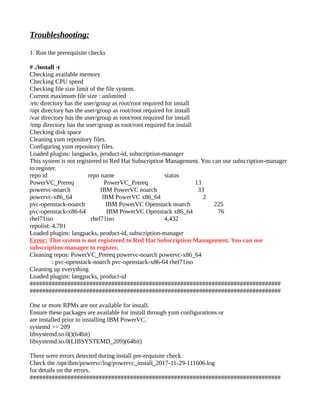
Troubleshooting:
1. Run the prerequisite checks
# ./install -t
Checking available memory
Checking CPU speed
Checking file size limit of the file system.
Current maximum file size : unlimited
/etc directory has the user/group as root/root required for install
/opt directory has the user/group as root/root required for install
/var directory has the user/group as root/root required for install
/tmp directory has the user/group as root/root required for install
Checking disk space
Cleaning yum repository files.
Configuring yum repository files.
Loaded plugins: langpacks, product-id, subscription-manager
This system is not registered to Red Hat Subscription Management. You can use subscription-manager
to register.
repo id repo name status
PowerVC_Prereq PowerVC_Prereq 13
powervc-noarch IBM PowerVC noarch 33
powervc-x86_64 IBM PowerVC x86_64 2
pvc-openstack-noarch IBM PowerVC Openstack noarch 225
pvc-openstack-x86-64 IBM PowerVC Openstack x86_64 76
rhel71iso rhel71iso 4,432
repolist: 4,781
Loaded plugins: langpacks, product-id, subscription-manager
Error: This system is not registered to Red Hat Subscription Management. You can use
subscription-manager to register.
Cleaning repos: PowerVC_Prereq powervc-noarch powervc-x86_64
: pvc-openstack-noarch pvc-openstack-x86-64 rhel71iso
Cleaning up everything
Loaded plugins: langpacks, product-id
################################################################################
################################################################################
One or more RPMs are not available for install.
Ensure these packages are available for install through yum configurations or
are installed prior to installing IBM PowerVC.
systemd >= 209
libsystemd.so.0()(64bit)
libsystemd.so.0(LIBSYSTEMD_209)(64bit)
There were errors detected during install pre-requisite check.
Check the /opt/ibm/powervc/log/powervc_install_2017-11-29-111606.log
for details on the errors.
################################################################################
################################################################################
Solution: Contact your Linux Administrator to register the system to Red Hat Subscription
Management. Once systems is registered with Red Hat Subscription Management, it will automatically
do the required package installation.
2. In my case I had the below error while upgrading the PowerVC.
Error: python-caribou-0.4.16-1.el7.noarch is obsoleted by python2-caribou-0.4.21-1.el7.noarch
Which is already installed.
Solution:
1- Revert the snapshot
2- Clean (or move to a different path) the backups from /var/opt/ibm/powervc/backups/
3- Upgrade python-caribou
4- Run the upgrade
3. The script may tries the ole backup to restore it.
Error: CONSOLE powervc_oslo.config.data_utils [-] The backup version 1.3.0.0 is older than
supported for restoration. Upgrade the backup system to at least version 1.3.0.1, take a new
backup, and then try the restore again.
Solution:
To move the backup to any other location and keep empty the backup location
(/var/opt/ibm/powervc/backups/).

Powervc upgrade from_1.3.0.2_to_1.3.2.0

  • 1.
    EHS - PowerVCupgrade 1.3.0.2 to 1.3.2.0 Gobinath Panchavarnam1/India/IBM
  • 2.
    Before you begin Review the hardware and software requirements for PowerVC Version 1.3.2.  Ensure that all compute and storage hosts are up and running before you start the upgrade.  Verify your environment before you start the upgrade to ensure that the upgrade process does not fail because of environment issues.  Ensure that no tasks, such as resizing, migrating, or deploying, are running on the virtual machine when you start the upgrade. Any tasks that are running on the virtual machine during the upgrade will cause the virtual machine to enter an error state after the upgrade is complete.  Ensure that VMWare snapshot backup of the Linux box if applicable. Open a web browser and navigate to the Entitled Software Support Website. a. Sign in with your IBM® ID. b. Click My entitled software. c. Select Software downloads in the left navigation bar, then select the Power (AIX) brand. d. Select the customer number you want to work with and click Continue. e. Under 5692-A6P, select the edition of PowerVC that you purchased, and click Continue. f. Choose to download either the PPC64, PPC64LE or the x86_64 tar file. Note: If you have not yet registered your IBM ID with a customer number, select Register Customer ID number. If you are the first IBM ID to register your customer number, yours becomes the primary ID. However, if yours is not the first IBM ID with this customer number, you are forwarded to the primary contact, who needs to approve your IBM ID.
  • 3.
    Upgrade Procedure: 1. Takesnapshot of VM copy to revert back or in case of any failure during the upgrade can revert back and start the upgrade from the beginning. 2. Copy the package to PowerVC System [root@hostname packages]# ls -lrt total 507900 drwx------. 2 root root 16384 Dec 14 2016 lost+found -rw-r--r-- 1 root root 520062315 Nov 29 10:26 powervc-install-x86-rhel-1.3.2.0.tgz drwxr-xr-x 2 root root 4096 Nov 29 10:29 powervc133 drwxrwxr-x 3 root root 4096 Nov 30 05:27 PowerVC1321_fixx 3. Extract the software package [root@hostname packages]# ls -lrt total 507904 drwx------. 2 root root 16384 Dec 14 2016 lost+found -rw-r--r-- 1 root root 520062315 Nov 29 10:26 powervc-install-x86-rhel-1.3.2.0.tgz drwxr-xr-x 2 root root 4096 Nov 29 10:29 powervc133 drwxrwxr-x 3 root root 4096 Nov 30 05:27 PowerVC1321_fixx drwx------ 5 root root 4096 Dec 25 04:56 powervc-1.3.2.0 4. During the upgrade /etc/passwd and /etc/sudoers will be modified. So take the backup of the file for future reference. Please don't restore the file. This is only to compare after upgrade. /etc/passwd file will be updated with new user for MariaDB in PowerVC 1.3.2.0. (User and group names: swift and panko). 5. Move the PowerVC backups (location is, /var/opt/ibm/powervc/backups) to any other location. If there is any other latest backup in this location will be used for the upgrade else will take new backup and do the upgrade. 6. Run the prerequisite checks # ./install -t Checking available memory Checking CPU speed Checking file size limit of the file system. Current maximum file size : unlimited /etc directory has the user/group as root/root required for install /opt directory has the user/group as root/root required for install /var directory has the user/group as root/root required for install /tmp directory has the user/group as root/root required for install Checking disk space Cleaning yum repository files. Configuring yum repository files.
  • 4.
    Loaded plugins: langpacks,product-id, subscription-manager repo id repo name status PowerVC_Prereq PowerVC_Prereq 13 powervc-noarch IBM PowerVC noarch 33 powervc-x86_64 IBM PowerVC x86_64 2 pvc-openstack-noarch IBM PowerVC Openstack noarch 225 pvc-openstack-x86-64 IBM PowerVC Openstack x86_64 76 rhel-7-server-rpms/7Server/x86_64 Red Hat Enterprise Linux 7 Server (RPMs 17,521 rhel71iso rhel71iso 4,432 repolist: 22,302 Loaded plugins: langpacks, product-id, subscription-manager Cleaning repos: PowerVC_Prereq powervc-noarch powervc-x86_64 : pvc-openstack-noarch pvc-openstack-x86-64 rhel-7-server-rpms : rhel71iso Cleaning up everything Loaded plugins: langpacks, product-id All RPM prereq requirements are met [root@hostname powervc-1.3.2.0]# Start the upgrade: Herewith I've shrinked the output log. Always, you can refer the log file to know more about the upgrade status. The log file will be under, /opt/ibm/powervc/log location. Run the ./install command to start the upgrade process. Respond to the system prompts. ################################################################################ Starting the IBM PowerVC 1.3.2.0 Installation on: 2017-11-30T03:21:36-05:00 ################################################################################ . . . . . . IBM PowerVC version 1.3.0.2 is installed. Do you want to upgrade to version 1.3.2.0: 1-Yes or 2-No? 1 Would you like to enable IBM Cloud PowerVC Manager for PowerVC 1.3.2.0: 1-Yes or 2-No? 2 <Important: Yes if you are using IBM cloud for PowerVC Manager else No> . . . Dependencies Resolved
  • 5.
    ========================================================================= ======= Package Arch VersionRepository Size ========================================================================= ======= Installing: ibmpowervc-lap-prerequisites noarch 1.3.2.0-1 /ibmpowervc-lap-prerequisites-1.3.2.0-1.noarch 0.0 Transaction Summary ========================================================================= ======= Install 1 Package . . . . Part 1 - General Terms BY DOWNLOADING, INSTALLING, COPYING, ACCESSING, CLICKING ON AN "ACCEPT" BUTTON, OR OTHERWISE USING THE PROGRAM, LICENSEE AGREES TO THE TERMS OF THIS AGREEMENT. IF YOU ARE ACCEPTING THESE TERMS ON BEHALF OF LICENSEE, YOU REPRESENT AND WARRANT THAT YOU HAVE FULLAUTHORITY TO BIND LICENSEE TO THESE TERMS. IF YOU DO NOT AGREE TO THESE TERMS, * DO NOT DOWNLOAD, INSTALL, COPY, ACCESS, CLICK ON AN "ACCEPT" BUTTON, OR USE THE PROGRAM; AND * PROMPTLY RETURN THE UNUSED MEDIA, DOCUMENTATION, AND Press Enter to continue viewing the license agreement, or enter "1" to accept the agreement, "2" to decline it, "3" to print it, "4" to read non-IBM terms, or "99" to go back to the previous screen. 2017-11-30T03:22:41.73-05:00 License accepted Do you want the PowerVC setup to configure the firewall? 1-Yes or 2-No? 2 NOTE: firewalld service has not been modified 2017-11-30T03:22:50.73-05:00 NOTE: firewalld service has not been modified NOTE: The following list of system configurations will be modified as part of installation. /etc/passwd /etc/sudoers Continue with the installation: 1-Yes or 2-No? 1 Checking system prerequisites. Installation task 1 of 6
  • 6.
    . . . . . Checking disk space Cleaningyum repository files. Configuring yum repository files. Loaded plugins: langpacks, product-id, subscription-manager repo id repo name status PowerVC_Prereq PowerVC_Prereq 13 powervc-noarch IBM PowerVC noarch 33 powervc-x86_64 IBM PowerVC x86_64 2 pvc-openstack-noarch IBM PowerVC Openstack noarch 225 pvc-openstack-x86-64 IBM PowerVC Openstack x86_64 76 rhel-7-server-rpms/7Server/x86_64 Red Hat Enterprise Linux 7 Server (RPMs 17,521 rhel71iso rhel71iso 4,432 repolist: 22,302 Loaded plugins: langpacks, product-id, subscription-manager Cleaning repos: PowerVC_Prereq powervc-noarch powervc-x86_64 : pvc-openstack-noarch pvc-openstack-x86-64 rhel-7-server-rpms : rhel71iso Cleaning up everything Loaded plugins: langpacks, product-id 2017-11-30 03:23:41 INFO rpm_prereq [-] All requirements are met All RPM prereq requirements are met Performing product backup. The product backup archive is located /var/opt/ibm/powervc/backups 2017-11-30 03:23:44 CONSOLE __main__ [-] Exporting database data from DB2 to restore to MariaDB… 2017-11-30T03:30:48.47-05:00 Running powervc-backup. 2017-11-30T03:35:34.60-05:00 group admin user list: root,fgimen,icopvcadmin,icoadmin,nicotor,gaciagui,rberteve,hu29060,ar089306 2017-11-30T03:35:35.35-05:00 group pvcadmintmp user list: root,fgimen,icopvcadmin,icoadmin,nicotor,gaciagui,rberteve,hu29060,ar089306 2017-11-30T03:35:35.36-05:00 group deployer user list: 2017-11-30T03:35:35.39-05:00 group pvcdeployertmp user list: 2017-11-30T03:35:35.41-05:00 group viewer user list: atrapano 2017-11-30T03:35:35.47-05:00 group pvcviewertmp user list: atrapano 2017-11-30T03:35:35.65-05:00 Completed powervc-backup. Removing previous version 2017-11-30T03:35:35.87-05:00 Upgrade uninstall started. IBM PowerVC uninstallation 2017-11-30T03:35:35.87-05:00 Using 1.3.0.x uninstall script. 2017-11-30T03:39:47.46-05:00 Upgrade uninstall complete. 2017-11-30T03:39:47.46-05:00 2017-11-30T03:39:47.48-05:00 Refreshing python-crypto package
  • 7.
    Cleaning yum repositoryfiles. Configuring yum repository files. Loaded plugins: langpacks, product-id, subscription-manager repo id repo name status PowerVC_Prereq PowerVC_Prereq 13 powervc-noarch IBM PowerVC noarch 33 powervc-x86_64 IBM PowerVC x86_64 2 pvc-openstack-noarch IBM PowerVC Openstack noarch 225 pvc-openstack-x86-64 IBM PowerVC Openstack x86_64 76 rhel-7-server-rpms/7Server/x86_64 Red Hat Enterprise Linux 7 Server (RPMs 17,521 rhel71iso rhel71iso 4,432 repolist: 22,302 Loaded plugins: langpacks, product-id, subscription-manager Cleaning repos: PowerVC_Prereq powervc-noarch powervc-x86_64 : pvc-openstack-noarch pvc-openstack-x86-64 rhel-7-server-rpms : rhel71iso Cleaning up everything Installing prerequisite packages. Installation task 2 of 6 . . . . Dependencies Resolved . . . . Complete! Loaded plugins: langpacks, product-id, subscription-manager Package python-ndg_httpsclient-0.3.2-1.el7.noarch already installed and latest version Nothing to do 2017-11-30T03:40:54.22-05:00 Installing prerequisite packages complete. Installing main set of Openstack packages. Installation task 3 of 6 2017-11-30T03:40:54.23-05:00 Installing main set of Openstack packages. . . . . . . . . . Complete!
  • 8.
    Installing PowerVC packages. Installationtask 4 of 6 2017-11-30T03:44:16.82-05:00 Installing PowerVC packages. . . . . . . . . Complete! Preparing... ######################################## Updating / installing... hbsd-3.0.0-0_9.0 ######################################## Installing database. Installation task 5 of 6 2017-11-30T03:45:09.43-05:00 ulimit settings 2017-11-30T03:45:09.44-05:00 core file size (blocks, -c) 0 data seg size (kbytes, -d) unlimited scheduling priority (-e) 0 file size (blocks, -f) unlimited pending signals (-i) 47346 max locked memory (kbytes, -l) 64 max memory size (kbytes, -m) unlimited open files (-n) 1024 pipe size (512 bytes, -p) 8 POSIX message queues (bytes, -q) 819200 real-time priority (-r) 0 stack size (kbytes, -s) 8192 cpu time (seconds, -t) unlimited max user processes (-u) 47346 virtual memory (kbytes, -v) unlimited file locks (-x) unlimited 2017-11-30T03:45:09.44-05:00 2017-11-30T03:45:11.54-05:00 Completed configuring objectstore rings 2017-11-30 03:45:12 CONSOLE powervc_oslo.config.data_mgr [-] Creating the PowerVC certificates... Creating the PowerVC certificates… . . . . 2017-11-30 03:46:13 CONSOLE powervc_oslo.config.data_mgr [-] Stopping PowerVC services...
  • 9.
    Stopping PowerVC services... 2017-11-3003:46:43 INFO powervc_oslo.config.data_utils [-] Shut down LIM on <hostname.ahe.pok.ibm.com> ...... 2017-11-30 03:46:43 WARNING powervc_oslo.config.data_utils [-] ls_limcontrol: Communication time out 2017-11-30 03:46:46 CONSOLE powervc_oslo.config.data_mgr [-] Starting PowerVC services... Starting PowerVC services... Restoring and migrating product data. 2017-11-30T03:46:55.20-05:00 Running powervc-restore. 2017-11-30T03:46:55.88-05:00 group pvcadmintmp user list: root,fgimen,icopvcadmin,icoadmin,nicotor,gaciagui,rberteve,hu29060,ar089306 2017-11-30T03:46:57.56-05:00 group admin user list: root,fgimen,icopvcadmin,icoadmin,nicotor,gaciagui,rberteve,hu29060,ar089306 2017-11-30T03:46:57.91-05:00 group pvcdeployertmp user list: 2017-11-30T03:46:58.26-05:00 group deployer user list: 2017-11-30T03:46:58.58-05:00 group pvcviewertmp user list: atrapano 2017-11-30T03:46:59.31-05:00 group viewer user list: atrapano 2017-11-30T04:34:13.71-05:00 Completed powervc-restore. <This may take upto 3 hours to complete it> Cleaning up temporary and support files. Installation task 6 of 6 2017-11-30T04:34:33.55-05:00 Cleaning up temporary and support files. The validation of PowerVC Services post install was successful. ************************************************************ PowerVC installation successfully completed at 2017-11-30T04:34:33-05:00. Refer to /opt/ibm/powervc/log/powervc_install_2017-11-30-032136.log for more details. Use a web browser to access IBM PowerVC at https://<PowerVC FQDN> Firewall configuration may be required to use PowerVC. Refer to the Knowledge Center topic 'Ports used by PowerVC'. ************************************************************
  • 10.
    Troubleshooting: 1. Run theprerequisite checks # ./install -t Checking available memory Checking CPU speed Checking file size limit of the file system. Current maximum file size : unlimited /etc directory has the user/group as root/root required for install /opt directory has the user/group as root/root required for install /var directory has the user/group as root/root required for install /tmp directory has the user/group as root/root required for install Checking disk space Cleaning yum repository files. Configuring yum repository files. Loaded plugins: langpacks, product-id, subscription-manager This system is not registered to Red Hat Subscription Management. You can use subscription-manager to register. repo id repo name status PowerVC_Prereq PowerVC_Prereq 13 powervc-noarch IBM PowerVC noarch 33 powervc-x86_64 IBM PowerVC x86_64 2 pvc-openstack-noarch IBM PowerVC Openstack noarch 225 pvc-openstack-x86-64 IBM PowerVC Openstack x86_64 76 rhel71iso rhel71iso 4,432 repolist: 4,781 Loaded plugins: langpacks, product-id, subscription-manager Error: This system is not registered to Red Hat Subscription Management. You can use subscription-manager to register. Cleaning repos: PowerVC_Prereq powervc-noarch powervc-x86_64 : pvc-openstack-noarch pvc-openstack-x86-64 rhel71iso Cleaning up everything Loaded plugins: langpacks, product-id ################################################################################ ################################################################################ One or more RPMs are not available for install. Ensure these packages are available for install through yum configurations or are installed prior to installing IBM PowerVC. systemd >= 209 libsystemd.so.0()(64bit) libsystemd.so.0(LIBSYSTEMD_209)(64bit) There were errors detected during install pre-requisite check. Check the /opt/ibm/powervc/log/powervc_install_2017-11-29-111606.log for details on the errors. ################################################################################
  • 11.
    ################################################################################ Solution: Contact yourLinux Administrator to register the system to Red Hat Subscription Management. Once systems is registered with Red Hat Subscription Management, it will automatically do the required package installation. 2. In my case I had the below error while upgrading the PowerVC. Error: python-caribou-0.4.16-1.el7.noarch is obsoleted by python2-caribou-0.4.21-1.el7.noarch Which is already installed. Solution: 1- Revert the snapshot 2- Clean (or move to a different path) the backups from /var/opt/ibm/powervc/backups/ 3- Upgrade python-caribou 4- Run the upgrade 3. The script may tries the ole backup to restore it. Error: CONSOLE powervc_oslo.config.data_utils [-] The backup version 1.3.0.0 is older than supported for restoration. Upgrade the backup system to at least version 1.3.0.1, take a new backup, and then try the restore again. Solution: To move the backup to any other location and keep empty the backup location (/var/opt/ibm/powervc/backups/).