

Day 2
Scripting
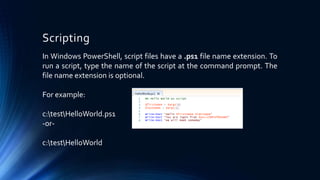
In Windows PowerShell, script files have a .ps1 file name extension. To
run a script, type the name of the script at the command prompt. The
file name extension is optional.
For example:
c:testHelloWorld.ps1
-or-
c:testHelloWorld
Using PowerShell
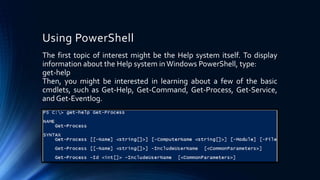
The first topic of interest might be the Help system itself. To display
information about the Help system inWindows PowerShell, type:
get-help
Then, you might be interested in learning about a few of the basic
cmdlets, such as Get-Help, Get-Command, Get-Process, Get-Service,
and Get-Eventlog.
Execution Policy
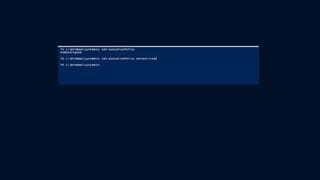
• The Get-ExecutionPolicy cmdlet simply tells
you which of the four execution policies
(policies that determine whichWindows
PowerShell scripts, if any, will run on your
computer) is currently in-force.TheWindows
PowerShell execution policies include the
following:
• Restricted - No scripts can be run.Windows
PowerShell can be used only in interactive
mode.
• AllSigned - Only scripts signed by a trusted
publisher can be run.
• RemoteSigned - Downloaded scripts must
be signed by a trusted publisher before they
can be run.
• Unrestricted - No restrictions; allWindows
PowerShell scripts can be run.
• The Set-ExecutionPolicy cmdlet enables
you to determine whichWindows
PowerShell scripts (if any) will be allowed to
run on your computer.Windows PowerShell
has four different execution policies:
• Restricted - No scripts can be run.Windows
PowerShell can be used only in interactive
mode.
• AllSigned - Only scripts signed by a trusted
publisher can be run.
• RemoteSigned - Downloaded scripts must
be signed by a trusted publisher before they
can be run.
• Unrestricted - No restrictions; allWindows
PowerShell scripts can be run.
Get-help and Get-Command
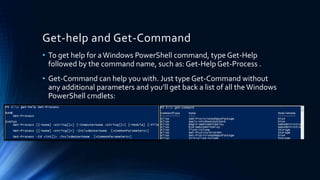
• To get help for aWindows PowerShell command, type Get-Help
followed by the command name, such as: Get-Help Get-Process .
• Get-Command can help you with. Just type Get-Command without
any additional parameters and you’ll get back a list of all the Windows
PowerShell cmdlets:
Format Output
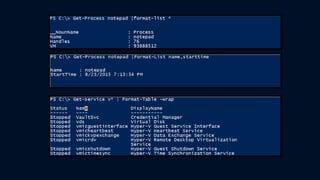
• Windows PowerShell has a set of cmdlets that allow you to control
which properties are displayed for particular objects.The names of all
the cmdlets begin with the verb Format.We commonly use Format-
Table and Format-List quite often
Advantages and Disadvantages of
PowerShell
• Advantages
• Object-Oriented
• .NET Objects and Forms supported
• More Functions compared to cmd.exe andVBScript.
More Extensible via cmdlets, plugins.
• Background Jobs
• Ease of administration
• Disadvantages
• Remoting creates openings for an attacker to exploit
• WinRM requires aWeb server to run on the server
Thank you!

Power shell basics day 2

  • 1.
  • 2.
    Scripting In Windows PowerShell,script files have a .ps1 file name extension. To run a script, type the name of the script at the command prompt. The file name extension is optional. For example: c:testHelloWorld.ps1 -or- c:testHelloWorld
  • 3.
    Using PowerShell The firsttopic of interest might be the Help system itself. To display information about the Help system inWindows PowerShell, type: get-help Then, you might be interested in learning about a few of the basic cmdlets, such as Get-Help, Get-Command, Get-Process, Get-Service, and Get-Eventlog.
  • 4.
    Execution Policy • TheGet-ExecutionPolicy cmdlet simply tells you which of the four execution policies (policies that determine whichWindows PowerShell scripts, if any, will run on your computer) is currently in-force.TheWindows PowerShell execution policies include the following: • Restricted - No scripts can be run.Windows PowerShell can be used only in interactive mode. • AllSigned - Only scripts signed by a trusted publisher can be run. • RemoteSigned - Downloaded scripts must be signed by a trusted publisher before they can be run. • Unrestricted - No restrictions; allWindows PowerShell scripts can be run. • The Set-ExecutionPolicy cmdlet enables you to determine whichWindows PowerShell scripts (if any) will be allowed to run on your computer.Windows PowerShell has four different execution policies: • Restricted - No scripts can be run.Windows PowerShell can be used only in interactive mode. • AllSigned - Only scripts signed by a trusted publisher can be run. • RemoteSigned - Downloaded scripts must be signed by a trusted publisher before they can be run. • Unrestricted - No restrictions; allWindows PowerShell scripts can be run.
  • 6.
    Get-help and Get-Command •To get help for aWindows PowerShell command, type Get-Help followed by the command name, such as: Get-Help Get-Process . • Get-Command can help you with. Just type Get-Command without any additional parameters and you’ll get back a list of all the Windows PowerShell cmdlets:
  • 7.
    Format Output • WindowsPowerShell has a set of cmdlets that allow you to control which properties are displayed for particular objects.The names of all the cmdlets begin with the verb Format.We commonly use Format- Table and Format-List quite often
  • 9.
    Advantages and Disadvantagesof PowerShell • Advantages • Object-Oriented • .NET Objects and Forms supported • More Functions compared to cmd.exe andVBScript. More Extensible via cmdlets, plugins. • Background Jobs • Ease of administration • Disadvantages • Remoting creates openings for an attacker to exploit • WinRM requires aWeb server to run on the server
  • 10.