PostgreSQL
It’s kind’ve a nifty database
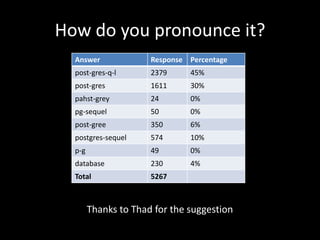
How do you pronounce it?
Thanks to Thad for the suggestion
Answer Response Percentage
post-gres-q-l 2379 45%
post-gres 1611 30%
pahst-grey 24 0%
pg-sequel 50 0%
post-gree 350 6%
postgres-sequel 574 10%
p-g 49 0%
database 230 4%
Total 5267
Who is this guy?
• I’m Barry Jones
• Been a developing web apps since ’98
• Not a DBA
• Performance and infrastructure nut
• Pragmatic Idealist
– Prefer the best solution possible for current circumstances vs the best solution
possible at all costs
What is PostgreSQL NOT?
• NOT a silver bullet
• NOT the answer to life, the universe and
everything
• NOT better at everything than everybody
• NOT always the best option for your needs
• NOT used to it’s potential in most cases
• NOT owned by Oracle or Microsoft
What IS PostgreSQL?
• Fully ACID compliant
• Feature rich and extensible
• Fast, scalable and leverages multicore
processors very well
• Enterprise class with quality corporate
support options
• Free as in beer
• It’s kind’ve nifty
Laundry List of Features
• Multi-version Concurrency Control (MVCC)
• Point in Time Recovery
• Tablespaces
• Asynchronous replication
• Nested Transactions
• Online/hot backups
• Genetic query optimizer multiple index types
• Write ahead logging (WAL)
• Internationalization: character sets, locale-aware sorting, case sensitivity,
formatting
• Full subquery support
• Multiple index scans per query
• ANSI-SQL:2008 standard conformant
• Table inheritance
• LISTEN / NOTIFY event system
• Ability to make a Power Point slide run out of room
What are we covering today?
• Full text-search
• Built in data types
• User defined data types
• Automatic data compression
• A look at some other cool features and
extensions, depending how we’re doing on
time
Full-text Search
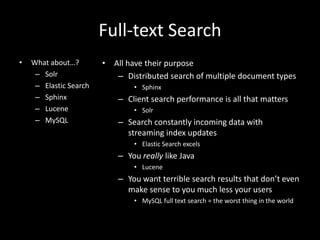
• What about…?
– Solr
– Elastic Search
– Sphinx
– Lucene
– MySQL
• All have their purpose
– Distributed search of multiple document types
• Sphinx
– Client search performance is all that matters
• Solr
– Search constantly incoming data with
streaming index updates
• Elastic Search excels
– You really like Java
• Lucene
– You want terrible search results that don’t even
make sense to you much less your users
• MySQL full text search = the worst thing in the world
Full-text Search
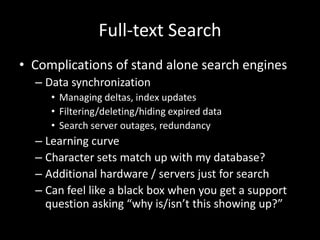
• Complications of stand alone search engines
– Data synchronization
• Managing deltas, index updates
• Filtering/deleting/hiding expired data
• Search server outages, redundancy
– Learning curve
– Character sets match up with my database?
– Additional hardware / servers just for search
– Can feel like a black box when you get a support
question asking “why is/isn’t this showing up?”
Full-text Search
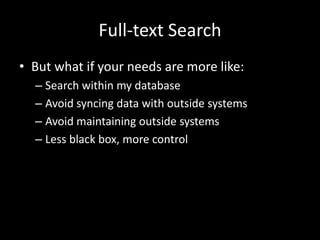
• But what if your needs are more like:
– Search within my database
– Avoid syncing data with outside systems
– Avoid maintaining outside systems
– Less black box, more control
Full-text Search
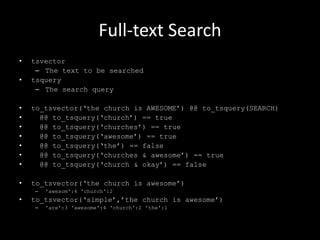
• tsvector
– The text to be searched
• tsquery
– The search query
• to_tsvector(„the church is AWESOME‟) @@ to_tsquery(SEARCH)
• @@ to_tsquery(„church‟) == true
• @@ to_tsquery(„churches‟) == true
• @@ to_tsquery(„awesome‟) == true
• @@ to_tsquery(„the‟) == false
• @@ to_tsquery(„churches & awesome‟) == true
• @@ to_tsquery(„church & okay‟) == false
• to_tsvector(„the church is awesome‟)
– 'awesom':4 'church':2
• to_tsvector(„simple‟,‟the church is awesome‟)
– 'are':3 'awesome':4 'church':2 'the':1
Full-text Search
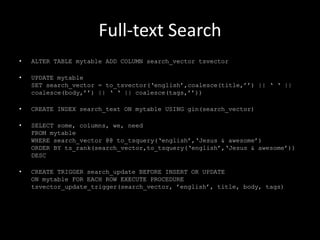
• ALTER TABLE mytable ADD COLUMN search_vector tsvector
• UPDATE mytable
SET search_vector = to_tsvector(„english‟,coalesce(title,‟‟) || „ „ ||
coalesce(body,‟‟) || „ „ || coalesce(tags,‟‟))
• CREATE INDEX search_text ON mytable USING gin(search_vector)
• SELECT some, columns, we, need
FROM mytable
WHERE search_vector @@ to_tsquery(„english‟,„Jesus & awesome‟)
ORDER BY ts_rank(search_vector,to_tsquery(„english‟,„Jesus & awesome‟))
DESC
• CREATE TRIGGER search_update BEFORE INSERT OR UPDATE
ON mytable FOR EACH ROW EXECUTE PROCEDURE
tsvector_update_trigger(search_vector, ‟english‟, title, body, tags)
Full-text Search
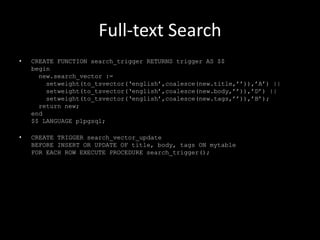
• CREATE FUNCTION search_trigger RETURNS trigger AS $$
begin
new.search_vector :=
setweight(to_tsvector(„english‟,coalesce(new.title,‟‟)),‟A‟) ||
setweight(to_tsvector(„english‟,coalesce(new.body,‟‟)),‟D‟) ||
setweight(to_tsvector(„english‟,coalesce(new.tags,‟‟)),‟B‟);
return new;
end
$$ LANGUAGE plpgsql;
• CREATE TRIGGER search_vector_update
BEFORE INSERT OR UPDATE OF title, body, tags ON mytable
FOR EACH ROW EXECUTE PROCEDURE search_trigger();
Full-text Search
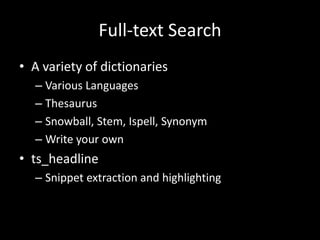
• A variety of dictionaries
– Various Languages
– Thesaurus
– Snowball, Stem, Ispell, Synonym
– Write your own
• ts_headline
– Snippet extraction and highlighting
Datatypes: ranges
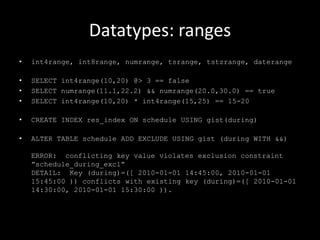
• int4range, int8range, numrange, tsrange, tstzrange, daterange
• SELECT int4range(10,20) @> 3 == false
• SELECT numrange(11.1,22.2) && numrange(20.0,30.0) == true
• SELECT int4range(10,20) * int4range(15,25) == 15-20
• CREATE INDEX res_index ON schedule USING gist(during)
• ALTER TABLE schedule ADD EXCLUDE USING gist (during WITH &&)
ERROR: conflicting key value violates exclusion constraint
”schedule_during_excl”
DETAIL: Key (during)=([ 2010-01-01 14:45:00, 2010-01-01
15:45:00 )) conflicts with existing key (during)=([ 2010-01-01
14:30:00, 2010-01-01 15:30:00 )).
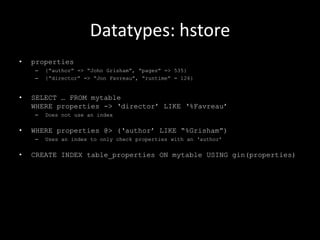
Datatypes: hstore
• properties
– {“author” => “John Grisham”, “pages” => 535}
– {“director” => “Jon Favreau”, “runtime” = 126}
• SELECT … FROM mytable
WHERE properties -> „director‟ LIKE „%Favreau‟
– Does not use an index
• WHERE properties @> („author‟ LIKE “%Grisham”)
– Uses an index to only check properties with an „author‟
• CREATE INDEX table_properties ON mytable USING gin(properties)
Datatypes: arrays
• CREATE TABLE sal_emp(name text, pay_by_quarter integer[],
schedule text[][])
• CREATE TABLE tictactoe ( squares integer[3][3] )
• INSERT INTO tictactoe VALUES („{{1,2,3},{4,5,6},{7,8,9}}‟)
• SELECT squares[1:2][1:1] == {{1},{4}}
• SELECT squares[2:3][2:3] == {{5,6},{8,9}}
Datatypes: JSON
• Validate JSON structure
• Convert row to JSON
• Functions and operators very similar to hstore
Datatypes: XML
• Validates well-formed XML
• Stores like a TEXT field
• XML operations like Xpath
• Can’t index XML column but you can index the
result of an Xpath function
Data compression with TOAST
• TOAST = The Oversized Attribute Storage Technique
• TOASTable data is automatically TOASTed
• Example:
– stored a 2.2m XML document
– storage size was 81k
User created datatypes
• Built in types
– Numerics, monetary, binary, time, date, interval, boolean,
enumerated, geometric, network address, bit string, text search, UUID,
XML, JSON, array, composite, range
– Add-ons for more such as UPC, ISBN and more
• Create your own types
– Address (contains 2 streets, city, state, zip, country)
– Define how your datatype is indexed
– GIN and GiST indexes are used by custom datatypes
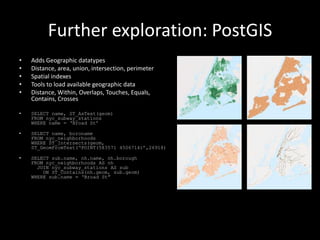
Further exploration: PostGIS
• Adds Geographic datatypes
• Distance, area, union, intersection, perimeter
• Spatial indexes
• Tools to load available geographic data
• Distance, Within, Overlaps, Touches, Equals,
Contains, Crosses
• SELECT name, ST_AsText(geom)
FROM nyc_subway_stations
WHERE name = „Broad St‟
• SELECT name, boroname
FROM nyc_neighborhoods
WHERE ST_Intersects(geom,
ST_GeomFromText(„POINT(583571 4506714)‟,26918)
• SELECT sub.name, nh.name, nh.borough
FROM nyc_neighborhoods AS nh
JOIN nyc_subway_stations AS sub
ON ST_Contains(nh.geom, sub.geom)
WHERE sub.name = „Broad St”
Further exploration: Functions
• Can be used in queries
• Can be used in stored procedures and triggers
• Can be used to build indexes
• Can be used as table defaults
• Can be written in PL/pgSQL, PL/Tcl, PL/Perl,
PL/Python out of the box
• PL/V8 is available an an extension to use
Javascript
Further exploration: PLV8
• CREATE OR REPLACE FUNCTION plv8_test(keys text[], vals text[])
RETURNS text AS $$
var o = {};
for(var i = 0; i < keys.length; i++) {
o[keys[i]] = vals[i];
}
return JSON.stringify(o);
$$ LANGUAGE plv8 IMMUTABLE STRICT;
SELECT plv8_test(ARRAY[„name‟,‟age‟],ARRAY[„Tom‟,‟29‟]);
• CREATE TYPE rec AS (i integer, t text);
CREATE FUNCTION set_of_records RETURNS SETOF rec AS $$
plv8.return_next({“i”: 1,”t”: ”a”});
plv8.return_next({“i”: 2,”t”: “b”});
$$ LANGUAGE plv8;
SELECT * FROM set_of_records();
Further exploration: Async commands
/ indexes
• Fine grained control within functions
– PQsendQuery
– PQsendQueryParams
– PQsendPrepare
– PQsendQueryPrepared
– PQsendDescribePrepared
– PQgetResult
– PQconsumeInput
• Per connection asynchronous commits
– set synchronous_commit = off
• Concurrent index creation to avoid blocking large tables
– CREATE INDEX CONCURRENTLY big_index ON mytable (things)
Thanks!
References / Credits
• NOTE: Some code samples in this presentation have minor
alterations for presentation clarity (such as leaving out
dictionary specifications on some search calls, etc)
• http://www.postgresql.org/docs/9.2/static/index.html
• http://workshops.opengeo.org/postgis-intro/
• http://stackoverflow.com/questions/15983152/how-can-i-find-out-
how-big-a-large-text-field-is-in-postgres
• https://devcenter.heroku.com/articles/heroku-postgres-
extensions-postgis-full-text-search
• http://railscasts.com/episodes/345-hstore?view=asciicast
• http://www.slideshare.net/billkarwin/full-text-search-in-
postgresql

PostgreSQL - It's kind've a nifty database

  • 1.
  • 2.
    How do youpronounce it? Thanks to Thad for the suggestion Answer Response Percentage post-gres-q-l 2379 45% post-gres 1611 30% pahst-grey 24 0% pg-sequel 50 0% post-gree 350 6% postgres-sequel 574 10% p-g 49 0% database 230 4% Total 5267
  • 3.
    Who is thisguy? • I’m Barry Jones • Been a developing web apps since ’98 • Not a DBA • Performance and infrastructure nut • Pragmatic Idealist – Prefer the best solution possible for current circumstances vs the best solution possible at all costs
  • 4.
    What is PostgreSQLNOT? • NOT a silver bullet • NOT the answer to life, the universe and everything • NOT better at everything than everybody • NOT always the best option for your needs • NOT used to it’s potential in most cases • NOT owned by Oracle or Microsoft
  • 5.
    What IS PostgreSQL? •Fully ACID compliant • Feature rich and extensible • Fast, scalable and leverages multicore processors very well • Enterprise class with quality corporate support options • Free as in beer • It’s kind’ve nifty
  • 6.
    Laundry List ofFeatures • Multi-version Concurrency Control (MVCC) • Point in Time Recovery • Tablespaces • Asynchronous replication • Nested Transactions • Online/hot backups • Genetic query optimizer multiple index types • Write ahead logging (WAL) • Internationalization: character sets, locale-aware sorting, case sensitivity, formatting • Full subquery support • Multiple index scans per query • ANSI-SQL:2008 standard conformant • Table inheritance • LISTEN / NOTIFY event system • Ability to make a Power Point slide run out of room
  • 7.
    What are wecovering today? • Full text-search • Built in data types • User defined data types • Automatic data compression • A look at some other cool features and extensions, depending how we’re doing on time
  • 8.
    Full-text Search • Whatabout…? – Solr – Elastic Search – Sphinx – Lucene – MySQL • All have their purpose – Distributed search of multiple document types • Sphinx – Client search performance is all that matters • Solr – Search constantly incoming data with streaming index updates • Elastic Search excels – You really like Java • Lucene – You want terrible search results that don’t even make sense to you much less your users • MySQL full text search = the worst thing in the world
  • 9.
    Full-text Search • Complicationsof stand alone search engines – Data synchronization • Managing deltas, index updates • Filtering/deleting/hiding expired data • Search server outages, redundancy – Learning curve – Character sets match up with my database? – Additional hardware / servers just for search – Can feel like a black box when you get a support question asking “why is/isn’t this showing up?”
  • 10.
    Full-text Search • Butwhat if your needs are more like: – Search within my database – Avoid syncing data with outside systems – Avoid maintaining outside systems – Less black box, more control
  • 11.
    Full-text Search • tsvector –The text to be searched • tsquery – The search query • to_tsvector(„the church is AWESOME‟) @@ to_tsquery(SEARCH) • @@ to_tsquery(„church‟) == true • @@ to_tsquery(„churches‟) == true • @@ to_tsquery(„awesome‟) == true • @@ to_tsquery(„the‟) == false • @@ to_tsquery(„churches & awesome‟) == true • @@ to_tsquery(„church & okay‟) == false • to_tsvector(„the church is awesome‟) – 'awesom':4 'church':2 • to_tsvector(„simple‟,‟the church is awesome‟) – 'are':3 'awesome':4 'church':2 'the':1
  • 12.
    Full-text Search • ALTERTABLE mytable ADD COLUMN search_vector tsvector • UPDATE mytable SET search_vector = to_tsvector(„english‟,coalesce(title,‟‟) || „ „ || coalesce(body,‟‟) || „ „ || coalesce(tags,‟‟)) • CREATE INDEX search_text ON mytable USING gin(search_vector) • SELECT some, columns, we, need FROM mytable WHERE search_vector @@ to_tsquery(„english‟,„Jesus & awesome‟) ORDER BY ts_rank(search_vector,to_tsquery(„english‟,„Jesus & awesome‟)) DESC • CREATE TRIGGER search_update BEFORE INSERT OR UPDATE ON mytable FOR EACH ROW EXECUTE PROCEDURE tsvector_update_trigger(search_vector, ‟english‟, title, body, tags)
  • 13.
    Full-text Search • CREATEFUNCTION search_trigger RETURNS trigger AS $$ begin new.search_vector := setweight(to_tsvector(„english‟,coalesce(new.title,‟‟)),‟A‟) || setweight(to_tsvector(„english‟,coalesce(new.body,‟‟)),‟D‟) || setweight(to_tsvector(„english‟,coalesce(new.tags,‟‟)),‟B‟); return new; end $$ LANGUAGE plpgsql; • CREATE TRIGGER search_vector_update BEFORE INSERT OR UPDATE OF title, body, tags ON mytable FOR EACH ROW EXECUTE PROCEDURE search_trigger();
  • 14.
    Full-text Search • Avariety of dictionaries – Various Languages – Thesaurus – Snowball, Stem, Ispell, Synonym – Write your own • ts_headline – Snippet extraction and highlighting
  • 15.
    Datatypes: ranges • int4range,int8range, numrange, tsrange, tstzrange, daterange • SELECT int4range(10,20) @> 3 == false • SELECT numrange(11.1,22.2) && numrange(20.0,30.0) == true • SELECT int4range(10,20) * int4range(15,25) == 15-20 • CREATE INDEX res_index ON schedule USING gist(during) • ALTER TABLE schedule ADD EXCLUDE USING gist (during WITH &&) ERROR: conflicting key value violates exclusion constraint ”schedule_during_excl” DETAIL: Key (during)=([ 2010-01-01 14:45:00, 2010-01-01 15:45:00 )) conflicts with existing key (during)=([ 2010-01-01 14:30:00, 2010-01-01 15:30:00 )).
  • 16.
    Datatypes: hstore • properties –{“author” => “John Grisham”, “pages” => 535} – {“director” => “Jon Favreau”, “runtime” = 126} • SELECT … FROM mytable WHERE properties -> „director‟ LIKE „%Favreau‟ – Does not use an index • WHERE properties @> („author‟ LIKE “%Grisham”) – Uses an index to only check properties with an „author‟ • CREATE INDEX table_properties ON mytable USING gin(properties)
  • 17.
    Datatypes: arrays • CREATETABLE sal_emp(name text, pay_by_quarter integer[], schedule text[][]) • CREATE TABLE tictactoe ( squares integer[3][3] ) • INSERT INTO tictactoe VALUES („{{1,2,3},{4,5,6},{7,8,9}}‟) • SELECT squares[1:2][1:1] == {{1},{4}} • SELECT squares[2:3][2:3] == {{5,6},{8,9}}
  • 18.
    Datatypes: JSON • ValidateJSON structure • Convert row to JSON • Functions and operators very similar to hstore
  • 19.
    Datatypes: XML • Validateswell-formed XML • Stores like a TEXT field • XML operations like Xpath • Can’t index XML column but you can index the result of an Xpath function
  • 20.
    Data compression withTOAST • TOAST = The Oversized Attribute Storage Technique • TOASTable data is automatically TOASTed • Example: – stored a 2.2m XML document – storage size was 81k
  • 21.
    User created datatypes •Built in types – Numerics, monetary, binary, time, date, interval, boolean, enumerated, geometric, network address, bit string, text search, UUID, XML, JSON, array, composite, range – Add-ons for more such as UPC, ISBN and more • Create your own types – Address (contains 2 streets, city, state, zip, country) – Define how your datatype is indexed – GIN and GiST indexes are used by custom datatypes
  • 22.
    Further exploration: PostGIS •Adds Geographic datatypes • Distance, area, union, intersection, perimeter • Spatial indexes • Tools to load available geographic data • Distance, Within, Overlaps, Touches, Equals, Contains, Crosses • SELECT name, ST_AsText(geom) FROM nyc_subway_stations WHERE name = „Broad St‟ • SELECT name, boroname FROM nyc_neighborhoods WHERE ST_Intersects(geom, ST_GeomFromText(„POINT(583571 4506714)‟,26918) • SELECT sub.name, nh.name, nh.borough FROM nyc_neighborhoods AS nh JOIN nyc_subway_stations AS sub ON ST_Contains(nh.geom, sub.geom) WHERE sub.name = „Broad St”
  • 23.
    Further exploration: Functions •Can be used in queries • Can be used in stored procedures and triggers • Can be used to build indexes • Can be used as table defaults • Can be written in PL/pgSQL, PL/Tcl, PL/Perl, PL/Python out of the box • PL/V8 is available an an extension to use Javascript
  • 24.
    Further exploration: PLV8 •CREATE OR REPLACE FUNCTION plv8_test(keys text[], vals text[]) RETURNS text AS $$ var o = {}; for(var i = 0; i < keys.length; i++) { o[keys[i]] = vals[i]; } return JSON.stringify(o); $$ LANGUAGE plv8 IMMUTABLE STRICT; SELECT plv8_test(ARRAY[„name‟,‟age‟],ARRAY[„Tom‟,‟29‟]); • CREATE TYPE rec AS (i integer, t text); CREATE FUNCTION set_of_records RETURNS SETOF rec AS $$ plv8.return_next({“i”: 1,”t”: ”a”}); plv8.return_next({“i”: 2,”t”: “b”}); $$ LANGUAGE plv8; SELECT * FROM set_of_records();
  • 25.
    Further exploration: Asynccommands / indexes • Fine grained control within functions – PQsendQuery – PQsendQueryParams – PQsendPrepare – PQsendQueryPrepared – PQsendDescribePrepared – PQgetResult – PQconsumeInput • Per connection asynchronous commits – set synchronous_commit = off • Concurrent index creation to avoid blocking large tables – CREATE INDEX CONCURRENTLY big_index ON mytable (things)
  • 26.
  • 27.
    References / Credits •NOTE: Some code samples in this presentation have minor alterations for presentation clarity (such as leaving out dictionary specifications on some search calls, etc) • http://www.postgresql.org/docs/9.2/static/index.html • http://workshops.opengeo.org/postgis-intro/ • http://stackoverflow.com/questions/15983152/how-can-i-find-out- how-big-a-large-text-field-is-in-postgres • https://devcenter.heroku.com/articles/heroku-postgres- extensions-postgis-full-text-search • http://railscasts.com/episodes/345-hstore?view=asciicast • http://www.slideshare.net/billkarwin/full-text-search-in- postgresql