Planning with VSTS @ Microsoft
DevOps at Microsoft Welcome to DevOps DevOps Technical Articles
aka.ms/DevOps aka.ms/WhatIsDevOps aka.ms/DevOpsArticles
DevOps Lab DevOps Hands-on Labs Visual Studio Team Services
aka.ms/DevOpsLab aka.ms/DevOpsLabs www.twitter.com/vsts
Whitesource OSS Security LaunchDarkly Flags 2018.05.11 v1.1
www.whitesource.com www.launchdarkly.com @vsts @almrangers
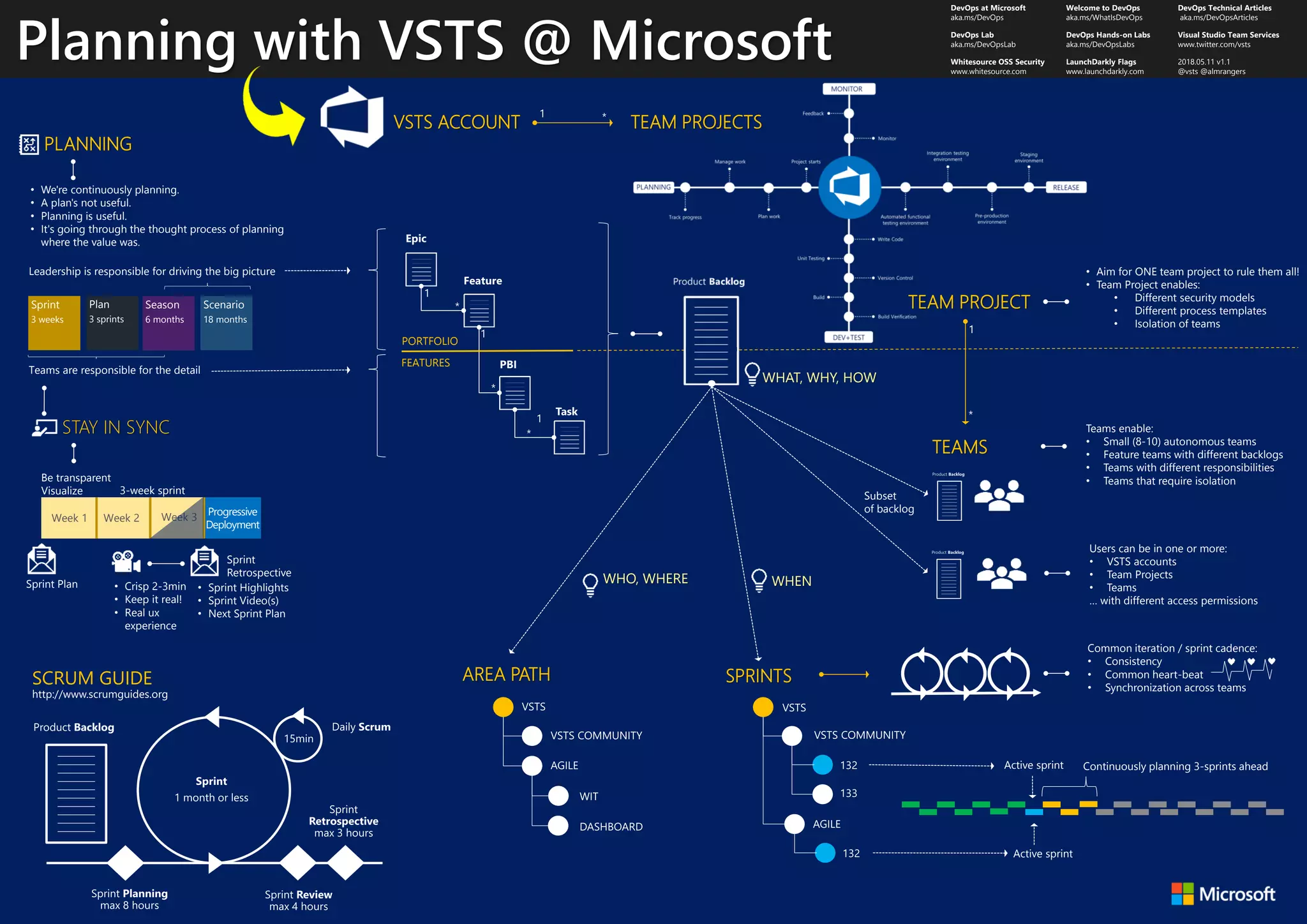
Teams are responsible for the detail
STAY IN SYNC
• Sprint Highlights
• Sprint Video(s)
• Next Sprint Plan
• Crisp 2-3min
• Keep it real!
• Real ux
experience
• We're continuously planning.
• A plan's not useful.
• Planning is useful.
• It's going through the thought process of planning
where the value was.
Progressive
Deployment
Week 1 Week 2 Week 3
3-week sprint
Sprint Plan
Sprint
Retrospective
Be transparent
Visualize
Sprint
3 weeks
Plan
3 sprints
Season
6 months
Scenario
18 months
Leadership is responsible for driving the big picture
PLANNING
SCRUM GUIDE
• Aim for ONE team project to rule them all!
• Team Project enables:
• Different security models
• Different process templates
• Isolation of teams
Teams enable:
• Small (8-10) autonomous teams
• Feature teams with different backlogs
• Teams with different responsibilities
• Teams that require isolation
TEAMS
PORTFOLIO
FEATURES
VSTS ACCOUNT TEAM PROJECTS
TEAM PROJECT
Users can be in one or more:
• VSTS accounts
• Team Projects
• Teams
… with different access permissions
AREA PATH
WHO, WHERE
Subset
of backlog
SPRINTS
Common iteration / sprint cadence:
• Consistency
• Common heart-beat
• Synchronization across teams
Active sprint Continuously planning 3-sprints ahead
Active sprint
WHEN
WHAT, WHY, HOW

Poster - DevOps Planning @ Microsoft

  • 1.
    Planning with VSTS@ Microsoft DevOps at Microsoft Welcome to DevOps DevOps Technical Articles aka.ms/DevOps aka.ms/WhatIsDevOps aka.ms/DevOpsArticles DevOps Lab DevOps Hands-on Labs Visual Studio Team Services aka.ms/DevOpsLab aka.ms/DevOpsLabs www.twitter.com/vsts Whitesource OSS Security LaunchDarkly Flags 2018.05.11 v1.1 www.whitesource.com www.launchdarkly.com @vsts @almrangers Teams are responsible for the detail STAY IN SYNC • Sprint Highlights • Sprint Video(s) • Next Sprint Plan • Crisp 2-3min • Keep it real! • Real ux experience • We're continuously planning. • A plan's not useful. • Planning is useful. • It's going through the thought process of planning where the value was. Progressive Deployment Week 1 Week 2 Week 3 3-week sprint Sprint Plan Sprint Retrospective Be transparent Visualize Sprint 3 weeks Plan 3 sprints Season 6 months Scenario 18 months Leadership is responsible for driving the big picture PLANNING SCRUM GUIDE • Aim for ONE team project to rule them all! • Team Project enables: • Different security models • Different process templates • Isolation of teams Teams enable: • Small (8-10) autonomous teams • Feature teams with different backlogs • Teams with different responsibilities • Teams that require isolation TEAMS PORTFOLIO FEATURES VSTS ACCOUNT TEAM PROJECTS TEAM PROJECT Users can be in one or more: • VSTS accounts • Team Projects • Teams … with different access permissions AREA PATH WHO, WHERE Subset of backlog SPRINTS Common iteration / sprint cadence: • Consistency • Common heart-beat • Synchronization across teams Active sprint Continuously planning 3-sprints ahead Active sprint WHEN WHAT, WHY, HOW