INTERACTION DESIGN PORTFOLIO by Terrance Nelson


    Rev PA1                2009-09-22   1
iPad Travel Application Concept 
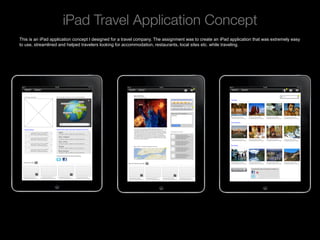
This is an iPad application concept I designed for a travel company. The assignment was to create an iPad application that was extremely easy
to use, streamlined and helped travelers looking for accommodation, restaurants, local sites etc. while traveling.


    Rev PA1                                              2009-09-22     2
Mobile Check-in (Appear)
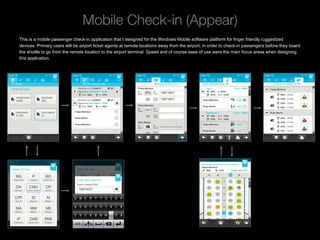
This is a mobile passenger check-in application that I designed for the Windows Mobile software platform for finger friendly ruggedized
devices. Primary users will be airport ticket agents at remote locations away from the airport, in order to check-in passengers before they board
the shuttle to go from the remote location to the airport terminal. Speed and of course ease of use were the main focus areas when designing
this application.


    Rev PA1                                               2009-09-22      3
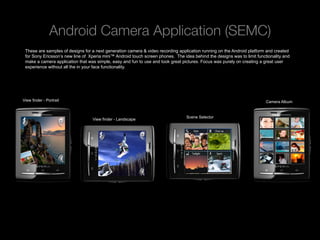
Android Camera Application (SEMC)
 These are samples of designs for a next generation camera & video recording application running on the Android platform and created
 for Sony Ericsson’s new line of Xperia mini™ Android touch screen phones. The idea behind the designs was to limit functionality and
 make a camera application that was simple, easy and fun to use and took great pictures. Focus was purely on creating a great user
 experience without all the in your face functionality.


View finder - Portrait                                                                                                   Camera Album


                                                                                 Scene Selector
                                  View finder - Landscape


   Rev PA1                                             2009-09-22     4
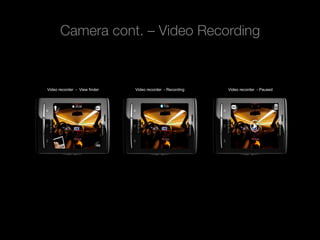
Camera cont. – Video Recording


          Video recorder - View finder   Video recorder - Recording   Video recorder - Paused


Rev PA1                                  2009-09-22     5
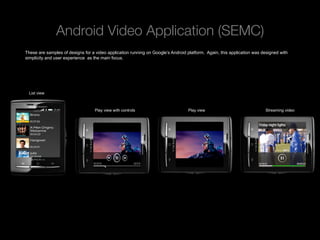
Android Video Application (SEMC)
These are samples of designs for a video application running on Google’s Android platform. Again, this application was designed with
simplicity and user experience as the main focus.


 List view


                                   Play view with controls                       Play view                              Streaming video


 Rev PA1                                                 2009-09-22   6
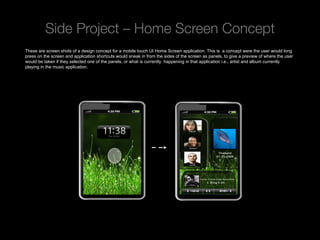
Side Project – Home Screen Concept
These are screen shots of a design concept for a mobile touch UI Home Screen application. This is a concept were the user would long
press on the screen and application shortcuts would sneak in from the sides of the screen as panels, to give a preview of where the user
would be taken if they selected one of the panels, or what is currently happening in that application i.e., artist and album currently
playing in the music application.


 Rev PA1                                              2009-09-22      7
Side Project cont. - Contacts
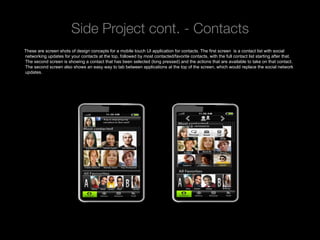
These are screen shots of design concepts for a mobile touch UI application for contacts. The first screen is a contact list with social
networking updates for your contacts at the top, followed by most contacted/favorite contacts, with the full contact list starting after that.
The second screen is showing a contact that has been selected (long pressed) and the actions that are available to take on that contact.
The second screen also shows an easy way to tab between applications at the top of the screen, which would replace the social network
updates.


 Rev PA1                                                 2009-09-22      8
Side Project cont. – RSS Feeds
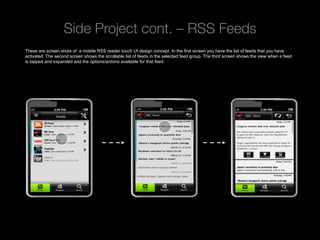
These are screen shots of a mobile RSS reader touch UI design concept. In the first screen you have the list of feeds that you have
activated. The second screen shows the scrollable list of feeds in the selected feed group. The third screen shows the view when a feed
is tapped and expanded and the options/actions available for that feed.


 Rev PA1                                              2009-09-22      9
Side Project cont. – “Camera roll”
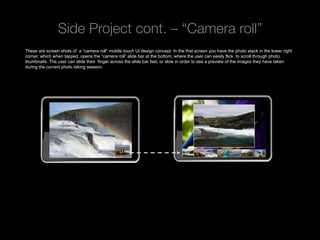
These are screen shots of a “camera roll” mobile touch UI design concept. In the first screen you have the photo stack in the lower right
corner, which when tapped, opens the “camera roll” slide bar at the bottom, where the user can easily flick to scroll through photo
thumbnails. The user can slide their finger across the slide bar fast, or slow in order to see a preview of the images they have taken
during the current photo taking session.


 Rev PA1                                               2009-09-22      10
iPhone Side Project
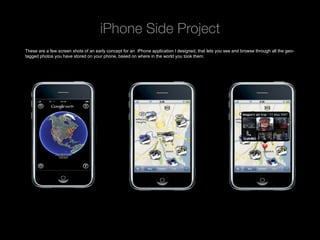
These are a few screen shots of an early concept for an iPhone application I designed, that lets you see and browse through all the geo-
tagged photos you have stored on your phone, based on where in the world you took them.


 Rev PA1                                              2009-09-22      11
Ocean Observations
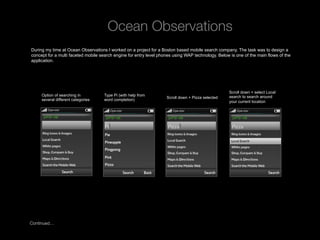
 During my time at Ocean Observations I worked on a project for a Boston based mobile search company. The task was to design a
 concept for a multi faceted mobile search engine for entry level phones using WAP technology. Below is one of the main flows of the
 application.


                                                                                                     Scroll down + select Local
      Option of searching in         Type Pi (with help from                                         search to search around
                                                                     Scroll down + Pizza selected
      several different categories   word completion)                                                your current location


Continued…

Rev PA1                                              2009-09-22    12
Local Search Results:
                                                                 Search Preferences:


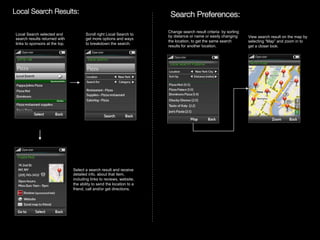
 Local Search selected and             Scroll right Local Search to
                                                                                   Change search result criteria by sorting
                                                                                   by distance or name or easily changing
 search results returned with           get more options and ways                                                             View search result on the map by
                                                                                   the location, to get the same search       selecting “Map” and zoom in to
 links to sponsors at the top.          to breakdown the search.
                                                                                   results for another location.              get a closer look.


                                 Select a search result and receive
                                 detailed info. about that item,
                                 including links to reviews, website,
                                 the ability to send the location to a
                                 friend, call and/or get directions.


        Rev PA1                                                      2009-09-22   13
TERRANCE NELSON
                        INTERACTION DESIGNER
                           terrance.nelson@gmail.com
                           +46.76.109.6425


Rev PA1               2009-09-22   14

Portfolio

  • 1.
    INTERACTION DESIGN PORTFOLIOby Terrance Nelson Rev PA1 2009-09-22 1
  • 2.
    iPad Travel ApplicationConcept This is an iPad application concept I designed for a travel company. The assignment was to create an iPad application that was extremely easy to use, streamlined and helped travelers looking for accommodation, restaurants, local sites etc. while traveling. Rev PA1 2009-09-22 2
  • 3.
    Mobile Check-in (Appear) Thisis a mobile passenger check-in application that I designed for the Windows Mobile software platform for finger friendly ruggedized devices. Primary users will be airport ticket agents at remote locations away from the airport, in order to check-in passengers before they board the shuttle to go from the remote location to the airport terminal. Speed and of course ease of use were the main focus areas when designing this application. Rev PA1 2009-09-22 3
  • 4.
    Android Camera Application(SEMC) These are samples of designs for a next generation camera & video recording application running on the Android platform and created for Sony Ericsson’s new line of Xperia mini™ Android touch screen phones. The idea behind the designs was to limit functionality and make a camera application that was simple, easy and fun to use and took great pictures. Focus was purely on creating a great user experience without all the in your face functionality. View finder - Portrait Camera Album Scene Selector View finder - Landscape Rev PA1 2009-09-22 4
  • 5.
    Camera cont. –Video Recording Video recorder - View finder Video recorder - Recording Video recorder - Paused Rev PA1 2009-09-22 5
  • 6.
    Android Video Application(SEMC) These are samples of designs for a video application running on Google’s Android platform. Again, this application was designed with simplicity and user experience as the main focus. List view Play view with controls Play view Streaming video Rev PA1 2009-09-22 6
  • 7.
    Side Project –Home Screen Concept These are screen shots of a design concept for a mobile touch UI Home Screen application. This is a concept were the user would long press on the screen and application shortcuts would sneak in from the sides of the screen as panels, to give a preview of where the user would be taken if they selected one of the panels, or what is currently happening in that application i.e., artist and album currently playing in the music application. Rev PA1 2009-09-22 7
  • 8.
    Side Project cont.- Contacts These are screen shots of design concepts for a mobile touch UI application for contacts. The first screen is a contact list with social networking updates for your contacts at the top, followed by most contacted/favorite contacts, with the full contact list starting after that. The second screen is showing a contact that has been selected (long pressed) and the actions that are available to take on that contact. The second screen also shows an easy way to tab between applications at the top of the screen, which would replace the social network updates. Rev PA1 2009-09-22 8
  • 9.
    Side Project cont.– RSS Feeds These are screen shots of a mobile RSS reader touch UI design concept. In the first screen you have the list of feeds that you have activated. The second screen shows the scrollable list of feeds in the selected feed group. The third screen shows the view when a feed is tapped and expanded and the options/actions available for that feed. Rev PA1 2009-09-22 9
  • 10.
    Side Project cont.– “Camera roll” These are screen shots of a “camera roll” mobile touch UI design concept. In the first screen you have the photo stack in the lower right corner, which when tapped, opens the “camera roll” slide bar at the bottom, where the user can easily flick to scroll through photo thumbnails. The user can slide their finger across the slide bar fast, or slow in order to see a preview of the images they have taken during the current photo taking session. Rev PA1 2009-09-22 10
  • 11.
    iPhone Side Project Theseare a few screen shots of an early concept for an iPhone application I designed, that lets you see and browse through all the geo- tagged photos you have stored on your phone, based on where in the world you took them. Rev PA1 2009-09-22 11
  • 12.
    Ocean Observations Duringmy time at Ocean Observations I worked on a project for a Boston based mobile search company. The task was to design a concept for a multi faceted mobile search engine for entry level phones using WAP technology. Below is one of the main flows of the application. Scroll down + select Local Option of searching in Type Pi (with help from search to search around Scroll down + Pizza selected several different categories word completion) your current location Continued… Rev PA1 2009-09-22 12
  • 13.
    Local Search Results: Search Preferences:   Local Search selected and Scroll right Local Search to Change search result criteria by sorting by distance or name or easily changing search results returned with get more options and ways View search result on the map by the location, to get the same search selecting “Map” and zoom in to links to sponsors at the top. to breakdown the search. results for another location. get a closer look. Select a search result and receive detailed info. about that item, including links to reviews, website, the ability to send the location to a friend, call and/or get directions. Rev PA1 2009-09-22 13
  • 14.
    TERRANCE NELSON INTERACTION DESIGNER terrance.nelson@gmail.com +46.76.109.6425 Rev PA1 2009-09-22 14