SparkFun Electronics:

Pop-up Paper Engineering
http://bit.ly/CentaurusPaperEng
Brian Huang
Education
Engineer

Angela Sheehan
Education
Outreach

Linz Craig
Education
Outreach
About us...
SparkFun Electronics
Boulder, CO
● Founded in 2003 by Nathan Seidle
● Focus in shortcuts to engineering design
● Design / Develop Electronics for Building,
Tinkering, Making
● Rooted in Open Source Hardware
Community
Today
You will learn what makes a circuit work and
apply this to create/make something novel and
unique.
You will apply the engineering design process
you’ve practiced in school on today’s design
task.
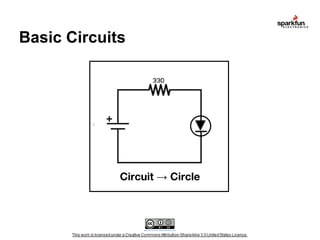
Basic Circuits

`

+

Circuit → Circle
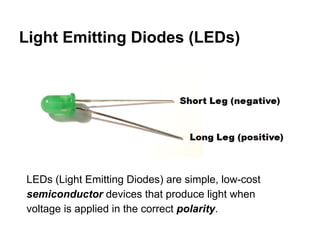
Light Emitting Diodes (LEDs)

LEDs (Light Emitting Diodes) are simple, low-cost
semiconductor devices that produce light when
voltage is applied in the correct polarity.
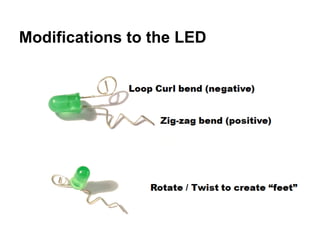
Modifications to the LED
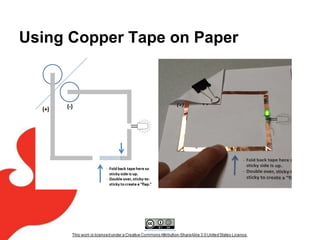
Using Copper Tape on Paper
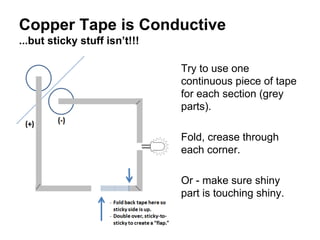
Copper Tape is Conductive
...but sticky stuff isn’t!!!
Try to use one
continuous piece of tape
for each section (grey
parts).
Fold, crease through
each corner.
Or - make sure shiny
part is touching shiny.
Adhesive is non-conductive…
Making Corners with one piece of tape
FOLD
DIAGONAL
TO MAKE A
CORNER

FOLD

FOLD
FORWARD
to CREASE
(Sticky side
exposed)

DONE!

Try to keep the piece of tape continuous across
corners and through-out the circuit.
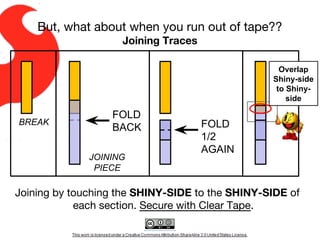
But, what about when you run out of tape??
Joining Traces
Overlap
Shiny-side
to Shinyside

BREAK

FOLD
BACK
JOINING
PIECE

FOLD
1/2
AGAIN

Joining by touching the SHINY-SIDE to the SHINY-SIDE of
each section. Secure with Clear Tape.
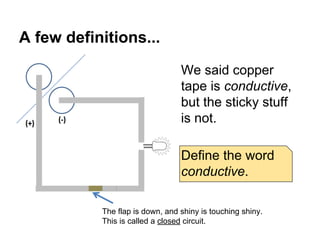
A few definitions...
We said copper
tape is conductive,
but the sticky stuff
is not.
Define the word
conductive.
The flap is down, and shiny is touching shiny.
This is called a closed circuit.
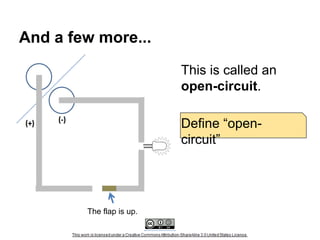
And a few more...
This is called an
open-circuit.
Define “opencircuit”

The flap is up.
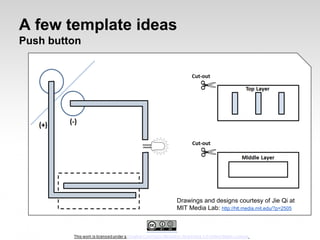
A few template ideas
Push button

Drawings and designs courtesy of Jie Qi at
MIT Media Lab: http://hlt.media.mit.edu/?p=2505
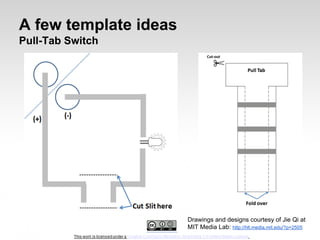
A few template ideas
Pull-Tab Switch

Drawings and designs courtesy of Jie Qi at
MIT Media Lab: http://hlt.media.mit.edu/?p=2505
How else can you make a switch?
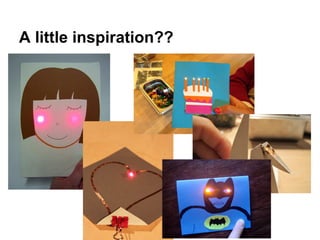
A little inspiration??
Draw, sketch, make something unique!

Your turn...
Design Process
Problem Statement
Design Process
Planning….
Sketch, write, doodle… think about
the following:

•WHO IS IT FOR?
•WHAT SHOULD IT DO?
•WHAT SHOULD IT LOOK LIKE?
Phase II -- Adding pop-up Paper
Engineering to Paper Circuits
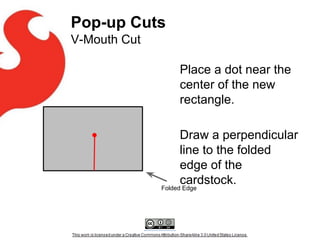
Pop-up Cuts
V-Mouth Cut
Place a dot near the
center of the new
rectangle.
Draw a perpendicular
line to the folded
edge of the
cardstock.

Folded Edge
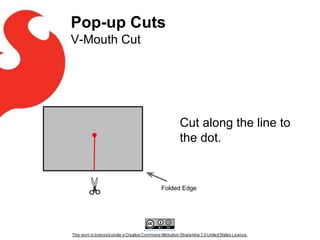
Pop-up Cuts
V-Mouth Cut

Cut along the line to
the dot.

Folded Edge
Pop-up Cuts
V-Mouth Cut
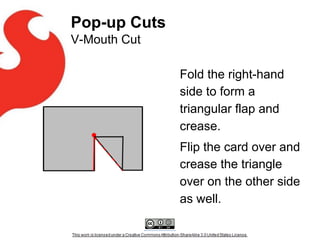
Fold the right-hand
side to form a
triangular flap and
crease.
Flip the card over and
crease the triangle
over on the other side
as well.
Pop-up Cuts
V-Mouth Cut
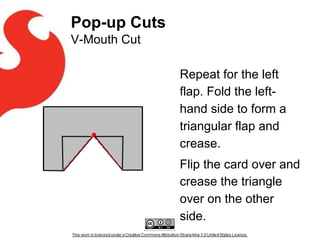
Repeat for the left
flap. Fold the lefthand side to form a
triangular flap and
crease.
Flip the card over and
crease the triangle
over on the other
side.
Opening the Mouth
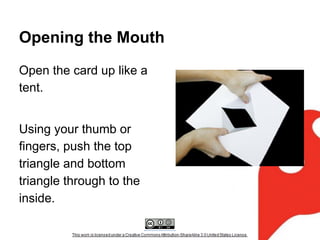
Open the card up like a
tent.
Using your thumb or
fingers, push the top
triangle and bottom
triangle through to the
inside.
Finally
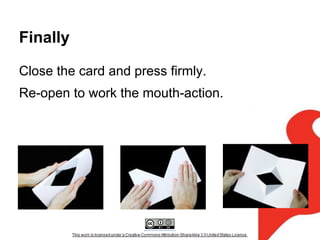
Close the card and press firmly.
Re-open to work the mouth-action.
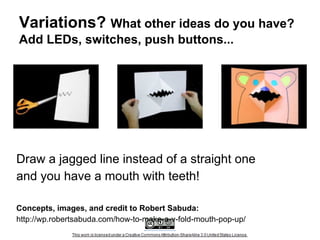
Variations? What other ideas do you have?
Add LEDs, switches, push buttons...

Draw a jagged line instead of a straight one
and you have a mouth with teeth!
Concepts, images, and credit to Robert Sabuda:
http://wp.robertsabuda.com/how-to-make-a-v-fold-mouth-pop-up/
Resources, Credits, and Thank yous
Thank you to Jie Qi and the High-Low Tech Lab at MIT for
the concepts, designs, and artwork for these paper circuits.
Thank you to Robert Sabuda for his pivotal work in pop-up
books and pop-up art.
Full-scale templates can be downloaded as a PowerPoint
file here. If you need a PDF, please e-mail me at brian.
huang@sparkfun.com
Thank you!
Thanks!
http://bit.ly/CentaurusPaperEng
Brian Huang
Education
Engineer

Angela Sheehan
Education
Outreach
email: education@sparkfun.com

Linz Craig
Education
Outreach
Pop up paper engineering - cu boulder & centaurus

Pop up paper engineering - cu boulder & centaurus

  • 1.
    SparkFun Electronics: Pop-up PaperEngineering http://bit.ly/CentaurusPaperEng Brian Huang Education Engineer Angela Sheehan Education Outreach Linz Craig Education Outreach
  • 2.
    About us... SparkFun Electronics Boulder,CO ● Founded in 2003 by Nathan Seidle ● Focus in shortcuts to engineering design ● Design / Develop Electronics for Building, Tinkering, Making ● Rooted in Open Source Hardware Community
  • 3.
    Today You will learnwhat makes a circuit work and apply this to create/make something novel and unique. You will apply the engineering design process you’ve practiced in school on today’s design task.
  • 4.
  • 5.
    Light Emitting Diodes(LEDs) LEDs (Light Emitting Diodes) are simple, low-cost semiconductor devices that produce light when voltage is applied in the correct polarity.
  • 6.
  • 7.
  • 8.
    Copper Tape isConductive ...but sticky stuff isn’t!!! Try to use one continuous piece of tape for each section (grey parts). Fold, crease through each corner. Or - make sure shiny part is touching shiny.
  • 9.
    Adhesive is non-conductive… MakingCorners with one piece of tape FOLD DIAGONAL TO MAKE A CORNER FOLD FOLD FORWARD to CREASE (Sticky side exposed) DONE! Try to keep the piece of tape continuous across corners and through-out the circuit.
  • 10.
    But, what aboutwhen you run out of tape?? Joining Traces Overlap Shiny-side to Shinyside BREAK FOLD BACK JOINING PIECE FOLD 1/2 AGAIN Joining by touching the SHINY-SIDE to the SHINY-SIDE of each section. Secure with Clear Tape.
  • 11.
    A few definitions... Wesaid copper tape is conductive, but the sticky stuff is not. Define the word conductive. The flap is down, and shiny is touching shiny. This is called a closed circuit.
  • 12.
    And a fewmore... This is called an open-circuit. Define “opencircuit” The flap is up.
  • 13.
    A few templateideas Push button Drawings and designs courtesy of Jie Qi at MIT Media Lab: http://hlt.media.mit.edu/?p=2505
  • 14.
    A few templateideas Pull-Tab Switch Drawings and designs courtesy of Jie Qi at MIT Media Lab: http://hlt.media.mit.edu/?p=2505
  • 15.
    How else canyou make a switch?
  • 16.
  • 17.
    Draw, sketch, makesomething unique! Your turn...
  • 18.
  • 19.
    Design Process Planning…. Sketch, write,doodle… think about the following: •WHO IS IT FOR? •WHAT SHOULD IT DO? •WHAT SHOULD IT LOOK LIKE?
  • 20.
    Phase II --Adding pop-up Paper Engineering to Paper Circuits
  • 21.
    Pop-up Cuts V-Mouth Cut Placea dot near the center of the new rectangle. Draw a perpendicular line to the folded edge of the cardstock. Folded Edge
  • 22.
    Pop-up Cuts V-Mouth Cut Cutalong the line to the dot. Folded Edge
  • 23.
    Pop-up Cuts V-Mouth Cut Foldthe right-hand side to form a triangular flap and crease. Flip the card over and crease the triangle over on the other side as well.
  • 24.
    Pop-up Cuts V-Mouth Cut Repeatfor the left flap. Fold the lefthand side to form a triangular flap and crease. Flip the card over and crease the triangle over on the other side.
  • 25.
    Opening the Mouth Openthe card up like a tent. Using your thumb or fingers, push the top triangle and bottom triangle through to the inside.
  • 26.
    Finally Close the cardand press firmly. Re-open to work the mouth-action.
  • 27.
    Variations? What otherideas do you have? Add LEDs, switches, push buttons... Draw a jagged line instead of a straight one and you have a mouth with teeth! Concepts, images, and credit to Robert Sabuda: http://wp.robertsabuda.com/how-to-make-a-v-fold-mouth-pop-up/
  • 28.
    Resources, Credits, andThank yous Thank you to Jie Qi and the High-Low Tech Lab at MIT for the concepts, designs, and artwork for these paper circuits. Thank you to Robert Sabuda for his pivotal work in pop-up books and pop-up art. Full-scale templates can be downloaded as a PowerPoint file here. If you need a PDF, please e-mail me at brian. huang@sparkfun.com
  • 29.
  • 30.