G6DPMM - Lecture 16 Architecture of Multimedia Systems
Multimedia Architecture Multimedia consists of : Resources (media) Hypermedia Links Multimedia software thus requires : Media viewer Link manager Database
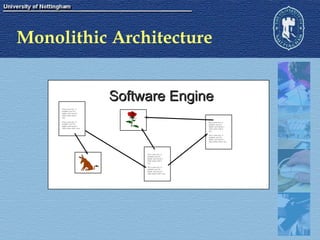
Monolithic Architecture Software Engine This is some text.  It  probably won’t be  legible, and it doesn’t  really matter what it  says.  This is some text.  It  probably won’t be  legible, and it doesn’t  really matter what it says.  This is some text.  It  probably won’t be  legible, and it doesn’t  really matter what it  says.  This is some text.  It  probably won’t be  legible, and it doesn’t  really matter what it says.  This is some text.  It  probably won’t be  legible, and it doesn’t  really matter what it  says.  This is some text.  It  probably won’t be  legible, and it doesn’t  really matter what it says.
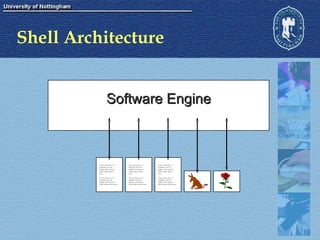
Shell Architecture Software Engine This is some text.  It  probably won’t be  legible, and it doesn’t  really matter what it  says.  This is some text.  It  probably won’t be  legible, and it doesn’t  really matter what it says.  This is some text.  It  probably won’t be  legible, and it doesn’t  really matter what it  says.  This is some text.  It  probably won’t be  legible, and it doesn’t  really matter what it says.  This is some text.  It  probably won’t be  legible, and it doesn’t  really matter what it  says.  This is some text.  It  probably won’t be  legible, and it doesn’t  really matter what it says.
Advantages of a “Shell” design Save development effort in large projects Reusability of content Portability
Link Management Authoring Systems Database Flat-field or relational Media file names are usually stored in fields Many suitable development systems  (eg Visual Basic and Delphi) Markup Language
Markup Languages The word “Markup” is derived from the printing industry Detailed stylistic instructions for typesetting Usually hand-written on the copy (eg underlining some text that is to be set in italics). Markup languages do the same job for computerised documentation systems. Markup adds logical structure to a document, or indicates how it is to be laid out (on paper or screen). Markup languages are a set of instructions that are amenable to automatic processing.
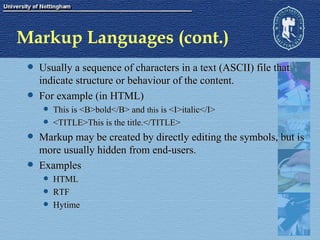
Markup Languages (cont.) Usually a sequence of characters in a text (ASCII) file that indicate structure or behaviour of the content. For example (in HTML) This is <B>bold</B> and  this  is <I>italic</I> <TITLE>This is the title.</TITLE> Markup may be created by directly editing the symbols, but is more usually hidden from end-users. Examples HTML RTF Hytime
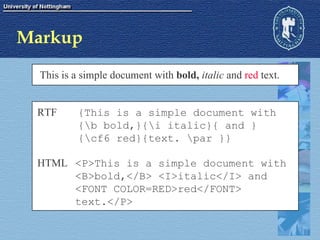
Markup This is a simple document with  bold,   italic  and  red  text. {This is a simple document with  {\b bold,}{\i italic}{ and } {\cf6 red}{text. \par }} RTF <P>This is a simple document with  <B>bold,</B> <I>italic</I> and  <FONT COLOR=RED>red</FONT> text.</P> HTML
Generalised Markup Flexible Metalanguage Tags indicate the structure of the information - not how it appears. For example : Title, Caption, Objectives, Filename NOT Bold, Italic, Red or Centred This ensures consistency
Generalised Markup (2) Semantics - what do the tags mean? Document Types Stylesheets Define the appearance and behaviour Content is described by markup language Simple (eg word processor) Complex (can contain program code)
SGML - History Standard Generalised Markup Language 1969 - GML from IBM  text editing formatting information retrieval 1980 SGML first published 1980’s SGML adopted by US IRS & DOD 1986 - ISO standard ISO 8879: Information processing--Text and office systems--Standard Generalized Markup Language (SGML), ([Geneva]: ISO, 1986).
SGML SGML defines a system of tag markup <TAG>This is a pair of SGML tags</TAG> SGML is a standard for how to specify a tag set. Document Type Definition (DTD) SGML documents contain structural elements that can be described without consideration of how they are displayed. SGML application. HTML is an SGML application.
Benefits of SGML Documents are created by thinking in terms of structure rather than appearance (which may change over time).  Documents are portable because any SGML compliant software can interpret them by reference to the DTD. Documents originally intended for one medium can easily be re-purposed for other media, such as the computer display screen.  Stylesheets are sometimes used.
Disadvantages of SGML Very complex Creating DTD’s requires  exacting software engineering Linking tends to be complex Writing SGML software is extremely hard SGML tools tend to be expensive Hytime is extremely complex and not widely used.
XML vs SGML XML is based upon SGML, but is substantially simplified for use on the WWW. Like SGML, XML is a metalanguage arbitrary definition of elements <TITLE> <PARAGRAPH> <ChapterHeading> <PRICE> <PARTNUMBER> <MANUFACTUER> <ExamGrade> Syntax may  optionally  be described by a DTD (or Schema) Legal XML without a DTD is well formed Valid documents have Schema Style and content are completely separate XML documents contain content Style is specified by  stylesheets
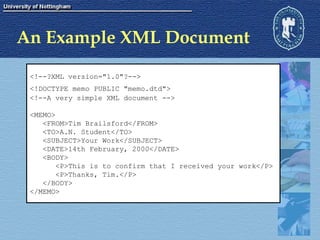
An Example XML Document <!--?XML version=&quot;1.0&quot;?--> <!DOCTYPE memo PUBLIC &quot;memo.dtd&quot;>   <!--A very simple XML document --> <MEMO> <FROM>Tim Brailsford</FROM> <TO>A.N. Student</TO> <SUBJECT>Your Work</SUBJECT> <DATE>14th February, 2000</DATE> <BODY> <P>This is to confirm that I received your work</P> <P>Thanks, Tim.</P> </BODY> </MEMO>
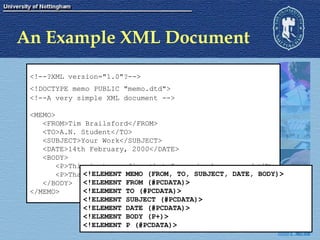
An Example XML Document <!--?XML version=&quot;1.0&quot;?--> <!DOCTYPE memo PUBLIC &quot;memo.dtd&quot;>   <!--A very simple XML document --> <MEMO> <FROM>Tim Brailsford</FROM> <TO>A.N. Student</TO> <SUBJECT>Your Work</SUBJECT> <DATE>14th February, 2000</DATE> <BODY> <P>This is to confirm that I received your work</P> <P>Thanks, Tim.</P> </BODY> </MEMO> <!ELEMENT MEMO (FROM, TO, SUBJECT, DATE, BODY)> <!ELEMENT FROM (#PCDATA)> <!ELEMENT TO (#PCDATA)> <!ELEMENT SUBJECT (#PCDATA)> <!ELEMENT DATE (#PCDATA)> <!ELEMENT BODY (P+)> <!ELEMENT P (#PCDATA)>
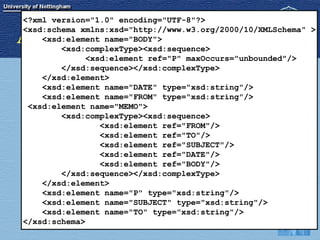
An Example XML Document <!--?XML version=&quot;1.0&quot;?--> <!DOCTYPE memo PUBLIC &quot;memo.dtd&quot;>   <!--A very simple XML document --> <MEMO> <FROM>Tim Brailsford</FROM> <TO>A.N. Student</TO> <SUBJECT>Your Work</SUBJECT> <DATE>14th February, 2000</DATE> <BODY> <P>This is to confirm that I received your work</P> <P>Thanks, Tim.</P> </BODY> </MEMO> <?xml version=&quot;1.0&quot; encoding=&quot;UTF-8&quot;?> <xsd:schema xmlns:xsd=&quot;http://www.w3.org/2000/10/XMLSchema&quot; > <xsd:element name=&quot;BODY&quot;> <xsd:complexType><xsd:sequence> <xsd:element ref=&quot;P&quot; maxOccurs=&quot;unbounded&quot;/> </xsd:sequence></xsd:complexType> </xsd:element> <xsd:element name=&quot;DATE&quot; type=&quot;xsd:string&quot;/> <xsd:element name=&quot;FROM&quot; type=&quot;xsd:string&quot;/>  <xsd:element name=&quot;MEMO&quot;> <xsd:complexType><xsd:sequence> <xsd:element ref=&quot;FROM&quot;/> <xsd:element ref=&quot;TO&quot;/> <xsd:element ref=&quot;SUBJECT&quot;/> <xsd:element ref=&quot;DATE&quot;/> <xsd:element ref=&quot;BODY&quot;/> </xsd:sequence></xsd:complexType> </xsd:element> <xsd:element name=&quot;P&quot; type=&quot;xsd:string&quot;/> <xsd:element name=&quot;SUBJECT&quot; type=&quot;xsd:string&quot;/> <xsd:element name=&quot;TO&quot; type=&quot;xsd:string&quot;/> </xsd:schema>
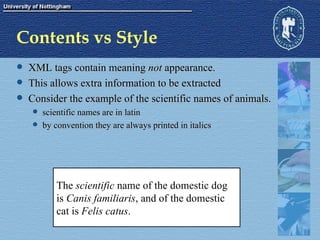
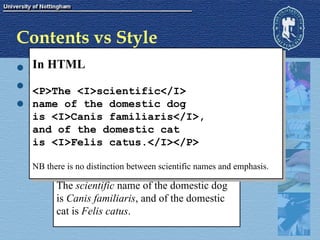
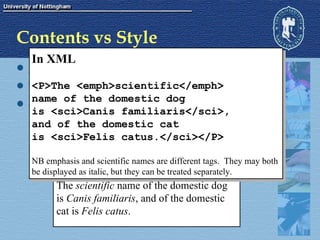
Contents vs Style XML tags contain meaning  not  appearance. This allows extra information to be extracted Consider the example of the scientific names of animals. scientific names are in latin by convention they are always printed in italics The  scientific  name of the domestic dog is  Canis familiaris , and of the domestic  cat is  Felis catus .
Contents vs Style XML tags contain meaning  not  appearance. This allows extra information to be extracted Consider the example of the scientific names of animals. scientific names are in latin by convention they are always printed in italics The  scientific  name of the domestic dog is  Canis familiaris , and of the domestic  cat is  Felis catus . In HTML <P>The <I>scientific</I>  name of the domestic dog  is <I>Canis familiaris</I>,  and of the domestic cat  is <I>Felis catus.</I></P> NB there is no distinction between scientific names and emphasis.
Contents vs Style XML tags contain meaning  not  appearance. This allows extra information to be extracted Consider the example of the scientific names of animals. scientific names are in latin by convention they are always printed in italics The  scientific  name of the domestic dog is  Canis familiaris , and of the domestic  cat is  Felis catus . In XML <P>The <emph>scientific</emph>  name of the domestic dog  is <sci>Canis familiaris</sci>,  and of the domestic cat  is <sci>Felis catus.</sci></P> NB emphasis and scientific names are different tags.  They may both  be displayed as italic, but they can be treated separately.
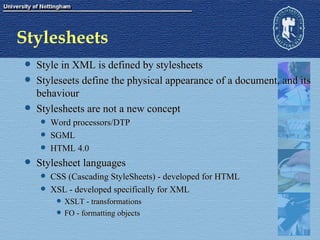
Stylesheets Style in XML is defined by stylesheets Styleseets define the physical appearance of a document, and its behaviour Stylesheets are not a new concept Word processors/DTP SGML HTML 4.0 Stylesheet languages CSS (Cascading StyleSheets) - developed for HTML XSL - developed specifically for XML XSLT - transformations FO - formatting objects

Pmm05 16

  • 1.
    G6DPMM - Lecture16 Architecture of Multimedia Systems
  • 2.
    Multimedia Architecture Multimediaconsists of : Resources (media) Hypermedia Links Multimedia software thus requires : Media viewer Link manager Database
  • 3.
    Monolithic Architecture SoftwareEngine This is some text. It probably won’t be legible, and it doesn’t really matter what it says. This is some text. It probably won’t be legible, and it doesn’t really matter what it says. This is some text. It probably won’t be legible, and it doesn’t really matter what it says. This is some text. It probably won’t be legible, and it doesn’t really matter what it says. This is some text. It probably won’t be legible, and it doesn’t really matter what it says. This is some text. It probably won’t be legible, and it doesn’t really matter what it says.
  • 4.
    Shell Architecture SoftwareEngine This is some text. It probably won’t be legible, and it doesn’t really matter what it says. This is some text. It probably won’t be legible, and it doesn’t really matter what it says. This is some text. It probably won’t be legible, and it doesn’t really matter what it says. This is some text. It probably won’t be legible, and it doesn’t really matter what it says. This is some text. It probably won’t be legible, and it doesn’t really matter what it says. This is some text. It probably won’t be legible, and it doesn’t really matter what it says.
  • 5.
    Advantages of a“Shell” design Save development effort in large projects Reusability of content Portability
  • 6.
    Link Management AuthoringSystems Database Flat-field or relational Media file names are usually stored in fields Many suitable development systems (eg Visual Basic and Delphi) Markup Language
  • 7.
    Markup Languages Theword “Markup” is derived from the printing industry Detailed stylistic instructions for typesetting Usually hand-written on the copy (eg underlining some text that is to be set in italics). Markup languages do the same job for computerised documentation systems. Markup adds logical structure to a document, or indicates how it is to be laid out (on paper or screen). Markup languages are a set of instructions that are amenable to automatic processing.
  • 8.
    Markup Languages (cont.)Usually a sequence of characters in a text (ASCII) file that indicate structure or behaviour of the content. For example (in HTML) This is <B>bold</B> and this is <I>italic</I> <TITLE>This is the title.</TITLE> Markup may be created by directly editing the symbols, but is more usually hidden from end-users. Examples HTML RTF Hytime
  • 9.
    Markup This isa simple document with bold, italic and red text. {This is a simple document with {\b bold,}{\i italic}{ and } {\cf6 red}{text. \par }} RTF <P>This is a simple document with <B>bold,</B> <I>italic</I> and <FONT COLOR=RED>red</FONT> text.</P> HTML
  • 10.
    Generalised Markup FlexibleMetalanguage Tags indicate the structure of the information - not how it appears. For example : Title, Caption, Objectives, Filename NOT Bold, Italic, Red or Centred This ensures consistency
  • 11.
    Generalised Markup (2)Semantics - what do the tags mean? Document Types Stylesheets Define the appearance and behaviour Content is described by markup language Simple (eg word processor) Complex (can contain program code)
  • 12.
    SGML - HistoryStandard Generalised Markup Language 1969 - GML from IBM text editing formatting information retrieval 1980 SGML first published 1980’s SGML adopted by US IRS & DOD 1986 - ISO standard ISO 8879: Information processing--Text and office systems--Standard Generalized Markup Language (SGML), ([Geneva]: ISO, 1986).
  • 13.
    SGML SGML definesa system of tag markup <TAG>This is a pair of SGML tags</TAG> SGML is a standard for how to specify a tag set. Document Type Definition (DTD) SGML documents contain structural elements that can be described without consideration of how they are displayed. SGML application. HTML is an SGML application.
  • 14.
    Benefits of SGMLDocuments are created by thinking in terms of structure rather than appearance (which may change over time). Documents are portable because any SGML compliant software can interpret them by reference to the DTD. Documents originally intended for one medium can easily be re-purposed for other media, such as the computer display screen. Stylesheets are sometimes used.
  • 15.
    Disadvantages of SGMLVery complex Creating DTD’s requires exacting software engineering Linking tends to be complex Writing SGML software is extremely hard SGML tools tend to be expensive Hytime is extremely complex and not widely used.
  • 16.
    XML vs SGMLXML is based upon SGML, but is substantially simplified for use on the WWW. Like SGML, XML is a metalanguage arbitrary definition of elements <TITLE> <PARAGRAPH> <ChapterHeading> <PRICE> <PARTNUMBER> <MANUFACTUER> <ExamGrade> Syntax may optionally be described by a DTD (or Schema) Legal XML without a DTD is well formed Valid documents have Schema Style and content are completely separate XML documents contain content Style is specified by stylesheets
  • 17.
    An Example XMLDocument <!--?XML version=&quot;1.0&quot;?--> <!DOCTYPE memo PUBLIC &quot;memo.dtd&quot;> <!--A very simple XML document --> <MEMO> <FROM>Tim Brailsford</FROM> <TO>A.N. Student</TO> <SUBJECT>Your Work</SUBJECT> <DATE>14th February, 2000</DATE> <BODY> <P>This is to confirm that I received your work</P> <P>Thanks, Tim.</P> </BODY> </MEMO>
  • 18.
    An Example XMLDocument <!--?XML version=&quot;1.0&quot;?--> <!DOCTYPE memo PUBLIC &quot;memo.dtd&quot;> <!--A very simple XML document --> <MEMO> <FROM>Tim Brailsford</FROM> <TO>A.N. Student</TO> <SUBJECT>Your Work</SUBJECT> <DATE>14th February, 2000</DATE> <BODY> <P>This is to confirm that I received your work</P> <P>Thanks, Tim.</P> </BODY> </MEMO> <!ELEMENT MEMO (FROM, TO, SUBJECT, DATE, BODY)> <!ELEMENT FROM (#PCDATA)> <!ELEMENT TO (#PCDATA)> <!ELEMENT SUBJECT (#PCDATA)> <!ELEMENT DATE (#PCDATA)> <!ELEMENT BODY (P+)> <!ELEMENT P (#PCDATA)>
  • 19.
    An Example XMLDocument <!--?XML version=&quot;1.0&quot;?--> <!DOCTYPE memo PUBLIC &quot;memo.dtd&quot;> <!--A very simple XML document --> <MEMO> <FROM>Tim Brailsford</FROM> <TO>A.N. Student</TO> <SUBJECT>Your Work</SUBJECT> <DATE>14th February, 2000</DATE> <BODY> <P>This is to confirm that I received your work</P> <P>Thanks, Tim.</P> </BODY> </MEMO> <?xml version=&quot;1.0&quot; encoding=&quot;UTF-8&quot;?> <xsd:schema xmlns:xsd=&quot;http://www.w3.org/2000/10/XMLSchema&quot; > <xsd:element name=&quot;BODY&quot;> <xsd:complexType><xsd:sequence> <xsd:element ref=&quot;P&quot; maxOccurs=&quot;unbounded&quot;/> </xsd:sequence></xsd:complexType> </xsd:element> <xsd:element name=&quot;DATE&quot; type=&quot;xsd:string&quot;/> <xsd:element name=&quot;FROM&quot; type=&quot;xsd:string&quot;/> <xsd:element name=&quot;MEMO&quot;> <xsd:complexType><xsd:sequence> <xsd:element ref=&quot;FROM&quot;/> <xsd:element ref=&quot;TO&quot;/> <xsd:element ref=&quot;SUBJECT&quot;/> <xsd:element ref=&quot;DATE&quot;/> <xsd:element ref=&quot;BODY&quot;/> </xsd:sequence></xsd:complexType> </xsd:element> <xsd:element name=&quot;P&quot; type=&quot;xsd:string&quot;/> <xsd:element name=&quot;SUBJECT&quot; type=&quot;xsd:string&quot;/> <xsd:element name=&quot;TO&quot; type=&quot;xsd:string&quot;/> </xsd:schema>
  • 20.
    Contents vs StyleXML tags contain meaning not appearance. This allows extra information to be extracted Consider the example of the scientific names of animals. scientific names are in latin by convention they are always printed in italics The scientific name of the domestic dog is Canis familiaris , and of the domestic cat is Felis catus .
  • 21.
    Contents vs StyleXML tags contain meaning not appearance. This allows extra information to be extracted Consider the example of the scientific names of animals. scientific names are in latin by convention they are always printed in italics The scientific name of the domestic dog is Canis familiaris , and of the domestic cat is Felis catus . In HTML <P>The <I>scientific</I> name of the domestic dog is <I>Canis familiaris</I>, and of the domestic cat is <I>Felis catus.</I></P> NB there is no distinction between scientific names and emphasis.
  • 22.
    Contents vs StyleXML tags contain meaning not appearance. This allows extra information to be extracted Consider the example of the scientific names of animals. scientific names are in latin by convention they are always printed in italics The scientific name of the domestic dog is Canis familiaris , and of the domestic cat is Felis catus . In XML <P>The <emph>scientific</emph> name of the domestic dog is <sci>Canis familiaris</sci>, and of the domestic cat is <sci>Felis catus.</sci></P> NB emphasis and scientific names are different tags. They may both be displayed as italic, but they can be treated separately.
  • 23.
    Stylesheets Style inXML is defined by stylesheets Styleseets define the physical appearance of a document, and its behaviour Stylesheets are not a new concept Word processors/DTP SGML HTML 4.0 Stylesheet languages CSS (Cascading StyleSheets) - developed for HTML XSL - developed specifically for XML XSLT - transformations FO - formatting objects