Beyond the			teacher’s roomExpanding your PLNChristina DiMicelli
TodayPLNIntro to some Web 2.0 resourcesHands-on activitiesCreate avatarSign up for some resourcesPlan for tomorrow
Focus on   PLN ~ What is it?		Personal			Learning				Network
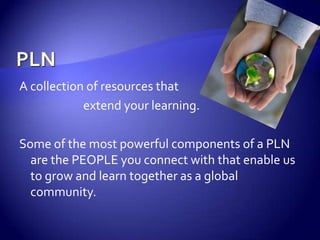
PLNA collection of resources that 			extend your learning.Some of the most powerful components of a PLN are the PEOPLE you connect with that enable us to grow and learn together as a global community.
What are examples in YOUR PLN?Talking to colleagues in the Teacher’s Room
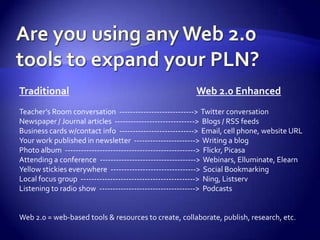
Are you using any Web 2.0 tools to expand your PLN?TraditionalWeb 2.0 EnhancedTeacher’s Room conversation  ---------------------------->  Twitter conversationNewspaper / Journal articles  ------------------------------>  Blogs / RSS feedsBusiness cards w/contact info  ---------------------------->  Email, cell phone, website URLYour work published in newsletter  ----------------------->  Writing a blogPhoto album  ------------------------------------------------->  Flickr, PicasaAttending a conference  ------------------------------------>  Webinars, Elluminate, ElearnYellow stickies everywhere  -------------------------------->  Social BookmarkingLocal focus group  ------------------------------------------->  Ning, ListservListening to radio show  ------------------------------------>  PodcastsWeb 2.0 = web-based tools & resources to create, collaborate, publish, research, etc.
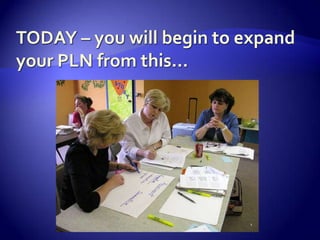
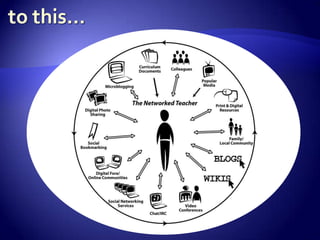
TODAY – you will begin to expand your PLN from this…
to this…
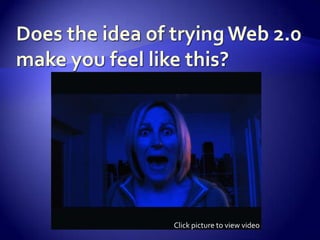
Does the idea of trying Web 2.0 make you feel like this?Click picture to view video
One small step at a time
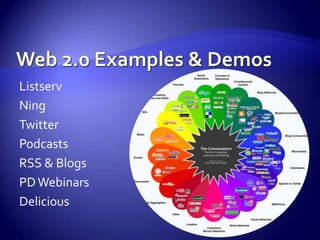
Web 2.0 Examples & DemosListserv NingTwitterPodcastsRSS & BlogsPD WebinarsDelicious
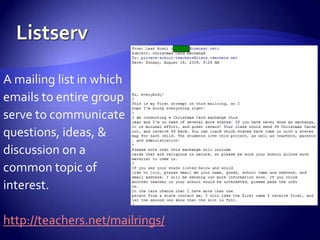
ListservA mailing list in whichemails to entire groupserve to communicatequestions, ideas, & discussion on a common topic of interest.http://teachers.net/mailrings/
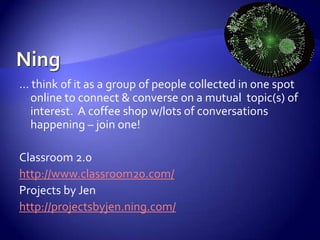
Ning… think of it as a group of people collected in one spot online to connect & converse on a mutual  topic(s) of interest.  A coffee shop w/lots of conversations happening – join one!Classroom 2.0http://www.classroom20.com/Projects by Jenhttp://projectsbyjen.ning.com/
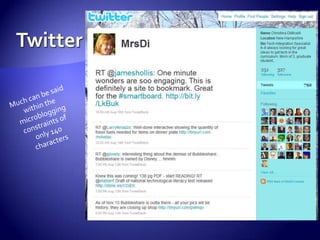
TwitterMuch can be saidwithin themicrobloggingconstraints of only 140characters
PodcastsA regularly produced audio (or video) presentation published on the internet on a specific topic – available to the public.  You DO NOT need an iPod to access!Seedlings (Maine educators) – also a Ninghttp://bitbybitseedlings.ning.com/iTunes is THE repository for podcasts (that’s another workshop!)
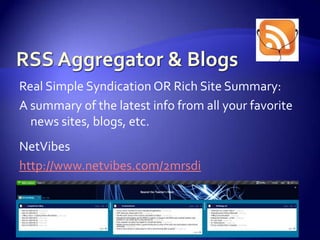
RSS Aggregator & BlogsReal Simple Syndication OR Rich Site Summary:A summary of the latest info from all your favorite news sites, blogs, etc.NetVibeshttp://www.netvibes.com/2mrsdi
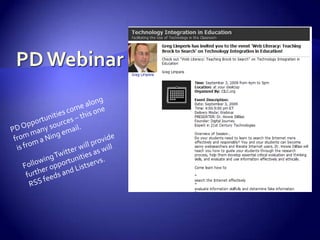
PD WebinarPD Opportunities come alongfrom many sources – this oneis from a Ning email.Following Twitter will providefurther opportunities as willRSS feeds and Listservs.
DeliciousSocial Bookmarking – keep all your bookmarks on the internet, tag (identify them with keywords) them, access them from ANY computer, and SHARE them with others.My bookmarks – you are ALWAYS welcome to lookhttp://delicious.com/cdimicelli
Take a SHORT break…Upon returning, we will have hands-on activities to begin expanding PLNs…Beyond the Teacher’s Room
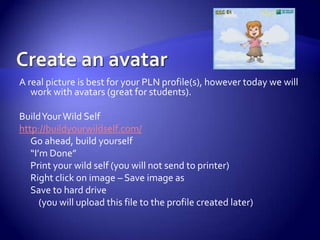
Create an avatarA real picture is best for your PLN profile(s), however today we will work with avatars (great for students).  Build Your Wild Selfhttp://buildyourwildself.com/Go ahead, build yourself“I’m Done”Print your wild self (you will not send to printer)Right click on image – Save image asSave to hard drive	    (you will upload this file to the profile created later)
Sign up for a listservUse your professional email address and find a topic of interest at:http://teachers.net/mailrings/
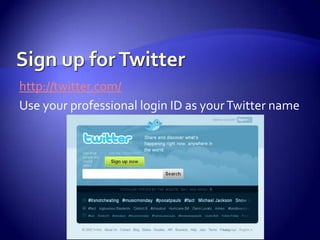
Sign up for Twitterhttp://twitter.com/Use your professional login ID as your Twitter name
Twitter SettingsMake sure to update your profile:Add your avatar picture	Add a short, descriptive bioChange your backgroundWe’ll put our IDs up on the board to share:Start to FOLLOW each otherTry a couple of tweets and see what happens
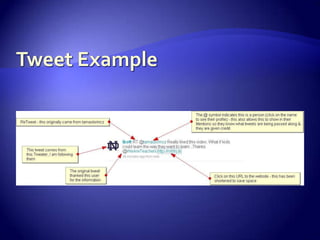
Important Twitter LingoRT = ReTweet – give credit where due, when you pass along a tweet, the RT shows where it originated fromDM = Direct Message – sometimes you just want to send a tweet to a person directly without it being publicMany times the URLs may look strange, they have been condensed to save space through a tool that changes the size of the URLHashtags(have a # before the word) – gives your tweet a keyword that can be searched, not always necessary @ before a login ID – this identifies the “word” as a person and the tweet will show up as a Mention on their page, it is identifying someone directly
Tweet Example
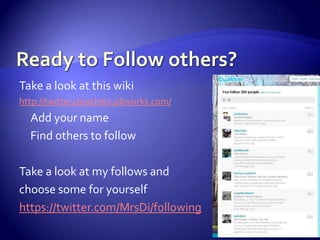
Ready to Follow others?Take a look at this wikihttp://twitter4teachers.pbworks.com/Add your nameFind others to followTake a look at my follows and choose some for yourselfhttps://twitter.com/MrsDi/following
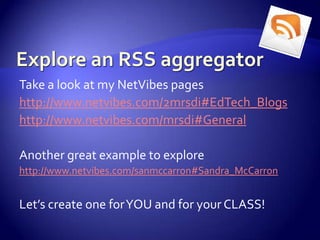
Explore an RSS aggregatorTake a look at my NetVibes pageshttp://www.netvibes.com/2mrsdi#EdTech_Blogshttp://www.netvibes.com/mrsdi#GeneralAnother great example to explorehttp://www.netvibes.com/sanmccarron#Sandra_McCarronLet’s create one for YOU and for your CLASS!
Explore a NingSign up and become a member of a Ning.  Today’s choices – try ONE!Classroom 2.0http://www.classroom20.com/Projects by Jenhttp://projectsbyjen.ning.com/Flat Classroomshttp://flatclassrooms.ning.com/National Council for Social Studieshttp://ncssnetwork.ning.com/Elementary Tech Teachershttp://elementarytechteachers.ning.com/
Plugged in for the FutureWhich resource are you most likely to use tomorrow?Which resource would you like more information or training on?Are you ready to move Beyond the Teacher’s Room?
Workshop SurveyPlease take a moment to answer a few questions – completely ANONYMOUS – about today’s workshop.  Thank you!http://tinyurl.com/n7gtrd
Photo credits:Screamhttp://www.flickr.com/photos/nataliejohnson/1908713509/Networked Teacherhttp://www.flickr.com/photos/courosa/2922421696/sizes/l/Teacher Roomhttp://www.flickr.com/photos/judybaxter/14414424/sizes/o/Globe in Handshttp://www.flickr.com/photos/noticelj/2878326718/Cartoon Globehttp://www.flickr.com/photos/ontdesign/692369952/Magnifyinghttp://www.flickr.com/photos/margolove/2056757292/Mindmaphttp://www.flickr.com/photos/wheatfields/3385159329/Cultivate Social Networkhttp://www.flickr.com/photos/intersectionconsulting/3704908885/sizes/o/Global Connecthttp://www.flickr.com/photos/churkinms/2582615161/Web 2.0http://www.flickr.com/photos/pipeapple/3280609082/Mailboxhttp://www.flickr.com/photos/timusan/503282535/
Photo credits (continued):Podcast RSShttp://www.flickr.com/photos/15319336@N07/2060971197/Microphonehttp://www.flickr.com/photos/visual_dichotomy/3623619145/Delicioushttp://www.flickr.com/photos/gabofr/1216701605/RSS Buttonhttp://www.flickr.com/photos/15319336@N07/2060971239/Twitter Birdhttp://www.flickr.com/photos/shawnzlea/2384656420/Plugged In Tomorrowhttp://www.flickr.com/photos/hoadang/2370203229/Questionhttp://www.flickr.com/photos/marcobellucci/3534516458/

PLN Workshop

  • 1.
    Beyond the teacher’s roomExpandingyour PLNChristina DiMicelli
  • 2.
    TodayPLNIntro to someWeb 2.0 resourcesHands-on activitiesCreate avatarSign up for some resourcesPlan for tomorrow
  • 3.
    Focus on PLN ~ What is it? Personal Learning Network
  • 4.
    PLNA collection ofresources that extend your learning.Some of the most powerful components of a PLN are the PEOPLE you connect with that enable us to grow and learn together as a global community.
  • 5.
    What are examplesin YOUR PLN?Talking to colleagues in the Teacher’s Room
  • 6.
    Are you usingany Web 2.0 tools to expand your PLN?TraditionalWeb 2.0 EnhancedTeacher’s Room conversation ----------------------------> Twitter conversationNewspaper / Journal articles ------------------------------> Blogs / RSS feedsBusiness cards w/contact info ----------------------------> Email, cell phone, website URLYour work published in newsletter -----------------------> Writing a blogPhoto album -------------------------------------------------> Flickr, PicasaAttending a conference ------------------------------------> Webinars, Elluminate, ElearnYellow stickies everywhere --------------------------------> Social BookmarkingLocal focus group -------------------------------------------> Ning, ListservListening to radio show ------------------------------------> PodcastsWeb 2.0 = web-based tools & resources to create, collaborate, publish, research, etc.
  • 7.
    TODAY – youwill begin to expand your PLN from this…
  • 8.
  • 9.
    Does the ideaof trying Web 2.0 make you feel like this?Click picture to view video
  • 10.
  • 11.
    Web 2.0 Examples& DemosListserv NingTwitterPodcastsRSS & BlogsPD WebinarsDelicious
  • 12.
    ListservA mailing listin whichemails to entire groupserve to communicatequestions, ideas, & discussion on a common topic of interest.http://teachers.net/mailrings/
  • 13.
    Ning… think ofit as a group of people collected in one spot online to connect & converse on a mutual topic(s) of interest. A coffee shop w/lots of conversations happening – join one!Classroom 2.0http://www.classroom20.com/Projects by Jenhttp://projectsbyjen.ning.com/
  • 14.
    TwitterMuch can besaidwithin themicrobloggingconstraints of only 140characters
  • 15.
    PodcastsA regularly producedaudio (or video) presentation published on the internet on a specific topic – available to the public. You DO NOT need an iPod to access!Seedlings (Maine educators) – also a Ninghttp://bitbybitseedlings.ning.com/iTunes is THE repository for podcasts (that’s another workshop!)
  • 16.
    RSS Aggregator &BlogsReal Simple Syndication OR Rich Site Summary:A summary of the latest info from all your favorite news sites, blogs, etc.NetVibeshttp://www.netvibes.com/2mrsdi
  • 17.
    PD WebinarPD Opportunitiescome alongfrom many sources – this oneis from a Ning email.Following Twitter will providefurther opportunities as willRSS feeds and Listservs.
  • 18.
    DeliciousSocial Bookmarking –keep all your bookmarks on the internet, tag (identify them with keywords) them, access them from ANY computer, and SHARE them with others.My bookmarks – you are ALWAYS welcome to lookhttp://delicious.com/cdimicelli
  • 19.
    Take a SHORTbreak…Upon returning, we will have hands-on activities to begin expanding PLNs…Beyond the Teacher’s Room
  • 20.
    Create an avatarAreal picture is best for your PLN profile(s), however today we will work with avatars (great for students). Build Your Wild Selfhttp://buildyourwildself.com/Go ahead, build yourself“I’m Done”Print your wild self (you will not send to printer)Right click on image – Save image asSave to hard drive (you will upload this file to the profile created later)
  • 21.
    Sign up fora listservUse your professional email address and find a topic of interest at:http://teachers.net/mailrings/
  • 22.
    Sign up forTwitterhttp://twitter.com/Use your professional login ID as your Twitter name
  • 23.
    Twitter SettingsMake sureto update your profile:Add your avatar picture Add a short, descriptive bioChange your backgroundWe’ll put our IDs up on the board to share:Start to FOLLOW each otherTry a couple of tweets and see what happens
  • 24.
    Important Twitter LingoRT= ReTweet – give credit where due, when you pass along a tweet, the RT shows where it originated fromDM = Direct Message – sometimes you just want to send a tweet to a person directly without it being publicMany times the URLs may look strange, they have been condensed to save space through a tool that changes the size of the URLHashtags(have a # before the word) – gives your tweet a keyword that can be searched, not always necessary @ before a login ID – this identifies the “word” as a person and the tweet will show up as a Mention on their page, it is identifying someone directly
  • 25.
  • 26.
    Ready to Followothers?Take a look at this wikihttp://twitter4teachers.pbworks.com/Add your nameFind others to followTake a look at my follows and choose some for yourselfhttps://twitter.com/MrsDi/following
  • 28.
    Explore an RSSaggregatorTake a look at my NetVibes pageshttp://www.netvibes.com/2mrsdi#EdTech_Blogshttp://www.netvibes.com/mrsdi#GeneralAnother great example to explorehttp://www.netvibes.com/sanmccarron#Sandra_McCarronLet’s create one for YOU and for your CLASS!
  • 29.
    Explore a NingSignup and become a member of a Ning. Today’s choices – try ONE!Classroom 2.0http://www.classroom20.com/Projects by Jenhttp://projectsbyjen.ning.com/Flat Classroomshttp://flatclassrooms.ning.com/National Council for Social Studieshttp://ncssnetwork.ning.com/Elementary Tech Teachershttp://elementarytechteachers.ning.com/
  • 30.
    Plugged in forthe FutureWhich resource are you most likely to use tomorrow?Which resource would you like more information or training on?Are you ready to move Beyond the Teacher’s Room?
  • 31.
    Workshop SurveyPlease takea moment to answer a few questions – completely ANONYMOUS – about today’s workshop. Thank you!http://tinyurl.com/n7gtrd
  • 32.
    Photo credits:Screamhttp://www.flickr.com/photos/nataliejohnson/1908713509/Networked Teacherhttp://www.flickr.com/photos/courosa/2922421696/sizes/l/TeacherRoomhttp://www.flickr.com/photos/judybaxter/14414424/sizes/o/Globe in Handshttp://www.flickr.com/photos/noticelj/2878326718/Cartoon Globehttp://www.flickr.com/photos/ontdesign/692369952/Magnifyinghttp://www.flickr.com/photos/margolove/2056757292/Mindmaphttp://www.flickr.com/photos/wheatfields/3385159329/Cultivate Social Networkhttp://www.flickr.com/photos/intersectionconsulting/3704908885/sizes/o/Global Connecthttp://www.flickr.com/photos/churkinms/2582615161/Web 2.0http://www.flickr.com/photos/pipeapple/3280609082/Mailboxhttp://www.flickr.com/photos/timusan/503282535/
  • 33.
    Photo credits (continued):PodcastRSShttp://www.flickr.com/photos/15319336@N07/2060971197/Microphonehttp://www.flickr.com/photos/visual_dichotomy/3623619145/Delicioushttp://www.flickr.com/photos/gabofr/1216701605/RSS Buttonhttp://www.flickr.com/photos/15319336@N07/2060971239/Twitter Birdhttp://www.flickr.com/photos/shawnzlea/2384656420/Plugged In Tomorrowhttp://www.flickr.com/photos/hoadang/2370203229/Questionhttp://www.flickr.com/photos/marcobellucci/3534516458/

Editor's Notes

  • #3 We will be running into terms and words that may be unfamiliar.No worries, we’ll define them and take hold of them as we go along.
  • #4 I realize this is just another acronym, another buzz word in professional development… but looking beyond that, the idea is sound.
  • #5 This is about moving past your usual contacts, your usual inputs for information – It is about expanding into the space that the internet provides, a truly global platform for communication, collaboration, sharing, & learning.The first step is to challenge yourself. Take hold of ONE idea, ONE resource you hear about today… and push your PLN beyond the teacher’s room and into the global network.I’ll help you.
  • #9 Now, this is the ultimate networked teacher… one who has tons of extra time too!Even if we can each pick 1 or 2 of these items to add to our PLN, we are expanding our learning capabilities beyond what we currently have in place.The opportunities are there – go for it.
  • #10 The video is titled “Introducing the Book” and is about a medeival “educator” calling the helpdesk to get assistance with the latest technology – the book.Don’t be afraid to ask for help!Don’t be afraid to experiment with the Web 2.0 tools available!You don’t have to be the “expert” in front of students with technology, just be willing to give it a shot!And I can be in your classroom with you to lend a hand if you need it.
  • #12 Don’t get overwhelmed.I am presenting a few ideas and demonstrations for ways to expand your PLN.You may not like all of them, that’s OK. Pick one that you would like to try, if we don’t get to it today… let me know you want to try the resource and I will sit down with you and get you set up.These are free.These are amazingly easy (once you are set up) ways to keep on top of the latest news and information in your topic selection.
  • #13 Emails delivered right to your inbox from the group you join.You can join in or begin any conversation.Use your “professional email” address – keep it separate from personal & it is easier to manage.
  • #14 A Ning is harder to grasp at first.But it is just a website dedicated to a selected topic.You join as a member (it’s free).Then you have access to all the information AND the membership.There are discussion threads, groups, etc. that address questions, ideas, and other sub-topics you may be interested in.You can just “lurk” and look around, or jump in and participate.Honestly, be bold and participate – it’s a great way to further your learning and connect with interesting people.
  • #15 Yes, we all know that Twitter is all about people posting the mundane facts of their existence… but if you set up your space well, it can be a tremendous method of communication.Imagine being able to receive resources, ideas, links from the best in your field?How about the opportunity to connect with them directly? No matter where on Earth they are?It’s all about SHARING and bringing together your community.My account, notice: picture, login ID, name, location, bio, following, followers, tweets, RT… some of the names in my list…
  • #16 Listen to them as professional developmentListen to them regularly with class (Grammar Girl on iTunes is very popular)Listen/watch them as a treat w/students (SuperWHY is on iTunes as a video podcast)How about producing your own with class and publishing them on the internet?
  • #17 How about using this for students?Have them set up RSS feeds that cover topics in the curriculum? Maybe all about a science topic and have feeds from journals, blogs, news reports that all deal with science for example?Newsreel can use this to get RSS feeds from latest headlines.
  • #18 PD opportunities online are numerous and varied.Don’t be intimidated, let’s try some together.You will see online conferences, webinars, elluminate sessions, podcasts… all are designed to give you access (most of this time it is free) to great information and peer interaction.
  • #19 As of this presentation, I have almost 4,000 bookmarks in a variety of categories.No reason you can’t find something to help in your classroom.Not all about technology so go exploring.The tags are just keywords that I attach to the bookmarks to help identify them, most bookmarks have more than one tag.When you are ready, let’s sit down together and get you started with Delicious too.
  • #21 An avatar is the representation of yourself you will use for your profile
  • #23 This will be your professional accountUse your full name to sign inUse your professional IDUse your professional email address
  • #30 Start to connect globally
  • #31 Discussion on value of these ideas & resourcesHow can we actually make this expansion of PL