1. Phishing: What is it?
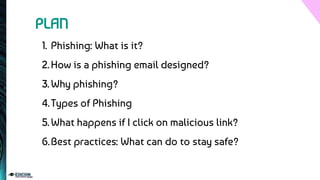
2.How is a phishing email designed?
3.Why phishing?
4.Types of Phishing
5.What happens if I click on malicious link?
6.Best practices: What can do to stay safe?
PLAN
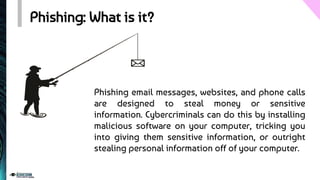
Phishing: What is it?
Phishing email messages, websites, and phone calls
are designed to steal money or sensitive
information. Cybercriminals can do this by installing
malicious software on your computer, tricking you
into giving them sensitive information, or outright
stealing personal information off of your computer.
How is a phishing email designed? (1/2)
A phishing message is designed to trick you Into doing one of
these four things.
Click Here!
Click an
Unsafe Link
Open an
Unsafe File
USERNAME
************
Type your
Password
Transfer
Funds
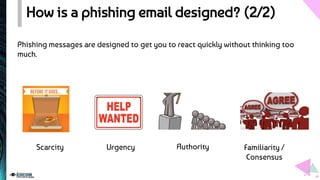
How is a phishing email designed? (2/2)
Scarcity Urgency Authority Familiarity /
Consensus
Phishing messages are designed to get you to react quickly without thinking too
much.
Examples
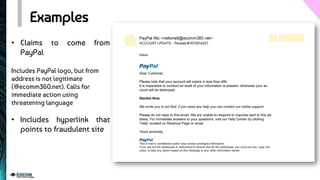
• Claims to come from
PayPal
Includes PayPal logo, but from
address is not legitimate
(@ecomm360.net). Calls for
immediate action using
threatening language
• Includes hyperlink that
points to fraudulent site
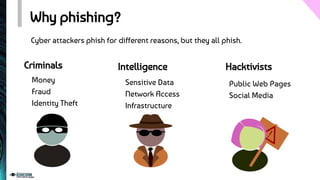
Why phishing?
Cyber attackers phish for different reasons, but they all phish.
Intelligence Hacktivists
Criminals
Money
Fraud
Identity Theft
Sensitive Data
Network Access
Infrastructure
Public Web Pages
Social Media
Types of Phishing (1/3)
Spear phishing - Phishing attempts directed at specific individuals or companies have
been termed spear phishing. Attackers may gather personal information (social
engineering) about their targets to increase their probability of success. This technique
is, by far, the most successful on the internet today, accounting for 91% of attacks.
Types of Phishing (2/3)
Clone phishing - A type of phishing attack whereby a legitimate, and previously
delivered email containing an attachment or link has had its content and recipient
address(es) taken and used to create an almost identical or cloned email. The
attachment or link within the email is replaced with a malicious version and then
sent from an email address spoofed to appear to come from the original sender.
Types of Phishing (3/3)
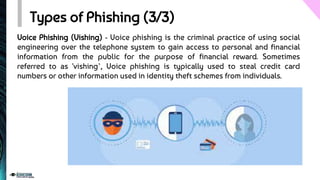
Voice Phishing (Vishing) - Voice phishing is the criminal practice of using social
engineering over the telephone system to gain access to personal and financial
information from the public for the purpose of financial reward. Sometimes
referred to as 'vishing’, Voice phishing is typically used to steal credit card
numbers or other information used in identity theft schemes from individuals.
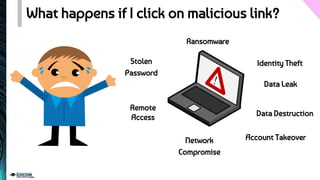
What happens if I click on malicious link?
Stolen
Password
Remote
Access
Ransomware
Network
Compromise
Identity Theft
Data Destruction
Account Takeover
Data Leak
Best Practices (1/5)
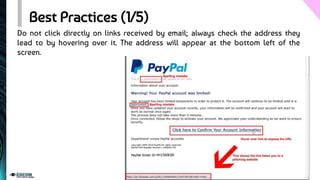
Do not click directly on links received by email; always check the address they
lead to by hovering over it. The address will appear at the bottom left of the
screen.
Best Practices (2/5)
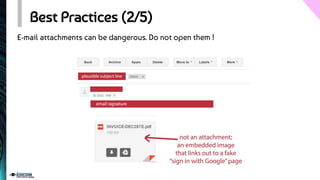
E-mail attachments can be dangerous. Do not open them !
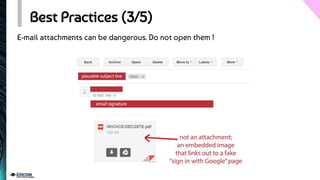
Best Practices (3/5)
E-mail attachments can be dangerous. Do not open them !
Best Practices (4/5)
Once an email containing confidential documents has been sent, delete it from the
sent items and from the recycle bin to prevent it from falling into the wrong hands
in case of hacking.
Best Practices (5/5)
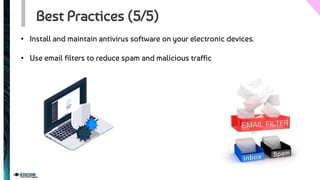
• Install and maintain antivirus software on your electronic devices.
• Use email filters to reduce spam and malicious traffic
M E R C I !
T H A N K Y O U !
QUESTIONS ?

Phishing mails: Bonnes pratiques

  • 2.
    1. Phishing: Whatis it? 2.How is a phishing email designed? 3.Why phishing? 4.Types of Phishing 5.What happens if I click on malicious link? 6.Best practices: What can do to stay safe? PLAN
  • 3.
    Phishing: What isit? Phishing email messages, websites, and phone calls are designed to steal money or sensitive information. Cybercriminals can do this by installing malicious software on your computer, tricking you into giving them sensitive information, or outright stealing personal information off of your computer.
  • 4.
    How is aphishing email designed? (1/2) A phishing message is designed to trick you Into doing one of these four things. Click Here! Click an Unsafe Link Open an Unsafe File USERNAME ************ Type your Password Transfer Funds
  • 5.
    How is aphishing email designed? (2/2) Scarcity Urgency Authority Familiarity / Consensus Phishing messages are designed to get you to react quickly without thinking too much.
  • 6.
    Examples • Claims tocome from PayPal Includes PayPal logo, but from address is not legitimate (@ecomm360.net). Calls for immediate action using threatening language • Includes hyperlink that points to fraudulent site
  • 7.
    Why phishing? Cyber attackersphish for different reasons, but they all phish. Intelligence Hacktivists Criminals Money Fraud Identity Theft Sensitive Data Network Access Infrastructure Public Web Pages Social Media
  • 8.
    Types of Phishing(1/3) Spear phishing - Phishing attempts directed at specific individuals or companies have been termed spear phishing. Attackers may gather personal information (social engineering) about their targets to increase their probability of success. This technique is, by far, the most successful on the internet today, accounting for 91% of attacks.
  • 9.
    Types of Phishing(2/3) Clone phishing - A type of phishing attack whereby a legitimate, and previously delivered email containing an attachment or link has had its content and recipient address(es) taken and used to create an almost identical or cloned email. The attachment or link within the email is replaced with a malicious version and then sent from an email address spoofed to appear to come from the original sender.
  • 10.
    Types of Phishing(3/3) Voice Phishing (Vishing) - Voice phishing is the criminal practice of using social engineering over the telephone system to gain access to personal and financial information from the public for the purpose of financial reward. Sometimes referred to as 'vishing’, Voice phishing is typically used to steal credit card numbers or other information used in identity theft schemes from individuals.
  • 11.
    What happens ifI click on malicious link? Stolen Password Remote Access Ransomware Network Compromise Identity Theft Data Destruction Account Takeover Data Leak
  • 12.
    Best Practices (1/5) Donot click directly on links received by email; always check the address they lead to by hovering over it. The address will appear at the bottom left of the screen.
  • 13.
    Best Practices (2/5) E-mailattachments can be dangerous. Do not open them !
  • 14.
    Best Practices (3/5) E-mailattachments can be dangerous. Do not open them !
  • 15.
    Best Practices (4/5) Oncean email containing confidential documents has been sent, delete it from the sent items and from the recycle bin to prevent it from falling into the wrong hands in case of hacking.
  • 16.
    Best Practices (5/5) •Install and maintain antivirus software on your electronic devices. • Use email filters to reduce spam and malicious traffic
  • 17.
    M E RC I ! T H A N K Y O U ! QUESTIONS ?