Multi-Dimensional Reporting using Report Studio

January 28th, 2010


               Click	
  to	
  edit	
  Master	
  sub1tle	
  style	


     Sanjeev Datta
     Consultant for PerformanceG2

  9/2/09	
  
Connect with us


 Call us: 877.742.4276

 Email Us: info@performanceg2.com

 Visit our Web site: performanceg2.com

 Watch our Cognos videos at: youtube.com/user/performanceg2
      Click	
  to	
  edit	
  Master	
  sub1tle	
  style	
  
 Follow us: twitter.com/performanceg2

 Read our blog: performanceg2.com/blog/
 Upcoming Events: performanceg2.com/events/
OLAP Reporting using Report Studio
  January 28th, 2010


9/2/09	
  
Session Objectives

       Data Models and OLAP Structures

       Cognos Studios

       MDX Functions

       Demo 1

       Advanced Functions

       Demo 2

       Best Practice

       Q&A

9/2/09	
  
Model Types


       Relational Model

       Dimensionally modeled relational (DMR) Model

       OLAP Model


9/2/09	
  
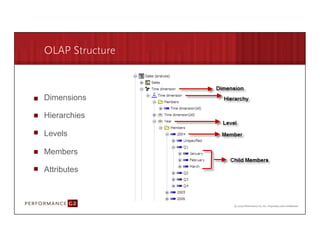
OLAP Structure


     Dimensions

     Hierarchies

     Levels

     Members

     Attributes


9/2/09	
  
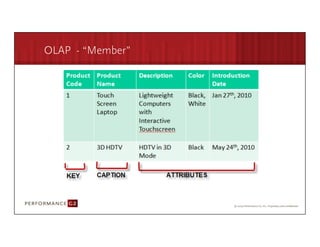
OLAP - “Member”


9/2/09	
  
Cognos Studios

     Report Studio

     Analysis Studio

     Query Studio


9/2/09	
  
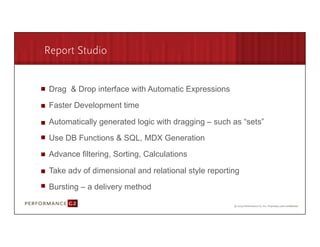
Report Studio


       Drag & Drop interface with Automatic Expressions

       Faster Development time

       Automatically generated logic with dragging – such as “sets”

       Use DB Functions & SQL, MDX Generation

       Advance filtering, Sorting, Calculations

       Take adv of dimensional and relational style reporting

       Bursting – a delivery method

9/2/09	
  
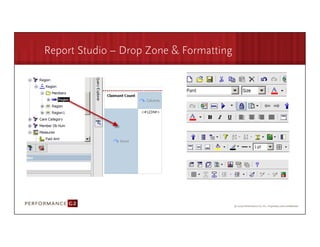
Report Studio – Drop Zone & Formatting


9/2/09	
  
Report Studio – MUN


       Member Unique Name (MUN)

       Referenced in an Expression

       Location of member in Multi Dimensional Structure


       [Sales (analysis)].[Time dimension].[Time dimension].[Month]
       ->[all].[2009].[20091].[200901]


9/2/09	
  
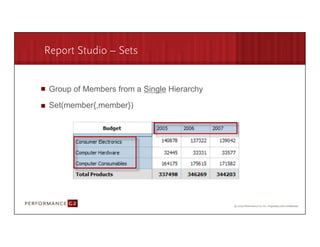
Report Studio – Sets


       Group of Members from a Single Hierarchy

       Set(member{,member})


9/2/09	
  
Report Studio – Tuple

  Measure values at the intersections of members from DIFFERENT
  dimensions

  Tuple([2006],[Computer Hardware])


9/2/09	
  
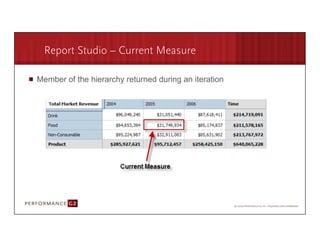
Report Studio – Current Measure

  Member of the hierarchy returned during an iteration


9/2/09	
  
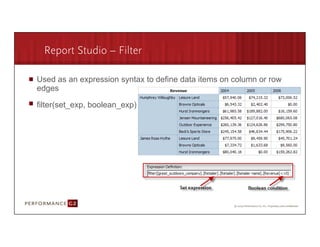
Report Studio – Filter

  Used as an expression syntax to define data items on column or row
  edges

  filter(set_exp, boolean_exp)


9/2/09	
  
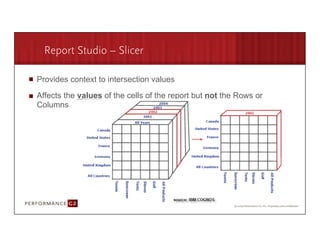
Report Studio – Slicer

  Provides context to intersection values

  Affects the values of the cells of the report but not the Rows or
  Columns


9/2/09	
  
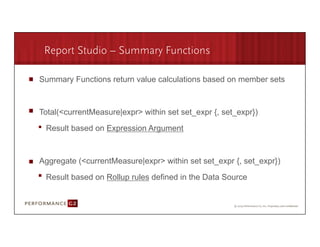
Report Studio – Summary Functions

   Summary Functions return value calculations based on member sets


   Total(<currentMeasure|expr> within set set_expr {, set_expr})

      Result based on Expression Argument


   Aggregate (<currentMeasure|expr> within set set_expr {, set_expr})

      Result based on Rollup rules defined in the Data Source


9/2/09	
  
Demo 1 – Creating OLAP Reports


9/2/09	
  
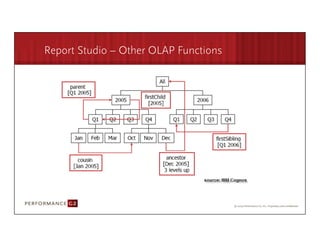
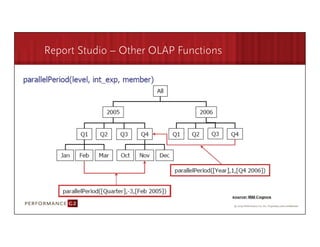
Report Studio – Other OLAP Functions


9/2/09	
  
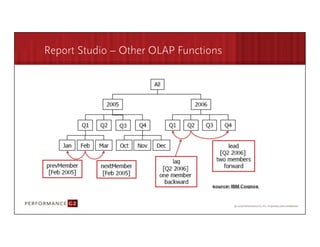
Report Studio – Other OLAP Functions


9/2/09	
  
Report Studio – Other OLAP Functions


9/2/09	
  
Demo 2 – OLAP Report Functions


9/2/09	
  
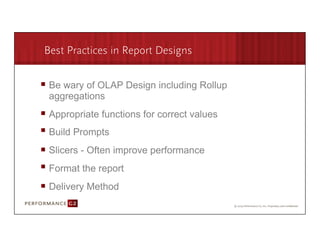
Best Practices in Report Designs


       Be wary of OLAP Design including Rollup
       aggregations
       Appropriate functions for correct values
       Build Prompts
       Slicers - Often improve performance
       Format the report
       Delivery Method

9/2/09	
  
Q&A Session


 info@performanceg2.com
9/2/09	
  
Connect with us

 Call us: 877.742.4276

 Email Us: info@performanceg2.com

 Visit our Web site: performanceg2.com

 Watch our Cognos videos at: youtube.com/user/performanceg2

 Follow us: twitter.com/performanceg2

 Read our blog: performanceg2.com/blog/

 Upcoming Events: performanceg2.com/events/
Thank your for attending our Webinar!


 info@performanceg2.com
9/2/09	
  

PG2 Multi Dimensional Reporting using Report Studio

  • 1.
    Multi-Dimensional Reporting usingReport Studio January 28th, 2010 Click  to  edit  Master  sub1tle  style   Sanjeev Datta Consultant for PerformanceG2 9/2/09  
  • 2.
    Connect with us Call us: 877.742.4276 Email Us: info@performanceg2.com Visit our Web site: performanceg2.com Watch our Cognos videos at: youtube.com/user/performanceg2 Click  to  edit  Master  sub1tle  style   Follow us: twitter.com/performanceg2 Read our blog: performanceg2.com/blog/ Upcoming Events: performanceg2.com/events/
  • 3.
    OLAP Reporting usingReport Studio January 28th, 2010 9/2/09  
  • 4.
    Session Objectives Data Models and OLAP Structures Cognos Studios MDX Functions Demo 1 Advanced Functions Demo 2 Best Practice Q&A 9/2/09  
  • 5.
    Model Types Relational Model Dimensionally modeled relational (DMR) Model OLAP Model 9/2/09  
  • 6.
    OLAP Structure Dimensions Hierarchies Levels Members Attributes 9/2/09  
  • 7.
  • 8.
    Cognos Studios Report Studio Analysis Studio Query Studio 9/2/09  
  • 9.
    Report Studio Drag & Drop interface with Automatic Expressions Faster Development time Automatically generated logic with dragging – such as “sets” Use DB Functions & SQL, MDX Generation Advance filtering, Sorting, Calculations Take adv of dimensional and relational style reporting Bursting – a delivery method 9/2/09  
  • 10.
    Report Studio –Drop Zone & Formatting 9/2/09  
  • 11.
    Report Studio –MUN Member Unique Name (MUN) Referenced in an Expression Location of member in Multi Dimensional Structure [Sales (analysis)].[Time dimension].[Time dimension].[Month] ->[all].[2009].[20091].[200901] 9/2/09  
  • 12.
    Report Studio –Sets Group of Members from a Single Hierarchy Set(member{,member}) 9/2/09  
  • 13.
    Report Studio –Tuple Measure values at the intersections of members from DIFFERENT dimensions Tuple([2006],[Computer Hardware]) 9/2/09  
  • 14.
    Report Studio –Current Measure Member of the hierarchy returned during an iteration 9/2/09  
  • 15.
    Report Studio –Filter Used as an expression syntax to define data items on column or row edges filter(set_exp, boolean_exp) 9/2/09  
  • 16.
    Report Studio –Slicer Provides context to intersection values Affects the values of the cells of the report but not the Rows or Columns 9/2/09  
  • 17.
    Report Studio –Summary Functions Summary Functions return value calculations based on member sets Total(<currentMeasure|expr> within set set_expr {, set_expr}) Result based on Expression Argument Aggregate (<currentMeasure|expr> within set set_expr {, set_expr}) Result based on Rollup rules defined in the Data Source 9/2/09  
  • 18.
    Demo 1 –Creating OLAP Reports 9/2/09  
  • 19.
    Report Studio –Other OLAP Functions 9/2/09  
  • 20.
    Report Studio –Other OLAP Functions 9/2/09  
  • 21.
    Report Studio –Other OLAP Functions 9/2/09  
  • 22.
    Demo 2 –OLAP Report Functions 9/2/09  
  • 23.
    Best Practices inReport Designs Be wary of OLAP Design including Rollup aggregations Appropriate functions for correct values Build Prompts Slicers - Often improve performance Format the report Delivery Method 9/2/09  
  • 24.
  • 25.
    Connect with us Call us: 877.742.4276 Email Us: info@performanceg2.com Visit our Web site: performanceg2.com Watch our Cognos videos at: youtube.com/user/performanceg2 Follow us: twitter.com/performanceg2 Read our blog: performanceg2.com/blog/ Upcoming Events: performanceg2.com/events/
  • 26.
    Thank your forattending our Webinar! info@performanceg2.com 9/2/09