SetFocus .NET Masters ProgramFramework Project and Library Management System ProjectDeveloped By: Zaccheus Roserie
Framework ProjectDeveloper: Zaccheus RoserieEmail: zroserie@gmail.com
SetFocus Project #1 – Framework ProjectObjectiveBuild parts of the business tier for a retail company. To achieve this two Assemblies were created: Foundation and AppTypes.SummaryThis project demonstrated the use of OOP techniques and the .NET framework. Some of the techniques implemented into this project include:Exception Handling. (using pre existing exceptions and building custom exceptions).
Inheritance, Polymorphism, Encapsulation
Abstract Classes and Interfaces
Events and Delegates
Serialization
Generic Collections
Creating  and implementing custom Enumerators
Properties
Enumeration
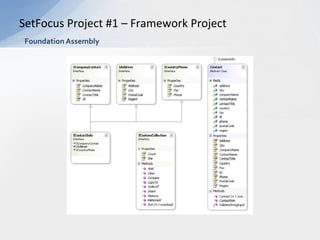
Creating and implementing custom attributesSetFocus Project #1 – Framework ProjectFoundation Assembly
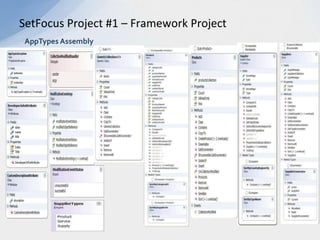
SetFocus Project #1 – Framework ProjectAppTypes Assembly
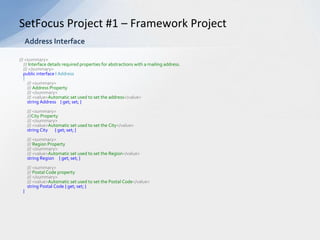
///<summary>    /// Interface details required properties for abstractions with a mailing address.///</summary>public interface I Address    {///<summary>        /// Address Property///</summary>        ///<value>Automatic set used to set the address</value>string Address    { get; set; }///<summary>        ///City Property///</summary>        ///<value>Automatic set used to set the City</value>string City       { get; set; }///<summary>        /// Region Property///</summary>        ///<value>Automatic set used to set the Region</value>string Region     { get; set; }///<summary>        ///Postal Code property ///</summary>        ///<value>Automatic set used to set the Postal Code</value>string Postal Code { get; set; }     }SetFocus Project #1 – Framework ProjectAddress Interface
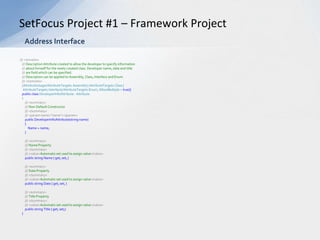
///<remarks>    /// Description Attribute created to allow the developer to specify information/// about himself for the newly created class. Developer name, date and title/// are field which can be specified./// Description can be applied to Assembly, Class, Interface and Enum///</remarks>    [AttributeUsage(AttributeTargets.Assembly | AttributeTargets.Class |     AttributeTargets.Interface| AttributeTargets.Enum, AllowMultiple = true)]    public class DeveloperInfoAttribute : Attribute    {///<summary>        /// Non-Default Constructor///</summary>        ///<param name="name"></param>public DeveloperInfoAttribute(string name)        {            Name = name;        }///<summary>        /// Name Property///</summary>        ///<value>Automatic set used to assign value</value>public string Name { get; set; }///<summary>        /// Date Property///</summary>        ///<value>Automatic set used to assign value</value>public string Date { get; set; }///<summary>        /// Title Property///</summary>        ///<value>Automatic set used to assign value</value>public string Title { get; set;}}SetFocus Project #1 – Framework ProjectAddress Interface
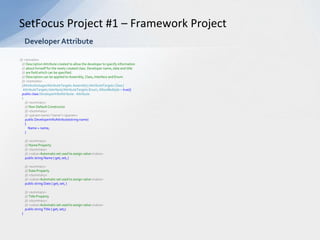
///<remarks>    /// Description Attribute created to allow the developer to specify information/// about himself for the newly created class. Developer name, date and title/// are field which can be specified./// Description can be applied to Assembly, Class, Interface and Enum///</remarks>    [AttributeUsage(AttributeTargets.Assembly| AttributeTargets.Class |     AttributeTargets.Interface| AttributeTargets.Enum, AllowMultiple = true)]    public class DeveloperInfoAttribute : Attribute    {///<summary>        /// Non-Default Constructor///</summary>        ///<param name="name"></param>public DeveloperInfoAttribute(string name)        {            Name = name;        }///<summary>        /// Name Property///</summary>        ///<value>Automatic set used to assign value</value>public string Name { get; set; }///<summary>        /// Date Property///</summary>        ///<value>Automatic set used to assign value</value>public string Date { get; set; }///<summary>        /// Title Property///</summary>        ///<value>Automatic set used to assign value</value>public string Title { get; set;}}SetFocus Project #1 – Framework ProjectDeveloper Attribute
Library Management SystemDeveloper: Zaccheus RoserieEmail: zroserie@gmail.com
SetFocus Project #2 – Library Phase 1ObjectiveCreate a Windows Forms-based front-end application that will provide a librarian with a visual interface through which the librarian may perform the desired functions. Required functionality included checking in and out books from the library as well as adding new members (adult or juvenile).SummaryThis project demonstrates the use of .NET Windows form based development techniques. Some of the techniques implemented into this project include:N-tier based architecture for scalability.
User input validation and feedback using error providers.
User input validation using regular expressions.
Exception and Error handling.
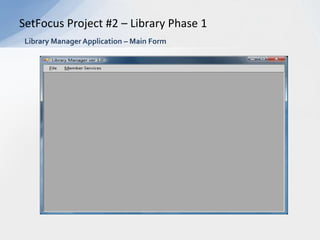
Implementation of a UI that requires minimal training for Librarians.SetFocus Project #2 – Library Phase 1Library Manager Application – Main Form
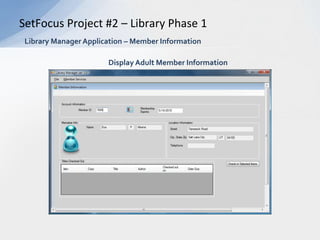
SetFocus Project #2 – Library Phase 1Library Manager Application – Member InformationDisplay Adult Member Information
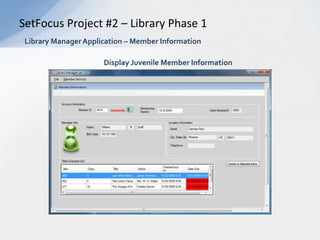
SetFocus Project #2 – Library Phase 1Library Manager Application – Member InformationDisplay Juvenile Member Information
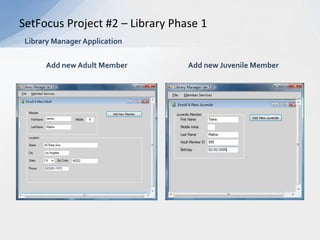
SetFocus Project #2 – Library Phase 1Library Manager ApplicationAdd new Adult MemberAdd new Juvenile Member
SetFocus Project #2 – Library Phase 1Library Manager ApplicationChecking a Book into of the Library
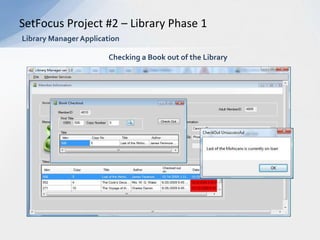
SetFocus Project #2 – Library Phase 1Library Manager ApplicationChecking a Book out of the Library
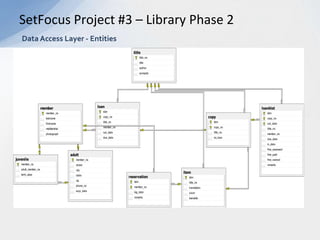
ObjectiveIn the Phase 1 project we were given the data access layer and created the presentation layer which interfaced with the Data access layer via the Business logic layer. In Phase 2, we recreated the Data Access Layer which consisted of the various Entities used by the application layers. SummaryThis project demonstrates the use of  ADO.NET, LINQ as well as ORM (Object Relational Modeling). Transact-SQL was also used to access the database, which was managed using SQL-Server 2008. Some of the techniques implemented into this project include:Recreate the Data Access Layer while keeping existing functionality within all other application layers.
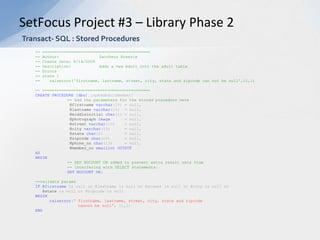
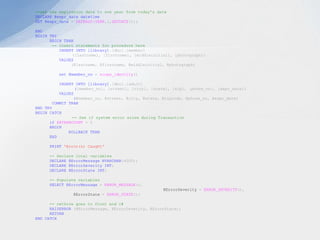
Implement error handling in SQL stored procedures.
Process errors received from stored procedures in ADO.NET using SQL state codes returned by stored  procedures.
Creating stored procedures in Transact-SQL on SQL-Server 2008.
Using LINQ to retrieve and process result sets (using the entities data context)

Final Project Presentation

  • 1.
    SetFocus .NET MastersProgramFramework Project and Library Management System ProjectDeveloped By: Zaccheus Roserie
  • 2.
    Framework ProjectDeveloper: ZaccheusRoserieEmail: zroserie@gmail.com
  • 3.
    SetFocus Project #1– Framework ProjectObjectiveBuild parts of the business tier for a retail company. To achieve this two Assemblies were created: Foundation and AppTypes.SummaryThis project demonstrated the use of OOP techniques and the .NET framework. Some of the techniques implemented into this project include:Exception Handling. (using pre existing exceptions and building custom exceptions).
  • 4.
  • 5.
  • 6.
  • 7.
  • 8.
  • 9.
    Creating andimplementing custom Enumerators
  • 10.
  • 11.
  • 12.
    Creating and implementingcustom attributesSetFocus Project #1 – Framework ProjectFoundation Assembly
  • 13.
    SetFocus Project #1– Framework ProjectAppTypes Assembly
  • 14.
    ///<summary> /// Interface details required properties for abstractions with a mailing address.///</summary>public interface I Address {///<summary> /// Address Property///</summary> ///<value>Automatic set used to set the address</value>string Address { get; set; }///<summary> ///City Property///</summary> ///<value>Automatic set used to set the City</value>string City { get; set; }///<summary> /// Region Property///</summary> ///<value>Automatic set used to set the Region</value>string Region { get; set; }///<summary> ///Postal Code property ///</summary> ///<value>Automatic set used to set the Postal Code</value>string Postal Code { get; set; } }SetFocus Project #1 – Framework ProjectAddress Interface
  • 15.
    ///<remarks> /// Description Attribute created to allow the developer to specify information/// about himself for the newly created class. Developer name, date and title/// are field which can be specified./// Description can be applied to Assembly, Class, Interface and Enum///</remarks> [AttributeUsage(AttributeTargets.Assembly | AttributeTargets.Class | AttributeTargets.Interface| AttributeTargets.Enum, AllowMultiple = true)] public class DeveloperInfoAttribute : Attribute {///<summary> /// Non-Default Constructor///</summary> ///<param name="name"></param>public DeveloperInfoAttribute(string name) { Name = name; }///<summary> /// Name Property///</summary> ///<value>Automatic set used to assign value</value>public string Name { get; set; }///<summary> /// Date Property///</summary> ///<value>Automatic set used to assign value</value>public string Date { get; set; }///<summary> /// Title Property///</summary> ///<value>Automatic set used to assign value</value>public string Title { get; set;}}SetFocus Project #1 – Framework ProjectAddress Interface
  • 16.
    ///<remarks> /// Description Attribute created to allow the developer to specify information/// about himself for the newly created class. Developer name, date and title/// are field which can be specified./// Description can be applied to Assembly, Class, Interface and Enum///</remarks> [AttributeUsage(AttributeTargets.Assembly| AttributeTargets.Class | AttributeTargets.Interface| AttributeTargets.Enum, AllowMultiple = true)] public class DeveloperInfoAttribute : Attribute {///<summary> /// Non-Default Constructor///</summary> ///<param name="name"></param>public DeveloperInfoAttribute(string name) { Name = name; }///<summary> /// Name Property///</summary> ///<value>Automatic set used to assign value</value>public string Name { get; set; }///<summary> /// Date Property///</summary> ///<value>Automatic set used to assign value</value>public string Date { get; set; }///<summary> /// Title Property///</summary> ///<value>Automatic set used to assign value</value>public string Title { get; set;}}SetFocus Project #1 – Framework ProjectDeveloper Attribute
  • 17.
    Library Management SystemDeveloper:Zaccheus RoserieEmail: zroserie@gmail.com
  • 18.
    SetFocus Project #2– Library Phase 1ObjectiveCreate a Windows Forms-based front-end application that will provide a librarian with a visual interface through which the librarian may perform the desired functions. Required functionality included checking in and out books from the library as well as adding new members (adult or juvenile).SummaryThis project demonstrates the use of .NET Windows form based development techniques. Some of the techniques implemented into this project include:N-tier based architecture for scalability.
  • 19.
    User input validationand feedback using error providers.
  • 20.
    User input validationusing regular expressions.
  • 21.
  • 22.
    Implementation of aUI that requires minimal training for Librarians.SetFocus Project #2 – Library Phase 1Library Manager Application – Main Form
  • 23.
    SetFocus Project #2– Library Phase 1Library Manager Application – Member InformationDisplay Adult Member Information
  • 24.
    SetFocus Project #2– Library Phase 1Library Manager Application – Member InformationDisplay Juvenile Member Information
  • 25.
    SetFocus Project #2– Library Phase 1Library Manager ApplicationAdd new Adult MemberAdd new Juvenile Member
  • 26.
    SetFocus Project #2– Library Phase 1Library Manager ApplicationChecking a Book into of the Library
  • 27.
    SetFocus Project #2– Library Phase 1Library Manager ApplicationChecking a Book into of the Library
  • 28.
    SetFocus Project #2– Library Phase 1Library Manager ApplicationChecking a Book out of the Library
  • 29.
    ObjectiveIn the Phase1 project we were given the data access layer and created the presentation layer which interfaced with the Data access layer via the Business logic layer. In Phase 2, we recreated the Data Access Layer which consisted of the various Entities used by the application layers. SummaryThis project demonstrates the use of ADO.NET, LINQ as well as ORM (Object Relational Modeling). Transact-SQL was also used to access the database, which was managed using SQL-Server 2008. Some of the techniques implemented into this project include:Recreate the Data Access Layer while keeping existing functionality within all other application layers.
  • 30.
    Implement error handlingin SQL stored procedures.
  • 31.
    Process errors receivedfrom stored procedures in ADO.NET using SQL state codes returned by stored procedures.
  • 32.
    Creating stored proceduresin Transact-SQL on SQL-Server 2008.
  • 33.
    Using LINQ toretrieve and process result sets (using the entities data context)