

Payments Integration:
a Short Case Study
Gergely Orosz
Engineering Manager, Amsterdam
Effortlessly
pay for Uber
Rider Payments Team
We build best in-class payment methods and
a magical digital payments experience for
riders. We enable the rest of Uber to leverage
this payments experience on the mobile and
the web.
● Let’s Build
building the payments integration
● Let’s Go
testing & rolling out
● Let’s Harden
then the Real World happened
Agenda
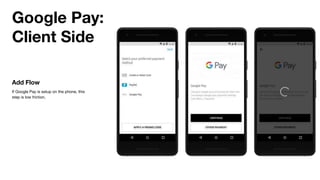
Google Pay:
Client Side
Add Flow
If Google Pay is setup on the phone, this
step is low friction.
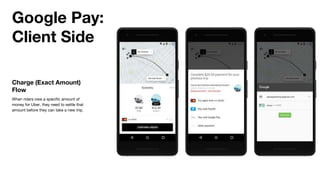
Google Pay:
Client Side
Charge (Exact Amount)
Flow
When riders owe a specific amount of
money for Uber, they need to settle that
amount before they can take a new trip.
Google Pay:
Client Side
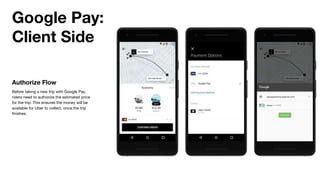
Authorize Flow
Before taking a new trip with Google Pay,
riders need to authorize the estimated price
for the trip. This ensures the money will be
available for Uber to collect, once the trip
finishes.
Google Pay:
Client Side
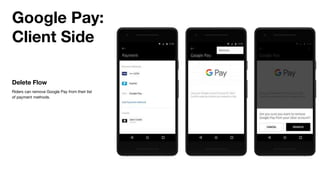
Delete Flow
Riders can remove Google Pay from their list
of payment methods.
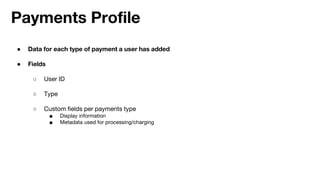
● Data for each type of payment a user has added
● Fields
○ User ID
○ Type
○ Custom fields per payments type
■ Display information
■ Metadata used for processing/charging
Payments Profile
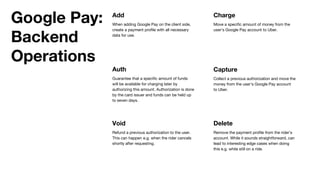
Void
Refund a previous authorization to the user.
This can happen e.g. when the rider cancels
shortly after requesting.
Delete
Remove the payment profile from the rider’s
account. While it sounds straightforward, can
lead to interesting edge cases when doing
this e.g. while still on a ride.
Add
When adding Google Pay on the client side,
create a payment profile with all necessary
data for use.
Auth
Guarantee that a specific amount of funds
will be available for charging later by
authorizing this amount. Authorization is done
by the card issuer and funds can be held up
to seven days.
Google Pay:
Backend
Operations
Charge
Move a specific amount of money from the
user’s Google Pay account to Uber.
Capture
Collect a previous authorization and move the
money from the user’s Google Pay account
to Uber.
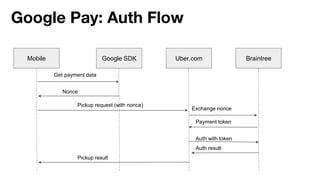
Google Pay: Auth Flow
Mobile Google SDK Uber.com Braintree
Get payment data
Nonce
Pickup request (with nonce)
Exchange nonce
Payment token
Auth with token
Auth result
Pickup result
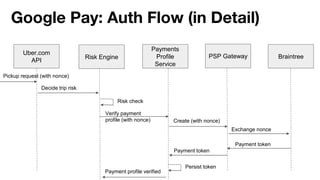
Google Pay: Auth Flow (in Detail)
Uber.com
API
Risk Engine
Payments
Profile
Service
Braintree
Pickup request (with nonce)
Exchange nonce
Payment token
PSP Gateway
Decide trip risk
Risk check
Verify payment
profile (with nonce) Create (with nonce)
Payment token
Persist token
Payment profile verified
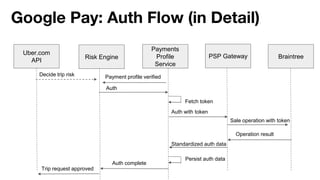
Google Pay: Auth Flow (in Detail)
Uber.com
API
Risk Engine
Payments
Profile
Service
Braintree
Operation result
PSP Gateway
Auth with token
Standardized auth data
Persist auth data
Payment profile verified
Auth
Decide trip risk
Sale operation with token
Auth complete
Trip request approved
Fetch token
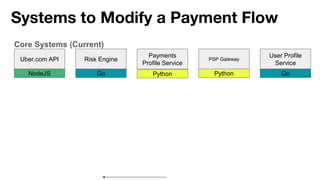
Systems to Modify a Payment Flow
Risk Engine
Payments
Profile Service
Go Python
Core Systems (Current)
Uber.com API
NodeJS
PSP Gateway
Python
User Profile
Service
Go
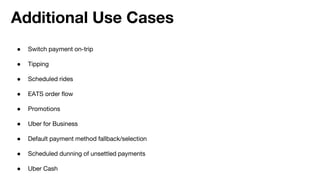
● Switch payment on-trip
● Tipping
● Scheduled rides
● EATS order flow
● Promotions
● Uber for Business
● Default payment method fallback/selection
● Scheduled dunning of unsettled payments
● Uber Cash
Additional Use Cases
Move fast by unblocking
ourselves
- most teams at Uber, 2009-2017
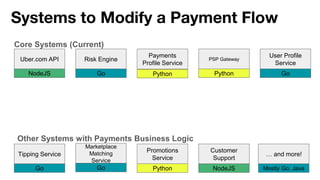
Systems to Modify a Payment Flow
Risk Engine
Payments
Profile Service
Go Python
Core Systems (Current)
Uber.com API
NodeJS
PSP Gateway
Python
User Profile
Service
Go
Other Systems with Payments Business Logic
Tipping Service
Go
Promotions
Service
Python
Customer
Support
NodeJS
Marketplace
Matching
Service
Go
… and more!
Mostly Go, Java
Let’s do the right thing
and pay down our tech
& architecture debt.
- most teams at Uber, 2017 onwards
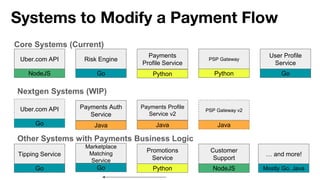
Systems to Modify a Payment Flow
Risk Engine
Payments
Profile Service
Go Python
Core Systems (Current)
Uber.com API
NodeJS
PSP Gateway
Python
User Profile
Service
Go
Other Systems with Payments Business Logic
Tipping Service
Go
Promotions
Service
Python
Customer
Support
NodeJS
Marketplace
Matching
Service
Go
… and more!
Mostly Go, Java
Nextgen Systems (WIP)
Payments Profile
Service v2
Java
Payments Auth
Service
Java
Uber.com API
Go
PSP Gateway v2
Java
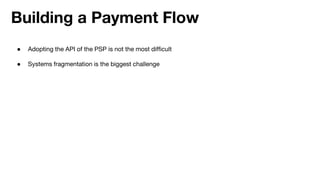
Building a Payment Flow
● Adopting the API of the PSP is not the most difficult
● Systems fragmentation is the biggest challenge
● Let’s Build
building the payments integration
● Let’s Go
testing & rolling out
● Let’s Harden
then the Real World happened
Agenda
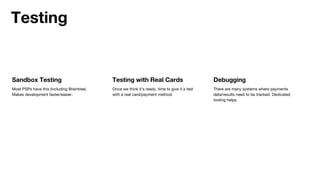
Sandbox Testing
Most PSPs have this (including Braintree).
Makes development faster/easier.
Testing
Testing with Real Cards
Once we think it’s ready, time to give it a test
with a real card/payment method.
Debugging
There are many systems where payments
data/results need to be tracked. Dedicated
tooling helps.
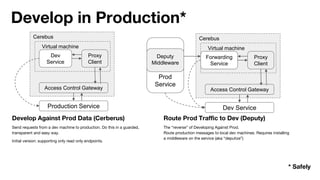
Develop Against Prod Data (Cerberus)
Send requests from a dev machine to production. Do this in a guarded,
transparent and easy way.
Initial version: supporting only read only endpoints.
Route Prod Traffic to Dev (Deputy)
The “reverse” of Developing Against Prod.
Route production messages to local dev machines. Requires installing
a middleware on the service (aka “deputize”)
Production Service
Access Control Gateway
Proxy
Client
Dev
Service
Virtual machine
Cerebus
Dev Service
Access Control Gateway
Proxy
Client
Forwarding
Service
Virtual machine
Cerebus
Prod
Service
Deputy
Middleware
Develop in Production*
* Safely
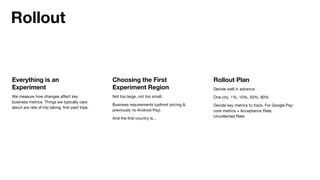
Everything is an
Experiment
We measure how changes affect key
business metrics. Things we typically care
about are rate of trip taking, first paid trips.
Rollout
Choosing the First
Experiment Region
Not too large, not too small.
Business requirements (upfront pricing &
previously no Android Pay)
And the first country is...
Rollout Plan
Decide well in advance
One city, 1%, 10%, 50%, 90%
Decide key metrics to track. For Google Pay:
core metrics + Acceptance Rate,
Uncollected Rate
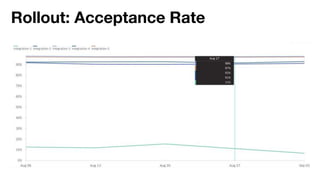
Rollout: Acceptance Rate
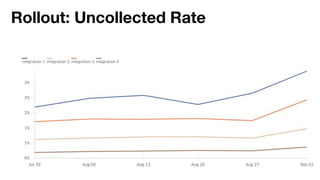
Rollout: Uncollected Rate
● Cautious rollout paid off. Data was worse than expected.
● Double checked sampling & hypothesis.
● Rolled back.
● Investigated root cause with with Google Pay. Fixed the issue on both ends.
● Resumed rollout. Rinse & repeat.
Rollout
● Let’s Build
building the payments integration
● Let’s Go
testing & rolling out
● Let’s Harden
then the Real World happened
Agenda
Anything that can go
wrong, will go wrong.
- Murphy
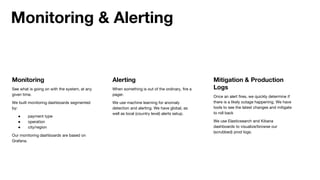
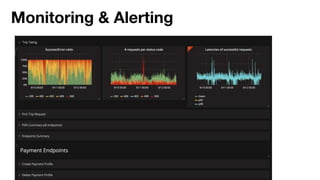
Monitoring
See what is going on with the system, at any
given time.
We built monitoring dashboards segmented
by:
● payment type
● operation
● city/region
Our monitoring dashboards are based on
Grafana.
Monitoring & Alerting
Alerting
When something is out of the ordinary, fire a
pager.
We use machine learning for anomaly
detection and alerting. We have global, as
well as local (country level) alerts setup.
Mitigation & Production
Logs
Once an alert fires, we quickly determine if
there is a likely outage happening. We have
tools to see the latest changes and mitigate
to roll back
We use Elasticsearch and Kibana
dashboards to visualize/browse our
(scrubbed) prod logs.
Monitoring & Alerting
Let’s talk about fraud.
Fraud is a problem that
never keeps us up at
night.
- said no one everyone building a payments system
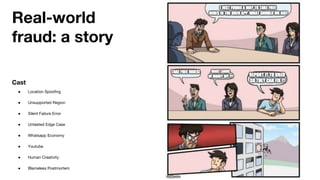
Real-world
fraud: a story
Cast
● Location Spoofing
● Unsupported Region
● Silent Failure Error
● Untested Edge Case
● Whatsapp Economy
● Youtube
● Human Creativity
● Blameless Postmortem
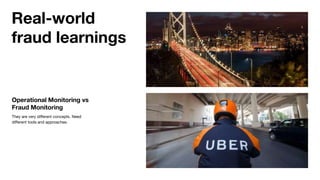
Operational Monitoring vs
Fraud Monitoring
They are very different concepts. Need
different tools and approaches.
Real-world
fraud learnings
● Let’s Build
building the payments
integration
● Let’s Go
testing & rolling out
● Let’s Harden
then the Real World happened
Summary
Gergely Orosz
@GergelyOrosz

Payments Integration at Uber: a (Short) Case Study

  • 1.
    Payments Integration: a ShortCase Study Gergely Orosz Engineering Manager, Amsterdam
  • 2.
    Effortlessly pay for Uber RiderPayments Team We build best in-class payment methods and a magical digital payments experience for riders. We enable the rest of Uber to leverage this payments experience on the mobile and the web.
  • 4.
    ● Let’s Build buildingthe payments integration ● Let’s Go testing & rolling out ● Let’s Harden then the Real World happened Agenda
  • 5.
    Google Pay: Client Side AddFlow If Google Pay is setup on the phone, this step is low friction.
  • 6.
    Google Pay: Client Side Charge(Exact Amount) Flow When riders owe a specific amount of money for Uber, they need to settle that amount before they can take a new trip.
  • 7.
    Google Pay: Client Side AuthorizeFlow Before taking a new trip with Google Pay, riders need to authorize the estimated price for the trip. This ensures the money will be available for Uber to collect, once the trip finishes.
  • 8.
    Google Pay: Client Side DeleteFlow Riders can remove Google Pay from their list of payment methods.
  • 9.
    ● Data foreach type of payment a user has added ● Fields ○ User ID ○ Type ○ Custom fields per payments type ■ Display information ■ Metadata used for processing/charging Payments Profile
  • 10.
    Void Refund a previousauthorization to the user. This can happen e.g. when the rider cancels shortly after requesting. Delete Remove the payment profile from the rider’s account. While it sounds straightforward, can lead to interesting edge cases when doing this e.g. while still on a ride. Add When adding Google Pay on the client side, create a payment profile with all necessary data for use. Auth Guarantee that a specific amount of funds will be available for charging later by authorizing this amount. Authorization is done by the card issuer and funds can be held up to seven days. Google Pay: Backend Operations Charge Move a specific amount of money from the user’s Google Pay account to Uber. Capture Collect a previous authorization and move the money from the user’s Google Pay account to Uber.
  • 11.
    Google Pay: AuthFlow Mobile Google SDK Uber.com Braintree Get payment data Nonce Pickup request (with nonce) Exchange nonce Payment token Auth with token Auth result Pickup result
  • 12.
    Google Pay: AuthFlow (in Detail) Uber.com API Risk Engine Payments Profile Service Braintree Pickup request (with nonce) Exchange nonce Payment token PSP Gateway Decide trip risk Risk check Verify payment profile (with nonce) Create (with nonce) Payment token Persist token Payment profile verified
  • 13.
    Google Pay: AuthFlow (in Detail) Uber.com API Risk Engine Payments Profile Service Braintree Operation result PSP Gateway Auth with token Standardized auth data Persist auth data Payment profile verified Auth Decide trip risk Sale operation with token Auth complete Trip request approved Fetch token
  • 14.
    Systems to Modifya Payment Flow Risk Engine Payments Profile Service Go Python Core Systems (Current) Uber.com API NodeJS PSP Gateway Python User Profile Service Go
  • 15.
    ● Switch paymenton-trip ● Tipping ● Scheduled rides ● EATS order flow ● Promotions ● Uber for Business ● Default payment method fallback/selection ● Scheduled dunning of unsettled payments ● Uber Cash Additional Use Cases
  • 16.
    Move fast byunblocking ourselves - most teams at Uber, 2009-2017
  • 17.
    Systems to Modifya Payment Flow Risk Engine Payments Profile Service Go Python Core Systems (Current) Uber.com API NodeJS PSP Gateway Python User Profile Service Go Other Systems with Payments Business Logic Tipping Service Go Promotions Service Python Customer Support NodeJS Marketplace Matching Service Go … and more! Mostly Go, Java
  • 18.
    Let’s do theright thing and pay down our tech & architecture debt. - most teams at Uber, 2017 onwards
  • 19.
    Systems to Modifya Payment Flow Risk Engine Payments Profile Service Go Python Core Systems (Current) Uber.com API NodeJS PSP Gateway Python User Profile Service Go Other Systems with Payments Business Logic Tipping Service Go Promotions Service Python Customer Support NodeJS Marketplace Matching Service Go … and more! Mostly Go, Java Nextgen Systems (WIP) Payments Profile Service v2 Java Payments Auth Service Java Uber.com API Go PSP Gateway v2 Java
  • 20.
    Building a PaymentFlow ● Adopting the API of the PSP is not the most difficult ● Systems fragmentation is the biggest challenge
  • 21.
    ● Let’s Build buildingthe payments integration ● Let’s Go testing & rolling out ● Let’s Harden then the Real World happened Agenda
  • 22.
    Sandbox Testing Most PSPshave this (including Braintree). Makes development faster/easier. Testing Testing with Real Cards Once we think it’s ready, time to give it a test with a real card/payment method. Debugging There are many systems where payments data/results need to be tracked. Dedicated tooling helps.
  • 23.
    Develop Against ProdData (Cerberus) Send requests from a dev machine to production. Do this in a guarded, transparent and easy way. Initial version: supporting only read only endpoints. Route Prod Traffic to Dev (Deputy) The “reverse” of Developing Against Prod. Route production messages to local dev machines. Requires installing a middleware on the service (aka “deputize”) Production Service Access Control Gateway Proxy Client Dev Service Virtual machine Cerebus Dev Service Access Control Gateway Proxy Client Forwarding Service Virtual machine Cerebus Prod Service Deputy Middleware Develop in Production* * Safely
  • 24.
    Everything is an Experiment Wemeasure how changes affect key business metrics. Things we typically care about are rate of trip taking, first paid trips. Rollout Choosing the First Experiment Region Not too large, not too small. Business requirements (upfront pricing & previously no Android Pay) And the first country is... Rollout Plan Decide well in advance One city, 1%, 10%, 50%, 90% Decide key metrics to track. For Google Pay: core metrics + Acceptance Rate, Uncollected Rate
  • 25.
  • 26.
  • 27.
    ● Cautious rolloutpaid off. Data was worse than expected. ● Double checked sampling & hypothesis. ● Rolled back. ● Investigated root cause with with Google Pay. Fixed the issue on both ends. ● Resumed rollout. Rinse & repeat. Rollout
  • 28.
    ● Let’s Build buildingthe payments integration ● Let’s Go testing & rolling out ● Let’s Harden then the Real World happened Agenda
  • 29.
    Anything that cango wrong, will go wrong. - Murphy
  • 30.
    Monitoring See what isgoing on with the system, at any given time. We built monitoring dashboards segmented by: ● payment type ● operation ● city/region Our monitoring dashboards are based on Grafana. Monitoring & Alerting Alerting When something is out of the ordinary, fire a pager. We use machine learning for anomaly detection and alerting. We have global, as well as local (country level) alerts setup. Mitigation & Production Logs Once an alert fires, we quickly determine if there is a likely outage happening. We have tools to see the latest changes and mitigate to roll back We use Elasticsearch and Kibana dashboards to visualize/browse our (scrubbed) prod logs.
  • 31.
  • 32.
  • 33.
    Fraud is aproblem that never keeps us up at night. - said no one everyone building a payments system
  • 34.
    Real-world fraud: a story Cast ●Location Spoofing ● Unsupported Region ● Silent Failure Error ● Untested Edge Case ● Whatsapp Economy ● Youtube ● Human Creativity ● Blameless Postmortem
  • 35.
    Operational Monitoring vs FraudMonitoring They are very different concepts. Need different tools and approaches. Real-world fraud learnings
  • 36.
    ● Let’s Build buildingthe payments integration ● Let’s Go testing & rolling out ● Let’s Harden then the Real World happened Summary Gergely Orosz @GergelyOrosz

Editor's Notes

  • #10 Hands up if you are familiar with the concept of a payments profile.
  • #33 Put your hands up if you have been involved with fraud cases hands-on when building a system.