What’s New In C# 5.0
Paulo Morgado
Paulo Morgado
CodePlex
Revista
PROGRAMAR
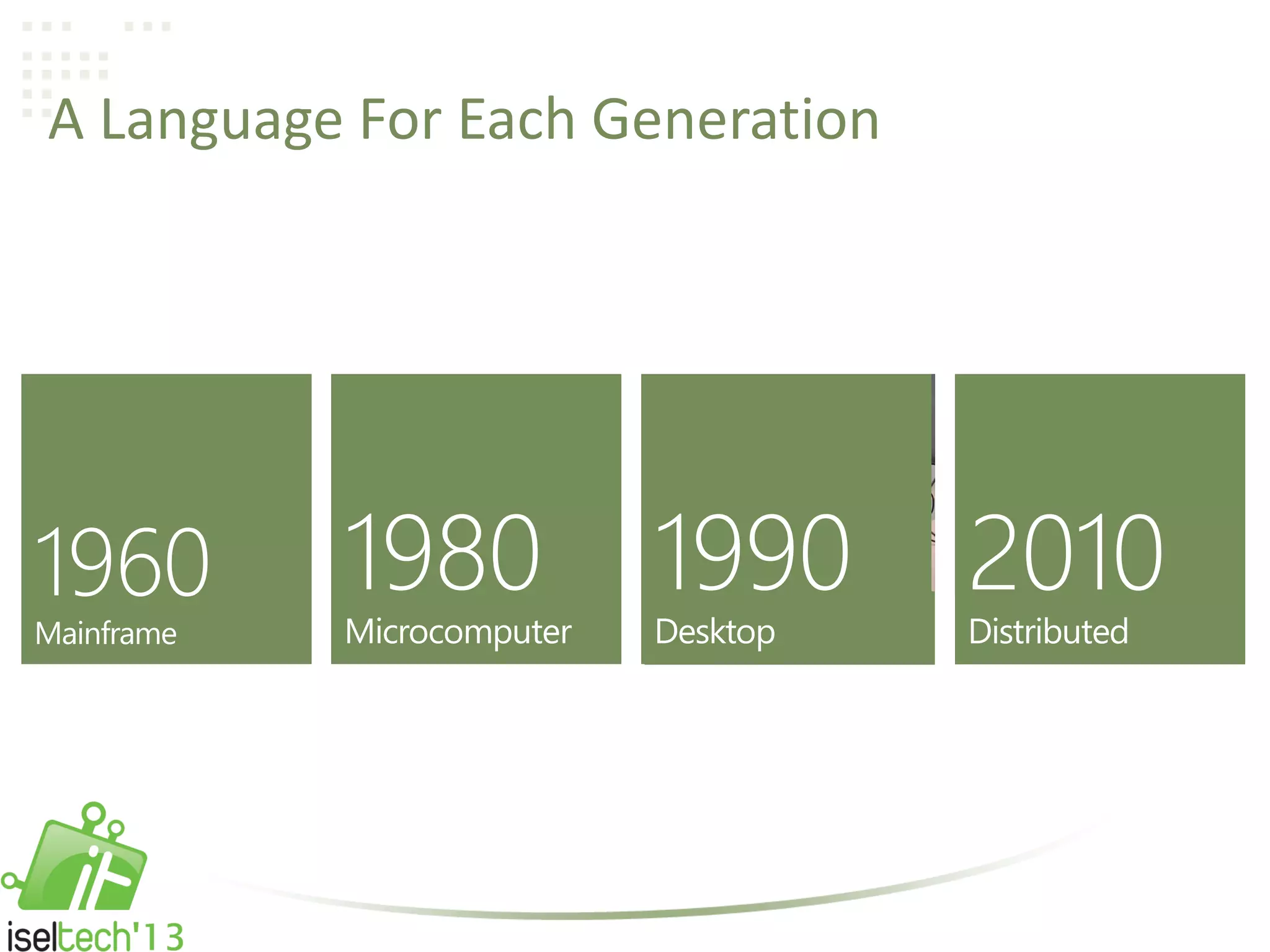
A Language For Each Generation
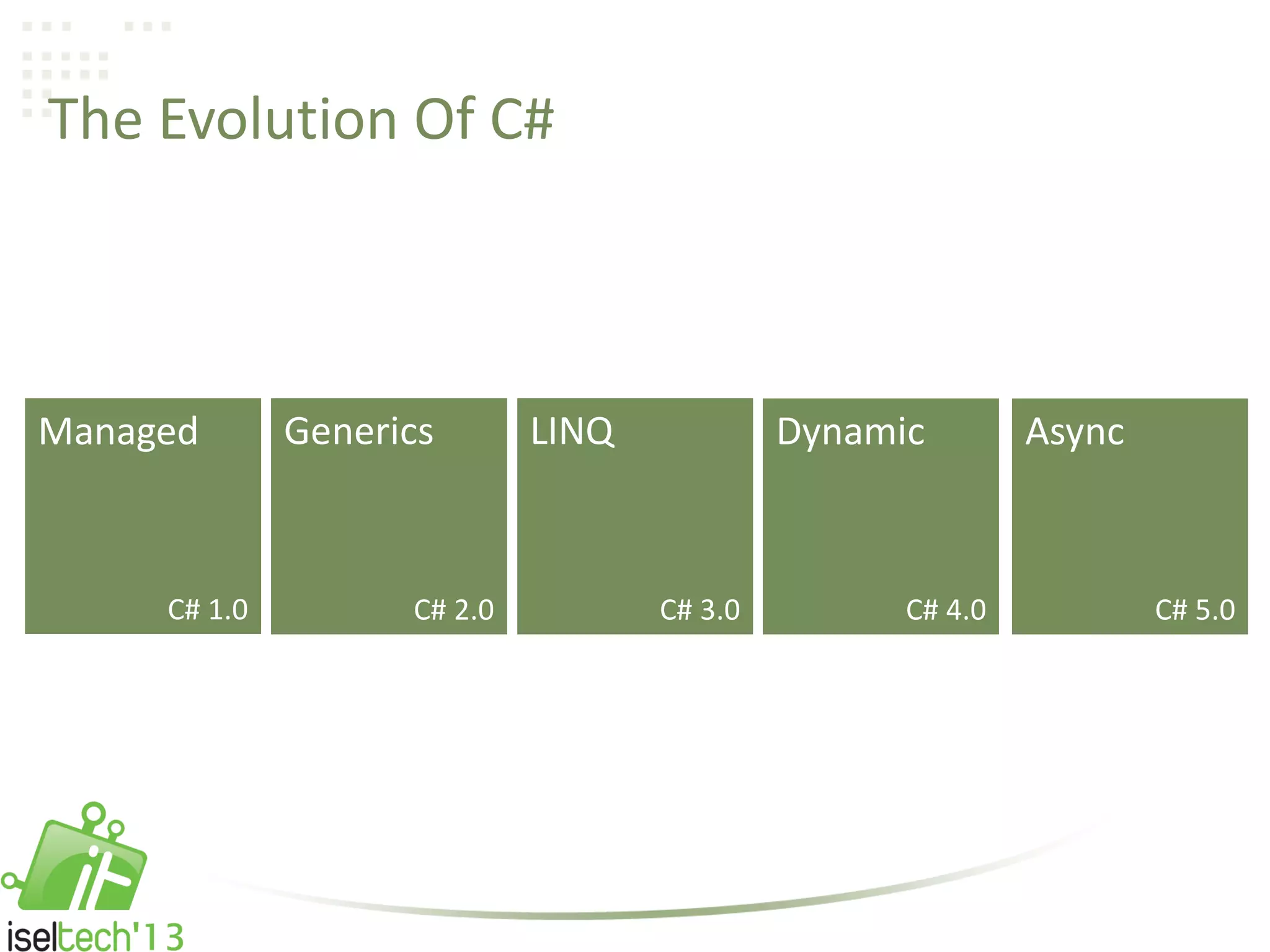
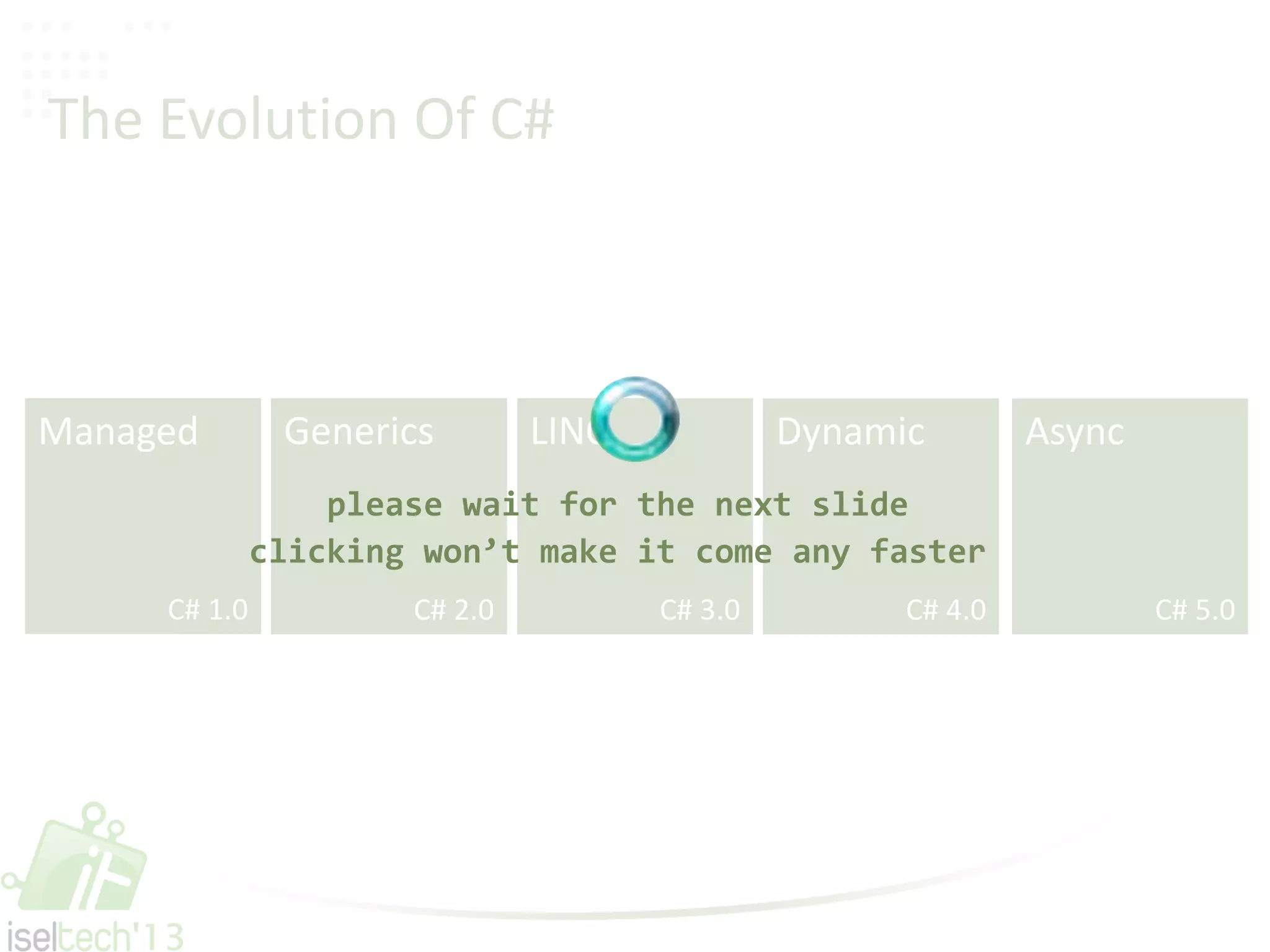
The Evolution Of C#
C# 1.0 C# 2.0 C# 3.0 C# 4.0 C# 5.0
Managed Generics LINQ Dynamic Async
The Evolution Of C#
C# 1.0 C# 2.0 C# 3.0 C# 4.0 C# 5.0
Managed Generics LINQ Dynamic Async
please wait for the next slide
clicking won’t make it come any faster
Demo
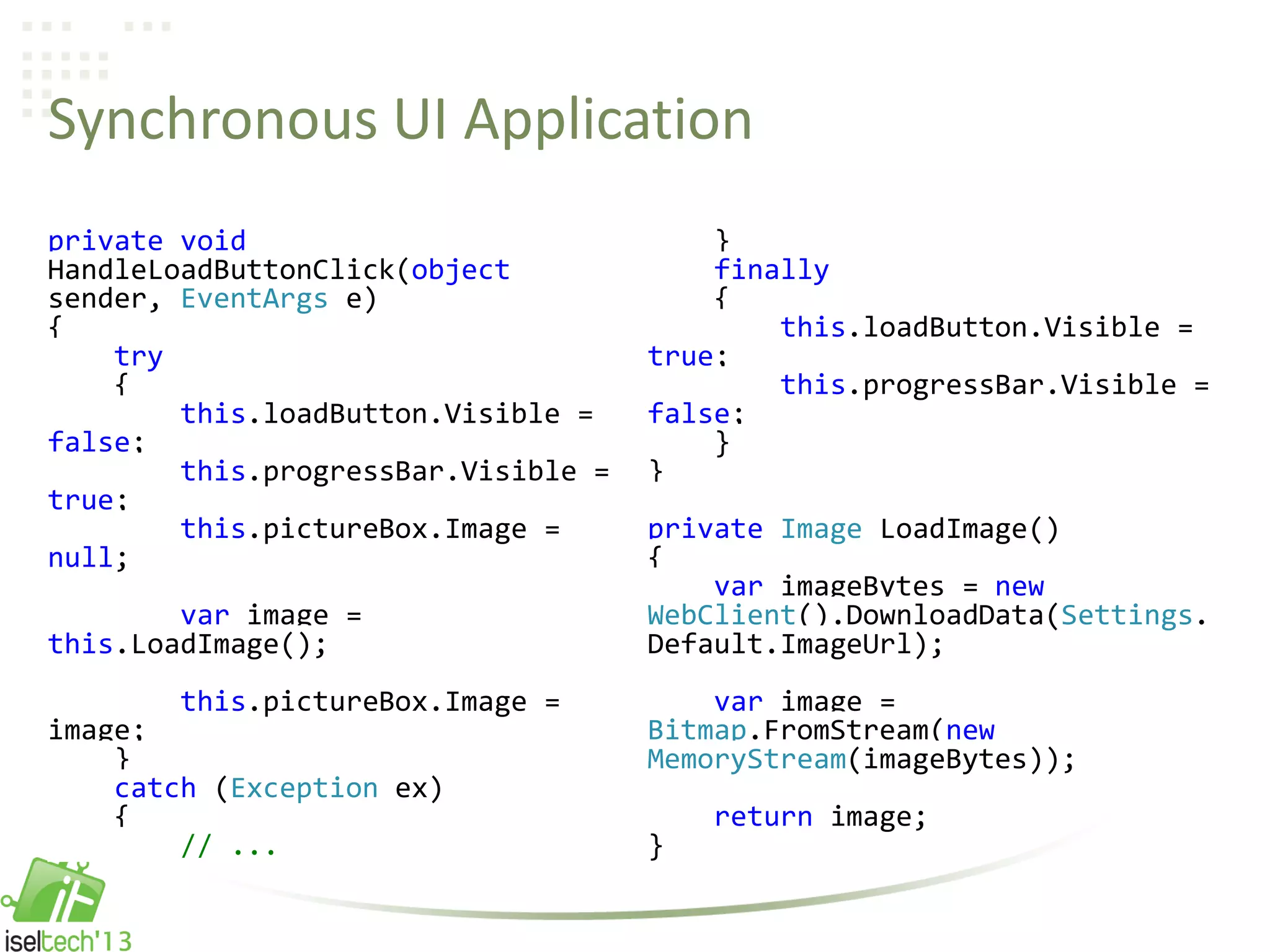
Synchronous UI Application
private void
HandleLoadButtonClick(object
sender, EventArgs e)
{
try
{
this.loadButton.Visible =
false;
this.progressBar.Visible =
true;
this.pictureBox.Image =
null;
var image =
this.LoadImage();
this.pictureBox.Image =
image;
}
catch (Exception ex)
{
// ...
}
finally
{
this.loadButton.Visible =
true;
this.progressBar.Visible =
false;
}
}
private Image LoadImage()
{
var imageBytes = new
WebClient().DownloadData(Settings.
Default.ImageUrl);
var image =
Bitmap.FromStream(new
MemoryStream(imageBytes));
return image;
}
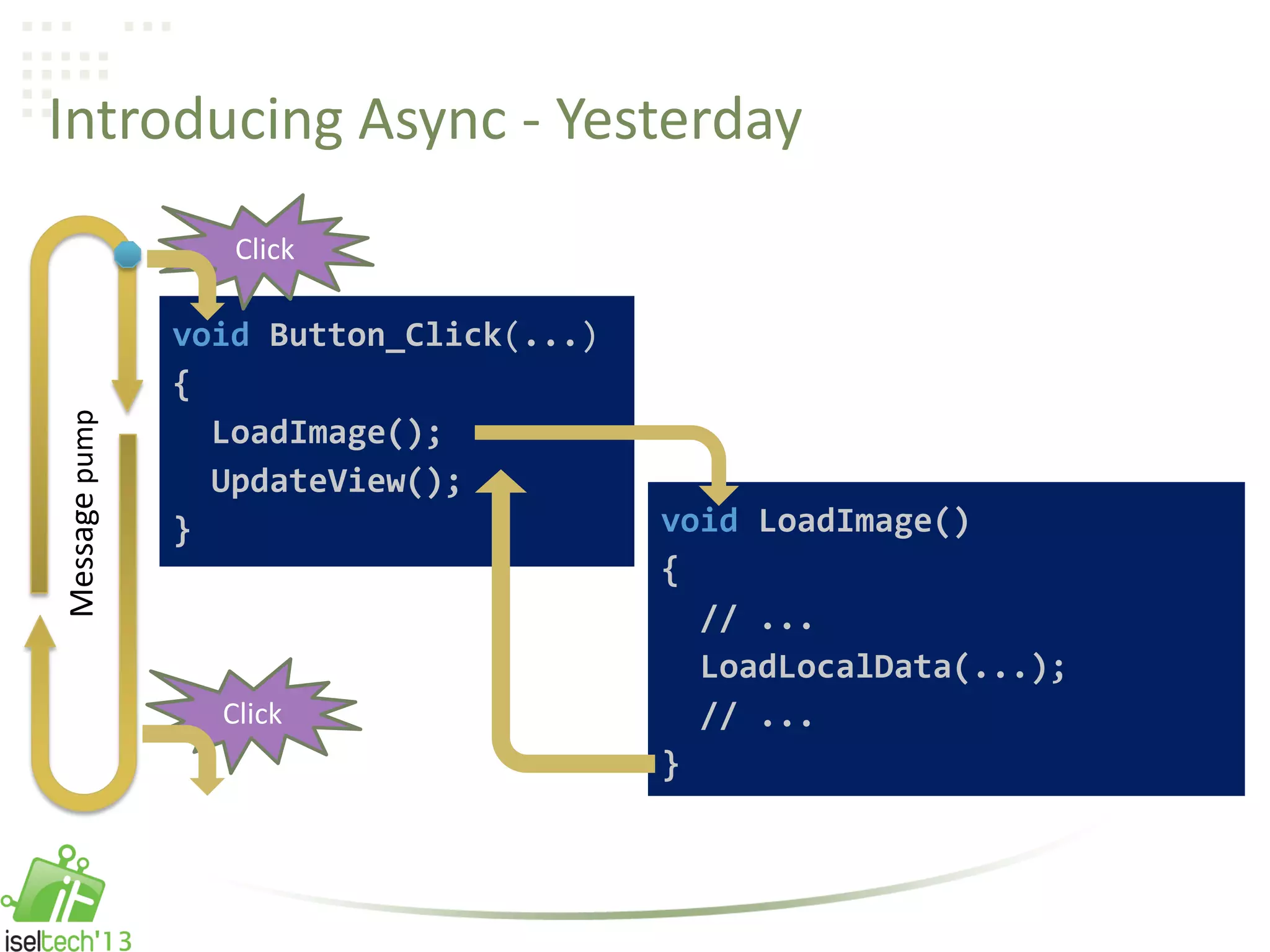
Introducing Async - Yesterday
Click
void LoadImage()
{
// ...
LoadLocalData(...);
// ...
}
void Button_Click(...)
{
LoadImage();
UpdateView();
}
Click
Messagepump
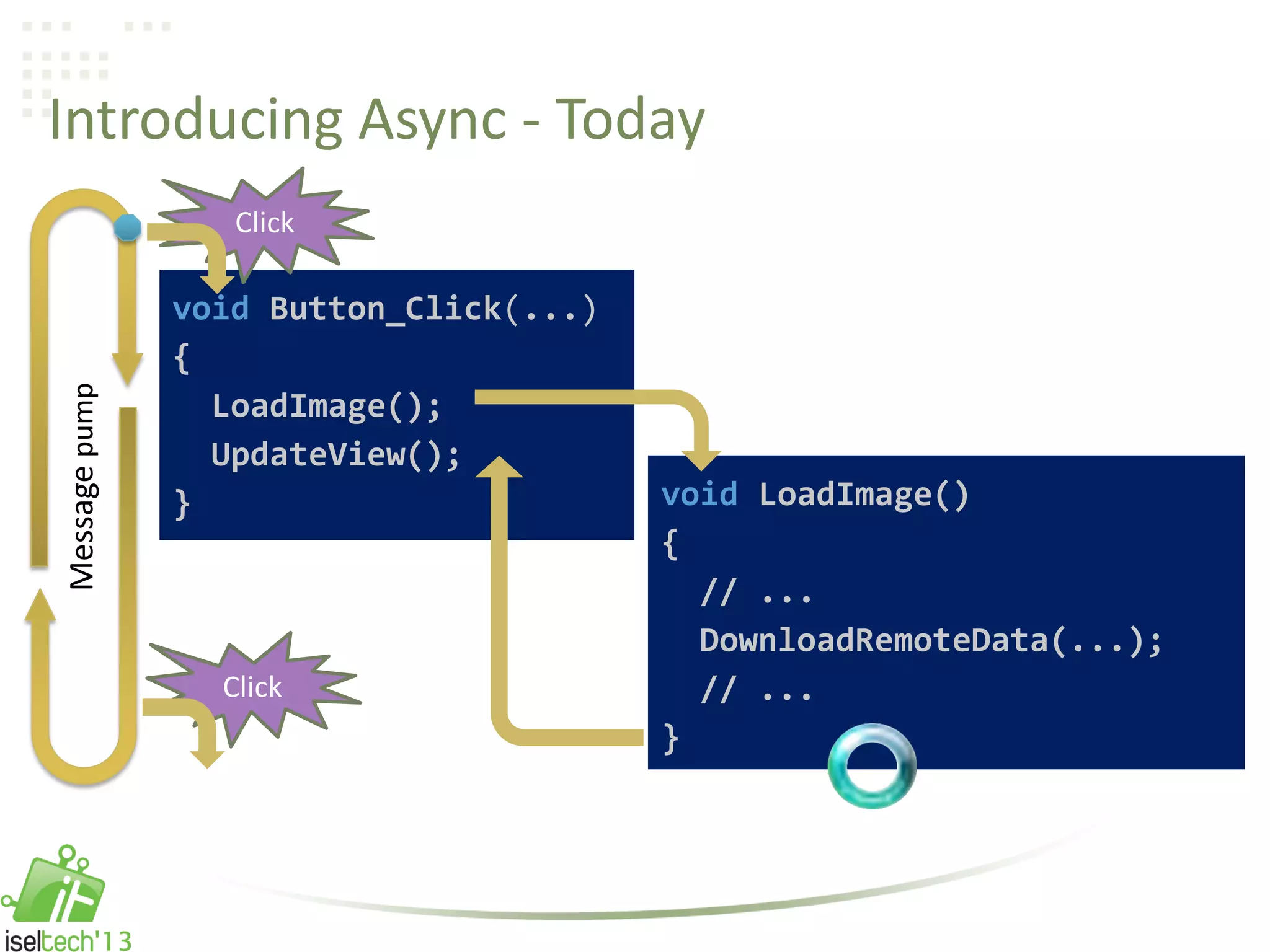
Introducing Async - Today
Click
void LoadImage()
{
// ...
DownloadRemoteData(...);
// ...
}
void Button_Click(...)
{
LoadImage();
UpdateView();
}
Click
Messagepump
Demo
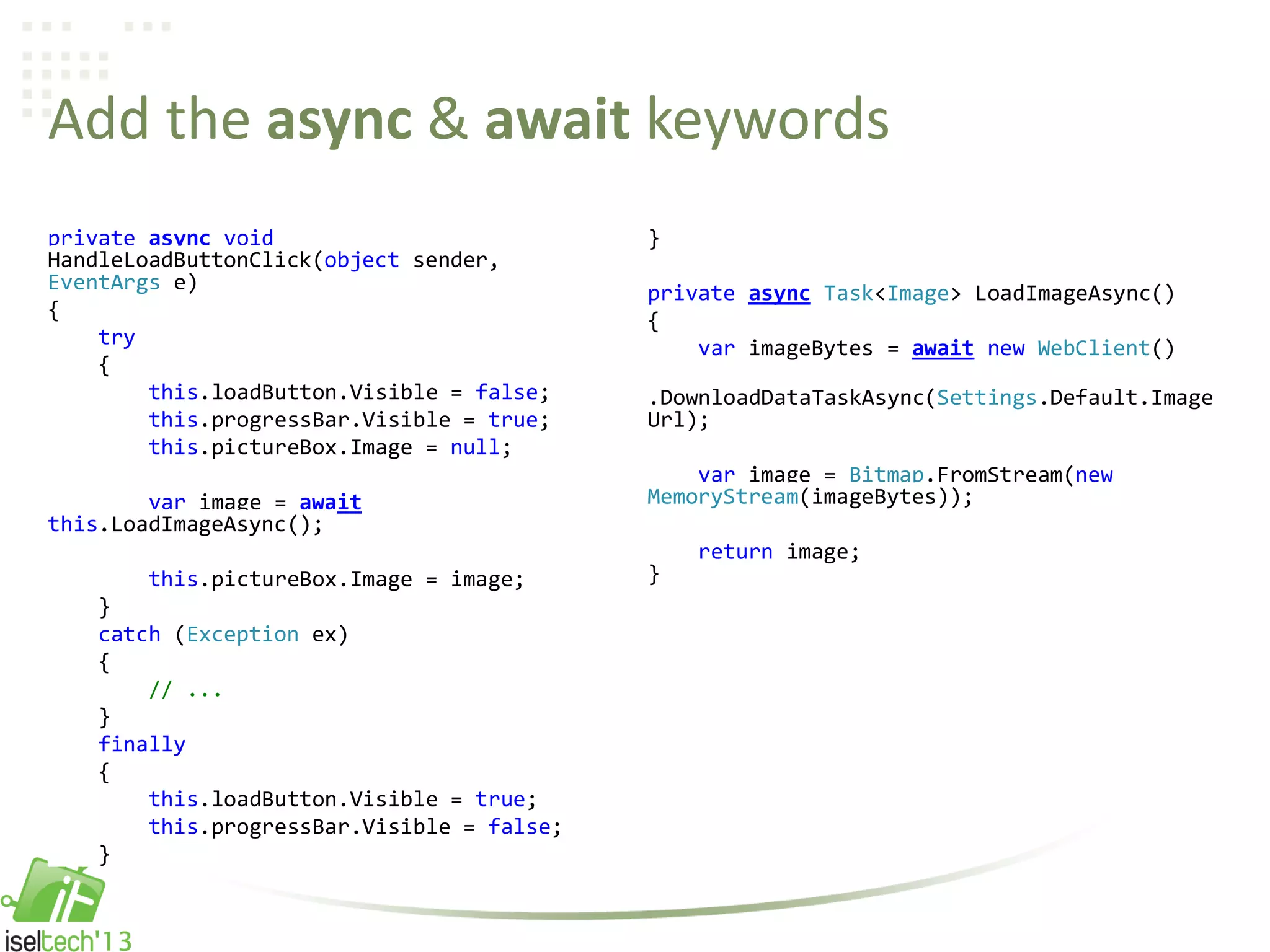
Add the async & await keywords
private async void
HandleLoadButtonClick(object sender,
EventArgs e)
{
try
{
this.loadButton.Visible = false;
this.progressBar.Visible = true;
this.pictureBox.Image = null;
var image = await
this.LoadImageAsync();
this.pictureBox.Image = image;
}
catch (Exception ex)
{
// ...
}
finally
{
this.loadButton.Visible = true;
this.progressBar.Visible = false;
}
}
private async Task<Image> LoadImageAsync()
{
var imageBytes = await new WebClient()
.DownloadDataTaskAsync(Settings.Default.Image
Url);
var image = Bitmap.FromStream(new
MemoryStream(imageBytes));
return image;
}
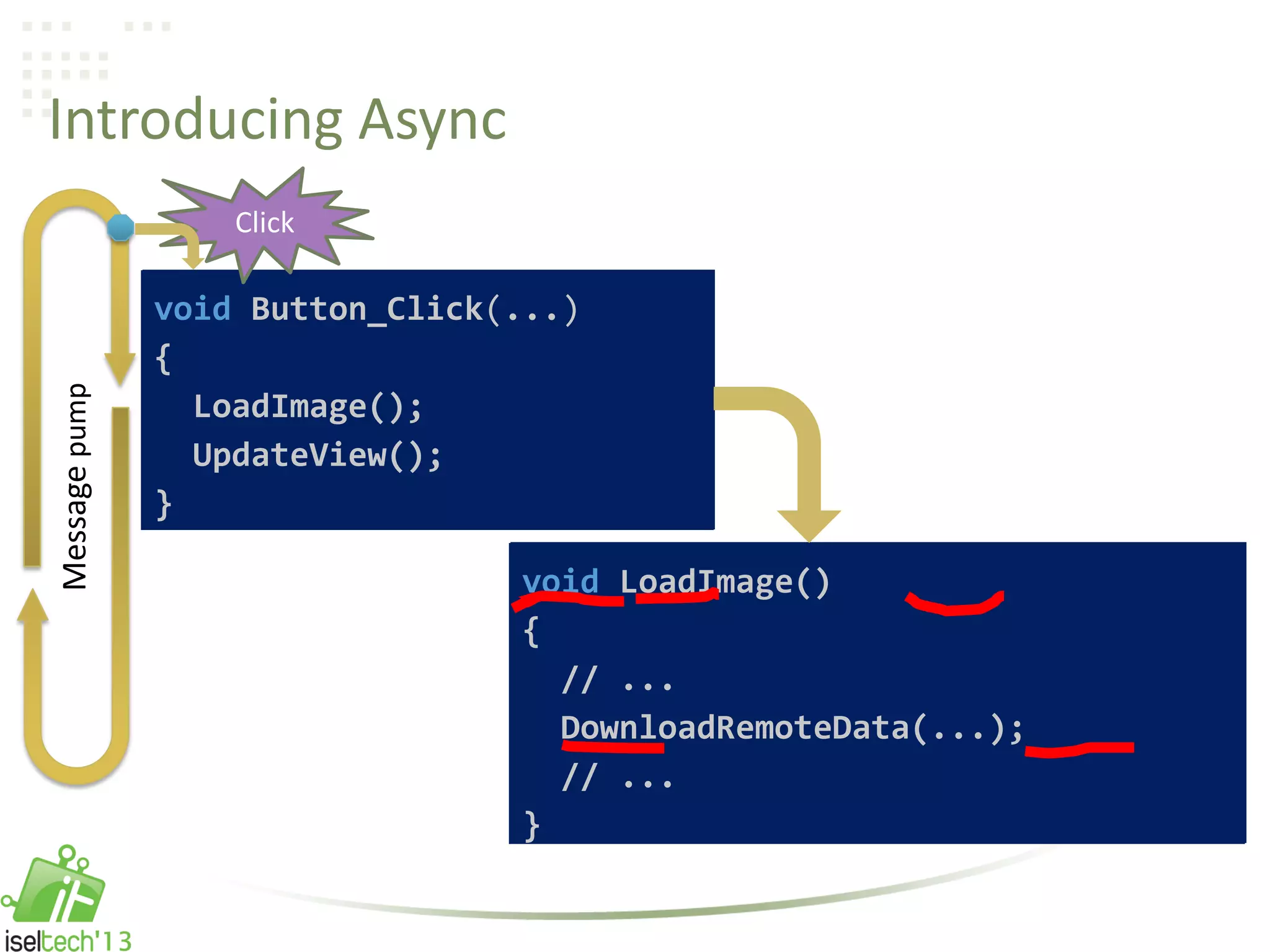
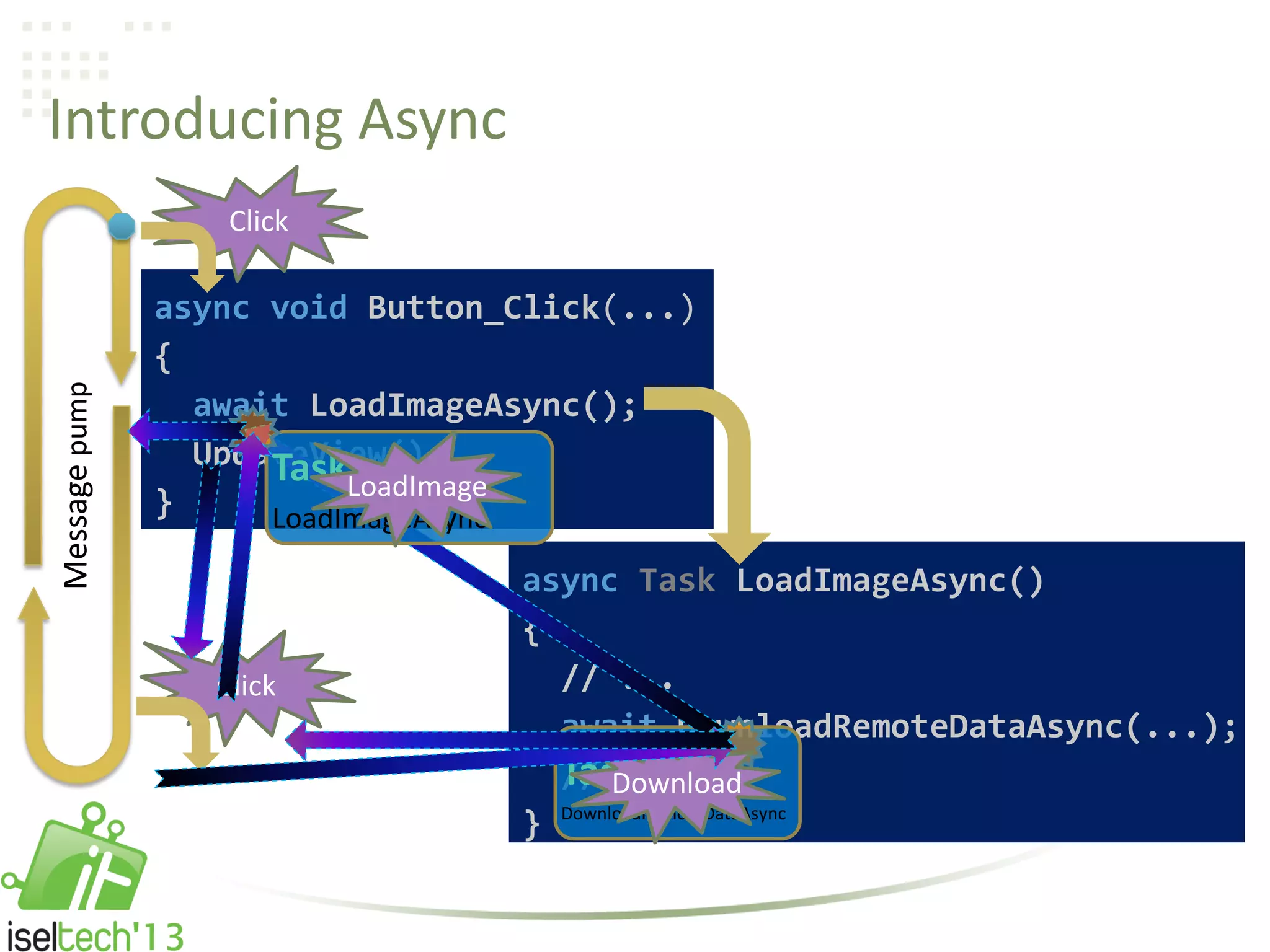
Introducing Async
async void Button_Click(...)
{
await LoadImageAsync();
UpdateView();
}
async Task LoadImageAsync()
{
// ...
await DownloadRemoteDataAsync(...);
// ...
}
Messagepump
void LoadImage()
{
// ...
DownloadRemoteData(...);
// ...
}
void Button_Click(...)
{
LoadImage();
UpdateView();
}
Click
Introducing Async
Click
async Task LoadImageAsync()
{
// ...
await DownloadRemoteDataAsync(...);
// ...
}
async void Button_Click(...)
{
await LoadImageAsync();
UpdateView();
}
Click
Messagepump
Task ...
DownloadRemoteDataAsync
Task ...
LoadImageAsync
Download
LoadImage
Demo
Async UI app: re-entrancy and deadlock
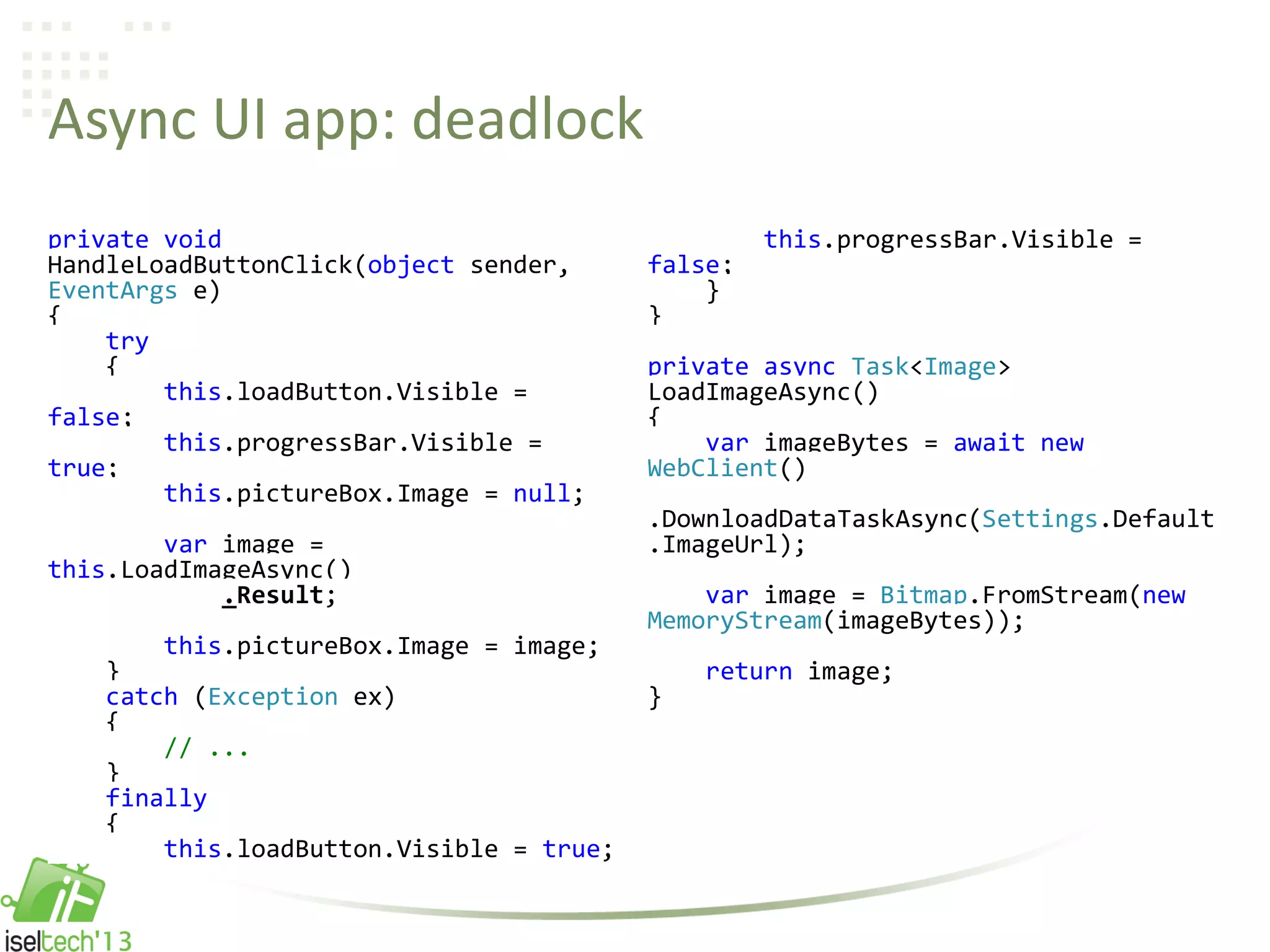
Async UI app: deadlock
private void
HandleLoadButtonClick(object sender,
EventArgs e)
{
try
{
this.loadButton.Visible =
false;
this.progressBar.Visible =
true;
this.pictureBox.Image = null;
var image =
this.LoadImageAsync()
.Result;
this.pictureBox.Image = image;
}
catch (Exception ex)
{
// ...
}
finally
{
this.loadButton.Visible = true;
this.progressBar.Visible =
false;
}
}
private async Task<Image>
LoadImageAsync()
{
var imageBytes = await new
WebClient()
.DownloadDataTaskAsync(Settings.Default
.ImageUrl);
var image = Bitmap.FromStream(new
MemoryStream(imageBytes));
return image;
}
Demo
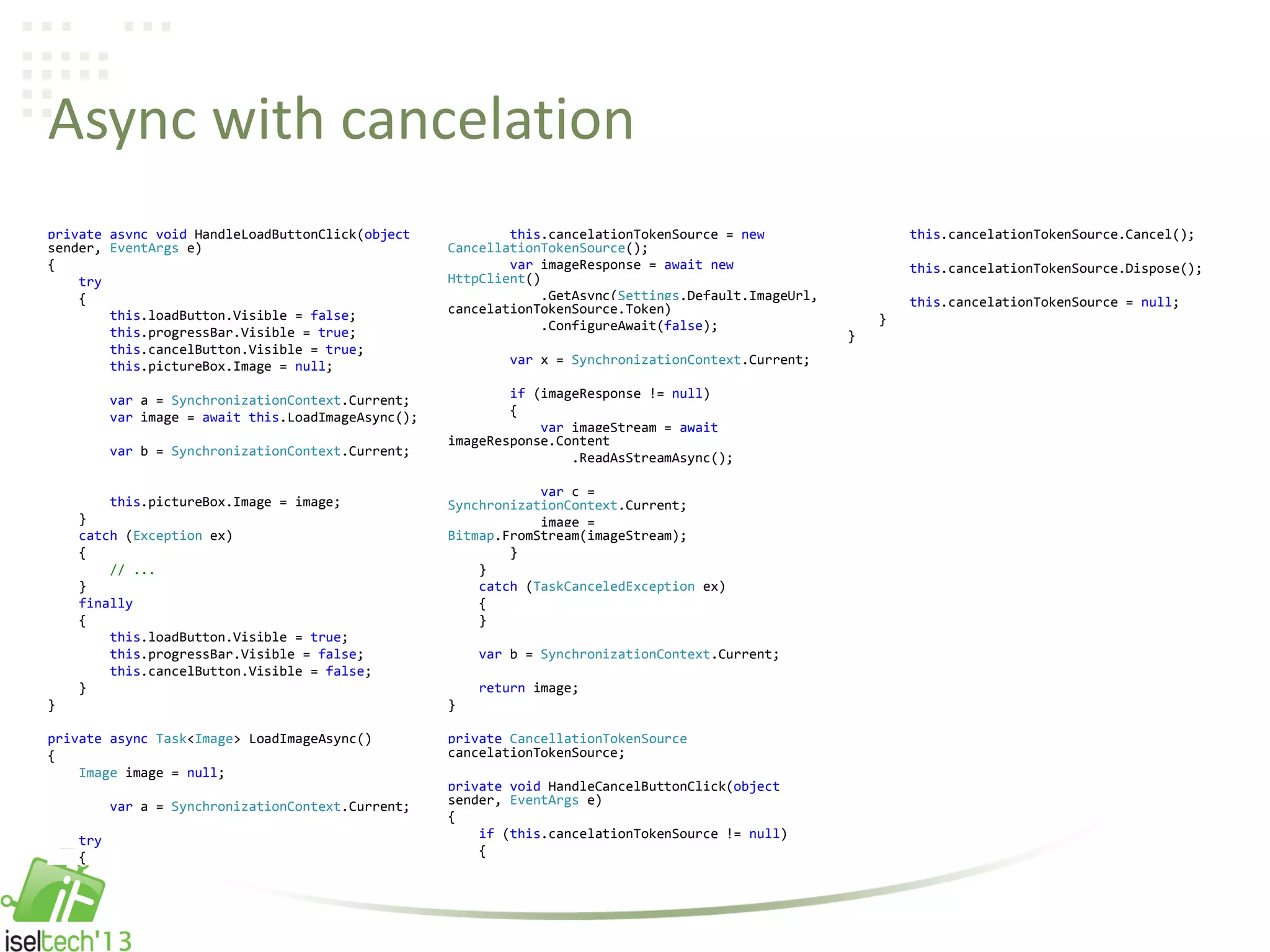
Async with cancelation
private async void HandleLoadButtonClick(object
sender, EventArgs e)
{
try
{
this.loadButton.Visible = false;
this.progressBar.Visible = true;
this.cancelButton.Visible = true;
this.pictureBox.Image = null;
var a = SynchronizationContext.Current;
var image = await this.LoadImageAsync();
var b = SynchronizationContext.Current;
this.pictureBox.Image = image;
}
catch (Exception ex)
{
// ...
}
finally
{
this.loadButton.Visible = true;
this.progressBar.Visible = false;
this.cancelButton.Visible = false;
}
}
private async Task<Image> LoadImageAsync()
{
Image image = null;
var a = SynchronizationContext.Current;
try
{
this.cancelationTokenSource = new
CancellationTokenSource();
var imageResponse = await new
HttpClient()
.GetAsync(Settings.Default.ImageUrl,
cancelationTokenSource.Token)
.ConfigureAwait(false);
var x = SynchronizationContext.Current;
if (imageResponse != null)
{
var imageStream = await
imageResponse.Content
.ReadAsStreamAsync();
var c =
SynchronizationContext.Current;
image =
Bitmap.FromStream(imageStream);
}
}
catch (TaskCanceledException ex)
{
}
var b = SynchronizationContext.Current;
return image;
}
private CancellationTokenSource
cancelationTokenSource;
private void HandleCancelButtonClick(object
sender, EventArgs e)
{
if (this.cancelationTokenSource != null)
{
this.cancelationTokenSource.Cancel();
this.cancelationTokenSource.Dispose();
this.cancelationTokenSource = null;
}
}
Demo
Async console app
Async console app
class Program
{
static void Main(string[] args)
{
Run().Wait();
}
static async Task Run()
{
await Task.Yield();
}
}
Demo
Async unit tests
Async unit tests
[TestMethod]
public async Task TestMethod1()
{
await Task.Delay(5000);
Assert.Fail();
}
Source Code Caller ID
• CallerFilePathAttribute
– Allows you to obtain the full path of the source file that contains the caller.
This is the file path at the time of compile.
• http://msdn.microsoft.com/library/system.runtime.compilerservices.callerfilepathattribute.aspx
• CallerLineNumberAttribute
– Allows you to obtain the line number in the source file at which the
method is called.
• http://msdn.microsoft.com/library/system.runtime.compilerservices.callerlinenumberattribute.aspx
• CallerMemberNameAttribute
– Allows you to obtain the method or property name of the caller to the
method.
• http://msdn.microsoft.com/library/system.runtime.compilerservices.callermembernameattribute.aspx
Source Code Caller ID - Examples
static void TraceMessage(
string message,
[CallerMemberName] string memberName = "",
[CallerFilePath] string sourceFilePath = "",
[CallerLineNumber] int sourceLineNumber = 0)
{
Trace.WriteLine(
string.Format(
"{0} at {1} in {2}:line {3}",
message,
memberName,
sourceFilePath,
sourceLineNumber));
}
Source Code Caller ID - Examples
private string field;
public string Property
{
get { return this.field; }
set
{
if (this.field != value)
{
this.field = value;
this.NotifyPropertyChanged();
}
}
}
protected void NotifyPropertyChanged([CallerMemberName] string propertyName = "")
{
// …
}
Breaking Changes
Breaking Changes
• You can use the iteration variable of a foreach statement in a lambda
expression that’s contained in the body of the loop.
• You can use the iteration variable of a foreach statement in a LINQ
expression that’s contained in the body of the loop.
• Overload resolution has been improved for calls that use named
arguments to access methods that contain params parameters.
• Overload resolution is improved for calls where the algorithm must
choose between a Func<object> parameter and a Func parameter that
has a different type parameter (e.g., string or int?) for a
Func<dynamic> argument.
• Side effects from named and positional arguments in a method call
now occur from left to right in the argument list.
http://msdn.microsoft.com/library/hh678682(v=vs.110).aspx
Resources
Resources
• C# Reference
– http://msdn.microsoft.com/library/618ayhy6.aspx
• Breaking Changes in C# 5.0
– http://msdn.microsoft.com/library/hh678682(v=vs.110).aspx
• .NET Framework 4.5
– http://msdn.microsoft.com/library/vstudio/w0x726c2(v=vs.110).aspx
• Task Parallel Library (TPL)
– http://msdn.microsoft.com/library/vstudio/dd460717.aspx
• Asynchronous Programming with Async and Await (C# and Visual
Basic)
– http://msdn.microsoft.com/library/hh191443.aspx
Resources
• Task-based Asynchronous Pattern
– http://msdn.microsoft.com/library/hh191443.aspx
• Task.Run vs Task.Factory.StartNew
– http://blogs.msdn.com/b/pfxteam/archive/2011/10/24/10229468.aspx
• An Async Premier
– http://msdn.microsoft.com/vstudio/jj573641.aspx
• Eduasync by Jon Skeet
– http://msmvps.com/blogs/jon_skeet/archive/tags/Eduasync/default.aspx
• Eric Lippert's Blog
– http://ericlippert.com/
– http://blogs.msdn.com/b/ericlippert/archive/tags/c_2300_+5-0/async/
Resources
• Lucian Wischik's Blog
– http://blogs.msdn.com/b/lucian/archive/tags/async/
• Parallel Programming Team Blog
– http://blogs.msdn.com/b/pfxteam/archive/tags/async/
• What’s new in C#5? – Red Gate
– http://www.youtube.com/watch?v=z7nry67oeKc
• Novidades Do C# 5.0 – Comunidade NetPonto
– http://www.youtube.com/watch?v=7Tl6CHf86z4
• Sample Code
– http://code.msdn.microsoft.com/C-50-AsyncAwait-Demo-Code-334679a5
Resources
• Paulo Morgado
– @PauloMorgado
– http://PauloMorgado.NET/
– http://mvp.support.microsoft.com/profile/Paulo.Morgado
– http://msmvps.com/blogs/paulomorgado/
– http://weblogs.asp.net/paulomorgado/
– http://pontonetpt.org/blogs/paulomorgado/
– http://www.codeproject.com/Members/PauloMorgado
– http://code.msdn.microsoft.com/site/search?f%5B0%5D.Type=User&f%5B
0%5D.Value=Paulo%20Morgado
– http://www.codeplex.com/UserAccount/UserProfile.aspx?UserName=Paul
oMorgado
– http://www.slideshare.net/PauloJorgeMorgado
Q & A
Thank You!

Paulo morgado what's new in c# 5.0

  • 1.
    What’s New InC# 5.0 Paulo Morgado
  • 2.
  • 3.
    A Language ForEach Generation
  • 4.
    The Evolution OfC# C# 1.0 C# 2.0 C# 3.0 C# 4.0 C# 5.0 Managed Generics LINQ Dynamic Async
  • 5.
    The Evolution OfC# C# 1.0 C# 2.0 C# 3.0 C# 4.0 C# 5.0 Managed Generics LINQ Dynamic Async please wait for the next slide clicking won’t make it come any faster
  • 6.
  • 7.
    Synchronous UI Application privatevoid HandleLoadButtonClick(object sender, EventArgs e) { try { this.loadButton.Visible = false; this.progressBar.Visible = true; this.pictureBox.Image = null; var image = this.LoadImage(); this.pictureBox.Image = image; } catch (Exception ex) { // ... } finally { this.loadButton.Visible = true; this.progressBar.Visible = false; } } private Image LoadImage() { var imageBytes = new WebClient().DownloadData(Settings. Default.ImageUrl); var image = Bitmap.FromStream(new MemoryStream(imageBytes)); return image; }
  • 8.
    Introducing Async -Yesterday Click void LoadImage() { // ... LoadLocalData(...); // ... } void Button_Click(...) { LoadImage(); UpdateView(); } Click Messagepump
  • 9.
    Introducing Async -Today Click void LoadImage() { // ... DownloadRemoteData(...); // ... } void Button_Click(...) { LoadImage(); UpdateView(); } Click Messagepump
  • 10.
    Demo Add the async& await keywords
  • 11.
    Add the async& await keywords private async void HandleLoadButtonClick(object sender, EventArgs e) { try { this.loadButton.Visible = false; this.progressBar.Visible = true; this.pictureBox.Image = null; var image = await this.LoadImageAsync(); this.pictureBox.Image = image; } catch (Exception ex) { // ... } finally { this.loadButton.Visible = true; this.progressBar.Visible = false; } } private async Task<Image> LoadImageAsync() { var imageBytes = await new WebClient() .DownloadDataTaskAsync(Settings.Default.Image Url); var image = Bitmap.FromStream(new MemoryStream(imageBytes)); return image; }
  • 12.
    Introducing Async async voidButton_Click(...) { await LoadImageAsync(); UpdateView(); } async Task LoadImageAsync() { // ... await DownloadRemoteDataAsync(...); // ... } Messagepump void LoadImage() { // ... DownloadRemoteData(...); // ... } void Button_Click(...) { LoadImage(); UpdateView(); } Click
  • 13.
    Introducing Async Click async TaskLoadImageAsync() { // ... await DownloadRemoteDataAsync(...); // ... } async void Button_Click(...) { await LoadImageAsync(); UpdateView(); } Click Messagepump Task ... DownloadRemoteDataAsync Task ... LoadImageAsync Download LoadImage
  • 14.
    Demo Async UI app:re-entrancy and deadlock
  • 15.
    Async UI app:deadlock private void HandleLoadButtonClick(object sender, EventArgs e) { try { this.loadButton.Visible = false; this.progressBar.Visible = true; this.pictureBox.Image = null; var image = this.LoadImageAsync() .Result; this.pictureBox.Image = image; } catch (Exception ex) { // ... } finally { this.loadButton.Visible = true; this.progressBar.Visible = false; } } private async Task<Image> LoadImageAsync() { var imageBytes = await new WebClient() .DownloadDataTaskAsync(Settings.Default .ImageUrl); var image = Bitmap.FromStream(new MemoryStream(imageBytes)); return image; }
  • 16.
  • 17.
    Async with cancelation privateasync void HandleLoadButtonClick(object sender, EventArgs e) { try { this.loadButton.Visible = false; this.progressBar.Visible = true; this.cancelButton.Visible = true; this.pictureBox.Image = null; var a = SynchronizationContext.Current; var image = await this.LoadImageAsync(); var b = SynchronizationContext.Current; this.pictureBox.Image = image; } catch (Exception ex) { // ... } finally { this.loadButton.Visible = true; this.progressBar.Visible = false; this.cancelButton.Visible = false; } } private async Task<Image> LoadImageAsync() { Image image = null; var a = SynchronizationContext.Current; try { this.cancelationTokenSource = new CancellationTokenSource(); var imageResponse = await new HttpClient() .GetAsync(Settings.Default.ImageUrl, cancelationTokenSource.Token) .ConfigureAwait(false); var x = SynchronizationContext.Current; if (imageResponse != null) { var imageStream = await imageResponse.Content .ReadAsStreamAsync(); var c = SynchronizationContext.Current; image = Bitmap.FromStream(imageStream); } } catch (TaskCanceledException ex) { } var b = SynchronizationContext.Current; return image; } private CancellationTokenSource cancelationTokenSource; private void HandleCancelButtonClick(object sender, EventArgs e) { if (this.cancelationTokenSource != null) { this.cancelationTokenSource.Cancel(); this.cancelationTokenSource.Dispose(); this.cancelationTokenSource = null; } }
  • 18.
  • 19.
    Async console app classProgram { static void Main(string[] args) { Run().Wait(); } static async Task Run() { await Task.Yield(); } }
  • 20.
  • 21.
    Async unit tests [TestMethod] publicasync Task TestMethod1() { await Task.Delay(5000); Assert.Fail(); }
  • 22.
  • 23.
    Source Code CallerID • CallerFilePathAttribute – Allows you to obtain the full path of the source file that contains the caller. This is the file path at the time of compile. • http://msdn.microsoft.com/library/system.runtime.compilerservices.callerfilepathattribute.aspx • CallerLineNumberAttribute – Allows you to obtain the line number in the source file at which the method is called. • http://msdn.microsoft.com/library/system.runtime.compilerservices.callerlinenumberattribute.aspx • CallerMemberNameAttribute – Allows you to obtain the method or property name of the caller to the method. • http://msdn.microsoft.com/library/system.runtime.compilerservices.callermembernameattribute.aspx
  • 24.
    Source Code CallerID - Examples static void TraceMessage( string message, [CallerMemberName] string memberName = "", [CallerFilePath] string sourceFilePath = "", [CallerLineNumber] int sourceLineNumber = 0) { Trace.WriteLine( string.Format( "{0} at {1} in {2}:line {3}", message, memberName, sourceFilePath, sourceLineNumber)); }
  • 25.
    Source Code CallerID - Examples private string field; public string Property { get { return this.field; } set { if (this.field != value) { this.field = value; this.NotifyPropertyChanged(); } } } protected void NotifyPropertyChanged([CallerMemberName] string propertyName = "") { // … }
  • 26.
  • 27.
    Breaking Changes • Youcan use the iteration variable of a foreach statement in a lambda expression that’s contained in the body of the loop. • You can use the iteration variable of a foreach statement in a LINQ expression that’s contained in the body of the loop. • Overload resolution has been improved for calls that use named arguments to access methods that contain params parameters. • Overload resolution is improved for calls where the algorithm must choose between a Func<object> parameter and a Func parameter that has a different type parameter (e.g., string or int?) for a Func<dynamic> argument. • Side effects from named and positional arguments in a method call now occur from left to right in the argument list. http://msdn.microsoft.com/library/hh678682(v=vs.110).aspx
  • 28.
  • 29.
    Resources • C# Reference –http://msdn.microsoft.com/library/618ayhy6.aspx • Breaking Changes in C# 5.0 – http://msdn.microsoft.com/library/hh678682(v=vs.110).aspx • .NET Framework 4.5 – http://msdn.microsoft.com/library/vstudio/w0x726c2(v=vs.110).aspx • Task Parallel Library (TPL) – http://msdn.microsoft.com/library/vstudio/dd460717.aspx • Asynchronous Programming with Async and Await (C# and Visual Basic) – http://msdn.microsoft.com/library/hh191443.aspx
  • 30.
    Resources • Task-based AsynchronousPattern – http://msdn.microsoft.com/library/hh191443.aspx • Task.Run vs Task.Factory.StartNew – http://blogs.msdn.com/b/pfxteam/archive/2011/10/24/10229468.aspx • An Async Premier – http://msdn.microsoft.com/vstudio/jj573641.aspx • Eduasync by Jon Skeet – http://msmvps.com/blogs/jon_skeet/archive/tags/Eduasync/default.aspx • Eric Lippert's Blog – http://ericlippert.com/ – http://blogs.msdn.com/b/ericlippert/archive/tags/c_2300_+5-0/async/
  • 31.
    Resources • Lucian Wischik'sBlog – http://blogs.msdn.com/b/lucian/archive/tags/async/ • Parallel Programming Team Blog – http://blogs.msdn.com/b/pfxteam/archive/tags/async/ • What’s new in C#5? – Red Gate – http://www.youtube.com/watch?v=z7nry67oeKc • Novidades Do C# 5.0 – Comunidade NetPonto – http://www.youtube.com/watch?v=7Tl6CHf86z4 • Sample Code – http://code.msdn.microsoft.com/C-50-AsyncAwait-Demo-Code-334679a5
  • 32.
    Resources • Paulo Morgado –@PauloMorgado – http://PauloMorgado.NET/ – http://mvp.support.microsoft.com/profile/Paulo.Morgado – http://msmvps.com/blogs/paulomorgado/ – http://weblogs.asp.net/paulomorgado/ – http://pontonetpt.org/blogs/paulomorgado/ – http://www.codeproject.com/Members/PauloMorgado – http://code.msdn.microsoft.com/site/search?f%5B0%5D.Type=User&f%5B 0%5D.Value=Paulo%20Morgado – http://www.codeplex.com/UserAccount/UserProfile.aspx?UserName=Paul oMorgado – http://www.slideshare.net/PauloJorgeMorgado
  • 33.
  • 34.