Craig Dunn
Developer Evangelist
Xamarin
craig@xamarin.com
@conceptdev
C# async await
for mobile
Mobile Apps
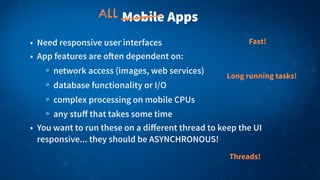
• Need responsive user interfaces
• App features are o!en dependent on:
network access (images, web services)
database functionality or I/O
complex processing on mobile CPUs
any stuff that takes some time
• You want to run these on a different thread to keep the UI
responsive... they should be ASYNCHRONOUS!
Fast!
Long running tasks!
Threads!
All
Responsive User Interfaces
Don’t design
for desktop
Responsive User Interfaces
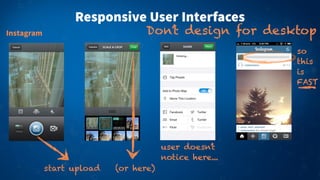
Instagram Don’t design for desktop
start upload (or here)
so
this
is
FAST
user doesn’t
notice here...
Responsive User Interfaces
Don’t design for desktopInstagram
hit-and-hope
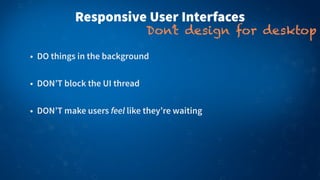
• DO things in the background
• DON’T block the UI thread
• DON’T make users feel like they’re waiting
Responsive User Interfaces
Don’t design for desktop
DEMODEMO1) Download Html string
2) Download Jpeg image
3) Save to Storage
4) Return Html length
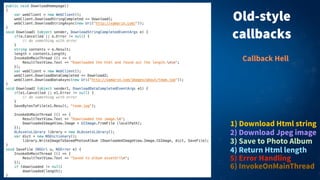
Old-style
callbacks
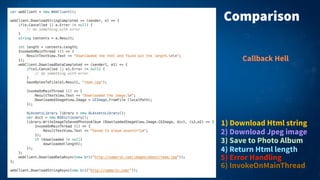
1) Download Html string
2) Download Jpeg image
3) Save to Photo Album
5) Error Handling
4) Return Html length
6) InvokeOnMainThread
Callback Hell
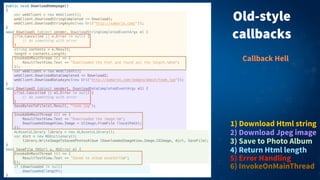
Old-style
callbacks
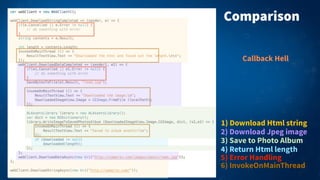
1) Download Html string
2) Download Jpeg image
3) Save to Photo Album
5) Error Handling
4) Return Html length
6) InvokeOnMainThread
Callback Hell
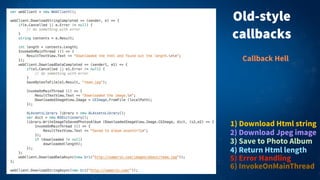
Old-style
callbacks
1) Download Html string
2) Download Jpeg image
3) Save to Photo Album
5) Error Handling
4) Return Html length
6) InvokeOnMainThread
Callback Hell
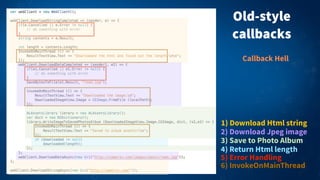
1) Download Html string
2) Download Jpeg image
3) Save to Photo Album
5) Error Handling
4) Return Html length
6) InvokeOnMainThread
Callback Hell
Old-style
callbacks
What is “async”?
• Tasks running outside of the main program flow
• Code runs on another thread, so the UI doesn’t block/freeze
• Completion runs on the calling thread, so if you started on the
UI that’s where you’ll be a!er the async task is complete
• async and await syntax in C# 5 takes Task support to the next
level!
Frameworks need to support it on long running tasks
Task Parallel Library (TPL)
has been around a while
Old-style callbacks
• Spaghetti code:
Callbacks are the new “GOTO”
Control flow jumps around in ways that are difficult to read
& understand from the source
Error handling is difficult to implement, required in many
different places
Changes in the chain can have unintended consequences
http://tirania.org/blog/archive/2013/Aug-15.html
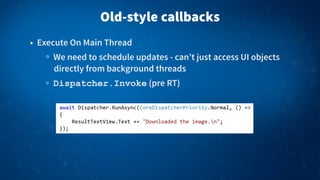
Old-style callbacks
• Execute On Main Thread
We need to schedule updates - can’t just access UI objects
directly from background threads
Dispatcher.Invoke (pre RT)
USING ASYNC
async, await, cancellation and error handling
Comparison
1) Download Html string
2) Download Jpeg image
3) Save to Photo Album
5) Error Handling
4) Return Html length
6) InvokeOnMainThread
Callback Hell
Comparison
1) Download Html string
2) Download Jpeg image
3) Save to Photo Album
5) Error Handling
4) Return Html length
6) InvokeOnMainThread
Callback Hell
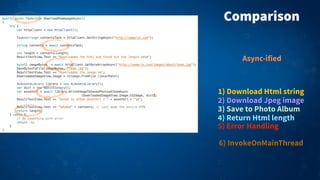
1) Download Html string
2) Download Jpeg image
3) Save to Photo Album
5) Error Handling
4) Return Html length
Comparison
Async-ified
6) InvokeOnMainThread
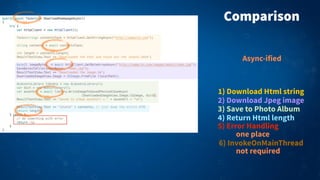
1) Download Html string
2) Download Jpeg image
3) Save to Photo Album
5) Error Handling
4) Return Html length
Comparison
6) InvokeOnMainThread
one place
not required
Async-ified
Comparison
1) Download Html string
2) Download Jpeg image
3) Save to Photo Album
5) Error Handling
4) Return Html length
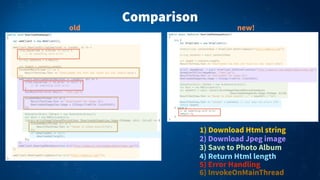
6) InvokeOnMainThread
old new!
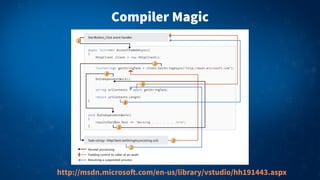
Compiler Magic
http://msdn.microso!.com/en-us/library/vstudio/hh191443.aspx
Compiler Magic
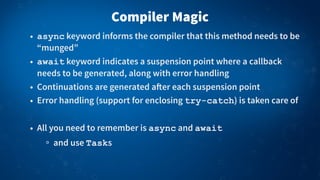
• async keyword informs the compiler that this method needs to be
“munged”
• await keyword indicates a suspension point where a callback
needs to be generated, along with error handling
• Continuations are generated a!er each suspension point
• Error handling (support for enclosing try-catch) is taken care of
• All you need to remember is async and await
and use Tasks
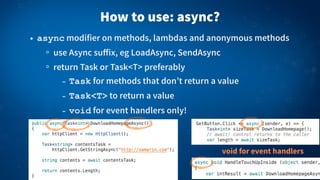
How to use: async?
• async modifier on methods, lambdas and anonymous methods
use Async suffix, eg LoadAsync, SendAsync
return Task or Task<T> preferably
- Task for methods that don’t return a value
- Task<T> to return a value
- void for event handlers only!
void for event handlers
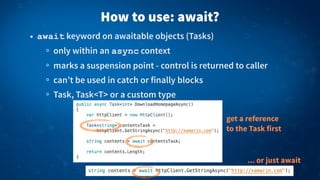
How to use: await?
• await keyword on awaitable objects (Tasks)
only within an async context
marks a suspension point - control is returned to caller
can’t be used in catch or finally blocks
Task, Task<T> or a custom type
get a reference
to the Task first
... or just await
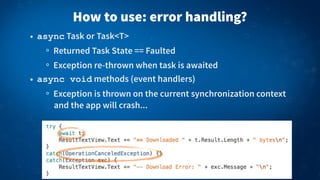
How to use: error handling?
• async Task or Task<T>
Returned Task State == Faulted
Exception re-thrown when task is awaited
• async void methods (event handlers)
Exception is thrown on the current synchronization context
and the app will crash...
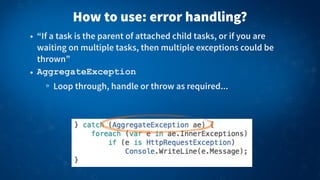
How to use: error handling?
• “If a task is the parent of attached child tasks, or if you are
waiting on multiple tasks, then multiple exceptions could be
thrown”
• AggregateException
Loop through, handle or throw as required...
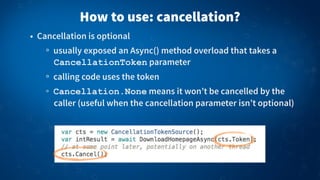
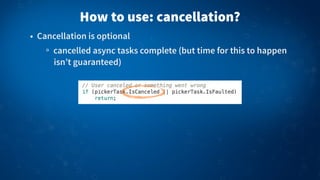
• Cancellation is optional
usually exposed an Async() method overload that takes a
CancellationToken parameter
calling code uses the token
Cancellation.None means it won’t be cancelled by the
caller (useful when the cancellation parameter isn’t optional)
How to use: cancellation?
• Cancellation is optional
cancelled async tasks complete (but time for this to happen
isn’t guaranteed)
How to use: cancellation?
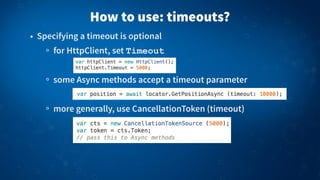
• Specifying a timeout is optional
for HttpClient, set Timeout
some Async methods accept a timeout parameter
more generally, use CancellationToken (timeout)
How to use: timeouts?
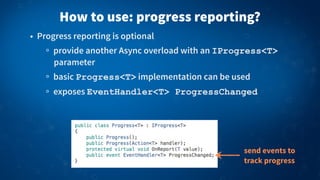
• Progress reporting is optional
provide another Async overload with an IProgress<T>
parameter
basic Progress<T> implementation can be used
exposes EventHandler<T> ProgressChanged
How to use: progress reporting?
send events to
track progress
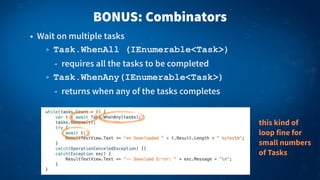
BONUS: Combinators
• Wait on multiple tasks
Task.WhenAll (IEnumerable<Task>)
- requires all the tasks to be completed
Task.WhenAny(IEnumerable<Task>)
- returns when any of the tasks completes
this kind of
loop fine for
small numbers
of Tasks
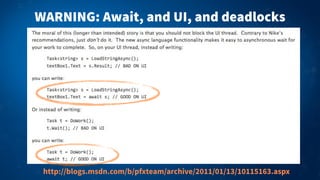
WARNING: Await, and UI, and deadlocks
http://blogs.msdn.com/b/pfxteam/archive/2011/01/13/10115163.aspx
MOAR MOBILE
iOS & Android too!
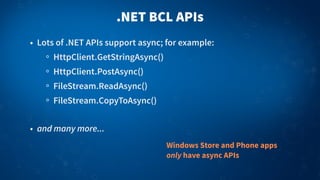
.NET BCL APIs
• Lots of .NET APIs support async; for example:
HttpClient.GetStringAsync()
HttpClient.PostAsync()
FileStream.ReadAsync()
FileStream.CopyToAsync()
• and many more...
Windows Store and Phone apps
only have async APIs
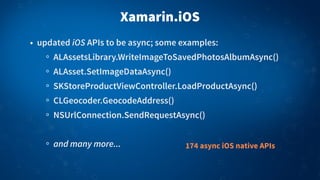
Xamarin.iOS
• updated iOS APIs to be async; some examples:
ALAssetsLibrary.WriteImageToSavedPhotosAlbumAsync()
ALAsset.SetImageDataAsync()
SKStoreProductViewController.LoadProductAsync()
CLGeocoder.GeocodeAddress()
NSUrlConnection.SendRequestAsync()
and many more... 174 async iOS native APIs
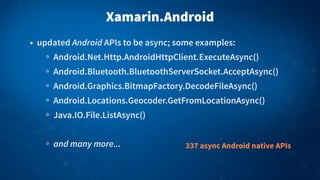
Xamarin.Android
• updated Android APIs to be async; some examples:
Android.Net.Http.AndroidHttpClient.ExecuteAsync()
Android.Bluetooth.BluetoothServerSocket.AcceptAsync()
Android.Graphics.BitmapFactory.DecodeFileAsync()
Android.Locations.Geocoder.GetFromLocationAsync()
Java.IO.File.ListAsync()
and many more... 337 async Android native APIs
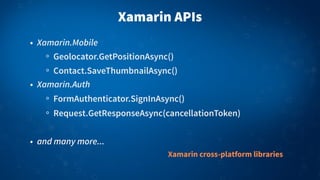
Xamarin APIs
• Xamarin.Mobile
Geolocator.GetPositionAsync()
Contact.SaveThumbnailAsync()
• Xamarin.Auth
FormAuthenticator.SignInAsync()
Request.GetResponseAsync(cancellationToken)
• and many more...
Xamarin cross-platform libraries
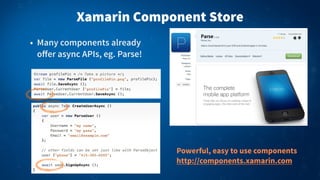
Xamarin Component Store
• Many components already
offer async APIs, eg. Parse!
Powerful, easy to use components
http://components.xamarin.com
DEMODEMO
ParseTodo
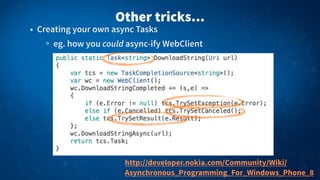
Other tricks...
• Creating your own async Tasks
eg. how you could async-ify WebClient
http://developer.nokia.com/Community/Wiki/
Asynchronous_Programming_For_Windows_Phone_8
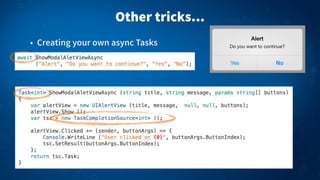
Other tricks...
• Creating your own async Tasks
Don’t await... give it a try
• Available in .NET 4.5 for Windows Store apps, Windows 8,
Windows Phone, etc.
• Also available programming in C# iOS & Android using Xamarin!
xamarin.com/download
Questions?
Developer Evangelist
Xamarin
craig@xamarin.com
@conceptdev
Craig Dunn

Async Await for Mobile Apps

  • 1.
  • 2.
    Mobile Apps • Needresponsive user interfaces • App features are o!en dependent on: network access (images, web services) database functionality or I/O complex processing on mobile CPUs any stuff that takes some time • You want to run these on a different thread to keep the UI responsive... they should be ASYNCHRONOUS! Fast! Long running tasks! Threads! All
  • 3.
  • 4.
    Responsive User Interfaces InstagramDon’t design for desktop start upload (or here) so this is FAST user doesn’t notice here...
  • 5.
    Responsive User Interfaces Don’tdesign for desktopInstagram hit-and-hope
  • 6.
    • DO thingsin the background • DON’T block the UI thread • DON’T make users feel like they’re waiting Responsive User Interfaces Don’t design for desktop
  • 7.
    DEMODEMO1) Download Htmlstring 2) Download Jpeg image 3) Save to Storage 4) Return Html length
  • 8.
    Old-style callbacks 1) Download Htmlstring 2) Download Jpeg image 3) Save to Photo Album 5) Error Handling 4) Return Html length 6) InvokeOnMainThread Callback Hell
  • 9.
    Old-style callbacks 1) Download Htmlstring 2) Download Jpeg image 3) Save to Photo Album 5) Error Handling 4) Return Html length 6) InvokeOnMainThread Callback Hell
  • 10.
    Old-style callbacks 1) Download Htmlstring 2) Download Jpeg image 3) Save to Photo Album 5) Error Handling 4) Return Html length 6) InvokeOnMainThread Callback Hell
  • 11.
    1) Download Htmlstring 2) Download Jpeg image 3) Save to Photo Album 5) Error Handling 4) Return Html length 6) InvokeOnMainThread Callback Hell Old-style callbacks
  • 12.
    What is “async”? •Tasks running outside of the main program flow • Code runs on another thread, so the UI doesn’t block/freeze • Completion runs on the calling thread, so if you started on the UI that’s where you’ll be a!er the async task is complete • async and await syntax in C# 5 takes Task support to the next level! Frameworks need to support it on long running tasks Task Parallel Library (TPL) has been around a while
  • 13.
    Old-style callbacks • Spaghetticode: Callbacks are the new “GOTO” Control flow jumps around in ways that are difficult to read & understand from the source Error handling is difficult to implement, required in many different places Changes in the chain can have unintended consequences http://tirania.org/blog/archive/2013/Aug-15.html
  • 14.
    Old-style callbacks • ExecuteOn Main Thread We need to schedule updates - can’t just access UI objects directly from background threads Dispatcher.Invoke (pre RT)
  • 15.
    USING ASYNC async, await,cancellation and error handling
  • 16.
    Comparison 1) Download Htmlstring 2) Download Jpeg image 3) Save to Photo Album 5) Error Handling 4) Return Html length 6) InvokeOnMainThread Callback Hell
  • 17.
    Comparison 1) Download Htmlstring 2) Download Jpeg image 3) Save to Photo Album 5) Error Handling 4) Return Html length 6) InvokeOnMainThread Callback Hell
  • 18.
    1) Download Htmlstring 2) Download Jpeg image 3) Save to Photo Album 5) Error Handling 4) Return Html length Comparison Async-ified 6) InvokeOnMainThread
  • 19.
    1) Download Htmlstring 2) Download Jpeg image 3) Save to Photo Album 5) Error Handling 4) Return Html length Comparison 6) InvokeOnMainThread one place not required Async-ified
  • 20.
    Comparison 1) Download Htmlstring 2) Download Jpeg image 3) Save to Photo Album 5) Error Handling 4) Return Html length 6) InvokeOnMainThread old new!
  • 21.
  • 22.
    Compiler Magic • asynckeyword informs the compiler that this method needs to be “munged” • await keyword indicates a suspension point where a callback needs to be generated, along with error handling • Continuations are generated a!er each suspension point • Error handling (support for enclosing try-catch) is taken care of • All you need to remember is async and await and use Tasks
  • 23.
    How to use:async? • async modifier on methods, lambdas and anonymous methods use Async suffix, eg LoadAsync, SendAsync return Task or Task<T> preferably - Task for methods that don’t return a value - Task<T> to return a value - void for event handlers only! void for event handlers
  • 24.
    How to use:await? • await keyword on awaitable objects (Tasks) only within an async context marks a suspension point - control is returned to caller can’t be used in catch or finally blocks Task, Task<T> or a custom type get a reference to the Task first ... or just await
  • 25.
    How to use:error handling? • async Task or Task<T> Returned Task State == Faulted Exception re-thrown when task is awaited • async void methods (event handlers) Exception is thrown on the current synchronization context and the app will crash...
  • 26.
    How to use:error handling? • “If a task is the parent of attached child tasks, or if you are waiting on multiple tasks, then multiple exceptions could be thrown” • AggregateException Loop through, handle or throw as required...
  • 27.
    • Cancellation isoptional usually exposed an Async() method overload that takes a CancellationToken parameter calling code uses the token Cancellation.None means it won’t be cancelled by the caller (useful when the cancellation parameter isn’t optional) How to use: cancellation?
  • 28.
    • Cancellation isoptional cancelled async tasks complete (but time for this to happen isn’t guaranteed) How to use: cancellation?
  • 29.
    • Specifying atimeout is optional for HttpClient, set Timeout some Async methods accept a timeout parameter more generally, use CancellationToken (timeout) How to use: timeouts?
  • 30.
    • Progress reportingis optional provide another Async overload with an IProgress<T> parameter basic Progress<T> implementation can be used exposes EventHandler<T> ProgressChanged How to use: progress reporting? send events to track progress
  • 31.
    BONUS: Combinators • Waiton multiple tasks Task.WhenAll (IEnumerable<Task>) - requires all the tasks to be completed Task.WhenAny(IEnumerable<Task>) - returns when any of the tasks completes this kind of loop fine for small numbers of Tasks
  • 32.
    WARNING: Await, andUI, and deadlocks http://blogs.msdn.com/b/pfxteam/archive/2011/01/13/10115163.aspx
  • 33.
    MOAR MOBILE iOS &Android too!
  • 34.
    .NET BCL APIs •Lots of .NET APIs support async; for example: HttpClient.GetStringAsync() HttpClient.PostAsync() FileStream.ReadAsync() FileStream.CopyToAsync() • and many more... Windows Store and Phone apps only have async APIs
  • 35.
    Xamarin.iOS • updated iOSAPIs to be async; some examples: ALAssetsLibrary.WriteImageToSavedPhotosAlbumAsync() ALAsset.SetImageDataAsync() SKStoreProductViewController.LoadProductAsync() CLGeocoder.GeocodeAddress() NSUrlConnection.SendRequestAsync() and many more... 174 async iOS native APIs
  • 36.
    Xamarin.Android • updated AndroidAPIs to be async; some examples: Android.Net.Http.AndroidHttpClient.ExecuteAsync() Android.Bluetooth.BluetoothServerSocket.AcceptAsync() Android.Graphics.BitmapFactory.DecodeFileAsync() Android.Locations.Geocoder.GetFromLocationAsync() Java.IO.File.ListAsync() and many more... 337 async Android native APIs
  • 37.
    Xamarin APIs • Xamarin.Mobile Geolocator.GetPositionAsync() Contact.SaveThumbnailAsync() •Xamarin.Auth FormAuthenticator.SignInAsync() Request.GetResponseAsync(cancellationToken) • and many more... Xamarin cross-platform libraries
  • 38.
    Xamarin Component Store •Many components already offer async APIs, eg. Parse! Powerful, easy to use components http://components.xamarin.com
  • 39.
  • 40.
    Other tricks... • Creatingyour own async Tasks eg. how you could async-ify WebClient http://developer.nokia.com/Community/Wiki/ Asynchronous_Programming_For_Windows_Phone_8
  • 41.
    Other tricks... • Creatingyour own async Tasks
  • 42.
    Don’t await... giveit a try • Available in .NET 4.5 for Windows Store apps, Windows 8, Windows Phone, etc. • Also available programming in C# iOS & Android using Xamarin! xamarin.com/download
  • 43.