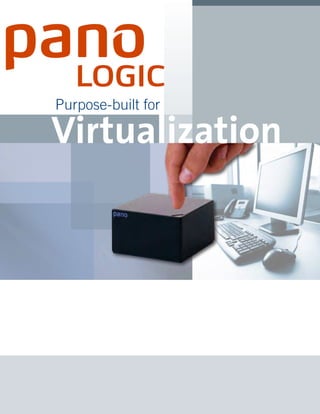
Purpose-built for Virtualization
END DESKTOP COMPUTING COMPLEXITY 
Pano Logic delivers the true benefits of virtualization to Windows 
users, freeing your IT staff from the escalating complexity and 
overhead of provisioning , securing, and supporting desktops. 
Centralizing all processing and management off the user’s 
desk and into the data center, the Pano System cuts hours from 
the time needed to deploy or troubleshoot desktops, while 
optimizing hardware utilization and tightening data security. 
It includes everything you need in one package, all purpose-built 
for virtual desktops, getting you started quickly and painlessly. 
“What appeals to me with the Pano 
System is the simplicity of the 
solution. I basically provisioned my 
virtual desktops and was able to 
start using our new Panos literally 
within a couple of hours.” 
Jeff Cunningham, Director of 
Information Systems for the 
AREC department at the 
University of Maryland 
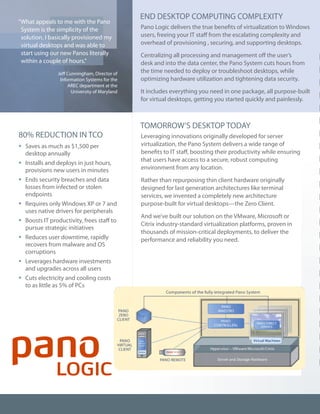
80% REDUCTION IN TCO 
ƒƒSaves as much as $1,500 per 
desktop annually 
ƒƒInstalls and deploys in just hours, 
provisions new users in minutes 
ƒƒEnds security breaches and data 
losses from infected or stolen 
endpoints 
ƒƒRequires only Windows XP or 7 and 
uses native drivers for peripherals 
ƒƒBoosts IT productivity, frees staff to 
pursue strategic initiatives 
ƒƒReduces user downtime, rapidly 
recovers from malware and OS 
corruptions 
ƒƒLeverages hardware investments 
and upgrades across all users 
ƒƒCuts electricity and cooling costs 
to as little as 5% of PCs 
TOMORROW’S DESKTOP TODAY 
Leveraging innovations originally developed for server 
virtualization, the Pano System delivers a wide range of 
benefits to IT staff, boosting their productivity while ensuring 
that users have access to a secure, robust computing 
environment from any location. 
Rather than repurposing thin client hardware originally 
designed for last generation architectures like terminal 
services, we invented a completely new architecture 
purpose-built for virtual desktops—the Zero Client. 
And we’ve built our solution on the VMware, Microsoft or 
Citrix industry-standard virtualization platforms, proven in 
thousands of mission-critical deployments, to deliver the 
performance and reliability you need.
COMPLETE SOLUTION 
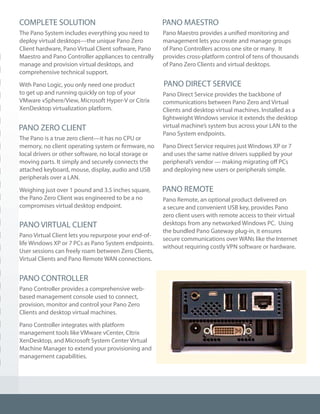
The Pano System includes everything you need to 
deploy virtual desktops—the unique Pano Zero 
Client hardware, Pano Virtual Client software, Pano 
Maestro and Pano Controller appliances to centrally 
manage and provision virtual desktops, and 
comprehensive technical support. 
With Pano Logic, you only need one product 
to get up and running quickly on top of your 
VMware vSphere/View, Microsoft Hyper-V or Citrix 
XenDesktop virtualization platform. 
PANO ZERO CLIENT 
The Pano is a true zero client—it has no CPU or 
memory, no client operating system or firmware, no 
local drivers or other software, no local storage or 
moving parts. It simply and securely connects the 
attached keyboard, mouse, display, audio and USB 
peripherals over a LAN. 
Weighing just over 1 pound and 3.5 inches square, 
the Pano Zero Client was engineered to be a no 
compromises virtual desktop endpoint. 
PANO VIRTUAL CLIENT 
Pano Virtual Client lets you repurpose your end-of-life 
Windows XP or 7 PCs as Pano System endpoints. 
User sessions can freely roam between Zero Clients, 
Virtual Clients and Pano Remote WAN connections. 
PANO CONTROLLER 
Pano Controller provides a comprehensive web-based 
management console used to connect, 
provision, monitor and control your Pano Zero 
Clients and desktop virtual machines. 
Pano Controller integrates with platform 
management tools like VMware vCenter, CItrix 
XenDesktop, and Microsoft System Center Virtual 
Machine Manager to extend your provisioning and 
management capabilities. 
PANO MAESTRO 
Pano Maestro provides a unified monitoring and 
management lets you create and manage groups 
of Pano Controllers across one site or many. It 
provides cross-platform control of tens of thousands 
of Pano Zero Clients and virtual desktops. 
PANO DIRECT SERVICE 
Pano Direct Service provides the backbone of 
communications between Pano Zero and Virtual 
Clients and desktop virtual machines. Installed as a 
lightweight Windows service it extends the desktop 
virtual machine’s system bus across your LAN to the 
Pano System endpoints. 
Pano Direct Service requires just Windows XP or 7 
and uses the same native drivers supplied by your 
peripheral’s vendor — making migrating off PCs 
and deploying new users or peripherals simple. 
PANO REMOTE 
Pano Remote, an optional product delivered on 
a secure and convenient USB key, provides Pano 
zero client users with remote access to their virtual 
desktops from any networked Windows PC. Using 
the bundled Pano Gateway plug-in, it ensures 
secure communications over WANs like the Internet 
without requiring costly VPN software or hardware.
PANO ZERO CLIENT TECHNICAL SPECIFICATIONS 
I/O Peripherals: Four USB 2.0 ports 
Video Display: One DVI-I port, second DVI-D monitor via optional Dual Monitor Cable. 
Includes one DVI to VGA converter. 
Networking: 10/100 Base-T Fast Ethernet twisted pair (RJ-45) 
Analog Audio Output/Input: Internal speaker; 3.5mm TRRS combo iPhone-compatible in/out mini jack 
Physical Characteristics: Height: 2.00" / 51.0mm, Width: 3.50" / 88.8mm, Depth: 3.50" / 88.8mm 
Power Supply: Worldwide auto-sensing 100-240 VAC, 50/60 Hz, 5VDC, 3.0 Amps maximum 
Power Usage: 6 watts with USB keyboard, mouse and one display connected, <0.2 watts in sleep mode 
Temperature Range: 50º to 104º F (10º to 40º C) 
Humidity: 20% to 80% non-condensing 
Weight: 1.1 lbs / 500 grams (per Pano Zero Client) 
Regulatory Compliance: RF Interference: FCC Class A, CE, RoHS Compliant 
REQUIRED VIRTUAL INFRASTRUCTURE: (one of the following) 
ƒƒVMware: 
• vSphere 4.1, 5.0, 5.0 U1; or VMware View 4.6, 5.0, 5.0.1; VMware vSphere 4/5 Essentials 
• vCenter Server 4.1 U1 or 5.0 including Appliance (optional but strongly recommended) 
ƒƒMicrosoft Hyper-V: 
• Windows Server 2008 R2 with Hyper-V or Hyper-V Server 2008 R2 
• System Center Virtual Machine Manager (required) 
ƒƒCitrix XenDesktop: 
• XenDesktop 5.5 and 5.6 
• XenServer (included with XenDesktop), VMware vSphere ESX 4.1 or 5.0, Microsoft Hyper-V 
• NetScaler MPX 9.2 hardware appliance or VPX 9.2 virtual appliance (optional) 
OPTIONAL ALTERNATE CONNECTION BROKERS: VMware View 4.5-5.0, XenDesktop 4/5 Controller 
DIRECTORY SERVICES: Microsoft Active Directory, Novell eDirectory, OpenLDAP 
DVM OPERATING SYSTEM: 32-bit Microsoft Windows XP Professional (SP2 or SP3), 32- and 64-bit 
Windows 7 Professional, Enterprise or Ultimate Editions 
PANO REMOTE HOST OPERATING SYSTEMS: Microsoft Windows XP SP3, Vista SP2, or 7 with RDP 6.1 or later 
This document was updated in May 2012 and is specific to the features and capabilities of Pano System 6.0 
© Copyright 2010, 2011, 2012 Pano Logic, Inc. 
Pano, Pano Logic, Pano Button, Pano Direct Protocol, and Pano Direct Technology are registered trademarks of Pano Logic, Inc. 
Pano Zero Client, Pano Gateway, Pano Controller, Pano Maestro, Pano Remote, Pano Virtual Client and Pano System are trademarks of Pano Logic, Inc. 
For more information visit www.panologic.com or call 650-454-8940 
Toll free (US): 877-677-PANO (877-677-7266) 
Pano Logic, Inc. 
2000 Seaport Blvd, Suite 200 
Redwood City, CA 94063 
This document was issued in August 2009 and is specific to the features and capabilities of Pano System 2.7. 
© Copyright 2009 Pano Logic, Inc. 
Pano, Pano Logic, and Pano Button, are registered trademarks of Pano Logic, Inc. Pano Device, Pano Gateway, Pano Manager, Pano Remote, 
Pano System, Pano Direct Protocol, and Pano Direct Technology are trademarks of Pano Logic, Inc. 
PANO DEVICE TECHNICAL SPECIFICATIONS 
O Peripherals: Three USB 2.0 ports 
Video Display: VGA-type video output (DB-15) 
Networking: 10/100 Base-T Fast Ethernet twisted pair (RJ-45) 
Audio Output: Internal speaker; 1/8-inch mini jack 
Audio Input: 1/8-inch mini microphone jack [future use] 
Physical Characteristics: Height: 2.00" / 51.0mm, Width: 3.50" / 88.8mm, Depth: 3.50" / 88.8mm 
Power: Worldwide auto-sensing 100-240 VAC, 50/60 Hz 
Average power usage with keyboard, mouse and display connected: 5.0 watts 
Temperature Range: 50º to 104º F (10º to 40º C) 
Humidity: 20% to 80% non-condensing 
Weight: 1.1 lbs / 500 grams (Pano Device) 
Regulatory Compliance: RF Interference: FCC Class B, CE 
Warranty: Three-year limited warranty 
REQUIRED VIRTUAL INFRASTRUCTURE: (one of the following) 
VMware ESX or ESXi Server 3.5 and VMware vCenter 2.5 or later 
Single VMware ESXi Server and VMware Infrastructure Client (VMware VIC) 
VMware vSphere 4 — ESX or ESXi 4.0 and vCenter 4.0 
OPTIONAL CONNECTION BROKERS: VMware View Manager 3.0 or 3.1 
DIRECTORY SERVICES: Microsoft Active Directory, Novell eDirectory, OpenLDAP 
DVM OPERATING SYSTEM: Microsoft Windows XP Professional, SP2 or SP3 
PANO REMOTE HOST OPERATING SYSTEMS: Microsoft Windows XP or Vista with RDP 6.1 or later 
PANO GATEWAY (FOR PANO REMOTE) HOST: Microsoft Windows Server 2008 Remote Desktop Services 
For more information visit www.panologic.com or call 650-454-8940 
Pano Logic, Inc. 
1350 Willow Road, Suite 202 
Menlo Park, CA 94025

Pano Logic - Purpose-built for Virtualization

  • 1.
  • 2.
    END DESKTOP COMPUTINGCOMPLEXITY Pano Logic delivers the true benefits of virtualization to Windows users, freeing your IT staff from the escalating complexity and overhead of provisioning , securing, and supporting desktops. Centralizing all processing and management off the user’s desk and into the data center, the Pano System cuts hours from the time needed to deploy or troubleshoot desktops, while optimizing hardware utilization and tightening data security. It includes everything you need in one package, all purpose-built for virtual desktops, getting you started quickly and painlessly. “What appeals to me with the Pano System is the simplicity of the solution. I basically provisioned my virtual desktops and was able to start using our new Panos literally within a couple of hours.” Jeff Cunningham, Director of Information Systems for the AREC department at the University of Maryland 80% REDUCTION IN TCO ƒƒSaves as much as $1,500 per desktop annually ƒƒInstalls and deploys in just hours, provisions new users in minutes ƒƒEnds security breaches and data losses from infected or stolen endpoints ƒƒRequires only Windows XP or 7 and uses native drivers for peripherals ƒƒBoosts IT productivity, frees staff to pursue strategic initiatives ƒƒReduces user downtime, rapidly recovers from malware and OS corruptions ƒƒLeverages hardware investments and upgrades across all users ƒƒCuts electricity and cooling costs to as little as 5% of PCs TOMORROW’S DESKTOP TODAY Leveraging innovations originally developed for server virtualization, the Pano System delivers a wide range of benefits to IT staff, boosting their productivity while ensuring that users have access to a secure, robust computing environment from any location. Rather than repurposing thin client hardware originally designed for last generation architectures like terminal services, we invented a completely new architecture purpose-built for virtual desktops—the Zero Client. And we’ve built our solution on the VMware, Microsoft or Citrix industry-standard virtualization platforms, proven in thousands of mission-critical deployments, to deliver the performance and reliability you need.
  • 3.
    COMPLETE SOLUTION ThePano System includes everything you need to deploy virtual desktops—the unique Pano Zero Client hardware, Pano Virtual Client software, Pano Maestro and Pano Controller appliances to centrally manage and provision virtual desktops, and comprehensive technical support. With Pano Logic, you only need one product to get up and running quickly on top of your VMware vSphere/View, Microsoft Hyper-V or Citrix XenDesktop virtualization platform. PANO ZERO CLIENT The Pano is a true zero client—it has no CPU or memory, no client operating system or firmware, no local drivers or other software, no local storage or moving parts. It simply and securely connects the attached keyboard, mouse, display, audio and USB peripherals over a LAN. Weighing just over 1 pound and 3.5 inches square, the Pano Zero Client was engineered to be a no compromises virtual desktop endpoint. PANO VIRTUAL CLIENT Pano Virtual Client lets you repurpose your end-of-life Windows XP or 7 PCs as Pano System endpoints. User sessions can freely roam between Zero Clients, Virtual Clients and Pano Remote WAN connections. PANO CONTROLLER Pano Controller provides a comprehensive web-based management console used to connect, provision, monitor and control your Pano Zero Clients and desktop virtual machines. Pano Controller integrates with platform management tools like VMware vCenter, CItrix XenDesktop, and Microsoft System Center Virtual Machine Manager to extend your provisioning and management capabilities. PANO MAESTRO Pano Maestro provides a unified monitoring and management lets you create and manage groups of Pano Controllers across one site or many. It provides cross-platform control of tens of thousands of Pano Zero Clients and virtual desktops. PANO DIRECT SERVICE Pano Direct Service provides the backbone of communications between Pano Zero and Virtual Clients and desktop virtual machines. Installed as a lightweight Windows service it extends the desktop virtual machine’s system bus across your LAN to the Pano System endpoints. Pano Direct Service requires just Windows XP or 7 and uses the same native drivers supplied by your peripheral’s vendor — making migrating off PCs and deploying new users or peripherals simple. PANO REMOTE Pano Remote, an optional product delivered on a secure and convenient USB key, provides Pano zero client users with remote access to their virtual desktops from any networked Windows PC. Using the bundled Pano Gateway plug-in, it ensures secure communications over WANs like the Internet without requiring costly VPN software or hardware.
  • 4.
    PANO ZERO CLIENTTECHNICAL SPECIFICATIONS I/O Peripherals: Four USB 2.0 ports Video Display: One DVI-I port, second DVI-D monitor via optional Dual Monitor Cable. Includes one DVI to VGA converter. Networking: 10/100 Base-T Fast Ethernet twisted pair (RJ-45) Analog Audio Output/Input: Internal speaker; 3.5mm TRRS combo iPhone-compatible in/out mini jack Physical Characteristics: Height: 2.00" / 51.0mm, Width: 3.50" / 88.8mm, Depth: 3.50" / 88.8mm Power Supply: Worldwide auto-sensing 100-240 VAC, 50/60 Hz, 5VDC, 3.0 Amps maximum Power Usage: 6 watts with USB keyboard, mouse and one display connected, <0.2 watts in sleep mode Temperature Range: 50º to 104º F (10º to 40º C) Humidity: 20% to 80% non-condensing Weight: 1.1 lbs / 500 grams (per Pano Zero Client) Regulatory Compliance: RF Interference: FCC Class A, CE, RoHS Compliant REQUIRED VIRTUAL INFRASTRUCTURE: (one of the following) ƒƒVMware: • vSphere 4.1, 5.0, 5.0 U1; or VMware View 4.6, 5.0, 5.0.1; VMware vSphere 4/5 Essentials • vCenter Server 4.1 U1 or 5.0 including Appliance (optional but strongly recommended) ƒƒMicrosoft Hyper-V: • Windows Server 2008 R2 with Hyper-V or Hyper-V Server 2008 R2 • System Center Virtual Machine Manager (required) ƒƒCitrix XenDesktop: • XenDesktop 5.5 and 5.6 • XenServer (included with XenDesktop), VMware vSphere ESX 4.1 or 5.0, Microsoft Hyper-V • NetScaler MPX 9.2 hardware appliance or VPX 9.2 virtual appliance (optional) OPTIONAL ALTERNATE CONNECTION BROKERS: VMware View 4.5-5.0, XenDesktop 4/5 Controller DIRECTORY SERVICES: Microsoft Active Directory, Novell eDirectory, OpenLDAP DVM OPERATING SYSTEM: 32-bit Microsoft Windows XP Professional (SP2 or SP3), 32- and 64-bit Windows 7 Professional, Enterprise or Ultimate Editions PANO REMOTE HOST OPERATING SYSTEMS: Microsoft Windows XP SP3, Vista SP2, or 7 with RDP 6.1 or later This document was updated in May 2012 and is specific to the features and capabilities of Pano System 6.0 © Copyright 2010, 2011, 2012 Pano Logic, Inc. Pano, Pano Logic, Pano Button, Pano Direct Protocol, and Pano Direct Technology are registered trademarks of Pano Logic, Inc. Pano Zero Client, Pano Gateway, Pano Controller, Pano Maestro, Pano Remote, Pano Virtual Client and Pano System are trademarks of Pano Logic, Inc. For more information visit www.panologic.com or call 650-454-8940 Toll free (US): 877-677-PANO (877-677-7266) Pano Logic, Inc. 2000 Seaport Blvd, Suite 200 Redwood City, CA 94063 This document was issued in August 2009 and is specific to the features and capabilities of Pano System 2.7. © Copyright 2009 Pano Logic, Inc. Pano, Pano Logic, and Pano Button, are registered trademarks of Pano Logic, Inc. Pano Device, Pano Gateway, Pano Manager, Pano Remote, Pano System, Pano Direct Protocol, and Pano Direct Technology are trademarks of Pano Logic, Inc. PANO DEVICE TECHNICAL SPECIFICATIONS O Peripherals: Three USB 2.0 ports Video Display: VGA-type video output (DB-15) Networking: 10/100 Base-T Fast Ethernet twisted pair (RJ-45) Audio Output: Internal speaker; 1/8-inch mini jack Audio Input: 1/8-inch mini microphone jack [future use] Physical Characteristics: Height: 2.00" / 51.0mm, Width: 3.50" / 88.8mm, Depth: 3.50" / 88.8mm Power: Worldwide auto-sensing 100-240 VAC, 50/60 Hz Average power usage with keyboard, mouse and display connected: 5.0 watts Temperature Range: 50º to 104º F (10º to 40º C) Humidity: 20% to 80% non-condensing Weight: 1.1 lbs / 500 grams (Pano Device) Regulatory Compliance: RF Interference: FCC Class B, CE Warranty: Three-year limited warranty REQUIRED VIRTUAL INFRASTRUCTURE: (one of the following) VMware ESX or ESXi Server 3.5 and VMware vCenter 2.5 or later Single VMware ESXi Server and VMware Infrastructure Client (VMware VIC) VMware vSphere 4 — ESX or ESXi 4.0 and vCenter 4.0 OPTIONAL CONNECTION BROKERS: VMware View Manager 3.0 or 3.1 DIRECTORY SERVICES: Microsoft Active Directory, Novell eDirectory, OpenLDAP DVM OPERATING SYSTEM: Microsoft Windows XP Professional, SP2 or SP3 PANO REMOTE HOST OPERATING SYSTEMS: Microsoft Windows XP or Vista with RDP 6.1 or later PANO GATEWAY (FOR PANO REMOTE) HOST: Microsoft Windows Server 2008 Remote Desktop Services For more information visit www.panologic.com or call 650-454-8940 Pano Logic, Inc. 1350 Willow Road, Suite 202 Menlo Park, CA 94025