PaaS Cloud with Java
Eberhard Wolff, Principal Technologist, SpringSource – A division of VMware
ewolff@vmware.com
Twitter: @ewolff
Blog: http://ewolff.com


                                                                    © 2009 VMware Inc. All rights reserved
Agenda
§  A Few Words About Cloud
§  PaaS – Platform as a Service
§  Google App Engine
§  Vmforce
§  Amazon Beanstalk


                                   2
A Few Words About Cloud


                          3
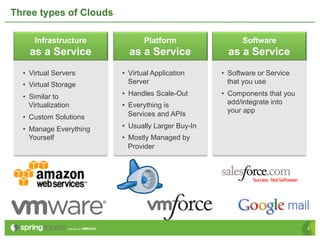
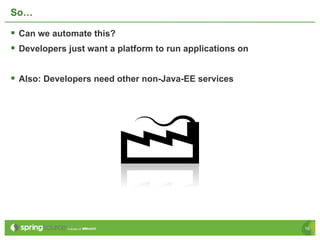
Three types of Clouds

      Infrastructure            Platform                  Software
    as a Service           as a Service               as a Service
  •  Virtual Servers     •  Virtual Application     •  Software or Service
  •  Virtual Storage        Server                     that you use

  •  Similar to          •  Handles Scale-Out       •  Components that you
     Virtualization      •  Everything is              add/integrate into
                                                       your app
  •  Custom Solutions       Services and APIs

  •  Manage Everything   •  Usually Larger Buy-In
     Yourself            •  Mostly Managed by
                            Provider


                                                                             4
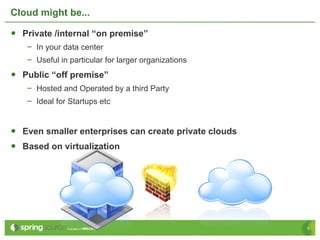
Cloud might be...

•  Private /internal “on premise”
   –  In your data center
   –  Useful in particular for larger organizations
•  Public “off premise”
   –  Hosted and Operated by a third Party
   –  Ideal for Startups etc


•  Even smaller enterprises can create private clouds
•  Based on virtualization


                                                        5
Cloud at the Core is a Business Model

§  Customer pays only for what he uses
 •  Per CPU hour or cycles, per GB of storage, per MB of network bandwidth
 •  Per user and year
 •  Not for having stand-by capacity


§  Flexibility: More capacity is available on demand
 •  Instantly available
 •  Customer uses GUI or API to expand capacity
 •  Cloud provider is responsible for having capacity ready


§  Makes IT just another service


                                                                             6
Why Cloud?

§  Compelling Economics
  •  Lower CapEx
  •  Cheaper handling of peak loads
  •  Better resource utilization
  •  Simple to achieve benefits – direct ROI


§  Flexibility and better productivity for
  development
  •  Much easier to set up environments
  •  Feasible to have production-like environments
   quickly and cheaply available
  •  Indirect: Better productivity leads to cost
   saving / better time to market


                                                     7
OK, so let me get started


                            8
So, let me get started

§  Get an account at an IaaS provider
§  …or virtualize your data center and create a self service portal

§  Install your (Java EE) environment
§  Install your (Java) application
§  Done

§  Wow, that was easy!


                                                                       9
That is not enough

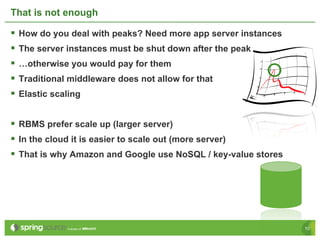
§  How do you deal with peaks? Need more app server instances
§  The server instances must be shut down after the peak
§  …otherwise you would pay for them
§  Traditional middleware does not allow for that
§  Elastic scaling

§  RBMS prefer scale up (larger server)
§  In the cloud it is easier to scale out (more server)
§  That is why Amazon and Google use NoSQL / key-value stores


                                                                 10
That is not enough: Handling Lot of Date

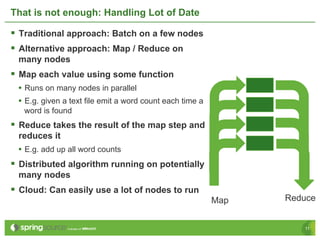
§  Traditional approach: Batch on a few nodes
§  Alternative approach: Map / Reduce on
 many nodes
§  Map each value using some function
 •  Runs on many nodes in parallel
 •  E.g. given a text file emit a word count each time a
   word is found
§  Reduce takes the result of the map step and
 reduces it
 •  E.g. add up all word counts
§  Distributed algorithm running on potentially
 many nodes
§  Cloud: Can easily use a lot of nodes to run
                                                           Map   Reduce


                                                                    11
That is not enough: More Than Just a Virtualized Computer

§  Additional services
  •  Amazon Simple Queue Service (SQS)
  •  Amazon Simple Notification Service (SNS)
  •  Amazon Simple Storage Service (S3)
  •  Amazon Elastic Block Store (EBS)


                                                            12
Cloud Influences the Programming Model

§  Some Jave EE technologies are not a good fit
 •  Non-JMS messaging technologies
   •  AMQP / RabbitMQ
   •  Amazon Simple Queue Service (SQS)
   •  Amazon Simple Notification Service (SNS)
 •  Two Phase Commit / JTA leads to long locking / strong coupling
 •  What do you do about Map / Reduce?
 •  What do you do about NoSQL?


§  You might be better off with a different programming model
 •  Spring can handle non-Java-EE environments (e.g. Tomcat)
 •  Projects for NoSQL, AMQP …


                                                                     13
More Flexibility Needed

§  And remember: You pay the resources you consume
§  You need to use more or less resources based on load

§  You need to be able to shut down servers if load is low
§  You need to be able to start new servers if load is high


                                                               14
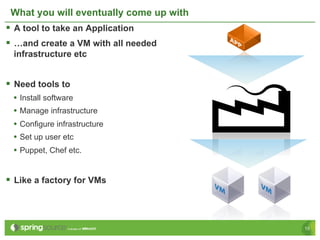
What you will eventually come up with
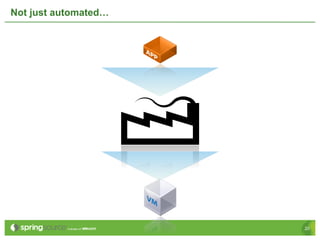
§  A tool to take an Application
§  …and create a VM with all needed
  infrastructure etc


§  Need tools to
  •  Install software
  •  Manage infrastructure
  •  Configure infrastructure
  •  Set up user etc
  •  Puppet, Chef etc.


§  Like a factory for VMs


                                         15
So…

§  Can we automate this?
§  Developers just want a platform to run applications on

§  Also: Developers need other non-Java-EE services


                                                             16
Introducing…


               17
The PaaS!

            18
Platform as a service (PaaS) the delivery of a
computing platform and solution stack as a
                   service.


                                                 19
Not just automated…


                      20
Invisible


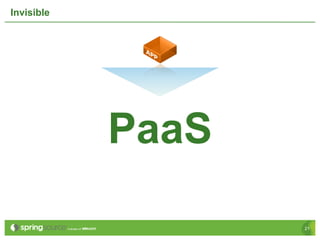
            PaaS

                   21
PaaS: Advantages and Disadvantages

§  Advantages
 •  More useful than IaaS: You would need to install a server anyway
 •  Automatic scaling
   •  Resources automatically added
 •  Can offer additional service
   •  Tuned for Cloud
   •  Technical e.g. data store, messaging, GUI elements
   •  Domain e.g. predefined data model
§  Disadvantages
 •  Less flexible
   •  Pre-defined programming model
   •  Defines environment
 •  Programming model might be different
   •  Hard to port existing code
   •  Need to learn

                                                                       22
Google App Engine


                    23
Google App Engine

§  Infrastructure offered by Google
§  Supports Java and Python

§  Infrastructure completely hidden

§  GAE sandbox more restrictive than normal JVM sandbox
§  So GAE can handle your application better
§  Java classes white list
 •  i.e. some Java classes must not be used
 •  no Thread
 •  no file system
 •  parts of System class (e.g. gc(), exit()…)
 •  Reflection and ClassLoader work

                                                           24
Google App Engine: Storage

§  Relational database only in App Engine for Business
§  Based on BigTable
  •  Google's storage technology
  •  Key/value i.e. objects stored under some key
  •  No joins
  •  Simple / simplistic (?)
  •  Scalable
  •  Example of NoSQL
  •  Principles will be discussed further in NoSQL


§  Max. 1 MB per entity (and other limitations)


                                                          25
Google App Engine: Storage APIs
§  API: Low level com.google.appengine.api.datastore
 •  Not compatible to JDBC or the like
 •  Queries, transactions, entities etc.
 •  Should only be used by framework
§  API: JDO (Java Data Objects)
 •  Standard for O/R Mapper and OODBMS
 •  Unsupported: Joins, JDOQL grouping and aggregates, polymorphic queries
§  API: JPA (Java Persistence API)
 •  Well established standard for O/R Mappers
 •  Unsupported: Many-to-many relationships; join, aggregate and polymorphic
   queries, some inheritance mappings
§  Problem: JPA / JDO based on RDBMS, but this is key/value
 §  So maybe use the low level API instead?
§  JPA and JDO actually implemented by Data Nucleus library
 •  Byte code must be enhanced in an additional compile step
                                                                               26
Google App Engine: Additional services

§  Memcache
 •  Implements JCache (JSR 107)
 •  Fast access to data in memory
§  URL Fetch based on java.net.URL to read data via HTTP
§  EMail support using JavaMail
§  XMPP instant messages (proprietary API)
§  Image Manipulation (proprietary API)
§  Authentication / Authorization based on Google accounts
 (proprietary API)
§  Task queuing (proprietary API, experimental)
§  Blob store (proprietary API, experimental) for data >1MB
§  Numerous other services available (not tied to App Engine)
 §  Google Predict, Google BigQuery …

                                                                 27
Google App Engine for Business

§  Centralized administration.
§  99.9% uptime SLA
§  Premium developer support available.
§  Sign on for users from your Google Apps domain
§  Announced
 •  SSL on your company’s domain for secure communications
 •  Access to advanced Google services.


                                                             28
Google App Engine

§  Documentation + SDK + Eclipse Plug In available
§  SDK contains environment for local tests

§  Spring / Spring Roo is the preferred programming model
§  …as it is popular and works with the limited model of the Google
 App Engine


§  http://code.google.com/appengine/


                                                                       29
Google App Engine Demo


                         © 2009 VMware Inc. All rights reserved
31
VMforce

§  Joined offerings by Salesforce and VMware
§  Salesforce
 •  Leading provider for SaaS / CRM
§  Salesforce offers force.com environment
 •  Scalable PaaS
 •  Database + data model
 •  Charting
 •  Reporting
 •  Chat etc
§  VMforce = force.com + VMware virtualization + SpringSource
 programming model


                                                                 32
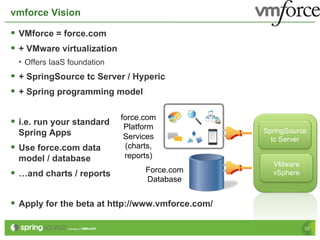
vmforce Vision

§  VMforce = force.com
§  + VMware virtualization
  •  Offers IaaS foundation
§  + SpringSource tc Server / Hyperic
§  + Spring programming model

                              force.com
§  i.e. run your standard     Platform
  Spring Apps                                       SpringSource
                               Services               tc Server
§  Use force.com data         (charts,
  model / database             reports)
                                                      VMware
§  …and charts / reports           Force.com         vSphere
                                    Database


§  Apply for the beta at http://www.vmforce.com/

                                                                33
Amazon BeanStalk

§  Based on the Amazon EC2 infrastructure
§  Add Linux, OpenJDK, Tomcat
§  Currently in beta
§  …and only in US-East
§  Eclipse Plug In available
§  Supports version handling of applications
§  Supports scaling depending on load indicators
§  Access to Tomcat logs etc.

§  Videos to get started
§  Demo application based on Spring
 •  Uses also S3 (storage) and Simple Notification Service (SNS)


                                                                   34
PaaS: Conclusion

§  PaaS offer a runtime environment in the cloud
§  Usually based on IaaS
§  Makes Cloud easier usable for a developer
§  …but less customizable and less choice
§  Technical challenges (scalability) solved by platform
§  Spring can be used as a universal model

§  Each PaaS differentiate themselves with their added services
  §  VMforce: database model, charts, reports, GUI elements
   (functional components)
  §  GAE: Big Table, caching, security, image processing, blob storage
   (technical platform)
  §  Amazon Beanstalk: Standard Java stack
§  Choose the right tool for the job!
                                                                          35

PaaS with Java

  • 1.
    PaaS Cloud withJava Eberhard Wolff, Principal Technologist, SpringSource – A division of VMware ewolff@vmware.com Twitter: @ewolff Blog: http://ewolff.com © 2009 VMware Inc. All rights reserved
  • 2.
    Agenda §  A FewWords About Cloud §  PaaS – Platform as a Service §  Google App Engine §  Vmforce §  Amazon Beanstalk 2
  • 3.
    A Few WordsAbout Cloud 3
  • 4.
    Three types ofClouds Infrastructure Platform Software as a Service as a Service as a Service •  Virtual Servers •  Virtual Application •  Software or Service •  Virtual Storage Server that you use •  Similar to •  Handles Scale-Out •  Components that you Virtualization •  Everything is add/integrate into your app •  Custom Solutions Services and APIs •  Manage Everything •  Usually Larger Buy-In Yourself •  Mostly Managed by Provider 4
  • 5.
    Cloud might be... • Private /internal “on premise” –  In your data center –  Useful in particular for larger organizations •  Public “off premise” –  Hosted and Operated by a third Party –  Ideal for Startups etc •  Even smaller enterprises can create private clouds •  Based on virtualization 5
  • 6.
    Cloud at theCore is a Business Model §  Customer pays only for what he uses •  Per CPU hour or cycles, per GB of storage, per MB of network bandwidth •  Per user and year •  Not for having stand-by capacity §  Flexibility: More capacity is available on demand •  Instantly available •  Customer uses GUI or API to expand capacity •  Cloud provider is responsible for having capacity ready §  Makes IT just another service 6
  • 7.
    Why Cloud? §  CompellingEconomics •  Lower CapEx •  Cheaper handling of peak loads •  Better resource utilization •  Simple to achieve benefits – direct ROI §  Flexibility and better productivity for development •  Much easier to set up environments •  Feasible to have production-like environments quickly and cheaply available •  Indirect: Better productivity leads to cost saving / better time to market 7
  • 8.
    OK, so letme get started 8
  • 9.
    So, let meget started §  Get an account at an IaaS provider §  …or virtualize your data center and create a self service portal §  Install your (Java EE) environment §  Install your (Java) application §  Done §  Wow, that was easy! 9
  • 10.
    That is notenough §  How do you deal with peaks? Need more app server instances §  The server instances must be shut down after the peak §  …otherwise you would pay for them §  Traditional middleware does not allow for that §  Elastic scaling §  RBMS prefer scale up (larger server) §  In the cloud it is easier to scale out (more server) §  That is why Amazon and Google use NoSQL / key-value stores 10
  • 11.
    That is notenough: Handling Lot of Date §  Traditional approach: Batch on a few nodes §  Alternative approach: Map / Reduce on many nodes §  Map each value using some function •  Runs on many nodes in parallel •  E.g. given a text file emit a word count each time a word is found §  Reduce takes the result of the map step and reduces it •  E.g. add up all word counts §  Distributed algorithm running on potentially many nodes §  Cloud: Can easily use a lot of nodes to run Map Reduce 11
  • 12.
    That is notenough: More Than Just a Virtualized Computer §  Additional services •  Amazon Simple Queue Service (SQS) •  Amazon Simple Notification Service (SNS) •  Amazon Simple Storage Service (S3) •  Amazon Elastic Block Store (EBS) 12
  • 13.
    Cloud Influences theProgramming Model §  Some Jave EE technologies are not a good fit •  Non-JMS messaging technologies •  AMQP / RabbitMQ •  Amazon Simple Queue Service (SQS) •  Amazon Simple Notification Service (SNS) •  Two Phase Commit / JTA leads to long locking / strong coupling •  What do you do about Map / Reduce? •  What do you do about NoSQL? §  You might be better off with a different programming model •  Spring can handle non-Java-EE environments (e.g. Tomcat) •  Projects for NoSQL, AMQP … 13
  • 14.
    More Flexibility Needed § And remember: You pay the resources you consume §  You need to use more or less resources based on load §  You need to be able to shut down servers if load is low §  You need to be able to start new servers if load is high 14
  • 15.
    What you willeventually come up with §  A tool to take an Application §  …and create a VM with all needed infrastructure etc §  Need tools to •  Install software •  Manage infrastructure •  Configure infrastructure •  Set up user etc •  Puppet, Chef etc. §  Like a factory for VMs 15
  • 16.
    So… §  Can weautomate this? §  Developers just want a platform to run applications on §  Also: Developers need other non-Java-EE services 16
  • 17.
  • 18.
  • 19.
    Platform as aservice (PaaS) the delivery of a computing platform and solution stack as a service. 19
  • 20.
  • 21.
    Invisible PaaS 21
  • 22.
    PaaS: Advantages andDisadvantages §  Advantages •  More useful than IaaS: You would need to install a server anyway •  Automatic scaling •  Resources automatically added •  Can offer additional service •  Tuned for Cloud •  Technical e.g. data store, messaging, GUI elements •  Domain e.g. predefined data model §  Disadvantages •  Less flexible •  Pre-defined programming model •  Defines environment •  Programming model might be different •  Hard to port existing code •  Need to learn 22
  • 23.
  • 24.
    Google App Engine § Infrastructure offered by Google §  Supports Java and Python §  Infrastructure completely hidden §  GAE sandbox more restrictive than normal JVM sandbox §  So GAE can handle your application better §  Java classes white list •  i.e. some Java classes must not be used •  no Thread •  no file system •  parts of System class (e.g. gc(), exit()…) •  Reflection and ClassLoader work 24
  • 25.
    Google App Engine:Storage §  Relational database only in App Engine for Business §  Based on BigTable •  Google's storage technology •  Key/value i.e. objects stored under some key •  No joins •  Simple / simplistic (?) •  Scalable •  Example of NoSQL •  Principles will be discussed further in NoSQL §  Max. 1 MB per entity (and other limitations) 25
  • 26.
    Google App Engine:Storage APIs §  API: Low level com.google.appengine.api.datastore •  Not compatible to JDBC or the like •  Queries, transactions, entities etc. •  Should only be used by framework §  API: JDO (Java Data Objects) •  Standard for O/R Mapper and OODBMS •  Unsupported: Joins, JDOQL grouping and aggregates, polymorphic queries §  API: JPA (Java Persistence API) •  Well established standard for O/R Mappers •  Unsupported: Many-to-many relationships; join, aggregate and polymorphic queries, some inheritance mappings §  Problem: JPA / JDO based on RDBMS, but this is key/value §  So maybe use the low level API instead? §  JPA and JDO actually implemented by Data Nucleus library •  Byte code must be enhanced in an additional compile step 26
  • 27.
    Google App Engine:Additional services §  Memcache •  Implements JCache (JSR 107) •  Fast access to data in memory §  URL Fetch based on java.net.URL to read data via HTTP §  EMail support using JavaMail §  XMPP instant messages (proprietary API) §  Image Manipulation (proprietary API) §  Authentication / Authorization based on Google accounts (proprietary API) §  Task queuing (proprietary API, experimental) §  Blob store (proprietary API, experimental) for data >1MB §  Numerous other services available (not tied to App Engine) §  Google Predict, Google BigQuery … 27
  • 28.
    Google App Enginefor Business §  Centralized administration. §  99.9% uptime SLA §  Premium developer support available. §  Sign on for users from your Google Apps domain §  Announced •  SSL on your company’s domain for secure communications •  Access to advanced Google services. 28
  • 29.
    Google App Engine § Documentation + SDK + Eclipse Plug In available §  SDK contains environment for local tests §  Spring / Spring Roo is the preferred programming model §  …as it is popular and works with the limited model of the Google App Engine §  http://code.google.com/appengine/ 29
  • 30.
    Google App EngineDemo © 2009 VMware Inc. All rights reserved
  • 31.
  • 32.
    VMforce §  Joined offeringsby Salesforce and VMware §  Salesforce •  Leading provider for SaaS / CRM §  Salesforce offers force.com environment •  Scalable PaaS •  Database + data model •  Charting •  Reporting •  Chat etc §  VMforce = force.com + VMware virtualization + SpringSource programming model 32
  • 33.
    vmforce Vision §  VMforce= force.com §  + VMware virtualization •  Offers IaaS foundation §  + SpringSource tc Server / Hyperic §  + Spring programming model force.com §  i.e. run your standard Platform Spring Apps SpringSource Services tc Server §  Use force.com data (charts, model / database reports) VMware §  …and charts / reports Force.com vSphere Database §  Apply for the beta at http://www.vmforce.com/ 33
  • 34.
    Amazon BeanStalk §  Basedon the Amazon EC2 infrastructure §  Add Linux, OpenJDK, Tomcat §  Currently in beta §  …and only in US-East §  Eclipse Plug In available §  Supports version handling of applications §  Supports scaling depending on load indicators §  Access to Tomcat logs etc. §  Videos to get started §  Demo application based on Spring •  Uses also S3 (storage) and Simple Notification Service (SNS) 34
  • 35.
    PaaS: Conclusion §  PaaSoffer a runtime environment in the cloud §  Usually based on IaaS §  Makes Cloud easier usable for a developer §  …but less customizable and less choice §  Technical challenges (scalability) solved by platform §  Spring can be used as a universal model §  Each PaaS differentiate themselves with their added services §  VMforce: database model, charts, reports, GUI elements (functional components) §  GAE: Big Table, caching, security, image processing, blob storage (technical platform) §  Amazon Beanstalk: Standard Java stack §  Choose the right tool for the job! 35