

Vijay Raj, Texas Instrumentshttp://www.msigeek.comOvercoming the application compatibility hurdle in Windows 7SESSION CODE: #####
About MeWork at Texas InstrumentsExpertise in Application Setups & Deployment (MVP)STEP Member for Windows 7Passionate about Technology EvangelismAvid Blogger at www.msigeek.com Excited about Cricket and MusicFan of Mark Russinovich, Sachin and Rahman!
Session OutlineTop Focus Areas when you move to Windows 7What has changed in Windows 7How it would affect the applications?Methods to mitigate the Compatibility IssuesApplication Compatibility Toolkit 5.5Basics, Setup Instructions, Analyzing ACT Reports, Standard User Analyzer and ShimsOverview of Microsoft Virtualization SolutionsSimple steps to fix Broken Applications
Session TakeawaysLearn how to start your Application Compatibility ProcessHow to work with ShimsMethods to mitigate and fix Broken Applications
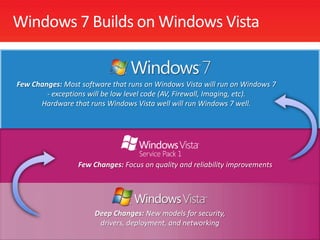
Windows 7 Builds on Windows VistaFew Changes: Most software that runs on Windows Vista will run on Windows 7 - exceptions will be low level code (AV, Firewall, Imaging, etc).  Hardware that runs Windows Vista well will run Windows 7 well.Few Changes: Focus on quality and reliability improvementsDeep Changes: New models for security, drivers, deployment, and networking
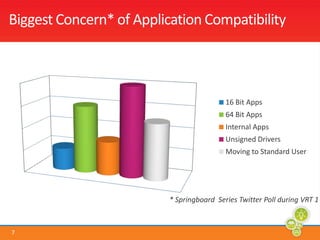
Biggest Concern* of Application Compatibility
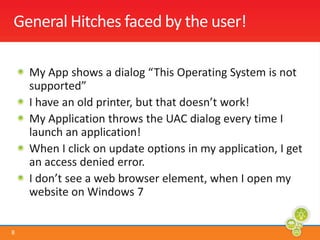
General Hitches faced by the user!My App shows a dialog “This Operating System is not supported”I have an old printer, but that doesn’t work!My Application throws the UAC dialog every time I launch an application!When I click on update options in my application, I get an access denied error.I don’t see a web browser element, when I open my website on Windows 7
Now how do we fix them?
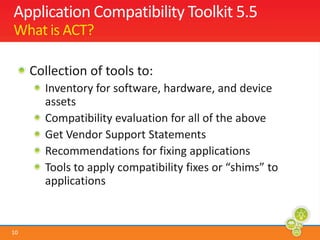
Application Compatibility Toolkit 5.5What is ACT?Collection of tools to:Inventory for software, hardware, and device assetsCompatibility evaluation for all of the aboveGet Vendor Support StatementsRecommendations for fixing applicationsTools to apply compatibility fixes or “shims” to applications
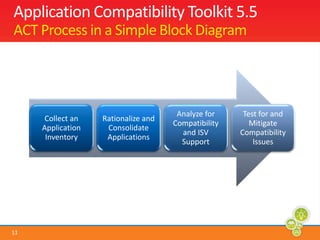
Application Compatibility Toolkit 5.5ACT Process in a Simple Block Diagram
ACT Walkthrough, ReportsDemo
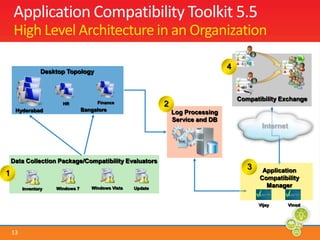
UpdateWindows 7InventoryApplication Compatibility Toolkit 5.5High Level Architecture in an Organization4Desktop TopologyCompatibility Exchange2FinanceHRBangaloreHyderabadLog Processing Service and DBInternetData Collection Package/Compatibility Evaluators3Application Compatibility Manager1Windows VistaVinodVijay
Shims and LayersWhat are Shims and Layers?When to Use ShimsVender no longer in businessInternal applicationsSupport negotiable
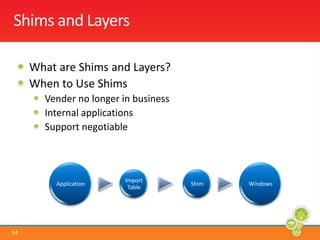
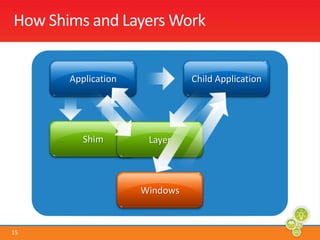
How Shims and Layers WorkApplicationChild ApplicationShimLayerWindows
Creating Shims and Deploying themboth in a machine and EnterpriseDemo
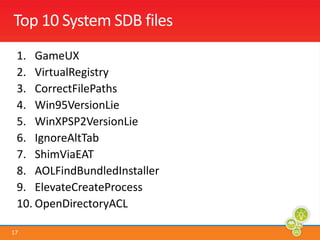
Top 10 System SDB filesGameUXVirtualRegistryCorrectFilePathsWin95VersionLieWinXPSP2VersionLieIgnoreAltTabShimViaEATAOLFindBundledInstallerElevateCreateProcessOpenDirectoryACL
Win XP Mode – Running two different version of IE browsers, Using lower version of SoftwareDemo
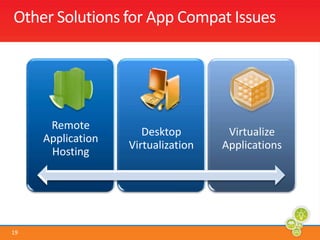
Other Solutions for App Compat Issues
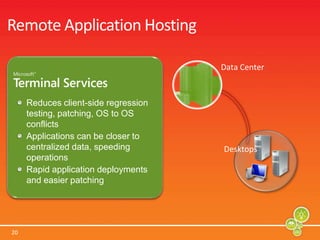
Remote Application HostingData CenterReduces client-side regression testing, patching, OS to OS conflictsApplications can be closer to centralized data, speeding operationsRapid application deployments and easier patchingDesktops
Desktop VirtualizationCentrally manage Virtual PCsSimplify Virtual PC image delivery and updateSeamless presentation of windows in a Virtual PC
Application Virtualization (App-V)Isolates applications from each otherMinimizes app-to-app conflicts and compatibility testingEnhances application provisioningProvide real-time usage reports
Summing upWindows 7 is more feature rich in terms of Security and reliability. Always test your applications as Standard UsersAppCompat is a critical Process – Microsoft takes this very seriouslyLots of free tools available online to help with developers and ITProsWith all the work and leveraging Windows 7, You will know realize that, “ The Juice is worth the Squeeze..!”
ReferencesChris Jackson’s Blog - http://blogs.msdn.com/cjacks/AppCompat VRTs - http://www.microsoft.com/springboard Microsoft TechNet  - http://www.technet.com/appcompatHow To’s and Tips  - http://appcompat.msigeek.comFollow me on Twitter at @msigeek
Related SessionsWhy is Terminal Services called Remote Desktop Services? – Apr 13 – 2.30 to 3.30Virtualization Scenarios for Business Critical Applications – Apr 14 – 11.15 to 12.15How to pick the right Desktop Virtualization solution –Apr 14 – 3.45 to 4.45
© 2008 Microsoft Corporation. All rights reserved. Microsoft, Windows, Windows Vista and other product names are or may be registered trademarks and/or trademarks in the U.S. and/or other countries.The information herein is for informational purposes only and represents the current view of Microsoft Corporation as of the date of this presentation.  Because Microsoft must respond to changing market conditions, it should not be interpreted to be a commitment on the part of Microsoft, and Microsoft cannot guarantee the accuracy of any information provided after the date of this presentation.  MICROSOFT MAKES NO WARRANTIES, EXPRESS, IMPLIED OR STATUTORY, AS TO THE INFORMATION IN THIS PRESENTATION.

Overcoming the application compatibility hurdle in windows 7

  • 2.
    Vijay Raj, TexasInstrumentshttp://www.msigeek.comOvercoming the application compatibility hurdle in Windows 7SESSION CODE: #####
  • 3.
    About MeWork atTexas InstrumentsExpertise in Application Setups & Deployment (MVP)STEP Member for Windows 7Passionate about Technology EvangelismAvid Blogger at www.msigeek.com Excited about Cricket and MusicFan of Mark Russinovich, Sachin and Rahman!
  • 4.
    Session OutlineTop FocusAreas when you move to Windows 7What has changed in Windows 7How it would affect the applications?Methods to mitigate the Compatibility IssuesApplication Compatibility Toolkit 5.5Basics, Setup Instructions, Analyzing ACT Reports, Standard User Analyzer and ShimsOverview of Microsoft Virtualization SolutionsSimple steps to fix Broken Applications
  • 5.
    Session TakeawaysLearn howto start your Application Compatibility ProcessHow to work with ShimsMethods to mitigate and fix Broken Applications
  • 6.
    Windows 7 Buildson Windows VistaFew Changes: Most software that runs on Windows Vista will run on Windows 7 - exceptions will be low level code (AV, Firewall, Imaging, etc). Hardware that runs Windows Vista well will run Windows 7 well.Few Changes: Focus on quality and reliability improvementsDeep Changes: New models for security, drivers, deployment, and networking
  • 7.
    Biggest Concern* ofApplication Compatibility
  • 8.
    General Hitches facedby the user!My App shows a dialog “This Operating System is not supported”I have an old printer, but that doesn’t work!My Application throws the UAC dialog every time I launch an application!When I click on update options in my application, I get an access denied error.I don’t see a web browser element, when I open my website on Windows 7
  • 9.
    Now how dowe fix them?
  • 10.
    Application Compatibility Toolkit5.5What is ACT?Collection of tools to:Inventory for software, hardware, and device assetsCompatibility evaluation for all of the aboveGet Vendor Support StatementsRecommendations for fixing applicationsTools to apply compatibility fixes or “shims” to applications
  • 11.
    Application Compatibility Toolkit5.5ACT Process in a Simple Block Diagram
  • 12.
  • 13.
    UpdateWindows 7InventoryApplication CompatibilityToolkit 5.5High Level Architecture in an Organization4Desktop TopologyCompatibility Exchange2FinanceHRBangaloreHyderabadLog Processing Service and DBInternetData Collection Package/Compatibility Evaluators3Application Compatibility Manager1Windows VistaVinodVijay
  • 14.
    Shims and LayersWhatare Shims and Layers?When to Use ShimsVender no longer in businessInternal applicationsSupport negotiable
  • 15.
    How Shims andLayers WorkApplicationChild ApplicationShimLayerWindows
  • 16.
    Creating Shims andDeploying themboth in a machine and EnterpriseDemo
  • 17.
    Top 10 SystemSDB filesGameUXVirtualRegistryCorrectFilePathsWin95VersionLieWinXPSP2VersionLieIgnoreAltTabShimViaEATAOLFindBundledInstallerElevateCreateProcessOpenDirectoryACL
  • 18.
    Win XP Mode– Running two different version of IE browsers, Using lower version of SoftwareDemo
  • 19.
    Other Solutions forApp Compat Issues
  • 20.
    Remote Application HostingDataCenterReduces client-side regression testing, patching, OS to OS conflictsApplications can be closer to centralized data, speeding operationsRapid application deployments and easier patchingDesktops
  • 21.
    Desktop VirtualizationCentrally manageVirtual PCsSimplify Virtual PC image delivery and updateSeamless presentation of windows in a Virtual PC
  • 22.
    Application Virtualization (App-V)Isolatesapplications from each otherMinimizes app-to-app conflicts and compatibility testingEnhances application provisioningProvide real-time usage reports
  • 23.
    Summing upWindows 7is more feature rich in terms of Security and reliability. Always test your applications as Standard UsersAppCompat is a critical Process – Microsoft takes this very seriouslyLots of free tools available online to help with developers and ITProsWith all the work and leveraging Windows 7, You will know realize that, “ The Juice is worth the Squeeze..!”
  • 24.
    ReferencesChris Jackson’s Blog- http://blogs.msdn.com/cjacks/AppCompat VRTs - http://www.microsoft.com/springboard Microsoft TechNet - http://www.technet.com/appcompatHow To’s and Tips - http://appcompat.msigeek.comFollow me on Twitter at @msigeek
  • 25.
    Related SessionsWhy isTerminal Services called Remote Desktop Services? – Apr 13 – 2.30 to 3.30Virtualization Scenarios for Business Critical Applications – Apr 14 – 11.15 to 12.15How to pick the right Desktop Virtualization solution –Apr 14 – 3.45 to 4.45
  • 26.
    © 2008 MicrosoftCorporation. All rights reserved. Microsoft, Windows, Windows Vista and other product names are or may be registered trademarks and/or trademarks in the U.S. and/or other countries.The information herein is for informational purposes only and represents the current view of Microsoft Corporation as of the date of this presentation. Because Microsoft must respond to changing market conditions, it should not be interpreted to be a commitment on the part of Microsoft, and Microsoft cannot guarantee the accuracy of any information provided after the date of this presentation. MICROSOFT MAKES NO WARRANTIES, EXPRESS, IMPLIED OR STATUTORY, AS TO THE INFORMATION IN THIS PRESENTATION.

Editor's Notes

  • #9 Point 1 – Discuss on the OS version changes, and how to mitigate it using Install Shield, Orca or Wise Package Studio.Point 2 – Explain that 16 bit drivers and software will not work on Windows 7Point 3 – Explain UAC phenomenon and how apps react to it. How it can be mitigated. Effective Shimming and UAC. Point 4 – WRP and how to mitigate it.Point 5 – Browser Compatibility Issues