Windows 7 Deployment Deep Dive How to Resolve (Nearly) Every Application Incompatibility Greg Shields, MVP, vExpert Concentrated Technology www.ConcentratedTech.com
You Aren’t Going to Like what You’re About to Learn
You Aren’t Going to Like what You’re About to Learn This.  Ain’t.  Easy.
You Aren’t Going to Like what You’re About to Learn This.  Ain’t.  Easy. Well, that’s not entirely true. Most applications run just fine atop Windows 7. Those that don’t were coded poorly, use inappropriate shortcuts, or leverage Windows XP work-arounds that no longer exist.
You Aren’t Going to Like what You’re About to Learn This.  Ain’t.  Easy. Well, that’s not entirely true. Most applications run just fine atop Windows 7. Those that don’t were coded poorly, use inappropriate shortcuts, or leverage Windows XP work-arounds that no longer exist. For all the other apps, solutions exist that can “shim” them into functionality. These shims will fix many of the remaining applications. … though not all…
Two Needs, Two Tools. Need #1: “I need to inventory the applications and drivers that are currently on my network.” The Microsoft Assessment and Planning Toolkit, or MAP, assists with resolving this need. Easy to use.  Reports are moderately useful.
Two Needs, Two Tools. Need #1: “I need to inventory the applications and drivers that are currently on my network.” The Microsoft Assessment and Planning Toolkit, or MAP, assists with resolving this need. Easy to use.  Reports are moderately useful. Need #2: “I need to resolve application incompatibilities with Windows 7.” The Application Compatibility Toolkit, or ACT, assists with resolving this need. More difficult to use.  Provides more than just reports.
MAPping Your Inventory
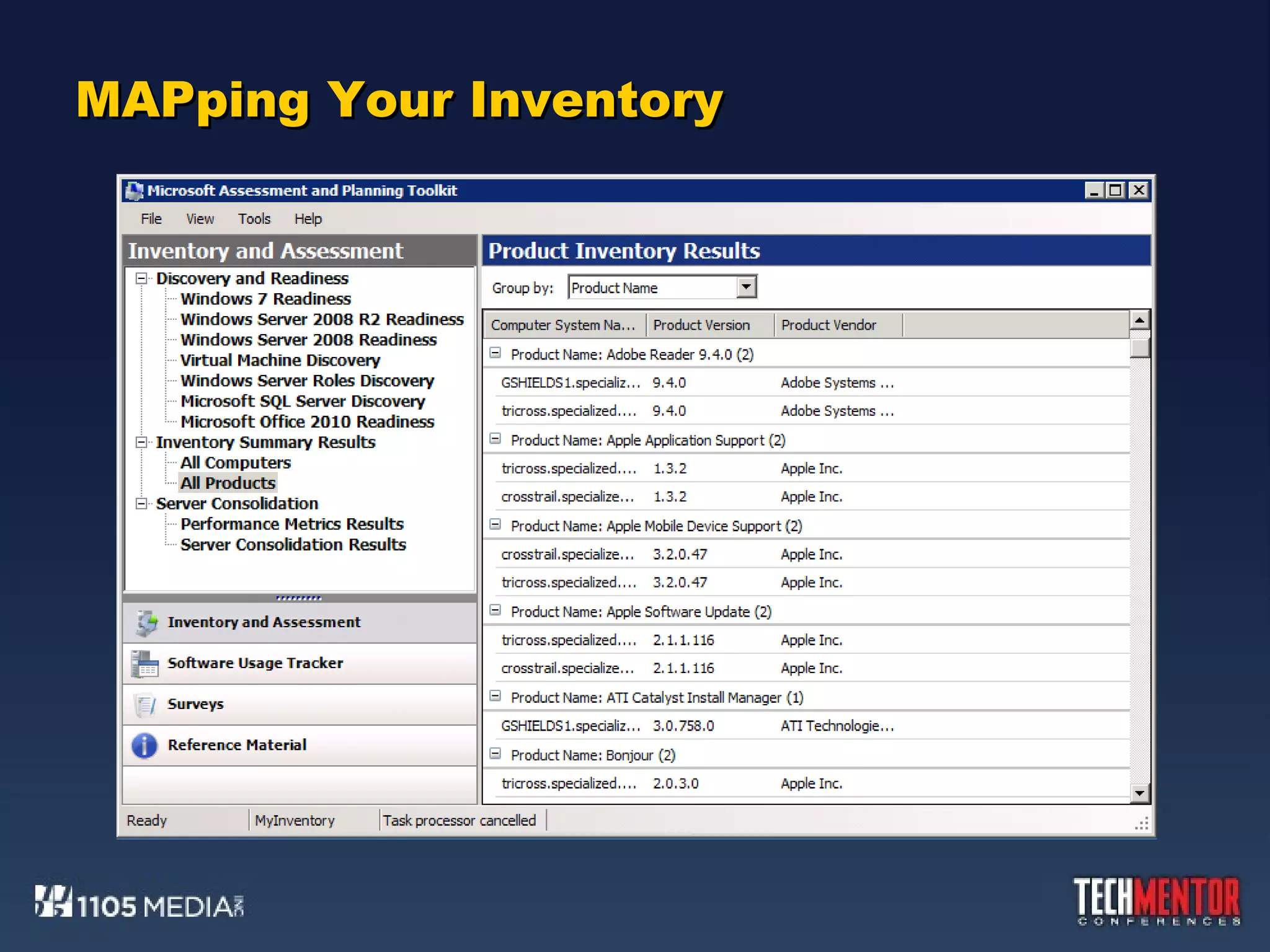
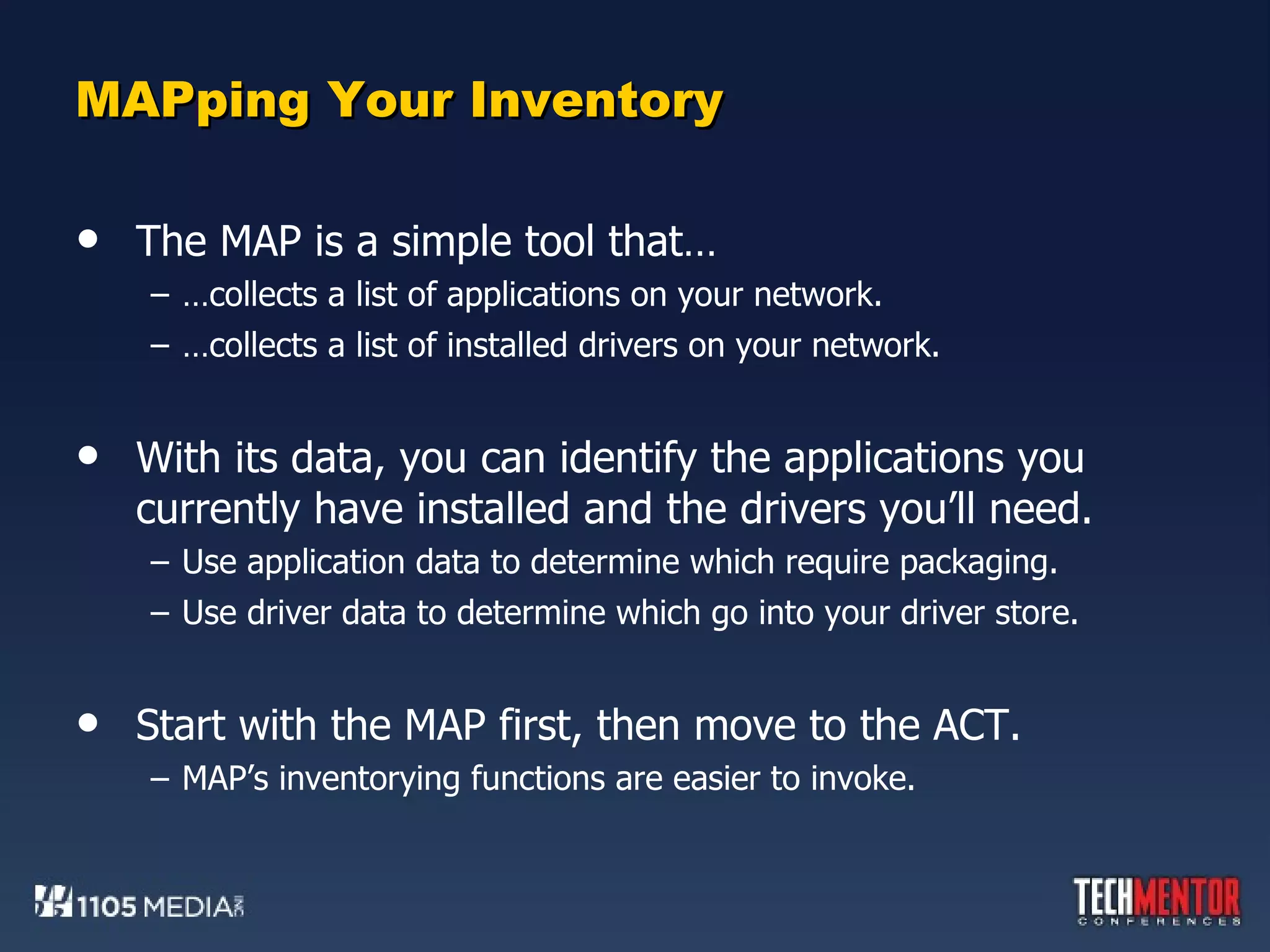
MAPping Your Inventory The MAP is a simple tool that… … collects a list of applications on your network. … collects a list of installed drivers on your network. With its data, you can identify the applications you currently have installed and the drivers you’ll need. Use application data to determine which require packaging. Use driver data to determine which go into your driver store. Start with the MAP first, then move to the ACT. MAP’s inventorying functions are easier to invoke.
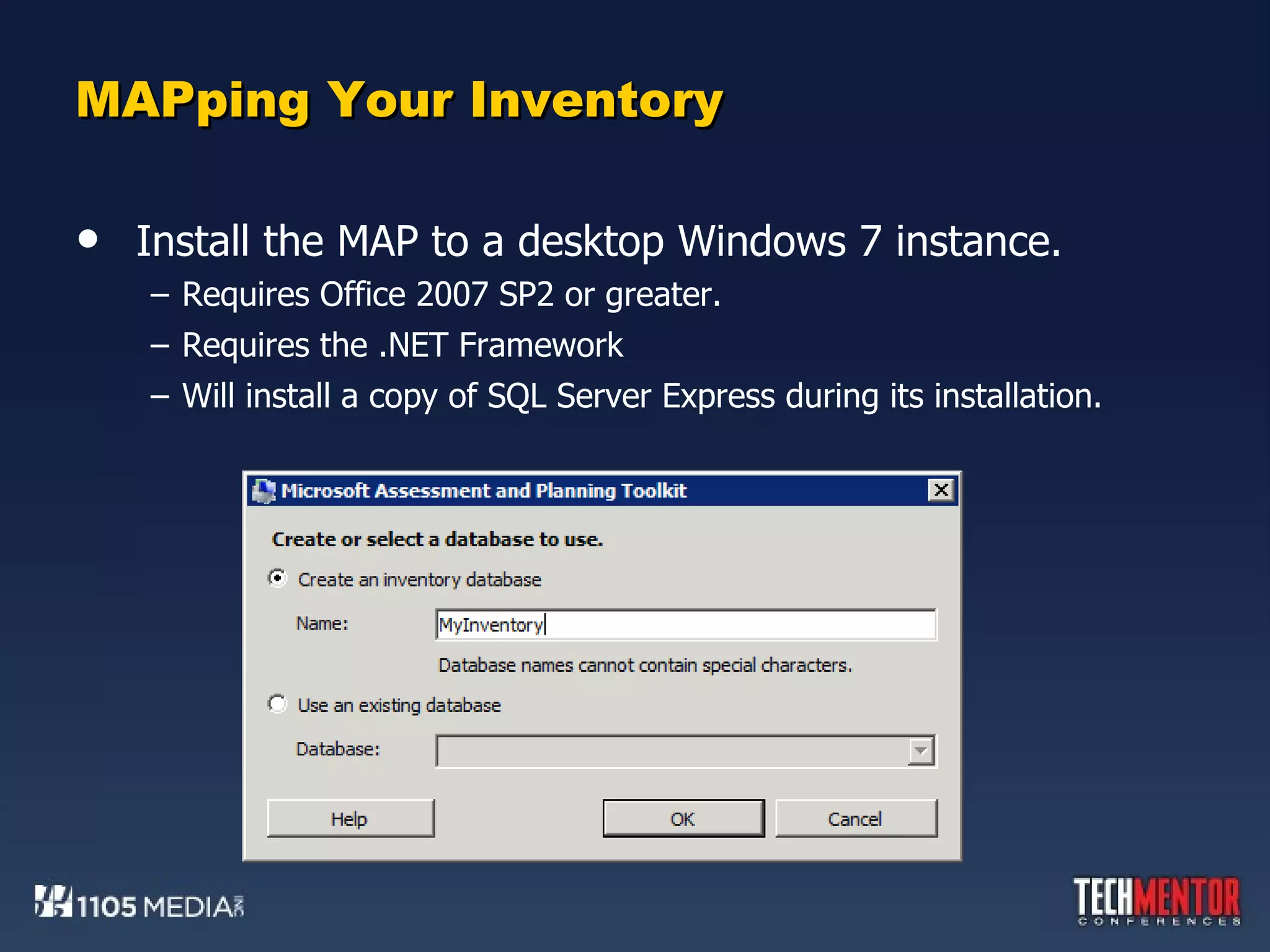
MAPping Your Inventory Install the MAP to a desktop Windows 7 instance. Requires Office 2007 SP2 or greater. Requires the .NET Framework Will install a copy of SQL Server Express during its installation.
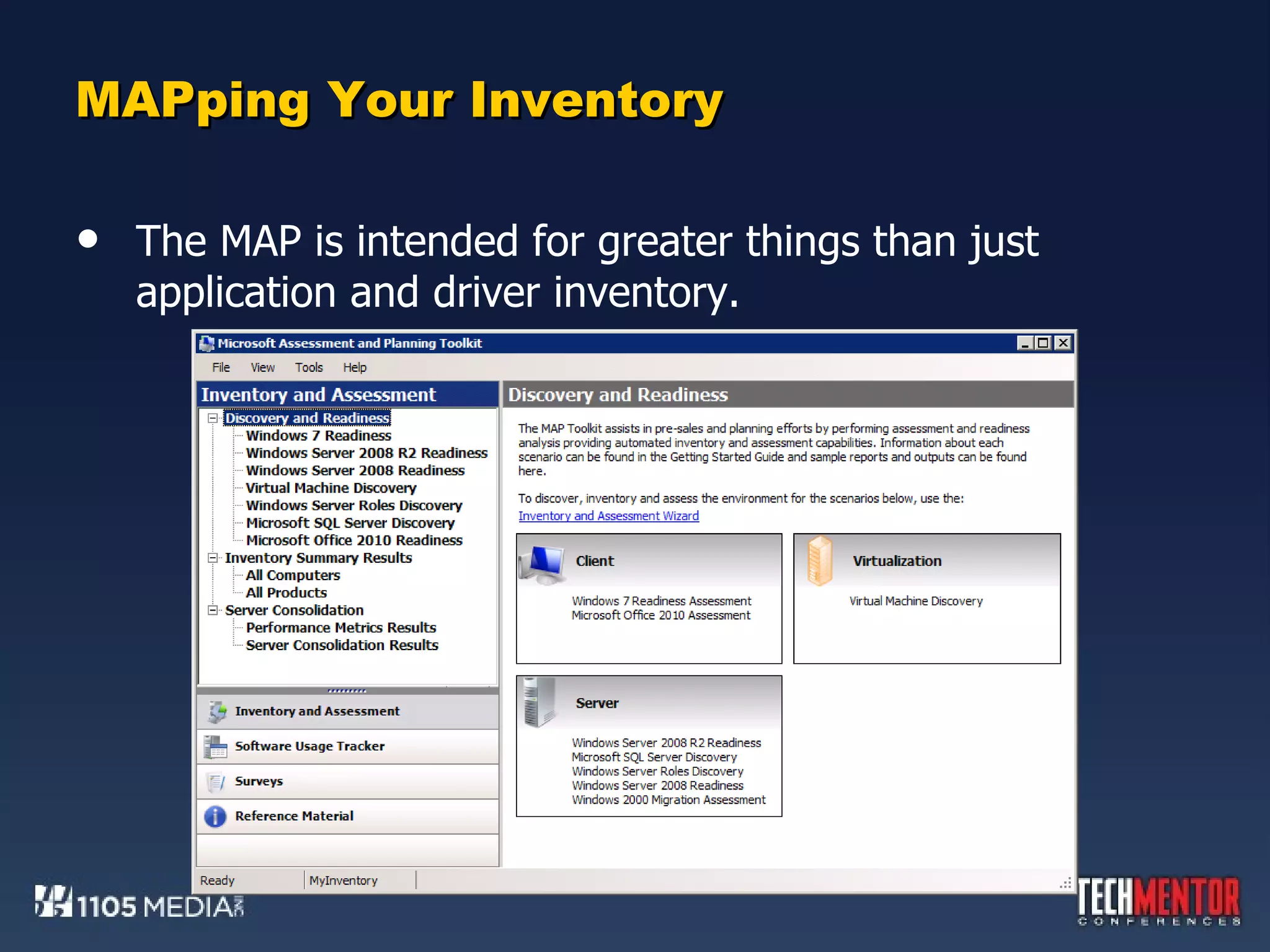
MAPping Your Inventory The MAP is intended for greater things than just application and driver inventory.
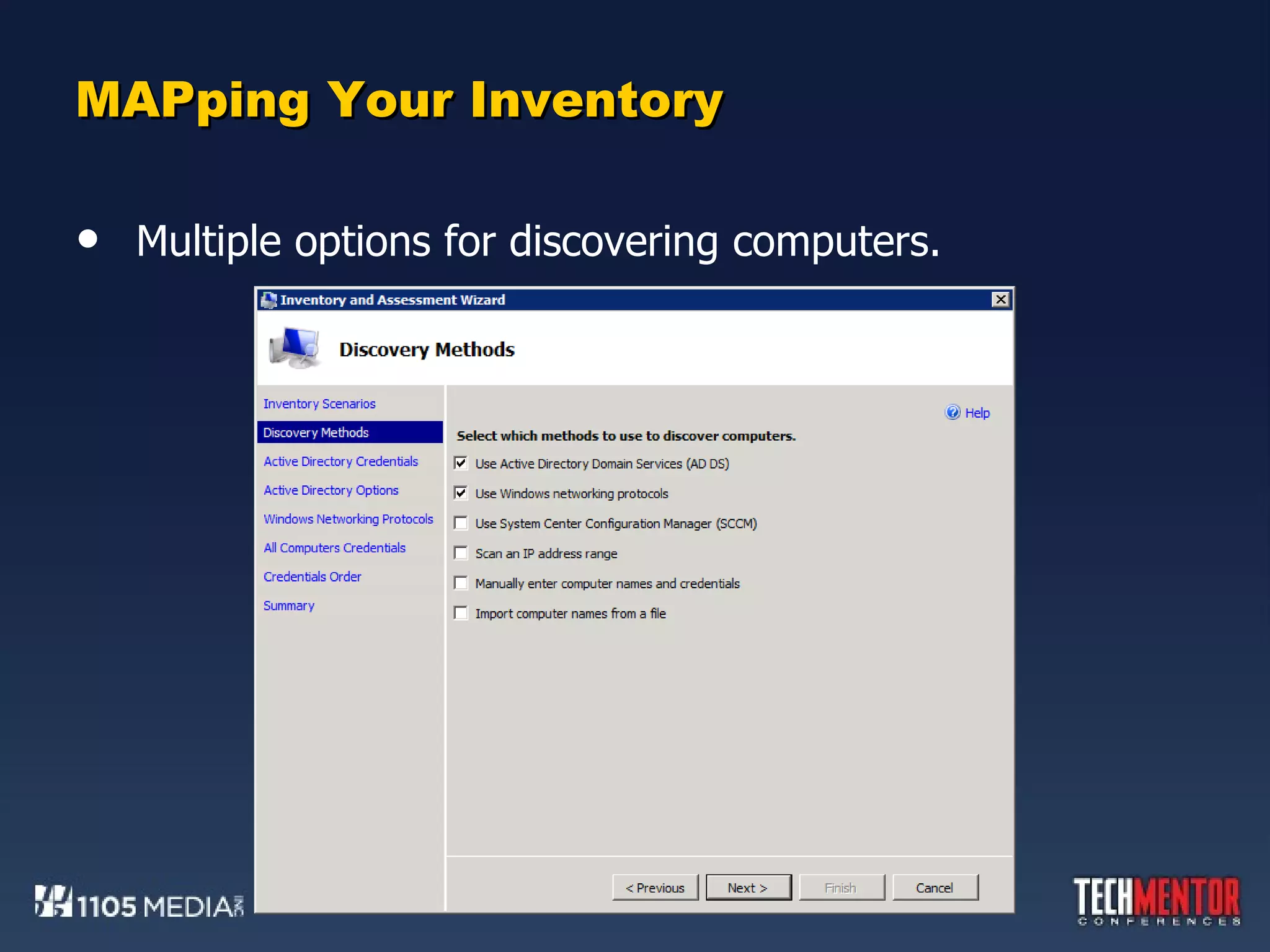
MAPping Your Inventory Multiple options for discovering computers.
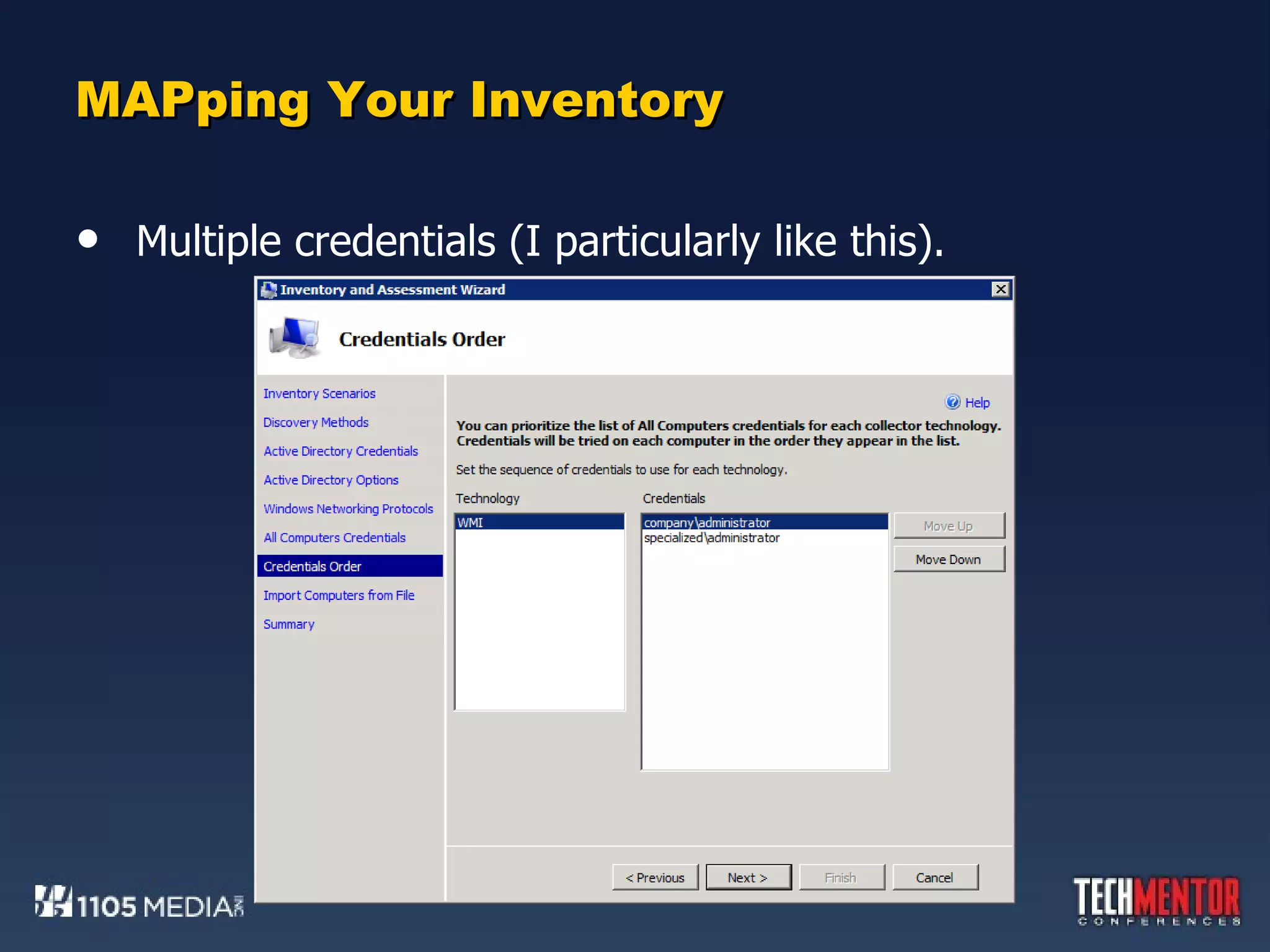
MAPping Your Inventory Multiple credentials (I particularly like this).
DEMO:  MAP  !
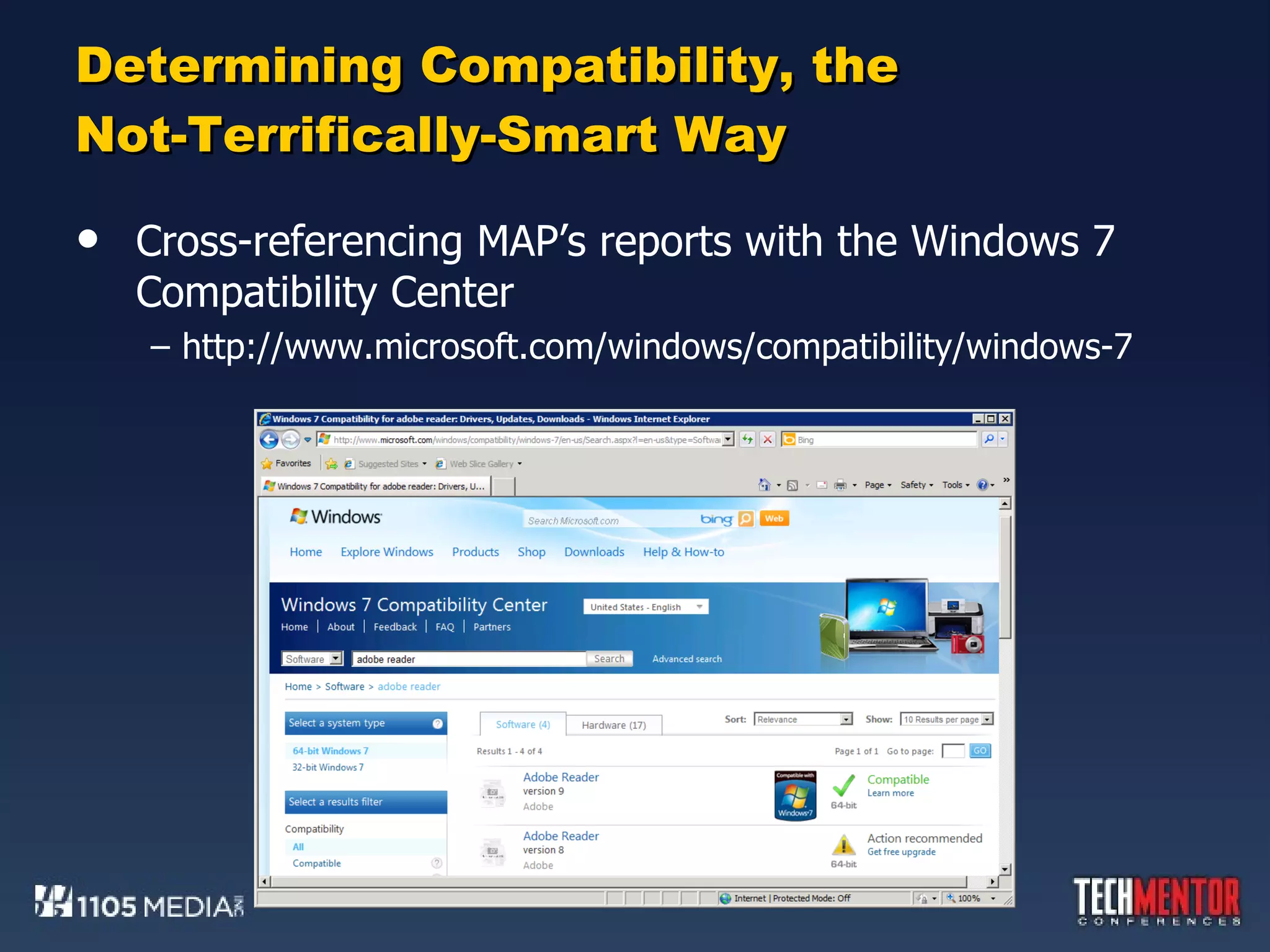
Determining Compatibility, the Not-Terrifically-Smart Way Cross-referencing MAP’s reports with the Windows 7 Compatibility Center http://www.microsoft.com/windows/compatibility/windows-7
ACTing on What you Know Har!  I Love These Acronyms! If the MAP is simple, the ACT…well…ain’t. The ACT is a robust solution for charting applications against their Clearinghouse rating for compatibility. It also supports the location and application of compatible fixes.
ACTing on What you Know Har!  I Love These Acronyms! If the MAP is simple, the ACT…well…ain’t. The ACT is a robust solution for charting applications against their Clearinghouse rating for compatibility. It also supports the location and application of compatible fixes. The ACT just isn’t as simple as the MAP. You can’t just install it and immediately run an inventory. Rather than using remote WMI to query computers, it requires the installation and execution of an agent. That agent must be deployed through some external solution, such as Group Policy Software Installation, logon scripts, or ConfigMgr. However, by being locally installed, that agent is  more powerful .
Installing the ACT Install the ACT to a Windows 7 or 2008 R2 computer. Using a server here is common, as the ACT tends to have a longer lifespan and is used by more people than the MAP. Special Note on Installation: If you intend to install the ACT on the same computer as MAP, one step is required prior to installation. First, install the MAP. Navigate to C:\SQLEXPRESS and double-click the installation file you find.  This launches the SQL Server Setup wizard. You’ll need to install a second SQL Server instance for ACT. Click through the wizard screens and create a New | Named Instance.
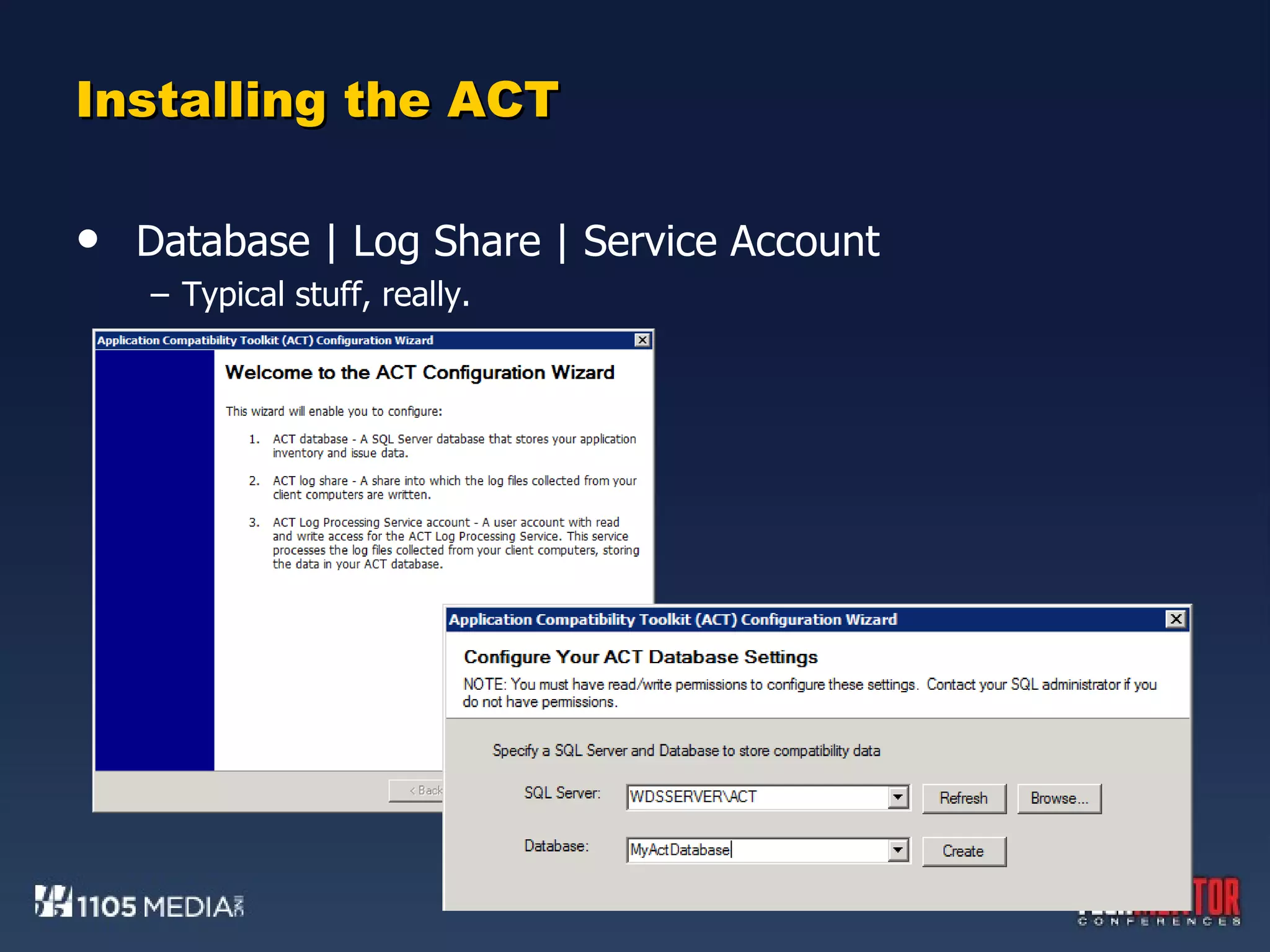
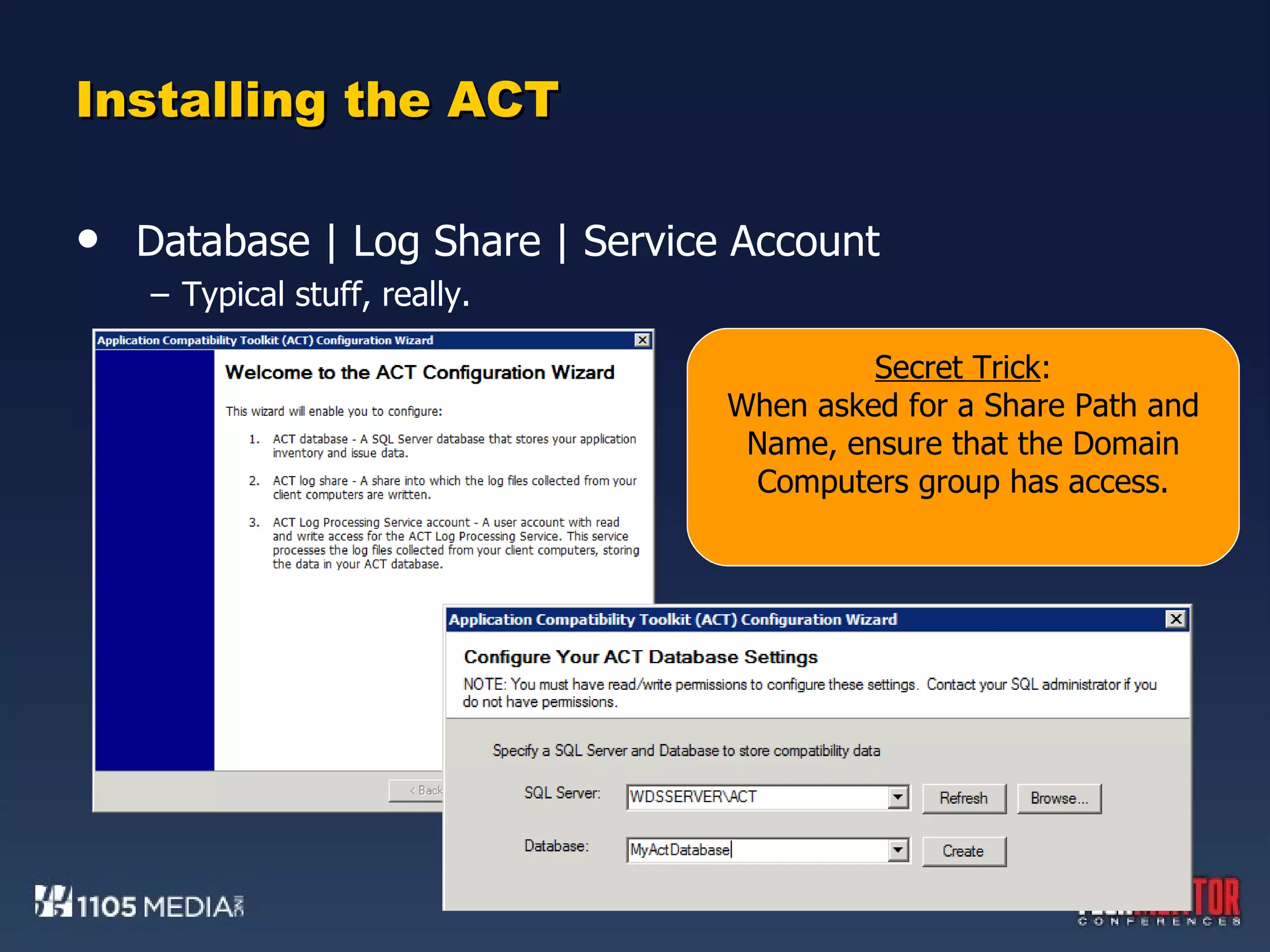
Installing the ACT Database | Log Share | Service Account Typical stuff, really.

Installing the ACT Database | Log Share | Service Account Typical stuff, really. Secret Trick : When asked for a Share Path and Name, ensure that the Domain Computers group has access.
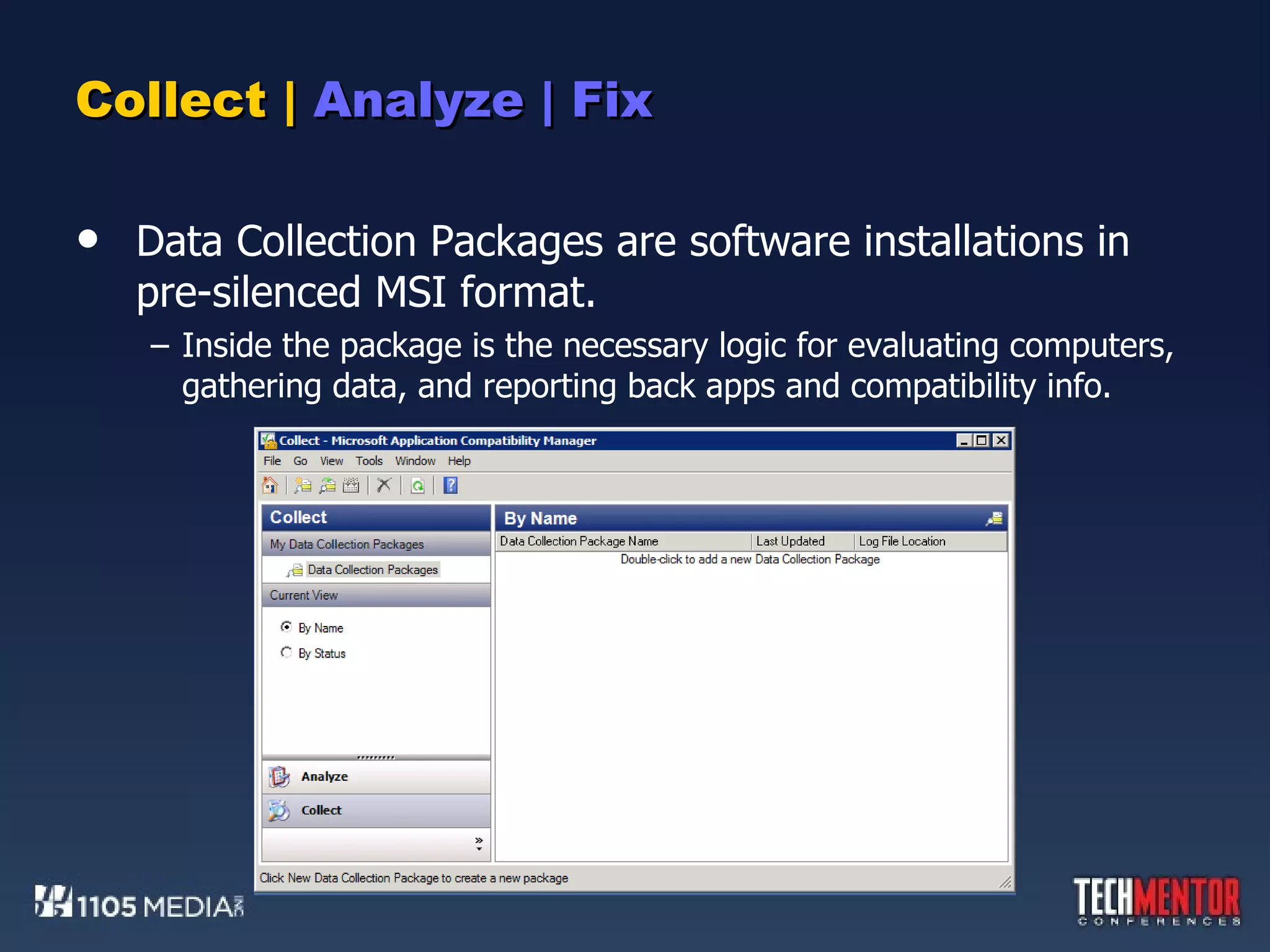
Collect |  Analyze | Fix Data Collection Packages are software installations in pre-silenced MSI format. Inside the package is the necessary logic for evaluating computers, gathering data, and reporting back apps and compatibility info.
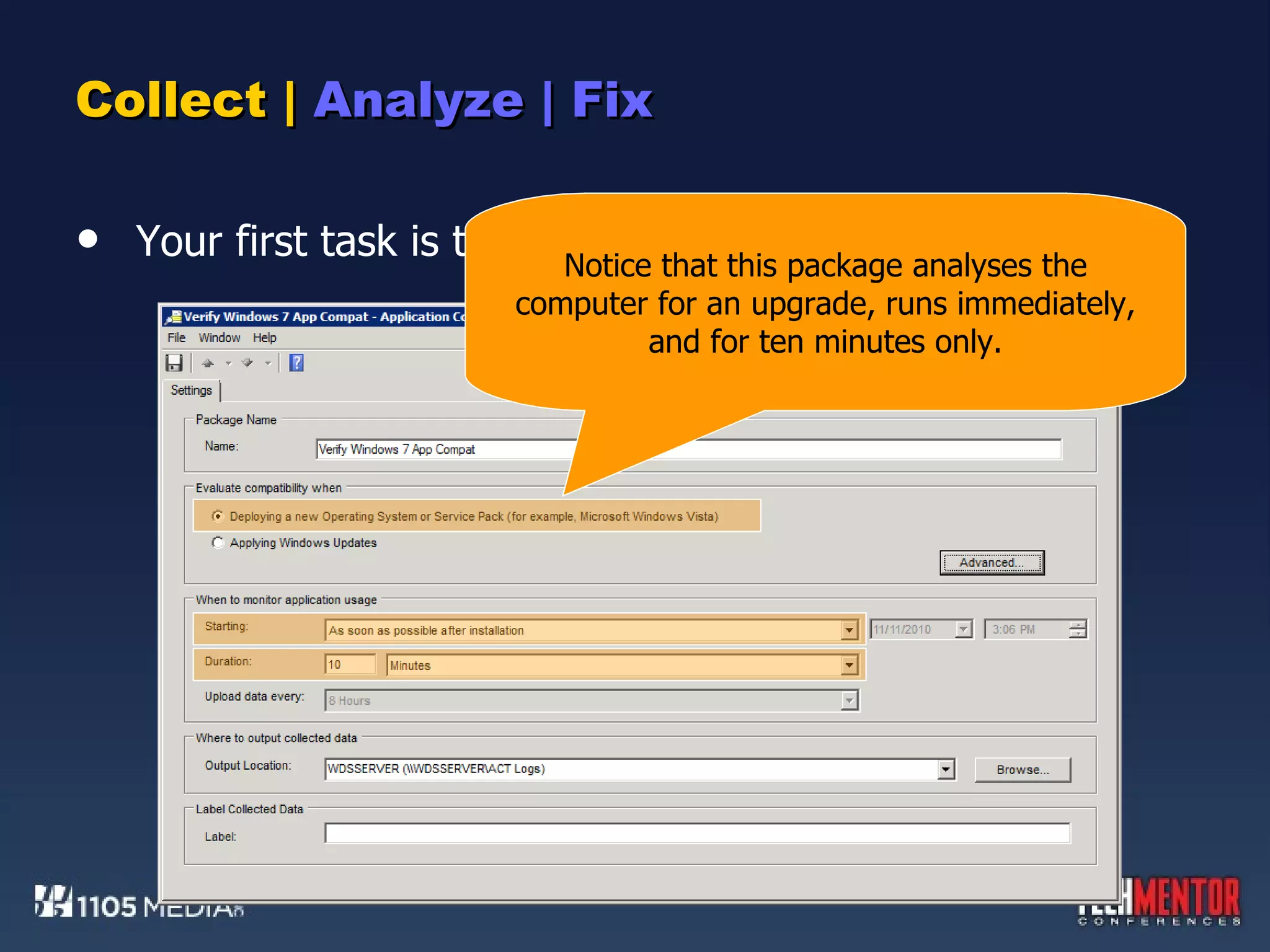
Collect |  Analyze | Fix Your first task is to create a Data Collection Package. Notice that this package analyses the computer for an upgrade, runs immediately, and for ten minutes only.
Collect |  Analyze | Fix Your first task is to create a Data Collection Package. Your second task is to deploy the DCP to computers around your network. You know how to do this now, because you took my earlier class on automated software distribution.
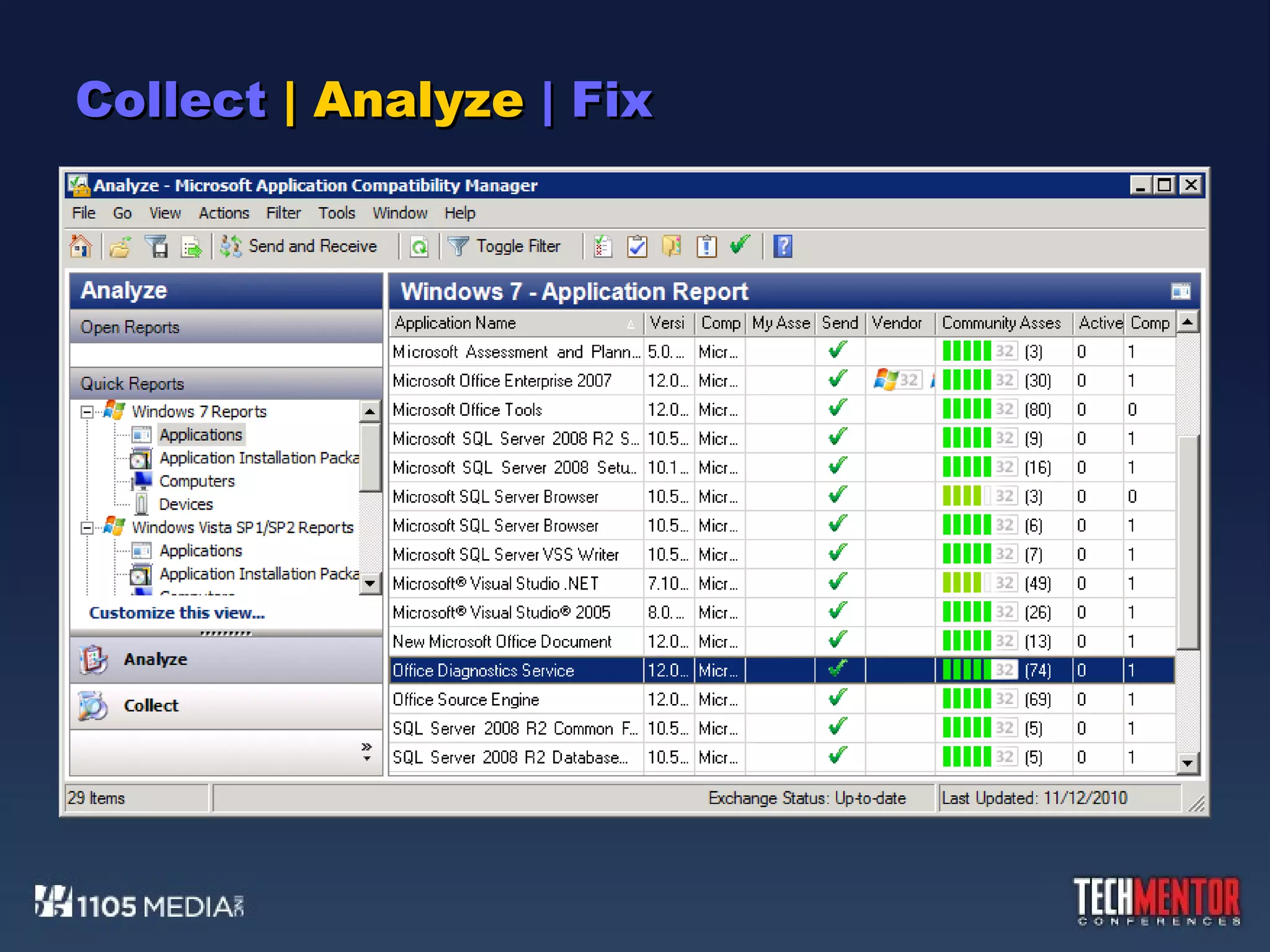
Collect  | Analyze  | Fix Your first task is to create a Data Collection Package. Your second task is to deploy the DCP to computers around your network. You know how to do this now, because you took my earlier class on automated software distribution. Your third task is to wait, then analyze. When data begins to appear in the ACT server’s \Processed folder, you know that agents are starting to report back. Take a look at the ACT’s Analyze view. Then, when enough clients have reported in, click the Send and Receive button.
Collect  | Analyze  | Fix
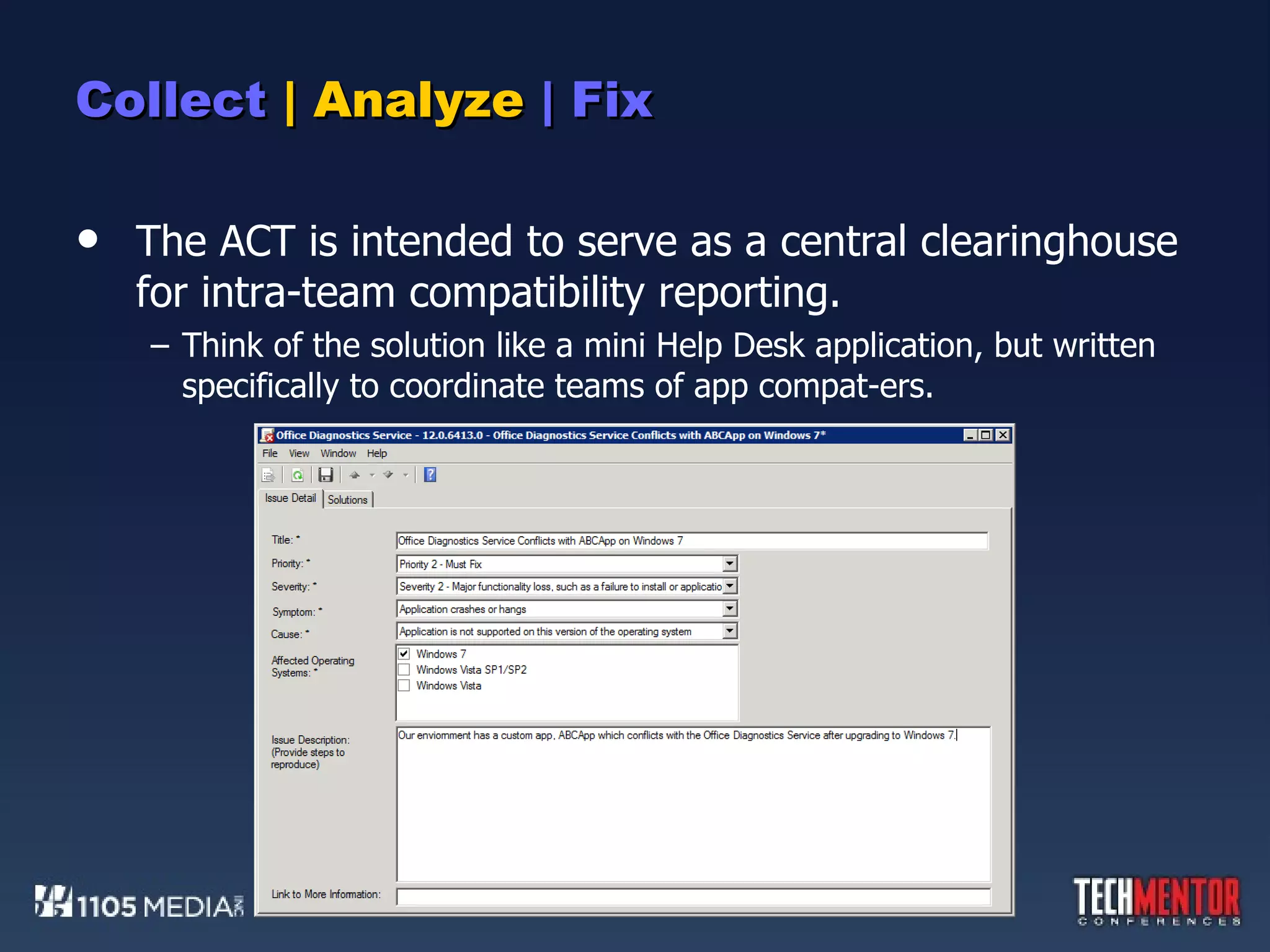
Collect  | Analyze  | Fix The ACT is intended to serve as a central clearinghouse for intra-team compatibility reporting. Think of the solution like a mini Help Desk application, but written specifically to coordinate teams of app compat-ers.
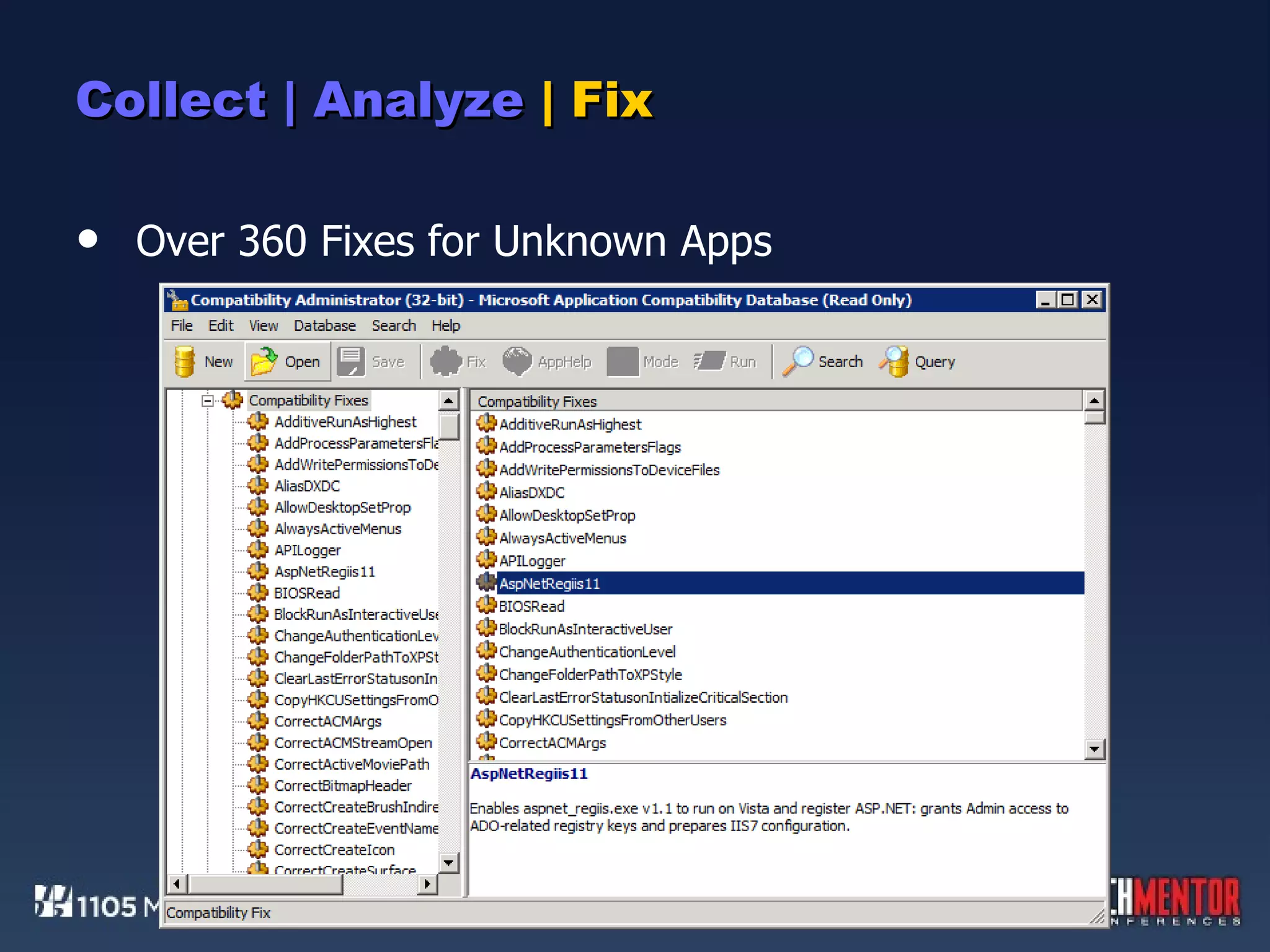
Collect | Analyze  | Fix Analyzing and tracking applications is one thing.  Actually fixing them is quite another. ACT’s Compatibility Administrator is the solution for testing and applying fixes to apps. Contains a catalog of over 6500 known “bad” apps and their fixes. Contains over 360 fixes (“shims”) for unknown apps. Contains a few easy-to-start Compatibility Mode fixes for automatically adjusting a bad app’s execution space.
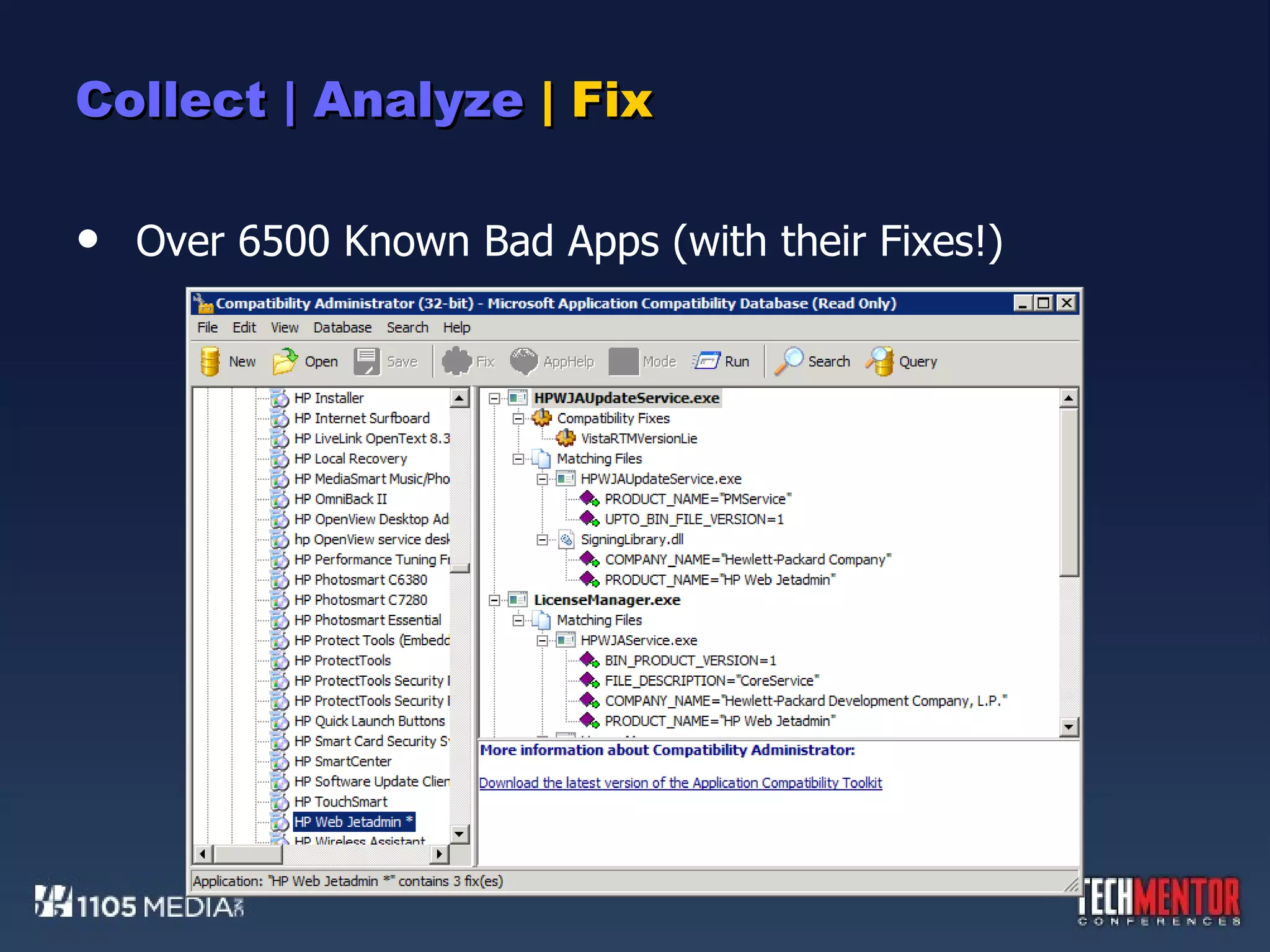
Collect | Analyze  | Fix Over 6500 Known Bad Apps (with their Fixes!)
Collect | Analyze  | Fix Over 360 Fixes for Unknown Apps
Collect | Analyze  | Fix Here’s the general flow of how this works. Do an inventory, and find the known-bad apps. See if fixes are available, or upgrade those apps to newer versions. If the app isn’t in the Clearinghouse and no fixes are available, being researching  why  the app fails. Start by setting the Compatibility Mode to Windows XP. Apply other fixes, guess-and-check, test, test, test. Make sure you uninstall fixes before trying something new. Mind the scientific method, natch. When a fix works, add that fix to your centralized fix database.
Collect | Analyze  | Fix Here’s the general flow of how this works. Do an inventory, and find the known-bad apps. See if fixes are available, or upgrade those apps to newer versions. If the app isn’t in the Clearinghouse and no fixes are available, being researching  why  the app fails. Start by setting the Compatibility Mode to Windows XP. Apply other fixes, guess-and-check, test, test, test. Make sure you uninstall fixes before trying something new. Mind the scientific method, natch. When a fix works, add that fix to your centralized fix database. Secret Trick :  A single “fix” database can contain all fixes for all apps. One package to fix them all…
DEMO:  ACT, AND SPECIFICALLY “FIX”ING
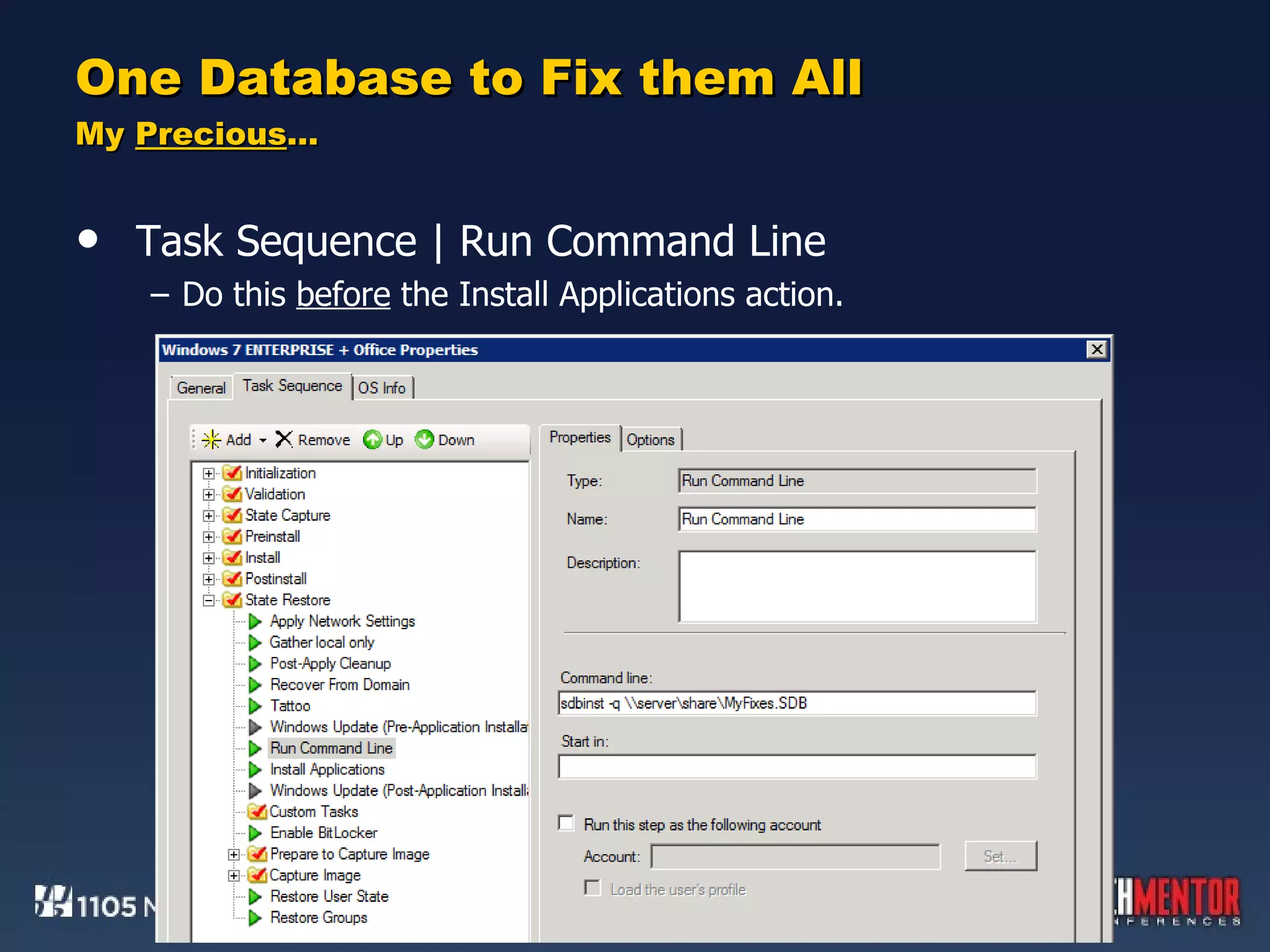
One Database to Fix them All My  Precious … The resulting compatibility fix (.SDB) database can be used against every application at once. Login script ConfigMgr or Group Policy Software Installation Task Sequence sdbinst.exe is in the default Windows 7 path. sdbinst.exe -q \\server\share\MyFixes.SDB
One Database to Fix them All My  Precious … Task Sequence | Run Command Line Do this  before  the Install Applications action.
DEMO:  APPLYING A FIX DATABASE
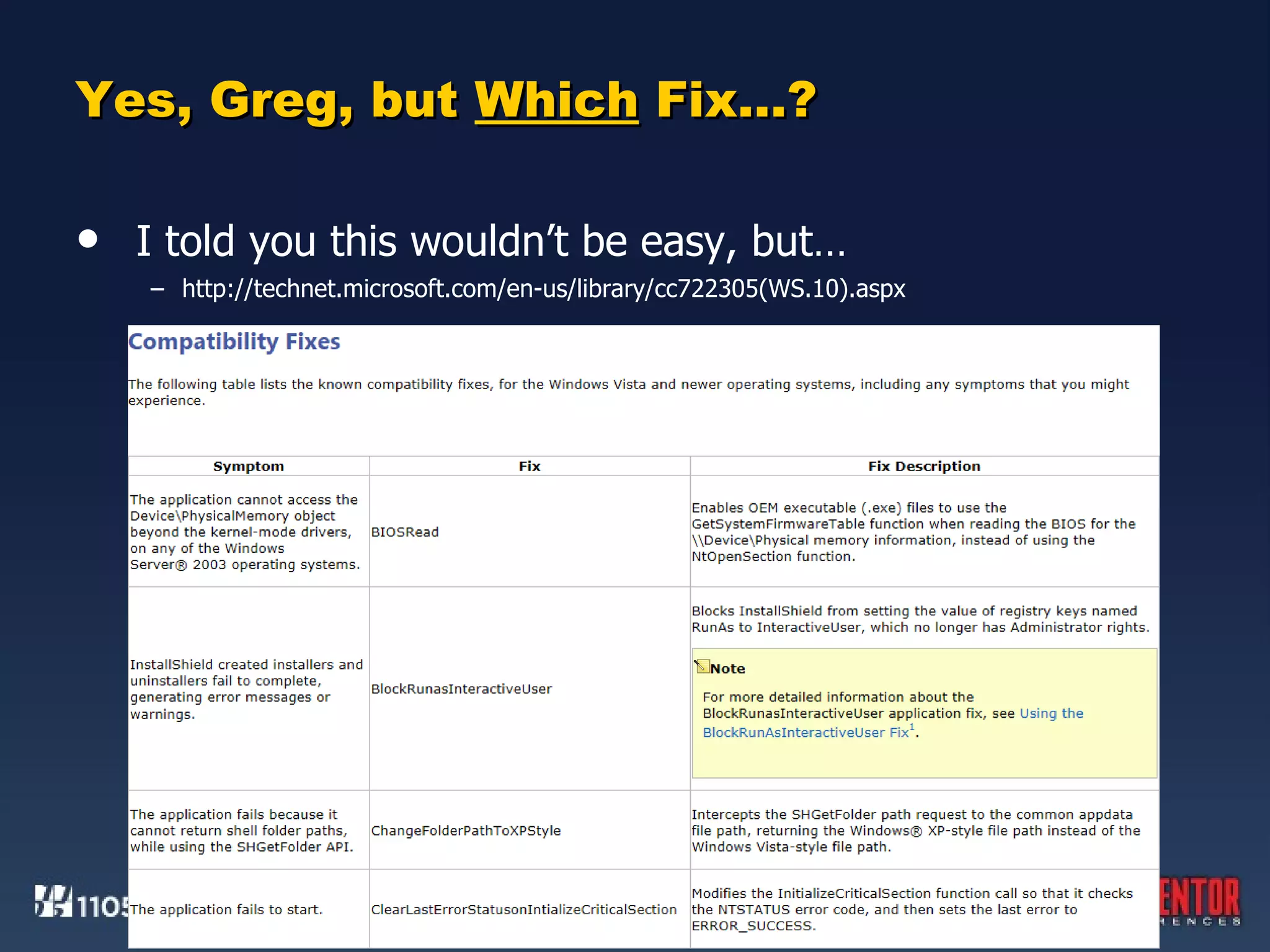
Yes, Greg, but  Which  Fix…? I told you this wouldn’t be easy, but… http://technet.microsoft.com/en-us/library/cc722305(WS.10).aspx
Windows 7 Deployment Deep Dive How to Resolve (Nearly) Every Application Incompatibility Greg Shields, MVP, vExpert Concentrated Technology www.ConcentratedTech.com

TechMentor Fall, 2011 - How to Resolve (Nearly) Every Windows 7 Application Incompatibility

  • 1.
    Windows 7 DeploymentDeep Dive How to Resolve (Nearly) Every Application Incompatibility Greg Shields, MVP, vExpert Concentrated Technology www.ConcentratedTech.com
  • 2.
    You Aren’t Goingto Like what You’re About to Learn
  • 3.
    You Aren’t Goingto Like what You’re About to Learn This. Ain’t. Easy.
  • 4.
    You Aren’t Goingto Like what You’re About to Learn This. Ain’t. Easy. Well, that’s not entirely true. Most applications run just fine atop Windows 7. Those that don’t were coded poorly, use inappropriate shortcuts, or leverage Windows XP work-arounds that no longer exist.
  • 5.
    You Aren’t Goingto Like what You’re About to Learn This. Ain’t. Easy. Well, that’s not entirely true. Most applications run just fine atop Windows 7. Those that don’t were coded poorly, use inappropriate shortcuts, or leverage Windows XP work-arounds that no longer exist. For all the other apps, solutions exist that can “shim” them into functionality. These shims will fix many of the remaining applications. … though not all…
  • 6.
    Two Needs, TwoTools. Need #1: “I need to inventory the applications and drivers that are currently on my network.” The Microsoft Assessment and Planning Toolkit, or MAP, assists with resolving this need. Easy to use. Reports are moderately useful.
  • 7.
    Two Needs, TwoTools. Need #1: “I need to inventory the applications and drivers that are currently on my network.” The Microsoft Assessment and Planning Toolkit, or MAP, assists with resolving this need. Easy to use. Reports are moderately useful. Need #2: “I need to resolve application incompatibilities with Windows 7.” The Application Compatibility Toolkit, or ACT, assists with resolving this need. More difficult to use. Provides more than just reports.
  • 8.
  • 9.
    MAPping Your InventoryThe MAP is a simple tool that… … collects a list of applications on your network. … collects a list of installed drivers on your network. With its data, you can identify the applications you currently have installed and the drivers you’ll need. Use application data to determine which require packaging. Use driver data to determine which go into your driver store. Start with the MAP first, then move to the ACT. MAP’s inventorying functions are easier to invoke.
  • 10.
    MAPping Your InventoryInstall the MAP to a desktop Windows 7 instance. Requires Office 2007 SP2 or greater. Requires the .NET Framework Will install a copy of SQL Server Express during its installation.
  • 11.
    MAPping Your InventoryThe MAP is intended for greater things than just application and driver inventory.
  • 12.
    MAPping Your InventoryMultiple options for discovering computers.
  • 13.
    MAPping Your InventoryMultiple credentials (I particularly like this).
  • 14.
  • 15.
    Determining Compatibility, theNot-Terrifically-Smart Way Cross-referencing MAP’s reports with the Windows 7 Compatibility Center http://www.microsoft.com/windows/compatibility/windows-7
  • 16.
    ACTing on Whatyou Know Har! I Love These Acronyms! If the MAP is simple, the ACT…well…ain’t. The ACT is a robust solution for charting applications against their Clearinghouse rating for compatibility. It also supports the location and application of compatible fixes.
  • 17.
    ACTing on Whatyou Know Har! I Love These Acronyms! If the MAP is simple, the ACT…well…ain’t. The ACT is a robust solution for charting applications against their Clearinghouse rating for compatibility. It also supports the location and application of compatible fixes. The ACT just isn’t as simple as the MAP. You can’t just install it and immediately run an inventory. Rather than using remote WMI to query computers, it requires the installation and execution of an agent. That agent must be deployed through some external solution, such as Group Policy Software Installation, logon scripts, or ConfigMgr. However, by being locally installed, that agent is more powerful .
  • 18.
    Installing the ACTInstall the ACT to a Windows 7 or 2008 R2 computer. Using a server here is common, as the ACT tends to have a longer lifespan and is used by more people than the MAP. Special Note on Installation: If you intend to install the ACT on the same computer as MAP, one step is required prior to installation. First, install the MAP. Navigate to C:\SQLEXPRESS and double-click the installation file you find. This launches the SQL Server Setup wizard. You’ll need to install a second SQL Server instance for ACT. Click through the wizard screens and create a New | Named Instance.
  • 19.
    Installing the ACTDatabase | Log Share | Service Account Typical stuff, really.
  • 20.
    Installing the ACTDatabase | Log Share | Service Account Typical stuff, really. Secret Trick : When asked for a Share Path and Name, ensure that the Domain Computers group has access.
  • 21.
    Collect | Analyze | Fix Data Collection Packages are software installations in pre-silenced MSI format. Inside the package is the necessary logic for evaluating computers, gathering data, and reporting back apps and compatibility info.
  • 22.
    Collect | Analyze | Fix Your first task is to create a Data Collection Package. Notice that this package analyses the computer for an upgrade, runs immediately, and for ten minutes only.
  • 23.
    Collect | Analyze | Fix Your first task is to create a Data Collection Package. Your second task is to deploy the DCP to computers around your network. You know how to do this now, because you took my earlier class on automated software distribution.
  • 24.
    Collect |Analyze | Fix Your first task is to create a Data Collection Package. Your second task is to deploy the DCP to computers around your network. You know how to do this now, because you took my earlier class on automated software distribution. Your third task is to wait, then analyze. When data begins to appear in the ACT server’s \Processed folder, you know that agents are starting to report back. Take a look at the ACT’s Analyze view. Then, when enough clients have reported in, click the Send and Receive button.
  • 25.
    Collect |Analyze | Fix
  • 26.
    Collect |Analyze | Fix The ACT is intended to serve as a central clearinghouse for intra-team compatibility reporting. Think of the solution like a mini Help Desk application, but written specifically to coordinate teams of app compat-ers.
  • 27.
    Collect | Analyze | Fix Analyzing and tracking applications is one thing. Actually fixing them is quite another. ACT’s Compatibility Administrator is the solution for testing and applying fixes to apps. Contains a catalog of over 6500 known “bad” apps and their fixes. Contains over 360 fixes (“shims”) for unknown apps. Contains a few easy-to-start Compatibility Mode fixes for automatically adjusting a bad app’s execution space.
  • 28.
    Collect | Analyze | Fix Over 6500 Known Bad Apps (with their Fixes!)
  • 29.
    Collect | Analyze | Fix Over 360 Fixes for Unknown Apps
  • 30.
    Collect | Analyze | Fix Here’s the general flow of how this works. Do an inventory, and find the known-bad apps. See if fixes are available, or upgrade those apps to newer versions. If the app isn’t in the Clearinghouse and no fixes are available, being researching why the app fails. Start by setting the Compatibility Mode to Windows XP. Apply other fixes, guess-and-check, test, test, test. Make sure you uninstall fixes before trying something new. Mind the scientific method, natch. When a fix works, add that fix to your centralized fix database.
  • 31.
    Collect | Analyze | Fix Here’s the general flow of how this works. Do an inventory, and find the known-bad apps. See if fixes are available, or upgrade those apps to newer versions. If the app isn’t in the Clearinghouse and no fixes are available, being researching why the app fails. Start by setting the Compatibility Mode to Windows XP. Apply other fixes, guess-and-check, test, test, test. Make sure you uninstall fixes before trying something new. Mind the scientific method, natch. When a fix works, add that fix to your centralized fix database. Secret Trick : A single “fix” database can contain all fixes for all apps. One package to fix them all…
  • 32.
    DEMO: ACT,AND SPECIFICALLY “FIX”ING
  • 33.
    One Database toFix them All My Precious … The resulting compatibility fix (.SDB) database can be used against every application at once. Login script ConfigMgr or Group Policy Software Installation Task Sequence sdbinst.exe is in the default Windows 7 path. sdbinst.exe -q \\server\share\MyFixes.SDB
  • 34.
    One Database toFix them All My Precious … Task Sequence | Run Command Line Do this before the Install Applications action.
  • 35.
    DEMO: APPLYINGA FIX DATABASE
  • 36.
    Yes, Greg, but Which Fix…? I told you this wouldn’t be easy, but… http://technet.microsoft.com/en-us/library/cc722305(WS.10).aspx
  • 37.
    Windows 7 DeploymentDeep Dive How to Resolve (Nearly) Every Application Incompatibility Greg Shields, MVP, vExpert Concentrated Technology www.ConcentratedTech.com

Editor's Notes

  • #2 TechMentor Las Vegas 2011 http://technet.microsoft.com/en-us/windows/aa905066.aspx?ITPID=article http://blogs.msdn.com/b/cjacks/
  • #38 TechMentor Las Vegas 2011