OVC3860 AT Command Application Notes
OVC3860
AT Command
Application Notes
Last Modified:2012-10-18
Document Revision:1.1
OmniVision Technologies, Inc. reserves the right to make changes without further notice to any product herein to improve
reliability, function or design. OmniVision does not assume any liability arising out of the application or use of any project,
circuit described herein; neither does it convey any license under its patent nor the right of others.
The datasheet is the official document of OmniVision. The applicaton notes are application guide lines for reference. If
there are any difference between datasheet and application notes, please follow datasheet and kindly report the
difference to OVT FAE.
This document contains information of a proprietary nature. None of this information shall be divulged to persons other
than OmniVision Technologies, Inc. employee authorized by the nature of their duties to receive such information, or
individuals or organizations authorized by OmniVision Technologies, Inc.
Company Confidential 1
OVC3860 AT Command Application Notes
Table of Contents
1 Overview.........................................................................................................................................4
2 The States of Bluetooth Application................................................................................................4
3 AT Command Operations................................................................................................................4
3.1.Command Format......................................................................................................................4
3.2.Indication Format.......................................................................................................................4
3.3.Supported AT Commands..........................................................................................................5
3.4.State Indications.........................................................................................................................6
3.5.Application Examples................................................................................................................7
3.5.1 Pairing & Connecting.......................................................................................................7
3.5.2 Phone Answering & Dialing............................................................................................8
3.5.3 State Query.......................................................................................................................9
3.5.4 Auto-answer & Auto-connect...........................................................................................9
3.5.5 Memory R/W.................................................................................................................10
3.5.6 Test mode.......................................................................................................................10
4 Command Explanations.................................................................................................................11
4.1. Enter Pairing Mode #CA........................................................................................................11
4.2.Cancel Pairing Mode #CB.......................................................................................................11
4.3.Connect HFP to Handset #CC.................................................................................................11
4.4.Disconnect HFP from Handset #CD........................................................................................11
4.5.Answer Call #CE.....................................................................................................................11
4.6.Reject Call #CF........................................................................................................................12
4.7.End Call #CG...........................................................................................................................12
4.8.Redial #CH..............................................................................................................................12
4.9.Voice Dial #CI.........................................................................................................................12
4.10.Cancel Voice Dial #CJ...........................................................................................................12
4.11.Mute/Unmute MIC #CM.......................................................................................................13
4.12.Transfer Call to/from Handset #CO.......................................................................................13
4.13.Release&Reject Call #CQ.....................................................................................................13
4.14.Release&Accept Call #CR.....................................................................................................13
4.15.Hold&Accept Call #CS.........................................................................................................13
4.16.Conference Call #CT.............................................................................................................14
4.17.Dial One Call #CW................................................................................................................14
4.18.Send DTMF #CX...................................................................................................................14
4.19.Query HFP Status #CY..........................................................................................................14
4.20.Reset #CZ..............................................................................................................................14
4.21.Play/Pause Music #MA.........................................................................................................15
4.22.Stop Music #MC....................................................................................................................15
4.23.Forward Music #MD.............................................................................................................15
4.24.Backward Music #ME...........................................................................................................15
4.25.Query Auto Answer and PowerOn Auto Connection Configuration #MF............................16
4.26.Enable PowerOn Auto Connection #MG...............................................................................16
4.27.Disable PowerOn Auto Connection #MH.............................................................................16
4.28.Connect to AV Source #MI....................................................................................................16
Company Confidential 2
OVC3860 AT Command Application Notes
4.29.Disconnect from AV Source #MJ..........................................................................................16
4.30.Query AVRCP Status #MO....................................................................................................17
4.31.Enable Auto Answer #MP......................................................................................................17
4.32.Disable Auto Answer #MQ....................................................................................................17
4.33.Start Fast Forward #MR........................................................................................................17
4.34.Start Rewind #MS..................................................................................................................17
4.35.Stop Fast Forward / Rewind #MT.........................................................................................18
4.36.Query A2DP Status #MV.......................................................................................................18
4.37.Write to Memory #MW.........................................................................................................18
4.38.Read from Memory #MX......................................................................................................18
4.39.Switch Two Remote Devices #MZ........................................................................................19
4.40. #ST........................................................................................................................................19
4.41.Set Clock Debug Mode #VC.................................................................................................19
4.42.Speaker Volume Down #VD..................................................................................................19
4.43.Enter BQB Test Mode #VE...................................................................................................19
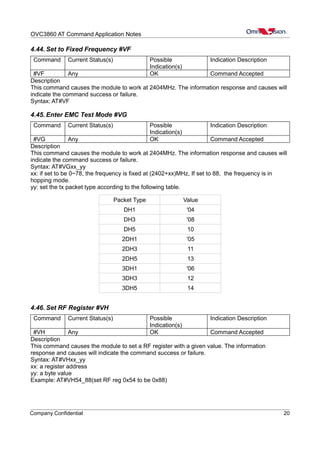
4.44.Set to Fixed Frequency #VF..................................................................................................20
4.45.Enter EMC Test Mode #VG..................................................................................................20
4.46.Set RF Register #VH.............................................................................................................20
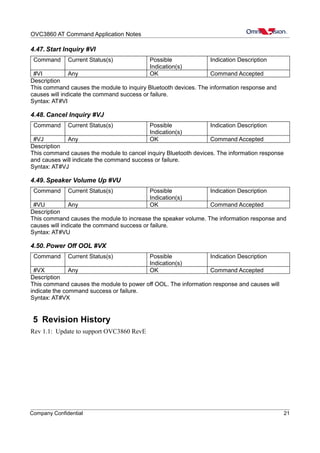
4.47.Start Inquiry #VI....................................................................................................................21
4.48.Cancel Inquiry #VJ................................................................................................................21
4.49.Speaker Volume Up #VU.......................................................................................................21
4.50.Power Off OOL #VX.............................................................................................................21
5 Revision History............................................................................................................................21
Company Confidential 3
OVC3860 AT Command Application Notes
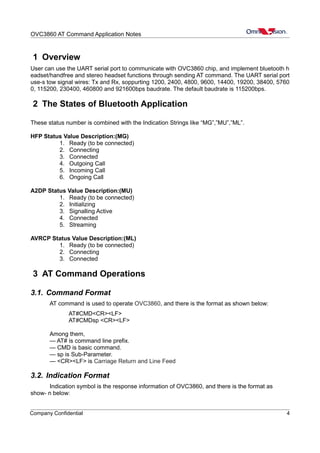
1 Overview
User can use the UART serial port to communicate with OVC3860 chip, and implement bluetooth h
eadset/handfree and stereo headset functions through sending AT command. The UART serial port
use-s tow signal wires: Tx and Rx, soppurting 1200, 2400, 4800, 9600, 14400, 19200, 38400, 5760
0, 115200, 230400, 460800 and 921600bps baudrate. The default baudrate is 115200bps.
2 The States of Bluetooth Application
These status number is combined with the Indication Strings like “MG”,”MU”,”ML”.
HFP Status Value Description:(MG)
1. Ready (to be connected)
2. Connecting
3. Connected
4. Outgoing Call
5. Incoming Call
6. Ongoing Call
A2DP Status Value Description:(MU)
1. Ready (to be connected)
2. Initializing
3. Signalling Active
4. Connected
5. Streaming
AVRCP Status Value Description:(ML)
1. Ready (to be connected)
2. Connecting
3. Connected
3 AT Command Operations
3.1. Command Format
AT command is used to operate OVC3860, and there is the format as shown below:
AT#CMD<CR><LF>
AT#CMDsp <CR><LF>
Among them,
— AT# is command line prefix.
— CMD is basic command.
— sp is Sub-Parameter.
— <CR><LF> is Carriage Return and Line Feed
3.2. Indication Format
Indication symbol is the response information of OVC3860, and there is the format as
show- n below:
Company Confidential 4
OVC3860 AT Command Application Notes
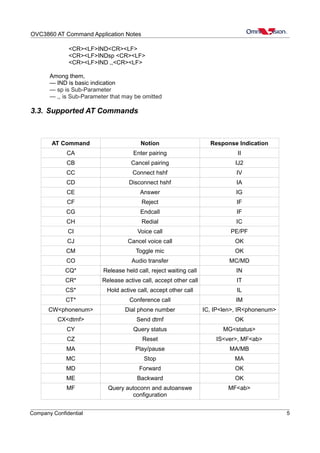
<CR><LF>IND<CR><LF>
<CR><LF>INDsp <CR><LF>
<CR><LF>IND ,,<CR><LF>
Among them,
— IND is basic indication
— sp is Sub-Parameter
— ,, is Sub-Parameter that may be omitted
3.3. Supported AT Commands
AT Command Notion Response Indication
CA Enter pairing II
CB Cancel pairing IJ2
CC Connect hshf IV
CD Disconnect hshf IA
CE Answer IG
CF Reject IF
CG Endcall IF
CH Redial IC
CI Voice call PE/PF
CJ Cancel voice call OK
CM Toggle mic OK
CO Audio transfer MC/MD
CQ* Release held call, reject waiting call IN
CR* Release active call, accept other call IT
CS* Hold active call, accept other call IL
CT* Conference call IM
CW<phonenum> Dial phone number IC, IP<len>, IR<phonenum>
CX<dtmf> Send dtmf OK
CY Query status MG<status>
CZ Reset IS<ver>, MF<ab>
MA Play/pause MA/MB
MC Stop MA
MD Forward OK
ME Backward OK
MF Query autoconn and autoanswe
configuration
MF<ab>
Company Confidential 5
OVC3860 AT Command Application Notes
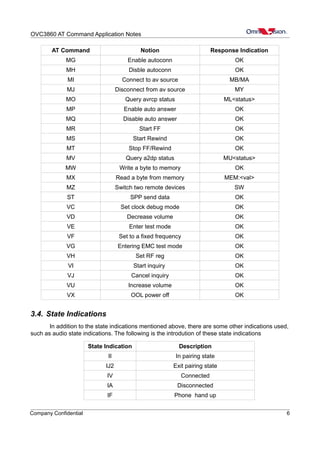
AT Command Notion Response Indication
MG Enable autoconn OK
MH Disble autoconn OK
MI Connect to av source MB/MA
MJ Disconnect from av source MY
MO Query avrcp status ML<status>
MP Enable auto answer OK
MQ Disable auto answer OK
MR Start FF OK
MS Start Rewind OK
MT Stop FF/Rewind OK
MV Query a2dp status MU<status>
MW Write a byte to memory OK
MX Read a byte from memory MEM:<val>
MZ Switch two remote devices SW
ST SPP send data OK
VC Set clock debug mode OK
VD Decrease volume OK
VE Enter test mode OK
VF Set to a fixed frequency OK
VG Entering EMC test mode OK
VH Set RF reg OK
VI Start inquiry OK
VJ Cancel inquiry OK
VU Increase volume OK
VX OOL power off OK
3.4. State Indications
In addition to the state indications mentioned above, there are some other indications used,
such as audio state indications. The following is the introdution of these state indications
State Indication Description
II In pairing state
IJ2 Exit pairing state
IV Connected
IA Disconnected
IF Phone hand up
Company Confidential 6
OVC3860 AT Command Application Notes
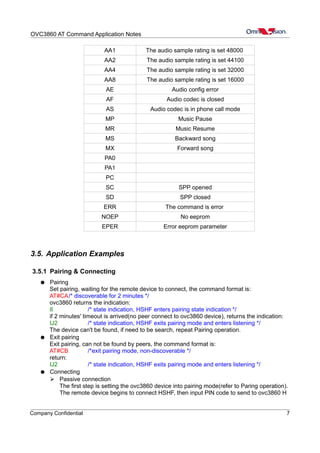
AA1 The audio sample rating is set 48000
AA2 The audio sample rating is set 44100
AA4 The audio sample rating is set 32000
AA8 The audio sample rating is set 16000
AE Audio config error
AF Audio codec is closed
AS Audio codec is in phone call mode
MP Music Pause
MR Music Resume
MS Backward song
MX Forward song
PA0
PA1
PC
SC SPP opened
SD SPP closed
ERR The command is error
NOEP No eeprom
EPER Error eeprom parameter
3.5. Application Examples
3.5.1 Pairing & Connecting
● Pairing
Set pairing, waiting for the remote device to connect, the command format is:
AT#CA/* discoverable for 2 minutes */
ovc3860 returns the indication:
II /* state indication, HSHF enters pairing state indication */
if 2 minutes' timeout is arrived(no peer connect to ovc3860 device), returns the indication:
IJ2 /* state indication, HSHF exits pairing mode and enters listening */
The device can't be found, if need to be search, repeat Pairing operation.
● Exit pairing
Exit pairing, can not be found by peers, the command format is:
AT#CB /*exit pairing mode, non-discoverable */
return:
IJ2 /* state indication, HSHF exits pairing mode and enters listening */
● Connecting
➢ Passive connection
The first step is setting the ovc3860 device into pairing mode(refer to Paring operation).
The remote device begins to connect HSHF, then input PIN code to send to ovc3860 H
Company Confidential 7
OVC3860 AT Command Application Notes
SHF device, when connection is successful, HSHF returns the indication:
IV /* state indication, connected */
➢ Active connection
Actively connect to the last successful connected device
AT#CC/* Connect to remote Device */
then input the local PIN code, and ovc3860 returns HSHF's state indication:
IV /* HSHF state is connected indication */
if Bluetooth mobile phone is turned off or not in Bluetooth signal range, will return a stat
us indication:
IJ2 /* HSHF exits pairing mode and enters listening state indication*/
● Exit connecting
Send the command:
AT#CD /* ACL disconnect from remote */
ovc3860 returns the indication:
IA /* HSHF state is listening */
if the remote device disconnects connection actively, ovc3860 also returns the same indicat
ion.
3.5.2 Phone Answering & Dialing
● Answering the phone
The phone receives a call, ovc3860 returns the indication, such as:
02167850001 /* Receive a incoming call 02167850001 */
at this time, user may refuse to answer the phone:
AT#CF /* Refuse to answer the phone */
ovc3860 returns:
IF /* Call-setup status is idle */
also, user may answer the phone:
AT#CE
return the indication:
IF /* hang-up indication */
if the other party hangs up the phone, also return:
IF /* hang-up indication */
● Dialing the phone
➢ Dialing
For example, dialing 10086, the command format is:
AT#CW10086
return
IC /* Call-setup status is outgoing */
IP5 /* Outgoing call number length indication */
IR10086 /* Outgoing call number indication */
➢ Sending DTMF
For example, sending number “1”
AT#CX1
return:
OK /* send DTMF successfully indication */
NOTE: sopported sending characters (0-9, #, *, A-D).
➢ Voice dialing
The command format is:
AT#CI
return:
PE /* The voice dial start indication */
Company Confidential 8
OVC3860 AT Command Application Notes
or,
PF /* The voice dial is not supported indication */
cancel the voice dialing:
AT#CJ
return:
PF /* The voice dial is stopped indication */
➢ Redialing
Redial the last outgoing call:
AT#CH
return:
IC /* Call-setup status is outgoing */
➢ Audio transfer
Transfer audio between HSHF and phone speaker:
AT#CO
when transfered to HSHF, ovc3860 returns:
MC /* The voice is on Bluetooth indication */
when transfered to HSHF:
MD /*The voice is on phone indication */
3.5.3 State Query
Query the HSHF applications state, the command is:
AT#CY
ovc3860 returns:
MGX /* The HSHF applications state is X indication*/
NOTE: X is the return parameter, 1 – “Ready”, 2 – “Connecting”, 3 – “Connected”, 4 –“Outg
oing call”, 5 –“Incoming call”,6 – “Ongoing call”.
3.5.4 Auto-answer & Auto-connect
● Query configuration
Query configurations of auto answer and auto connect after power on, the command is:
AT#MF
return:
MFXY /* X and Y are auto answer and auto connect configuration */
NOTE: X is the configuration parameter of auto anwser, 1 – “support auto answer”, 0 – “not
support auto answer”
Y is the configuration parameter of auto connect, 1 – “support auto connect after power
on”, 0 – “not support auto connect after power on”
● Auto-anwser
Enable auto anwser, the command is:
AT#MG
Disable auto anwser, the command is:
AT#MH
both return:
OK /* set successfully indication*/
● Auto-connect
Enable auto connect, the command is:
AT#MP
Disable auto connect, the command is:
Company Confidential 9
OVC3860 AT Command Application Notes
AT#MQ
both return:
OK /* set successfully indication*/
3.5.5 Memory R/W
● Read from memory
Read a byte from memory at a given address, the command is:
AT#MXADDR /* Read a byte from memory */
and, ADDR is a given address(32-bit, hexadecimal), for example, AT#MX08001AC4
ovc3860 returns:
MEM:VAL
VAL is the return hexadecimal value.
● Write to memory
Write a byte into memory at a given address, the command is:
AT#MWADDR_VAL /* Write a byte to memory */
and, ADDR is a given address(32-bit, hexadecimal), VAL is the written hexadecimal value, f
or example, AT#MW08001B9C_F6
return the indication:
OK
3.5.6 Test mode
Entering EMC test mode, ovc3860 transmits the specific packets in the specific frequency
or hopping frequency, the command format is :
AT#VGxx_yy
xx: If set to be 0~78, the frequency is fixed at (2402+xx)MHz, If set to 88, the frequency is
in hopping mode.
yy: Set the tx packet type according to the following table.
Packet Type Value
DH1 '04
DH3 '08
DH5 10
2DH1 '05
2DH3 11
2DH5 13
3DH1 '06
3DH3 12
3DH5 14
For example, AT#VG01_04, will make the chip sending out DH1 packets continuously in the
frequency 2403MHz
Company Confidential 10
OVC3860 AT Command Application Notes
4 Command Explanations
4.1. Enter Pairing Mode #CA
Command Current Status(s) Possible Indication(s) Indication Description
#CA Any II Enter Pairing Mode Indication
Description
This command puts the module in the pairing mode. The information response and causes will
indicate the command success or failure. Enter pairing mode indication or failure indication will be
sent to the host.
Note:
1.This command will cause a disconnection if module has already connected with some device.
2. Module will exit pairing mode if connection not happen in 2 minutes.
Syntax: AT#CA
4.2. Cancel Pairing Mode #CB
Command Current Status(s) Possible
Indication(s)
Indication Description
#CB Pairing IJ2 Exit Pairing Mode Indication
Description
If the module is in pairing mode, this command causes the module to exit the pairing mode and
enter the idle mode. The information response and causes will indicate the command success or
failure.
Syntax: AT#CB
4.3. Connect HFP to Handset #CC
Command Current Status(s) Possible
Indication(s)
Indication Description
#CC HFP Status = 1 IV Connecting Indication
Note: You can get current HFP status by #CY.
Description
This command causes the module to connect to a paired handset. The information response and
causes will indicate the command success or failure. Connect Indication will be sent to the host
after the connection is established. Otherwise Disconnect Indication will be sent to the host.
Syntax: AT#CC
4.4. Disconnect HFP from Handset #CD
Command Current Status(s) Possible
Indication(s)
Indication Description
#CD HFP Status ≥ 3 IA Disconnected Indication
Description
This command causes the module to disconnect from the connected handset. The information
response and causes will indicate the command success or failure. Disconnect Indication will be
sent to the host after the connection is dropped.
Syntax: AT#CD
4.5. Answer Call #CE
Command Current Status(s) Possible
Indication(s)
Indication Description
Company Confidential 11
OVC3860 AT Command Application Notes
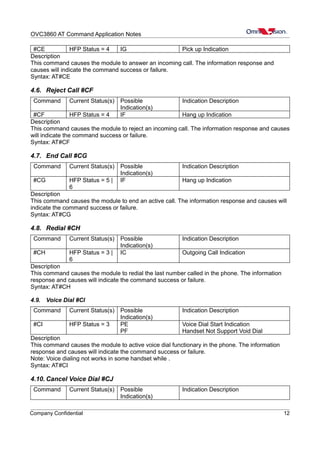
#CE HFP Status = 4 IG Pick up Indication
Description
This command causes the module to answer an incoming call. The information response and
causes will indicate the command success or failure.
Syntax: AT#CE
4.6. Reject Call #CF
Command Current Status(s) Possible
Indication(s)
Indication Description
#CF HFP Status = 4 IF Hang up Indication
Description
This command causes the module to reject an incoming call. The information response and causes
will indicate the command success or failure.
Syntax: AT#CF
4.7. End Call #CG
Command Current Status(s) Possible
Indication(s)
Indication Description
#CG HFP Status = 5 |
6
IF Hang up Indication
Description
This command causes the module to end an active call. The information response and causes will
indicate the command success or failure.
Syntax: AT#CG
4.8. Redial #CH
Command Current Status(s) Possible
Indication(s)
Indication Description
#CH HFP Status = 3 |
6
IC Outgoing Call Indication
Description
This command causes the module to redial the last number called in the phone. The information
response and causes will indicate the command success or failure.
Syntax: AT#CH
4.9. Voice Dial #CI
Command Current Status(s) Possible
Indication(s)
Indication Description
#CI HFP Status = 3 PE
PF
Voice Dial Start Indication
Handset Not Support Void Dial
Description
This command causes the module to active voice dial functionary in the phone. The information
response and causes will indicate the command success or failure.
Note: Voice dialing not works in some handset while .
Syntax: AT#CI
4.10. Cancel Voice Dial #CJ
Command Current Status(s) Possible
Indication(s)
Indication Description
Company Confidential 12
OVC3860 AT Command Application Notes
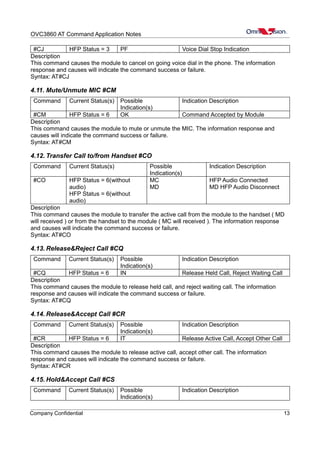
#CJ HFP Status = 3 PF Voice Dial Stop Indication
Description
This command causes the module to cancel on going voice dial in the phone. The information
response and causes will indicate the command success or failure.
Syntax: AT#CJ
4.11. Mute/Unmute MIC #CM
Command Current Status(s) Possible
Indication(s)
Indication Description
#CM HFP Status = 6 OK Command Accepted by Module
Description
This command causes the module to mute or unmute the MIC. The information response and
causes will indicate the command success or failure.
Syntax: AT#CM
4.12. Transfer Call to/from Handset #CO
Command Current Status(s) Possible
Indication(s)
Indication Description
#CO HFP Status = 6(without
audio)
HFP Status = 6(without
audio)
MC
MD
HFP Audio Connected
MD HFP Audio Disconnect
Description
This command causes the module to transfer the active call from the module to the handset ( MD
will received ) or from the handset to the module ( MC will received ). The information response
and causes will indicate the command success or failure.
Syntax: AT#CO
4.13. Release&Reject Call #CQ
Command Current Status(s) Possible
Indication(s)
Indication Description
#CQ HFP Status = 6 IN Release Held Call, Reject Waiting Call
Description
This command causes the module to release held call, and reject waiting call. The information
response and causes will indicate the command success or failure.
Syntax: AT#CQ
4.14. Release&Accept Call #CR
Command Current Status(s) Possible
Indication(s)
Indication Description
#CR HFP Status = 6 IT Release Active Call, Accept Other Call
Description
This command causes the module to release active call, accept other call. The information
response and causes will indicate the command success or failure.
Syntax: AT#CR
4.15. Hold&Accept Call #CS
Command Current Status(s) Possible
Indication(s)
Indication Description
Company Confidential 13
OVC3860 AT Command Application Notes
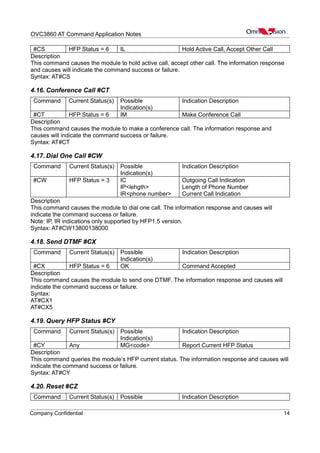
#CS HFP Status = 6 IL Hold Active Call, Accept Other Call
Description
This command causes the module to hold active call, accept other call. The information response
and causes will indicate the command success or failure.
Syntax: AT#CS
4.16. Conference Call #CT
Command Current Status(s) Possible
Indication(s)
Indication Description
#CT HFP Status = 6 IM Make Conference Call
Description
This command causes the module to make a conference call. The information response and
causes will indicate the command success or failure.
Syntax: AT#CT
4.17. Dial One Call #CW
Command Current Status(s) Possible
Indication(s)
Indication Description
#CW HFP Status = 3 IC
IP<lehgth>
IR<phone number>
Outgoing Call Indication
Length of Phone Number
Current Call Indication
Description
This command causes the module to dial one call. The information response and causes will
indicate the command success or failure.
Note: IP, IR indications only supported by HFP1.5 version.
Syntax: AT#CW13800138000
4.18. Send DTMF #CX
Command Current Status(s) Possible
Indication(s)
Indication Description
#CX HFP Status = 6 OK Command Accepted
Description
This command causes the module to send one DTMF. The information response and causes will
indicate the command success or failure.
Syntax:
AT#CX1
AT#CX5
4.19. Query HFP Status #CY
Command Current Status(s) Possible
Indication(s)
Indication Description
#CY Any MG<code> Report Current HFP Status
Description
This command queries the module’s HFP current status. The information response and causes will
indicate the command success or failure.
Syntax: AT#CY
4.20. Reset #CZ
Command Current Status(s) Possible Indication Description
Company Confidential 14
OVC3860 AT Command Application Notes
Indication(s)
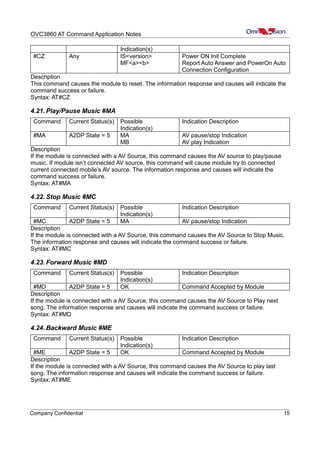
#CZ Any IS<version>
MF<a><b>
Power ON Init Complete
Report Auto Answer and PowerOn Auto
Connection Configuration
Description
This command causes the module to reset. The information response and causes will indicate the
command success or failure.
Syntax: AT#CZ
4.21. Play/Pause Music #MA
Command Current Status(s) Possible
Indication(s)
Indication Description
#MA A2DP State = 5 MA
MB
AV pause/stop Indication
AV play Indication
Description
If the module is connected with a AV Source, this command causes the AV source to play/pause
music. If module isn’t connected AV source, this command will cause module try to connected
current connected mobile’s AV source. The information response and causes will indicate the
command success or failure.
Syntax: AT#MA
4.22. Stop Music #MC
Command Current Status(s) Possible
Indication(s)
Indication Description
#MC A2DP State = 5 MA AV pause/stop Indication
Description
If the module is connected with a AV Source, this command causes the AV Source to Stop Music.
The information response and causes will indicate the command success or failure.
Syntax: AT#MC
4.23. Forward Music #MD
Command Current Status(s) Possible
Indication(s)
Indication Description
#MD A2DP State = 5 OK Command Accepted by Module
Description
If the module is connected with a AV Source, this command causes the AV Source to Play next
song. The information response and causes will indicate the command success or failure.
Syntax: AT#MD
4.24. Backward Music #ME
Command Current Status(s) Possible
Indication(s)
Indication Description
#ME A2DP State = 5 OK Command Accepted by Module
Description
If the module is connected with a AV Source, this command causes the AV Source to play last
song. The information response and causes will indicate the command success or failure.
Syntax: AT#ME
Company Confidential 15
OVC3860 AT Command Application Notes
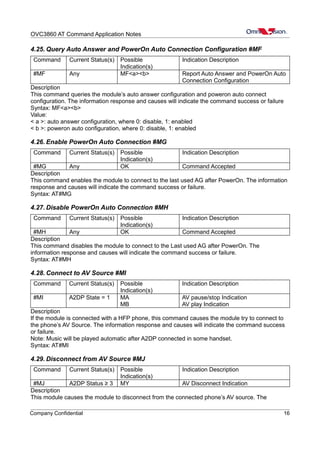
4.25. Query Auto Answer and PowerOn Auto Connection Configuration #MF
Command Current Status(s) Possible
Indication(s)
Indication Description
#MF Any MF<a><b> Report Auto Answer and PowerOn Auto
Connection Configuration
Description
This command queries the module’s auto answer configuration and poweron auto connect
configuration. The information response and causes will indicate the command success or failure
Syntax: MF<a><b>
Value:
< a >: auto answer configuration, where 0: disable, 1: enabled
< b >: poweron auto configuration, where 0: disable, 1: enabled
4.26. Enable PowerOn Auto Connection #MG
Command Current Status(s) Possible
Indication(s)
Indication Description
#MG Any OK Command Accepted
Description
This command enables the module to connect to the last used AG after PowerOn. The information
response and causes will indicate the command success or failure.
Syntax: AT#MG
4.27. Disable PowerOn Auto Connection #MH
Command Current Status(s) Possible
Indication(s)
Indication Description
#MH Any OK Command Accepted
Description
This command disables the module to connect to the Last used AG after PowerOn. The
information response and causes will indicate the command success or failure.
Syntax: AT#MH
4.28. Connect to AV Source #MI
Command Current Status(s) Possible
Indication(s)
Indication Description
#MI A2DP State = 1 MA
MB
AV pause/stop Indication
AV play Indication
Description
If the module is connected with a HFP phone, this command causes the module try to connect to
the phone’s AV Source. The information response and causes will indicate the command success
or failure.
Note: Music will be played automatic after A2DP connected in some handset.
Syntax: AT#MI
4.29. Disconnect from AV Source #MJ
Command Current Status(s) Possible
Indication(s)
Indication Description
#MJ A2DP Status ≥ 3 MY AV Disconnect Indication
Description
This module causes the module to disconnect from the connected phone’s AV source. The
Company Confidential 16
OVC3860 AT Command Application Notes
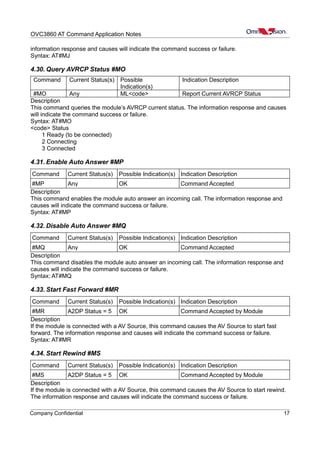
information response and causes will indicate the command success or failure.
Syntax: AT#MJ
4.30. Query AVRCP Status #MO
Command Current Status(s) Possible
Indication(s)
Indication Description
#MO Any ML<code> Report Current AVRCP Status
Description
This command queries the module’s AVRCP current status. The information response and causes
will indicate the command success or failure.
Syntax: AT#MO
<code> Status
1 Ready (to be connected)
2 Connecting
3 Connected
4.31. Enable Auto Answer #MP
Command Current Status(s) Possible Indication(s) Indication Description
#MP Any OK Command Accepted
Description
This command enables the module auto answer an incoming call. The information response and
causes will indicate the command success or failure.
Syntax: AT#MP
4.32. Disable Auto Answer #MQ
Command Current Status(s) Possible Indication(s) Indication Description
#MQ Any OK Command Accepted
Description
This command disables the module auto answer an incoming call. The information response and
causes will indicate the command success or failure.
Syntax: AT#MQ
4.33. Start Fast Forward #MR
Command Current Status(s) Possible Indication(s) Indication Description
#MR A2DP Status = 5 OK Command Accepted by Module
Description
If the module is connected with a AV Source, this command causes the AV Source to start fast
forward. The information response and causes will indicate the command success or failure.
Syntax: AT#MR
4.34. Start Rewind #MS
Command Current Status(s) Possible Indication(s) Indication Description
#MS A2DP Status = 5 OK Command Accepted by Module
Description
If the module is connected with a AV Source, this command causes the AV Source to start rewind.
The information response and causes will indicate the command success or failure.
Company Confidential 17
OVC3860 AT Command Application Notes
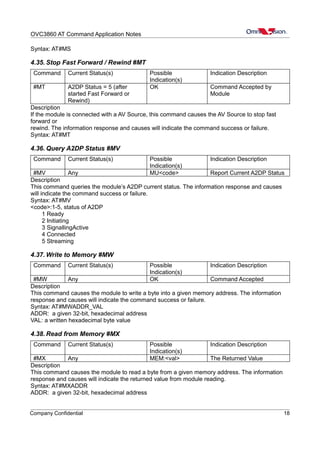
Syntax: AT#MS
4.35. Stop Fast Forward / Rewind #MT
Command Current Status(s) Possible
Indication(s)
Indication Description
#MT A2DP Status = 5 (after
started Fast Forward or
Rewind)
OK Command Accepted by
Module
Description
If the module is connected with a AV Source, this command causes the AV Source to stop fast
forward or
rewind. The information response and causes will indicate the command success or failure.
Syntax: AT#MT
4.36. Query A2DP Status #MV
Command Current Status(s) Possible
Indication(s)
Indication Description
#MV Any MU<code> Report Current A2DP Status
Description
This command queries the module’s A2DP current status. The information response and causes
will indicate the command success or failure.
Syntax: AT#MV
<code>:1-5, status of A2DP
1 Ready
2 Initiating
3 SignallingActive
4 Connected
5 Streaming
4.37. Write to Memory #MW
Command Current Status(s) Possible
Indication(s)
Indication Description
#MW Any OK Command Accepted
Description
This command causes the module to write a byte into a given memory address. The information
response and causes will indicate the command success or failure.
Syntax: AT#MWADDR_VAL
ADDR: a given 32-bit, hexadecimal address
VAL: a written hexadecimal byte value
4.38. Read from Memory #MX
Command Current Status(s) Possible
Indication(s)
Indication Description
#MX Any MEM:<val> The Returned Value
Description
This command causes the module to read a byte from a given memory address. The information
response and causes will indicate the returned value from module reading.
Syntax: AT#MXADDR
ADDR: a given 32-bit, hexadecimal address
Company Confidential 18
OVC3860 AT Command Application Notes
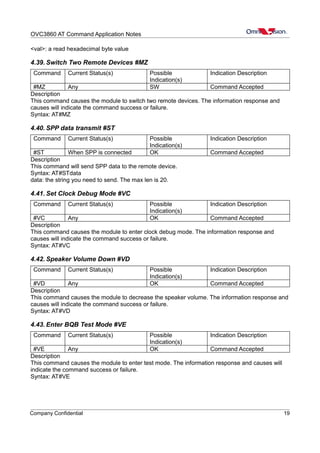
<val>: a read hexadecimal byte value
4.39. Switch Two Remote Devices #MZ
Command Current Status(s) Possible
Indication(s)
Indication Description
#MZ Any SW Command Accepted
Description
This command causes the module to switch two remote devices. The information response and
causes will indicate the command success or failure.
Syntax: AT#MZ
4.40. SPP data transmit #ST
Command Current Status(s) Possible
Indication(s)
Indication Description
#ST When SPP is connected OK Command Accepted
Description
This command will send SPP data to the remote device.
Syntax: AT#STdata
data: the string you need to send. The max len is 20.
4.41. Set Clock Debug Mode #VC
Command Current Status(s) Possible
Indication(s)
Indication Description
#VC Any OK Command Accepted
Description
This command causes the module to enter clock debug mode. The information response and
causes will indicate the command success or failure.
Syntax: AT#VC
4.42. Speaker Volume Down #VD
Command Current Status(s) Possible
Indication(s)
Indication Description
#VD Any OK Command Accepted
Description
This command causes the module to decrease the speaker volume. The information response and
causes will indicate the command success or failure.
Syntax: AT#VD
4.43. Enter BQB Test Mode #VE
Command Current Status(s) Possible
Indication(s)
Indication Description
#VE Any OK Command Accepted
Description
This command causes the module to enter test mode. The information response and causes will
indicate the command success or failure.
Syntax: AT#VE
Company Confidential 19
OVC3860 AT Command Application Notes
4.44. Set to Fixed Frequency #VF
Command Current Status(s) Possible
Indication(s)
Indication Description
#VF Any OK Command Accepted
Description
This command causes the module to work at 2404MHz. The information response and causes will
indicate the command success or failure.
Syntax: AT#VF
4.45. Enter EMC Test Mode #VG
Command Current Status(s) Possible
Indication(s)
Indication Description
#VG Any OK Command Accepted
Description
This command causes the module to work at 2404MHz. The information response and causes will
indicate the command success or failure.
Syntax: AT#VGxx_yy
xx: if set to be 0~78, the frequency is fixed at (2402+xx)MHz, If set to 88, the frequency is in
hopping mode.
yy: set the tx packet type according to the following table.
Packet Type Value
DH1 '04
DH3 '08
DH5 10
2DH1 '05
2DH3 11
2DH5 13
3DH1 '06
3DH3 12
3DH5 14
4.46. Set RF Register #VH
Command Current Status(s) Possible
Indication(s)
Indication Description
#VH Any OK Command Accepted
Description
This command causes the module to set a RF register with a given value. The information
response and causes will indicate the command success or failure.
Syntax: AT#VHxx_yy
xx: a register address
yy: a byte value
Example: AT#VH54_88(set RF reg 0x54 to be 0x88)
Company Confidential 20
OVC3860 AT Command Application Notes
4.47. Start Inquiry #VI
Command Current Status(s) Possible
Indication(s)
Indication Description
#VI Any OK Command Accepted
Description
This command causes the module to inquiry Bluetooth devices. The information response and
causes will indicate the command success or failure.
Syntax: AT#VI
4.48. Cancel Inquiry #VJ
Command Current Status(s) Possible
Indication(s)
Indication Description
#VJ Any OK Command Accepted
Description
This command causes the module to cancel inquiry Bluetooth devices. The information response
and causes will indicate the command success or failure.
Syntax: AT#VJ
4.49. Speaker Volume Up #VU
Command Current Status(s) Possible
Indication(s)
Indication Description
#VU Any OK Command Accepted
Description
This command causes the module to increase the speaker volume. The information response and
causes will indicate the command success or failure.
Syntax: AT#VU
4.50. Power Off OOL #VX
Command Current Status(s) Possible
Indication(s)
Indication Description
#VX Any OK Command Accepted
Description
This command causes the module to power off OOL. The information response and causes will
indicate the command success or failure.
Syntax: AT#VX
5 Revision History
Rev 1.1: Update to support OVC3860 RevE
Company Confidential 21

Ovc3860 command-list

  • 1.
    OVC3860 AT CommandApplication Notes OVC3860 AT Command Application Notes Last Modified:2012-10-18 Document Revision:1.1 OmniVision Technologies, Inc. reserves the right to make changes without further notice to any product herein to improve reliability, function or design. OmniVision does not assume any liability arising out of the application or use of any project, circuit described herein; neither does it convey any license under its patent nor the right of others. The datasheet is the official document of OmniVision. The applicaton notes are application guide lines for reference. If there are any difference between datasheet and application notes, please follow datasheet and kindly report the difference to OVT FAE. This document contains information of a proprietary nature. None of this information shall be divulged to persons other than OmniVision Technologies, Inc. employee authorized by the nature of their duties to receive such information, or individuals or organizations authorized by OmniVision Technologies, Inc. Company Confidential 1
  • 2.
    OVC3860 AT CommandApplication Notes Table of Contents 1 Overview.........................................................................................................................................4 2 The States of Bluetooth Application................................................................................................4 3 AT Command Operations................................................................................................................4 3.1.Command Format......................................................................................................................4 3.2.Indication Format.......................................................................................................................4 3.3.Supported AT Commands..........................................................................................................5 3.4.State Indications.........................................................................................................................6 3.5.Application Examples................................................................................................................7 3.5.1 Pairing & Connecting.......................................................................................................7 3.5.2 Phone Answering & Dialing............................................................................................8 3.5.3 State Query.......................................................................................................................9 3.5.4 Auto-answer & Auto-connect...........................................................................................9 3.5.5 Memory R/W.................................................................................................................10 3.5.6 Test mode.......................................................................................................................10 4 Command Explanations.................................................................................................................11 4.1. Enter Pairing Mode #CA........................................................................................................11 4.2.Cancel Pairing Mode #CB.......................................................................................................11 4.3.Connect HFP to Handset #CC.................................................................................................11 4.4.Disconnect HFP from Handset #CD........................................................................................11 4.5.Answer Call #CE.....................................................................................................................11 4.6.Reject Call #CF........................................................................................................................12 4.7.End Call #CG...........................................................................................................................12 4.8.Redial #CH..............................................................................................................................12 4.9.Voice Dial #CI.........................................................................................................................12 4.10.Cancel Voice Dial #CJ...........................................................................................................12 4.11.Mute/Unmute MIC #CM.......................................................................................................13 4.12.Transfer Call to/from Handset #CO.......................................................................................13 4.13.Release&Reject Call #CQ.....................................................................................................13 4.14.Release&Accept Call #CR.....................................................................................................13 4.15.Hold&Accept Call #CS.........................................................................................................13 4.16.Conference Call #CT.............................................................................................................14 4.17.Dial One Call #CW................................................................................................................14 4.18.Send DTMF #CX...................................................................................................................14 4.19.Query HFP Status #CY..........................................................................................................14 4.20.Reset #CZ..............................................................................................................................14 4.21.Play/Pause Music #MA.........................................................................................................15 4.22.Stop Music #MC....................................................................................................................15 4.23.Forward Music #MD.............................................................................................................15 4.24.Backward Music #ME...........................................................................................................15 4.25.Query Auto Answer and PowerOn Auto Connection Configuration #MF............................16 4.26.Enable PowerOn Auto Connection #MG...............................................................................16 4.27.Disable PowerOn Auto Connection #MH.............................................................................16 4.28.Connect to AV Source #MI....................................................................................................16 Company Confidential 2
  • 3.
    OVC3860 AT CommandApplication Notes 4.29.Disconnect from AV Source #MJ..........................................................................................16 4.30.Query AVRCP Status #MO....................................................................................................17 4.31.Enable Auto Answer #MP......................................................................................................17 4.32.Disable Auto Answer #MQ....................................................................................................17 4.33.Start Fast Forward #MR........................................................................................................17 4.34.Start Rewind #MS..................................................................................................................17 4.35.Stop Fast Forward / Rewind #MT.........................................................................................18 4.36.Query A2DP Status #MV.......................................................................................................18 4.37.Write to Memory #MW.........................................................................................................18 4.38.Read from Memory #MX......................................................................................................18 4.39.Switch Two Remote Devices #MZ........................................................................................19 4.40. #ST........................................................................................................................................19 4.41.Set Clock Debug Mode #VC.................................................................................................19 4.42.Speaker Volume Down #VD..................................................................................................19 4.43.Enter BQB Test Mode #VE...................................................................................................19 4.44.Set to Fixed Frequency #VF..................................................................................................20 4.45.Enter EMC Test Mode #VG..................................................................................................20 4.46.Set RF Register #VH.............................................................................................................20 4.47.Start Inquiry #VI....................................................................................................................21 4.48.Cancel Inquiry #VJ................................................................................................................21 4.49.Speaker Volume Up #VU.......................................................................................................21 4.50.Power Off OOL #VX.............................................................................................................21 5 Revision History............................................................................................................................21 Company Confidential 3
  • 4.
    OVC3860 AT CommandApplication Notes 1 Overview User can use the UART serial port to communicate with OVC3860 chip, and implement bluetooth h eadset/handfree and stereo headset functions through sending AT command. The UART serial port use-s tow signal wires: Tx and Rx, soppurting 1200, 2400, 4800, 9600, 14400, 19200, 38400, 5760 0, 115200, 230400, 460800 and 921600bps baudrate. The default baudrate is 115200bps. 2 The States of Bluetooth Application These status number is combined with the Indication Strings like “MG”,”MU”,”ML”. HFP Status Value Description:(MG) 1. Ready (to be connected) 2. Connecting 3. Connected 4. Outgoing Call 5. Incoming Call 6. Ongoing Call A2DP Status Value Description:(MU) 1. Ready (to be connected) 2. Initializing 3. Signalling Active 4. Connected 5. Streaming AVRCP Status Value Description:(ML) 1. Ready (to be connected) 2. Connecting 3. Connected 3 AT Command Operations 3.1. Command Format AT command is used to operate OVC3860, and there is the format as shown below: AT#CMD<CR><LF> AT#CMDsp <CR><LF> Among them, — AT# is command line prefix. — CMD is basic command. — sp is Sub-Parameter. — <CR><LF> is Carriage Return and Line Feed 3.2. Indication Format Indication symbol is the response information of OVC3860, and there is the format as show- n below: Company Confidential 4
  • 5.
    OVC3860 AT CommandApplication Notes <CR><LF>IND<CR><LF> <CR><LF>INDsp <CR><LF> <CR><LF>IND ,,<CR><LF> Among them, — IND is basic indication — sp is Sub-Parameter — ,, is Sub-Parameter that may be omitted 3.3. Supported AT Commands AT Command Notion Response Indication CA Enter pairing II CB Cancel pairing IJ2 CC Connect hshf IV CD Disconnect hshf IA CE Answer IG CF Reject IF CG Endcall IF CH Redial IC CI Voice call PE/PF CJ Cancel voice call OK CM Toggle mic OK CO Audio transfer MC/MD CQ* Release held call, reject waiting call IN CR* Release active call, accept other call IT CS* Hold active call, accept other call IL CT* Conference call IM CW<phonenum> Dial phone number IC, IP<len>, IR<phonenum> CX<dtmf> Send dtmf OK CY Query status MG<status> CZ Reset IS<ver>, MF<ab> MA Play/pause MA/MB MC Stop MA MD Forward OK ME Backward OK MF Query autoconn and autoanswe configuration MF<ab> Company Confidential 5
  • 6.
    OVC3860 AT CommandApplication Notes AT Command Notion Response Indication MG Enable autoconn OK MH Disble autoconn OK MI Connect to av source MB/MA MJ Disconnect from av source MY MO Query avrcp status ML<status> MP Enable auto answer OK MQ Disable auto answer OK MR Start FF OK MS Start Rewind OK MT Stop FF/Rewind OK MV Query a2dp status MU<status> MW Write a byte to memory OK MX Read a byte from memory MEM:<val> MZ Switch two remote devices SW ST SPP send data OK VC Set clock debug mode OK VD Decrease volume OK VE Enter test mode OK VF Set to a fixed frequency OK VG Entering EMC test mode OK VH Set RF reg OK VI Start inquiry OK VJ Cancel inquiry OK VU Increase volume OK VX OOL power off OK 3.4. State Indications In addition to the state indications mentioned above, there are some other indications used, such as audio state indications. The following is the introdution of these state indications State Indication Description II In pairing state IJ2 Exit pairing state IV Connected IA Disconnected IF Phone hand up Company Confidential 6
  • 7.
    OVC3860 AT CommandApplication Notes AA1 The audio sample rating is set 48000 AA2 The audio sample rating is set 44100 AA4 The audio sample rating is set 32000 AA8 The audio sample rating is set 16000 AE Audio config error AF Audio codec is closed AS Audio codec is in phone call mode MP Music Pause MR Music Resume MS Backward song MX Forward song PA0 PA1 PC SC SPP opened SD SPP closed ERR The command is error NOEP No eeprom EPER Error eeprom parameter 3.5. Application Examples 3.5.1 Pairing & Connecting ● Pairing Set pairing, waiting for the remote device to connect, the command format is: AT#CA/* discoverable for 2 minutes */ ovc3860 returns the indication: II /* state indication, HSHF enters pairing state indication */ if 2 minutes' timeout is arrived(no peer connect to ovc3860 device), returns the indication: IJ2 /* state indication, HSHF exits pairing mode and enters listening */ The device can't be found, if need to be search, repeat Pairing operation. ● Exit pairing Exit pairing, can not be found by peers, the command format is: AT#CB /*exit pairing mode, non-discoverable */ return: IJ2 /* state indication, HSHF exits pairing mode and enters listening */ ● Connecting ➢ Passive connection The first step is setting the ovc3860 device into pairing mode(refer to Paring operation). The remote device begins to connect HSHF, then input PIN code to send to ovc3860 H Company Confidential 7
  • 8.
    OVC3860 AT CommandApplication Notes SHF device, when connection is successful, HSHF returns the indication: IV /* state indication, connected */ ➢ Active connection Actively connect to the last successful connected device AT#CC/* Connect to remote Device */ then input the local PIN code, and ovc3860 returns HSHF's state indication: IV /* HSHF state is connected indication */ if Bluetooth mobile phone is turned off or not in Bluetooth signal range, will return a stat us indication: IJ2 /* HSHF exits pairing mode and enters listening state indication*/ ● Exit connecting Send the command: AT#CD /* ACL disconnect from remote */ ovc3860 returns the indication: IA /* HSHF state is listening */ if the remote device disconnects connection actively, ovc3860 also returns the same indicat ion. 3.5.2 Phone Answering & Dialing ● Answering the phone The phone receives a call, ovc3860 returns the indication, such as: 02167850001 /* Receive a incoming call 02167850001 */ at this time, user may refuse to answer the phone: AT#CF /* Refuse to answer the phone */ ovc3860 returns: IF /* Call-setup status is idle */ also, user may answer the phone: AT#CE return the indication: IF /* hang-up indication */ if the other party hangs up the phone, also return: IF /* hang-up indication */ ● Dialing the phone ➢ Dialing For example, dialing 10086, the command format is: AT#CW10086 return IC /* Call-setup status is outgoing */ IP5 /* Outgoing call number length indication */ IR10086 /* Outgoing call number indication */ ➢ Sending DTMF For example, sending number “1” AT#CX1 return: OK /* send DTMF successfully indication */ NOTE: sopported sending characters (0-9, #, *, A-D). ➢ Voice dialing The command format is: AT#CI return: PE /* The voice dial start indication */ Company Confidential 8
  • 9.
    OVC3860 AT CommandApplication Notes or, PF /* The voice dial is not supported indication */ cancel the voice dialing: AT#CJ return: PF /* The voice dial is stopped indication */ ➢ Redialing Redial the last outgoing call: AT#CH return: IC /* Call-setup status is outgoing */ ➢ Audio transfer Transfer audio between HSHF and phone speaker: AT#CO when transfered to HSHF, ovc3860 returns: MC /* The voice is on Bluetooth indication */ when transfered to HSHF: MD /*The voice is on phone indication */ 3.5.3 State Query Query the HSHF applications state, the command is: AT#CY ovc3860 returns: MGX /* The HSHF applications state is X indication*/ NOTE: X is the return parameter, 1 – “Ready”, 2 – “Connecting”, 3 – “Connected”, 4 –“Outg oing call”, 5 –“Incoming call”,6 – “Ongoing call”. 3.5.4 Auto-answer & Auto-connect ● Query configuration Query configurations of auto answer and auto connect after power on, the command is: AT#MF return: MFXY /* X and Y are auto answer and auto connect configuration */ NOTE: X is the configuration parameter of auto anwser, 1 – “support auto answer”, 0 – “not support auto answer” Y is the configuration parameter of auto connect, 1 – “support auto connect after power on”, 0 – “not support auto connect after power on” ● Auto-anwser Enable auto anwser, the command is: AT#MG Disable auto anwser, the command is: AT#MH both return: OK /* set successfully indication*/ ● Auto-connect Enable auto connect, the command is: AT#MP Disable auto connect, the command is: Company Confidential 9
  • 10.
    OVC3860 AT CommandApplication Notes AT#MQ both return: OK /* set successfully indication*/ 3.5.5 Memory R/W ● Read from memory Read a byte from memory at a given address, the command is: AT#MXADDR /* Read a byte from memory */ and, ADDR is a given address(32-bit, hexadecimal), for example, AT#MX08001AC4 ovc3860 returns: MEM:VAL VAL is the return hexadecimal value. ● Write to memory Write a byte into memory at a given address, the command is: AT#MWADDR_VAL /* Write a byte to memory */ and, ADDR is a given address(32-bit, hexadecimal), VAL is the written hexadecimal value, f or example, AT#MW08001B9C_F6 return the indication: OK 3.5.6 Test mode Entering EMC test mode, ovc3860 transmits the specific packets in the specific frequency or hopping frequency, the command format is : AT#VGxx_yy xx: If set to be 0~78, the frequency is fixed at (2402+xx)MHz, If set to 88, the frequency is in hopping mode. yy: Set the tx packet type according to the following table. Packet Type Value DH1 '04 DH3 '08 DH5 10 2DH1 '05 2DH3 11 2DH5 13 3DH1 '06 3DH3 12 3DH5 14 For example, AT#VG01_04, will make the chip sending out DH1 packets continuously in the frequency 2403MHz Company Confidential 10
  • 11.
    OVC3860 AT CommandApplication Notes 4 Command Explanations 4.1. Enter Pairing Mode #CA Command Current Status(s) Possible Indication(s) Indication Description #CA Any II Enter Pairing Mode Indication Description This command puts the module in the pairing mode. The information response and causes will indicate the command success or failure. Enter pairing mode indication or failure indication will be sent to the host. Note: 1.This command will cause a disconnection if module has already connected with some device. 2. Module will exit pairing mode if connection not happen in 2 minutes. Syntax: AT#CA 4.2. Cancel Pairing Mode #CB Command Current Status(s) Possible Indication(s) Indication Description #CB Pairing IJ2 Exit Pairing Mode Indication Description If the module is in pairing mode, this command causes the module to exit the pairing mode and enter the idle mode. The information response and causes will indicate the command success or failure. Syntax: AT#CB 4.3. Connect HFP to Handset #CC Command Current Status(s) Possible Indication(s) Indication Description #CC HFP Status = 1 IV Connecting Indication Note: You can get current HFP status by #CY. Description This command causes the module to connect to a paired handset. The information response and causes will indicate the command success or failure. Connect Indication will be sent to the host after the connection is established. Otherwise Disconnect Indication will be sent to the host. Syntax: AT#CC 4.4. Disconnect HFP from Handset #CD Command Current Status(s) Possible Indication(s) Indication Description #CD HFP Status ≥ 3 IA Disconnected Indication Description This command causes the module to disconnect from the connected handset. The information response and causes will indicate the command success or failure. Disconnect Indication will be sent to the host after the connection is dropped. Syntax: AT#CD 4.5. Answer Call #CE Command Current Status(s) Possible Indication(s) Indication Description Company Confidential 11
  • 12.
    OVC3860 AT CommandApplication Notes #CE HFP Status = 4 IG Pick up Indication Description This command causes the module to answer an incoming call. The information response and causes will indicate the command success or failure. Syntax: AT#CE 4.6. Reject Call #CF Command Current Status(s) Possible Indication(s) Indication Description #CF HFP Status = 4 IF Hang up Indication Description This command causes the module to reject an incoming call. The information response and causes will indicate the command success or failure. Syntax: AT#CF 4.7. End Call #CG Command Current Status(s) Possible Indication(s) Indication Description #CG HFP Status = 5 | 6 IF Hang up Indication Description This command causes the module to end an active call. The information response and causes will indicate the command success or failure. Syntax: AT#CG 4.8. Redial #CH Command Current Status(s) Possible Indication(s) Indication Description #CH HFP Status = 3 | 6 IC Outgoing Call Indication Description This command causes the module to redial the last number called in the phone. The information response and causes will indicate the command success or failure. Syntax: AT#CH 4.9. Voice Dial #CI Command Current Status(s) Possible Indication(s) Indication Description #CI HFP Status = 3 PE PF Voice Dial Start Indication Handset Not Support Void Dial Description This command causes the module to active voice dial functionary in the phone. The information response and causes will indicate the command success or failure. Note: Voice dialing not works in some handset while . Syntax: AT#CI 4.10. Cancel Voice Dial #CJ Command Current Status(s) Possible Indication(s) Indication Description Company Confidential 12
  • 13.
    OVC3860 AT CommandApplication Notes #CJ HFP Status = 3 PF Voice Dial Stop Indication Description This command causes the module to cancel on going voice dial in the phone. The information response and causes will indicate the command success or failure. Syntax: AT#CJ 4.11. Mute/Unmute MIC #CM Command Current Status(s) Possible Indication(s) Indication Description #CM HFP Status = 6 OK Command Accepted by Module Description This command causes the module to mute or unmute the MIC. The information response and causes will indicate the command success or failure. Syntax: AT#CM 4.12. Transfer Call to/from Handset #CO Command Current Status(s) Possible Indication(s) Indication Description #CO HFP Status = 6(without audio) HFP Status = 6(without audio) MC MD HFP Audio Connected MD HFP Audio Disconnect Description This command causes the module to transfer the active call from the module to the handset ( MD will received ) or from the handset to the module ( MC will received ). The information response and causes will indicate the command success or failure. Syntax: AT#CO 4.13. Release&Reject Call #CQ Command Current Status(s) Possible Indication(s) Indication Description #CQ HFP Status = 6 IN Release Held Call, Reject Waiting Call Description This command causes the module to release held call, and reject waiting call. The information response and causes will indicate the command success or failure. Syntax: AT#CQ 4.14. Release&Accept Call #CR Command Current Status(s) Possible Indication(s) Indication Description #CR HFP Status = 6 IT Release Active Call, Accept Other Call Description This command causes the module to release active call, accept other call. The information response and causes will indicate the command success or failure. Syntax: AT#CR 4.15. Hold&Accept Call #CS Command Current Status(s) Possible Indication(s) Indication Description Company Confidential 13
  • 14.
    OVC3860 AT CommandApplication Notes #CS HFP Status = 6 IL Hold Active Call, Accept Other Call Description This command causes the module to hold active call, accept other call. The information response and causes will indicate the command success or failure. Syntax: AT#CS 4.16. Conference Call #CT Command Current Status(s) Possible Indication(s) Indication Description #CT HFP Status = 6 IM Make Conference Call Description This command causes the module to make a conference call. The information response and causes will indicate the command success or failure. Syntax: AT#CT 4.17. Dial One Call #CW Command Current Status(s) Possible Indication(s) Indication Description #CW HFP Status = 3 IC IP<lehgth> IR<phone number> Outgoing Call Indication Length of Phone Number Current Call Indication Description This command causes the module to dial one call. The information response and causes will indicate the command success or failure. Note: IP, IR indications only supported by HFP1.5 version. Syntax: AT#CW13800138000 4.18. Send DTMF #CX Command Current Status(s) Possible Indication(s) Indication Description #CX HFP Status = 6 OK Command Accepted Description This command causes the module to send one DTMF. The information response and causes will indicate the command success or failure. Syntax: AT#CX1 AT#CX5 4.19. Query HFP Status #CY Command Current Status(s) Possible Indication(s) Indication Description #CY Any MG<code> Report Current HFP Status Description This command queries the module’s HFP current status. The information response and causes will indicate the command success or failure. Syntax: AT#CY 4.20. Reset #CZ Command Current Status(s) Possible Indication Description Company Confidential 14
  • 15.
    OVC3860 AT CommandApplication Notes Indication(s) #CZ Any IS<version> MF<a><b> Power ON Init Complete Report Auto Answer and PowerOn Auto Connection Configuration Description This command causes the module to reset. The information response and causes will indicate the command success or failure. Syntax: AT#CZ 4.21. Play/Pause Music #MA Command Current Status(s) Possible Indication(s) Indication Description #MA A2DP State = 5 MA MB AV pause/stop Indication AV play Indication Description If the module is connected with a AV Source, this command causes the AV source to play/pause music. If module isn’t connected AV source, this command will cause module try to connected current connected mobile’s AV source. The information response and causes will indicate the command success or failure. Syntax: AT#MA 4.22. Stop Music #MC Command Current Status(s) Possible Indication(s) Indication Description #MC A2DP State = 5 MA AV pause/stop Indication Description If the module is connected with a AV Source, this command causes the AV Source to Stop Music. The information response and causes will indicate the command success or failure. Syntax: AT#MC 4.23. Forward Music #MD Command Current Status(s) Possible Indication(s) Indication Description #MD A2DP State = 5 OK Command Accepted by Module Description If the module is connected with a AV Source, this command causes the AV Source to Play next song. The information response and causes will indicate the command success or failure. Syntax: AT#MD 4.24. Backward Music #ME Command Current Status(s) Possible Indication(s) Indication Description #ME A2DP State = 5 OK Command Accepted by Module Description If the module is connected with a AV Source, this command causes the AV Source to play last song. The information response and causes will indicate the command success or failure. Syntax: AT#ME Company Confidential 15
  • 16.
    OVC3860 AT CommandApplication Notes 4.25. Query Auto Answer and PowerOn Auto Connection Configuration #MF Command Current Status(s) Possible Indication(s) Indication Description #MF Any MF<a><b> Report Auto Answer and PowerOn Auto Connection Configuration Description This command queries the module’s auto answer configuration and poweron auto connect configuration. The information response and causes will indicate the command success or failure Syntax: MF<a><b> Value: < a >: auto answer configuration, where 0: disable, 1: enabled < b >: poweron auto configuration, where 0: disable, 1: enabled 4.26. Enable PowerOn Auto Connection #MG Command Current Status(s) Possible Indication(s) Indication Description #MG Any OK Command Accepted Description This command enables the module to connect to the last used AG after PowerOn. The information response and causes will indicate the command success or failure. Syntax: AT#MG 4.27. Disable PowerOn Auto Connection #MH Command Current Status(s) Possible Indication(s) Indication Description #MH Any OK Command Accepted Description This command disables the module to connect to the Last used AG after PowerOn. The information response and causes will indicate the command success or failure. Syntax: AT#MH 4.28. Connect to AV Source #MI Command Current Status(s) Possible Indication(s) Indication Description #MI A2DP State = 1 MA MB AV pause/stop Indication AV play Indication Description If the module is connected with a HFP phone, this command causes the module try to connect to the phone’s AV Source. The information response and causes will indicate the command success or failure. Note: Music will be played automatic after A2DP connected in some handset. Syntax: AT#MI 4.29. Disconnect from AV Source #MJ Command Current Status(s) Possible Indication(s) Indication Description #MJ A2DP Status ≥ 3 MY AV Disconnect Indication Description This module causes the module to disconnect from the connected phone’s AV source. The Company Confidential 16
  • 17.
    OVC3860 AT CommandApplication Notes information response and causes will indicate the command success or failure. Syntax: AT#MJ 4.30. Query AVRCP Status #MO Command Current Status(s) Possible Indication(s) Indication Description #MO Any ML<code> Report Current AVRCP Status Description This command queries the module’s AVRCP current status. The information response and causes will indicate the command success or failure. Syntax: AT#MO <code> Status 1 Ready (to be connected) 2 Connecting 3 Connected 4.31. Enable Auto Answer #MP Command Current Status(s) Possible Indication(s) Indication Description #MP Any OK Command Accepted Description This command enables the module auto answer an incoming call. The information response and causes will indicate the command success or failure. Syntax: AT#MP 4.32. Disable Auto Answer #MQ Command Current Status(s) Possible Indication(s) Indication Description #MQ Any OK Command Accepted Description This command disables the module auto answer an incoming call. The information response and causes will indicate the command success or failure. Syntax: AT#MQ 4.33. Start Fast Forward #MR Command Current Status(s) Possible Indication(s) Indication Description #MR A2DP Status = 5 OK Command Accepted by Module Description If the module is connected with a AV Source, this command causes the AV Source to start fast forward. The information response and causes will indicate the command success or failure. Syntax: AT#MR 4.34. Start Rewind #MS Command Current Status(s) Possible Indication(s) Indication Description #MS A2DP Status = 5 OK Command Accepted by Module Description If the module is connected with a AV Source, this command causes the AV Source to start rewind. The information response and causes will indicate the command success or failure. Company Confidential 17
  • 18.
    OVC3860 AT CommandApplication Notes Syntax: AT#MS 4.35. Stop Fast Forward / Rewind #MT Command Current Status(s) Possible Indication(s) Indication Description #MT A2DP Status = 5 (after started Fast Forward or Rewind) OK Command Accepted by Module Description If the module is connected with a AV Source, this command causes the AV Source to stop fast forward or rewind. The information response and causes will indicate the command success or failure. Syntax: AT#MT 4.36. Query A2DP Status #MV Command Current Status(s) Possible Indication(s) Indication Description #MV Any MU<code> Report Current A2DP Status Description This command queries the module’s A2DP current status. The information response and causes will indicate the command success or failure. Syntax: AT#MV <code>:1-5, status of A2DP 1 Ready 2 Initiating 3 SignallingActive 4 Connected 5 Streaming 4.37. Write to Memory #MW Command Current Status(s) Possible Indication(s) Indication Description #MW Any OK Command Accepted Description This command causes the module to write a byte into a given memory address. The information response and causes will indicate the command success or failure. Syntax: AT#MWADDR_VAL ADDR: a given 32-bit, hexadecimal address VAL: a written hexadecimal byte value 4.38. Read from Memory #MX Command Current Status(s) Possible Indication(s) Indication Description #MX Any MEM:<val> The Returned Value Description This command causes the module to read a byte from a given memory address. The information response and causes will indicate the returned value from module reading. Syntax: AT#MXADDR ADDR: a given 32-bit, hexadecimal address Company Confidential 18
  • 19.
    OVC3860 AT CommandApplication Notes <val>: a read hexadecimal byte value 4.39. Switch Two Remote Devices #MZ Command Current Status(s) Possible Indication(s) Indication Description #MZ Any SW Command Accepted Description This command causes the module to switch two remote devices. The information response and causes will indicate the command success or failure. Syntax: AT#MZ 4.40. SPP data transmit #ST Command Current Status(s) Possible Indication(s) Indication Description #ST When SPP is connected OK Command Accepted Description This command will send SPP data to the remote device. Syntax: AT#STdata data: the string you need to send. The max len is 20. 4.41. Set Clock Debug Mode #VC Command Current Status(s) Possible Indication(s) Indication Description #VC Any OK Command Accepted Description This command causes the module to enter clock debug mode. The information response and causes will indicate the command success or failure. Syntax: AT#VC 4.42. Speaker Volume Down #VD Command Current Status(s) Possible Indication(s) Indication Description #VD Any OK Command Accepted Description This command causes the module to decrease the speaker volume. The information response and causes will indicate the command success or failure. Syntax: AT#VD 4.43. Enter BQB Test Mode #VE Command Current Status(s) Possible Indication(s) Indication Description #VE Any OK Command Accepted Description This command causes the module to enter test mode. The information response and causes will indicate the command success or failure. Syntax: AT#VE Company Confidential 19
  • 20.
    OVC3860 AT CommandApplication Notes 4.44. Set to Fixed Frequency #VF Command Current Status(s) Possible Indication(s) Indication Description #VF Any OK Command Accepted Description This command causes the module to work at 2404MHz. The information response and causes will indicate the command success or failure. Syntax: AT#VF 4.45. Enter EMC Test Mode #VG Command Current Status(s) Possible Indication(s) Indication Description #VG Any OK Command Accepted Description This command causes the module to work at 2404MHz. The information response and causes will indicate the command success or failure. Syntax: AT#VGxx_yy xx: if set to be 0~78, the frequency is fixed at (2402+xx)MHz, If set to 88, the frequency is in hopping mode. yy: set the tx packet type according to the following table. Packet Type Value DH1 '04 DH3 '08 DH5 10 2DH1 '05 2DH3 11 2DH5 13 3DH1 '06 3DH3 12 3DH5 14 4.46. Set RF Register #VH Command Current Status(s) Possible Indication(s) Indication Description #VH Any OK Command Accepted Description This command causes the module to set a RF register with a given value. The information response and causes will indicate the command success or failure. Syntax: AT#VHxx_yy xx: a register address yy: a byte value Example: AT#VH54_88(set RF reg 0x54 to be 0x88) Company Confidential 20
  • 21.
    OVC3860 AT CommandApplication Notes 4.47. Start Inquiry #VI Command Current Status(s) Possible Indication(s) Indication Description #VI Any OK Command Accepted Description This command causes the module to inquiry Bluetooth devices. The information response and causes will indicate the command success or failure. Syntax: AT#VI 4.48. Cancel Inquiry #VJ Command Current Status(s) Possible Indication(s) Indication Description #VJ Any OK Command Accepted Description This command causes the module to cancel inquiry Bluetooth devices. The information response and causes will indicate the command success or failure. Syntax: AT#VJ 4.49. Speaker Volume Up #VU Command Current Status(s) Possible Indication(s) Indication Description #VU Any OK Command Accepted Description This command causes the module to increase the speaker volume. The information response and causes will indicate the command success or failure. Syntax: AT#VU 4.50. Power Off OOL #VX Command Current Status(s) Possible Indication(s) Indication Description #VX Any OK Command Accepted Description This command causes the module to power off OOL. The information response and causes will indicate the command success or failure. Syntax: AT#VX 5 Revision History Rev 1.1: Update to support OVC3860 RevE Company Confidential 21