Orchestrating Complex Workflows
with
AWS Step Functions
Chris Shenton
V! Studios CTO
Presentation Overview
● Workflows are boring, state management is difficult
○ Example: images.nasa.gov
● Workflows and State Machines
○ Examples: Jira, Plone, EVA hardware manifest
● Automate All The Things!
● AWS Step Functions
○ Examples: OCR for EVA, related OCR work
● Step Functions: implementation, diagram
○ Examples: EVA Hardware Manifest (part deux), Spaceflight App
● Benefits
● See Also...
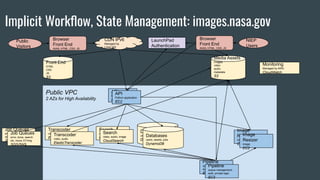
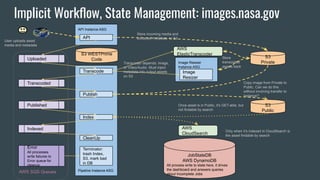
Implicit Workflow, State Management: images.nasa.gov
Public VPC
2 AZs for High Availability
Media Assets
images
video
audio
metadata
S3
Front End
HTML
CSS
JS
S3
API
Python application
EC2
API
Python application
EC2
Transcoder
video, audio
ElasticTranscoder
Transcoder
video, audio
ElasticTranscoder
Job Queues
error, done, search
idx, move, ET/img
SQS/SNS
Job Queues
error, done, search
idx, move, ET/img
SQS/SNS
Search
video, audio, image
CloudSearch
Search
video, audio, image
CloudSearch
CDN IPv6
Managed by
LimeLight
DataBases
users, assets jobs
DynamoDB
Databases
users, assets, jobs
DynamoDB
NIEP
Users
Public
Visitors
Browser
Front End
AVAIL HTML, CSS, JS
Monitoring
Managed by AWS
CloudWatch
Browser
Front End
AVAIL HTML, CSS, JS
Image
Resizer
image
EC2
Image
Resizer
image
EC2
Pipeline
queue management,
auth, private logic
EC2
Pipeline
queue management,
auth, private logic
EC2
LaunchPad
Authentication
AWS
CloudSearch
API Instance ASG
API
Uploaded
Error
All processes
write failures to
Error queue for
cleanup
Transcoded
Published
Indexed
Pipeline Instance ASG
Transcode
Publish
Index
S3
Private
S3 WESTPrime
Code
S3
Public
JobStateDB
AWS DynamoDB
All process write to state here, it drives
the dashboard and answers queries
about Incomplete Jobs
Image Resizer
Instance ASG
Image
Resizer
Terminator:
trash Index,
S3, mark bad
in DB
AWS
ElasticTranscoder
Store incoming media and
extracted metadata to S3
Copy image from Private to
Public. Can we do this
without involving transfer to
Instance?
Transcoder depends: Image,
or Video/Audio. Must inject
metadata into output assets
on S3
Store
transcoded
assets back
User uploads asset
media and metadata
Once asset is in Public, it’s GET-able, but
not findable by search
Only when it’s indexed in CloudSearch is
the asset findable by search
CleanUp
AWS SQS Queues
Implicit Workflow, State Management: images.nasa.gov
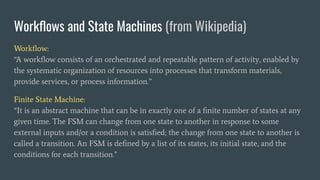
Workflows and State Machines (from Wikipedia)
Workflow:
“A workflow consists of an orchestrated and repeatable pattern of activity, enabled by
the systematic organization of resources into processes that transform materials,
provide services, or process information.”
Finite State Machine:
“It is an abstract machine that can be in exactly one of a finite number of states at any
given time. The FSM can change from one state to another in response to some
external inputs and/or a condition is satisfied; the change from one state to another is
called a transition. An FSM is defined by a list of its states, its initial state, and the
conditions for each transition.”
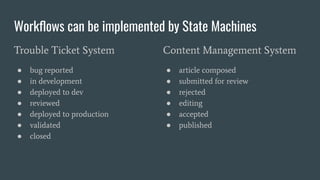
Workflows can be implemented by State Machines
Trouble Ticket System
● bug reported
● in development
● deployed to dev
● reviewed
● deployed to production
● validated
● closed
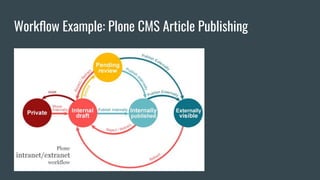
Content Management System
● article composed
● submitted for review
● rejected
● editing
● accepted
● published
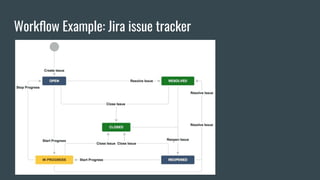
Workflow Example: Jira issue tracker
Workflow Example: Plone CMS Article Publishing
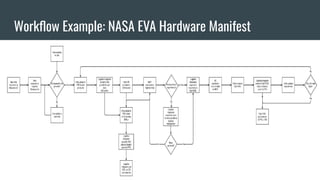
Workflow Example: NASA EVA Hardware Manifest
Automation
Introducing
AWS Step Functions
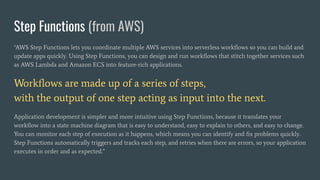
Step Functions (from AWS)
“AWS Step Functions lets you coordinate multiple AWS services into serverless workflows so you can build and
update apps quickly. Using Step Functions, you can design and run workflows that stitch together services such
as AWS Lambda and Amazon ECS into feature-rich applications.
Workflows are made up of a series of steps,
with the output of one step acting as input into the next.
Application development is simpler and more intuitive using Step Functions, because it translates your
workflow into a state machine diagram that is easy to understand, easy to explain to others, and easy to change.
You can monitor each step of execution as it happens, which means you can identify and fix problems quickly.
Step Functions automatically triggers and tracks each step, and retries when there are errors, so your application
executes in order and as expected.”
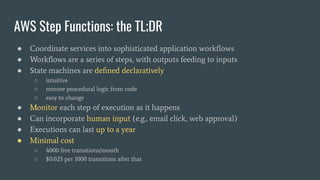
AWS Step Functions: the TL;DR
● Coordinate services into sophisticated application workflows
● Workflows are a series of steps, with outputs feeding to inputs
● State machines are defined declaratively
○ intuitive
○ remove procedural logic from code
○ easy to change
● Monitor each step of execution as it happens
● Can incorporate human input (e.g., email click, web approval)
● Executions can last up to a year
● Minimal cost
○ 4000 free transitions/month
○ $0.025 per 1000 transitions after that
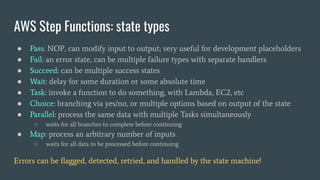
AWS Step Functions: state types
● Pass: NOP, can modify input to output; very useful for development placeholders
● Fail: an error state, can be multiple failure types with separate handlers
● Succeed: can be multiple success states
● Wait: delay for some duration or some absolute time
● Task: invoke a function to do something, with Lambda, EC2, etc
● Choice: branching via yes/no, or multiple options based on output of the state
● Parallel: process the same data with multiple Tasks simultaneously
○ waits for all branches to complete before continuing
● Map: process an arbitrary number of inputs
○ waits for all data to be processed before continuing
Errors can be flagged, detected, retried, and handled by the state machine!
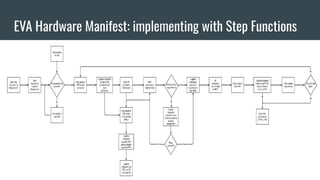
EVA Hardware Manifest: implementing with Step Functions
EVA Hardware Manifest:
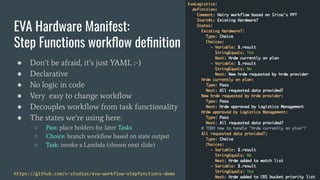
Step Functions workflow definition
● Don’t be afraid, it’s just YAML :-)
● Declarative
● No logic in code
● Very easy to change workflow
● Decouples workflow from task functionality
● The states we’re using here:
○ Pass: place holders for later Tasks
○ Choice: branch workflow based on state output
○ Task: invoke a Lambda (shown next slide)
https://github.com/v-studios/eva-workflow-stepfunctions-demo
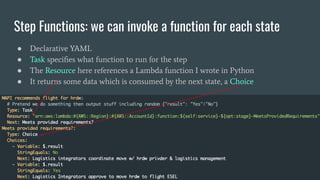
Step Functions: we can invoke a function for each state
● Declarative YAML
● Task specifies what function to run for the step
● The Resource here references a Lambda function I wrote in Python
● It returns some data which is consumed by the next state, a Choice
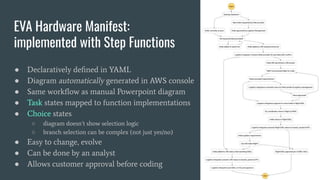
EVA Hardware Manifest:
implemented with Step Functions
● Declaratively defined in YAML
● Diagram automatically generated in AWS console
● Same workflow as manual Powerpoint diagram
● Task states mapped to function implementations
● Choice states
○ diagram doesn’t show selection logic
○ branch selection can be complex (not just yes/no)
● Easy to change, evolve
● Can be done by an analyst
● Allows customer approval before coding
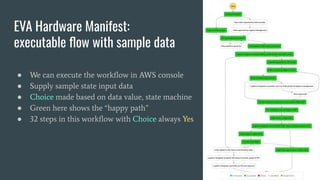
EVA Hardware Manifest:
executable flow with sample data
● We can execute the workflow in AWS console
● Supply sample state input data
● Choice made based on data value, state machine
● Green here shows the “happy path”
● 32 steps in this workflow with Choice always Yes
EVA Hardware Manifest:
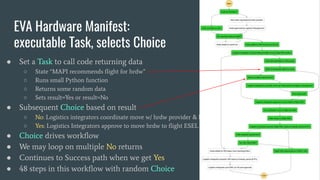
executable Task, selects Choice
● Set a Task to call code returning data
○ State “MAPI recommends flight for hrdw”
○ Runs small Python function
○ Returns some random data
○ Sets result=Yes or result=No
● Subsequent Choice based on result
○ No: Logistics integrators coordinate move w/ hrdw provider & logistics management
○ Yes: Logistics Integrators approve to move hrdw to flight ESEL
● Choice drives workflow
● We may loop on multiple No returns
● Continues to Success path when we get Yes
● 48 steps in this workflow with random Choice
OCR: Easy to evolve our workflow with Step Functions
0. Before Step Functions
1. Step Functions Callback
2. Step Functions: shiny new “Map” meta-state
3. Fast workflow evolution, independent of the business logic
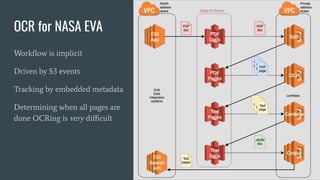
OCR for NASA EVA
Workflow is implicit
Driven by S3 events
Tracking by embedded metadata
Determining when all pages are
done OCRing is very difficult
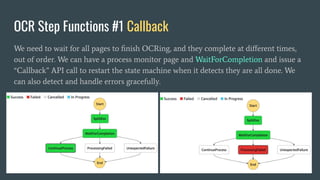
OCR Step Functions #1 Callback
We need to wait for all pages to finish OCRing, and they complete at different times,
out of order. We can have a process monitor page and WaitForCompletion and issue a
“Callback” API call to restart the state machine when it detects they are all done. We
can also detect and handle errors gracefully.
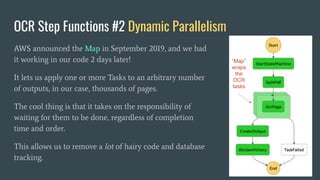
OCR Step Functions #2 Dynamic Parallelism
AWS announced the Map in September 2019, and we had
it working in our code 2 days later!
It lets us apply one or more Tasks to an arbitrary number
of outputs, in our case, thousands of pages.
The cool thing is that it takes on the responsibility of
waiting for them to be done, regardless of completion
time and order.
This allows us to remove a lot of hairy code and database
tracking.
“Map”
wraps
the
OCR
tasks
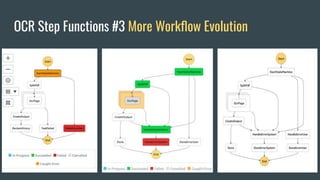
OCR Step Functions #3 More Workflow Evolution
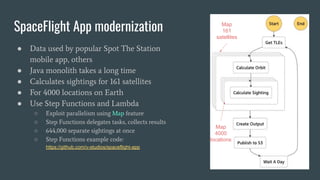
SpaceFlight App modernization
● Data used by popular Spot The Station
mobile app, others
● Java monolith takes a long time
● Calculates sightings for 161 satellites
● For 4000 locations on Earth
● Use Step Functions and Lambda
○ Exploit parallelism using Map feature
○ Step Functions delegates tasks, collects results
○ 644,000 separate sightings at once
○ Step Functions example code:
https://github.com/v-studios/spaceflight-app
Map
161
satellites
Map
4000
locations
Benefits: Automating Workflow with AWS Step Functions
● Remove complex workflow logic from application code
○ Application is more maintainable
○ Introduces less bugs
● Implement in declarative YAML
○ Fast to write, easy to change
○ Develop independent of implementation
○ Analysts can develop workflow and get customer buy-in before coding starts
● Powerful state machine language
○ Different states: Pass, Fail, Succeed, Wait, Task, Choice, Parallel, Map
○ Many Choice logical operators, comparisons, booleans
○ Parallel and Map state aggregators are very powerful
○ Sophisticated input/output processing, filtering, transformation
● Invoke your code at any step
● Inexpensive
See Also...
● Step Functions Express Workflows (December 2019)
○ Handles over 100,000 events/second
○ Starting at $1.00 / million requests
○ Limitations compared to regular Step Functions: 5 minute duration, no waiting for completion
● Lambda Destinations (November 2019)
○ Route async function results to resources without writing any code
○ Destinations: Lambda, SNS, SQS, EventBridge
○ Route on Success or Failure
○ When you don’t need all the power of Step Functions
● EventBridge (July 2019)
○ Serverless event bus
○ Connects your apps, SaaS apps, and AWS services
○ Over 100 built-in event sources and targets
○ Third-party adoption: Zendesk, Datadog, Pagerduty, SugarCRM, …
Questions? Answers!
● StepFunctions
○ main page: https://aws.amazon.com/step-functions/
○ re:Invent presentation: https://www.youtube.com/watch?v=75MRve4nv8s
● Related AWS
○ Step Functions Express Workflows: https://aws.amazon.com/step-functions/
○ Lambda; https://aws.amazon.com/lambda/
○ Lambda Destinations: https://docs.aws.amazon.com/lambda/latest/dg/invocation-async.html
○ Event Bridge: https://aws.amazon.com/eventbridge/
● Reach Out!
○ chris@v-studios.com https://v-studios.com/
○ Shentonfreude
● Code
○ https://github.com/v-studios/eva-workflow-stepfunctions-demo
○ https://github.com/v-studios/spaceflight-app

Orchestrating complex workflows with aws step functions

  • 1.
    Orchestrating Complex Workflows with AWSStep Functions Chris Shenton V! Studios CTO
  • 2.
    Presentation Overview ● Workflowsare boring, state management is difficult ○ Example: images.nasa.gov ● Workflows and State Machines ○ Examples: Jira, Plone, EVA hardware manifest ● Automate All The Things! ● AWS Step Functions ○ Examples: OCR for EVA, related OCR work ● Step Functions: implementation, diagram ○ Examples: EVA Hardware Manifest (part deux), Spaceflight App ● Benefits ● See Also...
  • 3.
    Implicit Workflow, StateManagement: images.nasa.gov Public VPC 2 AZs for High Availability Media Assets images video audio metadata S3 Front End HTML CSS JS S3 API Python application EC2 API Python application EC2 Transcoder video, audio ElasticTranscoder Transcoder video, audio ElasticTranscoder Job Queues error, done, search idx, move, ET/img SQS/SNS Job Queues error, done, search idx, move, ET/img SQS/SNS Search video, audio, image CloudSearch Search video, audio, image CloudSearch CDN IPv6 Managed by LimeLight DataBases users, assets jobs DynamoDB Databases users, assets, jobs DynamoDB NIEP Users Public Visitors Browser Front End AVAIL HTML, CSS, JS Monitoring Managed by AWS CloudWatch Browser Front End AVAIL HTML, CSS, JS Image Resizer image EC2 Image Resizer image EC2 Pipeline queue management, auth, private logic EC2 Pipeline queue management, auth, private logic EC2 LaunchPad Authentication
  • 4.
    AWS CloudSearch API Instance ASG API Uploaded Error Allprocesses write failures to Error queue for cleanup Transcoded Published Indexed Pipeline Instance ASG Transcode Publish Index S3 Private S3 WESTPrime Code S3 Public JobStateDB AWS DynamoDB All process write to state here, it drives the dashboard and answers queries about Incomplete Jobs Image Resizer Instance ASG Image Resizer Terminator: trash Index, S3, mark bad in DB AWS ElasticTranscoder Store incoming media and extracted metadata to S3 Copy image from Private to Public. Can we do this without involving transfer to Instance? Transcoder depends: Image, or Video/Audio. Must inject metadata into output assets on S3 Store transcoded assets back User uploads asset media and metadata Once asset is in Public, it’s GET-able, but not findable by search Only when it’s indexed in CloudSearch is the asset findable by search CleanUp AWS SQS Queues Implicit Workflow, State Management: images.nasa.gov
  • 5.
    Workflows and StateMachines (from Wikipedia) Workflow: “A workflow consists of an orchestrated and repeatable pattern of activity, enabled by the systematic organization of resources into processes that transform materials, provide services, or process information.” Finite State Machine: “It is an abstract machine that can be in exactly one of a finite number of states at any given time. The FSM can change from one state to another in response to some external inputs and/or a condition is satisfied; the change from one state to another is called a transition. An FSM is defined by a list of its states, its initial state, and the conditions for each transition.”
  • 6.
    Workflows can beimplemented by State Machines Trouble Ticket System ● bug reported ● in development ● deployed to dev ● reviewed ● deployed to production ● validated ● closed Content Management System ● article composed ● submitted for review ● rejected ● editing ● accepted ● published
  • 7.
  • 8.
    Workflow Example: PloneCMS Article Publishing
  • 9.
    Workflow Example: NASAEVA Hardware Manifest
  • 11.
  • 12.
    Step Functions (fromAWS) “AWS Step Functions lets you coordinate multiple AWS services into serverless workflows so you can build and update apps quickly. Using Step Functions, you can design and run workflows that stitch together services such as AWS Lambda and Amazon ECS into feature-rich applications. Workflows are made up of a series of steps, with the output of one step acting as input into the next. Application development is simpler and more intuitive using Step Functions, because it translates your workflow into a state machine diagram that is easy to understand, easy to explain to others, and easy to change. You can monitor each step of execution as it happens, which means you can identify and fix problems quickly. Step Functions automatically triggers and tracks each step, and retries when there are errors, so your application executes in order and as expected.”
  • 13.
    AWS Step Functions:the TL;DR ● Coordinate services into sophisticated application workflows ● Workflows are a series of steps, with outputs feeding to inputs ● State machines are defined declaratively ○ intuitive ○ remove procedural logic from code ○ easy to change ● Monitor each step of execution as it happens ● Can incorporate human input (e.g., email click, web approval) ● Executions can last up to a year ● Minimal cost ○ 4000 free transitions/month ○ $0.025 per 1000 transitions after that
  • 14.
    AWS Step Functions:state types ● Pass: NOP, can modify input to output; very useful for development placeholders ● Fail: an error state, can be multiple failure types with separate handlers ● Succeed: can be multiple success states ● Wait: delay for some duration or some absolute time ● Task: invoke a function to do something, with Lambda, EC2, etc ● Choice: branching via yes/no, or multiple options based on output of the state ● Parallel: process the same data with multiple Tasks simultaneously ○ waits for all branches to complete before continuing ● Map: process an arbitrary number of inputs ○ waits for all data to be processed before continuing Errors can be flagged, detected, retried, and handled by the state machine!
  • 15.
    EVA Hardware Manifest:implementing with Step Functions
  • 16.
    EVA Hardware Manifest: StepFunctions workflow definition ● Don’t be afraid, it’s just YAML :-) ● Declarative ● No logic in code ● Very easy to change workflow ● Decouples workflow from task functionality ● The states we’re using here: ○ Pass: place holders for later Tasks ○ Choice: branch workflow based on state output ○ Task: invoke a Lambda (shown next slide) https://github.com/v-studios/eva-workflow-stepfunctions-demo
  • 17.
    Step Functions: wecan invoke a function for each state ● Declarative YAML ● Task specifies what function to run for the step ● The Resource here references a Lambda function I wrote in Python ● It returns some data which is consumed by the next state, a Choice
  • 18.
    EVA Hardware Manifest: implementedwith Step Functions ● Declaratively defined in YAML ● Diagram automatically generated in AWS console ● Same workflow as manual Powerpoint diagram ● Task states mapped to function implementations ● Choice states ○ diagram doesn’t show selection logic ○ branch selection can be complex (not just yes/no) ● Easy to change, evolve ● Can be done by an analyst ● Allows customer approval before coding
  • 19.
    EVA Hardware Manifest: executableflow with sample data ● We can execute the workflow in AWS console ● Supply sample state input data ● Choice made based on data value, state machine ● Green here shows the “happy path” ● 32 steps in this workflow with Choice always Yes
  • 20.
    EVA Hardware Manifest: executableTask, selects Choice ● Set a Task to call code returning data ○ State “MAPI recommends flight for hrdw” ○ Runs small Python function ○ Returns some random data ○ Sets result=Yes or result=No ● Subsequent Choice based on result ○ No: Logistics integrators coordinate move w/ hrdw provider & logistics management ○ Yes: Logistics Integrators approve to move hrdw to flight ESEL ● Choice drives workflow ● We may loop on multiple No returns ● Continues to Success path when we get Yes ● 48 steps in this workflow with random Choice
  • 21.
    OCR: Easy toevolve our workflow with Step Functions 0. Before Step Functions 1. Step Functions Callback 2. Step Functions: shiny new “Map” meta-state 3. Fast workflow evolution, independent of the business logic
  • 22.
    OCR for NASAEVA Workflow is implicit Driven by S3 events Tracking by embedded metadata Determining when all pages are done OCRing is very difficult
  • 23.
    OCR Step Functions#1 Callback We need to wait for all pages to finish OCRing, and they complete at different times, out of order. We can have a process monitor page and WaitForCompletion and issue a “Callback” API call to restart the state machine when it detects they are all done. We can also detect and handle errors gracefully.
  • 24.
    OCR Step Functions#2 Dynamic Parallelism AWS announced the Map in September 2019, and we had it working in our code 2 days later! It lets us apply one or more Tasks to an arbitrary number of outputs, in our case, thousands of pages. The cool thing is that it takes on the responsibility of waiting for them to be done, regardless of completion time and order. This allows us to remove a lot of hairy code and database tracking. “Map” wraps the OCR tasks
  • 25.
    OCR Step Functions#3 More Workflow Evolution
  • 26.
    SpaceFlight App modernization ●Data used by popular Spot The Station mobile app, others ● Java monolith takes a long time ● Calculates sightings for 161 satellites ● For 4000 locations on Earth ● Use Step Functions and Lambda ○ Exploit parallelism using Map feature ○ Step Functions delegates tasks, collects results ○ 644,000 separate sightings at once ○ Step Functions example code: https://github.com/v-studios/spaceflight-app Map 161 satellites Map 4000 locations
  • 27.
    Benefits: Automating Workflowwith AWS Step Functions ● Remove complex workflow logic from application code ○ Application is more maintainable ○ Introduces less bugs ● Implement in declarative YAML ○ Fast to write, easy to change ○ Develop independent of implementation ○ Analysts can develop workflow and get customer buy-in before coding starts ● Powerful state machine language ○ Different states: Pass, Fail, Succeed, Wait, Task, Choice, Parallel, Map ○ Many Choice logical operators, comparisons, booleans ○ Parallel and Map state aggregators are very powerful ○ Sophisticated input/output processing, filtering, transformation ● Invoke your code at any step ● Inexpensive
  • 28.
    See Also... ● StepFunctions Express Workflows (December 2019) ○ Handles over 100,000 events/second ○ Starting at $1.00 / million requests ○ Limitations compared to regular Step Functions: 5 minute duration, no waiting for completion ● Lambda Destinations (November 2019) ○ Route async function results to resources without writing any code ○ Destinations: Lambda, SNS, SQS, EventBridge ○ Route on Success or Failure ○ When you don’t need all the power of Step Functions ● EventBridge (July 2019) ○ Serverless event bus ○ Connects your apps, SaaS apps, and AWS services ○ Over 100 built-in event sources and targets ○ Third-party adoption: Zendesk, Datadog, Pagerduty, SugarCRM, …
  • 29.
    Questions? Answers! ● StepFunctions ○main page: https://aws.amazon.com/step-functions/ ○ re:Invent presentation: https://www.youtube.com/watch?v=75MRve4nv8s ● Related AWS ○ Step Functions Express Workflows: https://aws.amazon.com/step-functions/ ○ Lambda; https://aws.amazon.com/lambda/ ○ Lambda Destinations: https://docs.aws.amazon.com/lambda/latest/dg/invocation-async.html ○ Event Bridge: https://aws.amazon.com/eventbridge/ ● Reach Out! ○ chris@v-studios.com https://v-studios.com/ ○ Shentonfreude ● Code ○ https://github.com/v-studios/eva-workflow-stepfunctions-demo ○ https://github.com/v-studios/spaceflight-app