SAP NW GATEWAY ODATA SERVICE
FROM SAP ABAP CDS VIEW
Anil Dasari
Overview
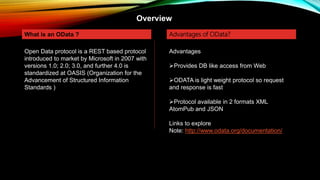
What is an OData ?
Open Data protocol is a REST based protocol
introduced to market by Microsoft in 2007 with
versions 1.0; 2.0; 3.0, and further 4.0 is
standardized at OASIS (Organization for the
Advancement of Structured Information
Standards )
Advantages of OData?
Advantages
Provides DB like access from Web
ODATA is light weight protocol so request
and response is fast
Protocol available in 2 formats XML
AtomPub and JSON
Links to explore
Note: http://www.odata.org/documentation/
Generating ODATA from CDS
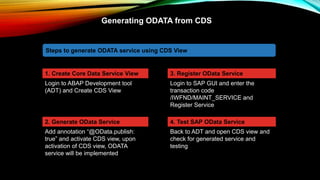
1. Create Core Data Service View
Login to ABAP Development tool
(ADT) and Create CDS View
Steps to generate ODATA service using CDS View
2. Generate OData Service
Add annotation “@OData.publish:
true” and activate CDS view, upon
activation of CDS view, ODATA
service will be implemented
3. Register OData Service
Login to SAP GUI and enter the
transaction code
/IWFND/MAINT_SERVICE and
Register Service
4. Test SAP OData Service
Back to ADT and open CDS view and
check for generated service and
testing
Generating ODATA from CDS
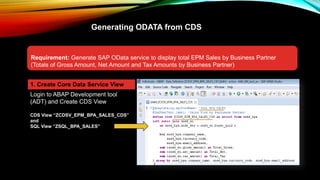
Requirement: Generate SAP OData service to display total EPM Sales by Business Partner
(Totals of Gross Amount, Net Amount and Tax Amounts by Business Partner)
1. Create Core Data Service View
Login to ABAP Development tool
(ADT) and Create CDS View
CDS View “ZCDSV_EPM_BPA_SALES_CDS”
and
SQL View “ZSQL_BPA_SALES”
Generating ODATA from CDS
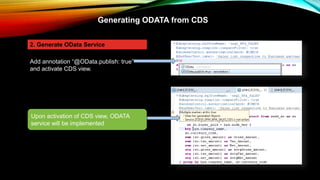
2. Generate OData Service
Add annotation “@OData.publish: true”
and activate CDS view.
Upon activation of CDS view, ODATA
service will be implemented
Generating ODATA from CDS
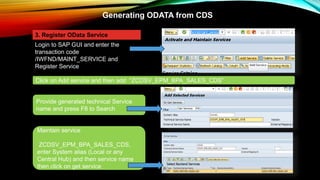
3. Register OData Service
Login to SAP GUI and enter the
transaction code
/IWFND/MAINT_SERVICE and
Register Service
Provide generated technical Service
name and press F8 to Search
Click on Add service and then add “ZCDSV_EPM_BPA_SALES_CDS”
Maintain service
ZCDSV_EPM_BPA_SALES_CDS,
enter System alias (Local or any
Central Hub) and then service name
then click on get service
Steps to generate ODATA service
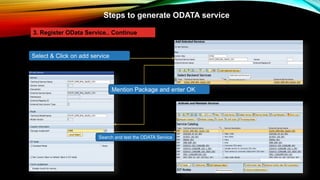
3. Register OData Service.. Continue
Select & Click on add service
Mention Package and enter OK
Search and test the ODATA Service
Steps to generate ODATA service
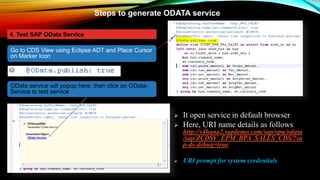
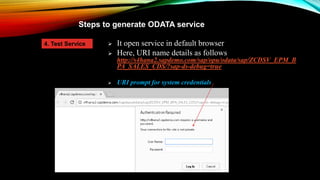
 It open service in default browser
 Here, URI name details as follows
http://s4hana2.sapdemo.com/sap/opu/odata
/sap/ZCDSV_EPM_BPA_SALES_CDS/?sa
p-ds-debug=true
 URI prompt for system credentials
4. Test SAP OData Service
OData service will popup here, then click on OData-
Service to test service
Go to CDS View using Eclipse ADT and Place Cursor
on Marker Icon
Steps to generate ODATA service
 It open service in default browser
 Here, URI name details as follows
http://s4hana2.sapdemo.com/sap/opu/odata/sap/ZCDSV_EPM_B
PA_SALES_CDS/?sap-ds-debug=true
 URI prompt for system credentials
4. Test Service
Steps to generate ODATA service
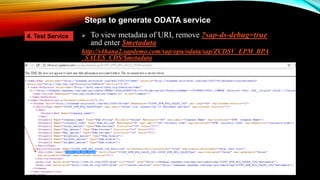
 To view metadata of URI, remove ?sap-ds-debug=true
and enter $metadata
http://s4hana2.sapdemo.com/sap/opu/odata/sap/ZCDSV_EPM_BPA
_SALES_CDS/$metadata
4. Test Service
Steps to generate ODATA service
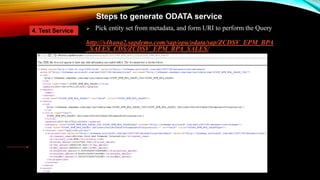
 Pick entity set from metadata, and form URI to perform the Query
http://s4hana2.sapdemo.com/sap/opu/odata/sap/ZCDSV_EPM_BPA
_SALES_CDS/ZCDSV_EPM_BPA_SALES/
4. Test Service

OData service from ABAP CDS

  • 1.
    SAP NW GATEWAYODATA SERVICE FROM SAP ABAP CDS VIEW Anil Dasari
  • 2.
    Overview What is anOData ? Open Data protocol is a REST based protocol introduced to market by Microsoft in 2007 with versions 1.0; 2.0; 3.0, and further 4.0 is standardized at OASIS (Organization for the Advancement of Structured Information Standards ) Advantages of OData? Advantages Provides DB like access from Web ODATA is light weight protocol so request and response is fast Protocol available in 2 formats XML AtomPub and JSON Links to explore Note: http://www.odata.org/documentation/
  • 3.
    Generating ODATA fromCDS 1. Create Core Data Service View Login to ABAP Development tool (ADT) and Create CDS View Steps to generate ODATA service using CDS View 2. Generate OData Service Add annotation “@OData.publish: true” and activate CDS view, upon activation of CDS view, ODATA service will be implemented 3. Register OData Service Login to SAP GUI and enter the transaction code /IWFND/MAINT_SERVICE and Register Service 4. Test SAP OData Service Back to ADT and open CDS view and check for generated service and testing
  • 4.
    Generating ODATA fromCDS Requirement: Generate SAP OData service to display total EPM Sales by Business Partner (Totals of Gross Amount, Net Amount and Tax Amounts by Business Partner) 1. Create Core Data Service View Login to ABAP Development tool (ADT) and Create CDS View CDS View “ZCDSV_EPM_BPA_SALES_CDS” and SQL View “ZSQL_BPA_SALES”
  • 5.
    Generating ODATA fromCDS 2. Generate OData Service Add annotation “@OData.publish: true” and activate CDS view. Upon activation of CDS view, ODATA service will be implemented
  • 6.
    Generating ODATA fromCDS 3. Register OData Service Login to SAP GUI and enter the transaction code /IWFND/MAINT_SERVICE and Register Service Provide generated technical Service name and press F8 to Search Click on Add service and then add “ZCDSV_EPM_BPA_SALES_CDS” Maintain service ZCDSV_EPM_BPA_SALES_CDS, enter System alias (Local or any Central Hub) and then service name then click on get service
  • 7.
    Steps to generateODATA service 3. Register OData Service.. Continue Select & Click on add service Mention Package and enter OK Search and test the ODATA Service
  • 8.
    Steps to generateODATA service  It open service in default browser  Here, URI name details as follows http://s4hana2.sapdemo.com/sap/opu/odata /sap/ZCDSV_EPM_BPA_SALES_CDS/?sa p-ds-debug=true  URI prompt for system credentials 4. Test SAP OData Service OData service will popup here, then click on OData- Service to test service Go to CDS View using Eclipse ADT and Place Cursor on Marker Icon
  • 9.
    Steps to generateODATA service  It open service in default browser  Here, URI name details as follows http://s4hana2.sapdemo.com/sap/opu/odata/sap/ZCDSV_EPM_B PA_SALES_CDS/?sap-ds-debug=true  URI prompt for system credentials 4. Test Service
  • 10.
    Steps to generateODATA service  To view metadata of URI, remove ?sap-ds-debug=true and enter $metadata http://s4hana2.sapdemo.com/sap/opu/odata/sap/ZCDSV_EPM_BPA _SALES_CDS/$metadata 4. Test Service
  • 11.
    Steps to generateODATA service  Pick entity set from metadata, and form URI to perform the Query http://s4hana2.sapdemo.com/sap/opu/odata/sap/ZCDSV_EPM_BPA _SALES_CDS/ZCDSV_EPM_BPA_SALES/ 4. Test Service