













 Independent consultant
 Performance Troubleshooting
 In-house workshops
 Cost-Based Optimizer
 Performance By Design
 Oracle ACE Director
 Member of OakTable Network
http://oracle-randolf.blogspot.com
https://www.youtube.com/c/RandolfGeist
https://community.oracle.com/welcome
 Oracle Cloud extended trial license as part of
Oracle ACE Director program
 Trial license comes with limitations / resource
quotas:
- 1TB max storage
- max 6 OCPUs (more details later)
- max 5 IP Endpoints
 Performance tests conducted within these
limits
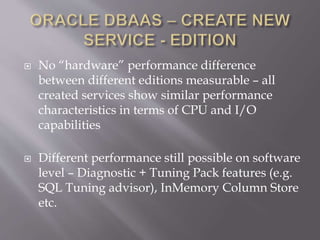
 No “hardware” performance difference
between different editions measurable – all
created services show similar performance
characteristics in terms of CPU and I/O
capabilities
 Different performance still possible on software
level – Diagnostic + Tuning Pack features (e.g.
SQL Tuning advisor), InMemory Column Store
etc.
 Services can be scaled by adding more CPUs,
RAM and storage
 Currently no online operation, other Cloud
providers can do some of these scaling
activities online
 Tablespace encryption mandatory
 Network access rules, by default public access
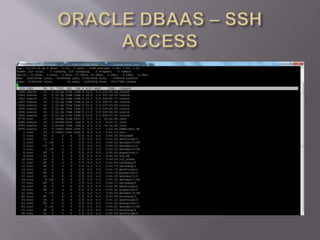
disabled, only access via SSH possible
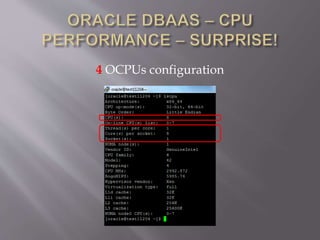
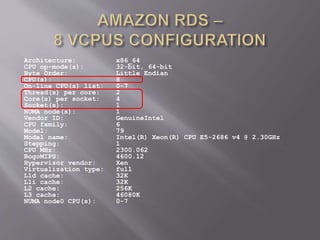
4 OCPUs configuration
Architecture: x86_64
CPU op-mode(s): 32-bit, 64-bit
Byte Order: Little Endian
CPU(s): 8
On-line CPU(s) list: 0-7
Thread(s) per core: 2
Core(s) per socket: 4
Socket(s): 1
NUMA node(s): 1
Vendor ID: GenuineIntel
CPU family: 6
Model: 79
Model name: Intel(R) Xeon(R) CPU E5-2686 v4 @ 2.30GHz
Stepping: 1
CPU MHz: 2300.062
BogoMIPS: 4600.12
Hypervisor vendor: Xen
Virtualization type: full
L1d cache: 32K
L1i cache: 32K
L2 cache: 256K
L3 cache: 46080K
NUMA node0 CPU(s): 0-7
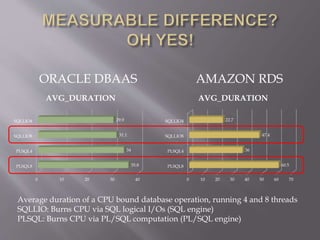
0 10 20 30 40
PLSQL8
PLSQL4
SQLLIO8
SQLLIO4
35.8
34
31.1
29.9
AVG_DURATION
0 10 20 30 40 50 60 70
PLSQL8
PLSQL4
SQLLIO8
SQLLIO4
60.5
36
47.4
22.7
AVG_DURATION
ORACLE DBAAS AMAZON RDS
Average duration of a CPU bound database operation, running 4 and 8 threads
SQLLIO: Burns CPU via SQL logical I/Os (SQL engine)
PLSQL: Burns CPU via PL/SQL computation (PL/SQL engine)
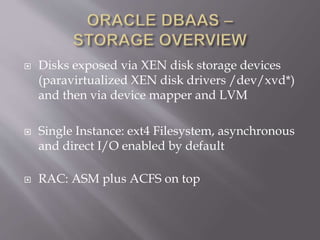
 Disks exposed via XEN disk storage devices
(paravirtualized XEN disk drivers /dev/xvd*)
and then via device mapper and LVM
 Single Instance: ext4 Filesystem, asynchronous
and direct I/O enabled by default
 RAC: ASM plus ACFS on top
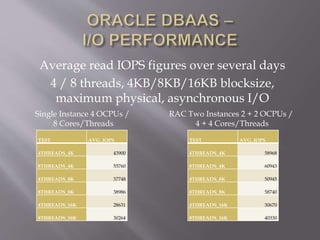
Average read IOPS figures over several days
4 / 8 threads, 4KB/8KB/16KB blocksize,
maximum physical, asynchronous I/O
TEST AVG_IOPS
4THREADS_4K 43900
8THREADS_4K 55760
4THREADS_8K 37748
8THREADS_8K 38986
4THREADS_16K 28631
8THREADS_16K 30264
TEST AVG_IOPS
4THREADS_4K 58968
8THREADS_4K 60943
4THREADS_8K 50945
8THREADS_8K 58740
4THREADS_16K 30670
8THREADS_16K 40330
Single Instance 4 OCPUs /
8 Cores/Threads
RAC Two Instances 2 + 2 OCPUs /
4 + 4 Cores/Threads
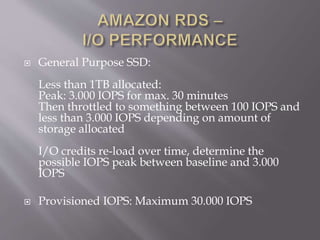
 General Purpose SSD:
Less than 1TB allocated:
Peak: 3.000 IOPS for max. 30 minutes
Then throttled to something between 100 IOPS and
less than 3.000 IOPS depending on amount of
storage allocated
I/O credits re-load over time, determine the
possible IOPS peak between baseline and 3.000
IOPS
 Provisioned IOPS: Maximum 30.000 IOPS
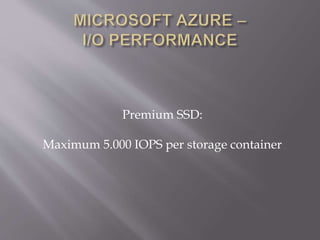
Premium SSD:
Maximum 5.000 IOPS per storage container
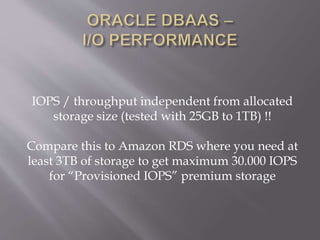
IOPS / throughput independent from allocated
storage size (tested with 25GB to 1TB) !!
Compare this to Amazon RDS where you need at
least 3TB of storage to get maximum 30.000 IOPS
for “Provisioned IOPS” premium storage
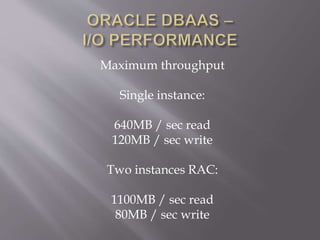
Maximum throughput
Single instance:
640MB / sec read
120MB / sec write
Two instances RAC:
1100MB / sec read
80MB / sec write
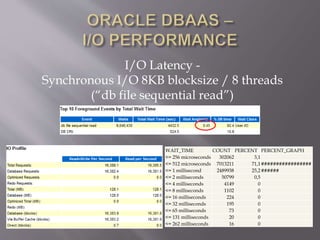
I/O Latency -
Synchronous I/O 8KB blocksize / 8 threads
(“db file sequential read”)
WAIT_TIME COUNT PERCENT PERCENT_GRAPH
<= 256 microseconds 302062 3,1
<= 512 microseconds 7013211 71,1#################
<= 1 millisecond 2489938 25,2######
<= 2 milliseconds 50799 0,5
<= 4 milliseconds 4149 0
<= 8 milliseconds 1102 0
<= 16 milliseconds 224 0
<= 32 milliseconds 195 0
<= 65 milliseconds 73 0
<= 131 milliseconds 20 0
<= 262 milliseconds 16 0
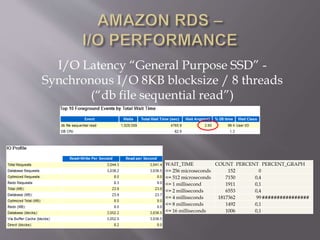
I/O Latency “General Purpose SSD” -
Synchronous I/O 8KB blocksize / 8 threads
(“db file sequential read”)
WAIT_TIME COUNT PERCENT PERCENT_GRAPH
<= 256 microseconds 152 0
<= 512 microseconds 7150 0,4
<= 1 millisecond 1911 0,1
<= 2 milliseconds 6553 0,4
<= 4 milliseconds 1817362 99################
<= 8 milliseconds 1492 0,1
<= 16 milliseconds 1006 0,1
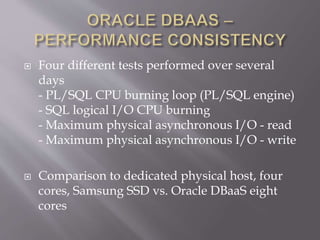
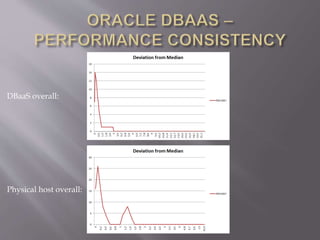
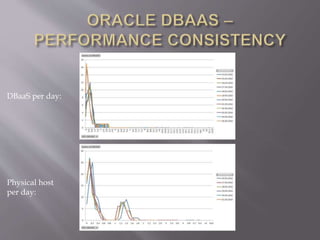
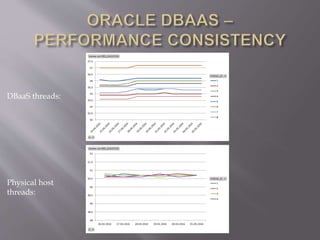
 Four different tests performed over several
days
- PL/SQL CPU burning loop (PL/SQL engine)
- SQL logical I/O CPU burning
- Maximum physical asynchronous I/O - read
- Maximum physical asynchronous I/O - write
 Comparison to dedicated physical host, four
cores, Samsung SSD vs. Oracle DBaaS eight
cores
Test 1: PL/SQL CPU burning loop, executed as
many times as CPUs available
declare
n number;
begin
loop
n := 0;
for i in 1..1000000000 loop
n := n + 1;
end loop;
insert into timings(testtype, thread_id, ts)
values ('PLSQL', &thread_id, systimestamp);
commit;
end loop;
end;
/
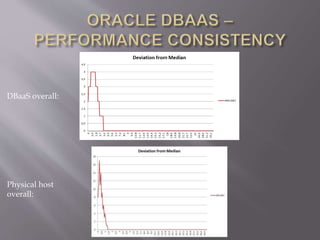
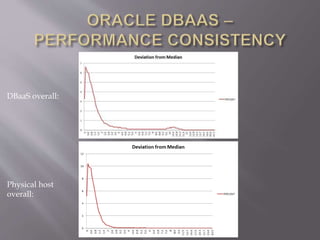
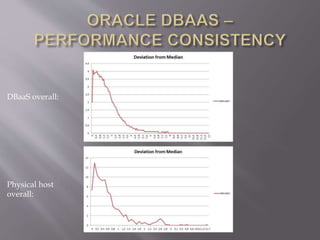
DBaaS overall:
Physical host overall:
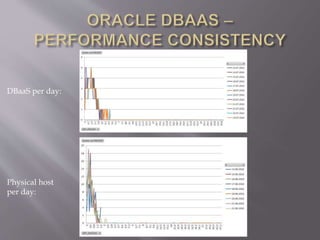
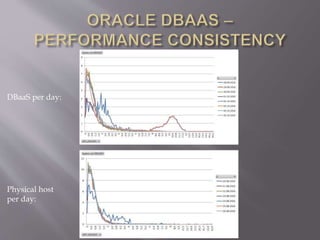
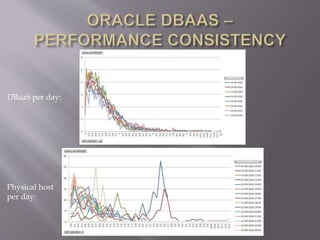
DBaaS per day:
Physical host
per day:
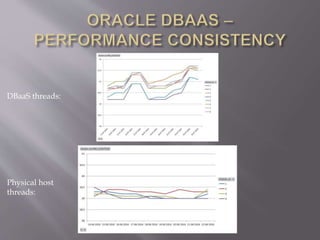
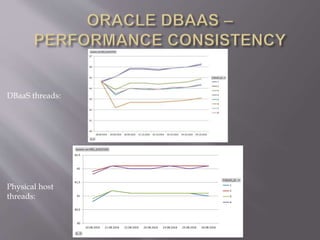
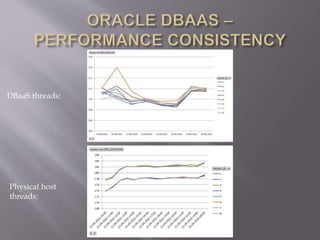
DBaaS threads:
Physical host
threads:
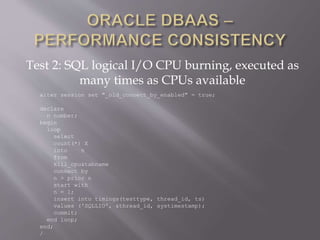
Test 2: SQL logical I/O CPU burning, executed as
many times as CPUs available
alter session set "_old_connect_by_enabled" = true;
declare
n number;
begin
loop
select
count(*) X
into n
from
kill_cpu&tabname
connect by
n > prior n
start with
n = 1;
insert into timings(testtype, thread_id, ts)
values ('SQLLIO', &thread_id, systimestamp);
commit;
end loop;
end;
/
DBaaS overall:
Physical host
overall:
DBaaS per day:
Physical host
per day:
DBaaS threads:
Physical host
threads:
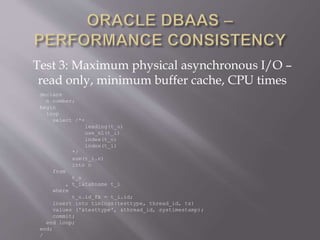
Test 3: Maximum physical asynchronous I/O –
read only, minimum buffer cache, CPU times
declare
n number;
begin
loop
select /*+
leading(t_o)
use_nl(t_i)
index(t_o)
index(t_i)
*/
sum(t_i.n)
into n
from
t_o
, t_i&tabname t_i
where
t_o.id_fk = t_i.id;
insert into timings(testtype, thread_id, ts)
values ('&testtype', &thread_id, systimestamp);
commit;
end loop;
end;
/
DBaaS overall:
Physical host
overall:
DBaaS per day:
Physical host
per day:
DBaaS threads:
Physical host
threads:
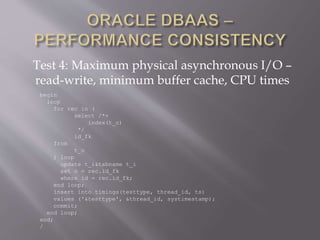
Test 4: Maximum physical asynchronous I/O –
read-write, minimum buffer cache, CPU times
begin
loop
for rec in (
select /*+
index(t_o)
*/
id_fk
from
t_o
) loop
update t_i&tabname t_i
set n = rec.id_fk
where id = rec.id_fk;
end loop;
insert into timings(testtype, thread_id, ts)
values ('&testtype', &thread_id, systimestamp);
commit;
end loop;
end;
/
DBaaS overall:
Physical host
overall:
DBaaS per day:
Physical host
per day:
DBaaS threads:
Physical host
threads:
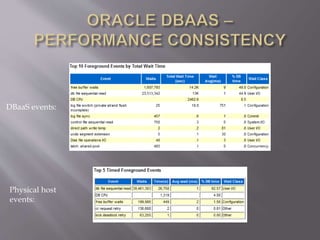
DBaaS events:
Physical host
events:
http://oracle-randolf.blogspot.com/search/label/DBaaS
Q & A
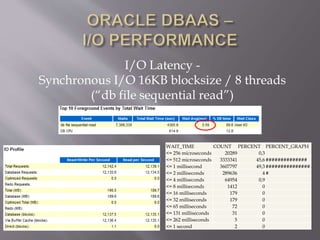
I/O Latency -
Synchronous I/O 16KB blocksize / 8 threads
(“db file sequential read”)
WAIT_TIME COUNT PERCENT PERCENT_GRAPH
<= 256 microseconds 20289 0,3
<= 512 microseconds 3333341 45,6##############
<= 1 millisecond 3607797 49,3###############
<= 2 milliseconds 289636 4#
<= 4 milliseconds 64954 0,9
<= 8 milliseconds 1412 0
<= 16 milliseconds 179 0
<= 32 milliseconds 179 0
<= 65 milliseconds 72 0
<= 131 milliseconds 31 0
<= 262 milliseconds 5 0
<= 1 second 2 0

Oracle Database Cloud Performance Doag 2016

  • 2.
     Independent consultant Performance Troubleshooting  In-house workshops  Cost-Based Optimizer  Performance By Design  Oracle ACE Director  Member of OakTable Network
  • 3.
  • 4.
  • 5.
  • 6.
     Oracle Cloudextended trial license as part of Oracle ACE Director program  Trial license comes with limitations / resource quotas: - 1TB max storage - max 6 OCPUs (more details later) - max 5 IP Endpoints  Performance tests conducted within these limits
  • 12.
     No “hardware”performance difference between different editions measurable – all created services show similar performance characteristics in terms of CPU and I/O capabilities  Different performance still possible on software level – Diagnostic + Tuning Pack features (e.g. SQL Tuning advisor), InMemory Column Store etc.
  • 17.
     Services canbe scaled by adding more CPUs, RAM and storage  Currently no online operation, other Cloud providers can do some of these scaling activities online
  • 18.
     Tablespace encryptionmandatory  Network access rules, by default public access disabled, only access via SSH possible
  • 23.
  • 24.
    Architecture: x86_64 CPU op-mode(s):32-bit, 64-bit Byte Order: Little Endian CPU(s): 8 On-line CPU(s) list: 0-7 Thread(s) per core: 2 Core(s) per socket: 4 Socket(s): 1 NUMA node(s): 1 Vendor ID: GenuineIntel CPU family: 6 Model: 79 Model name: Intel(R) Xeon(R) CPU E5-2686 v4 @ 2.30GHz Stepping: 1 CPU MHz: 2300.062 BogoMIPS: 4600.12 Hypervisor vendor: Xen Virtualization type: full L1d cache: 32K L1i cache: 32K L2 cache: 256K L3 cache: 46080K NUMA node0 CPU(s): 0-7
  • 25.
    0 10 2030 40 PLSQL8 PLSQL4 SQLLIO8 SQLLIO4 35.8 34 31.1 29.9 AVG_DURATION 0 10 20 30 40 50 60 70 PLSQL8 PLSQL4 SQLLIO8 SQLLIO4 60.5 36 47.4 22.7 AVG_DURATION ORACLE DBAAS AMAZON RDS Average duration of a CPU bound database operation, running 4 and 8 threads SQLLIO: Burns CPU via SQL logical I/Os (SQL engine) PLSQL: Burns CPU via PL/SQL computation (PL/SQL engine)
  • 26.
     Disks exposedvia XEN disk storage devices (paravirtualized XEN disk drivers /dev/xvd*) and then via device mapper and LVM  Single Instance: ext4 Filesystem, asynchronous and direct I/O enabled by default  RAC: ASM plus ACFS on top
  • 27.
    Average read IOPSfigures over several days 4 / 8 threads, 4KB/8KB/16KB blocksize, maximum physical, asynchronous I/O TEST AVG_IOPS 4THREADS_4K 43900 8THREADS_4K 55760 4THREADS_8K 37748 8THREADS_8K 38986 4THREADS_16K 28631 8THREADS_16K 30264 TEST AVG_IOPS 4THREADS_4K 58968 8THREADS_4K 60943 4THREADS_8K 50945 8THREADS_8K 58740 4THREADS_16K 30670 8THREADS_16K 40330 Single Instance 4 OCPUs / 8 Cores/Threads RAC Two Instances 2 + 2 OCPUs / 4 + 4 Cores/Threads
  • 28.
     General PurposeSSD: Less than 1TB allocated: Peak: 3.000 IOPS for max. 30 minutes Then throttled to something between 100 IOPS and less than 3.000 IOPS depending on amount of storage allocated I/O credits re-load over time, determine the possible IOPS peak between baseline and 3.000 IOPS  Provisioned IOPS: Maximum 30.000 IOPS
  • 29.
    Premium SSD: Maximum 5.000IOPS per storage container
  • 30.
    IOPS / throughputindependent from allocated storage size (tested with 25GB to 1TB) !! Compare this to Amazon RDS where you need at least 3TB of storage to get maximum 30.000 IOPS for “Provisioned IOPS” premium storage
  • 31.
    Maximum throughput Single instance: 640MB/ sec read 120MB / sec write Two instances RAC: 1100MB / sec read 80MB / sec write
  • 32.
    I/O Latency - SynchronousI/O 8KB blocksize / 8 threads (“db file sequential read”) WAIT_TIME COUNT PERCENT PERCENT_GRAPH <= 256 microseconds 302062 3,1 <= 512 microseconds 7013211 71,1################# <= 1 millisecond 2489938 25,2###### <= 2 milliseconds 50799 0,5 <= 4 milliseconds 4149 0 <= 8 milliseconds 1102 0 <= 16 milliseconds 224 0 <= 32 milliseconds 195 0 <= 65 milliseconds 73 0 <= 131 milliseconds 20 0 <= 262 milliseconds 16 0
  • 33.
    I/O Latency “GeneralPurpose SSD” - Synchronous I/O 8KB blocksize / 8 threads (“db file sequential read”) WAIT_TIME COUNT PERCENT PERCENT_GRAPH <= 256 microseconds 152 0 <= 512 microseconds 7150 0,4 <= 1 millisecond 1911 0,1 <= 2 milliseconds 6553 0,4 <= 4 milliseconds 1817362 99################ <= 8 milliseconds 1492 0,1 <= 16 milliseconds 1006 0,1
  • 34.
     Four differenttests performed over several days - PL/SQL CPU burning loop (PL/SQL engine) - SQL logical I/O CPU burning - Maximum physical asynchronous I/O - read - Maximum physical asynchronous I/O - write  Comparison to dedicated physical host, four cores, Samsung SSD vs. Oracle DBaaS eight cores
  • 35.
    Test 1: PL/SQLCPU burning loop, executed as many times as CPUs available declare n number; begin loop n := 0; for i in 1..1000000000 loop n := n + 1; end loop; insert into timings(testtype, thread_id, ts) values ('PLSQL', &thread_id, systimestamp); commit; end loop; end; /
  • 36.
  • 37.
  • 38.
  • 39.
    Test 2: SQLlogical I/O CPU burning, executed as many times as CPUs available alter session set "_old_connect_by_enabled" = true; declare n number; begin loop select count(*) X into n from kill_cpu&tabname connect by n > prior n start with n = 1; insert into timings(testtype, thread_id, ts) values ('SQLLIO', &thread_id, systimestamp); commit; end loop; end; /
  • 40.
  • 41.
  • 42.
  • 43.
    Test 3: Maximumphysical asynchronous I/O – read only, minimum buffer cache, CPU times declare n number; begin loop select /*+ leading(t_o) use_nl(t_i) index(t_o) index(t_i) */ sum(t_i.n) into n from t_o , t_i&tabname t_i where t_o.id_fk = t_i.id; insert into timings(testtype, thread_id, ts) values ('&testtype', &thread_id, systimestamp); commit; end loop; end; /
  • 44.
  • 45.
  • 46.
  • 47.
    Test 4: Maximumphysical asynchronous I/O – read-write, minimum buffer cache, CPU times begin loop for rec in ( select /*+ index(t_o) */ id_fk from t_o ) loop update t_i&tabname t_i set n = rec.id_fk where id = rec.id_fk; end loop; insert into timings(testtype, thread_id, ts) values ('&testtype', &thread_id, systimestamp); commit; end loop; end; /
  • 48.
  • 49.
  • 50.
  • 51.
  • 52.
  • 53.
  • 54.
    I/O Latency - SynchronousI/O 16KB blocksize / 8 threads (“db file sequential read”) WAIT_TIME COUNT PERCENT PERCENT_GRAPH <= 256 microseconds 20289 0,3 <= 512 microseconds 3333341 45,6############## <= 1 millisecond 3607797 49,3############### <= 2 milliseconds 289636 4# <= 4 milliseconds 64954 0,9 <= 8 milliseconds 1412 0 <= 16 milliseconds 179 0 <= 32 milliseconds 179 0 <= 65 milliseconds 72 0 <= 131 milliseconds 31 0 <= 262 milliseconds 5 0 <= 1 second 2 0

Editor's Notes

  • #3 Co-author of “Expert Oracle Practices” Oracle ACE Director: Acknowledged by Oracle for community contributions OakTable Network: Informal and independent group of people believing in a scientific approach towards Oracle
  • #4 http://oracle-randolf.blogspot.com
  • #5 https://www.youtube.com/c/RandolfGeist
  • #6 https://www.youtube.com/c/RandolfGeist
  • #53 http://oracle-randolf.blogspot.com