Adventures in RDS Load
Testing
Mike Harnish, KSM Technology Partners LLC
Objectives
Empirical basis for evaluation
 Of RDS as a platform for future development
 Of performance of different configurations

Platform for future load testing
 Of different configurations, schemas, and load profiles

Not strictly scientific
 Did not try to isolate all possible sources of variability

Not benchmarking
Not exhaustive
 Some configurations not tested
Why RDS? Why Oracle?
Why not DynamoDB/NoSQL?
 Nothing at all against them
 Testing platform design does not exclude them

Why not MySQL/SQLServer?
 Ran out of time

Why not PostgreSQL?
 Ran out of time, but would be my next choice

RDBMS migration path
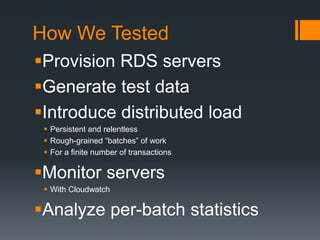
How We Tested
Provision RDS servers
Generate test data
Introduce distributed load
 Persistent and relentless
 Rough-grained “batches” of work
 For a finite number of transactions

Monitor servers
 With Cloudwatch

Analyze per-batch statistics
RDS Server Configurations
db.m2.4xlarge
 High-Memory Quadruple Extra Large DB Instance: 68 GB of
memory, 26 ECUs (8 virtual cores with 3.25 ECUs each), 64-bit
platform, High I/O Capacity, Provisioned IOPS Optimized:
1000Mbps
 At 3000 and 1000 PIOPS
 $3.14 base/hour, Oracle license included
 The largest supported instance type for Oracle

db.m1.xlarge
 Extra Large DB Instance: 15 GB of memory, 8 ECUs (4 virtual
cores with 2 ECUs each), 64-bit platform, High I/O Capacity,
Provisioned IOPS Optimized: 1000Mbps
 No PIOPS
 $1.13 base/hour, license included, on-demand
Test Schema
CREATE TABLE loadgen.account(
account_id NUMBER(9)
CONSTRAINT pk_account PRIMARY KEY,
balance NUMBER(6,2) DEFAULT 0 NOT NULL);
CREATE TABLE loadgen.tx(
tx_id NUMBER(9) CONSTRAINT pk_tx PRIMARY KEY,
account_id NUMBER(9) CONSTRAINT fk_tx_account
REFERENCES loadgen.account(account_id),
amount NUMBER(6,2) NOT NULL,
description VARCHAR2(100),
tx_timestamp TIMESTAMP DEFAULT SYSDATE);
CREATE INDEX loadgen.idx_tx_lookup ON loadgen.tx(account_id, tx_timestamp)
…
CREATE SEQUENCE loadgen.seq_tx_id
…
Baseline Test Data
5,037,003 accounts
353,225,005 transactions
 Roughly 70 initial transactions per account

300GB provisioned storage
 Mostly to get higher PIOPS

Using ~67GB of it
 According to CloudWatch
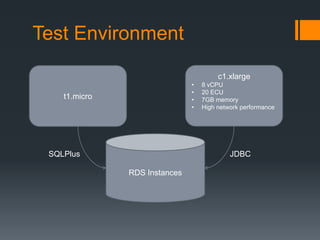
Test Environment
c1.xlarge
•
•
•
•

t1.micro

SQLPlus

8 vCPU
20 ECU
7GB memory
High network performance

JDBC
RDS Instances
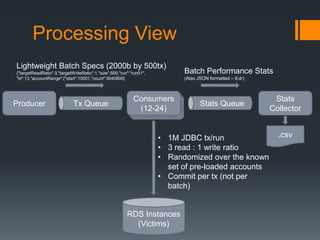
Processing View
Lightweight Batch Specs (2000b by 500tx)
{"targetReadRatio":3,"targetWriteRatio":1,"size":500,"run":"run01",
"id":13,"accountRange":{"start":10001,"count":5040800}

Producer

Tx Queue

Batch Performance Stats
(Also JSON formatted – tl;dr)

Consumers
(12-24)

Stats Queue

• 1M JDBC tx/run
• 3 read : 1 write ratio
• Randomized over the known
set of pre-loaded accounts
• Commit per tx (not per
batch)

RDS Instances
(Victims)

Stats
Collector
.csv
Transaction Specifications
Read Transaction
 Query random ACCOUNT for balance
 Query TX for last 10 tx by TIMESTAMP DESC
 Scan the returned cursor

Write Transaction
 Insert a random (+/-) amount into the TX table for a random
account
 Update the ACCOUNT table by applying that amount to the
current balance
 Commit (or rollback on failure)
[1] db.m2.4xlarge, 3000 PIOPS
(4 consumers @ 6 threads ea)
Cumulative: 5765 tps

Run 01
12000

9000

8000
10000

8000

6000

5000
TPS

Milliseconds Elapsed per Batch

7000

6000
4000

4000

3000

2000
2000
1000

0

0
1

101

201

301

401

501

601

701

801

901

1001 1101 1201 1301 1401 1501 1601 1701 1801 1901

Batch Received by Stats Collector
ElapsedTimeMillis

NetTPS
[1] db.m2.4xlarge, 3000 PIOPS
(4 consumers @ 6 threads ea)
Run 01 Monitoring Results

Peaked @ 2200 Write IOPS

Disk Queue Depth > 100

What’s up with Read IOPS?
[2] db.m2.4xlarge, 3000 PIOPS
(4 consumers @ 6 threads ea) … again
???

Cumulative: 4804 tps

Run 02
30000

14000

12000

10000
20000

8000
TPS

Milliseconds Elapsed per Batch

25000

15000
6000
10000
4000

5000

2000

0

0
1

101

201

301

401

501

601

701

801

901 1001 1101 1201 1301 1401 1501 1601 1701 1801 1901

Batch Received by Stats Collector
ElapsedTimeMillis

TotalTxPerSecond
[2] db.m2.4xlarge, 3000 PIOPS
(4 consumers @ 6 threads ea) … again
Run 02 Monitoring Results

Peaked @ 2500+ Write IOPS

Disk Queue Depth
tracks Write IOPS (or vice versa)
[3] db.m2.4xlarge, 3000 PIOPS
(4 consumers @ 6 threads ea) … third run
Cumulative: 4842 tps

Run 03
30000

10000
9000

25000

7000
20000
6000

15000

5000
4000

10000
3000
2000
5000
1000
0

0
1

101

201

301

401

501

601

701

801

901 1001 1101 1201 1301 1401 1501 1601 1701 1801 1901

Batch Received by Stats Collector
ElapsedTimeMillis

TotalTxPerSecond

TPS

Milliseconds Elapsed per Batch

8000
[3] db.m2.4xlarge, 3000 PIOPS
(4 consumers @ 6 threads ea) … third run
Run 03 Monitoring Results

Peaked @ 2500+ Write IOPS
Very curious what’s going on
in this interval, from peak to
end of run
Disk Queue Depth
tracks Write IOPS (or vice versa)
[4] db.m2.4xlarge, 1000 PIOPS
(2 consumers @ 6 threads ea)
Cumulative: 2854 tps
Run 04
12000

5000
4500

10000

Dialed back concurrency, on the hunch that
Oracle is resetting too many connections

8000

6000

3500
3000
2500
2000

4000
1500
1000
2000
500
0

0
1

101

201

301

401

501

601

701

801

901

1001 1101 1201 1301 1401 1501 1601 1701 1801 1901

Batch Received by Stats Collector
ElapsedTimeMillis

TotalTxPerSecond

TPS

Milliseconds Elapsed per Batch

4000
[4] db.m2.4xlarge, 1000 PIOPS
(2 consumers @ 6 threads ea)
Run 04 Monitoring Results
[5] db.m2.4xlarge, 1000 PIOPS
(4 consumers @ 6 threads ea)
Cumulative: 2187 tps

Run 05
80000

6000

Dialing back up made it worse

5000

60000
4000
50000

40000

3000

30000
2000
20000
1000
10000

0

0
1

101

201

301

401

501

601

701

801

901

1001 1101 1201 1301 1401 1501 1601 1701 1801 1901

Batch Received by Stats Collector
ElapsedTimeMillis

TotalTxPerSecond

TPS

Milliseconds Elapsed per Batch

70000
[5] db.m2.4xlarge, 1000 PIOPS
(4 consumers @ 6 threads ea)
Run 05 Monitoring Results
[6] db.m1.xlarge, No PIOPS
(2 consumers @ 6 threads ea)
12000

Cumulative: 1061 tps

Run 06

Some early flutter, but
not much

1200

1000

8000

800

6000

600

4000

400

2000

200

0

0
1

101

201

301

401

501

601

701

801

901

1001 1101 1201 1301 1401 1501 1601 1701 1801 1901

Batch Received by Stats Collector
ElapsedTimeMillis

TotalTxPerSecond

TPS

Milliseconds Elapsed per Batch

10000
[6] db.m1.xlarge, No PIOPS
(2 consumers @ 6 threads ea)
Run 06 Monitoring Results

Different colors than on
previous slides
Latency: Run 1 (3000 PIOPS)
Run 01 Batch Latencies (all milliseconds)

2000

15

1500

10

1000

5

500

0

0
1

101

201

301

401

501

601

701

801

901

1001 1101 1201 1301 1401 1501 1601 1701 1801 1901

Batch Received by Stats Collector
MedianWriteLatency

AvgTxLatencyMs

HighWriteLatency

High Write Latency

2500

20
AverageTx/Median Write Latency

25
Latency: Run 6 (No PIOPS)
Run 06 Batch Latencies (all milliseconds)
45

3500

40
3000

2500
30
2000

25

20

1500

15
1000
10
500
5

0

0
1

101

201

301

401

501

601

701

801

901

1001 1101 1201 1301 1401 1501 1601 1701 1801 1901

Batch Received by Stats Collector
AvgTxLatencyMs

MedianWriteLatency

HighWriteLatency

High Write Latency

AverageTx/Median Write Latency

35
Pricing

(does not include cost of backup storage)

Single AZ
Instance Type

Storage
PIOPS (GB)

Hourly
O/D**

PIOPS/
Month

Multi-AZ

Storage/
Cost/
GB-month* Month

Hourly
O/D**

PIOPS/
Month

Storage/
Cost/
GB-month* Month

Runs 1,2,3

db.m2.4xlarge

3000

300

$3.14

$0.10

$0.13 $2,598.30

$6.28

$0.20

$0.25 $5,196.60

Runs 4,5

db.m2.4xlarge

1000

300

$3.14

$0.10

$0.13 $2,398.30

$6.28

$0.20

$0.25 $4,796.60

Run 6

db.m1.xlarge

0

300

$1.13

$0.10

$0.10

$2.26

$0.20

$0.20 $1,687.20

$843.60

*Non-PIOPS storage also incurs I/O requests at $0.10/million requests
**Oracle “license-included” pricing. Significant savings for reserved instances.
Conclusions and Takeaways
PIOPS matters
 For throughput and latency

Need larger sampling periods
 To mitigate the effect of warm-up of instruments and subject

Need to try different R/W ratios
 And to gauge how they impact realized PIOPS

Backup and restore takes time
 Consider use of promotable read replicas, for platforms that support it
 Otherwise I might have had more samples
Questions?

Adventures in RDS Load Testing

  • 1.
    Adventures in RDSLoad Testing Mike Harnish, KSM Technology Partners LLC
  • 2.
    Objectives Empirical basis forevaluation  Of RDS as a platform for future development  Of performance of different configurations Platform for future load testing  Of different configurations, schemas, and load profiles Not strictly scientific  Did not try to isolate all possible sources of variability Not benchmarking Not exhaustive  Some configurations not tested
  • 3.
    Why RDS? WhyOracle? Why not DynamoDB/NoSQL?  Nothing at all against them  Testing platform design does not exclude them Why not MySQL/SQLServer?  Ran out of time Why not PostgreSQL?  Ran out of time, but would be my next choice RDBMS migration path
  • 4.
    How We Tested ProvisionRDS servers Generate test data Introduce distributed load  Persistent and relentless  Rough-grained “batches” of work  For a finite number of transactions Monitor servers  With Cloudwatch Analyze per-batch statistics
  • 5.
    RDS Server Configurations db.m2.4xlarge High-Memory Quadruple Extra Large DB Instance: 68 GB of memory, 26 ECUs (8 virtual cores with 3.25 ECUs each), 64-bit platform, High I/O Capacity, Provisioned IOPS Optimized: 1000Mbps  At 3000 and 1000 PIOPS  $3.14 base/hour, Oracle license included  The largest supported instance type for Oracle db.m1.xlarge  Extra Large DB Instance: 15 GB of memory, 8 ECUs (4 virtual cores with 2 ECUs each), 64-bit platform, High I/O Capacity, Provisioned IOPS Optimized: 1000Mbps  No PIOPS  $1.13 base/hour, license included, on-demand
  • 6.
    Test Schema CREATE TABLEloadgen.account( account_id NUMBER(9) CONSTRAINT pk_account PRIMARY KEY, balance NUMBER(6,2) DEFAULT 0 NOT NULL); CREATE TABLE loadgen.tx( tx_id NUMBER(9) CONSTRAINT pk_tx PRIMARY KEY, account_id NUMBER(9) CONSTRAINT fk_tx_account REFERENCES loadgen.account(account_id), amount NUMBER(6,2) NOT NULL, description VARCHAR2(100), tx_timestamp TIMESTAMP DEFAULT SYSDATE); CREATE INDEX loadgen.idx_tx_lookup ON loadgen.tx(account_id, tx_timestamp) … CREATE SEQUENCE loadgen.seq_tx_id …
  • 7.
    Baseline Test Data 5,037,003accounts 353,225,005 transactions  Roughly 70 initial transactions per account 300GB provisioned storage  Mostly to get higher PIOPS Using ~67GB of it  According to CloudWatch
  • 8.
    Test Environment c1.xlarge • • • • t1.micro SQLPlus 8 vCPU 20ECU 7GB memory High network performance JDBC RDS Instances
  • 9.
    Processing View Lightweight BatchSpecs (2000b by 500tx) {"targetReadRatio":3,"targetWriteRatio":1,"size":500,"run":"run01", "id":13,"accountRange":{"start":10001,"count":5040800} Producer Tx Queue Batch Performance Stats (Also JSON formatted – tl;dr) Consumers (12-24) Stats Queue • 1M JDBC tx/run • 3 read : 1 write ratio • Randomized over the known set of pre-loaded accounts • Commit per tx (not per batch) RDS Instances (Victims) Stats Collector .csv
  • 10.
    Transaction Specifications Read Transaction Query random ACCOUNT for balance  Query TX for last 10 tx by TIMESTAMP DESC  Scan the returned cursor Write Transaction  Insert a random (+/-) amount into the TX table for a random account  Update the ACCOUNT table by applying that amount to the current balance  Commit (or rollback on failure)
  • 11.
    [1] db.m2.4xlarge, 3000PIOPS (4 consumers @ 6 threads ea) Cumulative: 5765 tps Run 01 12000 9000 8000 10000 8000 6000 5000 TPS Milliseconds Elapsed per Batch 7000 6000 4000 4000 3000 2000 2000 1000 0 0 1 101 201 301 401 501 601 701 801 901 1001 1101 1201 1301 1401 1501 1601 1701 1801 1901 Batch Received by Stats Collector ElapsedTimeMillis NetTPS
  • 12.
    [1] db.m2.4xlarge, 3000PIOPS (4 consumers @ 6 threads ea) Run 01 Monitoring Results Peaked @ 2200 Write IOPS Disk Queue Depth > 100 What’s up with Read IOPS?
  • 13.
    [2] db.m2.4xlarge, 3000PIOPS (4 consumers @ 6 threads ea) … again ??? Cumulative: 4804 tps Run 02 30000 14000 12000 10000 20000 8000 TPS Milliseconds Elapsed per Batch 25000 15000 6000 10000 4000 5000 2000 0 0 1 101 201 301 401 501 601 701 801 901 1001 1101 1201 1301 1401 1501 1601 1701 1801 1901 Batch Received by Stats Collector ElapsedTimeMillis TotalTxPerSecond
  • 14.
    [2] db.m2.4xlarge, 3000PIOPS (4 consumers @ 6 threads ea) … again Run 02 Monitoring Results Peaked @ 2500+ Write IOPS Disk Queue Depth tracks Write IOPS (or vice versa)
  • 15.
    [3] db.m2.4xlarge, 3000PIOPS (4 consumers @ 6 threads ea) … third run Cumulative: 4842 tps Run 03 30000 10000 9000 25000 7000 20000 6000 15000 5000 4000 10000 3000 2000 5000 1000 0 0 1 101 201 301 401 501 601 701 801 901 1001 1101 1201 1301 1401 1501 1601 1701 1801 1901 Batch Received by Stats Collector ElapsedTimeMillis TotalTxPerSecond TPS Milliseconds Elapsed per Batch 8000
  • 16.
    [3] db.m2.4xlarge, 3000PIOPS (4 consumers @ 6 threads ea) … third run Run 03 Monitoring Results Peaked @ 2500+ Write IOPS Very curious what’s going on in this interval, from peak to end of run Disk Queue Depth tracks Write IOPS (or vice versa)
  • 17.
    [4] db.m2.4xlarge, 1000PIOPS (2 consumers @ 6 threads ea) Cumulative: 2854 tps Run 04 12000 5000 4500 10000 Dialed back concurrency, on the hunch that Oracle is resetting too many connections 8000 6000 3500 3000 2500 2000 4000 1500 1000 2000 500 0 0 1 101 201 301 401 501 601 701 801 901 1001 1101 1201 1301 1401 1501 1601 1701 1801 1901 Batch Received by Stats Collector ElapsedTimeMillis TotalTxPerSecond TPS Milliseconds Elapsed per Batch 4000
  • 18.
    [4] db.m2.4xlarge, 1000PIOPS (2 consumers @ 6 threads ea) Run 04 Monitoring Results
  • 19.
    [5] db.m2.4xlarge, 1000PIOPS (4 consumers @ 6 threads ea) Cumulative: 2187 tps Run 05 80000 6000 Dialing back up made it worse 5000 60000 4000 50000 40000 3000 30000 2000 20000 1000 10000 0 0 1 101 201 301 401 501 601 701 801 901 1001 1101 1201 1301 1401 1501 1601 1701 1801 1901 Batch Received by Stats Collector ElapsedTimeMillis TotalTxPerSecond TPS Milliseconds Elapsed per Batch 70000
  • 20.
    [5] db.m2.4xlarge, 1000PIOPS (4 consumers @ 6 threads ea) Run 05 Monitoring Results
  • 21.
    [6] db.m1.xlarge, NoPIOPS (2 consumers @ 6 threads ea) 12000 Cumulative: 1061 tps Run 06 Some early flutter, but not much 1200 1000 8000 800 6000 600 4000 400 2000 200 0 0 1 101 201 301 401 501 601 701 801 901 1001 1101 1201 1301 1401 1501 1601 1701 1801 1901 Batch Received by Stats Collector ElapsedTimeMillis TotalTxPerSecond TPS Milliseconds Elapsed per Batch 10000
  • 22.
    [6] db.m1.xlarge, NoPIOPS (2 consumers @ 6 threads ea) Run 06 Monitoring Results Different colors than on previous slides
  • 23.
    Latency: Run 1(3000 PIOPS) Run 01 Batch Latencies (all milliseconds) 2000 15 1500 10 1000 5 500 0 0 1 101 201 301 401 501 601 701 801 901 1001 1101 1201 1301 1401 1501 1601 1701 1801 1901 Batch Received by Stats Collector MedianWriteLatency AvgTxLatencyMs HighWriteLatency High Write Latency 2500 20 AverageTx/Median Write Latency 25
  • 24.
    Latency: Run 6(No PIOPS) Run 06 Batch Latencies (all milliseconds) 45 3500 40 3000 2500 30 2000 25 20 1500 15 1000 10 500 5 0 0 1 101 201 301 401 501 601 701 801 901 1001 1101 1201 1301 1401 1501 1601 1701 1801 1901 Batch Received by Stats Collector AvgTxLatencyMs MedianWriteLatency HighWriteLatency High Write Latency AverageTx/Median Write Latency 35
  • 25.
    Pricing (does not includecost of backup storage) Single AZ Instance Type Storage PIOPS (GB) Hourly O/D** PIOPS/ Month Multi-AZ Storage/ Cost/ GB-month* Month Hourly O/D** PIOPS/ Month Storage/ Cost/ GB-month* Month Runs 1,2,3 db.m2.4xlarge 3000 300 $3.14 $0.10 $0.13 $2,598.30 $6.28 $0.20 $0.25 $5,196.60 Runs 4,5 db.m2.4xlarge 1000 300 $3.14 $0.10 $0.13 $2,398.30 $6.28 $0.20 $0.25 $4,796.60 Run 6 db.m1.xlarge 0 300 $1.13 $0.10 $0.10 $2.26 $0.20 $0.20 $1,687.20 $843.60 *Non-PIOPS storage also incurs I/O requests at $0.10/million requests **Oracle “license-included” pricing. Significant savings for reserved instances.
  • 26.
    Conclusions and Takeaways PIOPSmatters  For throughput and latency Need larger sampling periods  To mitigate the effect of warm-up of instruments and subject Need to try different R/W ratios  And to gauge how they impact realized PIOPS Backup and restore takes time  Consider use of promotable read replicas, for platforms that support it  Otherwise I might have had more samples
  • 27.

Editor's Notes

  • #6 All single-AZ, all in us-east-1d because I’m a glutton for punishment