A Presentation for:
Autonomous Data Warehouse Cloud &
Data Visualization
Edelweiss Kammermann
Nuremberg, Germany
November 20th, 2018
© IT Convergence 2018 • All rights reserved
IT CONVERGENCE SNAPSHOT
© IT Convergence 2018 • All rights reserved
Over 600 Customers Engagements In More Than 50 Countries
EXTENSIVE EXPERTISE ACROSS THE GLOBE
© IT Convergence 2018 • All rights reserved
Edelweiss Kammermann
 Computer Engineer, BI and Data Integration Specialist
 Over 20 years of Consulting and Project Management experience in Oracle technology.
 Co-founder and Vice President of Uruguayan Oracle User Group (UYOUG)
 Vice President of LAOUC (Latin America Oracle User Community)
 BI Manager at ITConvergence
 Writer and frequent speaker at international conferences: Collaborate, OTN Tour LA,
UKOUG Tech & Apps, OOW, etc
 Oracle ACE Director
 Oracle Big Data Implementation Specialist
© IT Convergence 2018 • All rights reserved
Uruguay
© IT Convergence 2018 • All rights reserved
3 Membership Tiers
• Oracle ACE Director
• Oracle ACE
• Oracle ACE Associate
bit.ly/OracleACEProgram
500+ Technical Experts
Helping Peers Globally
Connect:
Nominate yourself or someone you know: acenomination.oracle.com
@oracleace
Facebook.com/oracleaces
oracle-ace_ww@oracle.com
© IT Convergence 2018 • All rights reserved
Index
What is Autonomous Data Warehouse Cloud?
Creating an Instance of ADWC
Connectivity with ADWC
How to connect DVD to ADWC
Oracle Data Visualization
© IT Convergence 2018 • All rights reserved
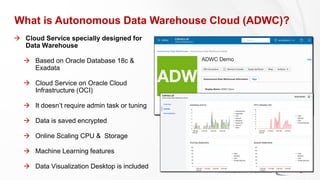
What is Autonomous Data Warehouse Cloud (ADWC)?
 Cloud Service specially designed for
Data Warehouse
 Based on Oracle Database 18c &
Exadata
 Cloud Service on Oracle Cloud
Infrastructure (OCI)
 It doesn’t require admin task or tuning
 Data is saved encrypted
 Online Scaling CPU & Storage
 Machine Learning features
 Data Visualization Desktop is included
© IT Convergence 2018 • All rights reserved
ADWC Restrictions - August 2018
 Tablespaces are automatically configured. Cannot be created, modified or deleted
 Compression: Hybrid Columnar Compression (Exadata functionality) Cannot be modified.
 Cannot create dblinks to other databases (security reasons). Only allowed from other databases
to ADWC
 Cannot create or modify Materialized Views, Indexes or Partitions
 Restricted list of SQL commands in the following documentation
https://docs.oracle.com/en/cloud/paas/autonomous-data-warehouse-cloud/user/experienced-database-
users.html#GUID-58EE6599-6DB4-4F8E-816D-0422377857E5
 There is no access to sys or system user.
 The administrator user is “admin”
© IT Convergence 2018 • All rights reserved
ADWC Restrictions – Since September 2018
 Tablespaces are automatically configured. Cannot be created, modified or deleted
 Compression: Hybrid Columnar Compression (Exadata functionality) + all table compression
types.
 Cannot create dblinks to other databases (security reasons). Only allowed from other databases
to ADWC
 Materialized Views, Partition and Indexes can be created now.
 Restricted list of SQL commands in the following documentation
https://docs.oracle.com/en/cloud/paas/autonomous-data-warehouse-cloud/user/experienced-database-
users.html#GUID-58EE6599-6DB4-4F8E-816D-0422377857E5
 There is no access to sys or system user.
 The administrator user is “admin”
© IT Convergence 2018 • All rights reserved
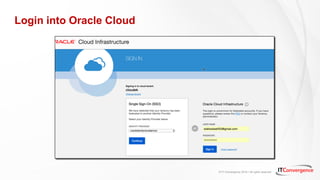
Login into Oracle Cloud
© IT Convergence 2018 • All rights reserved
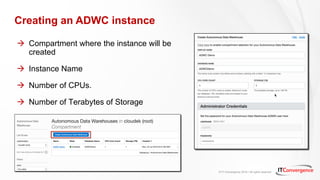
Creating an ADWC instance
 Compartment where the instance will be
created
 Instance Name
 Number of CPUs.
 Number of Terabytes of Storage
© IT Convergence 2018 • All rights reserved
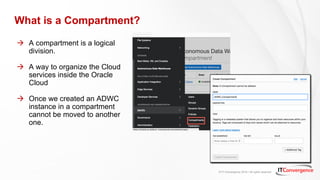
What is a Compartment?
 A compartment is a logical
division.
 A way to organize the Cloud
services inside the Oracle
Cloud
 Once we created an ADWC
instance in a compartment
cannot be moved to another
one.
© IT Convergence 2018 • All rights reserved
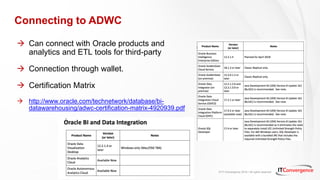
Connecting to ADWC
 Can connect with Oracle products and
analytics and ETL tools for third-party
 Connection through wallet.
 Certification Matrix
 http://www.oracle.com/technetwork/database/bi-
datawarehousing/adwc-certification-matrix-4920939.pdf
© IT Convergence 2018 • All rights reserved
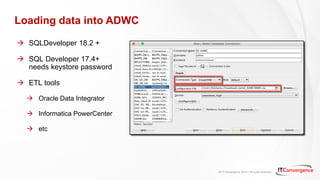
Loading data into ADWC
 SQLDeveloper 18.2 +
 SQL Developer 17.4+
needs keystore password
 ETL tools
 Oracle Data Integrator
 Informatica PowerCenter
 etc
© IT Convergence 2018 • All rights reserved
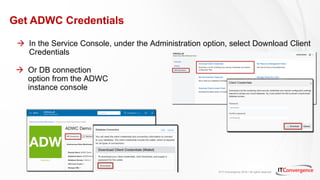
Get ADWC Credentials
 In the Service Console, under the Administration option, select Download Client
Credentials
 Or DB connection
option from the ADWC
instance console
© IT Convergence 2018 • All rights reserved
ADWC Wallet’s Content
© IT Convergence 2018 • All rights reserved
ADWC Connection Details
 The connection details can be found In the tnsnames. ora or using the new DB connection
button
 Choose the correspondent one depending on performance requirements
© IT Convergence 2018 • All rights reserved
ADWC Connection Types
 Pre defined Service names offer different levels of performance & concurrency
 High: the highest level of performance. Number of concurrent queries 3 – this value does not
depend of the number of CPUs
 Medium: performance lower level than high Number of concurrent queries: depends on
number of CPUs (lineal increment)
 Low: is the lowest value for performance but is the highest value of concurrency
Obs: Using Low database replication like GoldenGate
© IT Convergence 2018 • All rights reserved
ADWC Concurrency Examples
 Considering an ADWC instance with 16 CPU
 High: 3 concurrent queries
 Medium: 20 concurrent queries
 Low: 32 concurrent queries
© IT Convergence 2018 • All rights reserved
From Where Data can be loaded in ADWC?
 Local servers files
 Oracle Database (on prem or Cloud)
 Storage in the Cloud
 Oracle Object Storage
 Azure Blob Storage
 AWS S3
© IT Convergence 2018 • All rights reserved
Connecting to ADWC from Data Visualization Desktop (DVD)
For previous versions to 12.2.5.0
1. Get the ADWC Credentials (Wallet)
2. Copy the wallet.sso under DVD folder
3. Get the connection details from the
tnsnames.ora file or DB connection option
4. Create a new connection in DVD
© IT Convergence 2018 • All rights reserved
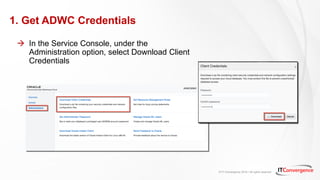
1. Get ADWC Credentials
 In the Service Console, under the
Administration option, select Download Client
Credentials
© IT Convergence 2018 • All rights reserved
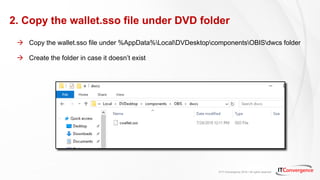
2. Copy the wallet.sso file under DVD folder
 Copy the wallet.sso file under %AppData%LocalDVDesktopcomponentsOBISdwcs folder
 Create the folder in case it doesn’t exist
© IT Convergence 2018 • All rights reserved
3. Get the ADWC Connection Details
 The connection details can be found In the tnsnames. ora or using the new DB connection
button
 Choose the correspondent one depending on performance requirements
© IT Convergence 2018 • All rights reserved
4. Creating an ADWC connection in DVD
© IT Convergence 2018 • All rights reserved
Connecting to ADWC from Data Visualization Desktop (DVD)
Since version 12.2.5.0
1. Get the ADWC Credentials (Wallet)
2. Get the connection details from the
tnsnames.ora file or DB connection option
3. Create a new connection in DVD 12.2.5.0
© IT Convergence 2018 • All rights reserved
Creating a new ADWC connection in DVD 12.2.5
© IT Convergence 2018 • All rights reserved
Oracle Data Visualization Desktop
 Self- Service Analytics
 Intuitive and easy to use
 Oriented to Business Users
 Can connect to more than 30
data sources
 Sources can be combined
without coding or SQL
knowledge
© IT Convergence 2018 • All rights reserved
Data Visualization – Getting Started
 Create Data Sets
 Create a Project
 Select a Data Set
 Drag & Drop attributes to create
Data visualizations
 Add filters
 Combine with other sources
 Create the story of the data with
the Narrate option
 Share the Project
© IT Convergence 2018 • All rights reserved
Creating ADWC Data Sets in Data Visualization Desktop
 Select database schema
 Data Sets can be based on
 Selected columns from a table
 SQL Query
© IT Convergence 2018 • All rights reserved
ADWC Demo
© IT Convergence 2018 • All rights reserved
Further Information
 ADWC Cloud
https://cloud.oracle.com/en_US/datawarehouse
 Labs for ADWC
https://www.youtube.com/watch?v=bEPwRlukjVU
 ADWC Tutorials
https://docs.oracle.com/en/cloud/paas/autonomous-data-warehouse-cloud/tutorials.html
 ADWC & Machine learning Documentation
https://docs.oracle.com/en/cloud/paas/autonomous-data-warehouse-cloud/books.html
Oracle Analytics Library
https://www.oracle.com/solutions/business-analytics/data-visualization/library.html
Oracle Data Visualization Dekstop Downloads
https://www.oracle.com/technetwork/middleware/oracle-data-visualization/downloads/oracle-data-
visualization-desktop-2938957.html
© IT Convergence 2018 • All rights reservedITC CORPORATE PRESENTATION © IT Convergence 2017 • All rights reserved34
Questions?
© IT Convergence 2018 • All rights reserved
email: ekammermann@itconvergence.com
Twitter: @EdelweissK
© IT Convergence 2018 • All rights reserved

Oracle Autonomous Data Warehouse Cloud and Data Visualization

  • 1.
    A Presentation for: AutonomousData Warehouse Cloud & Data Visualization Edelweiss Kammermann Nuremberg, Germany November 20th, 2018
  • 2.
    © IT Convergence2018 • All rights reserved IT CONVERGENCE SNAPSHOT
  • 3.
    © IT Convergence2018 • All rights reserved Over 600 Customers Engagements In More Than 50 Countries EXTENSIVE EXPERTISE ACROSS THE GLOBE
  • 4.
    © IT Convergence2018 • All rights reserved Edelweiss Kammermann  Computer Engineer, BI and Data Integration Specialist  Over 20 years of Consulting and Project Management experience in Oracle technology.  Co-founder and Vice President of Uruguayan Oracle User Group (UYOUG)  Vice President of LAOUC (Latin America Oracle User Community)  BI Manager at ITConvergence  Writer and frequent speaker at international conferences: Collaborate, OTN Tour LA, UKOUG Tech & Apps, OOW, etc  Oracle ACE Director  Oracle Big Data Implementation Specialist
  • 5.
    © IT Convergence2018 • All rights reserved Uruguay
  • 6.
    © IT Convergence2018 • All rights reserved 3 Membership Tiers • Oracle ACE Director • Oracle ACE • Oracle ACE Associate bit.ly/OracleACEProgram 500+ Technical Experts Helping Peers Globally Connect: Nominate yourself or someone you know: acenomination.oracle.com @oracleace Facebook.com/oracleaces oracle-ace_ww@oracle.com
  • 7.
    © IT Convergence2018 • All rights reserved Index What is Autonomous Data Warehouse Cloud? Creating an Instance of ADWC Connectivity with ADWC How to connect DVD to ADWC Oracle Data Visualization
  • 8.
    © IT Convergence2018 • All rights reserved What is Autonomous Data Warehouse Cloud (ADWC)?  Cloud Service specially designed for Data Warehouse  Based on Oracle Database 18c & Exadata  Cloud Service on Oracle Cloud Infrastructure (OCI)  It doesn’t require admin task or tuning  Data is saved encrypted  Online Scaling CPU & Storage  Machine Learning features  Data Visualization Desktop is included
  • 9.
    © IT Convergence2018 • All rights reserved ADWC Restrictions - August 2018  Tablespaces are automatically configured. Cannot be created, modified or deleted  Compression: Hybrid Columnar Compression (Exadata functionality) Cannot be modified.  Cannot create dblinks to other databases (security reasons). Only allowed from other databases to ADWC  Cannot create or modify Materialized Views, Indexes or Partitions  Restricted list of SQL commands in the following documentation https://docs.oracle.com/en/cloud/paas/autonomous-data-warehouse-cloud/user/experienced-database- users.html#GUID-58EE6599-6DB4-4F8E-816D-0422377857E5  There is no access to sys or system user.  The administrator user is “admin”
  • 10.
    © IT Convergence2018 • All rights reserved ADWC Restrictions – Since September 2018  Tablespaces are automatically configured. Cannot be created, modified or deleted  Compression: Hybrid Columnar Compression (Exadata functionality) + all table compression types.  Cannot create dblinks to other databases (security reasons). Only allowed from other databases to ADWC  Materialized Views, Partition and Indexes can be created now.  Restricted list of SQL commands in the following documentation https://docs.oracle.com/en/cloud/paas/autonomous-data-warehouse-cloud/user/experienced-database- users.html#GUID-58EE6599-6DB4-4F8E-816D-0422377857E5  There is no access to sys or system user.  The administrator user is “admin”
  • 11.
    © IT Convergence2018 • All rights reserved Login into Oracle Cloud
  • 12.
    © IT Convergence2018 • All rights reserved Creating an ADWC instance  Compartment where the instance will be created  Instance Name  Number of CPUs.  Number of Terabytes of Storage
  • 13.
    © IT Convergence2018 • All rights reserved What is a Compartment?  A compartment is a logical division.  A way to organize the Cloud services inside the Oracle Cloud  Once we created an ADWC instance in a compartment cannot be moved to another one.
  • 14.
    © IT Convergence2018 • All rights reserved Connecting to ADWC  Can connect with Oracle products and analytics and ETL tools for third-party  Connection through wallet.  Certification Matrix  http://www.oracle.com/technetwork/database/bi- datawarehousing/adwc-certification-matrix-4920939.pdf
  • 15.
    © IT Convergence2018 • All rights reserved Loading data into ADWC  SQLDeveloper 18.2 +  SQL Developer 17.4+ needs keystore password  ETL tools  Oracle Data Integrator  Informatica PowerCenter  etc
  • 16.
    © IT Convergence2018 • All rights reserved Get ADWC Credentials  In the Service Console, under the Administration option, select Download Client Credentials  Or DB connection option from the ADWC instance console
  • 17.
    © IT Convergence2018 • All rights reserved ADWC Wallet’s Content
  • 18.
    © IT Convergence2018 • All rights reserved ADWC Connection Details  The connection details can be found In the tnsnames. ora or using the new DB connection button  Choose the correspondent one depending on performance requirements
  • 19.
    © IT Convergence2018 • All rights reserved ADWC Connection Types  Pre defined Service names offer different levels of performance & concurrency  High: the highest level of performance. Number of concurrent queries 3 – this value does not depend of the number of CPUs  Medium: performance lower level than high Number of concurrent queries: depends on number of CPUs (lineal increment)  Low: is the lowest value for performance but is the highest value of concurrency Obs: Using Low database replication like GoldenGate
  • 20.
    © IT Convergence2018 • All rights reserved ADWC Concurrency Examples  Considering an ADWC instance with 16 CPU  High: 3 concurrent queries  Medium: 20 concurrent queries  Low: 32 concurrent queries
  • 21.
    © IT Convergence2018 • All rights reserved From Where Data can be loaded in ADWC?  Local servers files  Oracle Database (on prem or Cloud)  Storage in the Cloud  Oracle Object Storage  Azure Blob Storage  AWS S3
  • 22.
    © IT Convergence2018 • All rights reserved Connecting to ADWC from Data Visualization Desktop (DVD) For previous versions to 12.2.5.0 1. Get the ADWC Credentials (Wallet) 2. Copy the wallet.sso under DVD folder 3. Get the connection details from the tnsnames.ora file or DB connection option 4. Create a new connection in DVD
  • 23.
    © IT Convergence2018 • All rights reserved 1. Get ADWC Credentials  In the Service Console, under the Administration option, select Download Client Credentials
  • 24.
    © IT Convergence2018 • All rights reserved 2. Copy the wallet.sso file under DVD folder  Copy the wallet.sso file under %AppData%LocalDVDesktopcomponentsOBISdwcs folder  Create the folder in case it doesn’t exist
  • 25.
    © IT Convergence2018 • All rights reserved 3. Get the ADWC Connection Details  The connection details can be found In the tnsnames. ora or using the new DB connection button  Choose the correspondent one depending on performance requirements
  • 26.
    © IT Convergence2018 • All rights reserved 4. Creating an ADWC connection in DVD
  • 27.
    © IT Convergence2018 • All rights reserved Connecting to ADWC from Data Visualization Desktop (DVD) Since version 12.2.5.0 1. Get the ADWC Credentials (Wallet) 2. Get the connection details from the tnsnames.ora file or DB connection option 3. Create a new connection in DVD 12.2.5.0
  • 28.
    © IT Convergence2018 • All rights reserved Creating a new ADWC connection in DVD 12.2.5
  • 29.
    © IT Convergence2018 • All rights reserved Oracle Data Visualization Desktop  Self- Service Analytics  Intuitive and easy to use  Oriented to Business Users  Can connect to more than 30 data sources  Sources can be combined without coding or SQL knowledge
  • 30.
    © IT Convergence2018 • All rights reserved Data Visualization – Getting Started  Create Data Sets  Create a Project  Select a Data Set  Drag & Drop attributes to create Data visualizations  Add filters  Combine with other sources  Create the story of the data with the Narrate option  Share the Project
  • 31.
    © IT Convergence2018 • All rights reserved Creating ADWC Data Sets in Data Visualization Desktop  Select database schema  Data Sets can be based on  Selected columns from a table  SQL Query
  • 32.
    © IT Convergence2018 • All rights reserved ADWC Demo
  • 33.
    © IT Convergence2018 • All rights reserved Further Information  ADWC Cloud https://cloud.oracle.com/en_US/datawarehouse  Labs for ADWC https://www.youtube.com/watch?v=bEPwRlukjVU  ADWC Tutorials https://docs.oracle.com/en/cloud/paas/autonomous-data-warehouse-cloud/tutorials.html  ADWC & Machine learning Documentation https://docs.oracle.com/en/cloud/paas/autonomous-data-warehouse-cloud/books.html Oracle Analytics Library https://www.oracle.com/solutions/business-analytics/data-visualization/library.html Oracle Data Visualization Dekstop Downloads https://www.oracle.com/technetwork/middleware/oracle-data-visualization/downloads/oracle-data- visualization-desktop-2938957.html
  • 34.
    © IT Convergence2018 • All rights reservedITC CORPORATE PRESENTATION © IT Convergence 2017 • All rights reserved34 Questions?
  • 35.
    © IT Convergence2018 • All rights reserved email: ekammermann@itconvergence.com Twitter: @EdelweissK
  • 36.
    © IT Convergence2018 • All rights reserved