



Marcus Vinicius Miguel Pedro
MARCUS VINICIUS MIGUEL PEDRO
• Blog: www.viniciusdba.com.br;
• 22 years working in IT Industry;
• 15+ years working with Oracle Database;
• GUOB Board Member (Brazilian Oracle User Group);
• Speaker in Oracle-related events: GUOB, IFSP, FATEC, OOW Latin America;
• Technical Reviewer for Oracle Press Book: Oracle Database 12c Oracle RMAN Backup and Recovery
• Working as Sr. Database Consultant in Accenture Enkitec Group;
• Certifications:
- Oracle Database 9i Administrator Certified Associate (OCA);
- Oracle Database 9i Administrator Certified Professional (OCP);
- Oracle Database 10g Administrator Certified Professional (OCP);
- Oracle Database 10g: RAC Administrator Certified Expert (OCE RAC 10g);
- Oracle Database 11g Administrator Certified Professional (OCP);
- Oracle Database 11g Certified Implementation Specialist (OCS);
- Oracle Database 11g Grid & RAC Certified Expert (OCE RAC 11g);
- Oracle Database 11g Tuning Certified Expert (OCE Tuning 11g);
- Oracle Database 12c Certified Professional (OCP);
- Oracle Database Cloud Service Operations Certified Associate;
• Awards:
- Oracle ACE Alumni
- Oracle Database Cloud Administrator Certified Professional;
- Oracle Database 12c Tuning Certified Expert (OCE Tuning 12c);
- Oracle Database 12c: RAC and Grid Infrastructure Certified Expert (OCE RAC 12c);
- Oracle Database 12c: Data Guard Administrator Certified Expert (OCE DataGuard 12c);
- Oracle Database 12c: Maximum Availability Certified Expert (OCE MAA 12c);
- Oracle Exadata X5 Administrator Certified Expert;
- Oracle Cloud Infrastructure 2018 Certified Associate;
- Oracle Exadata Machine and Cloud Service 2017 Certified Implementation Specialist;
- Oracle Cloud Platform Data Management 2018 Certified Associate.
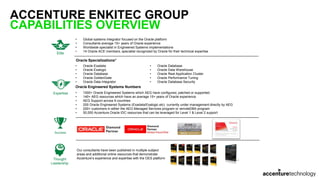
ACCENTURE ENKITEC GROUP
CAPABILITIES OVERVIEW
4
• Global systems integrator focused on the Oracle platform
• Consultants average 15+ years of Oracle experience
• Worldwide specialist in Engineered Systems implementations
• 14 Oracle ACE members, specialist recognized by Oracle for their technical expertise
Elite
Expertise
Oracle Specializations*
• Oracle Exadata
• Oracle Exalogic
• Oracle Database
• Oracle GoldenGate
• Oracle Data Integrator
• Oracle Database
• Oracle Data Warehouse
• Oracle Real Application Cluster
• Oracle Performance Tuning
• Oracle Database Security
Thought
Leadership
Success
Our consultants have been published in multiple subject
areas and additional online resources that demonstrate
Accenture’s experience and expertise with the OES platform
Oracle Engineered Systems Numbers
• 1000+ Oracle Engineered Systems which AEG have configured, patched or supported.
• 140+ AEG resources which have an average 15+ years of Oracle experience
• AEG Support across 9 countries
• 200 Oracle Engineered Systems (Exadata/Exalogic etc) currently under management directly by AEG
• 200+ customers in either the AEG Managed Services program or remoteDBA program
• 50,000 Accenture Oracle IDC resources that can be leveraged for Level 1 & Level 2 support
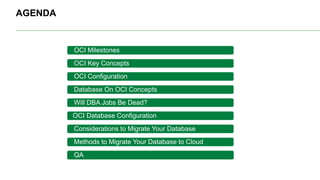
AGENDA
OCI Milestones
OCI Key Concepts
OCI Configuration
Database On OCI Concepts
Will DBA Jobs Be Dead?
OCI Database Configuration
Considerations to Migrate Your Database
Methods to Migrate Your Database to Cloud
QA
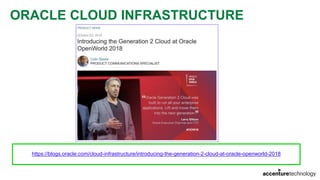
ORACLE CLOUD INFRASTRUCTURE
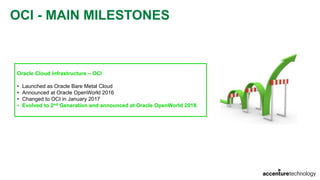
OCI - MAIN MILESTONES
Oracle Cloud Infrastructure – OCI
• Launched as Oracle Bare Metal Cloud
• Announced at Oracle OpenWorld 2016
• Changed to OCI in January 2017
• Evolved to 2nd Generation and announced at Oracle OpenWorld 2018.
ORACLE CLOUD INFRASTRUCTURE
https://blogs.oracle.com/cloud-infrastructure/introducing-the-generation-2-cloud-at-oracle-openworld-2018
OCI
COMPARTMENTS
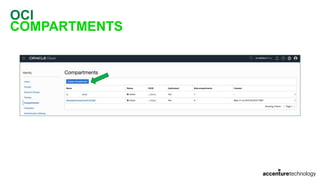
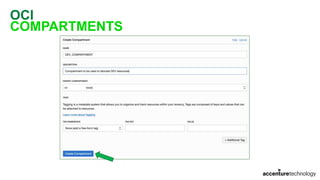
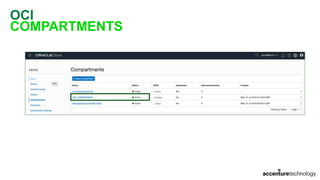
• Compartment is a collection of related resources (instances, VCNs, block volumes, etc)
• Can be accessed by groups that have have been given permission by an administrator
• When you sign up for OCI, Oracle creates your tenancy, which is the root compartment
• You can create compartments to organize and isolate your cloud resources:
• DEV_COMPARTMENT;
• QA_COMPARTMENT;
• PROD_COMPARTMENT.
OCI
KEY CONCEPTS
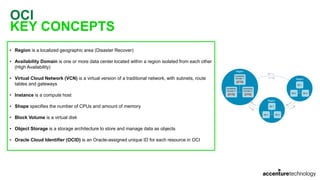
• Region is a localized geographic area (Disaster Recover)
• Availability Domain is one or more data center located within a region isolated from each other
(High Availability)
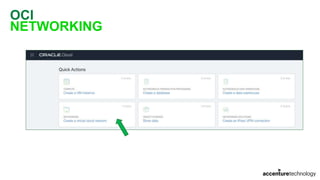
• Virtual Cloud Network (VCN) is a virtual version of a traditional network, with subnets, route
tables and gateways
• Instance is a compute host
• Shape specifies the number of CPUs and amount of memory
• Block Volume is a virtual disk
• Object Storage is a storage architecture to store and manage data as objects
• Oracle Cloud Identifier (OCID) is an Oracle-assigned unique ID for each resource in OCI
OCI
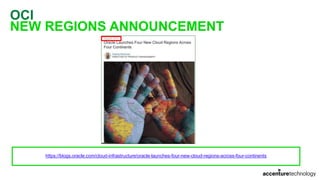
NEW REGIONS ANNOUNCEMENT
https://blogs.oracle.com/cloud-infrastructure/oracle-launches-four-new-cloud-regions-across-four-continents
OCI
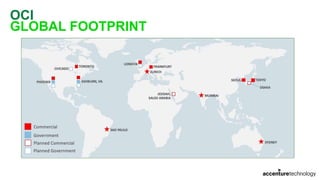
GLOBAL FOOTPRINT
OCI
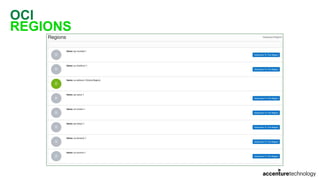
REGIONS
OCI
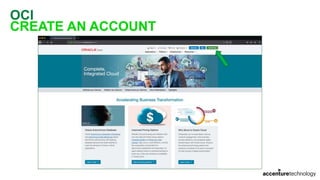
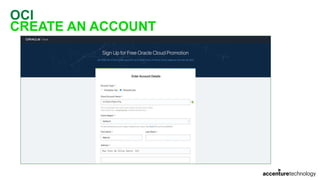
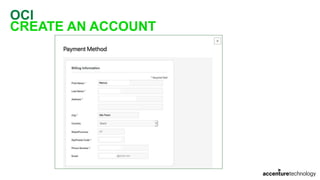
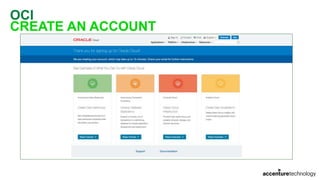
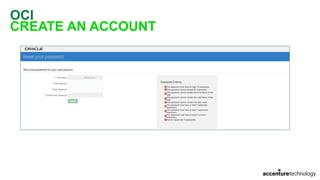
CREATE AN ACCOUNT
OCI
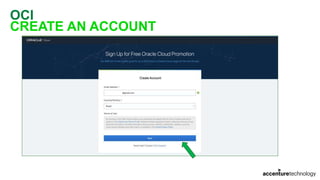
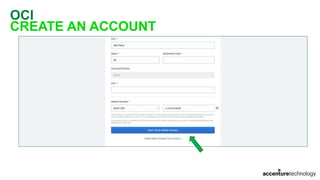
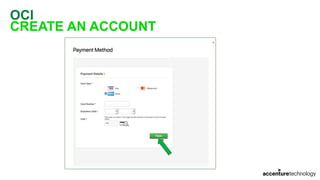
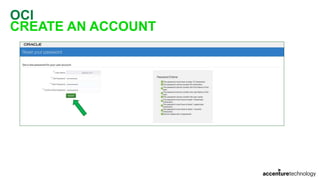
CREATE AN ACCOUNT
OCI
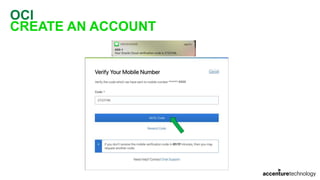
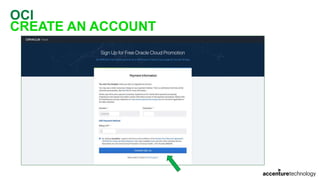
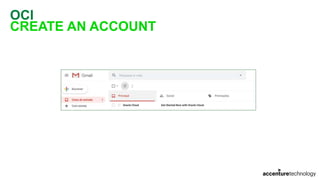
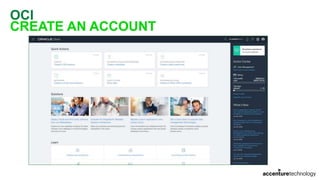
CREATE AN ACCOUNT
OCI
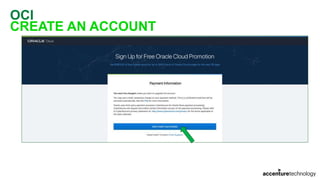
CREATE AN ACCOUNT
OCI
CREATE AN ACCOUNT
OCI
CREATE AN ACCOUNT
OCI
CREATE AN ACCOUNT
OCI
CREATE AN ACCOUNT
OCI
CREATE AN ACCOUNT
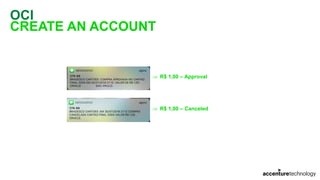
 R$ 1,00 – Approval
 R$ 1,00 – Canceled
OCI
CREATE AN ACCOUNT
OCI
CREATE AN ACCOUNT
OCI
CREATE AN ACCOUNT
OCI
CREATE AN ACCOUNT
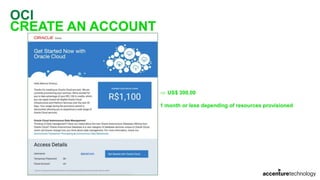
 US$ 300,00
1 month or less depending of resources provisioned
OCI
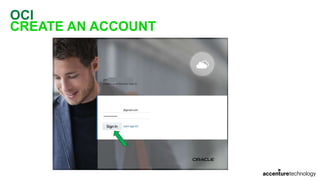
CREATE AN ACCOUNT
OCI
CREATE AN ACCOUNT
OCI
CREATE AN ACCOUNT
OCI
CREATE AN ACCOUNT
OCI
COMPARTMENTS
OCI
COMPARTMENTS
OCI
COMPARTMENTS
OCI
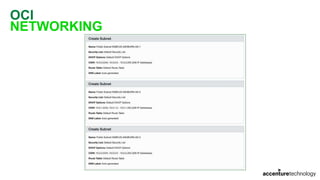
NETWORKING
OCI
NETWORKING
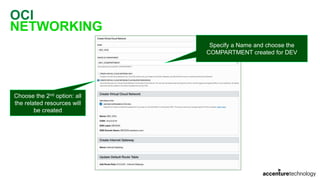
Specify a Name and choose the
COMPARTMENT created for DEV
Choose the 2nd option: all
the related resources will
be created
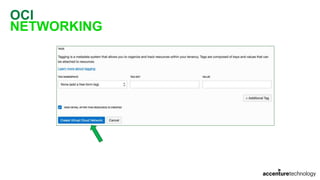
OCI
NETWORKING
OCI
NETWORKING
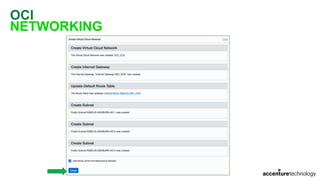
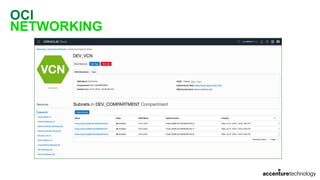
OCI
NETWORKING
OCI
NETWORKING
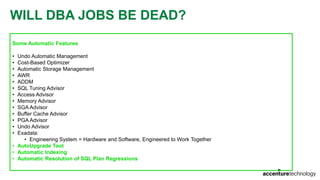
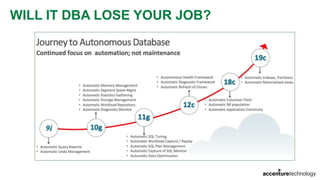
WILL DBA JOBS BE DEAD?
Some Automatic Features
• Undo Automatic Management
• Cost-Based Optimizer
• Automatic Storage Management
• AWR
• ADDM
• SQL Tuning Advisor
• Access Advisor
• Memory Advisor
• SGA Advisor
• Buffer Cache Advisor
• PGA Advisor
• Undo Advisor
• Exadata:
• Engineering System = Hardware and Software, Engineered to Work Together
• AutoUpgrade Tool
• Automatic Indexing
• Automatic Resolution of SQL Plan Regressions
WILL DBA JOBS BE DEAD?
In my humble opinion
No!
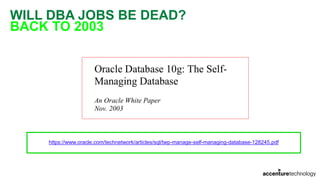
WILL DBA JOBS BE DEAD?
BACK TO 2003
https://www.oracle.com/technetwork/articles/sql/twp-manage-self-managing-database-128245.pdf
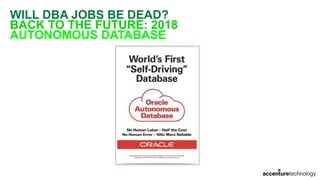
WILL DBA JOBS BE DEAD?
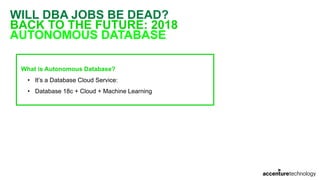
BACK TO THE FUTURE: 2018
AUTONOMOUS DATABASE
WILL DBA JOBS BE DEAD?
BACK TO THE FUTURE: 2018
AUTONOMOUS DATABASE
What is Autonomous Database?
• It’s a Database Cloud Service:
• Database 18c + Cloud + Machine Learning
WILL IT DBA LOSE YOUR JOB?
OCI DATABASE CLOUD
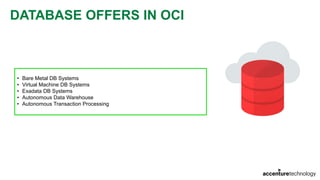
DATABASE OFFERS IN OCI
• Bare Metal DB Systems
• Virtual Machine DB Systems
• Exadata DB Systems
• Autonomous Data Warehouse
• Autonomous Transaction Processing
DATABASE LICENSING MODELS
Two Types of Licensing
• License Included
• Bring Your Own License (BYOL)
Prices may vary according with your contract with Oracle
• Pricing and Features: https://cloud.oracle.com/database/pricing
DATABASE EDITIONS
Editions Supported
• Standard Edition
• Enterprise Edition
• Enterprise Edition – High Performance
• Enterprise Edition – Extreme Performance
DATABASE EDITIONS
STANDARD EDITION
Features
• All features included in Oracle Database Standard Edition 2
• Full Oracle Database Instance
• Up to 24 CPUs
• Transparent Data Encryption
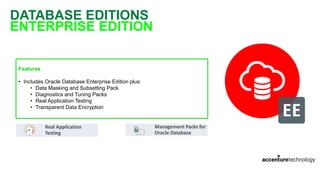
DATABASE EDITIONS
ENTERPRISE EDITION
Features
• Includes Oracle Database Enterprise Edition plus:
• Data Masking and Subsetting Pack
• Diagnostics and Tuning Packs
• Real Application Testing
• Transparent Data Encryption
DATABASE EDITIONS
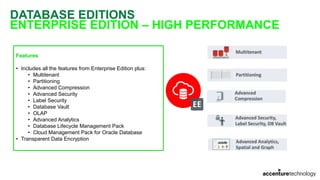
ENTERPRISE EDITION – HIGH PERFORMANCE
Features
• Includes all the features from Enterprise Edition plus:
• Multitenant
• Partitioning
• Advanced Compression
• Advanced Security
• Label Security
• Database Vault
• OLAP
• Advanced Analytics
• Database Lifecycle Management Pack
• Cloud Management Pack for Oracle Database
• Transparent Data Encryption
DATABASE EDITIONS
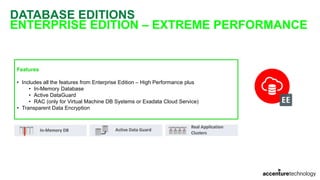
ENTERPRISE EDITION – EXTREME PERFORMANCE
Features
• Includes all the features from Enterprise Edition – High Performance plus
• In-Memory Database
• Active DataGuard
• RAC (only for Virtual Machine DB Systems or Exadata Cloud Service)
• Transparent Data Encryption
DATABASE VERSIONS
Versions Supported
• Oracle Database 11g Release 2 (11.2)
• Oracle Database 12c Release 1 (12.1)
• Oracle Database 12c Release 2 (12.2)
• Oracle Database 18c (18.0)
• Oracle Database 19c (19.0) – Only for VM DB Systems and Exadata – Aug/2019
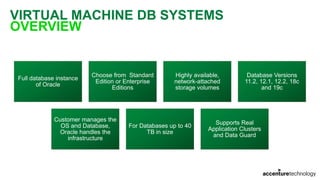
VIRTUAL MACHINE DB SYSTEMS
OVERVIEW
Full database instance
of Oracle
Choose from Standard
Edition or Enterprise
Editions
Highly available,
network-attached
storage volumes
Database Versions
11.2, 12.1, 12.2, 18c
and 19c
Customer manages the
OS and Database,
Oracle handles the
infrastructure
For Databases up to 40
TB in size
Supports Real
Application Clusters
and Data Guard
VIRTUAL MACHINE DB SYSTEMS
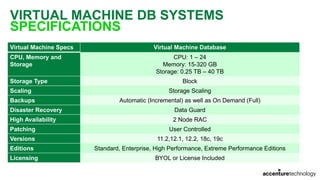
SPECIFICATIONS
Virtual Machine Specs Virtual Machine Database
CPU, Memory and
Storage
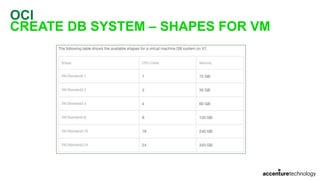
CPU: 1 – 24
Memory: 15-320 GB
Storage: 0.25 TB – 40 TB
Storage Type Block
Scaling Storage Scaling
Backups Automatic (Incremental) as well as On Demand (Full)
Disaster Recovery Data Guard
High Availability 2 Node RAC
Patching User Controlled
Versions 11.2,12.1, 12.2, 18c, 19c
Editions Standard, Enterprise, High Performance, Extreme Performance Editions
Licensing BYOL or License Included
VIRTUAL MACHINE DB SYSTEMS
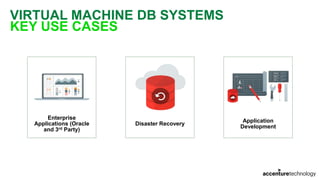
KEY USE CASES
Enterprise
Applications (Oracle
and 3rd Party)
Disaster Recovery
Application
Development
BARE METAL DB SYSTEMS
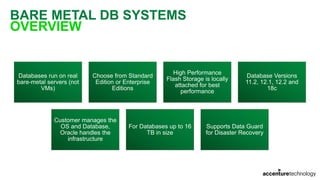
OVERVIEW
Databases run on real
bare-metal servers (not
VMs)
Choose from Standard
Edition or Enterprise
Editions
High Performance
Flash Storage is locally
attached for best
performance
Database Versions
11.2, 12.1, 12.2 and
18c
Customer manages the
OS and Database,
Oracle handles the
infrastructure
For Databases up to 16
TB in size
Supports Data Guard
for Disaster Recovery
BARE METAL DB SYSTEMS
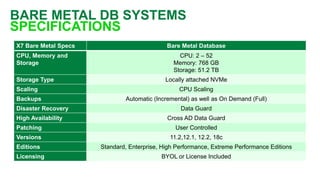
SPECIFICATIONS
X7 Bare Metal Specs Bare Metal Database
CPU, Memory and
Storage
CPU: 2 – 52
Memory: 768 GB
Storage: 51.2 TB
Storage Type Locally attached NVMe
Scaling CPU Scaling
Backups Automatic (Incremental) as well as On Demand (Full)
Disaster Recovery Data Guard
High Availability Cross AD Data Guard
Patching User Controlled
Versions 11.2,12.1, 12.2, 18c
Editions Standard, Enterprise, High Performance, Extreme Performance Editions
Licensing BYOL or License Included
BARE METAL DB SYSTEMS
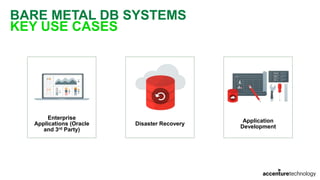
KEY USE CASES
Enterprise
Applications (Oracle
and 3rd Party)
Disaster Recovery
Application
Development
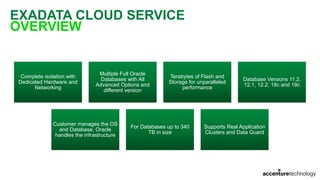
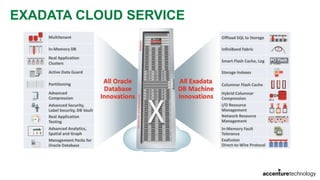
EXADATA CLOUD SERVICE
OVERVIEW
Complete isolation with
Dedicated Hardware and
Networking
Multiple Full Oracle
Databases with All
Advanced Options and
different version
Terabytes of Flash and
Storage for unparalleled
performance
Database Versions 11.2,
12.1, 12.2, 18c and 19c
Customer manages the OS
and Database, Oracle
handles the infrastructure
For Databases up to 340
TB in size
Supports Real Application
Clusters and Data Guard
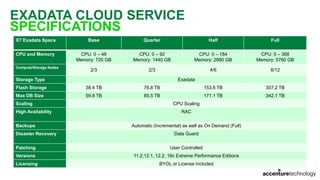
EXADATA CLOUD SERVICE
SPECIFICATIONS
X7 Exadata Specs Base Quarter Half Full
CPU and Memory CPU: 0 – 48
Memory: 720 GB
CPU: 0 – 92
Memory: 1440 GB
CPU: 0 – 184
Memory: 2880 GB
CPU: 0 – 368
Memory: 5760 GB
Compute/Storage Nodes
2/3 2/3 4/6 8/12
Storage Type Exadata
Flash Storage 38.4 TB 76.8 TB 153.6 TB 307.2 TB
Max DB Size 59.8 TB 85.5 TB 171.1 TB 342.1 TB
Scaling CPU Scaling
High Availability RAC
Backups Automatic (Incremental) as well as On Demand (Full)
Disaster Recovery Data Guard
Patching User Controlled
Versions 11.2,12.1, 12.2, 18c Extreme Performance Editions
Licensing BYOL or License Included
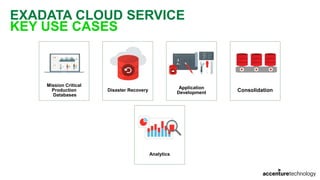
EXADATA CLOUD SERVICE
KEY USE CASES
Mission Critical
Production
Databases
Disaster Recovery
Application
Development Consolidation
Analytics
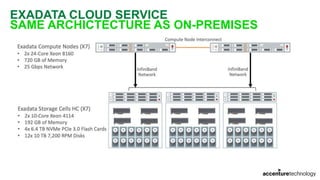
EXADATA CLOUD SERVICE
SAME ARCHICTECTURE AS ON-PREMISES
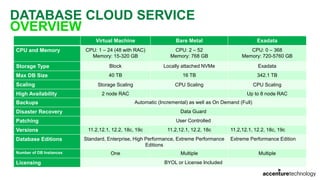
DATABASE CLOUD SERVICE
OVERVIEW
Virtual Machine Bare Metal Exadata
CPU and Memory CPU: 1 – 24 (48 with RAC)
Memory: 15-320 GB
CPU: 2 – 52
Memory: 768 GB
CPU: 0 – 368
Memory: 720-5760 GB
Storage Type Block Locally attached NVMe Exadata
Max DB Size 40 TB 16 TB 342.1 TB
Scaling Storage Scaling CPU Scaling CPU Scaling
High Availability 2 node RAC Up to 8 node RAC
Backups Automatic (Incremental) as well as On Demand (Full)
Disaster Recovery Data Guard
Patching User Controlled
Versions 11.2,12.1, 12.2, 18c, 19c 11.2,12.1, 12.2, 18c 11.2,12.1, 12.2, 18c, 19c
Database Editions Standard, Enterprise, High Performance, Extreme Performance
Editions
Extreme Performance Edition
Number of DB Instances One Multiple Multiple
Licensing BYOL or License Included
OCI
NETWORKING SETUP FOR DB SYSTEMS
Two Options
• Public Subnet can be useful for proof-of-concept or development work. Use if you have services that run only on a
public network and need to access database.
• Private Subnet recommended for a production system. Cannot be reached from the Internet.
OCI
DATABASE ON CLOUD
One Million Question
• Should I move my database(s) to Cloud?
OCI
DATABASE ON CLOUD
• It Depends!
• Are you planning to move your application ecosystem to cloud?
OCI
DATABASE ON CLOUD
Big Challenge when moving databases to Cloud
• Traffic between Database tier and Application tier
• Moving your application ecosystem along with database you can benefit from Cloud features/advantages
• If some piece/part of your application remains in On-Premises DataCenter, even with FastConnect you can expect
some increased response time.
DATABASE SIZING
OCI
DATABASE SIZING
Most Common Question
• Should I provision resources using the same sizing as I have in On-Premises?
OCI
DATABASE SIZING
As always, it depends!
OCI
DATABASE SIZING
Some Questions
• Actually, do you have waits for CPU?
• If yes, how long are the waits? Those waits impact business?
• If yes, maybe your CPU is under pressure
• If no, probably you have spikes
Let’s assume as example that you have spikes in CPU usage
OCI
DATABASE SIZING
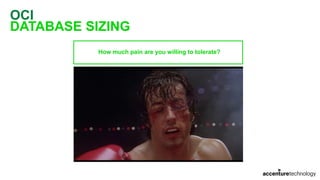
How much pain are you willing to tolerate?
OCI
DATABASE SIZING
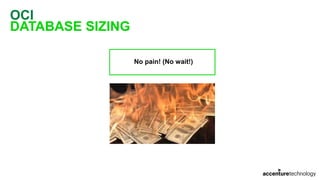
No pain! (No wait!)
OCI
DATABASE SIZING
Some pain is tolerated!
OCI
DATABASE SIZING
How measure CPU usage?
• If you have Diagnostics Pack: DBA_HIST_ACTIVE_SESS_HISTORY (ASH)
• If you don’t, STATSPACK or any external OS monitoring tool
OCI
DATABASE SIZING
DBA_HIST_ACTIVE_SESS_HISTORY
• Query for how many sessions are waiting for CPU (WHERE session_state = 'ON CPU' )
Main Issue
• ASH is sampled only when there is activity
• Some periods of time without activity do not generate ASH samples
How to avoid issues when using ASH to sizing CPU usage?
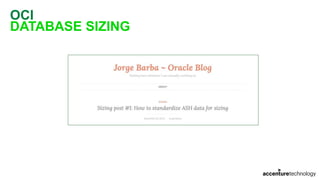
• ASH Standardization!
• Jorge Barba from Acenture Enkitec Group:
https://jorgebarbablog.wordpress.com/2016/12/21/how-to-standardize-ash-data-for-sizing/
OCI
DATABASE SIZING
OCI
DATABASE SIZING
With ASH data standardized, should I use MAX values?
• Only if you cannot tolerate any pain!
Can I use AVERAGE?
• No! You can have some spike periods much biggest than AVERAGE.
OCI
DATABASE SIZING
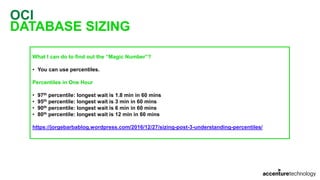
What I can do to find out the “Magic Number”?
• You can use percentiles.
Percentiles in One Hour
• 97th percentile: longest wait is 1.8 min in 60 mins
• 95th percentile: longest wait is 3 min in 60 mins
• 90th percentile: longest wait is 6 min in 60 mins
• 80th percentile: longest wait is 12 min in 60 mins
https://jorgebarbablog.wordpress.com/2016/12/27/sizing-post-3-understanding-percentiles/
OCI
DATABASE SIZING
How is the appropriate percentile for my database workload?
How much pain are you willing to tolerate?
OCI
DATABASE SIZING
Memory
• Should be the same. Check the Shapes available to fit your need
IOPS
• AWR:
• physical read total IO requests
• physical write total IO requests
I/O Throughput
• AWR:
• physical read bytes
• physical write bytes
CREATING A DB SYSTEM IN OCI
OCI
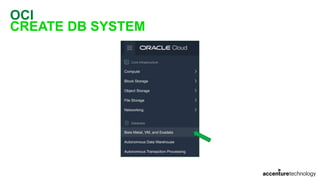
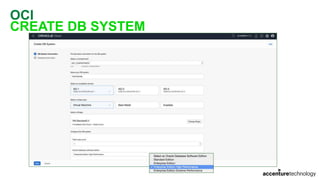
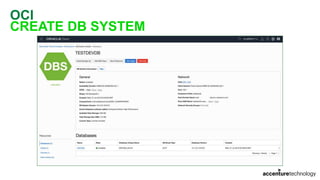
CREATE DB SYSTEM
OCI
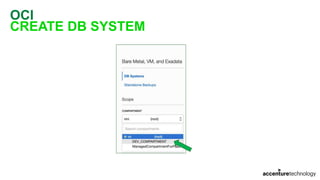
CREATE DB SYSTEM
OCI
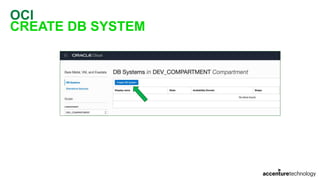
CREATE DB SYSTEM
OCI
CREATE DB SYSTEM
OCI
CREATE DB SYSTEM – SHAPES FOR VM
OCI
CREATE DB SYSTEM
OCI
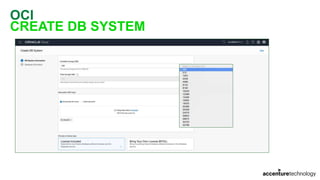
CREATE DB SYSTEM
OCI
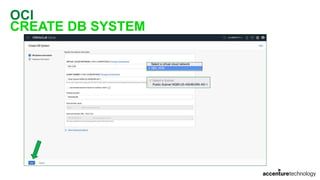
CREATE DB SYSTEM
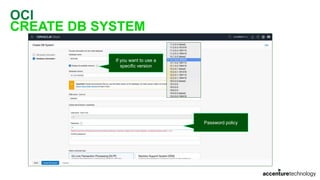
If you want to use a
specific version
Password policy
OCI
CREATE DB SYSTEM
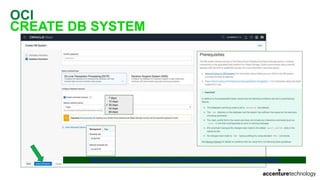
https://docs.cloud.oracle.com/iaas/Content/Database/Tasks/backingupOS.htm#prerequisites
OCI
CREATE DB SYSTEM
OCI
CREATE DB SYSTEM
90 minutes later…
OCI
CREATE DB SYSTEM
OCI
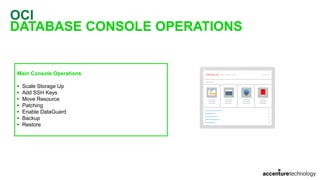
DATABASE CONSOLE OPERATIONS
Main Console Operations
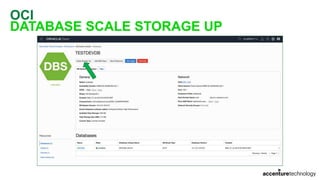
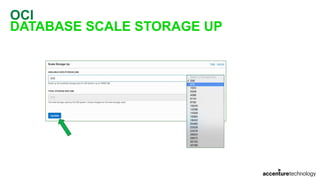
• Scale Storage Up
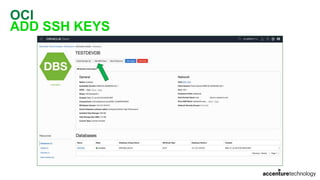
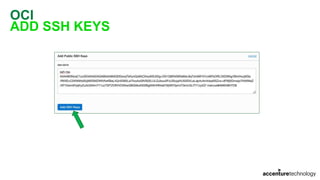
• Add SSH Keys
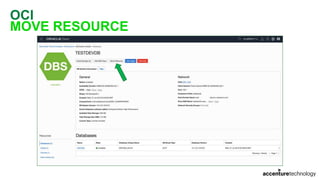
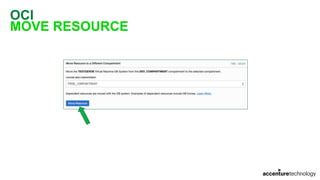
• Move Resource
• Patching
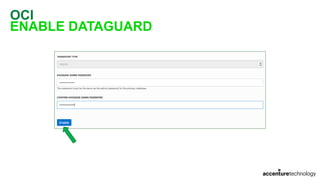
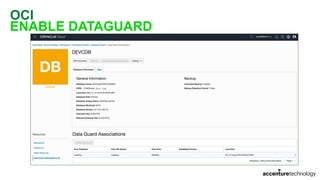
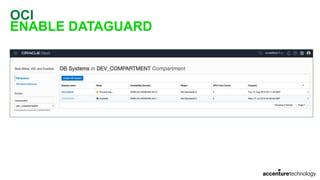
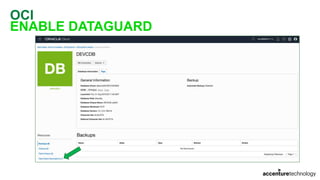
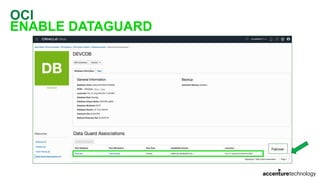
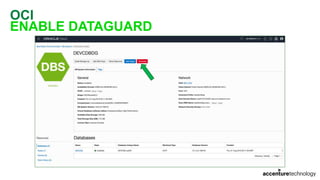
• Enable DataGuard
• Backup
• Restore
OCI
DATABASE SCALE STORAGE UP
OCI
DATABASE SCALE STORAGE UP
OCI
ADD SSH KEYS
OCI
ADD SSH KEYS
OCI
MOVE RESOURCE
OCI
MOVE RESOURCE
OCI
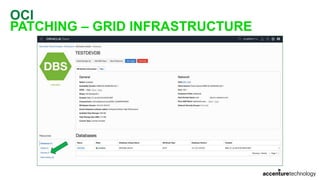
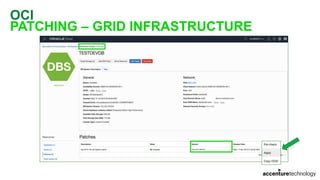
PATCHING – GRID INFRASTRUCTURE
OCI
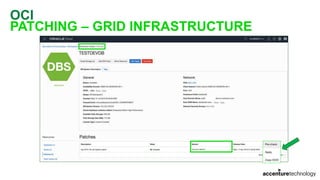
PATCHING – GRID INFRASTRUCTURE
OCI
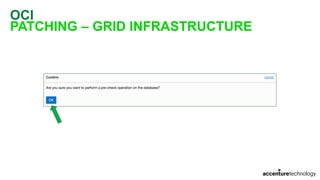
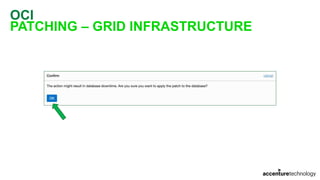
PATCHING – GRID INFRASTRUCTURE
OCI
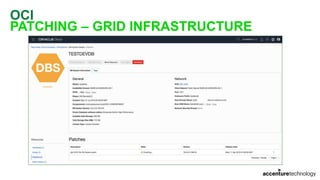
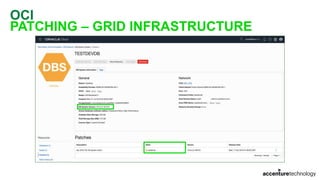
PATCHING – GRID INFRASTRUCTURE
OCI
PATCHING – GRID INFRASTRUCTURE
6 minutes later…
OCI
PATCHING – GRID INFRASTRUCTURE
OCI
PATCHING – GRID INFRASTRUCTURE
OCI
PATCHING – GRID INFRASTRUCTURE
OCI
PATCHING – GRID INFRASTRUCTURE
26 minutes later…
OCI
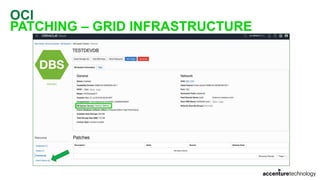
PATCHING – GRID INFRASTRUCTURE
OCI
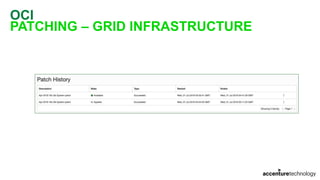
PATCHING – GRID INFRASTRUCTURE
OCI
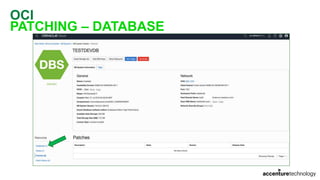
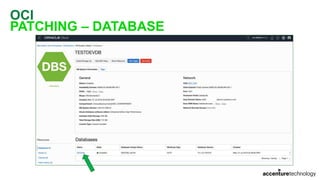
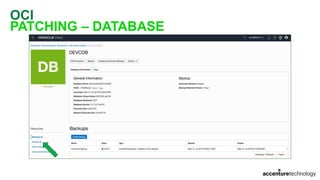
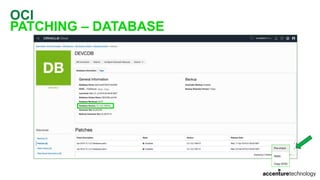
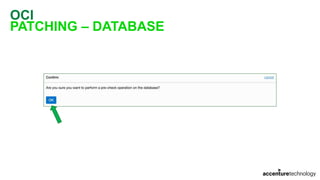
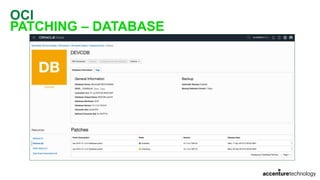
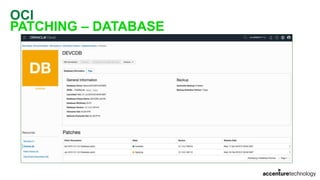
PATCHING – DATABASE
OCI
PATCHING – DATABASE
OCI
PATCHING – DATABASE
OCI
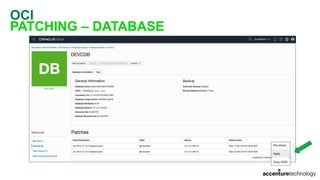
PATCHING – DATABASE
OCI
PATCHING – DATABASE
OCI
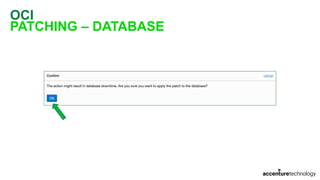
PATCHING – DATABASE
OCI
PATCHING – DATABASE
8 minutes later…
OCI
PATCHING – DATABASE
OCI
PATCHING – DATABASE
OCI
PATCHING – DATABASE
OCI
PATCHING – DATABASE
42 minutes later…
OCI
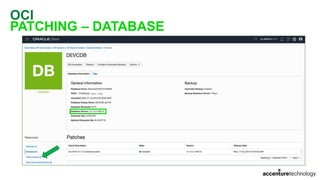
PATCHING – DATABASE
OCI
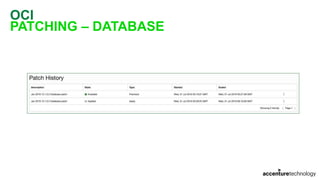
PATCHING – DATABASE
OCI
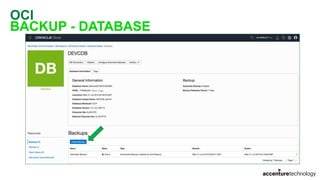
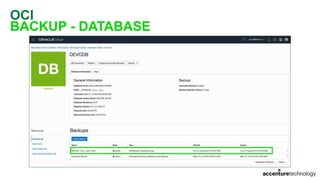
BACKUP - DATABASE
OCI
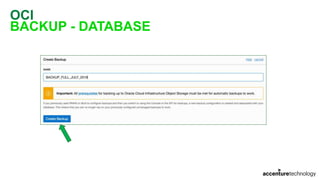
BACKUP - DATABASE
OCI
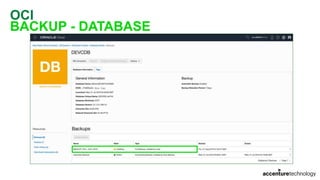
BACKUP - DATABASE
OCI
BACKUP - DATABASE
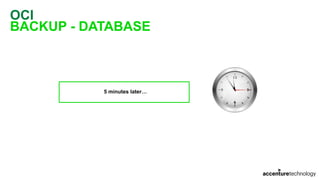
5 minutes later…
OCI
BACKUP - DATABASE
OCI
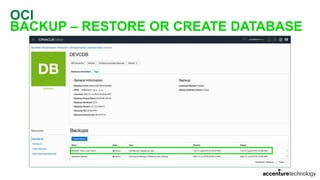
BACKUP – RESTORE OR CREATE DATABASE
OCI
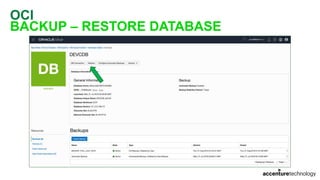
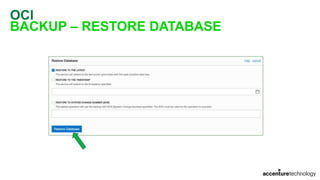
BACKUP – RESTORE DATABASE
OCI
BACKUP – RESTORE DATABASE
OCI
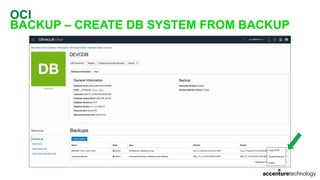
BACKUP – CREATE DB SYSTEM FROM BACKUP
OCI
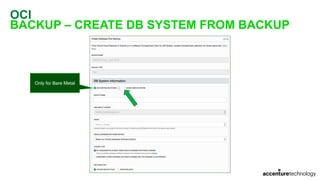
BACKUP – CREATE DB SYSTEM FROM BACKUP
Only for Bare Metal
OCI
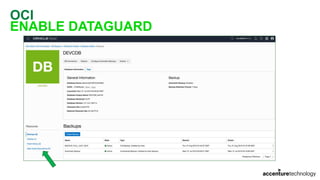
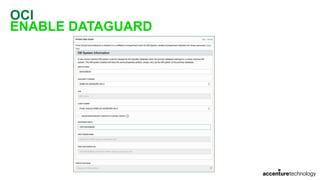
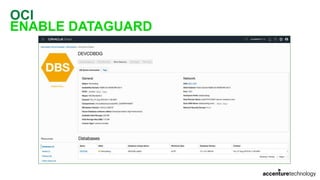
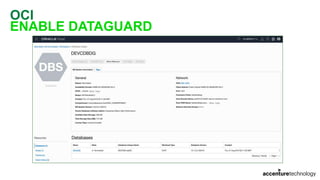
ENABLE DATAGUARD
OCI
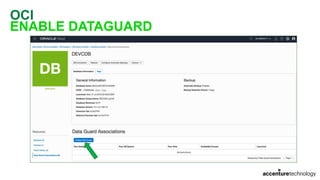
ENABLE DATAGUARD
OCI
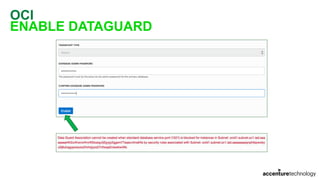
ENABLE DATAGUARD
OCI
ENABLE DATAGUARD
OCI
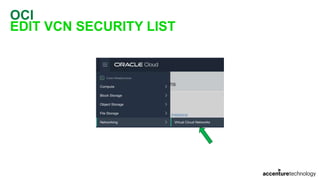
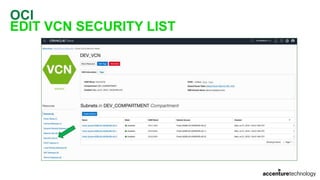
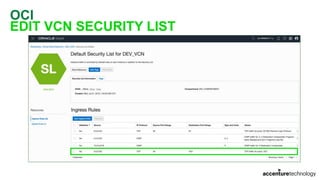
EDIT VCN SECURITY LIST
OCI
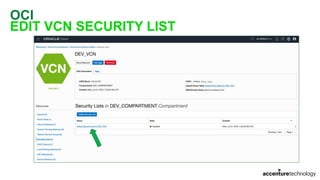
EDIT VCN SECURITY LIST
OCI
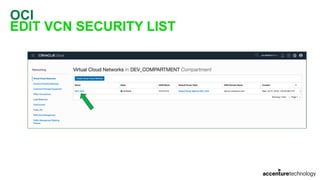
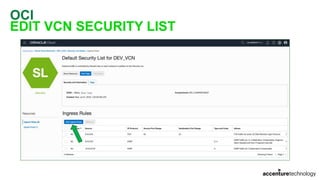
EDIT VCN SECURITY LIST
OCI
EDIT VCN SECURITY LIST
OCI
EDIT VCN SECURITY LIST
OCI
EDIT VCN SECURITY LIST
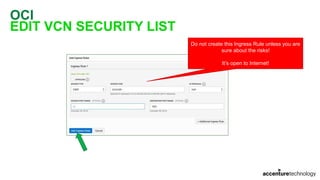
Do not create this Ingress Rule unless you are
sure about the risks!
It’s open to Internet!
OCI
EDIT VCN SECURITY LIST
OCI
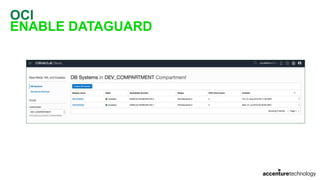
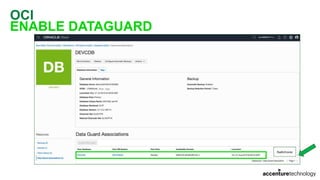
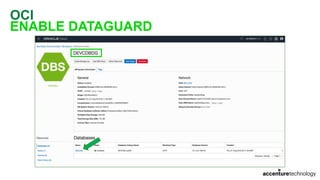
ENABLE DATAGUARD
OCI
ENABLE DATAGUARD
OCI
ENABLE DATAGUARD
OCI
ENABLE DATAGUARD
90 minutes later…
OCI
ENABLE DATAGUARD
OCI
ENABLE DATAGUARD
OCI
ENABLE DATAGUARD
OCI
ENABLE DATAGUARD
OCI
ENABLE DATAGUARD
OCI
ENABLE DATAGUARD
OCI
ENABLE DATAGUARD
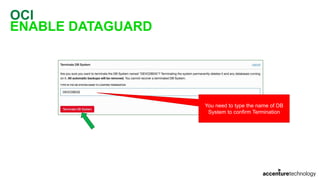
You need to type the name of DB
System to confirm Termination
OCI
ENABLE DATAGUARD
OCI
ENABLE DATAGUARD
CONNECTING TO DATABASE
OCI
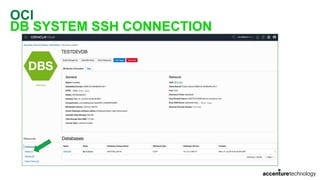
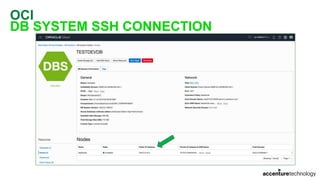
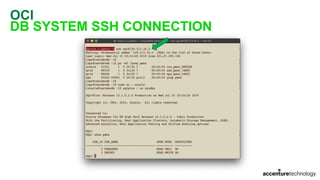
DB SYSTEM SSH CONNECTION
OCI
DB SYSTEM SSH CONNECTION
OCI
DB SYSTEM SSH CONNECTION
OCI
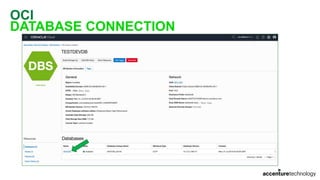
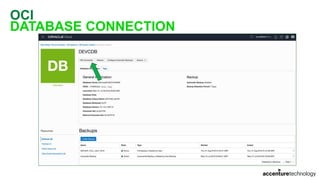
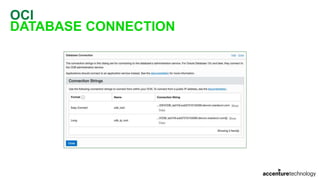
DATABASE CONNECTION
OCI
DATABASE CONNECTION
OCI
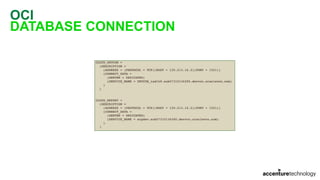
DATABASE CONNECTION
OCI
DATABASE CONNECTION
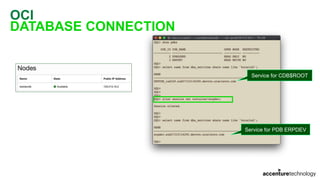
Service for CDB$ROOT
Service for PDB ERPDEV
OCI
DATABASE CONNECTION
OCI
DATABASE CONNECTION
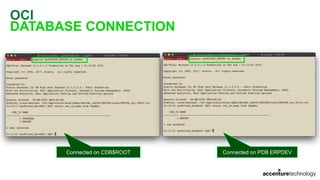
Connected on CDB$ROOT Connected on PDB ERPDEV
DATABASE MIGRATION METHODS
OCI
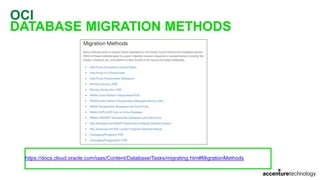
DATABASE MIGRATION METHODS
https://docs.cloud.oracle.com/iaas/Content/Database/Tasks/migrating.htm#MigrationMethods
OCI
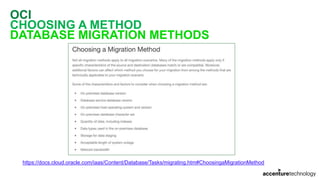
CHOOSING A METHOD
DATABASE MIGRATION METHODS
https://docs.cloud.oracle.com/iaas/Content/Database/Tasks/migrating.htm#ChoosingaMigrationMethod
OCI
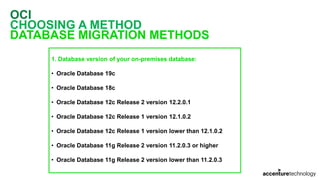
CHOOSING A METHOD
DATABASE MIGRATION METHODS
1. Database version of your on-premises database:
• Oracle Database 19c
• Oracle Database 18c
• Oracle Database 12c Release 2 version 12.2.0.1
• Oracle Database 12c Release 1 version 12.1.0.2
• Oracle Database 12c Release 1 version lower than 12.1.0.2
• Oracle Database 11g Release 2 version 11.2.0.3 or higher
• Oracle Database 11g Release 2 version lower than 11.2.0.3
OCI
CHOOSING A METHOD
DATABASE MIGRATION METHODS
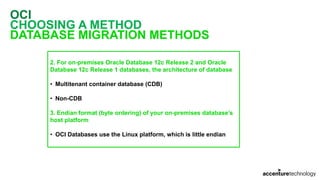
2. For on-premises Oracle Database 12c Release 2 and Oracle
Database 12c Release 1 databases, the architecture of database
• Multitenant container database (CDB)
• Non-CDB
3. Endian format (byte ordering) of your on-premises database’s

host platform
• OCI Databases use the Linux platform, which is little endian
OCI
CHOOSING A METHOD
DATABASE MIGRATION METHODS
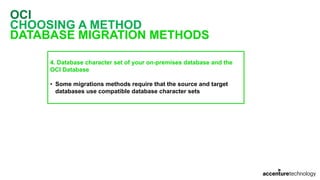
4. Database character set of your on-premises database and the
OCI Database
• Some migrations methods require that the source and target
databases use compatible database character sets
OCI
CHOOSING A METHOD
DATABASE MIGRATION METHODS
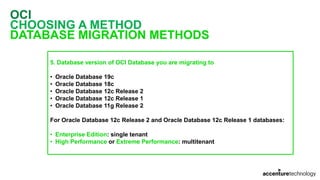
5. Database version of OCI Database you are migrating to
• Oracle Database 19c
• Oracle Database 18c
• Oracle Database 12c Release 2
• Oracle Database 12c Release 1
• Oracle Database 11g Release 2
For Oracle Database 12c Release 2 and Oracle Database 12c Release 1 databases:
• Enterprise Edition: single tenant
• High Performance or Extreme Performance: multitenant
OCI
DATABASE MIGRATION
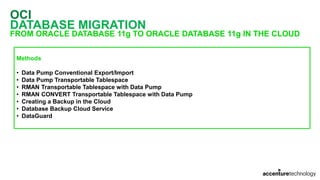
FROM ORACLE DATABASE 11g TO ORACLE DATABASE 11g IN THE CLOUD
Methods
• Data Pump Conventional Export/Import
• Data Pump Transportable Tablespace
• RMAN Transportable Tablespace with Data Pump
• RMAN CONVERT Transportable Tablespace with Data Pump
• Creating a Backup in the Cloud
• Database Backup Cloud Service
• DataGuard
OCI
DATABASE MIGRATION
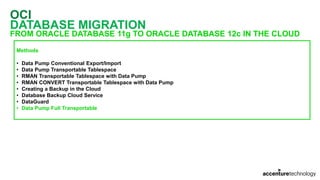
FROM ORACLE DATABASE 11g TO ORACLE DATABASE 12c IN THE CLOUD
Methods
• Data Pump Conventional Export/Import
• Data Pump Transportable Tablespace
• RMAN Transportable Tablespace with Data Pump
• RMAN CONVERT Transportable Tablespace with Data Pump
• Creating a Backup in the Cloud
• Database Backup Cloud Service
• DataGuard
• Data Pump Full Transportable
OCI
DATABASE MIGRATION
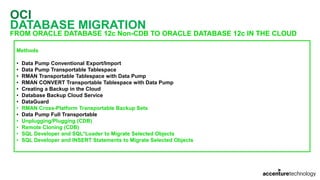
FROM ORACLE DATABASE 12c Non-CDB TO ORACLE DATABASE 12c IN THE CLOUD
Methods
• Data Pump Conventional Export/Import
• Data Pump Transportable Tablespace
• RMAN Transportable Tablespace with Data Pump
• RMAN CONVERT Transportable Tablespace with Data Pump
• Creating a Backup in the Cloud
• Database Backup Cloud Service
• DataGuard
• RMAN Cross-Platform Transportable Backup Sets
• Data Pump Full Transportable
• Unplugging/Plugging (CDB)
• Remote Cloning (CDB)
• SQL Developer and SQL*Loader to Migrate Selected Objects
• SQL Developer and INSERT Statements to Migrate Selected Objects
OCI
DATABASE MIGRATION
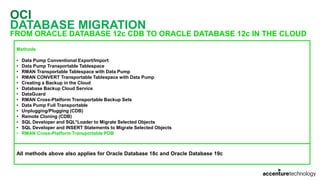
FROM ORACLE DATABASE 12c CDB TO ORACLE DATABASE 12c IN THE CLOUD
Methods
• Data Pump Conventional Export/Import
• Data Pump Transportable Tablespace
• RMAN Transportable Tablespace with Data Pump
• RMAN CONVERT Transportable Tablespace with Data Pump
• Creating a Backup in the Cloud
• Database Backup Cloud Service
• DataGuard
• RMAN Cross-Platform Transportable Backup Sets
• Data Pump Full Transportable
• Unplugging/Plugging (CDB)
• Remote Cloning (CDB)
• SQL Developer and SQL*Loader to Migrate Selected Objects
• SQL Developer and INSERT Statements to Migrate Selected Objects
• RMAN Cross-Platform Transportable PDB
All methods above also applies for Oracle Database 18c and Oracle Database 19c
OCI
DATABASE MIGRATION
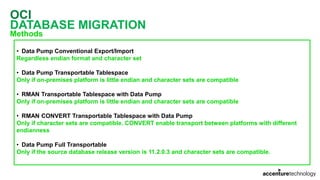
Methods
• Data Pump Conventional Export/Import
Regardless endian format and character set
• Data Pump Transportable Tablespace
Only if on-premises platform is little endian and character sets are compatible
• RMAN Transportable Tablespace with Data Pump
Only if on-premises platform is little endian and character sets are compatible
• RMAN CONVERT Transportable Tablespace with Data Pump
Only if character sets are compatible. CONVERT enable transport between platforms with different
endianness
• Data Pump Full Transportable
Only if the source database release version is 11.2.0.3 and character sets are compatible.
OCI
DATABASE MIGRATION
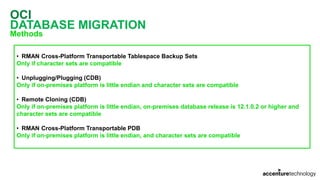
Methods
• RMAN Cross-Platform Transportable Tablespace Backup Sets
Only if character sets are compatible
• Unplugging/Plugging (CDB)
Only if on-premises platform is little endian and character sets are compatible
• Remote Cloning (CDB)
Only if on-premises platform is little endian, on-premises database release is 12.1.0.2 or higher and
character sets are compatible
• RMAN Cross-Platform Transportable PDB
Only if on-premises platform is little endian, and character sets are compatible
OCI
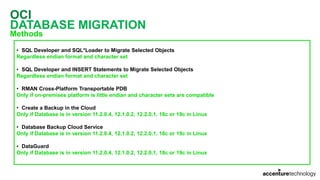
DATABASE MIGRATION
Methods
• SQL Developer and SQL*Loader to Migrate Selected Objects
Regardless endian format and character set
• SQL Developer and INSERT Statements to Migrate Selected Objects
Regardless endian format and character set
• RMAN Cross-Platform Transportable PDB
Only if on-premises platform is little endian and character sets are compatible
• Create a Backup in the Cloud
Only if Database is in version 11.2.0.4, 12.1.0.2, 12.2.0.1, 18c or 19c in Linux
• Database Backup Cloud Service
Only if Database is in version 11.2.0.4, 12.1.0.2, 12.2.0.1, 18c or 19c in Linux
• DataGuard
Only if Database is in version 11.2.0.4, 12.1.0.2, 12.2.0.1, 18c or 19c in Linux
OCI
DATABASE MIGRATION
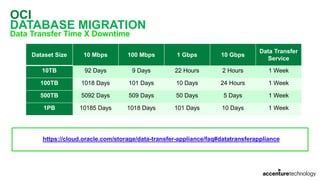
Data Transfer Time X Downtime
https://cloud.oracle.com/storage/data-transfer-appliance/faq#datatransferappliance
Dataset Size 10 Mbps 100 Mbps 1 Gbps 10 Gbps
Data Transfer
Service
10TB 92 Days 9 Days 22 Hours 2 Hours 1 Week
100TB 1018 Days 101 Days 10 Days 24 Hours 1 Week
500TB 5092 Days 509 Days 50 Days 5 Days 1 Week
1PB 10185 Days 1018 Days 101 Days 10 Days 1 Week
OCI
DATABASE MIGRATION
Data Transfer Service
OCI
DATABASE MIGRATION
Data Transfer Appliance
OCI
DATABASE MIGRATION
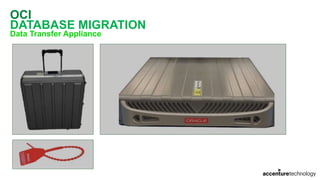
Data Transfer Appliance
• OCI Customers can use Data Transfer Appliance service for free
• Customers are only charged for Object Storage usage once the data is transferred to bucket
• Data are encrypted using AES-256 encryption. The encryption keys are never stored on appliance
• Shipping is free. Oracle pays to ship the transfer appliance and then back to Oracle
• File size limit is 10TB per file
• A manifest file captures MD5 for each file uploaded. When imported to the bucket, MD5 should match
• Limit of 150 TB per appliance
OCI
DATABASE MIGRATION
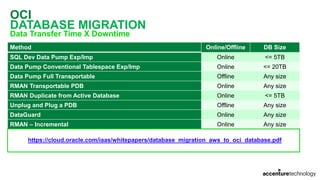
Data Transfer Time X Downtime
Method Online/Offline DB Size
SQL Dev Data Pump Exp/Imp Online <= 5TB
Data Pump Conventional Tablespace Exp/Imp Online <= 20TB
Data Pump Full Transportable Offline Any size
RMAN Transportable PDB Online Any size
RMAN Duplicate from Active Database Online <= 5TB
Unplug and Plug a PDB Offline Any size
DataGuard Online Any size
RMAN – Incremental Online Any size
https://cloud.oracle.com/iaas/whitepapers/database_migration_aws_to_oci_database.pdf
OCI
DATABASE MIGRATION
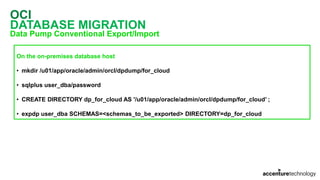
Data Pump Conventional Export/Import
On the on-premises database host
• mkdir /u01/app/oracle/admin/orcl/dpdump/for_cloud
• sqlplus user_dba/password
• CREATE DIRECTORY dp_for_cloud AS '/u01/app/oracle/admin/orcl/dpdump/for_cloud’ ;
• expdp user_dba SCHEMAS=<schemas_to_be_exported> DIRECTORY=dp_for_cloud
OCI
DATABASE MIGRATION
Data Pump Conventional Export/Import
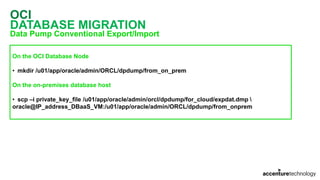
On the OCI Database Node
• mkdir /u01/app/oracle/admin/ORCL/dpdump/from_on_prem
On the on-premises database host
• scp –i private_key_file /u01/app/oracle/admin/orcl/dpdump/for_cloud/expdat.dmp 
oracle@IP_address_DBaaS_VM:/u01/app/oracle/admin/ORCL/dpdump/from_onprem
OCI
DATABASE MIGRATION
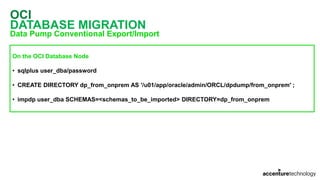
Data Pump Conventional Export/Import
On the OCI Database Node
• sqlplus user_dba/password
• CREATE DIRECTORY dp_from_onprem AS '/u01/app/oracle/admin/ORCL/dpdump/from_onprem' ;
• impdp user_dba SCHEMAS=<schemas_to_be_imported> DIRECTORY=dp_from_onprem
OCI
DATABASE MIGRATION
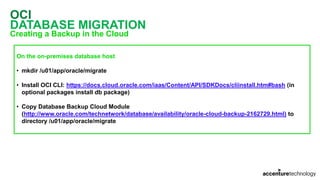
Creating a Backup in the Cloud
On the on-premises database host
• mkdir /u01/app/oracle/migrate
• Install OCI CLI: https://docs.cloud.oracle.com/iaas/Content/API/SDKDocs/cliinstall.htm#bash (in
optional packages install db package)
• Copy Database Backup Cloud Module
(http://www.oracle.com/technetwork/database/availability/oracle-cloud-backup-2162729.html) to
directory /u01/app/oracle/migrate
OCI
DATABASE MIGRATION
Creating a Backup in the Cloud
On the on-premises database host
• Create a file /u01/app/oracle/migrate/config:
[DEFAULT]
user=ocid1.user.oc1..asfsfsfdsfsfsfsseieecaxozpqzdvsffsfsdsu7ufq
fingerprint=7e:00:fd:12:9f:00:ab:13:94:da:b4:e0:14:08:21:06
key_file=/home/oraobp/id_rsa
tenancy=ocid1.tenancy.oc1..afsfsdfsferh7napjdht7ojosfdsfsdfsdfsxyqrvku6lg7tblckxna
region=us-ashburn-1
OCI
DATABASE MIGRATION
Creating a Backup in the Cloud
On the on-premises database host
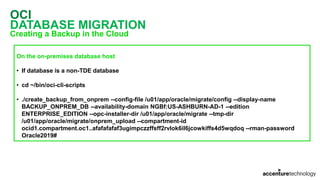
• If database is a non-TDE database
• cd ~/bin/oci-cli-scripts
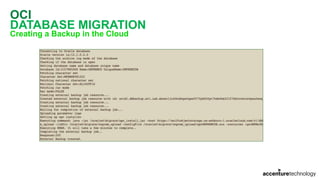
• ./create_backup_from_onprem --config-file /u01/app/oracle/migrate/config --display-name
BACKUP_ONPREM_DB --availability-domain NGBf:US-ASHBURN-AD-1 --edition
ENTERPRISE_EDITION --opc-installer-dir /u01/app/oracle/migrate --tmp-dir
/u01/app/oracle/migrate/onprem_upload --compartment-id
ocid1.compartment.oc1..afafafafaf3ugimpczzffsff2rvlok6il6jcowkiffs4d5wqdoq --rman-password
Oracle2019#
OCI
DATABASE MIGRATION
Creating a Backup in the Cloud
OCI
DATABASE MIGRATION
Creating a Backup in the Cloud
OCI
DATABASE MIGRATION
Creating a Backup in the Cloud
OCI
DATABASE MIGRATION
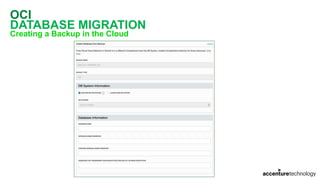
Creating a Backup in the Cloud
OCI
DATABASE MIGRATION
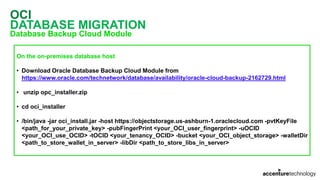
Database Backup Cloud Module
On the on-premises database host
• Download Oracle Database Backup Cloud Module from
https://www.oracle.com/technetwork/database/availability/oracle-cloud-backup-2162729.html
• unzip opc_installer.zip
• cd oci_installer
• /bin/java -jar oci_install.jar -host https://objectstorage.us-ashburn-1.oraclecloud.com -pvtKeyFile
<path_for_your_private_key> -pubFingerPrint <your_OCI_user_fingerprint> -uOCID
<your_OCI_use_OCID> -tOCID <your_tenancy_OCID> -bucket <your_OCI_object_storage> -walletDir
<path_to_store_wallet_in_server> -libDir <path_to_store_libs_in_server>
OCI
DATABASE MIGRATION
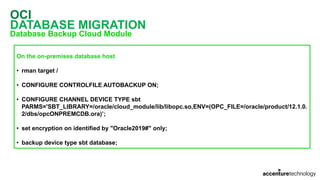
Database Backup Cloud Module
On the on-premises database host
• rman target /
• CONFIGURE CONTROLFILE AUTOBACKUP ON;
• CONFIGURE CHANNEL DEVICE TYPE sbt
PARMS='SBT_LIBRARY=/oracle/cloud_module/lib/libopc.so,ENV=(OPC_FILE=/oracle/product/12.1.0.
2/dbs/opcONPREMCDB.ora)’;
• set encryption on identified by "Oracle2019#" only;
• backup device type sbt database;
OCI
DATABASE MIGRATION
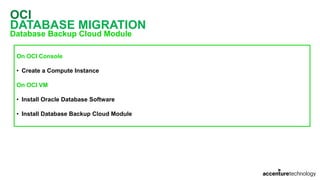
Database Backup Cloud Module
On OCI Console
• Create a Compute Instance
On OCI VM
• Install Oracle Database Software
• Install Database Backup Cloud Module
OCI
DATABASE MIGRATION
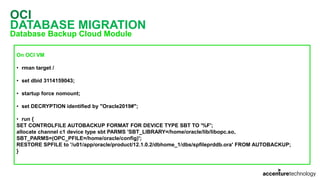
Database Backup Cloud Module
On OCI VM
• rman target /
• set dbid 3114159043;
• startup force nomount;
• set DECRYPTION identified by "Oracle2019#";
• run {
SET CONTROLFILE AUTOBACKUP FORMAT FOR DEVICE TYPE SBT TO '%F';
allocate channel c1 device type sbt PARMS 'SBT_LIBRARY=/home/oracle/lib/libopc.so,
SBT_PARMS=(OPC_PFILE=/home/oracle/config)';
RESTORE SPFILE to '/u01/app/oracle/product/12.1.0.2/dbhome_1/dbs/spfileprddb.ora' FROM AUTOBACKUP;
}
OCI
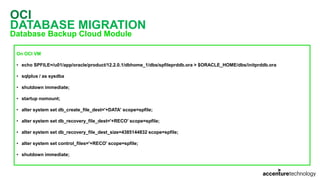
DATABASE MIGRATION
Database Backup Cloud Module
On OCI VM
• echo SPFILE=/u01/app/oracle/product/12.2.0.1/dbhome_1/dbs/spfileprddb.ora > $ORACLE_HOME/dbs/initprddb.ora
• sqlplus / as sysdba
• shutdown immediate;
• startup nomount;
• alter system set db_create_file_dest='+DATA' scope=spfile;
• alter system set db_recovery_file_dest='+RECO' scope=spfile;
• alter system set db_recovery_file_dest_size=4385144832 scope=spfile;
• alter system set control_files='+RECO' scope=spfile;
• shutdown immediate;
OCI
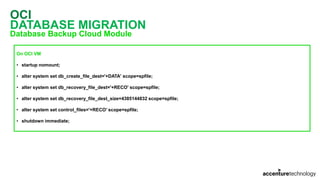
DATABASE MIGRATION
Database Backup Cloud Module
On OCI VM
• startup nomount;
• alter system set db_create_file_dest='+DATA' scope=spfile;
• alter system set db_recovery_file_dest='+RECO' scope=spfile;
• alter system set db_recovery_file_dest_size=4385144832 scope=spfile;
• alter system set control_files='+RECO' scope=spfile;
• shutdown immediate;
OCI
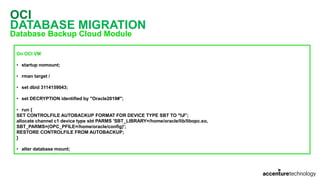
DATABASE MIGRATION
Database Backup Cloud Module
On OCI VM
• startup nomount;
• rman target /
• set dbid 3114159043;
• set DECRYPTION identified by "Oracle2019#";
• run {
SET CONTROLFILE AUTOBACKUP FORMAT FOR DEVICE TYPE SBT TO '%F';
allocate channel c1 device type sbt PARMS 'SBT_LIBRARY=/home/oracle/lib/libopc.so,
SBT_PARMS=(OPC_PFILE=/home/oracle/config)';
RESTORE CONTROLFILE FROM AUTOBACKUP;
}
• alter database mount;
OCI
DATABASE MIGRATION
Database Backup Cloud Module
On OCI VM
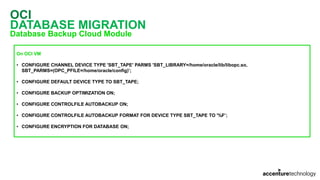
• CONFIGURE CHANNEL DEVICE TYPE 'SBT_TAPE' PARMS 'SBT_LIBRARY=/home/oracle/lib/libopc.so,
SBT_PARMS=(OPC_PFILE=/home/oracle/config)’;
• CONFIGURE DEFAULT DEVICE TYPE TO SBT_TAPE;
• CONFIGURE BACKUP OPTIMIZATION ON;
• CONFIGURE CONTROLFILE AUTOBACKUP ON;
• CONFIGURE CONTROLFILE AUTOBACKUP FORMAT FOR DEVICE TYPE SBT_TAPE TO '%F’;
• CONFIGURE ENCRYPTION FOR DATABASE ON;
OCI
DATABASE MIGRATION
Database Backup Cloud Module
On OCI VM
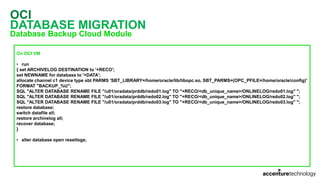
• run
{ set ARCHIVELOG DESTINATION to '+RECO';
set NEWNAME for database to '+DATA';
allocate channel c1 device type sbt PARMS 'SBT_LIBRARY=/home/oracle/lib/libopc.so, SBT_PARMS=(OPC_PFILE=/home/oracle/config)'
FORMAT "BACKUP_%U";
SQL "ALTER DATABASE RENAME FILE ''/u01/oradata/prddb/redo01.log'' TO ''+RECO/<db_unique_name>/ONLINELOG/redo01.log'' ";
SQL "ALTER DATABASE RENAME FILE ''/u01/oradata/prddb/redo02.log'' TO ''+RECO/<db_unique_name>/ONLINELOG/redo02.log'' ";
SQL "ALTER DATABASE RENAME FILE ''/u01/oradata/prddb/redo03.log'' TO ''+RECO/<db_unique_name>/ONLINELOG/redo03.log'' ";
restore database;
switch datafile all;
restore archivelog all;
recover database;
}
• alter database open resetlogs;
OCI
DATABASE MIGRATION
DataGuard
On the on-premises database host
• ALTER DATABASE FORCE LOGGING;
• SHUTDOWN IMMEDIATE;
• STARTUP MOUNT;
• ALTER DATABASE ARCHIVELOG;
• ALTER DATABASE OPEN;
• Create Standby Redo Logs for all threads that you have in database;
• The number of Standby Redo Logs should be the same+1 of Online Redo Logs;
• ALTER DATABASE ADD STANDBY LOGFILE THREAD 1 GROUP xx '/path/to/standby_log_file01.dbf' size xxM[G];
• scp –i private_key_file $ORACLE_HOME/dbs/orapwORCL 
oracle@IP_address_DBaaS_VM:$ORACLE_HOME/dbs/orapwORCL
OCI
DATABASE MIGRATION
DataGuard
On OCI VM
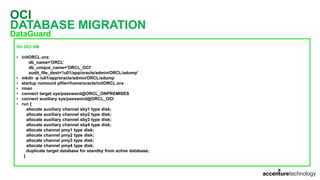
• initORCL.ora:
db_name='ORCL’
db_unique_name='ORCL_OCI’
audit_file_dest='/u01/app/oracle/admin/ORCL/adump'
• mkdir -p /u01/app/oracle/admin/ORCL/adump
• startup nomount pfile=/home/oracle/initORCL.ora
• rman
• connect target sys/password@ORCL_ONPREMISES
• connect auxiliary sys/password@ORCL_OCI
• run {
allocate auxiliary channel sby1 type disk;
allocate auxiliary channel sby2 type disk;
allocate auxiliary channel sby3 type disk;
allocate auxiliary channel sby4 type disk;
allocate channel pmy1 type disk;
allocate channel pmy2 type disk;
allocate channel pmy3 type disk;
allocate channel pmy4 type disk;
duplicate target database for standby from active database;
}
OCI
DATABASE MIGRATION
DataGuard
On Both: on-premises database host and OCI VM
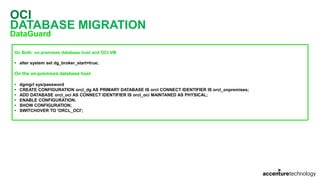
• alter system set dg_broker_start=true;
On the on-premises database host
• dgmgrl sys/password
• CREATE CONFIGURATION orcl_dg AS PRIMARY DATABASE IS orcl CONNECT IDENTIFIER IS orcl_onpremises;
• ADD DATABASE orcl_oci AS CONNECT IDENTIFIER IS orcl_oci MAINTANED AS PHYSICAL;
• ENABLE CONFIGURATION;
• SHOW CONFIGURATION;
• SWITCHOVER TO 'ORCL_OCI';
OCI
DATABASE MIGRATION
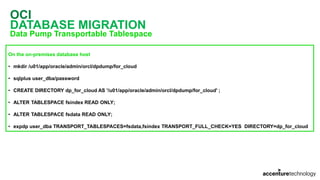
Data Pump Transportable Tablespace
On the on-premises database host
• mkdir /u01/app/oracle/admin/orcl/dpdump/for_cloud
• sqlplus user_dba/password
• CREATE DIRECTORY dp_for_cloud AS '/u01/app/oracle/admin/orcl/dpdump/for_cloud' ;
• ALTER TABLESPACE fsindex READ ONLY;
• ALTER TABLESPACE fsdata READ ONLY;
• expdp user_dba TRANSPORT_TABLESPACES=fsdata,fsindex TRANSPORT_FULL_CHECK=YES DIRECTORY=dp_for_cloud
OCI
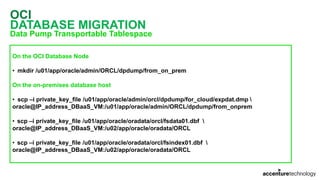
DATABASE MIGRATION
Data Pump Transportable Tablespace
On the OCI Database Node
• mkdir /u01/app/oracle/admin/ORCL/dpdump/from_on_prem
On the on-premises database host
• scp –i private_key_file /u01/app/oracle/admin/orcl/dpdump/for_cloud/expdat.dmp 
oracle@IP_address_DBaaS_VM:/u01/app/oracle/admin/ORCL/dpdump/from_onprem
• scp –i private_key_file /u01/app/oracle/oradata/orcl/fsdata01.dbf 
oracle@IP_address_DBaaS_VM:/u02/app/oracle/oradata/ORCL
• scp –i private_key_file /u01/app/oracle/oradata/orcl/fsindex01.dbf 
oracle@IP_address_DBaaS_VM:/u02/app/oracle/oradata/ORCL
OCI
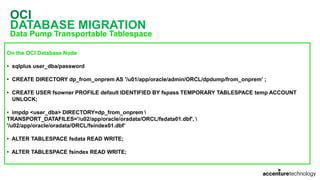
DATABASE MIGRATION
Data Pump Transportable Tablespace
On the OCI Database Node
• sqlplus user_dba/password
• CREATE DIRECTORY dp_from_onprem AS '/u01/app/oracle/admin/ORCL/dpdump/from_onprem' ;
• CREATE USER fsowner PROFILE default IDENTIFIED BY fspass TEMPORARY TABLESPACE temp ACCOUNT
UNLOCK;
• impdp <user_dba> DIRECTORY=dp_from_onprem 
TRANSPORT_DATAFILES='/u02/app/oracle/oradata/ORCL/fsdata01.dbf', 
'/u02/app/oracle/oradata/ORCL/fsindex01.dbf’
• ALTER TABLESPACE fsdata READ WRITE;
• ALTER TABLESPACE fsindex READ WRITE;
OCI
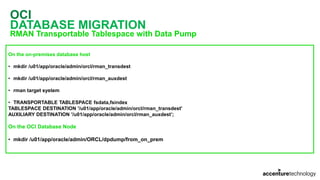
DATABASE MIGRATION
RMAN Transportable Tablespace with Data Pump
On the on-premises database host
• mkdir /u01/app/oracle/admin/orcl/rman_transdest
• mkdir /u01/app/oracle/admin/orcl/rman_auxdest
• rman target system
• TRANSPORTABLE TABLESPACE fsdata,fsindex
TABLESPACE DESTINATION '/u01/app/oracle/admin/orcl/rman_transdest'
AUXILIARY DESTINATION '/u01/app/oracle/admin/orcl/rman_auxdest’;
On the OCI Database Node
• mkdir /u01/app/oracle/admin/ORCL/dpdump/from_on_prem
OCI
DATABASE MIGRATION
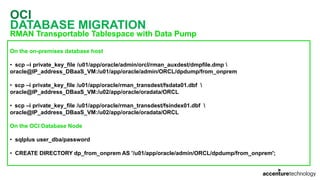
RMAN Transportable Tablespace with Data Pump
On the on-premises database host
• scp –i private_key_file /u01/app/oracle/admin/orcl/rman_auxdest/dmpfile.dmp 
oracle@IP_address_DBaaS_VM:/u01/app/oracle/admin/ORCL/dpdump/from_onprem
• scp –i private_key_file /u01/app/oracle/rman_transdest/fsdata01.dbf 
oracle@IP_address_DBaaS_VM:/u02/app/oracle/oradata/ORCL
• scp –i private_key_file /u01/app/oracle/rman_transdest/fsindex01.dbf 
oracle@IP_address_DBaaS_VM:/u02/app/oracle/oradata/ORCL
On the OCI Database Node
• sqlplus user_dba/password
• CREATE DIRECTORY dp_from_onprem AS '/u01/app/oracle/admin/ORCL/dpdump/from_onprem';
OCI
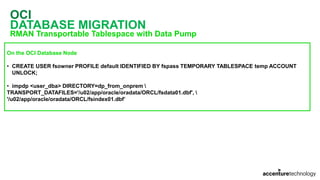
DATABASE MIGRATION
RMAN Transportable Tablespace with Data Pump
On the OCI Database Node
• CREATE USER fsowner PROFILE default IDENTIFIED BY fspass TEMPORARY TABLESPACE temp ACCOUNT
UNLOCK;
• impdp <user_dba> DIRECTORY=dp_from_onprem 
TRANSPORT_DATAFILES='/u02/app/oracle/oradata/ORCL/fsdata01.dbf', 
'/u02/app/oracle/oradata/ORCL/fsindex01.dbf’
OCI
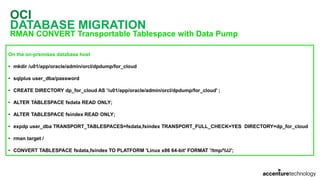
DATABASE MIGRATION
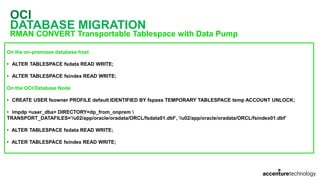
RMAN CONVERT Transportable Tablespace with Data Pump
On the on-premises database host
• mkdir /u01/app/oracle/admin/orcl/dpdump/for_cloud
• sqlplus user_dba/password
• CREATE DIRECTORY dp_for_cloud AS '/u01/app/oracle/admin/orcl/dpdump/for_cloud' ;
• ALTER TABLESPACE fsdata READ ONLY;
• ALTER TABLESPACE fsindex READ ONLY;
• expdp user_dba TRANSPORT_TABLESPACES=fsdata,fsindex TRANSPORT_FULL_CHECK=YES DIRECTORY=dp_for_cloud
• rman target /
• CONVERT TABLESPACE fsdata,fsindex TO PLATFORM 'Linux x86 64-bit' FORMAT '/tmp/%U';
OCI
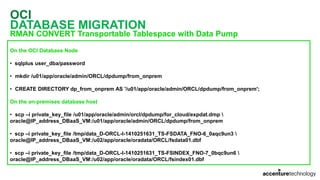
DATABASE MIGRATION
RMAN CONVERT Transportable Tablespace with Data Pump
On the OCI Database Node
• sqlplus user_dba/password
• mkdir /u01/app/oracle/admin/ORCL/dpdump/from_onprem
• CREATE DIRECTORY dp_from_onprem AS '/u01/app/oracle/admin/ORCL/dpdump/from_onprem';
On the on-premises database host
• scp –i private_key_file /u01/app/oracle/admin/orcl/dpdump/for_cloud/expdat.dmp 
oracle@IP_address_DBaaS_VM:/u01/app/oracle/admin/ORCL/dpdump/from_onprem
• scp –i private_key_file /tmp/data_D-ORCL-I-1410251631_TS-FSDATA_FNO-6_0aqc9un3 
oracle@IP_address_DBaaS_VM:/u02/app/oracle/oradata/ORCL/fsdata01.dbf
• scp –i private_key_file /tmp/data_D-ORCL-I-1410251631_TS-FSINDEX_FNO-7_0bqc9un6 
oracle@IP_address_DBaaS_VM:/u02/app/oracle/oradata/ORCL/fsindex01.dbf
OCI
DATABASE MIGRATION
RMAN CONVERT Transportable Tablespace with Data Pump
On the on-premises database host
• ALTER TABLESPACE fsdata READ WRITE;
• ALTER TABLESPACE fsindex READ WRITE;
On the OCI Database Node
• CREATE USER fsowner PROFILE default IDENTIFIED BY fspass TEMPORARY TABLESPACE temp ACCOUNT UNLOCK;
• impdp <user_dba> DIRECTORY=dp_from_onprem 
TRANSPORT_DATAFILES='/u02/app/oracle/oradata/ORCL/fsdata01.dbf’, '/u02/app/oracle/oradata/ORCL/fsindex01.dbf’
• ALTER TABLESPACE fsdata READ WRITE;
• ALTER TABLESPACE fsindex READ WRITE;
OCI
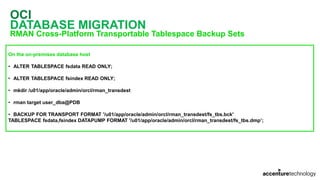
DATABASE MIGRATION
RMAN Cross-Platform Transportable Tablespace Backup Sets
On the on-premises database host
• ALTER TABLESPACE fsdata READ ONLY;
• ALTER TABLESPACE fsindex READ ONLY;
• mkdir /u01/app/oracle/admin/orcl/rman_transdest
• rman target user_dba@PDB
• BACKUP FOR TRANSPORT FORMAT '/u01/app/oracle/admin/orcl/rman_transdest/fs_tbs.bck'
TABLESPACE fsdata,fsindex DATAPUMP FORMAT '/u01/app/oracle/admin/orcl/rman_transdest/fs_tbs.dmp’;
OCI
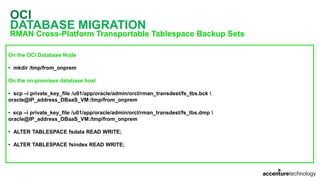
DATABASE MIGRATION
RMAN Cross-Platform Transportable Tablespace Backup Sets
On the OCI Database Node
• mkdir /tmp/from_onprem
On the on-premises database host
• scp –i private_key_file /u01/app/oracle/admin/orcl/rman_transdest/fs_tbs.bck 
oracle@IP_address_DBaaS_VM:/tmp/from_onprem
• scp –i private_key_file /u01/app/oracle/admin/orcl/rman_transdest/fs_tbs.dmp 
oracle@IP_address_DBaaS_VM:/tmp/from_onprem
• ALTER TABLESPACE fsdata READ WRITE;
• ALTER TABLESPACE fsindex READ WRITE;
OCI
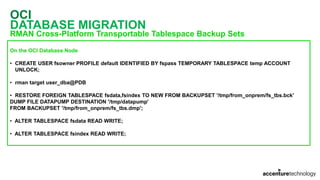
DATABASE MIGRATION
RMAN Cross-Platform Transportable Tablespace Backup Sets
On the OCI Database Node
• CREATE USER fsowner PROFILE default IDENTIFIED BY fspass TEMPORARY TABLESPACE temp ACCOUNT
UNLOCK;
• rman target user_dba@PDB
• RESTORE FOREIGN TABLESPACE fsdata,fsindex TO NEW FROM BACKUPSET '/tmp/from_onprem/fs_tbs.bck'
DUMP FILE DATAPUMP DESTINATION '/tmp/datapump'
FROM BACKUPSET '/tmp/from_onprem/fs_tbs.dmp';
• ALTER TABLESPACE fsdata READ WRITE;
• ALTER TABLESPACE fsindex READ WRITE;
OCI
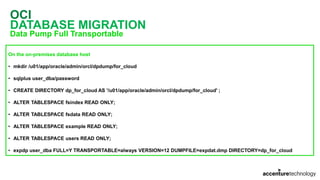
DATABASE MIGRATION
Data Pump Full Transportable
On the on-premises database host
• mkdir /u01/app/oracle/admin/orcl/dpdump/for_cloud
• sqlplus user_dba/password
• CREATE DIRECTORY dp_for_cloud AS '/u01/app/oracle/admin/orcl/dpdump/for_cloud' ;
• ALTER TABLESPACE fsindex READ ONLY;
• ALTER TABLESPACE fsdata READ ONLY;
• ALTER TABLESPACE example READ ONLY;
• ALTER TABLESPACE users READ ONLY;
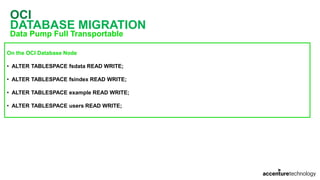
• expdp user_dba FULL=Y TRANSPORTABLE=always VERSION=12 DUMPFILE=expdat.dmp DIRECTORY=dp_for_cloud
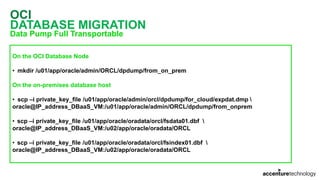
OCI
DATABASE MIGRATION
Data Pump Full Transportable
On the OCI Database Node
• mkdir /u01/app/oracle/admin/ORCL/dpdump/from_on_prem
On the on-premises database host
• scp –i private_key_file /u01/app/oracle/admin/orcl/dpdump/for_cloud/expdat.dmp 
oracle@IP_address_DBaaS_VM:/u01/app/oracle/admin/ORCL/dpdump/from_onprem
• scp –i private_key_file /u01/app/oracle/oradata/orcl/fsdata01.dbf 
oracle@IP_address_DBaaS_VM:/u02/app/oracle/oradata/ORCL
• scp –i private_key_file /u01/app/oracle/oradata/orcl/fsindex01.dbf 
oracle@IP_address_DBaaS_VM:/u02/app/oracle/oradata/ORCL
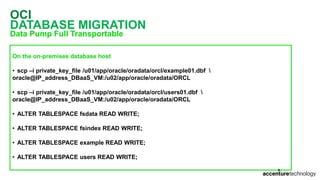
OCI
DATABASE MIGRATION
Data Pump Full Transportable
On the on-premises database host
• scp –i private_key_file /u01/app/oracle/oradata/orcl/example01.dbf 
oracle@IP_address_DBaaS_VM:/u02/app/oracle/oradata/ORCL
• scp –i private_key_file /u01/app/oracle/oradata/orcl/users01.dbf 
oracle@IP_address_DBaaS_VM:/u02/app/oracle/oradata/ORCL
• ALTER TABLESPACE fsdata READ WRITE;
• ALTER TABLESPACE fsindex READ WRITE;
• ALTER TABLESPACE example READ WRITE;
• ALTER TABLESPACE users READ WRITE;
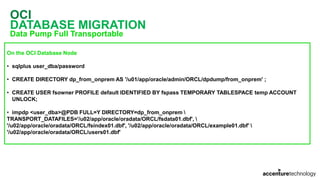
OCI
DATABASE MIGRATION
Data Pump Full Transportable
On the OCI Database Node
• sqlplus user_dba/password
• CREATE DIRECTORY dp_from_onprem AS '/u01/app/oracle/admin/ORCL/dpdump/from_onprem' ;
• CREATE USER fsowner PROFILE default IDENTIFIED BY fspass TEMPORARY TABLESPACE temp ACCOUNT
UNLOCK;
• impdp <user_dba>@PDB FULL=Y DIRECTORY=dp_from_onprem 
TRANSPORT_DATAFILES='/u02/app/oracle/oradata/ORCL/fsdata01.dbf', 
'/u02/app/oracle/oradata/ORCL/fsindex01.dbf', '/u02/app/oracle/oradata/ORCL/example01.dbf' 
'/u02/app/oracle/oradata/ORCL/users01.dbf'
OCI
DATABASE MIGRATION
Data Pump Full Transportable
On the OCI Database Node
• ALTER TABLESPACE fsdata READ WRITE;
• ALTER TABLESPACE fsindex READ WRITE;
• ALTER TABLESPACE example READ WRITE;
• ALTER TABLESPACE users READ WRITE;
OCI
DATABASE MIGRATION
Unplugging/Plugging
On the on-premises database host
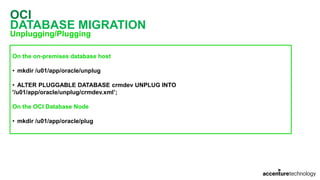
• mkdir /u01/app/oracle/unplug
• ALTER PLUGGABLE DATABASE crmdev UNPLUG INTO
'/u01/app/oracle/unplug/crmdev.xml’;
On the OCI Database Node
• mkdir /u01/app/oracle/plug
OCI
DATABASE MIGRATION
Unplugging/Plugging
On the on-premises database host
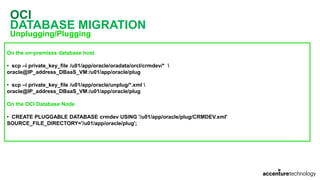
• scp –i private_key_file /u01/app/oracle/oradata/orcl/crmdev/* 
oracle@IP_address_DBaaS_VM:/u01/app/oracle/plug
• scp –i private_key_file /u01/app/oracle/unplug/*.xml 
oracle@IP_address_DBaaS_VM:/u01/app/oracle/plug
On the OCI Database Node
• CREATE PLUGGABLE DATABASE crmdev USING '/u01/app/oracle/plug/CRMDEV.xml'
SOURCE_FILE_DIRECTORY='/u01/app/oracle/plug';
OCI
DATABASE MIGRATION
Remote Cloning
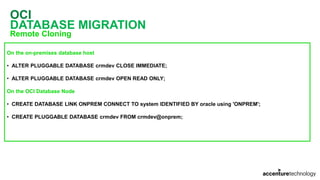
On the on-premises database host
• ALTER PLUGGABLE DATABASE crmdev CLOSE IMMEDIATE;
• ALTER PLUGGABLE DATABASE crmdev OPEN READ ONLY;
On the OCI Database Node
• CREATE DATABASE LINK ONPREM CONNECT TO system IDENTIFIED BY oracle using 'ONPREM';
• CREATE PLUGGABLE DATABASE crmdev FROM crmdev@onprem;
OCI
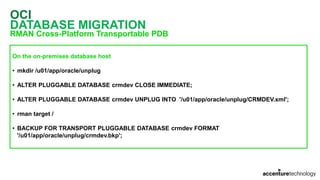
DATABASE MIGRATION
RMAN Cross-Platform Transportable PDB
On the on-premises database host
• mkdir /u01/app/oracle/unplug
• ALTER PLUGGABLE DATABASE crmdev CLOSE IMMEDIATE;
• ALTER PLUGGABLE DATABASE crmdev UNPLUG INTO '/u01/app/oracle/unplug/CRMDEV.xml';
• rman target /
• BACKUP FOR TRANSPORT PLUGGABLE DATABASE crmdev FORMAT
'/u01/app/oracle/unplug/crmdev.bkp';
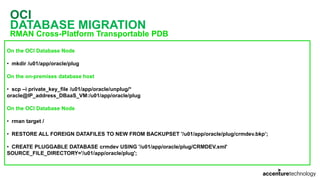
OCI
DATABASE MIGRATION
RMAN Cross-Platform Transportable PDB
On the OCI Database Node
• mkdir /u01/app/oracle/plug
On the on-premises database host
• scp –i private_key_file /u01/app/oracle/unplug/*
oracle@IP_address_DBaaS_VM:/u01/app/oracle/plug
On the OCI Database Node
• rman target /
• RESTORE ALL FOREIGN DATAFILES TO NEW FROM BACKUPSET '/u01/app/oracle/plug/crmdev.bkp’;
• CREATE PLUGGABLE DATABASE crmdev USING '/u01/app/oracle/plug/CRMDEV.xml'
SOURCE_FILE_DIRECTORY='/u01/app/oracle/plug';
OCI
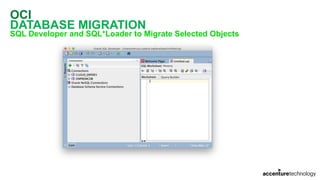
DATABASE MIGRATION
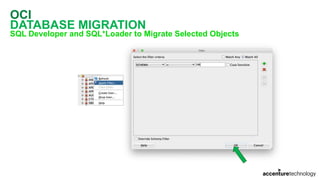
SQL Developer and SQL*Loader to Migrate Selected Objects
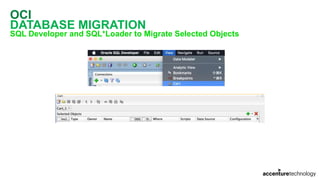
OCI
DATABASE MIGRATION
SQL Developer and SQL*Loader to Migrate Selected Objects
OCI
DATABASE MIGRATION
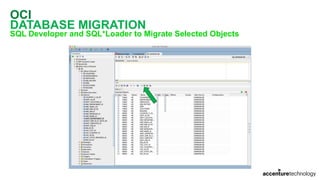
SQL Developer and SQL*Loader to Migrate Selected Objects
OCI
DATABASE MIGRATION
SQL Developer and SQL*Loader to Migrate Selected Objects
OCI
DATABASE MIGRATION
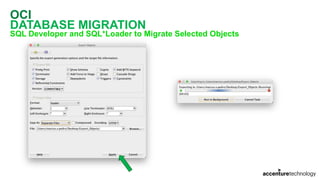
SQL Developer and SQL*Loader to Migrate Selected Objects
OCI
DATABASE MIGRATION
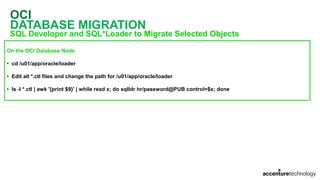
SQL Developer and SQL*Loader to Migrate Selected Objects
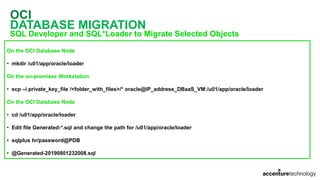
On the OCI Database Node
• mkdir /u01/app/oracle/loader
On the on-premises Workstation
• scp –i private_key_file /<folder_with_files>/* oracle@IP_address_DBaaS_VM:/u01/app/oracle/loader
On the OCI Database Node
• cd /u01/app/oracle/loader
• Edit file Generated-*.sql and change the path for /u01/app/oracle/loader
• sqlplus hr/password@PDB
• @Generated-20190801232008.sql
OCI
DATABASE MIGRATION
SQL Developer and SQL*Loader to Migrate Selected Objects
On the OCI Database Node
• cd /u01/app/oracle/loader
• Edit all *.ctl files and change the path for /u01/app/oracle/loader
• ls -l *.ctl | awk '{print $9}' | while read x; do sqlldr hr/password@PUB control=$x; done
OCI
DATABASE MIGRATION
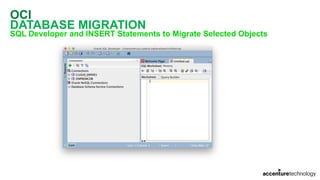
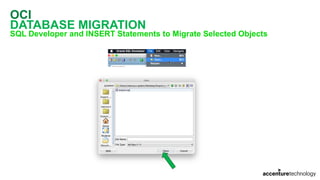
SQL Developer and INSERT Statements to Migrate Selected Objects
OCI
DATABASE MIGRATION
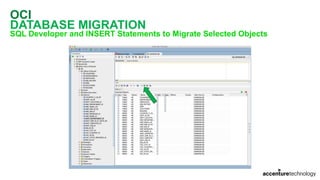
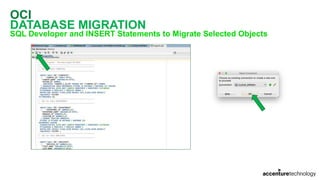
SQL Developer and INSERT Statements to Migrate Selected Objects
OCI
DATABASE MIGRATION
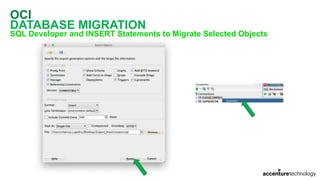
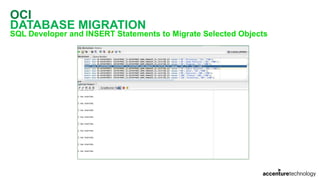
SQL Developer and INSERT Statements to Migrate Selected Objects
OCI
DATABASE MIGRATION
SQL Developer and INSERT Statements to Migrate Selected Objects
OCI
DATABASE MIGRATION
SQL Developer and INSERT Statements to Migrate Selected Objects
OCI
DATABASE MIGRATION
SQL Developer and INSERT Statements to Migrate Selected Objects
QUESTIONS?
REACH ME OUT
blog@viniciusdba.com.br
twitter.com/viniciusdba
facebook.com/viniciusdba
linkedin.com/in/viniciusdba
Thanks!

2019 - GUOB Tech Day / Groundbreakers LAD Tour - Database Migration Methods to Cloud

  • 1.
  • 2.
    MARCUS VINICIUS MIGUELPEDRO • Blog: www.viniciusdba.com.br; • 22 years working in IT Industry; • 15+ years working with Oracle Database; • GUOB Board Member (Brazilian Oracle User Group); • Speaker in Oracle-related events: GUOB, IFSP, FATEC, OOW Latin America; • Technical Reviewer for Oracle Press Book: Oracle Database 12c Oracle RMAN Backup and Recovery • Working as Sr. Database Consultant in Accenture Enkitec Group; • Certifications: - Oracle Database 9i Administrator Certified Associate (OCA); - Oracle Database 9i Administrator Certified Professional (OCP); - Oracle Database 10g Administrator Certified Professional (OCP); - Oracle Database 10g: RAC Administrator Certified Expert (OCE RAC 10g); - Oracle Database 11g Administrator Certified Professional (OCP); - Oracle Database 11g Certified Implementation Specialist (OCS); - Oracle Database 11g Grid & RAC Certified Expert (OCE RAC 11g); - Oracle Database 11g Tuning Certified Expert (OCE Tuning 11g); - Oracle Database 12c Certified Professional (OCP); - Oracle Database Cloud Service Operations Certified Associate; • Awards: - Oracle ACE Alumni - Oracle Database Cloud Administrator Certified Professional; - Oracle Database 12c Tuning Certified Expert (OCE Tuning 12c); - Oracle Database 12c: RAC and Grid Infrastructure Certified Expert (OCE RAC 12c); - Oracle Database 12c: Data Guard Administrator Certified Expert (OCE DataGuard 12c); - Oracle Database 12c: Maximum Availability Certified Expert (OCE MAA 12c); - Oracle Exadata X5 Administrator Certified Expert; - Oracle Cloud Infrastructure 2018 Certified Associate; - Oracle Exadata Machine and Cloud Service 2017 Certified Implementation Specialist; - Oracle Cloud Platform Data Management 2018 Certified Associate.
  • 3.
    ACCENTURE ENKITEC GROUP CAPABILITIESOVERVIEW 4 • Global systems integrator focused on the Oracle platform • Consultants average 15+ years of Oracle experience • Worldwide specialist in Engineered Systems implementations • 14 Oracle ACE members, specialist recognized by Oracle for their technical expertise Elite Expertise Oracle Specializations* • Oracle Exadata • Oracle Exalogic • Oracle Database • Oracle GoldenGate • Oracle Data Integrator • Oracle Database • Oracle Data Warehouse • Oracle Real Application Cluster • Oracle Performance Tuning • Oracle Database Security Thought Leadership Success Our consultants have been published in multiple subject areas and additional online resources that demonstrate Accenture’s experience and expertise with the OES platform Oracle Engineered Systems Numbers • 1000+ Oracle Engineered Systems which AEG have configured, patched or supported. • 140+ AEG resources which have an average 15+ years of Oracle experience • AEG Support across 9 countries • 200 Oracle Engineered Systems (Exadata/Exalogic etc) currently under management directly by AEG • 200+ customers in either the AEG Managed Services program or remoteDBA program • 50,000 Accenture Oracle IDC resources that can be leveraged for Level 1 & Level 2 support
  • 4.
    AGENDA OCI Milestones OCI KeyConcepts OCI Configuration Database On OCI Concepts Will DBA Jobs Be Dead? OCI Database Configuration Considerations to Migrate Your Database Methods to Migrate Your Database to Cloud QA
  • 5.
  • 6.
    OCI - MAINMILESTONES Oracle Cloud Infrastructure – OCI • Launched as Oracle Bare Metal Cloud • Announced at Oracle OpenWorld 2016 • Changed to OCI in January 2017 • Evolved to 2nd Generation and announced at Oracle OpenWorld 2018.
  • 7.
  • 8.
    OCI COMPARTMENTS • Compartment isa collection of related resources (instances, VCNs, block volumes, etc) • Can be accessed by groups that have have been given permission by an administrator • When you sign up for OCI, Oracle creates your tenancy, which is the root compartment • You can create compartments to organize and isolate your cloud resources: • DEV_COMPARTMENT; • QA_COMPARTMENT; • PROD_COMPARTMENT.
  • 9.
    OCI KEY CONCEPTS • Regionis a localized geographic area (Disaster Recover) • Availability Domain is one or more data center located within a region isolated from each other (High Availability) • Virtual Cloud Network (VCN) is a virtual version of a traditional network, with subnets, route tables and gateways • Instance is a compute host • Shape specifies the number of CPUs and amount of memory • Block Volume is a virtual disk • Object Storage is a storage architecture to store and manage data as objects • Oracle Cloud Identifier (OCID) is an Oracle-assigned unique ID for each resource in OCI
  • 10.
  • 11.
  • 12.
  • 13.
  • 14.
  • 15.
  • 16.
  • 17.
  • 18.
  • 19.
  • 20.
  • 21.
    OCI CREATE AN ACCOUNT R$ 1,00 – Approval  R$ 1,00 – Canceled
  • 22.
  • 23.
  • 24.
  • 25.
    OCI CREATE AN ACCOUNT US$ 300,00 1 month or less depending of resources provisioned
  • 26.
  • 27.
  • 28.
  • 29.
  • 30.
  • 31.
  • 32.
  • 33.
  • 34.
    OCI NETWORKING Specify a Nameand choose the COMPARTMENT created for DEV Choose the 2nd option: all the related resources will be created
  • 35.
  • 36.
  • 37.
  • 38.
  • 39.
    WILL DBA JOBSBE DEAD?
  • 40.
    WILL DBA JOBSBE DEAD? Some Automatic Features • Undo Automatic Management • Cost-Based Optimizer • Automatic Storage Management • AWR • ADDM • SQL Tuning Advisor • Access Advisor • Memory Advisor • SGA Advisor • Buffer Cache Advisor • PGA Advisor • Undo Advisor • Exadata: • Engineering System = Hardware and Software, Engineered to Work Together • AutoUpgrade Tool • Automatic Indexing • Automatic Resolution of SQL Plan Regressions
  • 41.
    WILL DBA JOBSBE DEAD? In my humble opinion No!
  • 42.
    WILL DBA JOBSBE DEAD?
  • 43.
    WILL DBA JOBSBE DEAD? BACK TO 2003 https://www.oracle.com/technetwork/articles/sql/twp-manage-self-managing-database-128245.pdf
  • 44.
    WILL DBA JOBSBE DEAD? BACK TO THE FUTURE: 2018 AUTONOMOUS DATABASE
  • 45.
    WILL DBA JOBSBE DEAD? BACK TO THE FUTURE: 2018 AUTONOMOUS DATABASE What is Autonomous Database? • It’s a Database Cloud Service: • Database 18c + Cloud + Machine Learning
  • 46.
    WILL IT DBALOSE YOUR JOB?
  • 47.
  • 48.
    DATABASE OFFERS INOCI • Bare Metal DB Systems • Virtual Machine DB Systems • Exadata DB Systems • Autonomous Data Warehouse • Autonomous Transaction Processing
  • 49.
    DATABASE LICENSING MODELS TwoTypes of Licensing • License Included • Bring Your Own License (BYOL) Prices may vary according with your contract with Oracle • Pricing and Features: https://cloud.oracle.com/database/pricing
  • 50.
    DATABASE EDITIONS Editions Supported •Standard Edition • Enterprise Edition • Enterprise Edition – High Performance • Enterprise Edition – Extreme Performance
  • 51.
    DATABASE EDITIONS STANDARD EDITION Features •All features included in Oracle Database Standard Edition 2 • Full Oracle Database Instance • Up to 24 CPUs • Transparent Data Encryption
  • 52.
    DATABASE EDITIONS ENTERPRISE EDITION Features •Includes Oracle Database Enterprise Edition plus: • Data Masking and Subsetting Pack • Diagnostics and Tuning Packs • Real Application Testing • Transparent Data Encryption
  • 53.
    DATABASE EDITIONS ENTERPRISE EDITION– HIGH PERFORMANCE Features • Includes all the features from Enterprise Edition plus: • Multitenant • Partitioning • Advanced Compression • Advanced Security • Label Security • Database Vault • OLAP • Advanced Analytics • Database Lifecycle Management Pack • Cloud Management Pack for Oracle Database • Transparent Data Encryption
  • 54.
    DATABASE EDITIONS ENTERPRISE EDITION– EXTREME PERFORMANCE Features • Includes all the features from Enterprise Edition – High Performance plus • In-Memory Database • Active DataGuard • RAC (only for Virtual Machine DB Systems or Exadata Cloud Service) • Transparent Data Encryption
  • 55.
    DATABASE VERSIONS Versions Supported •Oracle Database 11g Release 2 (11.2) • Oracle Database 12c Release 1 (12.1) • Oracle Database 12c Release 2 (12.2) • Oracle Database 18c (18.0) • Oracle Database 19c (19.0) – Only for VM DB Systems and Exadata – Aug/2019
  • 56.
    VIRTUAL MACHINE DBSYSTEMS OVERVIEW Full database instance of Oracle Choose from Standard Edition or Enterprise Editions Highly available, network-attached storage volumes Database Versions 11.2, 12.1, 12.2, 18c and 19c Customer manages the OS and Database, Oracle handles the infrastructure For Databases up to 40 TB in size Supports Real Application Clusters and Data Guard
  • 57.
    VIRTUAL MACHINE DBSYSTEMS SPECIFICATIONS Virtual Machine Specs Virtual Machine Database CPU, Memory and Storage CPU: 1 – 24 Memory: 15-320 GB Storage: 0.25 TB – 40 TB Storage Type Block Scaling Storage Scaling Backups Automatic (Incremental) as well as On Demand (Full) Disaster Recovery Data Guard High Availability 2 Node RAC Patching User Controlled Versions 11.2,12.1, 12.2, 18c, 19c Editions Standard, Enterprise, High Performance, Extreme Performance Editions Licensing BYOL or License Included
  • 58.
    VIRTUAL MACHINE DBSYSTEMS KEY USE CASES Enterprise Applications (Oracle and 3rd Party) Disaster Recovery Application Development
  • 59.
    BARE METAL DBSYSTEMS OVERVIEW Databases run on real bare-metal servers (not VMs) Choose from Standard Edition or Enterprise Editions High Performance Flash Storage is locally attached for best performance Database Versions 11.2, 12.1, 12.2 and 18c Customer manages the OS and Database, Oracle handles the infrastructure For Databases up to 16 TB in size Supports Data Guard for Disaster Recovery
  • 60.
    BARE METAL DBSYSTEMS SPECIFICATIONS X7 Bare Metal Specs Bare Metal Database CPU, Memory and Storage CPU: 2 – 52 Memory: 768 GB Storage: 51.2 TB Storage Type Locally attached NVMe Scaling CPU Scaling Backups Automatic (Incremental) as well as On Demand (Full) Disaster Recovery Data Guard High Availability Cross AD Data Guard Patching User Controlled Versions 11.2,12.1, 12.2, 18c Editions Standard, Enterprise, High Performance, Extreme Performance Editions Licensing BYOL or License Included
  • 61.
    BARE METAL DBSYSTEMS KEY USE CASES Enterprise Applications (Oracle and 3rd Party) Disaster Recovery Application Development
  • 62.
    EXADATA CLOUD SERVICE OVERVIEW Completeisolation with Dedicated Hardware and Networking Multiple Full Oracle Databases with All Advanced Options and different version Terabytes of Flash and Storage for unparalleled performance Database Versions 11.2, 12.1, 12.2, 18c and 19c Customer manages the OS and Database, Oracle handles the infrastructure For Databases up to 340 TB in size Supports Real Application Clusters and Data Guard
  • 63.
    EXADATA CLOUD SERVICE SPECIFICATIONS X7Exadata Specs Base Quarter Half Full CPU and Memory CPU: 0 – 48 Memory: 720 GB CPU: 0 – 92 Memory: 1440 GB CPU: 0 – 184 Memory: 2880 GB CPU: 0 – 368 Memory: 5760 GB Compute/Storage Nodes 2/3 2/3 4/6 8/12 Storage Type Exadata Flash Storage 38.4 TB 76.8 TB 153.6 TB 307.2 TB Max DB Size 59.8 TB 85.5 TB 171.1 TB 342.1 TB Scaling CPU Scaling High Availability RAC Backups Automatic (Incremental) as well as On Demand (Full) Disaster Recovery Data Guard Patching User Controlled Versions 11.2,12.1, 12.2, 18c Extreme Performance Editions Licensing BYOL or License Included
  • 64.
    EXADATA CLOUD SERVICE KEYUSE CASES Mission Critical Production Databases Disaster Recovery Application Development Consolidation Analytics
  • 65.
  • 66.
    EXADATA CLOUD SERVICE SAMEARCHICTECTURE AS ON-PREMISES
  • 67.
    DATABASE CLOUD SERVICE OVERVIEW VirtualMachine Bare Metal Exadata CPU and Memory CPU: 1 – 24 (48 with RAC) Memory: 15-320 GB CPU: 2 – 52 Memory: 768 GB CPU: 0 – 368 Memory: 720-5760 GB Storage Type Block Locally attached NVMe Exadata Max DB Size 40 TB 16 TB 342.1 TB Scaling Storage Scaling CPU Scaling CPU Scaling High Availability 2 node RAC Up to 8 node RAC Backups Automatic (Incremental) as well as On Demand (Full) Disaster Recovery Data Guard Patching User Controlled Versions 11.2,12.1, 12.2, 18c, 19c 11.2,12.1, 12.2, 18c 11.2,12.1, 12.2, 18c, 19c Database Editions Standard, Enterprise, High Performance, Extreme Performance Editions Extreme Performance Edition Number of DB Instances One Multiple Multiple Licensing BYOL or License Included
  • 68.
    OCI NETWORKING SETUP FORDB SYSTEMS Two Options • Public Subnet can be useful for proof-of-concept or development work. Use if you have services that run only on a public network and need to access database. • Private Subnet recommended for a production system. Cannot be reached from the Internet.
  • 69.
    OCI DATABASE ON CLOUD OneMillion Question • Should I move my database(s) to Cloud?
  • 70.
    OCI DATABASE ON CLOUD •It Depends! • Are you planning to move your application ecosystem to cloud?
  • 71.
    OCI DATABASE ON CLOUD BigChallenge when moving databases to Cloud • Traffic between Database tier and Application tier • Moving your application ecosystem along with database you can benefit from Cloud features/advantages • If some piece/part of your application remains in On-Premises DataCenter, even with FastConnect you can expect some increased response time.
  • 72.
  • 73.
    OCI DATABASE SIZING Most CommonQuestion • Should I provision resources using the same sizing as I have in On-Premises?
  • 74.
  • 75.
    OCI DATABASE SIZING Some Questions •Actually, do you have waits for CPU? • If yes, how long are the waits? Those waits impact business? • If yes, maybe your CPU is under pressure • If no, probably you have spikes Let’s assume as example that you have spikes in CPU usage
  • 76.
    OCI DATABASE SIZING How muchpain are you willing to tolerate?
  • 77.
  • 78.
  • 79.
    OCI DATABASE SIZING How measureCPU usage? • If you have Diagnostics Pack: DBA_HIST_ACTIVE_SESS_HISTORY (ASH) • If you don’t, STATSPACK or any external OS monitoring tool
  • 80.
    OCI DATABASE SIZING DBA_HIST_ACTIVE_SESS_HISTORY • Queryfor how many sessions are waiting for CPU (WHERE session_state = 'ON CPU' ) Main Issue • ASH is sampled only when there is activity • Some periods of time without activity do not generate ASH samples How to avoid issues when using ASH to sizing CPU usage? • ASH Standardization! • Jorge Barba from Acenture Enkitec Group: https://jorgebarbablog.wordpress.com/2016/12/21/how-to-standardize-ash-data-for-sizing/
  • 81.
  • 82.
    OCI DATABASE SIZING With ASHdata standardized, should I use MAX values? • Only if you cannot tolerate any pain! Can I use AVERAGE? • No! You can have some spike periods much biggest than AVERAGE.
  • 83.
    OCI DATABASE SIZING What Ican do to find out the “Magic Number”? • You can use percentiles. Percentiles in One Hour • 97th percentile: longest wait is 1.8 min in 60 mins • 95th percentile: longest wait is 3 min in 60 mins • 90th percentile: longest wait is 6 min in 60 mins • 80th percentile: longest wait is 12 min in 60 mins https://jorgebarbablog.wordpress.com/2016/12/27/sizing-post-3-understanding-percentiles/
  • 84.
    OCI DATABASE SIZING How isthe appropriate percentile for my database workload? How much pain are you willing to tolerate?
  • 85.
    OCI DATABASE SIZING Memory • Shouldbe the same. Check the Shapes available to fit your need IOPS • AWR: • physical read total IO requests • physical write total IO requests I/O Throughput • AWR: • physical read bytes • physical write bytes
  • 86.
    CREATING A DBSYSTEM IN OCI
  • 87.
  • 88.
  • 89.
  • 90.
  • 91.
    OCI CREATE DB SYSTEM– SHAPES FOR VM
  • 92.
  • 93.
  • 94.
    OCI CREATE DB SYSTEM Ifyou want to use a specific version Password policy
  • 95.
  • 96.
  • 97.
    OCI CREATE DB SYSTEM 90minutes later…
  • 98.
  • 99.
    OCI DATABASE CONSOLE OPERATIONS MainConsole Operations • Scale Storage Up • Add SSH Keys • Move Resource • Patching • Enable DataGuard • Backup • Restore
  • 100.
  • 101.
  • 102.
  • 103.
  • 104.
  • 105.
  • 106.
    OCI PATCHING – GRIDINFRASTRUCTURE
  • 107.
    OCI PATCHING – GRIDINFRASTRUCTURE
  • 108.
    OCI PATCHING – GRIDINFRASTRUCTURE
  • 109.
    OCI PATCHING – GRIDINFRASTRUCTURE
  • 110.
    OCI PATCHING – GRIDINFRASTRUCTURE 6 minutes later…
  • 111.
    OCI PATCHING – GRIDINFRASTRUCTURE
  • 112.
    OCI PATCHING – GRIDINFRASTRUCTURE
  • 113.
    OCI PATCHING – GRIDINFRASTRUCTURE
  • 114.
    OCI PATCHING – GRIDINFRASTRUCTURE 26 minutes later…
  • 115.
    OCI PATCHING – GRIDINFRASTRUCTURE
  • 116.
    OCI PATCHING – GRIDINFRASTRUCTURE
  • 117.
  • 118.
  • 119.
  • 120.
  • 121.
  • 122.
  • 123.
  • 124.
  • 125.
  • 126.
  • 127.
  • 128.
  • 129.
  • 130.
  • 131.
  • 132.
  • 133.
    OCI BACKUP - DATABASE 5minutes later…
  • 134.
  • 135.
    OCI BACKUP – RESTOREOR CREATE DATABASE
  • 136.
  • 137.
  • 138.
    OCI BACKUP – CREATEDB SYSTEM FROM BACKUP
  • 139.
    OCI BACKUP – CREATEDB SYSTEM FROM BACKUP Only for Bare Metal
  • 140.
  • 141.
  • 142.
  • 143.
  • 144.
  • 145.
  • 146.
  • 147.
  • 148.
  • 149.
    OCI EDIT VCN SECURITYLIST Do not create this Ingress Rule unless you are sure about the risks! It’s open to Internet!
  • 150.
  • 151.
  • 152.
  • 153.
  • 154.
  • 155.
  • 156.
  • 157.
  • 158.
  • 159.
  • 160.
  • 161.
    OCI ENABLE DATAGUARD You needto type the name of DB System to confirm Termination
  • 162.
  • 163.
  • 164.
  • 165.
  • 166.
  • 167.
  • 168.
  • 169.
  • 170.
  • 171.
    OCI DATABASE CONNECTION Service forCDB$ROOT Service for PDB ERPDEV
  • 172.
  • 173.
    OCI DATABASE CONNECTION Connected onCDB$ROOT Connected on PDB ERPDEV
  • 174.
  • 175.
  • 176.
    OCI CHOOSING A METHOD DATABASEMIGRATION METHODS https://docs.cloud.oracle.com/iaas/Content/Database/Tasks/migrating.htm#ChoosingaMigrationMethod
  • 177.
    OCI CHOOSING A METHOD DATABASEMIGRATION METHODS 1. Database version of your on-premises database: • Oracle Database 19c • Oracle Database 18c • Oracle Database 12c Release 2 version 12.2.0.1 • Oracle Database 12c Release 1 version 12.1.0.2 • Oracle Database 12c Release 1 version lower than 12.1.0.2 • Oracle Database 11g Release 2 version 11.2.0.3 or higher • Oracle Database 11g Release 2 version lower than 11.2.0.3
  • 178.
    OCI CHOOSING A METHOD DATABASEMIGRATION METHODS 2. For on-premises Oracle Database 12c Release 2 and Oracle Database 12c Release 1 databases, the architecture of database • Multitenant container database (CDB) • Non-CDB 3. Endian format (byte ordering) of your on-premises database’s host platform • OCI Databases use the Linux platform, which is little endian
  • 179.
    OCI CHOOSING A METHOD DATABASEMIGRATION METHODS 4. Database character set of your on-premises database and the OCI Database • Some migrations methods require that the source and target databases use compatible database character sets
  • 180.
    OCI CHOOSING A METHOD DATABASEMIGRATION METHODS 5. Database version of OCI Database you are migrating to • Oracle Database 19c • Oracle Database 18c • Oracle Database 12c Release 2 • Oracle Database 12c Release 1 • Oracle Database 11g Release 2 For Oracle Database 12c Release 2 and Oracle Database 12c Release 1 databases: • Enterprise Edition: single tenant • High Performance or Extreme Performance: multitenant
  • 181.
    OCI DATABASE MIGRATION FROM ORACLEDATABASE 11g TO ORACLE DATABASE 11g IN THE CLOUD Methods • Data Pump Conventional Export/Import • Data Pump Transportable Tablespace • RMAN Transportable Tablespace with Data Pump • RMAN CONVERT Transportable Tablespace with Data Pump • Creating a Backup in the Cloud • Database Backup Cloud Service • DataGuard
  • 182.
    OCI DATABASE MIGRATION FROM ORACLEDATABASE 11g TO ORACLE DATABASE 12c IN THE CLOUD Methods • Data Pump Conventional Export/Import • Data Pump Transportable Tablespace • RMAN Transportable Tablespace with Data Pump • RMAN CONVERT Transportable Tablespace with Data Pump • Creating a Backup in the Cloud • Database Backup Cloud Service • DataGuard • Data Pump Full Transportable
  • 183.
    OCI DATABASE MIGRATION FROM ORACLEDATABASE 12c Non-CDB TO ORACLE DATABASE 12c IN THE CLOUD Methods • Data Pump Conventional Export/Import • Data Pump Transportable Tablespace • RMAN Transportable Tablespace with Data Pump • RMAN CONVERT Transportable Tablespace with Data Pump • Creating a Backup in the Cloud • Database Backup Cloud Service • DataGuard • RMAN Cross-Platform Transportable Backup Sets • Data Pump Full Transportable • Unplugging/Plugging (CDB) • Remote Cloning (CDB) • SQL Developer and SQL*Loader to Migrate Selected Objects • SQL Developer and INSERT Statements to Migrate Selected Objects
  • 184.
    OCI DATABASE MIGRATION FROM ORACLEDATABASE 12c CDB TO ORACLE DATABASE 12c IN THE CLOUD Methods • Data Pump Conventional Export/Import • Data Pump Transportable Tablespace • RMAN Transportable Tablespace with Data Pump • RMAN CONVERT Transportable Tablespace with Data Pump • Creating a Backup in the Cloud • Database Backup Cloud Service • DataGuard • RMAN Cross-Platform Transportable Backup Sets • Data Pump Full Transportable • Unplugging/Plugging (CDB) • Remote Cloning (CDB) • SQL Developer and SQL*Loader to Migrate Selected Objects • SQL Developer and INSERT Statements to Migrate Selected Objects • RMAN Cross-Platform Transportable PDB All methods above also applies for Oracle Database 18c and Oracle Database 19c
  • 185.
    OCI DATABASE MIGRATION Methods • DataPump Conventional Export/Import Regardless endian format and character set • Data Pump Transportable Tablespace Only if on-premises platform is little endian and character sets are compatible • RMAN Transportable Tablespace with Data Pump Only if on-premises platform is little endian and character sets are compatible • RMAN CONVERT Transportable Tablespace with Data Pump Only if character sets are compatible. CONVERT enable transport between platforms with different endianness • Data Pump Full Transportable Only if the source database release version is 11.2.0.3 and character sets are compatible.
  • 186.
    OCI DATABASE MIGRATION Methods • RMANCross-Platform Transportable Tablespace Backup Sets Only if character sets are compatible • Unplugging/Plugging (CDB) Only if on-premises platform is little endian and character sets are compatible • Remote Cloning (CDB) Only if on-premises platform is little endian, on-premises database release is 12.1.0.2 or higher and character sets are compatible • RMAN Cross-Platform Transportable PDB Only if on-premises platform is little endian, and character sets are compatible
  • 187.
    OCI DATABASE MIGRATION Methods • SQLDeveloper and SQL*Loader to Migrate Selected Objects Regardless endian format and character set • SQL Developer and INSERT Statements to Migrate Selected Objects Regardless endian format and character set • RMAN Cross-Platform Transportable PDB Only if on-premises platform is little endian and character sets are compatible • Create a Backup in the Cloud Only if Database is in version 11.2.0.4, 12.1.0.2, 12.2.0.1, 18c or 19c in Linux • Database Backup Cloud Service Only if Database is in version 11.2.0.4, 12.1.0.2, 12.2.0.1, 18c or 19c in Linux • DataGuard Only if Database is in version 11.2.0.4, 12.1.0.2, 12.2.0.1, 18c or 19c in Linux
  • 188.
    OCI DATABASE MIGRATION Data TransferTime X Downtime https://cloud.oracle.com/storage/data-transfer-appliance/faq#datatransferappliance Dataset Size 10 Mbps 100 Mbps 1 Gbps 10 Gbps Data Transfer Service 10TB 92 Days 9 Days 22 Hours 2 Hours 1 Week 100TB 1018 Days 101 Days 10 Days 24 Hours 1 Week 500TB 5092 Days 509 Days 50 Days 5 Days 1 Week 1PB 10185 Days 1018 Days 101 Days 10 Days 1 Week
  • 189.
  • 190.
  • 191.
    OCI DATABASE MIGRATION Data TransferAppliance • OCI Customers can use Data Transfer Appliance service for free • Customers are only charged for Object Storage usage once the data is transferred to bucket • Data are encrypted using AES-256 encryption. The encryption keys are never stored on appliance • Shipping is free. Oracle pays to ship the transfer appliance and then back to Oracle • File size limit is 10TB per file • A manifest file captures MD5 for each file uploaded. When imported to the bucket, MD5 should match • Limit of 150 TB per appliance
  • 192.
    OCI DATABASE MIGRATION Data TransferTime X Downtime Method Online/Offline DB Size SQL Dev Data Pump Exp/Imp Online <= 5TB Data Pump Conventional Tablespace Exp/Imp Online <= 20TB Data Pump Full Transportable Offline Any size RMAN Transportable PDB Online Any size RMAN Duplicate from Active Database Online <= 5TB Unplug and Plug a PDB Offline Any size DataGuard Online Any size RMAN – Incremental Online Any size https://cloud.oracle.com/iaas/whitepapers/database_migration_aws_to_oci_database.pdf
  • 193.
    OCI DATABASE MIGRATION Data PumpConventional Export/Import On the on-premises database host • mkdir /u01/app/oracle/admin/orcl/dpdump/for_cloud • sqlplus user_dba/password • CREATE DIRECTORY dp_for_cloud AS '/u01/app/oracle/admin/orcl/dpdump/for_cloud’ ; • expdp user_dba SCHEMAS=<schemas_to_be_exported> DIRECTORY=dp_for_cloud
  • 194.
    OCI DATABASE MIGRATION Data PumpConventional Export/Import On the OCI Database Node • mkdir /u01/app/oracle/admin/ORCL/dpdump/from_on_prem On the on-premises database host • scp –i private_key_file /u01/app/oracle/admin/orcl/dpdump/for_cloud/expdat.dmp oracle@IP_address_DBaaS_VM:/u01/app/oracle/admin/ORCL/dpdump/from_onprem
  • 195.
    OCI DATABASE MIGRATION Data PumpConventional Export/Import On the OCI Database Node • sqlplus user_dba/password • CREATE DIRECTORY dp_from_onprem AS '/u01/app/oracle/admin/ORCL/dpdump/from_onprem' ; • impdp user_dba SCHEMAS=<schemas_to_be_imported> DIRECTORY=dp_from_onprem
  • 196.
    OCI DATABASE MIGRATION Creating aBackup in the Cloud On the on-premises database host • mkdir /u01/app/oracle/migrate • Install OCI CLI: https://docs.cloud.oracle.com/iaas/Content/API/SDKDocs/cliinstall.htm#bash (in optional packages install db package) • Copy Database Backup Cloud Module (http://www.oracle.com/technetwork/database/availability/oracle-cloud-backup-2162729.html) to directory /u01/app/oracle/migrate
  • 197.
    OCI DATABASE MIGRATION Creating aBackup in the Cloud On the on-premises database host • Create a file /u01/app/oracle/migrate/config: [DEFAULT] user=ocid1.user.oc1..asfsfsfdsfsfsfsseieecaxozpqzdvsffsfsdsu7ufq fingerprint=7e:00:fd:12:9f:00:ab:13:94:da:b4:e0:14:08:21:06 key_file=/home/oraobp/id_rsa tenancy=ocid1.tenancy.oc1..afsfsdfsferh7napjdht7ojosfdsfsdfsdfsxyqrvku6lg7tblckxna region=us-ashburn-1
  • 198.
    OCI DATABASE MIGRATION Creating aBackup in the Cloud On the on-premises database host • If database is a non-TDE database • cd ~/bin/oci-cli-scripts • ./create_backup_from_onprem --config-file /u01/app/oracle/migrate/config --display-name BACKUP_ONPREM_DB --availability-domain NGBf:US-ASHBURN-AD-1 --edition ENTERPRISE_EDITION --opc-installer-dir /u01/app/oracle/migrate --tmp-dir /u01/app/oracle/migrate/onprem_upload --compartment-id ocid1.compartment.oc1..afafafafaf3ugimpczzffsff2rvlok6il6jcowkiffs4d5wqdoq --rman-password Oracle2019#
  • 199.
  • 200.
  • 201.
  • 202.
  • 203.
    OCI DATABASE MIGRATION Database BackupCloud Module On the on-premises database host • Download Oracle Database Backup Cloud Module from https://www.oracle.com/technetwork/database/availability/oracle-cloud-backup-2162729.html • unzip opc_installer.zip • cd oci_installer • /bin/java -jar oci_install.jar -host https://objectstorage.us-ashburn-1.oraclecloud.com -pvtKeyFile <path_for_your_private_key> -pubFingerPrint <your_OCI_user_fingerprint> -uOCID <your_OCI_use_OCID> -tOCID <your_tenancy_OCID> -bucket <your_OCI_object_storage> -walletDir <path_to_store_wallet_in_server> -libDir <path_to_store_libs_in_server>
  • 204.
    OCI DATABASE MIGRATION Database BackupCloud Module On the on-premises database host • rman target / • CONFIGURE CONTROLFILE AUTOBACKUP ON; • CONFIGURE CHANNEL DEVICE TYPE sbt PARMS='SBT_LIBRARY=/oracle/cloud_module/lib/libopc.so,ENV=(OPC_FILE=/oracle/product/12.1.0. 2/dbs/opcONPREMCDB.ora)’; • set encryption on identified by "Oracle2019#" only; • backup device type sbt database;
  • 205.
    OCI DATABASE MIGRATION Database BackupCloud Module On OCI Console • Create a Compute Instance On OCI VM • Install Oracle Database Software • Install Database Backup Cloud Module
  • 206.
    OCI DATABASE MIGRATION Database BackupCloud Module On OCI VM • rman target / • set dbid 3114159043; • startup force nomount; • set DECRYPTION identified by "Oracle2019#"; • run { SET CONTROLFILE AUTOBACKUP FORMAT FOR DEVICE TYPE SBT TO '%F'; allocate channel c1 device type sbt PARMS 'SBT_LIBRARY=/home/oracle/lib/libopc.so, SBT_PARMS=(OPC_PFILE=/home/oracle/config)'; RESTORE SPFILE to '/u01/app/oracle/product/12.1.0.2/dbhome_1/dbs/spfileprddb.ora' FROM AUTOBACKUP; }
  • 207.
    OCI DATABASE MIGRATION Database BackupCloud Module On OCI VM • echo SPFILE=/u01/app/oracle/product/12.2.0.1/dbhome_1/dbs/spfileprddb.ora > $ORACLE_HOME/dbs/initprddb.ora • sqlplus / as sysdba • shutdown immediate; • startup nomount; • alter system set db_create_file_dest='+DATA' scope=spfile; • alter system set db_recovery_file_dest='+RECO' scope=spfile; • alter system set db_recovery_file_dest_size=4385144832 scope=spfile; • alter system set control_files='+RECO' scope=spfile; • shutdown immediate;
  • 208.
    OCI DATABASE MIGRATION Database BackupCloud Module On OCI VM • startup nomount; • alter system set db_create_file_dest='+DATA' scope=spfile; • alter system set db_recovery_file_dest='+RECO' scope=spfile; • alter system set db_recovery_file_dest_size=4385144832 scope=spfile; • alter system set control_files='+RECO' scope=spfile; • shutdown immediate;
  • 209.
    OCI DATABASE MIGRATION Database BackupCloud Module On OCI VM • startup nomount; • rman target / • set dbid 3114159043; • set DECRYPTION identified by "Oracle2019#"; • run { SET CONTROLFILE AUTOBACKUP FORMAT FOR DEVICE TYPE SBT TO '%F'; allocate channel c1 device type sbt PARMS 'SBT_LIBRARY=/home/oracle/lib/libopc.so, SBT_PARMS=(OPC_PFILE=/home/oracle/config)'; RESTORE CONTROLFILE FROM AUTOBACKUP; } • alter database mount;
  • 210.
    OCI DATABASE MIGRATION Database BackupCloud Module On OCI VM • CONFIGURE CHANNEL DEVICE TYPE 'SBT_TAPE' PARMS 'SBT_LIBRARY=/home/oracle/lib/libopc.so, SBT_PARMS=(OPC_PFILE=/home/oracle/config)’; • CONFIGURE DEFAULT DEVICE TYPE TO SBT_TAPE; • CONFIGURE BACKUP OPTIMIZATION ON; • CONFIGURE CONTROLFILE AUTOBACKUP ON; • CONFIGURE CONTROLFILE AUTOBACKUP FORMAT FOR DEVICE TYPE SBT_TAPE TO '%F’; • CONFIGURE ENCRYPTION FOR DATABASE ON;
  • 211.
    OCI DATABASE MIGRATION Database BackupCloud Module On OCI VM • run { set ARCHIVELOG DESTINATION to '+RECO'; set NEWNAME for database to '+DATA'; allocate channel c1 device type sbt PARMS 'SBT_LIBRARY=/home/oracle/lib/libopc.so, SBT_PARMS=(OPC_PFILE=/home/oracle/config)' FORMAT "BACKUP_%U"; SQL "ALTER DATABASE RENAME FILE ''/u01/oradata/prddb/redo01.log'' TO ''+RECO/<db_unique_name>/ONLINELOG/redo01.log'' "; SQL "ALTER DATABASE RENAME FILE ''/u01/oradata/prddb/redo02.log'' TO ''+RECO/<db_unique_name>/ONLINELOG/redo02.log'' "; SQL "ALTER DATABASE RENAME FILE ''/u01/oradata/prddb/redo03.log'' TO ''+RECO/<db_unique_name>/ONLINELOG/redo03.log'' "; restore database; switch datafile all; restore archivelog all; recover database; } • alter database open resetlogs;
  • 212.
    OCI DATABASE MIGRATION DataGuard On theon-premises database host • ALTER DATABASE FORCE LOGGING; • SHUTDOWN IMMEDIATE; • STARTUP MOUNT; • ALTER DATABASE ARCHIVELOG; • ALTER DATABASE OPEN; • Create Standby Redo Logs for all threads that you have in database; • The number of Standby Redo Logs should be the same+1 of Online Redo Logs; • ALTER DATABASE ADD STANDBY LOGFILE THREAD 1 GROUP xx '/path/to/standby_log_file01.dbf' size xxM[G]; • scp –i private_key_file $ORACLE_HOME/dbs/orapwORCL oracle@IP_address_DBaaS_VM:$ORACLE_HOME/dbs/orapwORCL
  • 213.
    OCI DATABASE MIGRATION DataGuard On OCIVM • initORCL.ora: db_name='ORCL’ db_unique_name='ORCL_OCI’ audit_file_dest='/u01/app/oracle/admin/ORCL/adump' • mkdir -p /u01/app/oracle/admin/ORCL/adump • startup nomount pfile=/home/oracle/initORCL.ora • rman • connect target sys/password@ORCL_ONPREMISES • connect auxiliary sys/password@ORCL_OCI • run { allocate auxiliary channel sby1 type disk; allocate auxiliary channel sby2 type disk; allocate auxiliary channel sby3 type disk; allocate auxiliary channel sby4 type disk; allocate channel pmy1 type disk; allocate channel pmy2 type disk; allocate channel pmy3 type disk; allocate channel pmy4 type disk; duplicate target database for standby from active database; }
  • 214.
    OCI DATABASE MIGRATION DataGuard On Both:on-premises database host and OCI VM • alter system set dg_broker_start=true; On the on-premises database host • dgmgrl sys/password • CREATE CONFIGURATION orcl_dg AS PRIMARY DATABASE IS orcl CONNECT IDENTIFIER IS orcl_onpremises; • ADD DATABASE orcl_oci AS CONNECT IDENTIFIER IS orcl_oci MAINTANED AS PHYSICAL; • ENABLE CONFIGURATION; • SHOW CONFIGURATION; • SWITCHOVER TO 'ORCL_OCI';
  • 215.
    OCI DATABASE MIGRATION Data PumpTransportable Tablespace On the on-premises database host • mkdir /u01/app/oracle/admin/orcl/dpdump/for_cloud • sqlplus user_dba/password • CREATE DIRECTORY dp_for_cloud AS '/u01/app/oracle/admin/orcl/dpdump/for_cloud' ; • ALTER TABLESPACE fsindex READ ONLY; • ALTER TABLESPACE fsdata READ ONLY; • expdp user_dba TRANSPORT_TABLESPACES=fsdata,fsindex TRANSPORT_FULL_CHECK=YES DIRECTORY=dp_for_cloud
  • 216.
    OCI DATABASE MIGRATION Data PumpTransportable Tablespace On the OCI Database Node • mkdir /u01/app/oracle/admin/ORCL/dpdump/from_on_prem On the on-premises database host • scp –i private_key_file /u01/app/oracle/admin/orcl/dpdump/for_cloud/expdat.dmp oracle@IP_address_DBaaS_VM:/u01/app/oracle/admin/ORCL/dpdump/from_onprem • scp –i private_key_file /u01/app/oracle/oradata/orcl/fsdata01.dbf oracle@IP_address_DBaaS_VM:/u02/app/oracle/oradata/ORCL • scp –i private_key_file /u01/app/oracle/oradata/orcl/fsindex01.dbf oracle@IP_address_DBaaS_VM:/u02/app/oracle/oradata/ORCL
  • 217.
    OCI DATABASE MIGRATION Data PumpTransportable Tablespace On the OCI Database Node • sqlplus user_dba/password • CREATE DIRECTORY dp_from_onprem AS '/u01/app/oracle/admin/ORCL/dpdump/from_onprem' ; • CREATE USER fsowner PROFILE default IDENTIFIED BY fspass TEMPORARY TABLESPACE temp ACCOUNT UNLOCK; • impdp <user_dba> DIRECTORY=dp_from_onprem TRANSPORT_DATAFILES='/u02/app/oracle/oradata/ORCL/fsdata01.dbf', '/u02/app/oracle/oradata/ORCL/fsindex01.dbf’ • ALTER TABLESPACE fsdata READ WRITE; • ALTER TABLESPACE fsindex READ WRITE;
  • 218.
    OCI DATABASE MIGRATION RMAN TransportableTablespace with Data Pump On the on-premises database host • mkdir /u01/app/oracle/admin/orcl/rman_transdest • mkdir /u01/app/oracle/admin/orcl/rman_auxdest • rman target system • TRANSPORTABLE TABLESPACE fsdata,fsindex TABLESPACE DESTINATION '/u01/app/oracle/admin/orcl/rman_transdest' AUXILIARY DESTINATION '/u01/app/oracle/admin/orcl/rman_auxdest’; On the OCI Database Node • mkdir /u01/app/oracle/admin/ORCL/dpdump/from_on_prem
  • 219.
    OCI DATABASE MIGRATION RMAN TransportableTablespace with Data Pump On the on-premises database host • scp –i private_key_file /u01/app/oracle/admin/orcl/rman_auxdest/dmpfile.dmp oracle@IP_address_DBaaS_VM:/u01/app/oracle/admin/ORCL/dpdump/from_onprem • scp –i private_key_file /u01/app/oracle/rman_transdest/fsdata01.dbf oracle@IP_address_DBaaS_VM:/u02/app/oracle/oradata/ORCL • scp –i private_key_file /u01/app/oracle/rman_transdest/fsindex01.dbf oracle@IP_address_DBaaS_VM:/u02/app/oracle/oradata/ORCL On the OCI Database Node • sqlplus user_dba/password • CREATE DIRECTORY dp_from_onprem AS '/u01/app/oracle/admin/ORCL/dpdump/from_onprem';
  • 220.
    OCI DATABASE MIGRATION RMAN TransportableTablespace with Data Pump On the OCI Database Node • CREATE USER fsowner PROFILE default IDENTIFIED BY fspass TEMPORARY TABLESPACE temp ACCOUNT UNLOCK; • impdp <user_dba> DIRECTORY=dp_from_onprem TRANSPORT_DATAFILES='/u02/app/oracle/oradata/ORCL/fsdata01.dbf', '/u02/app/oracle/oradata/ORCL/fsindex01.dbf’
  • 221.
    OCI DATABASE MIGRATION RMAN CONVERTTransportable Tablespace with Data Pump On the on-premises database host • mkdir /u01/app/oracle/admin/orcl/dpdump/for_cloud • sqlplus user_dba/password • CREATE DIRECTORY dp_for_cloud AS '/u01/app/oracle/admin/orcl/dpdump/for_cloud' ; • ALTER TABLESPACE fsdata READ ONLY; • ALTER TABLESPACE fsindex READ ONLY; • expdp user_dba TRANSPORT_TABLESPACES=fsdata,fsindex TRANSPORT_FULL_CHECK=YES DIRECTORY=dp_for_cloud • rman target / • CONVERT TABLESPACE fsdata,fsindex TO PLATFORM 'Linux x86 64-bit' FORMAT '/tmp/%U';
  • 222.
    OCI DATABASE MIGRATION RMAN CONVERTTransportable Tablespace with Data Pump On the OCI Database Node • sqlplus user_dba/password • mkdir /u01/app/oracle/admin/ORCL/dpdump/from_onprem • CREATE DIRECTORY dp_from_onprem AS '/u01/app/oracle/admin/ORCL/dpdump/from_onprem'; On the on-premises database host • scp –i private_key_file /u01/app/oracle/admin/orcl/dpdump/for_cloud/expdat.dmp oracle@IP_address_DBaaS_VM:/u01/app/oracle/admin/ORCL/dpdump/from_onprem • scp –i private_key_file /tmp/data_D-ORCL-I-1410251631_TS-FSDATA_FNO-6_0aqc9un3 oracle@IP_address_DBaaS_VM:/u02/app/oracle/oradata/ORCL/fsdata01.dbf • scp –i private_key_file /tmp/data_D-ORCL-I-1410251631_TS-FSINDEX_FNO-7_0bqc9un6 oracle@IP_address_DBaaS_VM:/u02/app/oracle/oradata/ORCL/fsindex01.dbf
  • 223.
    OCI DATABASE MIGRATION RMAN CONVERTTransportable Tablespace with Data Pump On the on-premises database host • ALTER TABLESPACE fsdata READ WRITE; • ALTER TABLESPACE fsindex READ WRITE; On the OCI Database Node • CREATE USER fsowner PROFILE default IDENTIFIED BY fspass TEMPORARY TABLESPACE temp ACCOUNT UNLOCK; • impdp <user_dba> DIRECTORY=dp_from_onprem TRANSPORT_DATAFILES='/u02/app/oracle/oradata/ORCL/fsdata01.dbf’, '/u02/app/oracle/oradata/ORCL/fsindex01.dbf’ • ALTER TABLESPACE fsdata READ WRITE; • ALTER TABLESPACE fsindex READ WRITE;
  • 224.
    OCI DATABASE MIGRATION RMAN Cross-PlatformTransportable Tablespace Backup Sets On the on-premises database host • ALTER TABLESPACE fsdata READ ONLY; • ALTER TABLESPACE fsindex READ ONLY; • mkdir /u01/app/oracle/admin/orcl/rman_transdest • rman target user_dba@PDB • BACKUP FOR TRANSPORT FORMAT '/u01/app/oracle/admin/orcl/rman_transdest/fs_tbs.bck' TABLESPACE fsdata,fsindex DATAPUMP FORMAT '/u01/app/oracle/admin/orcl/rman_transdest/fs_tbs.dmp’;
  • 225.
    OCI DATABASE MIGRATION RMAN Cross-PlatformTransportable Tablespace Backup Sets On the OCI Database Node • mkdir /tmp/from_onprem On the on-premises database host • scp –i private_key_file /u01/app/oracle/admin/orcl/rman_transdest/fs_tbs.bck oracle@IP_address_DBaaS_VM:/tmp/from_onprem • scp –i private_key_file /u01/app/oracle/admin/orcl/rman_transdest/fs_tbs.dmp oracle@IP_address_DBaaS_VM:/tmp/from_onprem • ALTER TABLESPACE fsdata READ WRITE; • ALTER TABLESPACE fsindex READ WRITE;
  • 226.
    OCI DATABASE MIGRATION RMAN Cross-PlatformTransportable Tablespace Backup Sets On the OCI Database Node • CREATE USER fsowner PROFILE default IDENTIFIED BY fspass TEMPORARY TABLESPACE temp ACCOUNT UNLOCK; • rman target user_dba@PDB • RESTORE FOREIGN TABLESPACE fsdata,fsindex TO NEW FROM BACKUPSET '/tmp/from_onprem/fs_tbs.bck' DUMP FILE DATAPUMP DESTINATION '/tmp/datapump' FROM BACKUPSET '/tmp/from_onprem/fs_tbs.dmp'; • ALTER TABLESPACE fsdata READ WRITE; • ALTER TABLESPACE fsindex READ WRITE;
  • 227.
    OCI DATABASE MIGRATION Data PumpFull Transportable On the on-premises database host • mkdir /u01/app/oracle/admin/orcl/dpdump/for_cloud • sqlplus user_dba/password • CREATE DIRECTORY dp_for_cloud AS '/u01/app/oracle/admin/orcl/dpdump/for_cloud' ; • ALTER TABLESPACE fsindex READ ONLY; • ALTER TABLESPACE fsdata READ ONLY; • ALTER TABLESPACE example READ ONLY; • ALTER TABLESPACE users READ ONLY; • expdp user_dba FULL=Y TRANSPORTABLE=always VERSION=12 DUMPFILE=expdat.dmp DIRECTORY=dp_for_cloud
  • 228.
    OCI DATABASE MIGRATION Data PumpFull Transportable On the OCI Database Node • mkdir /u01/app/oracle/admin/ORCL/dpdump/from_on_prem On the on-premises database host • scp –i private_key_file /u01/app/oracle/admin/orcl/dpdump/for_cloud/expdat.dmp oracle@IP_address_DBaaS_VM:/u01/app/oracle/admin/ORCL/dpdump/from_onprem • scp –i private_key_file /u01/app/oracle/oradata/orcl/fsdata01.dbf oracle@IP_address_DBaaS_VM:/u02/app/oracle/oradata/ORCL • scp –i private_key_file /u01/app/oracle/oradata/orcl/fsindex01.dbf oracle@IP_address_DBaaS_VM:/u02/app/oracle/oradata/ORCL
  • 229.
    OCI DATABASE MIGRATION Data PumpFull Transportable On the on-premises database host • scp –i private_key_file /u01/app/oracle/oradata/orcl/example01.dbf oracle@IP_address_DBaaS_VM:/u02/app/oracle/oradata/ORCL • scp –i private_key_file /u01/app/oracle/oradata/orcl/users01.dbf oracle@IP_address_DBaaS_VM:/u02/app/oracle/oradata/ORCL • ALTER TABLESPACE fsdata READ WRITE; • ALTER TABLESPACE fsindex READ WRITE; • ALTER TABLESPACE example READ WRITE; • ALTER TABLESPACE users READ WRITE;
  • 230.
    OCI DATABASE MIGRATION Data PumpFull Transportable On the OCI Database Node • sqlplus user_dba/password • CREATE DIRECTORY dp_from_onprem AS '/u01/app/oracle/admin/ORCL/dpdump/from_onprem' ; • CREATE USER fsowner PROFILE default IDENTIFIED BY fspass TEMPORARY TABLESPACE temp ACCOUNT UNLOCK; • impdp <user_dba>@PDB FULL=Y DIRECTORY=dp_from_onprem TRANSPORT_DATAFILES='/u02/app/oracle/oradata/ORCL/fsdata01.dbf', '/u02/app/oracle/oradata/ORCL/fsindex01.dbf', '/u02/app/oracle/oradata/ORCL/example01.dbf' '/u02/app/oracle/oradata/ORCL/users01.dbf'
  • 231.
    OCI DATABASE MIGRATION Data PumpFull Transportable On the OCI Database Node • ALTER TABLESPACE fsdata READ WRITE; • ALTER TABLESPACE fsindex READ WRITE; • ALTER TABLESPACE example READ WRITE; • ALTER TABLESPACE users READ WRITE;
  • 232.
    OCI DATABASE MIGRATION Unplugging/Plugging On theon-premises database host • mkdir /u01/app/oracle/unplug • ALTER PLUGGABLE DATABASE crmdev UNPLUG INTO '/u01/app/oracle/unplug/crmdev.xml’; On the OCI Database Node • mkdir /u01/app/oracle/plug
  • 233.
    OCI DATABASE MIGRATION Unplugging/Plugging On theon-premises database host • scp –i private_key_file /u01/app/oracle/oradata/orcl/crmdev/* oracle@IP_address_DBaaS_VM:/u01/app/oracle/plug • scp –i private_key_file /u01/app/oracle/unplug/*.xml oracle@IP_address_DBaaS_VM:/u01/app/oracle/plug On the OCI Database Node • CREATE PLUGGABLE DATABASE crmdev USING '/u01/app/oracle/plug/CRMDEV.xml' SOURCE_FILE_DIRECTORY='/u01/app/oracle/plug';
  • 234.
    OCI DATABASE MIGRATION Remote Cloning Onthe on-premises database host • ALTER PLUGGABLE DATABASE crmdev CLOSE IMMEDIATE; • ALTER PLUGGABLE DATABASE crmdev OPEN READ ONLY; On the OCI Database Node • CREATE DATABASE LINK ONPREM CONNECT TO system IDENTIFIED BY oracle using 'ONPREM'; • CREATE PLUGGABLE DATABASE crmdev FROM crmdev@onprem;
  • 235.
    OCI DATABASE MIGRATION RMAN Cross-PlatformTransportable PDB On the on-premises database host • mkdir /u01/app/oracle/unplug • ALTER PLUGGABLE DATABASE crmdev CLOSE IMMEDIATE; • ALTER PLUGGABLE DATABASE crmdev UNPLUG INTO '/u01/app/oracle/unplug/CRMDEV.xml'; • rman target / • BACKUP FOR TRANSPORT PLUGGABLE DATABASE crmdev FORMAT '/u01/app/oracle/unplug/crmdev.bkp';
  • 236.
    OCI DATABASE MIGRATION RMAN Cross-PlatformTransportable PDB On the OCI Database Node • mkdir /u01/app/oracle/plug On the on-premises database host • scp –i private_key_file /u01/app/oracle/unplug/* oracle@IP_address_DBaaS_VM:/u01/app/oracle/plug On the OCI Database Node • rman target / • RESTORE ALL FOREIGN DATAFILES TO NEW FROM BACKUPSET '/u01/app/oracle/plug/crmdev.bkp’; • CREATE PLUGGABLE DATABASE crmdev USING '/u01/app/oracle/plug/CRMDEV.xml' SOURCE_FILE_DIRECTORY='/u01/app/oracle/plug';
  • 237.
    OCI DATABASE MIGRATION SQL Developerand SQL*Loader to Migrate Selected Objects
  • 238.
    OCI DATABASE MIGRATION SQL Developerand SQL*Loader to Migrate Selected Objects
  • 239.
    OCI DATABASE MIGRATION SQL Developerand SQL*Loader to Migrate Selected Objects
  • 240.
    OCI DATABASE MIGRATION SQL Developerand SQL*Loader to Migrate Selected Objects
  • 241.
    OCI DATABASE MIGRATION SQL Developerand SQL*Loader to Migrate Selected Objects
  • 242.
    OCI DATABASE MIGRATION SQL Developerand SQL*Loader to Migrate Selected Objects On the OCI Database Node • mkdir /u01/app/oracle/loader On the on-premises Workstation • scp –i private_key_file /<folder_with_files>/* oracle@IP_address_DBaaS_VM:/u01/app/oracle/loader On the OCI Database Node • cd /u01/app/oracle/loader • Edit file Generated-*.sql and change the path for /u01/app/oracle/loader • sqlplus hr/password@PDB • @Generated-20190801232008.sql
  • 243.
    OCI DATABASE MIGRATION SQL Developerand SQL*Loader to Migrate Selected Objects On the OCI Database Node • cd /u01/app/oracle/loader • Edit all *.ctl files and change the path for /u01/app/oracle/loader • ls -l *.ctl | awk '{print $9}' | while read x; do sqlldr hr/password@PUB control=$x; done
  • 244.
    OCI DATABASE MIGRATION SQL Developerand INSERT Statements to Migrate Selected Objects
  • 245.
    OCI DATABASE MIGRATION SQL Developerand INSERT Statements to Migrate Selected Objects
  • 246.
    OCI DATABASE MIGRATION SQL Developerand INSERT Statements to Migrate Selected Objects
  • 247.
    OCI DATABASE MIGRATION SQL Developerand INSERT Statements to Migrate Selected Objects
  • 248.
    OCI DATABASE MIGRATION SQL Developerand INSERT Statements to Migrate Selected Objects
  • 249.
    OCI DATABASE MIGRATION SQL Developerand INSERT Statements to Migrate Selected Objects
  • 250.
  • 251.
  • 252.

Editor's Notes

  • #85 Not always the longest wait is contiguous.
  • #87 Not always the longest wait is contiguous.