Oracle ACFS in Oracle 11.2Concepts, Architecture, Deployment, Management and performance monitoringGuenadi N. Jilevski: OCP 7,8,8i,9i,10g 11g OCM 9i
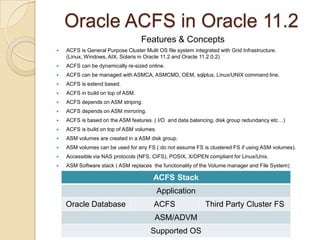
Oracle ACFS in Oracle 11.2Features & ConceptsACFS is General Purpose Cluster Multi OS file system integrated with Grid Infrastructure. (Linux, Windows, AIX, Solaris in Oracle 11.2 and Oracle 11.2.0.2)ACFS can be dynamically re-sized online. ACFS can be managed with ASMCA, ASMCMD, OEM, sqlplus, Linux/UNIX command line.ACFS is extend based.ACFS in build on top of ASM.ACFS depends on ASM striping.ACFS depends on ASM mirroring.ACFS is based on the ASM features. ( I/O  and data balancing, disk group redundancy etc…)ACFS is build on top of ASM volumes.ASM volumes are created in a ASM disk group.ASM volumes can be used for any FS ( do not assume FS is clustered FS if using ASM volumes).Accessible via NAS protocols (NFS, CIFS), POSIX, X/OPEN compliant for Linux/Unix.ASM Software stack ( ASM replaces  the functionality of the Volume manager and File System)
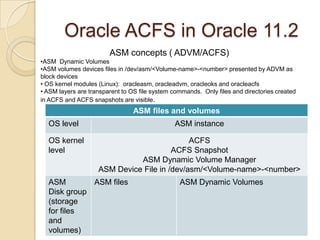
Oracle ACFS in Oracle 11.2ASM concepts ( ADVM/ACFS) ASM  Dynamic Volumes
ASM volumes devices files in /dev/asm/<Volume-name>-<number> presented by ADVM as block devices
OS kernel modules (Linux):  oracleasm, oracleadvm, oracleoks and oracleacfs
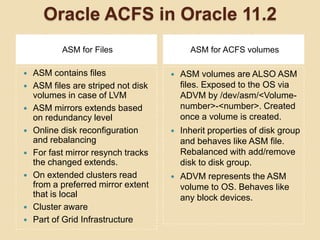
 ASM layers are transparent to OS file system commands.  Only files and directories created in ACFS and ACFS snapshots are visible.Oracle ACFS in Oracle 11.2ASM for FilesASM for ACFS volumesASM contains filesASM files are striped not disk volumes in case of LVMASM mirrors extends based on redundancy levelOnline disk reconfiguration and rebalancingFor fast mirror resynch tracks the changed extends.On extended clusters read from a preferred mirror extent that is localCluster awarePart of Grid InfrastructureASM volumes are ALSO ASM files. Exposed to the OS via ADVM by /dev/asm/<Volume-number>-<number>. Created once a volume is created.Inherit properties of disk group and behaves like ASM file. Rebalanced with add/remove disk to disk group.ADVM represents the ASM volume to OS. Behaves like any block devices.
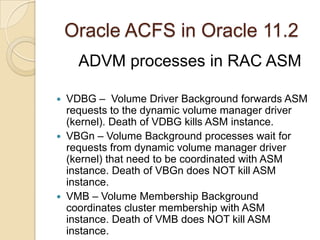
Oracle ACFS in Oracle 11.2ADVM processes in RAC ASMVDBG –  Volume Driver Background forwards ASM requests to the dynamic volume manager driver (kernel). Death of VDBG kills ASM instance.VBGn – Volume Background processes wait for requests from dynamic volume manager driver (kernel) that need to be coordinated with ASM instance. Death of VBGn does NOT kill ASM instance.VMB – Volume Membership Background coordinates cluster membership with ASM instance. Death of VMB does NOT kill ASM instance.
Oracle ACFS in Oracle 11.2RestrictionsADVM volumes can not be used as boot devices or root file system.ADVM volumes can not be used for RAW devices.ADVM volume devices can not be used for multi-pathing.ADVM volumes can not be used with ASMlib. Do not layer ASM over ASM.ADVM volumes can not be partitioned with fdisk.ADVM volumes are not to be used for Oracle Grid Infrastructure installation.
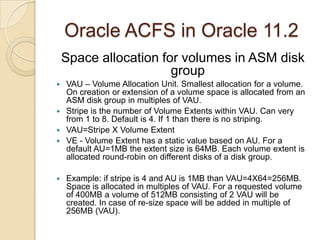
Oracle ACFS in Oracle 11.2Space allocation for volumes in ASM disk groupVAU – Volume Allocation Unit. Smallest allocation for a volume. On creation or extension of a volume space is allocated from an ASM disk group in multiples of VAU. Stripe is the number of Volume Extents within VAU. Can very from 1 to 8. Default is 4. If 1 than there is no striping.VAU=Stripe X Volume ExtentVE - Volume Extent has a static value based on AU. For a default AU=1MB the extent size is 64MB. Each volume extent is allocated round-robin on different disks of a disk group.Example: if stripe is 4 and AU is 1MB than VAU=4X64=256MB. Space is allocated in multiples of VAU. For a requested volume of 400MB a volume of 512MB consisting of 2 VAU will be created. In case of re-size space will be added in multiple of 256MB (VAU).
Oracle ACFS in Oracle 11.2 Space allocation within a volumeVolume is created with Stripe column – number of stripes. Default 4. From 1 to 8. If 1 no striping.Stripe width – size of each stripe. Default 128K. Range from 4K, 8K,16K,32K,64K, 128K, 256K, 512K,1M.Space for the volume is allocated as explained in VAU from ASM disk group.Space within the volume, when a file is created/resized on the ACFS, is allocated in chunks: size of VAU
the size of the strip width round-robin across all of the VE  in the VAU.Oracle ACFS in Oracle 11.2Steps to create an ACFSPrerequisites: compatible.asm>=11.2compatible.advm>=11.2,  compatible.asm>=compatible.advmLoad ADVM drivers $GI_HOME/bin/acfsload start –s as root on Oracle Restart only. For clustered  Oracle GI in ASM RAC is automatically loaded.Create the ASM volumeCreate the mount pointMake the file system as root or GI ownerMount the file system as root unless using /sbin/acfsutil as GI owner.Register the file system. For the file system to persists reboot register it similarly to /etc/fstab with acfsutil. Registering the File System automatically mounts the file system on restart/reboot and manage it as CRS resource. GI owner for /sbin/acfsutil.
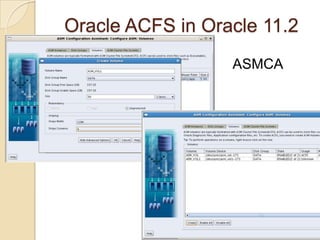
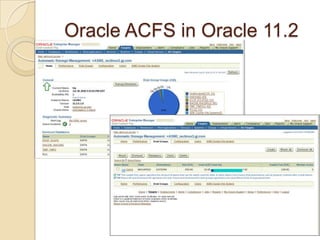
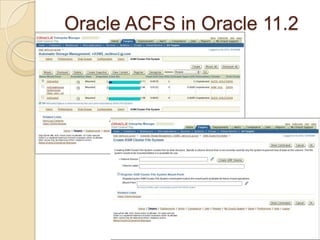
Oracle ACFS in Oracle 11.2ASMCA
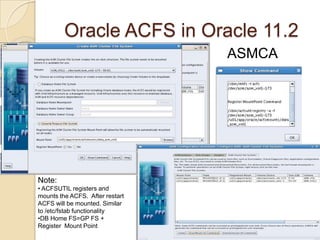
Oracle ACFS in Oracle 11.2ASMCANote:  ACFSUTIL registers and mounts the ACFS.  After restart ACFS will be mounted. Similar to /etc/fstab functionality
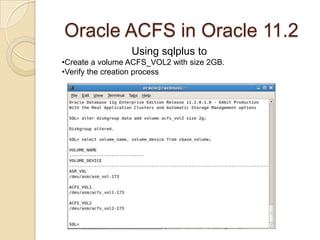
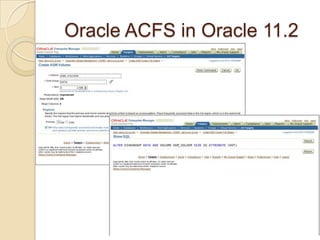
DB Home FS=GP FS + Register  Mount PointOracle ACFS in Oracle 11.2Using sqlplus to Create a volume ACFS_VOL2 with size 2GB.
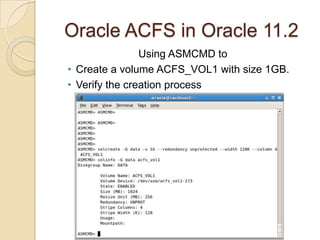
Verify the creation processOracle ACFS in Oracle 11.2Using ASMCMD to Create a volume ACFS_VOL1 with size 1GB.
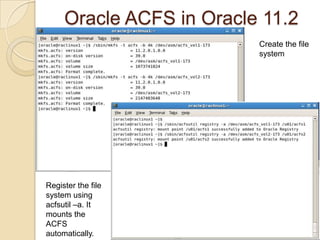
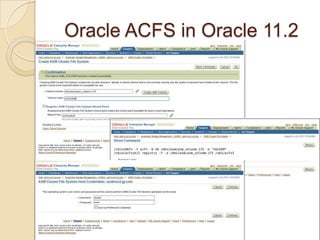
Verify the creation processOracle ACFS in Oracle 11.2Create the file systemRegister the file system using acfsutil –a. It mounts the ACFS automatically.
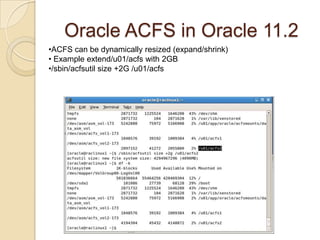
Oracle ACFS in Oracle 11.2ACFS can be dynamically resized (expand/shrink)
 Example extend/u01/acfs with 2GB
/sbin/acfsutil size +2G /u01/acfsOracle ACFS in Oracle 11.2ACFS snapshotOnline read-only point in time copy of the ACFSACFS store metadata in the ACFS volume for directories, filenames and pointers to file blocks. As a file on ACFS gets modified the original blocks are copied for recovery into the snapshot.Useful for :Recovery as of the snapshot timeConsistent backup of the files in the snapshotYou can have up to 63 snapshots per volume
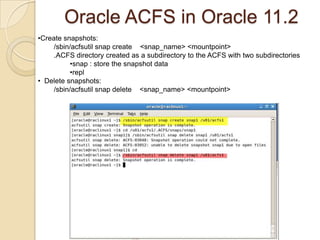
Oracle ACFS in Oracle 11.2Create snapshots: /sbin/acfsutil snap create    <snap_name> <mountpoint>.ACFS directory created as a subdirectory to the ACFS with two subdirectoriessnap : store the snapshot data
repl
  Delete snapshots: /sbin/acfsutil snap delete    <snap_name> <mountpoint>
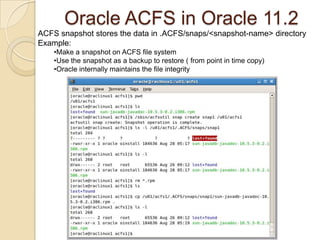
Oracle ACFS in Oracle 11.2ACFS snapshot stores the data in .ACFS/snaps/<snapshot-name> directoryExample:Make a snapshot on ACFS file system
Use the snapshot as a backup to restore ( from point in time copy)
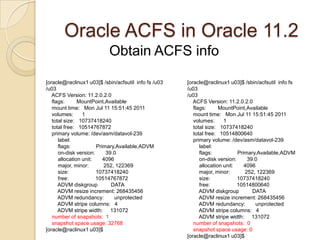
Oracle internally maintains the file integrityOracle ACFS in Oracle 11.2Obtain ACFS info[oracle@raclinux1 u03]$ /sbin/acfsutil  info fs /u03/u03    ACFS Version: 11.2.0.2.0    flags:        MountPoint,Available    mount time:   Mon Jul 11 15:51:45 2011    volumes:      1    total size:   10737418240    total free:   10514800640    primary volume: /dev/asm/datavol-239        label:                         flags:                 Primary,Available,ADVM        on-disk version:       39.0        allocation unit:       4096        major, minor:          252, 122369        size:                  10737418240        free:                  10514800640        ADVM diskgroup         DATA        ADVM resize increment: 268435456        ADVM redundancy:       unprotected        ADVM stripe columns:   4        ADVM stripe width:     131072    number of snapshots:  0    snapshot space usage: 0[oracle@raclinux1 u03]$ [oracle@raclinux1 u03]$ /sbin/acfsutil  info fs /u03/u03    ACFS Version: 11.2.0.2.0    flags:        MountPoint,Available    mount time:   Mon Jul 11 15:51:45 2011    volumes:      1    total size:   10737418240    total free:   10514767872    primary volume: /dev/asm/datavol-239        label:                         flags:                 Primary,Available,ADVM        on-disk version:       39.0        allocation unit:       4096        major, minor:          252, 122369        size:                  10737418240        free:                  10514767872        ADVM diskgroup         DATA        ADVM resize increment: 268435456        ADVM redundancy:       unprotected        ADVM stripe columns:   4        ADVM stripe width:     131072number of snapshots:  1    snapshot space usage: 32768[oracle@raclinux1 u03]$
Oracle ACFS in Oracle 11.2
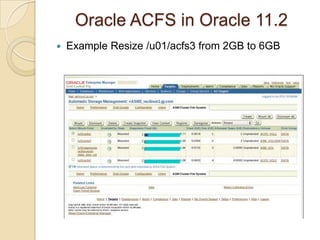
Oracle ACFS in Oracle 11.2Example Resize /u01/acfs3 from 2GB to 6GB
Oracle ACFS in Oracle 11.2
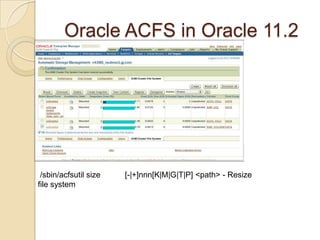
Oracle ACFS in Oracle 11.2 /sbin/acfsutil size           [-|+]nnn[K|M|G|T|P] <path> - Resize file system
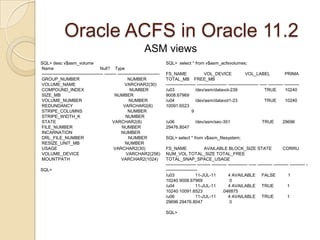
Oracle ACFS in Oracle 11.2ASM viewsSQL> desc v$asm_volume Name                                      Null?    Type ----------------------------------------- -------- ---------------------------- GROUP_NUMBER                                       NUMBER VOLUME_NAME                                        VARCHAR2(30) COMPOUND_INDEX                                     NUMBER SIZE_MB                                            NUMBER VOLUME_NUMBER                                      NUMBER REDUNDANCY                                         VARCHAR2(6) STRIPE_COLUMNS                                     NUMBER STRIPE_WIDTH_K                                     NUMBER STATE                                              VARCHAR2(8) FILE_NUMBER                                        NUMBER INCARNATION                                        NUMBER DRL_FILE_NUMBER                                    NUMBER RESIZE_UNIT_MB                                     NUMBER USAGE                                              VARCHAR2(30) VOLUME_DEVICE                                      VARCHAR2(256) MOUNTPATH                                          VARCHAR2(1024)SQL>SQL>  select * from v$asm_acfsvolumes;FS_NAME              VOL_DEVICE           VOL_LABEL            PRIMA   TOTAL_MB    FREE_MB-------------------- -------------------- -------------------- ----- ---------- ----------/u03                 /dev/asm/datavol-239                      TRUE       10240 9008.67969/u04                 /dev/asm/datavol1-23                      TRUE       10240 10091.6523                     9/u06                 /dev/asm/sec-351                          TRUE       29696 29476.8047SQL> select * from v$asm_filesystem;FS_NAME              AVAILABLE BLOCK_SIZE STATE         CORRU    NUM_VOL TOTAL_SIZE TOTAL_FREE TOTAL_SNAP_SPACE_USAGE-------------------- --------- ---------- ------------- ----- ---------- ---------- ---------- ----------------------/u03                 11-JUL-11          4 AVAILABLE     FALSE          1      10240 9008.67969                      0/u04                 11-JUL-11          4 AVAILABLE     TRUE           1      10240 10091.6523                .046875/u06                 11-JUL-11          4 AVAILABLE     TRUE           1      29696 29476.8047                      0SQL>
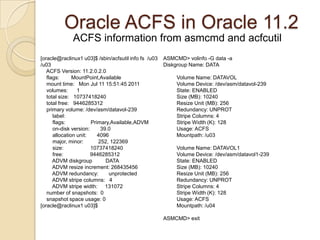
Oracle ACFS in Oracle 11.2ACFS information from asmcmd and acfcutil[oracle@raclinux1 u03]$ /sbin/acfsutil info fs  /u03/u03    ACFS Version: 11.2.0.2.0    flags:        MountPoint,Available    mount time:   Mon Jul 11 15:51:45 2011    volumes:      1    total size:   10737418240    total free:   9446285312    primary volume: /dev/asm/datavol-239        label:                         flags:                 Primary,Available,ADVM        on-disk version:       39.0        allocation unit:       4096        major, minor:          252, 122369        size:                  10737418240        free:                  9446285312        ADVM diskgroup         DATA        ADVM resize increment: 268435456        ADVM redundancy:       unprotected        ADVM stripe columns:   4        ADVM stripe width:     131072    number of snapshots:  0    snapshot space usage: 0[oracle@raclinux1 u03]$ASMCMD> volinfo -G data -aDiskgroup Name: DATA         Volume Name: DATAVOL         Volume Device: /dev/asm/datavol-239         State: ENABLED         Size (MB): 10240         Resize Unit (MB): 256         Redundancy: UNPROT         Stripe Columns: 4         Stripe Width (K): 128         Usage: ACFS         Mountpath: /u03          Volume Name: DATAVOL1         Volume Device: /dev/asm/datavol1-239         State: ENABLED         Size (MB): 10240         Resize Unit (MB): 256         Redundancy: UNPROT         Stripe Columns: 4         Stripe Width (K): 128         Usage: ACFS         Mountpath: /u04 ASMCMD> exit
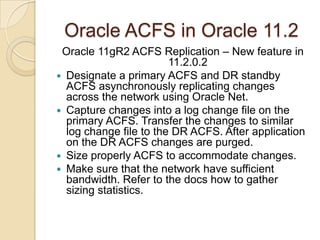
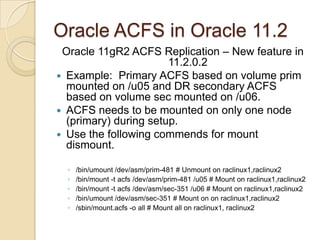
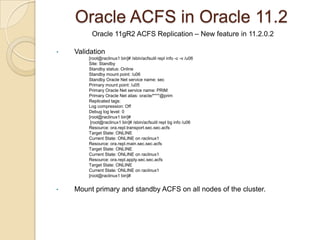
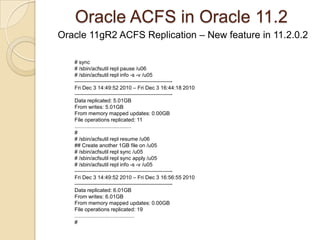
Oracle ACFS in Oracle 11.2 Oracle 11gR2 ACFS Replication – New feature in 11.2.0.2 Designate a primary ACFS and DR standby ACFS asynchronously replicating changes across the network using Oracle Net.Capture changes into a log change file on the primary ACFS. Transfer the changes to similar log change file to the DR ACFS. After application on the DR ACFS changes are purged.Size properly ACFS to accommodate changes.Make sure that the network have sufficient bandwidth. Refer to the docs how to gather sizing statistics.
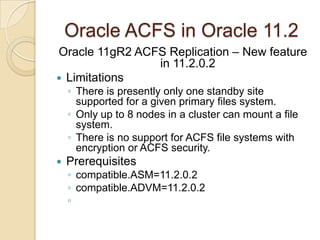
Oracle ACFS in Oracle 11.2 Oracle 11gR2 ACFS Replication – New feature in 11.2.0.2 LimitationsThere is presently only one standby site supported for a given primary files system.Only up to 8 nodes in a cluster can mount a file system.There is no support for ACFS file systems with encryption or ACFS security.Prerequisitescompatible.ASM=11.2.0.2 compatible.ADVM=11.2.0.2

Oracle acfs in oracle 11

  • 1.
    Oracle ACFS inOracle 11.2Concepts, Architecture, Deployment, Management and performance monitoringGuenadi N. Jilevski: OCP 7,8,8i,9i,10g 11g OCM 9i
  • 2.
    Oracle ACFS inOracle 11.2Features & ConceptsACFS is General Purpose Cluster Multi OS file system integrated with Grid Infrastructure. (Linux, Windows, AIX, Solaris in Oracle 11.2 and Oracle 11.2.0.2)ACFS can be dynamically re-sized online. ACFS can be managed with ASMCA, ASMCMD, OEM, sqlplus, Linux/UNIX command line.ACFS is extend based.ACFS in build on top of ASM.ACFS depends on ASM striping.ACFS depends on ASM mirroring.ACFS is based on the ASM features. ( I/O and data balancing, disk group redundancy etc…)ACFS is build on top of ASM volumes.ASM volumes are created in a ASM disk group.ASM volumes can be used for any FS ( do not assume FS is clustered FS if using ASM volumes).Accessible via NAS protocols (NFS, CIFS), POSIX, X/OPEN compliant for Linux/Unix.ASM Software stack ( ASM replaces the functionality of the Volume manager and File System)
  • 3.
    Oracle ACFS inOracle 11.2ASM concepts ( ADVM/ACFS) ASM Dynamic Volumes
  • 4.
    ASM volumes devicesfiles in /dev/asm/<Volume-name>-<number> presented by ADVM as block devices
  • 5.
    OS kernel modules(Linux): oracleasm, oracleadvm, oracleoks and oracleacfs
  • 6.
    ASM layersare transparent to OS file system commands. Only files and directories created in ACFS and ACFS snapshots are visible.Oracle ACFS in Oracle 11.2ASM for FilesASM for ACFS volumesASM contains filesASM files are striped not disk volumes in case of LVMASM mirrors extends based on redundancy levelOnline disk reconfiguration and rebalancingFor fast mirror resynch tracks the changed extends.On extended clusters read from a preferred mirror extent that is localCluster awarePart of Grid InfrastructureASM volumes are ALSO ASM files. Exposed to the OS via ADVM by /dev/asm/<Volume-number>-<number>. Created once a volume is created.Inherit properties of disk group and behaves like ASM file. Rebalanced with add/remove disk to disk group.ADVM represents the ASM volume to OS. Behaves like any block devices.
  • 7.
    Oracle ACFS inOracle 11.2ADVM processes in RAC ASMVDBG – Volume Driver Background forwards ASM requests to the dynamic volume manager driver (kernel). Death of VDBG kills ASM instance.VBGn – Volume Background processes wait for requests from dynamic volume manager driver (kernel) that need to be coordinated with ASM instance. Death of VBGn does NOT kill ASM instance.VMB – Volume Membership Background coordinates cluster membership with ASM instance. Death of VMB does NOT kill ASM instance.
  • 8.
    Oracle ACFS inOracle 11.2RestrictionsADVM volumes can not be used as boot devices or root file system.ADVM volumes can not be used for RAW devices.ADVM volume devices can not be used for multi-pathing.ADVM volumes can not be used with ASMlib. Do not layer ASM over ASM.ADVM volumes can not be partitioned with fdisk.ADVM volumes are not to be used for Oracle Grid Infrastructure installation.
  • 9.
    Oracle ACFS inOracle 11.2Space allocation for volumes in ASM disk groupVAU – Volume Allocation Unit. Smallest allocation for a volume. On creation or extension of a volume space is allocated from an ASM disk group in multiples of VAU. Stripe is the number of Volume Extents within VAU. Can very from 1 to 8. Default is 4. If 1 than there is no striping.VAU=Stripe X Volume ExtentVE - Volume Extent has a static value based on AU. For a default AU=1MB the extent size is 64MB. Each volume extent is allocated round-robin on different disks of a disk group.Example: if stripe is 4 and AU is 1MB than VAU=4X64=256MB. Space is allocated in multiples of VAU. For a requested volume of 400MB a volume of 512MB consisting of 2 VAU will be created. In case of re-size space will be added in multiple of 256MB (VAU).
  • 10.
    Oracle ACFS inOracle 11.2 Space allocation within a volumeVolume is created with Stripe column – number of stripes. Default 4. From 1 to 8. If 1 no striping.Stripe width – size of each stripe. Default 128K. Range from 4K, 8K,16K,32K,64K, 128K, 256K, 512K,1M.Space for the volume is allocated as explained in VAU from ASM disk group.Space within the volume, when a file is created/resized on the ACFS, is allocated in chunks: size of VAU
  • 11.
    the size ofthe strip width round-robin across all of the VE in the VAU.Oracle ACFS in Oracle 11.2Steps to create an ACFSPrerequisites: compatible.asm>=11.2compatible.advm>=11.2, compatible.asm>=compatible.advmLoad ADVM drivers $GI_HOME/bin/acfsload start –s as root on Oracle Restart only. For clustered Oracle GI in ASM RAC is automatically loaded.Create the ASM volumeCreate the mount pointMake the file system as root or GI ownerMount the file system as root unless using /sbin/acfsutil as GI owner.Register the file system. For the file system to persists reboot register it similarly to /etc/fstab with acfsutil. Registering the File System automatically mounts the file system on restart/reboot and manage it as CRS resource. GI owner for /sbin/acfsutil.
  • 12.
    Oracle ACFS inOracle 11.2ASMCA
  • 13.
    Oracle ACFS inOracle 11.2ASMCANote: ACFSUTIL registers and mounts the ACFS. After restart ACFS will be mounted. Similar to /etc/fstab functionality
  • 14.
    DB Home FS=GPFS + Register Mount PointOracle ACFS in Oracle 11.2Using sqlplus to Create a volume ACFS_VOL2 with size 2GB.
  • 15.
    Verify the creationprocessOracle ACFS in Oracle 11.2Using ASMCMD to Create a volume ACFS_VOL1 with size 1GB.
  • 16.
    Verify the creationprocessOracle ACFS in Oracle 11.2Create the file systemRegister the file system using acfsutil –a. It mounts the ACFS automatically.
  • 17.
    Oracle ACFS inOracle 11.2ACFS can be dynamically resized (expand/shrink)
  • 18.
  • 19.
    /sbin/acfsutil size +2G/u01/acfsOracle ACFS in Oracle 11.2ACFS snapshotOnline read-only point in time copy of the ACFSACFS store metadata in the ACFS volume for directories, filenames and pointers to file blocks. As a file on ACFS gets modified the original blocks are copied for recovery into the snapshot.Useful for :Recovery as of the snapshot timeConsistent backup of the files in the snapshotYou can have up to 63 snapshots per volume
  • 20.
    Oracle ACFS inOracle 11.2Create snapshots: /sbin/acfsutil snap create <snap_name> <mountpoint>.ACFS directory created as a subdirectory to the ACFS with two subdirectoriessnap : store the snapshot data
  • 21.
  • 22.
    Deletesnapshots: /sbin/acfsutil snap delete <snap_name> <mountpoint>
  • 23.
    Oracle ACFS inOracle 11.2ACFS snapshot stores the data in .ACFS/snaps/<snapshot-name> directoryExample:Make a snapshot on ACFS file system
  • 24.
    Use the snapshotas a backup to restore ( from point in time copy)
  • 25.
    Oracle internally maintainsthe file integrityOracle ACFS in Oracle 11.2Obtain ACFS info[oracle@raclinux1 u03]$ /sbin/acfsutil info fs /u03/u03 ACFS Version: 11.2.0.2.0 flags: MountPoint,Available mount time: Mon Jul 11 15:51:45 2011 volumes: 1 total size: 10737418240 total free: 10514800640 primary volume: /dev/asm/datavol-239 label: flags: Primary,Available,ADVM on-disk version: 39.0 allocation unit: 4096 major, minor: 252, 122369 size: 10737418240 free: 10514800640 ADVM diskgroup DATA ADVM resize increment: 268435456 ADVM redundancy: unprotected ADVM stripe columns: 4 ADVM stripe width: 131072 number of snapshots: 0 snapshot space usage: 0[oracle@raclinux1 u03]$ [oracle@raclinux1 u03]$ /sbin/acfsutil info fs /u03/u03 ACFS Version: 11.2.0.2.0 flags: MountPoint,Available mount time: Mon Jul 11 15:51:45 2011 volumes: 1 total size: 10737418240 total free: 10514767872 primary volume: /dev/asm/datavol-239 label: flags: Primary,Available,ADVM on-disk version: 39.0 allocation unit: 4096 major, minor: 252, 122369 size: 10737418240 free: 10514767872 ADVM diskgroup DATA ADVM resize increment: 268435456 ADVM redundancy: unprotected ADVM stripe columns: 4 ADVM stripe width: 131072number of snapshots: 1 snapshot space usage: 32768[oracle@raclinux1 u03]$
  • 26.
    Oracle ACFS inOracle 11.2
  • 27.
    Oracle ACFS inOracle 11.2
  • 28.
    Oracle ACFS inOracle 11.2
  • 29.
    Oracle ACFS inOracle 11.2
  • 30.
    Oracle ACFS inOracle 11.2Example Resize /u01/acfs3 from 2GB to 6GB
  • 31.
    Oracle ACFS inOracle 11.2
  • 32.
    Oracle ACFS inOracle 11.2 /sbin/acfsutil size [-|+]nnn[K|M|G|T|P] <path> - Resize file system
  • 33.
    Oracle ACFS inOracle 11.2ASM viewsSQL> desc v$asm_volume Name Null? Type ----------------------------------------- -------- ---------------------------- GROUP_NUMBER NUMBER VOLUME_NAME VARCHAR2(30) COMPOUND_INDEX NUMBER SIZE_MB NUMBER VOLUME_NUMBER NUMBER REDUNDANCY VARCHAR2(6) STRIPE_COLUMNS NUMBER STRIPE_WIDTH_K NUMBER STATE VARCHAR2(8) FILE_NUMBER NUMBER INCARNATION NUMBER DRL_FILE_NUMBER NUMBER RESIZE_UNIT_MB NUMBER USAGE VARCHAR2(30) VOLUME_DEVICE VARCHAR2(256) MOUNTPATH VARCHAR2(1024)SQL>SQL> select * from v$asm_acfsvolumes;FS_NAME VOL_DEVICE VOL_LABEL PRIMA TOTAL_MB FREE_MB-------------------- -------------------- -------------------- ----- ---------- ----------/u03 /dev/asm/datavol-239 TRUE 10240 9008.67969/u04 /dev/asm/datavol1-23 TRUE 10240 10091.6523 9/u06 /dev/asm/sec-351 TRUE 29696 29476.8047SQL> select * from v$asm_filesystem;FS_NAME AVAILABLE BLOCK_SIZE STATE CORRU NUM_VOL TOTAL_SIZE TOTAL_FREE TOTAL_SNAP_SPACE_USAGE-------------------- --------- ---------- ------------- ----- ---------- ---------- ---------- ----------------------/u03 11-JUL-11 4 AVAILABLE FALSE 1 10240 9008.67969 0/u04 11-JUL-11 4 AVAILABLE TRUE 1 10240 10091.6523 .046875/u06 11-JUL-11 4 AVAILABLE TRUE 1 29696 29476.8047 0SQL>
  • 34.
    Oracle ACFS inOracle 11.2ACFS information from asmcmd and acfcutil[oracle@raclinux1 u03]$ /sbin/acfsutil info fs /u03/u03 ACFS Version: 11.2.0.2.0 flags: MountPoint,Available mount time: Mon Jul 11 15:51:45 2011 volumes: 1 total size: 10737418240 total free: 9446285312 primary volume: /dev/asm/datavol-239 label: flags: Primary,Available,ADVM on-disk version: 39.0 allocation unit: 4096 major, minor: 252, 122369 size: 10737418240 free: 9446285312 ADVM diskgroup DATA ADVM resize increment: 268435456 ADVM redundancy: unprotected ADVM stripe columns: 4 ADVM stripe width: 131072 number of snapshots: 0 snapshot space usage: 0[oracle@raclinux1 u03]$ASMCMD> volinfo -G data -aDiskgroup Name: DATA Volume Name: DATAVOL Volume Device: /dev/asm/datavol-239 State: ENABLED Size (MB): 10240 Resize Unit (MB): 256 Redundancy: UNPROT Stripe Columns: 4 Stripe Width (K): 128 Usage: ACFS Mountpath: /u03 Volume Name: DATAVOL1 Volume Device: /dev/asm/datavol1-239 State: ENABLED Size (MB): 10240 Resize Unit (MB): 256 Redundancy: UNPROT Stripe Columns: 4 Stripe Width (K): 128 Usage: ACFS Mountpath: /u04 ASMCMD> exit
  • 35.
    Oracle ACFS inOracle 11.2 Oracle 11gR2 ACFS Replication – New feature in 11.2.0.2 Designate a primary ACFS and DR standby ACFS asynchronously replicating changes across the network using Oracle Net.Capture changes into a log change file on the primary ACFS. Transfer the changes to similar log change file to the DR ACFS. After application on the DR ACFS changes are purged.Size properly ACFS to accommodate changes.Make sure that the network have sufficient bandwidth. Refer to the docs how to gather sizing statistics.
  • 36.
    Oracle ACFS inOracle 11.2 Oracle 11gR2 ACFS Replication – New feature in 11.2.0.2 LimitationsThere is presently only one standby site supported for a given primary files system.Only up to 8 nodes in a cluster can mount a file system.There is no support for ACFS file systems with encryption or ACFS security.Prerequisitescompatible.ASM=11.2.0.2 compatible.ADVM=11.2.0.2