Oracle Database File Mapping
for Oracle ASM Files
(12c..23c)
Alireza Kamrani
08/03/2024
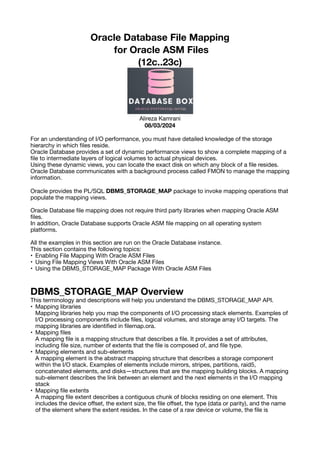
For an understanding of I/O performance, you must have detailed knowledge of the storage
hierarchy in which
fi
les reside.
Oracle Database provides a set of dynamic performance views to show a complete mapping of a
fi
le to intermediate layers of logical volumes to actual physical devices.
Using these dynamic views, you can locate the exact disk on which any block of a
fi
le resides.
Oracle Database communicates with a background process called FMON to manage the mapping
information.
Oracle provides the PL/SQL DBMS_STORAGE_MAP package to invoke mapping operations that
populate the mapping views.
Oracle Database
fi
le mapping does not require third party libraries when mapping Oracle ASM
fi
les.
In addition, Oracle Database supports Oracle ASM
fi
le mapping on all operating system
platforms.
All the examples in this section are run on the Oracle Database instance.
This section contains the following topics:
• Enabling File Mapping With Oracle ASM Files
• Using File Mapping Views With Oracle ASM Files
• Using the DBMS_STORAGE_MAP Package With Oracle ASM Files
DBMS_STORAGE_MAP Overview
This terminology and descriptions will help you understand the DBMS_STORAGE_MAP API.
• Mapping libraries
Mapping libraries help you map the components of I/O processing stack elements. Examples of
I/O processing components include
fi
les, logical volumes, and storage array I/O targets. The
mapping libraries are identi
fi
ed in
fi
lemap.ora.
• Mapping
fi
les
A mapping
fi
le is a mapping structure that describes a
fi
le. It provides a set of attributes,
including
fi
le size, number of extents that the
fi
le is composed of, and
fi
le type.
• Mapping elements and sub-elements
A mapping element is the abstract mapping structure that describes a storage component
within the I/O stack. Examples of elements include mirrors, stripes, partitions, raid5,
concatenated elements, and disks—structures that are the mapping building blocks. A mapping
sub-element describes the link between an element and the next elements in the I/O mapping
stack
• Mapping
fi
le extents
A mapping
fi
le extent describes a contiguous chunk of blocks residing on one element. This
includes the device o
ff
set, the extent size, the
fi
le o
ff
set, the type (data or parity), and the name
of the element where the extent resides. In the case of a raw device or volume, the
fi
le is
composed of only one
fi
le extent component. A mapping
fi
le extent is di
ff
erent from Oracle
extents.
Enabling File Mapping With Oracle ASM Files
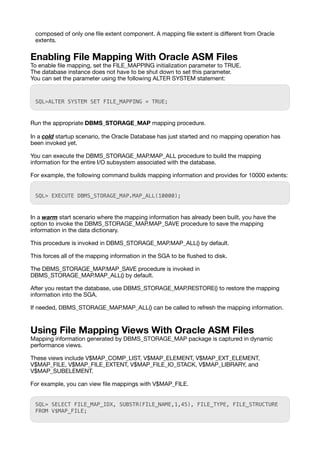
To enable
fi
le mapping, set the FILE_MAPPING initialization parameter to TRUE.
The database instance does not have to be shut down to set this parameter.
You can set the parameter using the following ALTER SYSTEM statement:
SQL>ALTER SYSTEM SET FILE_MAPPING = TRUE;
Run the appropriate DBMS_STORAGE_MAP mapping procedure.
In a cold startup scenario, the Oracle Database has just started and no mapping operation has
been invoked yet.
You can execute the DBMS_STORAGE_MAP.MAP_ALL procedure to build the mapping
information for the entire I/O subsystem associated with the database.
For example, the following command builds mapping information and provides for 10000 extents:
SQL> EXECUTE DBMS_STORAGE_MAP.MAP_ALL(10000);
In a warm start scenario where the mapping information has already been built, you have the
option to invoke the DBMS_STORAGE_MAP.MAP_SAVE procedure to save the mapping
information in the data dictionary.
This procedure is invoked in DBMS_STORAGE_MAP.MAP_ALL() by default.
This forces all of the mapping information in the SGA to be
fl
ushed to disk.
The DBMS_STORAGE_MAP.MAP_SAVE procedure is invoked in
DBMS_STORAGE_MAP.MAP_ALL() by default.
After you restart the database, use DBMS_STORAGE_MAP.RESTORE() to restore the mapping
information into the SGA.
If needed, DBMS_STORAGE_MAP.MAP_ALL() can be called to refresh the mapping information.
Using File Mapping Views With Oracle ASM Files
Mapping information generated by DBMS_STORAGE_MAP package is captured in dynamic
performance views.
These views include V$MAP_COMP_LIST, V$MAP_ELEMENT, V$MAP_EXT_ELEMENT,
V$MAP_FILE, V$MAP_FILE_EXTENT, V$MAP_FILE_IO_STACK, V$MAP_LIBRARY, and
V$MAP_SUBELEMENT.
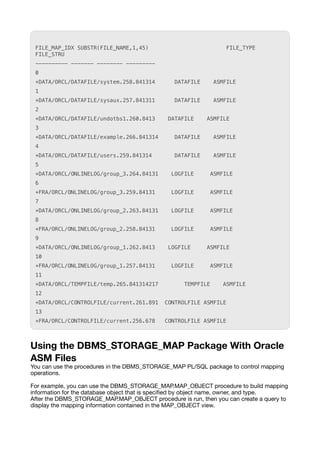
For example, you can view
fi
le mappings with V$MAP_FILE.
SQL> SELECT FILE_MAP_IDX, SUBSTR(FILE_NAME,1,45), FILE_TYPE, FILE_STRUCTURE
FROM V$MAP_FILE;
FILE_MAP_IDX SUBSTR(FILE_NAME,1,45) FILE_TYPE
FILE_STRU
---------- ------- -------- ---------
0
+DATA/ORCL/DATAFILE/system.258.841314 DATAFILE ASMFILE
1
+DATA/ORCL/DATAFILE/sysaux.257.841311 DATAFILE ASMFILE
2
+DATA/ORCL/DATAFILE/undotbs1.260.8413 DATAFILE ASMFILE
3
+DATA/ORCL/DATAFILE/example.266.841314 DATAFILE ASMFILE
4
+DATA/ORCL/DATAFILE/users.259.841314 DATAFILE ASMFILE
5
+DATA/ORCL/ONLINELOG/group_3.264.84131 LOGFILE ASMFILE
6
+FRA/ORCL/ONLINELOG/group_3.259.84131 LOGFILE ASMFILE
7
+DATA/ORCL/ONLINELOG/group_2.263.84131 LOGFILE ASMFILE
8
+FRA/ORCL/ONLINELOG/group_2.258.84131 LOGFILE ASMFILE
9
+DATA/ORCL/ONLINELOG/group_1.262.8413 LOGFILE ASMFILE
10
+FRA/ORCL/ONLINELOG/group_1.257.84131 LOGFILE ASMFILE
11
+DATA/ORCL/TEMPFILE/temp.265.841314217 TEMPFILE ASMFILE
12
+DATA/ORCL/CONTROLFILE/current.261.891 CONTROLFILE ASMFILE
13
+FRA/ORCL/CONTROLFILE/current.256.678 CONTROLFILE ASMFILE
Using the DBMS_STORAGE_MAP Package With Oracle
ASM Files
You can use the procedures in the DBMS_STORAGE_MAP PL/SQL package to control mapping
operations.
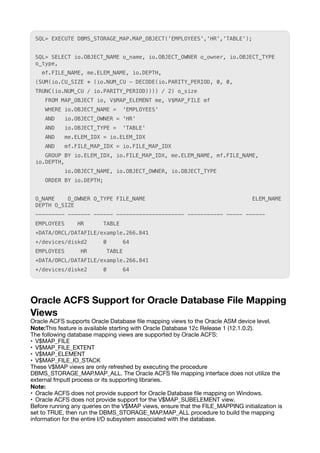
For example, you can use the DBMS_STORAGE_MAP.MAP_OBJECT procedure to build mapping
information for the database object that is speci
fi
ed by object name, owner, and type.
After the DBMS_STORAGE_MAP.MAP_OBJECT procedure is run, then you can create a query to
display the mapping information contained in the MAP_OBJECT view.
SQL> EXECUTE DBMS_STORAGE_MAP.MAP_OBJECT('EMPLOYEES','HR','TABLE');
SQL> SELECT io.OBJECT_NAME o_name, io.OBJECT_OWNER o_owner, io.OBJECT_TYPE
o_type,
mf.FILE_NAME, me.ELEM_NAME, io.DEPTH,
(SUM(io.CU_SIZE * (io.NUM_CU - DECODE(io.PARITY_PERIOD, 0, 0,
TRUNC(io.NUM_CU / io.PARITY_PERIOD)))) / 2) o_size
FROM MAP_OBJECT io, V$MAP_ELEMENT me, V$MAP_FILE mf
WHERE io.OBJECT_NAME = 'EMPLOYEES'
AND io.OBJECT_OWNER = 'HR'
AND io.OBJECT_TYPE = 'TABLE'
AND me.ELEM_IDX = io.ELEM_IDX
AND mf.FILE_MAP_IDX = io.FILE_MAP_IDX
GROUP BY io.ELEM_IDX, io.FILE_MAP_IDX, me.ELEM_NAME, mf.FILE_NAME,
io.DEPTH,
io.OBJECT_NAME, io.OBJECT_OWNER, io.OBJECT_TYPE
ORDER BY io.DEPTH;
O_NAME O_OWNER O_TYPE FILE_NAME ELEM_NAME
DEPTH O_SIZE
--------- ------- ------ --------------------- ----------- ----- ------
EMPLOYEES HR TABLE
+DATA/ORCL/DATAFILE/example.266.841
+/devices/diskd2 0 64
EMPLOYEES HR TABLE
+DATA/ORCL/DATAFILE/example.266.841
+/devices/diske2 0 64
Oracle ACFS Support for Oracle Database File Mapping
Views
Oracle ACFS supports Oracle Database
fi
le mapping views to the Oracle ASM device level.
Note:This feature is available starting with Oracle Database 12c Release 1 (12.1.0.2).
The following database mapping views are supported by Oracle ACFS:
• V$MAP_FILE
• V$MAP_FILE_EXTENT
• V$MAP_ELEMENT
• V$MAP_FILE_IO_STACK
These V$MAP views are only refreshed by executing the procedure
DBMS_STORAGE_MAP.MAP_ALL. The Oracle ACFS
fi
le mapping interface does not utilize the
external fmputl process or its supporting libraries.
Note:
• Oracle ACFS does not provide support for Oracle Database
fi
le mapping on Windows.
• Oracle ACFS does not provide support for the V$MAP_SUBELEMENT view.
Before running any queries on the V$MAP views, ensure that the FILE_MAPPING initialization is
set to TRUE, then run the DBMS_STORAGE_MAP.MAP_ALL procedure to build the mapping
information for the entire I/O subsystem associated with the database.
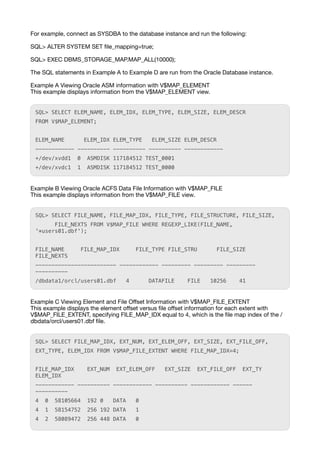
For example, connect as SYSDBA to the database instance and run the following:
SQL> ALTER SYSTEM SET
fi
le_mapping=true;
SQL> EXEC DBMS_STORAGE_MAP.MAP_ALL(10000);
The SQL statements in Example A to Example D are run from the Oracle Database instance.
Example A Viewing Oracle ASM information with V$MAP_ELEMENT
This example displays information from the V$MAP_ELEMENT view.
SQL> SELECT ELEM_NAME, ELEM_IDX, ELEM_TYPE, ELEM_SIZE, ELEM_DESCR
FROM V$MAP_ELEMENT;
ELEM_NAME ELEM_IDX ELEM_TYPE ELEM_SIZE ELEM_DESCR
------------ ---------- ---------- ---------- ------------
+/dev/xvdd1 0 ASMDISK 117184512 TEST_0001
+/dev/xvdc1 1 ASMDISK 117184512 TEST_0000
Example B Viewing Oracle ACFS Data File Information with V$MAP_FILE
This example displays information from the V$MAP_FILE view.
SQL> SELECT FILE_NAME, FILE_MAP_IDX, FILE_TYPE, FILE_STRUCTURE, FILE_SIZE,
FILE_NEXTS FROM V$MAP_FILE WHERE REGEXP_LIKE(FILE_NAME,
'*users01.dbf');
FILE_NAME FILE_MAP_IDX FILE_TYPE FILE_STRU FILE_SIZE
FILE_NEXTS
------------------------- ------------ --------- --------- ---------
----------
/dbdata1/orcl/users01.dbf 4 DATAFILE FILE 10256 41
Example C Viewing Element and File O
ff
set Information with V$MAP_FILE_EXTENT
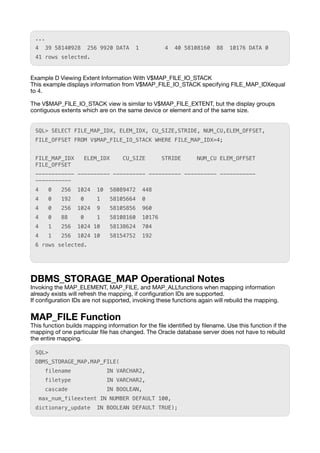
This example displays the element o
ff
set versus
fi
le o
ff
set information for each extent with
V$MAP_FILE_EXTENT, specifying FILE_MAP_IDX equal to 4, which is the
fi
le map index of the /
dbdata/orcl/users01.dbf
fi
le.
SQL> SELECT FILE_MAP_IDX, EXT_NUM, EXT_ELEM_OFF, EXT_SIZE, EXT_FILE_OFF,
EXT_TYPE, ELEM_IDX FROM V$MAP_FILE_EXTENT WHERE FILE_MAP_IDX=4;
FILE_MAP_IDX EXT_NUM EXT_ELEM_OFF EXT_SIZE EXT_FILE_OFF EXT_TY
ELEM_IDX
------------ ---------- ------------ ---------- ------------ ------
----------
4 0 58105664 192 0 DATA 0
4 1 58154752 256 192 DATA 1
4 2 58089472 256 448 DATA 0
...
4 39 58140928 256 9920 DATA 1 4 40 58108160 88 10176 DATA 0
41 rows selected.
Example D Viewing Extent Information With V$MAP_FILE_IO_STACK
This example displays information from V$MAP_FILE_IO_STACK specifying FILE_MAP_IDXequal
to 4.
The V$MAP_FILE_IO_STACK view is similar to V$MAP_FILE_EXTENT, but the display groups
contiguous extents which are on the same device or element and of the same size.
SQL> SELECT FILE_MAP_IDX, ELEM_IDX, CU_SIZE,STRIDE, NUM_CU,ELEM_OFFSET,
FILE_OFFSET FROM V$MAP_FILE_IO_STACK WHERE FILE_MAP_IDX=4;
FILE_MAP_IDX ELEM_IDX CU_SIZE STRIDE NUM_CU ELEM_OFFSET
FILE_OFFSET
------------ ---------- ---------- ---------- ---------- -----------
-----------
4 0 256 1024 10 58089472 448
4 0 192 0 1 58105664 0
4 0 256 1024 9 58105856 960
4 0 88 0 1 58108160 10176
4 1 256 1024 10 58138624 704
4 1 256 1024 10 58154752 192
6 rows selected.
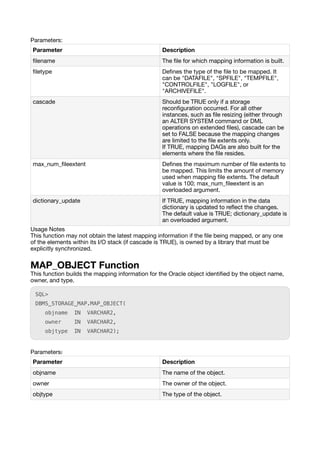
DBMS_STORAGE_MAP Operational Notes
Invoking the MAP_ELEMENT, MAP_FILE, and MAP_ALLfunctions when mapping information
already exists will refresh the mapping, if con
fi
guration IDs are supported.
If con
fi
guration IDs are not supported, invoking these functions again will rebuild the mapping.
MAP_FILE Function
This function builds mapping information for the
fi
le identi
fi
ed by
fi
lename. Use this function if the
mapping of one particular
fi
le has changed. The Oracle database server does not have to rebuild
the entire mapping.
SQL>
DBMS_STORAGE_MAP.MAP_FILE(
filename IN VARCHAR2,
filetype IN VARCHAR2,
cascade IN BOOLEAN,
max_num_fileextent IN NUMBER DEFAULT 100,
dictionary_update IN BOOLEAN DEFAULT TRUE);
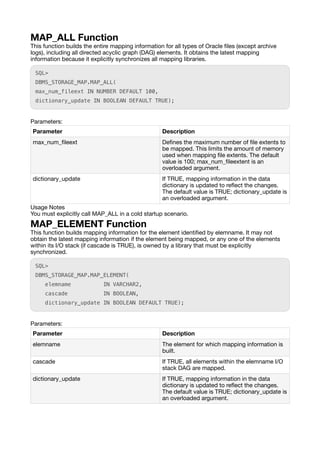
Parameters:
Usage Notes
This function may not obtain the latest mapping information if the
fi
le being mapped, or any one
of the elements within its I/O stack (if cascade is TRUE), is owned by a library that must be
explicitly synchronized.
MAP_OBJECT Function
This function builds the mapping information for the Oracle object identi
fi
ed by the object name,
owner, and type.
SQL>
DBMS_STORAGE_MAP.MAP_OBJECT(
objname IN VARCHAR2,
owner IN VARCHAR2,
objtype IN VARCHAR2);
Parameters:
Parameter Description
fi
lename The
fi
le for which mapping information is built.
fi
letype De
fi
nes the type of the
fi
le to be mapped. It
can be "DATAFILE", "SPFILE", "TEMPFILE",
"CONTROLFILE", "LOGFILE", or
"ARCHIVEFILE".
cascade Should be TRUE only if a storage
recon
fi
guration occurred. For all other
instances, such as
fi
le resizing (either through
an ALTER SYSTEM command or DML
operations on extended
fi
les), cascade can be
set to FALSE because the mapping changes
are limited to the
fi
le extents only.
If TRUE, mapping DAGs are also built for the
elements where the
fi
le resides.
max_num_
fi
leextent De
fi
nes the maximum number of
fi
le extents to
be mapped. This limits the amount of memory
used when mapping
fi
le extents. The default
value is 100; max_num_
fi
leextent is an
overloaded argument.
dictionary_update If TRUE, mapping information in the data
dictionary is updated to re
fl
ect the changes.
The default value is TRUE; dictionary_update is
an overloaded argument.
Parameter Description
objname The name of the object.
owner The owner of the object.
objtype The type of the object.
MAP_ALL Function
This function builds the entire mapping information for all types of Oracle
fi
les (except archive
logs), including all directed acyclic graph (DAG) elements. It obtains the latest mapping
information because it explicitly synchronizes all mapping libraries.
SQL>
DBMS_STORAGE_MAP.MAP_ALL(
max_num_fileext IN NUMBER DEFAULT 100,
dictionary_update IN BOOLEAN DEFAULT TRUE);
Parameters:
Usage Notes
You must explicitly call MAP_ALL in a cold startup scenario.
MAP_ELEMENT Function
This function builds mapping information for the element identi
fi
ed by elemname. It may not
obtain the latest mapping information if the element being mapped, or any one of the elements
within its I/O stack (if cascade is TRUE), is owned by a library that must be explicitly
synchronized.
SQL>
DBMS_STORAGE_MAP.MAP_ELEMENT(
elemname IN VARCHAR2,
cascade IN BOOLEAN,
dictionary_update IN BOOLEAN DEFAULT TRUE);
Parameters:
Parameter Description
max_num_
fi
leext De
fi
nes the maximum number of
fi
le extents to
be mapped. This limits the amount of memory
used when mapping
fi
le extents. The default
value is 100; max_num_
fi
leextent is an
overloaded argument.
dictionary_update If TRUE, mapping information in the data
dictionary is updated to re
fl
ect the changes.
The default value is TRUE; dictionary_update is
an overloaded argument.
Parameter Description
elemname The element for which mapping information is
built.
cascade If TRUE, all elements within the elemname I/O
stack DAG are mapped.
dictionary_update If TRUE, mapping information in the data
dictionary is updated to re
fl
ect the changes.
The default value is TRUE; dictionary_update is
an overloaded argument.
RESTORE Function
This function loads the entire mapping information from the data dictionary into the shared
memory of the instance.
You can invoke RESTORE only after a SAVE operation. You must explicitly call RESTORE in a
warm startup scenario.
SQL>DBMS_STORAGE_MAP.RESTORE;
SAVE Function
This function saves information needed to regenerate the entire mapping into the data dictionary.
SQL>DBMS_STORAGE_MAP.SAVE;
LOCK_MAP Procedure
This procedure locks the mapping information in the shared memory of the instance.
This is useful when you need a consistent snapshot of the V$MAP tables. Without locking the
mapping information, V$MAP_ELEMENT and V$MAP_SUBELEMENT, for example, may be
inconsistent.
SQL>DBMS_STORAGE_MAP.LOCK_MAP;
UNLOCK_MAP Procedure
This procedure unlocks the mapping information in the shared memory of the instance.
SQL>DBMS_STORAGE_MAP.UNLOCK_MAP;
More info:
https://docs.oracle.com/en/database/oracle/oracle-database/12.2/ostmg/asm-
fi
les-directories-
templates.html
https://docs.oracle.com/en/database/oracle/oracle-database/23/ostmg/asm-
fi
les-directories-
templates.html#OSTMG94200
Sincerely,
Alireza Kamrani.

Oracle Database File Mapping for Oracle ASM Files

  • 1.
    Oracle Database FileMapping for Oracle ASM Files (12c..23c) Alireza Kamrani 08/03/2024 For an understanding of I/O performance, you must have detailed knowledge of the storage hierarchy in which fi les reside. Oracle Database provides a set of dynamic performance views to show a complete mapping of a fi le to intermediate layers of logical volumes to actual physical devices. Using these dynamic views, you can locate the exact disk on which any block of a fi le resides. Oracle Database communicates with a background process called FMON to manage the mapping information. Oracle provides the PL/SQL DBMS_STORAGE_MAP package to invoke mapping operations that populate the mapping views. Oracle Database fi le mapping does not require third party libraries when mapping Oracle ASM fi les. In addition, Oracle Database supports Oracle ASM fi le mapping on all operating system platforms. All the examples in this section are run on the Oracle Database instance. This section contains the following topics: • Enabling File Mapping With Oracle ASM Files • Using File Mapping Views With Oracle ASM Files • Using the DBMS_STORAGE_MAP Package With Oracle ASM Files DBMS_STORAGE_MAP Overview This terminology and descriptions will help you understand the DBMS_STORAGE_MAP API. • Mapping libraries Mapping libraries help you map the components of I/O processing stack elements. Examples of I/O processing components include fi les, logical volumes, and storage array I/O targets. The mapping libraries are identi fi ed in fi lemap.ora. • Mapping fi les A mapping fi le is a mapping structure that describes a fi le. It provides a set of attributes, including fi le size, number of extents that the fi le is composed of, and fi le type. • Mapping elements and sub-elements A mapping element is the abstract mapping structure that describes a storage component within the I/O stack. Examples of elements include mirrors, stripes, partitions, raid5, concatenated elements, and disks—structures that are the mapping building blocks. A mapping sub-element describes the link between an element and the next elements in the I/O mapping stack • Mapping fi le extents A mapping fi le extent describes a contiguous chunk of blocks residing on one element. This includes the device o ff set, the extent size, the fi le o ff set, the type (data or parity), and the name of the element where the extent resides. In the case of a raw device or volume, the fi le is
  • 2.
    composed of onlyone fi le extent component. A mapping fi le extent is di ff erent from Oracle extents. Enabling File Mapping With Oracle ASM Files To enable fi le mapping, set the FILE_MAPPING initialization parameter to TRUE. The database instance does not have to be shut down to set this parameter. You can set the parameter using the following ALTER SYSTEM statement: SQL>ALTER SYSTEM SET FILE_MAPPING = TRUE; Run the appropriate DBMS_STORAGE_MAP mapping procedure. In a cold startup scenario, the Oracle Database has just started and no mapping operation has been invoked yet. You can execute the DBMS_STORAGE_MAP.MAP_ALL procedure to build the mapping information for the entire I/O subsystem associated with the database. For example, the following command builds mapping information and provides for 10000 extents: SQL> EXECUTE DBMS_STORAGE_MAP.MAP_ALL(10000); In a warm start scenario where the mapping information has already been built, you have the option to invoke the DBMS_STORAGE_MAP.MAP_SAVE procedure to save the mapping information in the data dictionary. This procedure is invoked in DBMS_STORAGE_MAP.MAP_ALL() by default. This forces all of the mapping information in the SGA to be fl ushed to disk. The DBMS_STORAGE_MAP.MAP_SAVE procedure is invoked in DBMS_STORAGE_MAP.MAP_ALL() by default. After you restart the database, use DBMS_STORAGE_MAP.RESTORE() to restore the mapping information into the SGA. If needed, DBMS_STORAGE_MAP.MAP_ALL() can be called to refresh the mapping information. Using File Mapping Views With Oracle ASM Files Mapping information generated by DBMS_STORAGE_MAP package is captured in dynamic performance views. These views include V$MAP_COMP_LIST, V$MAP_ELEMENT, V$MAP_EXT_ELEMENT, V$MAP_FILE, V$MAP_FILE_EXTENT, V$MAP_FILE_IO_STACK, V$MAP_LIBRARY, and V$MAP_SUBELEMENT. For example, you can view fi le mappings with V$MAP_FILE. SQL> SELECT FILE_MAP_IDX, SUBSTR(FILE_NAME,1,45), FILE_TYPE, FILE_STRUCTURE FROM V$MAP_FILE;
  • 3.
    FILE_MAP_IDX SUBSTR(FILE_NAME,1,45) FILE_TYPE FILE_STRU ----------------- -------- --------- 0 +DATA/ORCL/DATAFILE/system.258.841314 DATAFILE ASMFILE 1 +DATA/ORCL/DATAFILE/sysaux.257.841311 DATAFILE ASMFILE 2 +DATA/ORCL/DATAFILE/undotbs1.260.8413 DATAFILE ASMFILE 3 +DATA/ORCL/DATAFILE/example.266.841314 DATAFILE ASMFILE 4 +DATA/ORCL/DATAFILE/users.259.841314 DATAFILE ASMFILE 5 +DATA/ORCL/ONLINELOG/group_3.264.84131 LOGFILE ASMFILE 6 +FRA/ORCL/ONLINELOG/group_3.259.84131 LOGFILE ASMFILE 7 +DATA/ORCL/ONLINELOG/group_2.263.84131 LOGFILE ASMFILE 8 +FRA/ORCL/ONLINELOG/group_2.258.84131 LOGFILE ASMFILE 9 +DATA/ORCL/ONLINELOG/group_1.262.8413 LOGFILE ASMFILE 10 +FRA/ORCL/ONLINELOG/group_1.257.84131 LOGFILE ASMFILE 11 +DATA/ORCL/TEMPFILE/temp.265.841314217 TEMPFILE ASMFILE 12 +DATA/ORCL/CONTROLFILE/current.261.891 CONTROLFILE ASMFILE 13 +FRA/ORCL/CONTROLFILE/current.256.678 CONTROLFILE ASMFILE Using the DBMS_STORAGE_MAP Package With Oracle ASM Files You can use the procedures in the DBMS_STORAGE_MAP PL/SQL package to control mapping operations. For example, you can use the DBMS_STORAGE_MAP.MAP_OBJECT procedure to build mapping information for the database object that is speci fi ed by object name, owner, and type. After the DBMS_STORAGE_MAP.MAP_OBJECT procedure is run, then you can create a query to display the mapping information contained in the MAP_OBJECT view.
  • 4.
    SQL> EXECUTE DBMS_STORAGE_MAP.MAP_OBJECT('EMPLOYEES','HR','TABLE'); SQL>SELECT io.OBJECT_NAME o_name, io.OBJECT_OWNER o_owner, io.OBJECT_TYPE o_type, mf.FILE_NAME, me.ELEM_NAME, io.DEPTH, (SUM(io.CU_SIZE * (io.NUM_CU - DECODE(io.PARITY_PERIOD, 0, 0, TRUNC(io.NUM_CU / io.PARITY_PERIOD)))) / 2) o_size FROM MAP_OBJECT io, V$MAP_ELEMENT me, V$MAP_FILE mf WHERE io.OBJECT_NAME = 'EMPLOYEES' AND io.OBJECT_OWNER = 'HR' AND io.OBJECT_TYPE = 'TABLE' AND me.ELEM_IDX = io.ELEM_IDX AND mf.FILE_MAP_IDX = io.FILE_MAP_IDX GROUP BY io.ELEM_IDX, io.FILE_MAP_IDX, me.ELEM_NAME, mf.FILE_NAME, io.DEPTH, io.OBJECT_NAME, io.OBJECT_OWNER, io.OBJECT_TYPE ORDER BY io.DEPTH; O_NAME O_OWNER O_TYPE FILE_NAME ELEM_NAME DEPTH O_SIZE --------- ------- ------ --------------------- ----------- ----- ------ EMPLOYEES HR TABLE +DATA/ORCL/DATAFILE/example.266.841 +/devices/diskd2 0 64 EMPLOYEES HR TABLE +DATA/ORCL/DATAFILE/example.266.841 +/devices/diske2 0 64 Oracle ACFS Support for Oracle Database File Mapping Views Oracle ACFS supports Oracle Database fi le mapping views to the Oracle ASM device level. Note:This feature is available starting with Oracle Database 12c Release 1 (12.1.0.2). The following database mapping views are supported by Oracle ACFS: • V$MAP_FILE • V$MAP_FILE_EXTENT • V$MAP_ELEMENT • V$MAP_FILE_IO_STACK These V$MAP views are only refreshed by executing the procedure DBMS_STORAGE_MAP.MAP_ALL. The Oracle ACFS fi le mapping interface does not utilize the external fmputl process or its supporting libraries. Note: • Oracle ACFS does not provide support for Oracle Database fi le mapping on Windows. • Oracle ACFS does not provide support for the V$MAP_SUBELEMENT view. Before running any queries on the V$MAP views, ensure that the FILE_MAPPING initialization is set to TRUE, then run the DBMS_STORAGE_MAP.MAP_ALL procedure to build the mapping information for the entire I/O subsystem associated with the database.
  • 5.
    For example, connectas SYSDBA to the database instance and run the following: SQL> ALTER SYSTEM SET fi le_mapping=true; SQL> EXEC DBMS_STORAGE_MAP.MAP_ALL(10000); The SQL statements in Example A to Example D are run from the Oracle Database instance. Example A Viewing Oracle ASM information with V$MAP_ELEMENT This example displays information from the V$MAP_ELEMENT view. SQL> SELECT ELEM_NAME, ELEM_IDX, ELEM_TYPE, ELEM_SIZE, ELEM_DESCR FROM V$MAP_ELEMENT; ELEM_NAME ELEM_IDX ELEM_TYPE ELEM_SIZE ELEM_DESCR ------------ ---------- ---------- ---------- ------------ +/dev/xvdd1 0 ASMDISK 117184512 TEST_0001 +/dev/xvdc1 1 ASMDISK 117184512 TEST_0000 Example B Viewing Oracle ACFS Data File Information with V$MAP_FILE This example displays information from the V$MAP_FILE view. SQL> SELECT FILE_NAME, FILE_MAP_IDX, FILE_TYPE, FILE_STRUCTURE, FILE_SIZE, FILE_NEXTS FROM V$MAP_FILE WHERE REGEXP_LIKE(FILE_NAME, '*users01.dbf'); FILE_NAME FILE_MAP_IDX FILE_TYPE FILE_STRU FILE_SIZE FILE_NEXTS ------------------------- ------------ --------- --------- --------- ---------- /dbdata1/orcl/users01.dbf 4 DATAFILE FILE 10256 41 Example C Viewing Element and File O ff set Information with V$MAP_FILE_EXTENT This example displays the element o ff set versus fi le o ff set information for each extent with V$MAP_FILE_EXTENT, specifying FILE_MAP_IDX equal to 4, which is the fi le map index of the / dbdata/orcl/users01.dbf fi le. SQL> SELECT FILE_MAP_IDX, EXT_NUM, EXT_ELEM_OFF, EXT_SIZE, EXT_FILE_OFF, EXT_TYPE, ELEM_IDX FROM V$MAP_FILE_EXTENT WHERE FILE_MAP_IDX=4; FILE_MAP_IDX EXT_NUM EXT_ELEM_OFF EXT_SIZE EXT_FILE_OFF EXT_TY ELEM_IDX ------------ ---------- ------------ ---------- ------------ ------ ---------- 4 0 58105664 192 0 DATA 0 4 1 58154752 256 192 DATA 1 4 2 58089472 256 448 DATA 0
  • 6.
    ... 4 39 58140928256 9920 DATA 1 4 40 58108160 88 10176 DATA 0 41 rows selected. Example D Viewing Extent Information With V$MAP_FILE_IO_STACK This example displays information from V$MAP_FILE_IO_STACK specifying FILE_MAP_IDXequal to 4. The V$MAP_FILE_IO_STACK view is similar to V$MAP_FILE_EXTENT, but the display groups contiguous extents which are on the same device or element and of the same size. SQL> SELECT FILE_MAP_IDX, ELEM_IDX, CU_SIZE,STRIDE, NUM_CU,ELEM_OFFSET, FILE_OFFSET FROM V$MAP_FILE_IO_STACK WHERE FILE_MAP_IDX=4; FILE_MAP_IDX ELEM_IDX CU_SIZE STRIDE NUM_CU ELEM_OFFSET FILE_OFFSET ------------ ---------- ---------- ---------- ---------- ----------- ----------- 4 0 256 1024 10 58089472 448 4 0 192 0 1 58105664 0 4 0 256 1024 9 58105856 960 4 0 88 0 1 58108160 10176 4 1 256 1024 10 58138624 704 4 1 256 1024 10 58154752 192 6 rows selected. DBMS_STORAGE_MAP Operational Notes Invoking the MAP_ELEMENT, MAP_FILE, and MAP_ALLfunctions when mapping information already exists will refresh the mapping, if con fi guration IDs are supported. If con fi guration IDs are not supported, invoking these functions again will rebuild the mapping. MAP_FILE Function This function builds mapping information for the fi le identi fi ed by fi lename. Use this function if the mapping of one particular fi le has changed. The Oracle database server does not have to rebuild the entire mapping. SQL> DBMS_STORAGE_MAP.MAP_FILE( filename IN VARCHAR2, filetype IN VARCHAR2, cascade IN BOOLEAN, max_num_fileextent IN NUMBER DEFAULT 100, dictionary_update IN BOOLEAN DEFAULT TRUE);
  • 7.
    Parameters: Usage Notes This functionmay not obtain the latest mapping information if the fi le being mapped, or any one of the elements within its I/O stack (if cascade is TRUE), is owned by a library that must be explicitly synchronized. MAP_OBJECT Function This function builds the mapping information for the Oracle object identi fi ed by the object name, owner, and type. SQL> DBMS_STORAGE_MAP.MAP_OBJECT( objname IN VARCHAR2, owner IN VARCHAR2, objtype IN VARCHAR2); Parameters: Parameter Description fi lename The fi le for which mapping information is built. fi letype De fi nes the type of the fi le to be mapped. It can be "DATAFILE", "SPFILE", "TEMPFILE", "CONTROLFILE", "LOGFILE", or "ARCHIVEFILE". cascade Should be TRUE only if a storage recon fi guration occurred. For all other instances, such as fi le resizing (either through an ALTER SYSTEM command or DML operations on extended fi les), cascade can be set to FALSE because the mapping changes are limited to the fi le extents only. If TRUE, mapping DAGs are also built for the elements where the fi le resides. max_num_ fi leextent De fi nes the maximum number of fi le extents to be mapped. This limits the amount of memory used when mapping fi le extents. The default value is 100; max_num_ fi leextent is an overloaded argument. dictionary_update If TRUE, mapping information in the data dictionary is updated to re fl ect the changes. The default value is TRUE; dictionary_update is an overloaded argument. Parameter Description objname The name of the object. owner The owner of the object. objtype The type of the object.
  • 8.
    MAP_ALL Function This functionbuilds the entire mapping information for all types of Oracle fi les (except archive logs), including all directed acyclic graph (DAG) elements. It obtains the latest mapping information because it explicitly synchronizes all mapping libraries. SQL> DBMS_STORAGE_MAP.MAP_ALL( max_num_fileext IN NUMBER DEFAULT 100, dictionary_update IN BOOLEAN DEFAULT TRUE); Parameters: Usage Notes You must explicitly call MAP_ALL in a cold startup scenario. MAP_ELEMENT Function This function builds mapping information for the element identi fi ed by elemname. It may not obtain the latest mapping information if the element being mapped, or any one of the elements within its I/O stack (if cascade is TRUE), is owned by a library that must be explicitly synchronized. SQL> DBMS_STORAGE_MAP.MAP_ELEMENT( elemname IN VARCHAR2, cascade IN BOOLEAN, dictionary_update IN BOOLEAN DEFAULT TRUE); Parameters: Parameter Description max_num_ fi leext De fi nes the maximum number of fi le extents to be mapped. This limits the amount of memory used when mapping fi le extents. The default value is 100; max_num_ fi leextent is an overloaded argument. dictionary_update If TRUE, mapping information in the data dictionary is updated to re fl ect the changes. The default value is TRUE; dictionary_update is an overloaded argument. Parameter Description elemname The element for which mapping information is built. cascade If TRUE, all elements within the elemname I/O stack DAG are mapped. dictionary_update If TRUE, mapping information in the data dictionary is updated to re fl ect the changes. The default value is TRUE; dictionary_update is an overloaded argument.
  • 9.
    RESTORE Function This functionloads the entire mapping information from the data dictionary into the shared memory of the instance. You can invoke RESTORE only after a SAVE operation. You must explicitly call RESTORE in a warm startup scenario. SQL>DBMS_STORAGE_MAP.RESTORE; SAVE Function This function saves information needed to regenerate the entire mapping into the data dictionary. SQL>DBMS_STORAGE_MAP.SAVE; LOCK_MAP Procedure This procedure locks the mapping information in the shared memory of the instance. This is useful when you need a consistent snapshot of the V$MAP tables. Without locking the mapping information, V$MAP_ELEMENT and V$MAP_SUBELEMENT, for example, may be inconsistent. SQL>DBMS_STORAGE_MAP.LOCK_MAP; UNLOCK_MAP Procedure This procedure unlocks the mapping information in the shared memory of the instance. SQL>DBMS_STORAGE_MAP.UNLOCK_MAP; More info: https://docs.oracle.com/en/database/oracle/oracle-database/12.2/ostmg/asm- fi les-directories- templates.html https://docs.oracle.com/en/database/oracle/oracle-database/23/ostmg/asm- fi les-directories- templates.html#OSTMG94200 Sincerely, Alireza Kamrani.