© 2021. All rights reserved
Optimizing Performance Using
Continuous Production Profiling
Yonatan Goldschmidt
Principal Engineer and Research Team Lead @ Granulate
Connect on LinkedIn | GitHub: https://github.com/Jongy
Meet Yonatan Goldschmidt
●About me:
○ 6 years of service as R&D specialist & team lead
○ Likes everything about computers and software
○ Today, a team lead at Granulate’s Performance Research
●About Granulate:
Enables companies to optimize their workloads, improve performance
and leverage that to reduce compute costs
aka why DevOpsDays accepted my session ;)
Why should I optimize?
●Reduce cost
●Improve SLA
Main Reasons:
And Why Profile?
What is Profiling?
●The dynamic inspection of running programs
●Most commonly, used to aid optimization
○ Can also be used to aid debugging
●Many types (CPU, memory, networking/IO, locks …)
●Many tools
Profiling is cool…
… but not common enough!
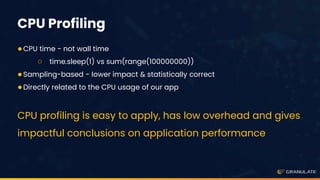
CPU Profiling
●CPU time - not wall time
○ time.sleep(1) vs sum(range(100000000))
●Sampling-based - lower impact & statistically correct
●Directly related to the CPU usage of our app
CPU profiling is easy to apply, has low overhead and gives
impactful conclusions on application performance
●X-axis: relative part from the profile
●Y-axis: stack trace
Additional resources:
●Intro: rbspy.github.io/using-flamegraphs/
●Advanced: brendangregg.com/flamegraphs.html
Flamegraphs
● Production vs local
Continuous and Production Profiling
● Continuous
○ Varying load
○ Code changes
Continuous and Production Profiling
From Theory to Practice
Continuously Profile
Analyze Results
Implement Code
Improvements
Verify Results
REPEAT!
Live Demo!
gProfiler Demo Env.
gProfiler Use-cases
●We’re using gProfiler regularly on our systems
○ Ruby - fluentd plugin was rewritten
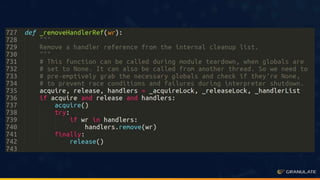
○ Python example - removeHandlerRef case in one of our servers
Takeaways
Thank You!
To start free profiling, visit: gprofiler.io
Feel free to DM here or connect on LinkedIn and GitHub (/jongy)
Q&A

OPTIMIZING PERFORMANCE USING CONTINUOUS PRODUCTION PROFILING ,YONATAN GOLDSCHMIDT, Granulate

  • 1.
    © 2021. Allrights reserved Optimizing Performance Using Continuous Production Profiling Yonatan Goldschmidt Principal Engineer and Research Team Lead @ Granulate Connect on LinkedIn | GitHub: https://github.com/Jongy
  • 2.
    Meet Yonatan Goldschmidt ●Aboutme: ○ 6 years of service as R&D specialist & team lead ○ Likes everything about computers and software ○ Today, a team lead at Granulate’s Performance Research ●About Granulate: Enables companies to optimize their workloads, improve performance and leverage that to reduce compute costs aka why DevOpsDays accepted my session ;)
  • 3.
    Why should Ioptimize? ●Reduce cost ●Improve SLA Main Reasons:
  • 4.
  • 5.
    What is Profiling? ●Thedynamic inspection of running programs ●Most commonly, used to aid optimization ○ Can also be used to aid debugging ●Many types (CPU, memory, networking/IO, locks …) ●Many tools
  • 6.
    Profiling is cool… …but not common enough!
  • 7.
    CPU Profiling ●CPU time- not wall time ○ time.sleep(1) vs sum(range(100000000)) ●Sampling-based - lower impact & statistically correct ●Directly related to the CPU usage of our app CPU profiling is easy to apply, has low overhead and gives impactful conclusions on application performance
  • 8.
    ●X-axis: relative partfrom the profile ●Y-axis: stack trace Additional resources: ●Intro: rbspy.github.io/using-flamegraphs/ ●Advanced: brendangregg.com/flamegraphs.html Flamegraphs
  • 10.
    ● Production vslocal Continuous and Production Profiling
  • 11.
    ● Continuous ○ Varyingload ○ Code changes Continuous and Production Profiling
  • 12.
    From Theory toPractice Continuously Profile Analyze Results Implement Code Improvements Verify Results REPEAT!
  • 13.
  • 14.
  • 16.
    gProfiler Use-cases ●We’re usinggProfiler regularly on our systems ○ Ruby - fluentd plugin was rewritten ○ Python example - removeHandlerRef case in one of our servers
  • 20.
  • 21.
    Thank You! To startfree profiling, visit: gprofiler.io Feel free to DM here or connect on LinkedIn and GitHub (/jongy)
  • 22.