OPERATING A
COMPUTERIZED
RESERVATION SYSTEM
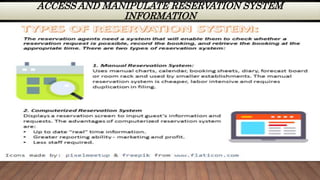
ACCESS AND MANIPULATE RESERVATION SYSTEM
INFORMATION
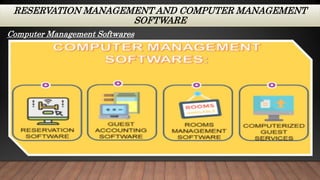
RESERVATION MANAGEMENT AND COMPUTER MANAGEMENT
SOFTWARE
Computer Management Softwares
CREATING AND PROCESSING RESERVATION
A central reservation system or (CRS) is a
computerized system used by hotels and other
lodging establishment to store, retrieve information
and conduct transactions. In this topic, we will
discuss the common functions, features, content and
window display of a CRS when creating and
processing reservation.
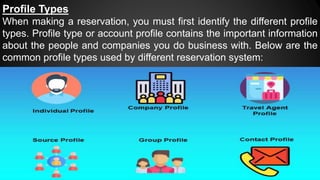
Profile Types
When making a reservation, you must first identify the different profile
types. Profile type or account profile contains the important information
about the people and companies you do business with. Below are the
common profile types used by different reservation system:
CREATING AND PROCESSING RESERVATION
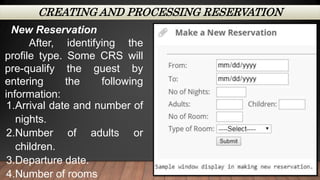
New Reservation
After, identifying the
profile type. Some CRS will
pre-qualify the guest by
entering the following
information:
1.Arrival date and number of
nights.
2.Number of adults or
children.
3.Departure date.
4.Number of rooms
UPDATES AND AMENDMENTS TO
RESERVATION
One feature of a CRS is to update and amend an
existing reservation. To apply this feature, you
need to check the reservation tab and look for a
“Update Reservation’ option.
1. Go to reservation and look for “Update Reservation”
from the menu bar options.
2. The Reservation Search screen will appear. This screen
is used to search the reservation you wish to update.
3. Complete the required fields in the reservation search
screen.
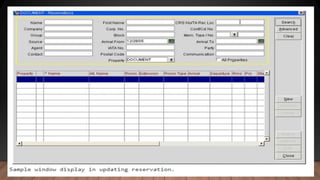
4. The CRS will now show the lists of reservation that
matches your search. Click or highlight the reservation
you want to update, and the reservation screen will
appear for editing.
SENDING AND RECEIVING RESERVATION
COMMUNICATIONS
Communication from Industry Colleagues:
Creating an internal communication in a reservation
system is one of the best functions of a CRS. This function
allows you to disseminate reservation details in a more
convenient way. Sending and receiving communication in
some CRS are under the Miscellaneous tab. To complete this
action, you need to go to reports under the miscellaneous tab
and search the appropriate reports. Access the reports
module for printing reports, mailings, letters, etc.
Reference:
https://www.e-tesda.gov.ph/

operatingacomputerizedreservationsystem-capiznhs-201109123608.pptx

  • 1.
  • 2.
    ACCESS AND MANIPULATERESERVATION SYSTEM INFORMATION
  • 3.
    RESERVATION MANAGEMENT ANDCOMPUTER MANAGEMENT SOFTWARE Computer Management Softwares
  • 4.
    CREATING AND PROCESSINGRESERVATION A central reservation system or (CRS) is a computerized system used by hotels and other lodging establishment to store, retrieve information and conduct transactions. In this topic, we will discuss the common functions, features, content and window display of a CRS when creating and processing reservation.
  • 5.
    Profile Types When makinga reservation, you must first identify the different profile types. Profile type or account profile contains the important information about the people and companies you do business with. Below are the common profile types used by different reservation system:
  • 6.
    CREATING AND PROCESSINGRESERVATION New Reservation After, identifying the profile type. Some CRS will pre-qualify the guest by entering the following information: 1.Arrival date and number of nights. 2.Number of adults or children. 3.Departure date. 4.Number of rooms
  • 7.
    UPDATES AND AMENDMENTSTO RESERVATION One feature of a CRS is to update and amend an existing reservation. To apply this feature, you need to check the reservation tab and look for a “Update Reservation’ option.
  • 8.
    1. Go toreservation and look for “Update Reservation” from the menu bar options. 2. The Reservation Search screen will appear. This screen is used to search the reservation you wish to update. 3. Complete the required fields in the reservation search screen. 4. The CRS will now show the lists of reservation that matches your search. Click or highlight the reservation you want to update, and the reservation screen will appear for editing.
  • 10.
    SENDING AND RECEIVINGRESERVATION COMMUNICATIONS Communication from Industry Colleagues: Creating an internal communication in a reservation system is one of the best functions of a CRS. This function allows you to disseminate reservation details in a more convenient way. Sending and receiving communication in some CRS are under the Miscellaneous tab. To complete this action, you need to go to reports under the miscellaneous tab and search the appropriate reports. Access the reports module for printing reports, mailings, letters, etc.
  • 11.