B.Tech – CS 2nd Year Operating System (KCS- 401) Dr. Pankaj Kumar
Operating System
KCS – 401
Process
Dr. Pankaj Kumar
Associate Professor – CSE
SRMGPC Lucknow
Outline of the Lecture
B.Tech – CS 2nd Year Operating System (KCS- 401) Dr. Pankaj Kumar
Process Concept
Process in memory
Process state
Process Transition Diagram,
Process Control Block (PCB)
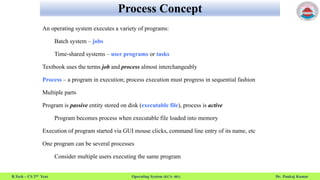
Process Concept
B.Tech – CS 2nd Year Operating System (KCS- 401) Dr. Pankaj Kumar
An operating system executes a variety of programs:
Batch system – jobs
Time-shared systems – user programs or tasks
Textbook uses the terms job and process almost interchangeably
Process – a program in execution; process execution must progress in sequential fashion
Multiple parts
Program is passive entity stored on disk (executable file), process is active
Program becomes process when executable file loaded into memory
Execution of program started via GUI mouse clicks, command line entry of its name, etc
One program can be several processes
Consider multiple users executing the same program
Process in Memory
B.Tech – CS 2nd Year Operating System (KCS- 401) Dr. Pankaj Kumar
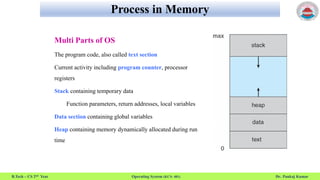
Multi Parts of OS
The program code, also called text section
Current activity including program counter, processor
registers
Stack containing temporary data
Function parameters, return addresses, local variables
Data section containing global variables
Heap containing memory dynamically allocated during run
time
Process State
B.Tech – CS 2nd Year Operating System (KCS- 401) Dr. Pankaj Kumar
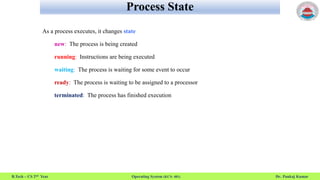
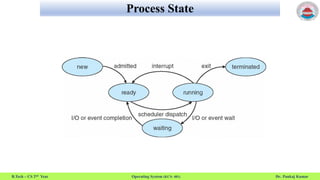
As a process executes, it changes state
new: The process is being created
running: Instructions are being executed
waiting: The process is waiting for some event to occur
ready: The process is waiting to be assigned to a processor
terminated: The process has finished execution
Process State
B.Tech – CS 2nd Year Operating System (KCS- 401) Dr. Pankaj Kumar
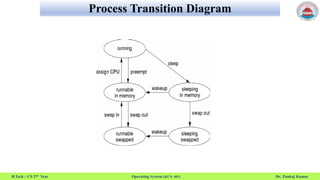
Process Transition Diagram
B.Tech – CS 2nd Year Operating System (KCS- 401) Dr. Pankaj Kumar
Process Control Block
B.Tech – CS 2nd Year Operating System (KCS- 401) Dr. Pankaj Kumar
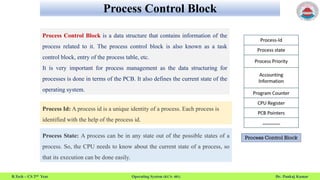
Process Control Block is a data structure that contains information of the
process related to it. The process control block is also known as a task
control block, entry of the process table, etc.
It is very important for process management as the data structuring for
processes is done in terms of the PCB. It also defines the current state of the
operating system.
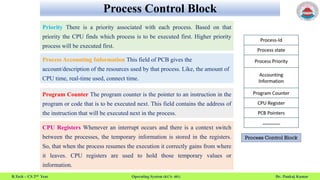
Process Id: A process id is a unique identity of a process. Each process is
identified with the help of the process id.
Process State: A process can be in any state out of the possible states of a
process. So, the CPU needs to know about the current state of a process, so
that its execution can be done easily.
Process Control Block
B.Tech – CS 2nd Year Operating System (KCS- 401) Dr. Pankaj Kumar
Priority There is a priority associated with each process. Based on that
priority the CPU finds which process is to be executed first. Higher priority
process will be executed first.
Process Accounting Information This field of PCB gives the
account/description of the resources used by that process. Like, the amount of
CPU time, real-time used, connect time.
Program Counter The program counter is the pointer to an instruction in the
program or code that is to be executed next. This field contains the address of
the instruction that will be executed next in the process.
CPU Registers Whenever an interrupt occurs and there is a context switch
between the processes, the temporary information is stored in the registers.
So, that when the process resumes the execution it correctly gains from where
it leaves. CPU registers are used to hold those temporary values or
information.
Process Control Block
B.Tech – CS 2nd Year Operating System (KCS- 401) Dr. Pankaj Kumar
PCB Pointer In this field, the pointer has an address of the next PCB, whose
process state is ready. In this way, the operating system maintains the
hierarchy of all the processes so that a parent process could locate all the child
processes it creates easily.
List of Open Files These are the different files that are associated with the
process
I/O Status Information This information includes the list of I/O devices used
by the process, the list of files etc.
Event Information This field contains the information of the event for which
the certain process is in block state. Whenever that event occurs the operating
system identifies the process awaiting for this event using this field. If the
event occurred match with this field the process changes its state from
blocked to ready.
Process Address Space
B.Tech – CS 2nd Year Operating System (KCS- 401) Dr. Pankaj Kumar
Address space is a space in computer memory. Every process has an address space.
Address Space can be of two types
1.Physical Address Space
2.Virtual Address Space
Process Address Space means a space that is allocated in memory for a process. The process
address space is the set of logical addresses that a process references in its code.
Process identification information
B.Tech – CS 2nd Year Operating System (KCS- 401) Dr. Pankaj Kumar
A PID (i.e., process identification number) is an identification number that is automatically
assigned to each process.
A process is an executing (i.e., running) instance of a program. Each process is guaranteed a
unique PID, which is always a non-negative integer.
The process init is the only process that will always have the same PID on any session and on any
system, and that PID is 1. This is because init is always the first process on the system and is the
ancestor of all other processes.
A very large PID does not necessarily mean that there are anywhere near that many processes on
a system. This is because such numbers are often a result of the fact that PIDs are not
immediately reused, in order to prevent possible errors.

Operating System: process

  • 1.
    B.Tech – CS2nd Year Operating System (KCS- 401) Dr. Pankaj Kumar Operating System KCS – 401 Process Dr. Pankaj Kumar Associate Professor – CSE SRMGPC Lucknow
  • 2.
    Outline of theLecture B.Tech – CS 2nd Year Operating System (KCS- 401) Dr. Pankaj Kumar Process Concept Process in memory Process state Process Transition Diagram, Process Control Block (PCB)
  • 3.
    Process Concept B.Tech –CS 2nd Year Operating System (KCS- 401) Dr. Pankaj Kumar An operating system executes a variety of programs: Batch system – jobs Time-shared systems – user programs or tasks Textbook uses the terms job and process almost interchangeably Process – a program in execution; process execution must progress in sequential fashion Multiple parts Program is passive entity stored on disk (executable file), process is active Program becomes process when executable file loaded into memory Execution of program started via GUI mouse clicks, command line entry of its name, etc One program can be several processes Consider multiple users executing the same program
  • 4.
    Process in Memory B.Tech– CS 2nd Year Operating System (KCS- 401) Dr. Pankaj Kumar Multi Parts of OS The program code, also called text section Current activity including program counter, processor registers Stack containing temporary data Function parameters, return addresses, local variables Data section containing global variables Heap containing memory dynamically allocated during run time
  • 5.
    Process State B.Tech –CS 2nd Year Operating System (KCS- 401) Dr. Pankaj Kumar As a process executes, it changes state new: The process is being created running: Instructions are being executed waiting: The process is waiting for some event to occur ready: The process is waiting to be assigned to a processor terminated: The process has finished execution
  • 6.
    Process State B.Tech –CS 2nd Year Operating System (KCS- 401) Dr. Pankaj Kumar
  • 7.
    Process Transition Diagram B.Tech– CS 2nd Year Operating System (KCS- 401) Dr. Pankaj Kumar
  • 8.
    Process Control Block B.Tech– CS 2nd Year Operating System (KCS- 401) Dr. Pankaj Kumar Process Control Block is a data structure that contains information of the process related to it. The process control block is also known as a task control block, entry of the process table, etc. It is very important for process management as the data structuring for processes is done in terms of the PCB. It also defines the current state of the operating system. Process Id: A process id is a unique identity of a process. Each process is identified with the help of the process id. Process State: A process can be in any state out of the possible states of a process. So, the CPU needs to know about the current state of a process, so that its execution can be done easily.
  • 9.
    Process Control Block B.Tech– CS 2nd Year Operating System (KCS- 401) Dr. Pankaj Kumar Priority There is a priority associated with each process. Based on that priority the CPU finds which process is to be executed first. Higher priority process will be executed first. Process Accounting Information This field of PCB gives the account/description of the resources used by that process. Like, the amount of CPU time, real-time used, connect time. Program Counter The program counter is the pointer to an instruction in the program or code that is to be executed next. This field contains the address of the instruction that will be executed next in the process. CPU Registers Whenever an interrupt occurs and there is a context switch between the processes, the temporary information is stored in the registers. So, that when the process resumes the execution it correctly gains from where it leaves. CPU registers are used to hold those temporary values or information.
  • 10.
    Process Control Block B.Tech– CS 2nd Year Operating System (KCS- 401) Dr. Pankaj Kumar PCB Pointer In this field, the pointer has an address of the next PCB, whose process state is ready. In this way, the operating system maintains the hierarchy of all the processes so that a parent process could locate all the child processes it creates easily. List of Open Files These are the different files that are associated with the process I/O Status Information This information includes the list of I/O devices used by the process, the list of files etc. Event Information This field contains the information of the event for which the certain process is in block state. Whenever that event occurs the operating system identifies the process awaiting for this event using this field. If the event occurred match with this field the process changes its state from blocked to ready.
  • 11.
    Process Address Space B.Tech– CS 2nd Year Operating System (KCS- 401) Dr. Pankaj Kumar Address space is a space in computer memory. Every process has an address space. Address Space can be of two types 1.Physical Address Space 2.Virtual Address Space Process Address Space means a space that is allocated in memory for a process. The process address space is the set of logical addresses that a process references in its code.
  • 12.
    Process identification information B.Tech– CS 2nd Year Operating System (KCS- 401) Dr. Pankaj Kumar A PID (i.e., process identification number) is an identification number that is automatically assigned to each process. A process is an executing (i.e., running) instance of a program. Each process is guaranteed a unique PID, which is always a non-negative integer. The process init is the only process that will always have the same PID on any session and on any system, and that PID is 1. This is because init is always the first process on the system and is the ancestor of all other processes. A very large PID does not necessarily mean that there are anywhere near that many processes on a system. This is because such numbers are often a result of the fact that PIDs are not immediately reused, in order to prevent possible errors.